Skip to content
  • MySensors
  • OpenHardware.io
  • Categories
  • Recent
  • Tags
  • Popular
Skins
  • Light
  • Brite
  • Cerulean
  • Cosmo
  • Flatly
  • Journal
  • Litera
  • Lumen
  • Lux
  • Materia
  • Minty
  • Morph
  • Pulse
  • Sandstone
  • Simplex
  • Sketchy
  • Spacelab
  • United
  • Yeti
  • Zephyr
  • Dark
  • Cyborg
  • Darkly
  • Quartz
  • Slate
  • Solar
  • Superhero
  • Vapor

  • Default (No Skin)
  • No Skin
Collapse
Brand Logo
A

a-lurker

@a-lurker
About
Posts
31
Topics
2
Shares
0
Groups
0
Followers
0
Following
0

Posts

Recent Best Controversial

  • Wiring a separate power supply for the radio
    A a-lurker

    Nice analysis - powering up devices in an appropriate order can definitely cause problems such as via the (parasitic) static protection diodes seen on various pins. Presumably this invokes Yveaux's interest in current limiting resistors.

    It's a bit unclear how the layout under discussion is actually powered. A cct diagram would be useful here but generally speaking, everything should be powered up pretty much simultaneously, if possible. Regardless the various arduino ccts in existence seem to provide a variety of power paths, many of which are perhaps undesirable. eg supplying power directly to power lines that have on board regulators and hoping that "back driving" those regulators will not cause problems. Likewise various arduinos use the serial chip to provide some power and it's quickly overloaded.

    A detailed cct is required to provide any definitive PSU analysis.
    Troubleshooting

  • Wiring a separate power supply for the radio
    A a-lurker

    @DAN S "...do I really need the IRQ line?"

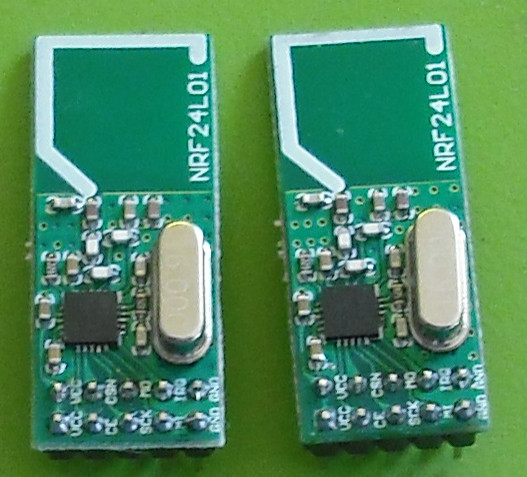
    As far as I can see the IRQ is not used by the NRF24 radio library. I don't ever wire it to the radio.

    Troubleshooting

  • INA219 DC Current Sensor
    A a-lurker

    @hek - just suggesting that you ensure the CT you purchase has some protective measure, such as Zener clamps to limit the Voltage when the secondary is not connected to anything. The ones you linked to look fine.

    Hardware ina219

  • INA219 DC Current Sensor
    A a-lurker

    On the current transformers (CT). Need a little caution with these. If they are energized with no burden resistor and do not have any protective measures in place like zeners, then the output Voltage can be very high. For example if the transformer is one turn to 2000 turns, like Hek's example transformer and we assume the open circuit resistance is 10 MOhms (it's probably higher) and the primary current flow is just one 1 Amp, then the output Voltage can reach 5000 Volts. (1/2000)*10,000,000=5000. The Voltage produced is ultimately moderated by core saturation. I've seen these things produce nice sparks. However Hek's transformer uses a protective measure to avoid this: two zeners in series across the secondary. The linked article under "6. Operation without an external burden."

    http://openenergymonitor.org/emon/buildingblocks/report-yhdc-sct-013-000-current-transformer

    indicates the Voltage is clamped to +/-22V by the zeners. This is still enough to fry your Arduino ADC, if the required burden resistor is accidentally incorrectly connected. Likewise probably best not to unplug & plug in the CT, while its got power going through the primary. It may be more prudent to hardwire the CT to the Arduino.

    Hardware ina219

  • 2.0 Discussion: Units, sensor types and protocol
    A a-lurker

    V_ANGLE sounds good. With a bit of (floating point) maths, all can be calculated.

    Announcements

  • 2.0 Discussion: Units, sensor types and protocol
    A a-lurker

    @HEK I'll bite:

    Use under scores consistently ? eg V_RAINRATE and V_LIGHT_LEVEL

    The units to be used here can be clearer:
    V_VOLTAGE ---> V_VOLTS
    V_CURRENT ---> V_AMPS

    Where the base unit is not used - should the name reflect that? eg V_DISTANCE --> V_DISTANCE_CM

    Electrical impedance and resistance are not the same thing- suspect resistance is intended here?
    V_IMPEDANCE --> V_RESISTANCE

    HUM is a bit vague - suggest: V_HUM --> V_HUMIDITY

    V_DIRECTION may be confused with an angle or up/down. Could use V_COMPASS_POINT, but that may be confused with magnetic or true north!
    V_LIGHT could be confused with V_LIGHT_LEVEL. Could use V_LIGHT_STATUS
    V_TEMP while often used, can be confused with a temporary variable? Could use V_TEMPERATURE
    V_VOLUME could be confused with audio volume? Could use V_CUBIC_MEASURE
    V_HEATER_MODE for V_HEATER?

    Could add V_DEW_POINT

    STATUS always be used for binary values eg on/off, locked/unlocked?
    V_LOCK_STATUS
    V_LIGHT_STATUS
    V_HEATER_STATUS

    Announcements

  • Multiple DH-11 Sensors on the same Arduino Pin?
    A a-lurker

    The DHT22 spec sheet (a similar device), indicates that you need a single dedicated i/o pin per sensor.

    Hardware

  • Sleep/Wake/TXRx Cycle
    A a-lurker

    Any one presenting measurements should indicate if they are using Ver 1.3 or 1.4 of the code. There are significant differences in how the timing and ACKing is organized between the two. The OP is using 1.3 and I suspect @yVEAUX is using 1.4 - please correct me if I am wrong on that.

    There is no point in trying compare results between 1.3 and 1.4 Any one using 1.3V will be far better off with 1.4.

    Hardware

  • Standard versus LNA+PA radio modules
    A a-lurker

    Yes the improvement to the noise figure is the prime consideration. A signal buried in the noise, amplified by 10 dB, is still a signal buried in the noise. As you point out the NF is defined primarily by the front end amplifier. As long as the front end has reasonable gain subsequent stages will not contribute substantially to the NF. I've incorrectly used the 10 dB figure as the NF improvement.

    So using your figure of 2.6 dB, which looks like an appropriate figure but could be higher; then this suggests, It's really a waste of time using the LNA+PA PCBs unless they are used at both ends. In which case you get the benefit of the power amplifiers and a slight receiver improvement.

    Any improvement people may witness with just one end having a LNA+PA PCB is probably just because the LNA+PA PCB uses a far better antenna - the rubber duck versus the PCB antennas. In which case you are probably just as better off using these:

    https://www.sparkfun.com/products/705

    Noting it has 3V3 regulator built in, that may help with power supply sag, that people are experiencing with the PCB modules - requiring capacitors to be added latter. However they are a bit expensive\e.

    Hardware

  • Antenna 101
    A a-lurker

    There are all sorts of magical antenna shapes - a few examples here:

    http://www.ti.com/lit/an/swra351a/swra351a.pdf

    The PCBs with the zigzag shape

    http://www.barefootelectronics.com/nordicc.png

    are probably a "meandering inverted F antenna" similar to this one:

    http://www.ti.com/lit/an/swra117d/swra117d.pdf

    The PCBs with the seven shaped antenna is probably just a 1/4 wave monopole bent to make it less sensitive to polarization?

    http://www.barefootelectronics.com/NordicA.jpg

    Hard to say what the rubber ducks use unless pulled apart. It's easy to just assume they are all interchangeable. They aren't - they are designed specifically for the frequency to be used. This one is a dipole with the associated doughnut radiation pattern:

    http://martybugs.net/wireless/rubberducky.cgi

    Hardware

  • Sleep/Wake/TXRx Cycle
    A a-lurker

    @therik To show as code - insert a couple of line feeds at the start and then all lines of code thereafter, indent with four spaces.

    If you are using ver 1.3 of the Arduino code; then recommend you change to the ver 1.4 of the code. The radio code is far better.

    Hardware

  • Sleep/Wake/TXRx Cycle
    A a-lurker

    Yes I thought this was a rather long time too. Need to post the code in use.

    Just on say a single transmission at 250K bps - then (32*8)/250000 = about one ms. That's assuming a 32 byte payload at 8 bits per byte. It would be longer than this, as it may be sent multiple times, if an ACK was not received. Plus the turn around time and the actual ACKing has to be added in as well.

    How many variables are being returned?

    Hardware

  • New library to read Arduino VCC supply level without resistors for battery powered sensor nodes that do not use a voltage regulator but connect directly to the batteries ;-)
    A a-lurker

    @ ZEPH Good links. Pretty much says it all - including that in the cct posted above the divider could have leakage into the ADC I/P when the FET is off.

    Something else that's probably important is to measure the Voltage just before going into sleep, rather than when the CPU powers up. This gives a better indication of what the battery condition, because the measurement occurs a little while after the load has been applied to the battery. If you measure when the CPU powers up, the battery has the whole sleep time to "recover" from its last wake up. I'm pretty sure this could be demonstrated by making a start and end measurement and seeing what happens over time.

    Development supply vcc

  • Problems on reboot
    A a-lurker

    Roy from the IT Crowd: "Have you tried turning it off and on again?"

    Troubleshooting

  • New library to read Arduino VCC supply level without resistors for battery powered sensor nodes that do not use a voltage regulator but connect directly to the batteries ;-)
    A a-lurker

    OCD - I'm obsessive about OCD too!! So no problem with the FET approach, as long it's turned off properly, otherwise it will also leak a similar current. But it should be possible to get it work OK. There will be an increased measuring time. eg turn on FET, wait till circuit settles and then measure. While that is occurring, the CPU (and maybe the radio) are drawing full power (thousands of times as much as the divider does). That's also wasted power that needs to be taken into consideration and may outweigh the savings?

    Development supply vcc

  • New library to read Arduino VCC supply level without resistors for battery powered sensor nodes that do not use a voltage regulator but connect directly to the batteries ;-)
    A a-lurker

    Like the schematic drawing program - that's good.

    Not sure that all this effort is needed. We're only looking at 1uA8 with 470K and 1M divider at 2V6. If large value resistors are used, then don't forget the high quality (low leakage) bypass capacitor.

    Development supply vcc

  • Battery Sensor v 1.0 PCB
    A a-lurker

    @axillent I'm in agreement.

    My Project

  • New library to read Arduino VCC supply level without resistors for battery powered sensor nodes that do not use a voltage regulator but connect directly to the batteries ;-)
    A a-lurker

    @Zeph Your statement that there are two cases to be considered is right.

    A small ceramic bypass cap (say 0.1 uF) is also important on the Voltage dividers to minimise ADC measurement errors due to any noise on these high impedance nodes. Cheap electrolytics are not applicable.

    Also need to watch the settling time when switching the multiplexor - need at least 5 msec (or more; depends on size of cap connected to Vref pin):

    http://capnbry.net/blog/?p=167

    and see the heading "Changing reference voltage" here:

    http://meettechniek.info/embedded/arduino-analog.html

    Development supply vcc

  • New library to read Arduino VCC supply level without resistors for battery powered sensor nodes that do not use a voltage regulator but connect directly to the batteries ;-)
    A a-lurker

    This will only work if the battery is directly connected to the CPU. If using an inverter you need the resistors. They only draw 1uA8.

    Development supply vcc

  • Battery Sensor v 1.0 PCB
    A a-lurker

    With a 4 MHz crystal it can run to near 1V8. See page 310 of the data sheet.

    The radio could run directly off the battery and the CPU and sensors off the inverter. That may be a good compromise as the radio draws the most amount of power?

    My Project
  • Login

  • Don't have an account? Register

  • Login or register to search.
  • First post
    Last post
0
  • MySensors
  • OpenHardware.io
  • Categories
  • Recent
  • Tags
  • Popular