Skip to content
  • MySensors
  • OpenHardware.io
  • Categories
  • Recent
  • Tags
  • Popular
Skins
  • Light
  • Brite
  • Cerulean
  • Cosmo
  • Flatly
  • Journal
  • Litera
  • Lumen
  • Lux
  • Materia
  • Minty
  • Morph
  • Pulse
  • Sandstone
  • Simplex
  • Sketchy
  • Spacelab
  • United
  • Yeti
  • Zephyr
  • Dark
  • Cyborg
  • Darkly
  • Quartz
  • Slate
  • Solar
  • Superhero
  • Vapor

  • Default (No Skin)
  • No Skin
Collapse
Brand Logo
EncryptE

Encrypt

@Encrypt
About
Posts
43
Topics
8
Shares
0
Groups
0
Followers
0
Following
0

Posts

Recent Best Controversial

  • Unable to read data from my (Linky) electricity meter
    EncryptE Encrypt

    Hello everyone!

    Thank you @mfalkvidd for your answer.
    I finally found the issue...

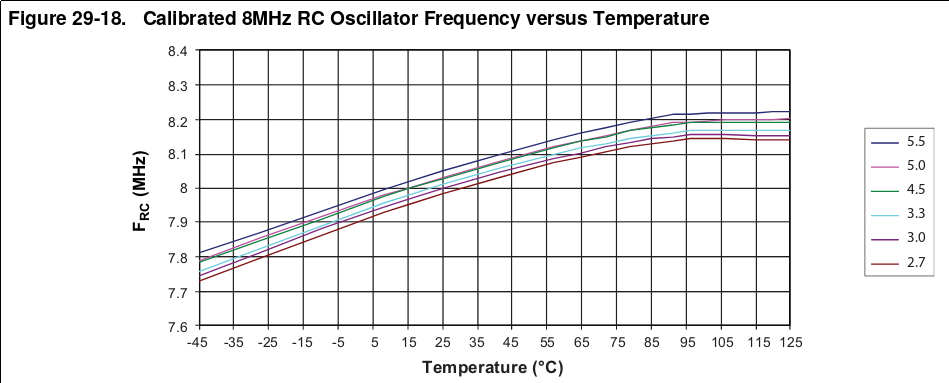
    Timing is particularly critical when reading UART and using the internal RC oscillator isn't a good idea... at all. Especially knowing that its frequency varies (quite a lot in my opinion) with temperature:

    capture.png
    (Page 274 of the ATMEGA328P datasheet available here: https://ww1.microchip.com/downloads/en/DeviceDoc/Atmel-7810-Automotive-Microcontrollers-ATmega328P_Datasheet.pdf)

    So, I changed the fuses of the ATMEGA328P to use an external 8 MHz crystal oscillator and now everything works perfectly! :champagne:

    Regarding the code, I've initialized the "Serial" object with the configuration SERIAL_7E1, it works as expected!

    Cheers!
    Encrypt

    Troubleshooting

  • Unable to read data from my (Linky) electricity meter
    EncryptE Encrypt

    Hello everyone!

    I am working on a new project, which goal is to read data sent by my "Linky" electricity meter here in France. This meter has a 3 pole terminal block on which I can connect a circuit to grab data about my power consumption.

    Here is a quick overview of how this works on the Linky meter: https://lucidar.me/en/home-automation/linky-customer-tele-information/

    A bit of context
    To do that, I'm using (as usual) a barebone ATMEGA328P running at 8MHz with its internal RC oscillator, an RFM69w radio and a few other components.

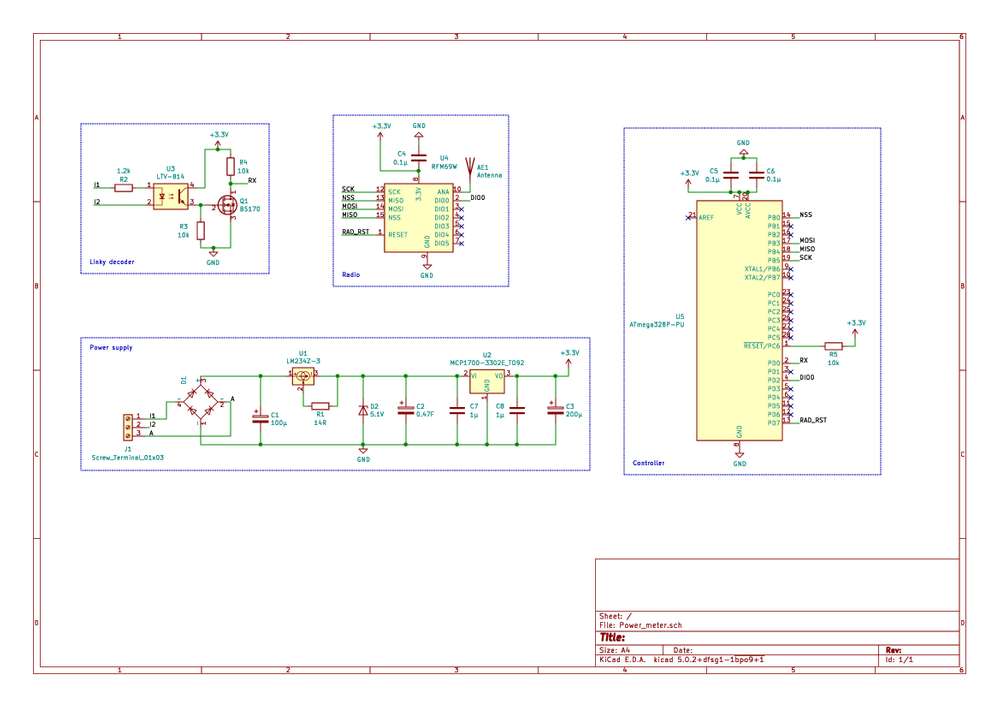
    The DIY circuit to get UART data out of the Linky meter can be found on various websites: an optocoupler makes the 50kHz modulated signal a digital signal and a mosfet ensures it outputs values between 0V and Vcc.
    This corresponds to the "Linky decoder" part of the schematics posted below.

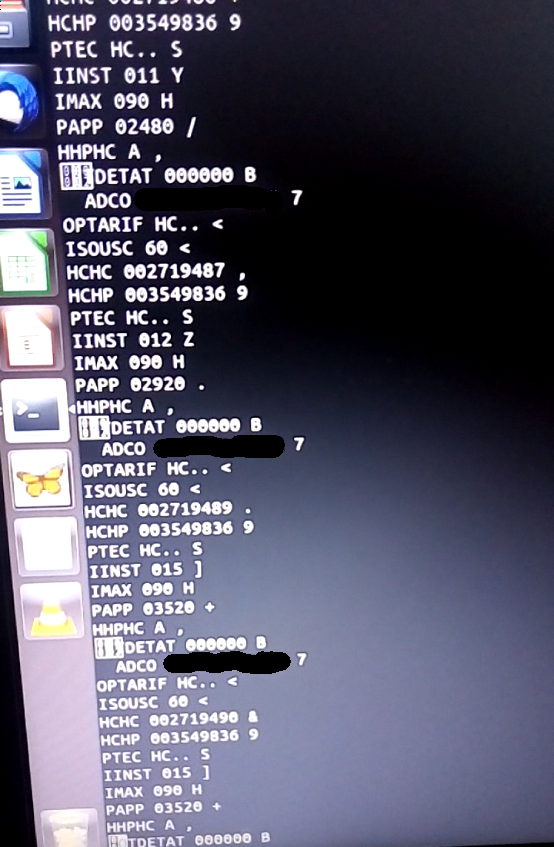
    I tested that on a breadboard with an FTDI, so far so good, I can get data on my computer.

    capture.png

    On this screenshot, I'm running picocom like this:

    picocom -b 1200 -d 7 -p e -f n /dev/ttyUSB0
    

    Indeed, the Linky UART format is 7 bits data, even parity, one stop bit. The data is sent at 1200 bauds.

    Where I am now
    I'm currently integrating that circuit with my MySensors setup.
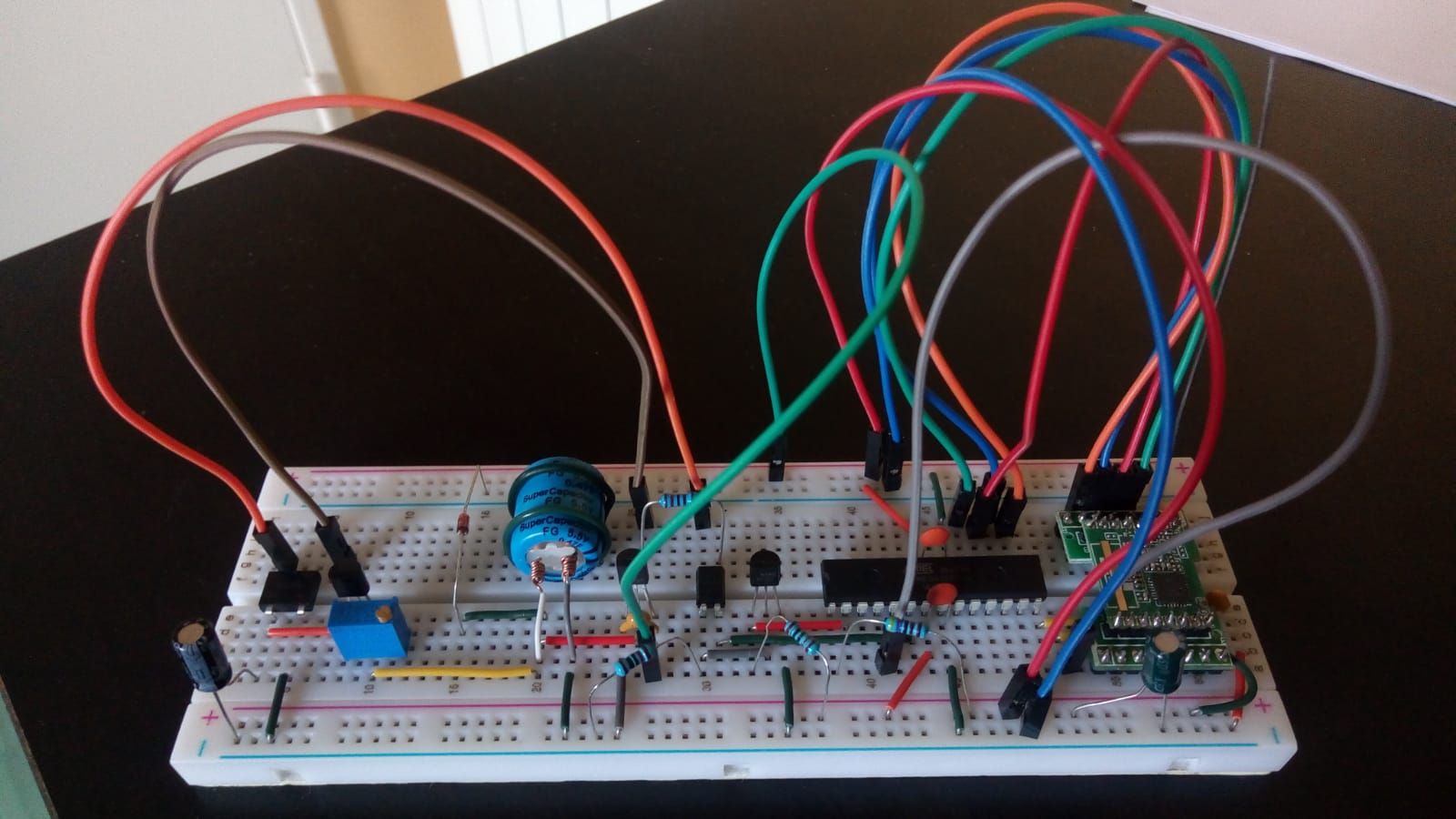
    I've made the same circuit on a breadboard, added components to directly power the board via the "I1 and A" terminals.

    Since only 130mW of current can be extracted between the I1 and A terminals, I'm using an LM234 to charge a 0.47F tank supercapacitor at a constant current of 5mA.
    Since the circuit (ATMEGA328P + "linky decoder") consume less than 5mA, it works pretty well. The radio is disabled between each loop so that the circuit only reads téléinfo frames (if not, the radio would consume 16mA in "listen mode").

    Here are the schematics and a photograph of the board:
    schema.jpg
    circuit.jpg

    In terms of code, I'm using Hallard's LibTeleinfo library.
    It's a very well made library, available here: https://github.com/hallard/LibTeleinfo

    Here is the code running on the microcontroller:

    // MySensors configuration
    #define MY_RADIO_RFM69
    #define MY_RFM69_RST_PIN 8
    #define MY_RFM69_NEW_DRIVER
    #define MY_RFM69_ENABLE_ENCRYPTION
    #define MY_DISABLED_SERIAL
     
    // Global settings
    #define REPORT_TIMEOUT 180000
    #define PTEC_CHILD_ID 0
    #define PAPP_CHILD_ID 1
    #define HCHC_CHILD_ID 2
    #define HCHP_CHILD_ID 3
     
    // Include libraries
    #include <MySensors.h>
    #include <LibTeleinfo.h>
     
    // Global variables
    char ptec_value[3];
    unsigned long last_report = 0;
    long last_metrics[3] = {0, 0, 0}; // papp_max, hchc, hchp
    long cur_metrics[3] = {0, 0, 0};
    TInfo tinfo;
    MyMessage ptec_msg(PTEC_CHILD_ID, V_TEXT);
    MyMessage metrics_msg[3] = {
        MyMessage(PAPP_CHILD_ID, V_VA),
        MyMessage(HCHC_CHILD_ID, V_KWH),
        MyMessage(HCHP_CHILD_ID, V_KWH)
    };
     
    // Callback when a frame is received
    void data_callback(ValueList *me, uint8_t flags) {
     
        // Only take into account new / updated frames
        if (!(flags & (TINFO_FLAGS_ADDED | TINFO_FLAGS_UPDATED))) {
            return;
        }
     
        // Max apparent power
        if (strcmp(me->name, "PAPP") == 0) {
            cur_metrics[0] = max(cur_metrics[0], atol(me->value));
        }
     
        // "Heure creuse" counter
        else if (strcmp(me->name, "HCHC") == 0) {
            cur_metrics[1] = atol(me->value);
        }
     
        // "Heure pleine" counter
        else if (strcmp(me->name, "HCHP") == 0) {
            cur_metrics[2] = atol(me->value);
        }
     
        // Heure pleine / heure creuse
        else if (strcmp(me->name, "PTEC") == 0) {
     
            // Extract the two first characters ("HP" / "HC")
            strncpy(me->value, ptec_value, 2);
            ptec_value[2] = "\0";
     
            // Send the value immediately
            transportReInitialise();
            send(ptec_msg.set(ptec_value));
            transportDisable();
        }
    }
     
    void presentation() { 
     
        // Present the sensors
        sendSketchInfo("Power meter", "1.0");
        present(PTEC_CHILD_ID, S_INFO, "ptec");
        present(PAPP_CHILD_ID, S_POWER, "papp_max");
        present(HCHC_CHILD_ID, S_POWER, "hchc");
        present(HCHP_CHILD_ID, S_POWER, "hchp");
    }
     
    void setup() {
     
        // Setup serial
        Serial.begin(1200);
    //    Serial.begin(1200, SERIAL_7E1);
     
        // Initialise the teleinfo object
        tinfo.init(TINFO_MODE_HISTORIQUE);
        tinfo.attachData(data_callback);
    }
     
    void loop() {
     
        // Disable the radio
        transportDisable();
     
        // Read Linky frames for REPORT_TIMEOUT ms
        while ((unsigned long)(millis() - last_report) < REPORT_TIMEOUT) {
     
            // Read Teleinfo data and process it
            if (Serial.available()) {
                tinfo.process(Serial.read());
            }
        }
     
        // Re-initialise the radio to send metrics
        transportReInitialise();
        
        // Potentially send the value of metrics that changed
        for (byte i = 0 ; i <= 2 ; i++) {
        
            // If the value indeed changed, send a message
            if (cur_metrics[i] != last_metrics[i]) {
                send(metrics_msg[i].set(cur_metrics[i]));
                last_metrics[i] = cur_metrics[i];
            }
        }
      
        // Reset the PAPP max value
        cur_metrics[0] = 0;
     
        // Set the new counter value
        last_report = millis();
    }
    

    My problem
    So, for an unknown reason (yet), I don't get any data on HomeAssistant.
    The node presents itself but that basically doesn't go further.

    Nov 20 17:53:48 DEBUG TSF:MSG:FPAR REQ,ID=7
    Nov 20 17:53:48 DEBUG TSF:CKU:OK,FCTRL
    Nov 20 17:53:48 DEBUG TSF:MSG:GWL OK
    Nov 20 17:53:49 DEBUG TSF:MSG:SEND,0-0-7-7,s=255,c=3,t=8,pt=1,l=1,sg=0,ft=0,st=OK:0
    Nov 20 17:53:50 DEBUG TSF:MSG:READ,7-7-0,s=255,c=3,t=24,pt=1,l=1,sg=0:1
    Nov 20 17:53:50 DEBUG TSF:MSG:PINGED,ID=7,HP=1
    Nov 20 17:53:50 DEBUG TSF:MSG:SEND,0-0-7-7,s=255,c=3,t=25,pt=1,l=1,sg=0,ft=0,st=OK:1
    Nov 20 17:53:50 DEBUG TSF:MSG:READ,7-7-0,s=255,c=3,t=15,pt=6,l=2,sg=0:0100
    Nov 20 17:53:50 DEBUG TSF:MSG:SEND,0-0-7-7,s=255,c=3,t=15,pt=6,l=2,sg=0,ft=0,st=OK:0100
    Nov 20 17:53:50 DEBUG TSF:MSG:READ,7-7-0,s=255,c=0,t=17,pt=0,l=5,sg=0:2.3.1
    Nov 20 17:53:50 DEBUG TSF:MSG:READ,7-7-0,s=255,c=3,t=6,pt=1,l=1,sg=0:0
    Nov 20 17:53:51 DEBUG TSF:MSG:SEND,0-0-7-7,s=255,c=3,t=6,pt=0,l=1,sg=0,ft=0,st=OK:M
    Nov 20 17:53:51 DEBUG TSF:MSG:READ,7-7-0,s=255,c=3,t=11,pt=0,l=11,sg=0:Power meter
    Nov 20 17:53:51 DEBUG TSF:MSG:READ,7-7-0,s=255,c=3,t=12,pt=0,l=3,sg=0:1.0
    Nov 20 17:53:51 DEBUG TSF:MSG:READ,7-7-0,s=0,c=0,t=36,pt=0,l=4,sg=0:ptec
    Nov 20 17:53:51 DEBUG TSF:MSG:READ,7-7-0,s=1,c=0,t=13,pt=0,l=8,sg=0:papp_max
    Nov 20 17:53:51 DEBUG TSF:MSG:READ,7-7-0,s=2,c=0,t=13,pt=0,l=4,sg=0:hchc
    Nov 20 17:53:51 DEBUG TSF:MSG:READ,7-7-0,s=3,c=0,t=13,pt=0,l=4,sg=0:hchp
    Nov 20 17:53:51 DEBUG TSF:MSG:READ,7-7-0,s=255,c=3,t=26,pt=1,l=1,sg=0:2
    Nov 20 17:53:51 DEBUG TSF:MSG:SEND,0-0-7-7,s=255,c=3,t=27,pt=1,l=1,sg=0,ft=0,st=OK:1
    

    As you could see earlier, I've managed to successfully read data out of the Linky meter via an FTDI. So I guess that somehow the ATMEGA328P should be able to read this as well...

    According to what I've understood, I have to use "SERIAL_7E1" to read the Linky frames via the UART hardware bus. I tried both with and without it, but without success yet.

    My question
    Do you eventually know what could be wrong here?
    Is there eventually a bug in my code (another pair of eyes won't hurt for sure)?

    I hope I explained everything. If I forgot a detail, please ask me for details!

    Thanks in advance for your help!
    Encrypt

    Troubleshooting

  • HLK-PMxx protection: choosing the right MOV / fuse value
    EncryptE Encrypt

    Hello @monte!

    Which kind of varistor did you use? What was its rated voltage?

    As @skywatch mentioned, if you chose a varistor which value was "too close" to your mains line, it probably got triggered too much...

    Also, if your fuse was "too big" (500mA or more), it's probably the reason why it didn't blow.

    Hardware

  • HLK-PMxx protection: choosing the right MOV / fuse value
    EncryptE Encrypt

    Hello @skywatch !

    Thank you very much for your answer! It is now clear for me! :)

    Cheers!

    Hardware

  • HLK-PMxx protection: choosing the right MOV / fuse value
    EncryptE Encrypt

    Hello!

    I am still working on a MySensors project which uses an HLK-PM03 module to provide 3.3V DC from mains to my circuit. This project was almost finished when I came across posts on forums recommending adding a fuse / varistor in front of the HLK-PM03 module to protect it.

    So I dug that subject a bit more and I came across a recent HLK-PMxx datasheet in which this is mentioned: https://datasheet.lcsc.com/szlcsc/1912111437_HI-LINK-HLK-PM12_C209905.pdf

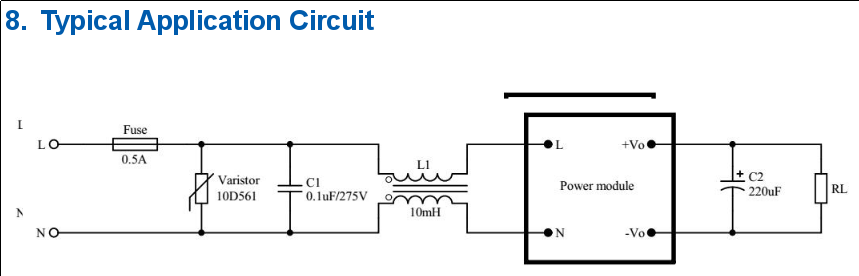
    capture.png

    The fuse and varistor are really needed to protect the circuit ; the capacitor / inductance are apparently optional. In the datasheet, the constructor recommends using a 0.5A slow blow fuse and a 350V varistor (10D561K).

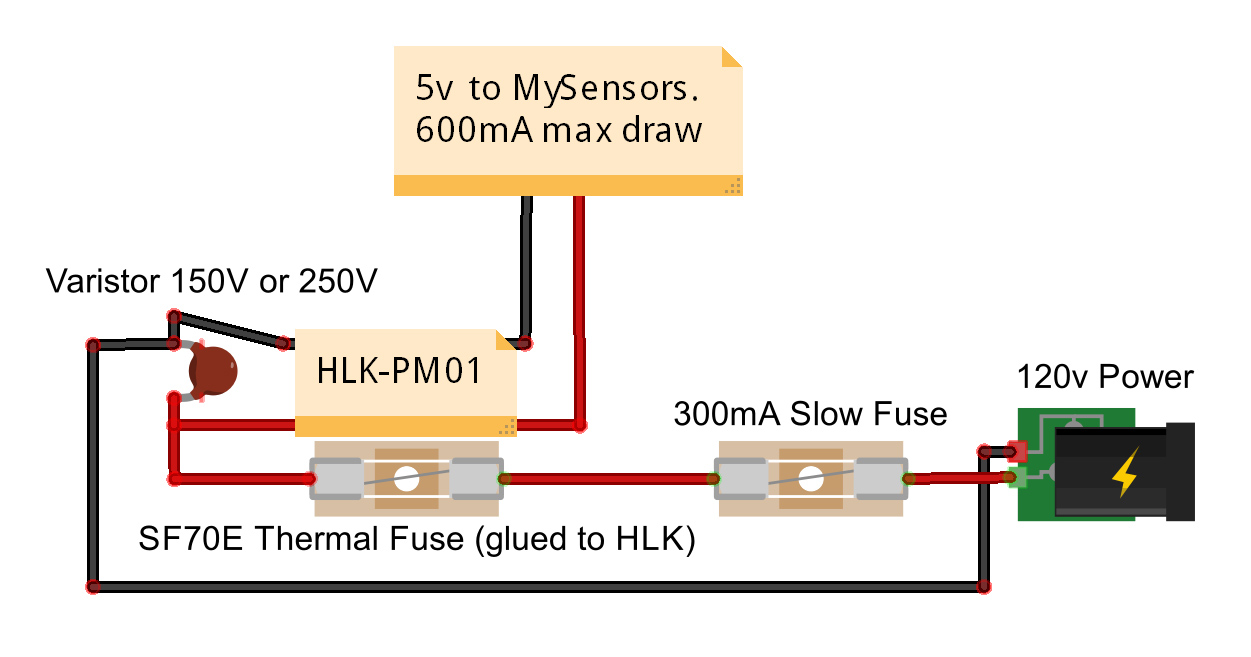
    But I found a discussion on the MySensors forums with completely different recommendations. This one typically: https://forum.mysensors.org/topic/1607/safe-in-wall-ac-to-dc-transformers
    The first post shows a diagram with a 0.3A slow blow fuse and a 250V varistor.

    alt text

    The choice of the "right" components really puzzled me recently, so here is my question: which varistor / fuse value should I select, at the end?

    I'm particularly interested in knowing how varistors (MOVs) should be chosen, because I have read so many conflicting arguments on different forums...

    A post of @skywatch I recently found (https://forum.mysensors.org/topic/9790/has-anyone-else-seen-a-varistor-mov-failure-in-a-power-supply?_=1597873012895) seems to confirm the choice of the manufacturer regarding the 350V RMS MOV.

    Finally, note that I live in France ; mains voltage here is 230V AC +/- 10%.

    Thanks in advance for your answers!
    Encrypt

    Hardware

  • Collective purchase order of RFM69W radios (Paris area)
    EncryptE Encrypt

    Hello!

    I'll post a quick message on the forums this time :P

    I will surely run out of RFM69W radios in the coming weeks, since I will finish one of my projects and I have a few other ideas of sensors to build.
    I am planning to order something like 10 RFM69W radios directly to HopeRF (its manufacturer) to be sure I get genuine parts.

    So, I thought: why not do a collective purchase order, so that we can all reduce shipping costs? :)

    Regarding the price of the radios, HopeRF sold them $2.60 each almost 2 years ago. The shipping cost was $8 (EMS packet) or $30 (DHL) and there was a $2 paypal charge.

    A friend of mine would also be interested in ordering 10 radios, so we are two for the moment. Is there anyone in the Paris area also interested?
    Once received, I could give you the radios in person in Paris since I work there.

    Cheers!

    General Discussion

  • What is the "robust" way to sleep / send messages?
    EncryptE Encrypt

    Hello!

    Thank you @TRS-80 and @zboblamont for your answers and sorry for the delay...

    To answer your question @TRS-80, I'm actually trying to figure out what is the most robust way to use the MySensors library.
    Most examples out there consider that all underlying layers (hardware, transmission...) will just work an the return value of sleep / send is never used.

    I've found that if the send call fails due to missing hardware ACKs, the node ends up registering again. So, I was considering retrying sending data if send failed, but MySensors already retries sending the data a few times as @zboblamont says.

    Regarding the sleep call, I'm now checking the return value and making sure that the return code is the interrupt, as specified by the API. Here is my new code:

    // MySensors configuration
    #define MY_SPLASH_SCREEN_DISABLED
    #define MY_RADIO_RFM69
    #define MY_RFM69_RST_PIN 8
    #define MY_RFM69_NEW_DRIVER
    #define MY_RFM69_ENABLE_ENCRYPTION 
    
    // Include libraries
    #include <MySensors.h>
    
    // Global settings
    #define BATT_ADC_PIN A1
    #define CHILD_ID 0
    #define SENSOR_PIN 3
    #define SENSOR_INT digitalPinToInterrupt(SENSOR_PIN)
    
    // Global variables
    byte last_batt_level = 0;
    unsigned long total_water = 0;
    MyMessage water_msg(CHILD_ID, V_VOLUME);
    
    // Check the battery voltage and eventually send it
    void report_battery_level() {
    
        // Read the battery voltage
        long adc = analogRead(BATT_ADC_PIN);
    
        // Compute the battery level
        // Vmin = 1.6/(3.3/1023) = 496
        // Vmax = 3/(3.3/1023) = 930
        long level = (adc-496)*100/434;
        byte batt_level = constrain(level, 0, 100);
        
        // The battery level changed, send it
        if (batt_level != last_batt_level) {
            sendBatteryLevel(batt_level);        
            last_batt_level = batt_level;
        }
    }
    
    void presentation() { 
        sendSketchInfo("Water meter", "1.0");
        present(CHILD_ID, S_WATER);
    }
    
    void setup() {
        pinMode(BATT_ADC_PIN, INPUT);
        pinMode(SENSOR_PIN, INPUT);
    }
    
    void loop() {
      
        // Sleep until we get a FALLING signal
        byte interrupt = sleep(SENSOR_INT, FALLING, 0);
    
        // We were woken up by the sensor
        if (interrupt == SENSOR_INT) {
    
            // Send the new water volume to the gateway
            total_water++;
            send(water_msg.set(total_water));
        
            // Send the battery level every 150L
            if (total_water % 150 == 0) {
                report_battery_level();
            }
        }
    }
    

    I've had communication issues since I changed the code and the reported water consumption didn't skyrocket as previously, which is good.

    To answer to @zboblamont, the FALLING interrupt is fine actually. The water volume is incremented "rather slowly", at most every 7s I'd say (if we open all taps :P).

    I'll have to fix the communication problems and to do that I'll have to design proper PCBs. The sensors / gateway are on breadboards right now, which is surely suboptimal.

    Cheers!

    Development

  • What is the "robust" way to sleep / send messages?
    EncryptE Encrypt

    Hello everyone!

    I recently built a water meter with MySensors based on:

    • A barebone ATMEGA328P
    • An RFM69W radio
    • The ITRON Cyble sensor (https://www.itron.com/-/media/feature/products/documents/brochure/cyble-sensor-water-brochure-english.pdf).
    • Two AA batteries, a 3.3V boost converter...

    Here is the code running on the microcontroller:

    // MySensors configuration
    #define MY_SPLASH_SCREEN_DISABLED
    #define MY_RADIO_RFM69
    #define MY_RFM69_RST_PIN 8
    #define MY_RFM69_NEW_DRIVER
    #define MY_RFM69_ENABLE_ENCRYPTION 
    
    // Include libraries
    #include <MySensors.h>
    
    // Global settings
    #define BATT_ADC_PIN A1
    #define CHILD_ID 0
    #define SENSOR_PIN 3
    
    // Global variables
    byte last_batt_level = 0;
    unsigned long total_water = 0;
    MyMessage water_msg(CHILD_ID, V_VOLUME);
    
    // Check the battery voltage and eventually send it
    void report_battery_level() {
    
        // Read the battery voltage
        long adc = analogRead(BATT_ADC_PIN);
    
        // Compute the battery level
        // Vmin = 2/(3.3/1023) = 620
        // Vmax = 3/(3.3/1023) = 930
        long level = (adc-620)*100/310;
        byte batt_level = constrain(level, 0, 100);
        
        // The battery level changed, send it
        if (batt_level != last_batt_level) {
            sendBatteryLevel(batt_level);        
            last_batt_level = batt_level;
        }
    }
    
    void presentation() { 
        sendSketchInfo("Water meter", "1.0");
        present(CHILD_ID, S_WATER);
    }
    
    void setup() {
        pinMode(BATT_ADC_PIN, INPUT);
        pinMode(SENSOR_PIN, INPUT);
    }
    
    void loop() {
      
        // Sleep until we get a FALLING signal
        sleep(digitalPinToInterrupt(SENSOR_PIN), FALLING, 0);
    
        // Send the new water volume to the gateway
        total_water++;
        send(water_msg.set(total_water));
    
        // Send the battery level every 150L
        if (total_water % 150 == 0) {
            report_battery_level();
        }
    }
    

    It has been working well globally. However I ran into two issues.

    First problem: For an unknown reason, my Raspberry Pi gateway stopped responding at some point. As a result, the send() call probably failed and I suspect the sleep() method to immediately return with a value I don't check. When I restarted the gateway, the node reported a water consumption of a million liters so the loop() method was surely called multiple times...
    This is the first issue to fix in the code.

    Second problem: When the voltage of the batteries was too low, the same kind of problem also occured. I could see in the gateway logs that the sensor tried to reconnect multiple times without success (there were NACKs during the presentation step), since the radio didn't have enough power to operate normally. When presentation finally succeeded, the node reposted a water consumption of a million litters. So here again, the loop() method had been called multiple times.

    So, what is the "robust" way to prevent these problems, in the code?

    The underlying questions probably are:

    • What will happen if the send() call fails? Will the code continue or will it retry sending the data a few times?
    • In which cases will the sleep() method actually not put the node into sleep mode?
    • Do you know why the loop() method was called multiple times, resulting in a large value of the total_water variable during the issue? According to this discussion, I would have thought the loop() method would not have been called again if the node wasn't successfully reconnected to the gateway due to the while (!isTransportReady() && (sleepDeltaMS < sleepingTimeMS) && (sleepDeltaMS < MY_SLEEP_TRANSPORT_RECONNECT_TIMEOUT_MS)) part of the code... Unless _process() actually calls loop()?

    It would be great to have complete "robust" sketch examples in the MySensors repository on GitHub, since all examples consider that the gateway will always be responding, that the node will always be correctly power and will always successfully send its payload.

    On the hardware side, the Connecting the radio page also assumes that the RFM69W radio will always be operating correctly and it's not recommended to connect the RESET pin of the radio to the Arduino / ATMEGA. That's unfortunate since connecting that pin on one of my projects recently fixed stability issues! ;)

    Thanks in advance for your help!

    Development

  • Is it worth it adding a reset circuit to MySensors nodes?
    EncryptE Encrypt

    Hello everyone and thank you for your feedback so far!

    @BearWithBeard gave a good argument since I'm also using HomeAssistant.

    Moreover, adding such a circuit will only add €0.50 per board, so it sounds good!

    Hardware

  • Is it worth it adding a reset circuit to MySensors nodes?
    EncryptE Encrypt

    Helloes 👋

    I am back on the forums with a quite simple question for you :)

    I am currently finishing to design a PCB for a MySensors project with "elementary" components: an ATMEGA328P as microcontroller, an HLK-PM03 as power supply, an RFM69W as radio...
    This node will be directly connected to mains, therefore the only way to reboot it is to remove the fuse at the fuse box, which isn't very handy.

    This made me wonder: is it worth adding a reset circuit (connected to the RESET pin of the microcontroller) to a MySensors node?
    In other words, have you ever experienced issues with your nodes that required a power cycle / reset?

    I'm in touch with a MySensors user (brianx) over IRC (#mysensors on Freenode, which I invite you to join :P ). He told me that one of his nodes sometimes freezes and power cycling isn't very easy.

    On my side, I built a MySensors "pilot wire" node a few months ago. Sometimes, after something like 15 days to a month, the node also freezes: it stops responding to any command, including network discovery requests.
    I didn't add an electrolytic capacitor to the prototype -- which probably doesn't help -- but I guess a reset circuit could be worth in the final version of the board.

    So what are your opinions / experiences?

    Hardware

  • Solar Energy Harvesting for wireless motes
    EncryptE Encrypt

    Personally, I'd just use the AEM10941, ah ah.

    It has MPPT module, starts charging the storage medium when your solar cell reached 50mV... It's hard to beat that :P

    That being said, it's made to work with small solar cells, so if you plan to use "big" panels (via V > 5V or I > 110 mA), then building your own circuit will be better.

    I can't say much about your design though, I haven't enough knowledge on that matter ;)

    Hardware

  • Signing fails due to NACKed messages
    EncryptE Encrypt

    Hello again!

    I restarted the node this morning, just out of curiosity...

    I'm actually very surprised to see that presentation works without any problem (and the node sends its initial value correctly), but commands sent later failed...

    Here are the logs:

    Nov 16 12:12:16 DEBUG TSF:MSG:READ,2-2-255,s=255,c=3,t=7,pt=0,l=0,sg=0:
    Nov 16 12:12:16 DEBUG TSF:MSG:BC
    Nov 16 12:12:16 DEBUG TSF:MSG:FPAR REQ,ID=2
    Nov 16 12:12:16 DEBUG TSF:PNG:SEND,TO=0
    Nov 16 12:12:16 DEBUG TSF:CKU:OK
    Nov 16 12:12:16 DEBUG TSF:MSG:GWL OK
    Nov 16 12:12:16 DEBUG TSF:MSG:SEND,0-0-2-2,s=255,c=3,t=8,pt=1,l=1,sg=0,ft=0,st=OK:0
    Nov 16 12:12:18 DEBUG TSF:MSG:READ,2-2-0,s=255,c=3,t=24,pt=1,l=1,sg=0:1
    Nov 16 12:12:18 DEBUG TSF:MSG:PINGED,ID=2,HP=1
    Nov 16 12:12:18 DEBUG TSF:MSG:SEND,0-0-2-2,s=255,c=3,t=25,pt=1,l=1,sg=0,ft=0,st=OK:1
    Nov 16 12:12:18 DEBUG TSF:MSG:READ,2-2-0,s=255,c=3,t=15,pt=6,l=2,sg=0:0101
    Nov 16 12:12:18 DEBUG TSF:MSG:SEND,0-0-2-2,s=255,c=3,t=15,pt=6,l=2,sg=0,ft=0,st=OK:0100
    Nov 16 12:12:18 DEBUG TSF:MSG:READ,2-2-0,s=255,c=3,t=16,pt=0,l=0,sg=0:
    Nov 16 12:12:18 DEBUG TSF:MSG:SEND,0-0-2-2,s=255,c=3,t=17,pt=6,l=25,sg=0,ft=0,st=OK:<NONCE>
    Nov 16 12:12:18 DEBUG TSF:MSG:READ,2-2-0,s=255,c=0,t=17,pt=0,l=5,sg=1:2.3.1
    Nov 16 12:12:19 DEBUG TSF:MSG:READ,2-2-0,s=255,c=3,t=16,pt=0,l=0,sg=1:
    Nov 16 12:12:19 DEBUG TSF:MSG:SEND,0-0-2-2,s=255,c=3,t=17,pt=6,l=25,sg=1,ft=0,st=OK:<NONCE>
    Nov 16 12:12:19 DEBUG TSF:MSG:READ,2-2-0,s=255,c=3,t=6,pt=1,l=1,sg=1:0
    Nov 16 12:12:19 DEBUG TSF:MSG:SEND,0-0-2-2,s=255,c=3,t=16,pt=0,l=0,sg=1,ft=0,st=OK:
    Nov 16 12:12:19 DEBUG TSF:MSG:READ,2-2-0,s=255,c=3,t=17,pt=6,l=25,sg=1:<NONCE>
    Nov 16 12:12:19 DEBUG TSF:MSG:SEND,0-0-2-2,s=255,c=3,t=6,pt=0,l=1,sg=1,ft=0,st=OK:M
    Nov 16 12:12:19 DEBUG TSF:MSG:READ,2-2-0,s=255,c=3,t=16,pt=0,l=0,sg=1:
    Nov 16 12:12:19 DEBUG TSF:MSG:SEND,0-0-2-2,s=255,c=3,t=17,pt=6,l=25,sg=1,ft=0,st=OK:<NONCE>
    Nov 16 12:12:19 DEBUG TSF:MSG:READ,2-2-0,s=255,c=3,t=11,pt=0,l=10,sg=1:Fil pilote
    Nov 16 12:12:20 DEBUG TSF:MSG:READ,2-2-0,s=255,c=3,t=16,pt=0,l=0,sg=1:
    Nov 16 12:12:20 DEBUG TSF:MSG:SEND,0-0-2-2,s=255,c=3,t=17,pt=6,l=25,sg=1,ft=0,st=OK:<NONCE>
    Nov 16 12:12:20 DEBUG TSF:MSG:READ,2-2-0,s=255,c=3,t=12,pt=0,l=3,sg=1:1.0
    Nov 16 12:12:20 DEBUG TSF:MSG:READ,2-2-0,s=0,c=3,t=16,pt=0,l=0,sg=1:
    Nov 16 12:12:20 DEBUG TSF:MSG:SEND,0-0-2-2,s=255,c=3,t=17,pt=6,l=25,sg=1,ft=0,st=OK:<NONCE>
    Nov 16 12:12:21 DEBUG TSF:MSG:READ,2-2-0,s=0,c=0,t=4,pt=0,l=0,sg=1:
    Nov 16 12:12:21 DEBUG TSF:MSG:READ,2-2-0,s=255,c=3,t=26,pt=1,l=1,sg=1:2
    Nov 16 12:12:21 DEBUG TSF:MSG:SEND,0-0-2-2,s=255,c=3,t=16,pt=0,l=0,sg=1,ft=0,st=OK:
    Nov 16 12:12:21 DEBUG TSF:MSG:READ,2-2-0,s=255,c=3,t=17,pt=6,l=25,sg=1:<NONCE>
    Nov 16 12:12:21 DEBUG TSF:MSG:SEND,0-0-2-2,s=255,c=3,t=27,pt=1,l=1,sg=1,ft=0,st=OK:1
    Nov 16 12:12:21 DEBUG TSF:MSG:READ,2-2-0,s=0,c=3,t=16,pt=0,l=0,sg=1:
    Nov 16 12:12:21 DEBUG TSF:MSG:SEND,0-0-2-2,s=255,c=3,t=17,pt=6,l=25,sg=1,ft=0,st=OK:<NONCE>
    Nov 16 12:12:21 DEBUG TSF:MSG:READ,2-2-0,s=0,c=1,t=2,pt=2,l=2,sg=1:1
    Nov 16 12:12:21 DEBUG TSF:MSG:READ,2-2-0,s=0,c=3,t=16,pt=0,l=0,sg=1:
    Nov 16 12:12:22 DEBUG TSF:MSG:SEND,0-0-2-2,s=255,c=3,t=17,pt=6,l=25,sg=1,ft=0,st=OK:<NONCE>
    Nov 16 12:12:22 DEBUG TSF:MSG:READ,2-2-0,s=0,c=1,t=3,pt=2,l=2,sg=1:2
    Nov 16 12:13:21 DEBUG TSF:MSG:SEND,0-0-2-2,s=0,c=3,t=16,pt=0,l=0,sg=1,ft=0,st=OK:
    Nov 16 12:13:21 DEBUG TSF:MSG:READ,2-2-0,s=255,c=3,t=17,pt=6,l=25,sg=1:<NONCE>
    Nov 16 12:13:21 DEBUG TSF:MSG:SEND,0-0-2-2,s=0,c=1,t=3,pt=0,l=1,sg=1,ft=0,st=OK:3
    Nov 16 12:13:25 DEBUG !TSF:MSG:SEND,0-0-2-2,s=0,c=3,t=16,pt=0,l=0,sg=1,ft=0,st=NACK:
    Nov 16 12:13:25 DEBUG !TSF:MSG:SIGN FAIL
    Nov 16 12:13:25 DEBUG TSF:MSG:READ,2-2-0,s=255,c=3,t=17,pt=6,l=25,sg=1:<NONCE>
    Nov 16 12:13:30 DEBUG !TSF:MSG:SEND,0-0-2-2,s=0,c=3,t=16,pt=0,l=0,sg=1,ft=0,st=NACK:
    Nov 16 12:13:30 DEBUG !TSF:MSG:SIGN FAIL
    Nov 16 12:13:30 DEBUG TSF:MSG:READ,2-2-0,s=255,c=3,t=17,pt=6,l=25,sg=1:<NONCE>
    Nov 16 12:13:39 DEBUG !TSF:MSG:SEND,0-0-2-2,s=0,c=3,t=16,pt=0,l=0,sg=1,ft=0,st=NACK:
    Nov 16 12:13:39 DEBUG !TSF:MSG:SIGN FAIL
    Nov 16 12:13:39 DEBUG TSF:MSG:READ,2-2-0,s=255,c=3,t=17,pt=6,l=25,sg=1:<NONCE>
    Nov 16 12:13:44 DEBUG !TSF:MSG:SEND,0-0-2-2,s=0,c=3,t=16,pt=0,l=0,sg=1,ft=0,st=NACK:
    Nov 16 12:13:44 DEBUG !TSF:MSG:SIGN FAIL
    Nov 16 12:13:44 DEBUG TSF:MSG:READ,2-2-0,s=255,c=3,t=17,pt=6,l=25,sg=1:<NONCE>
    Nov 16 12:13:47 DEBUG TSF:MSG:SEND,0-0-2-2,s=0,c=3,t=16,pt=0,l=0,sg=1,ft=0,st=OK:
    Nov 16 12:13:47 DEBUG TSF:MSG:READ,2-2-0,s=255,c=3,t=17,pt=6,l=25,sg=1:<NONCE>
    Nov 16 12:13:47 DEBUG TSF:MSG:SEND,0-0-2-2,s=0,c=1,t=3,pt=0,l=1,sg=1,ft=0,st=OK:0
    

    As you can see, the node finished starting at 12:13:25 but my first command at 12:13:25 failed.

    If it was really a noise / power supply issue, I would expect presentation to fail, considering that it's a long process taking more than 5s and using the radio quite intensively.

    I've read that people here got range issue with MySensors 2.3.x, isn't that linked? Here for instance:

    • https://forum.mysensors.org/topic/9321/rpi-ethernet-gateway-with-rfm69h-c-w-very-poor-range/9
    • https://forum.mysensors.org/topic/7912/rfm69-new-driver-delay/56

    @tekka: It seems you were working on that, was it supposed to be fixed in version 2.3.1?

    I can't enable radio logging easily but I suspect it could be caused by the auto-adjusting RSSI feature...


    Troubleshooting

  • Signing fails due to NACKed messages
    EncryptE Encrypt

    Well, I'm using RFM69W radios running on the 868MHz band.
    So, there should be a very low traffic on that band (compared to Wi-Fi).

    I'll probably add a capacitor near Vcc pin of the radio, I've just seen on the datasheet that it's recommended , although it seems there is already one on the board.

    Also, regarding the gateway, I plan to make a dipole antenna, since I don't have any space constraint.

    Troubleshooting

  • Signing fails due to NACKed messages
    EncryptE Encrypt

    Hello @Anticimex, thanks for your answer!

    You're right, since nothing changed on the hardware side, it may be a noise / power supply issue.

    Also, I should really finish making clean MySensors PCBs for that project and not rely on breadboards and stuff like that which is very likely to degrade the signal.

    I'll keep you updated with my progress, thanks again :)

    Troubleshooting

  • Signing fails due to NACKed messages
    EncryptE Encrypt

    Hello!

    The issue persists finally, but network discovery seems to be working, it seems... Here are relevant logs:

    Nov 14 21:32:00 DEBUG TSM:READY:NWD REQ
    Nov 14 21:32:00 DEBUG TSF:MSG:SEND,0-0-255-255,s=255,c=3,t=20,pt=0,l=0,sg=0,ft=0,st=OK:
    Nov 14 21:32:00 DEBUG TSF:MSG:READ,2-2-0,s=255,c=3,t=21,pt=1,l=1,sg=1:0
    Nov 14 21:41:59 DEBUG TSF:SRT:OK
    Nov 14 21:42:00 DEBUG TSF:SAN:OK
    Nov 14 21:52:00 DEBUG TSM:READY:NWD REQ
    Nov 14 21:52:00 DEBUG TSF:MSG:SEND,0-0-255-255,s=255,c=3,t=20,pt=0,l=0,sg=0,ft=0,st=OK:
    Nov 14 21:52:00 DEBUG TSF:MSG:READ,2-2-0,s=255,c=3,t=21,pt=1,l=1,sg=1:0
    Nov 14 21:57:00 DEBUG TSF:SAN:OK
    Nov 14 22:00:00 DEBUG !TSF:MSG:SEND,0-0-2-2,s=0,c=3,t=16,pt=0,l=0,sg=1,ft=0,st=NACK:
    Nov 14 22:00:00 DEBUG !TSF:MSG:SIGN FAIL
    Nov 14 22:00:00 DEBUG TSF:MSG:READ,2-2-0,s=255,c=3,t=17,pt=6,l=25,sg=1:<NONCE>
    Nov 14 22:00:41 DEBUG TSF:MSG:SEND,0-0-2-2,s=0,c=3,t=16,pt=0,l=0,sg=1,ft=0,st=OK:
    Nov 14 22:00:42 DEBUG TSF:MSG:READ,2-2-0,s=255,c=3,t=17,pt=6,l=25,sg=1:<NONCE>
    Nov 14 22:00:42 DEBUG TSF:MSG:SEND,0-0-2-2,s=0,c=1,t=3,pt=0,l=1,sg=1,ft=0,st=OK:6
    Nov 14 22:00:43 DEBUG TSF:MSG:SEND,0-0-2-2,s=0,c=3,t=16,pt=0,l=0,sg=1,ft=0,st=OK:
    Nov 14 22:00:43 DEBUG TSF:MSG:READ,2-2-0,s=255,c=3,t=17,pt=6,l=25,sg=1:<NONCE>
    Nov 14 22:00:43 DEBUG TSF:MSG:SEND,0-0-2-2,s=0,c=1,t=3,pt=0,l=1,sg=1,ft=0,st=OK:3
    

    As you can see, the heater was supposed to go into "Eco" mode at 22:00:00 but signing failed.
    It seems that the nonce was received though, but the nonce request wasn't acknowledged...

    At 22:00:43, I changed manually the mode to "Off" and to "Eco" again (in HomeAssistant) and it finally worked...

    Do you have any clue why this is happening?
    Maybe @Anticimex -- the awesome security guy of MySensors -- has an idea? :P

    Troubleshooting

  • Solar Energy Harvesting for wireless motes
    EncryptE Encrypt

    Hello!

    Sorry for the delay, it seems I haven't been notified...

    As far as I'm concerned, I have no account on that website.
    I could create one, even if I'm planning to use the chip on the future...

    I'll come back to you if I do so :)

    Hardware

  • Signing fails due to NACKed messages
    EncryptE Encrypt

    Hello!

    I've just noticed in the logs I provided that the node doesn't respond to network discovery requests... So I'd say there is definitely something wrong with my setup now...

    I rebooted the gateway and the node and it is working again...
    I guess the issue is temporarily resolved.

    I have a question: does the TX/RX power of the (RFM69W) radio automatically changes over time, depending on signal quality?
    I think I've read that somewhere on the MySensors forums but I may be wrong.

    If it does, maybe the radio signal was automatically set to a too low value at some point?

    Troubleshooting

  • A water pulse meter using interrupts and the ATMEGA328P "power save" mode
    EncryptE Encrypt

    Thanks for the feedback @zboblamont!
    I was probably overthinking the whole thing :P

    Troubleshooting

  • Solar Energy Harvesting for wireless motes
    EncryptE Encrypt

    There is a "Where to buy" button at the top of the page I linked.

    As you can see on, the page, they can be bought worldwide on the Fujitsu webshop for €4 per unit: https://shop.feeu.com/epages/es966226.sf/en_GB/?ObjectPath=/Shops/es966226/Products/AEM10941

    You can also buy the "ready to use" board built and sold by Jasper Sikken on Tindie:

    • The supercapaciors version: https://www.tindie.com/products/jaspersikken/solar-harvesting-into-supercapacitors/
    • The lithium-ion version: https://www.tindie.com/products/jaspersikken/solar-harvesting-into-li-ion-battery/
      They are a bit expensive though (€22.60 each), that's why I'm considering building my own boards.

    I've just found now that he has posted the schematics on GitHub, that's great:

    • https://github.com/jrsikken/AEMSUCA
    • https://github.com/jrsikken/AEMLION
    Hardware

  • Signing fails due to NACKed messages
    EncryptE Encrypt

    Hello everyone!

    I am experiencing issues with my "pilot wire" node (controlling one of my heaters) since a few days.

    At 8:00 a.m., the MySensors gateway is supposed to send a V_PERCENTAGE message to the heater with "0" as payload, so that it goes into comfort mode and starts heating.
    At the opposite, at 10:00 p.m., a V_PERCENTAGE message with "3" as payload is sent to the heater so that it goes into "eco" mode.

    All communications are encrypted on my MySensors network and the pilot wire node requires signed messages. Everything was correctly set up (after long discussions here :stuck_out_tongue_winking_eye:) and it has been working well for months.

    However, I'm starting to get "!TSF:MSG:SIGN FAIL" messages on the MySensors gateway and the heater therefore fails to change of mode. Here are relevant logs:

    Nov 10 07:35:21 DEBUG TSM:READY:NWD REQ
    Nov 10 07:35:21 DEBUG TSF:MSG:SEND,0-0-255-255,s=255,c=3,t=20,pt=0,l=0,sg=0,ft=0,st=OK:
    Nov 10 07:35:21 DEBUG TSF:SAN:OK
    Nov 10 07:50:21 DEBUG TSF:SAN:OK
    Nov 10 07:55:21 DEBUG TSM:READY:NWD REQ
    Nov 10 07:55:21 DEBUG TSF:MSG:SEND,0-0-255-255,s=255,c=3,t=20,pt=0,l=0,sg=0,ft=0,st=OK:
    Nov 10 08:00:01 DEBUG !TSF:MSG:SEND,0-0-2-2,s=0,c=3,t=16,pt=0,l=0,sg=1,ft=0,st=NACK:
    Nov 10 08:00:01 DEBUG !TSF:MSG:SIGN FAIL
    Nov 10 08:05:21 DEBUG TSF:SRT:OK
    Nov 10 08:05:21 DEBUG TSF:SAN:OK
    Nov 10 08:15:21 DEBUG TSM:READY:NWD REQ
    Nov 10 08:15:21 DEBUG TSF:MSG:SEND,0-0-255-255,s=255,c=3,t=20,pt=0,l=0,sg=0,ft=0,st=OK:
    Nov 10 08:20:21 DEBUG TSF:SAN:OK
    Nov 10 08:35:21 DEBUG TSF:SRT:OK
    Nov 10 08:35:21 DEBUG TSM:READY:NWD REQ
    Nov 10 08:35:21 DEBUG TSF:MSG:SEND,0-0-255-255,s=255,c=3,t=20,pt=0,l=0,sg=0,ft=0,st=OK:
    Nov 10 08:35:21 DEBUG TSF:SAN:OK
    Nov 10 08:50:21 DEBUG TSF:SAN:OK
    Nov 10 08:55:21 DEBUG TSM:READY:NWD REQ
    Nov 10 08:55:21 DEBUG TSF:MSG:SEND,0-0-255-255,s=255,c=3,t=20,pt=0,l=0,sg=0,ft=0,st=OK:
    Nov 10 09:05:21 DEBUG TSF:SRT:OK
    Nov 10 09:05:21 DEBUG TSF:SAN:OK
    Nov 10 09:15:21 DEBUG TSM:READY:NWD REQ
    Nov 10 09:15:21 DEBUG TSF:MSG:SEND,0-0-255-255,s=255,c=3,t=20,pt=0,l=0,sg=0,ft=0,st=OK:
    Nov 10 09:20:21 DEBUG TSF:SAN:OK
    Nov 10 09:35:21 DEBUG TSF:SRT:OK
    Nov 10 09:35:21 DEBUG TSM:READY:NWD REQ
    Nov 10 09:35:21 DEBUG TSF:MSG:SEND,0-0-255-255,s=255,c=3,t=20,pt=0,l=0,sg=0,ft=0,st=OK:
    Nov 10 09:35:21 DEBUG TSF:SAN:OK
    Nov 10 09:50:21 DEBUG TSF:SAN:OK
    Nov 10 09:55:21 DEBUG TSM:READY:NWD REQ
    Nov 10 09:55:21 DEBUG TSF:MSG:SEND,0-0-255-255,s=255,c=3,t=20,pt=0,l=0,sg=0,ft=0,st=OK:
    Nov 10 10:05:21 DEBUG TSF:SRT:OK
    Nov 10 10:05:21 DEBUG TSF:SAN:OK
    Nov 10 10:10:30 DEBUG !TSF:MSG:SEND,0-0-2-2,s=0,c=3,t=16,pt=0,l=0,sg=1,ft=0,st=NACK:
    Nov 10 10:10:30 DEBUG !TSF:MSG:SIGN FAIL
    Nov 10 10:10:30 DEBUG TSF:MSG:READ,2-2-0,s=255,c=3,t=17,pt=6,l=25,sg=1:<NONCE>
    Nov 10 10:10:34 DEBUG TSF:MSG:SEND,0-0-2-2,s=0,c=3,t=16,pt=0,l=0,sg=1,ft=0,st=OK:
    Nov 10 10:10:34 DEBUG TSF:MSG:READ,2-2-0,s=255,c=3,t=17,pt=6,l=25,sg=1:<NONCE>
    Nov 10 10:10:34 DEBUG TSF:MSG:SEND,0-0-2-2,s=0,c=1,t=3,pt=0,l=1,sg=1,ft=0,st=OK:0
    

    As you can see, when I noticed that the heater was cold at 10:10 a.m. this morning, I changed the mode back to something else ("Off", which failed) and changed again to comfort (and this time, it worked).

    Do you have any clue why this is happening? Note that I haven't touched to the hardware.
    Is there a way to tell MySensors to re-send a message if it fails? Or maybe I could do something on the HomeAssistant side?

    Also, note that the radios used are RFM69W modules. Regarding location, the node is at the basement, the gateway is upstairs and if you drew a line through the walls, the distance between both is approximately 15 meters, I'd say.

    Thanks in advance for your help!

    #-------------------- Appendix --------------------#

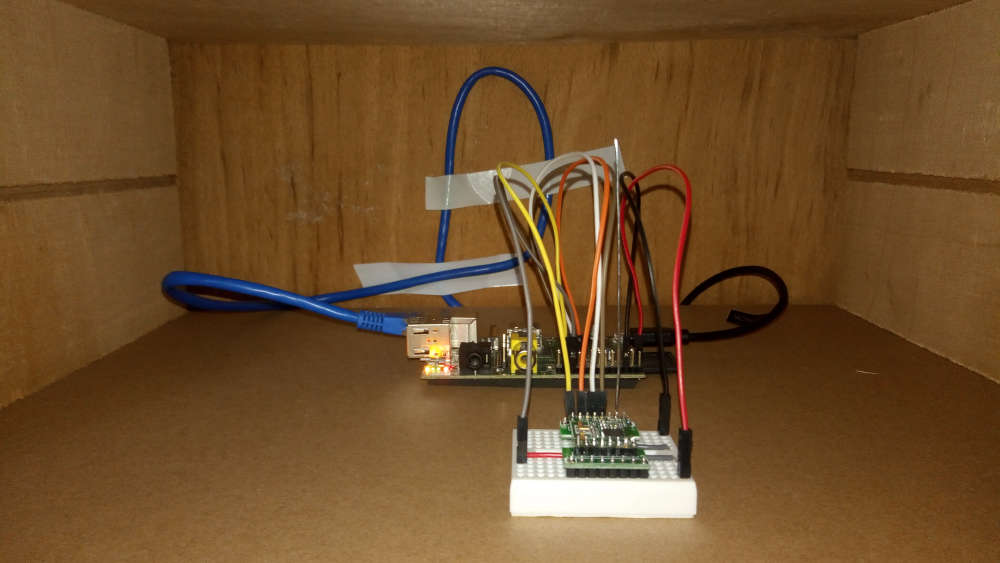
    My Raspberry Pi serial Gateway:
    0_1573387957073_P_20191110_130510.jpg

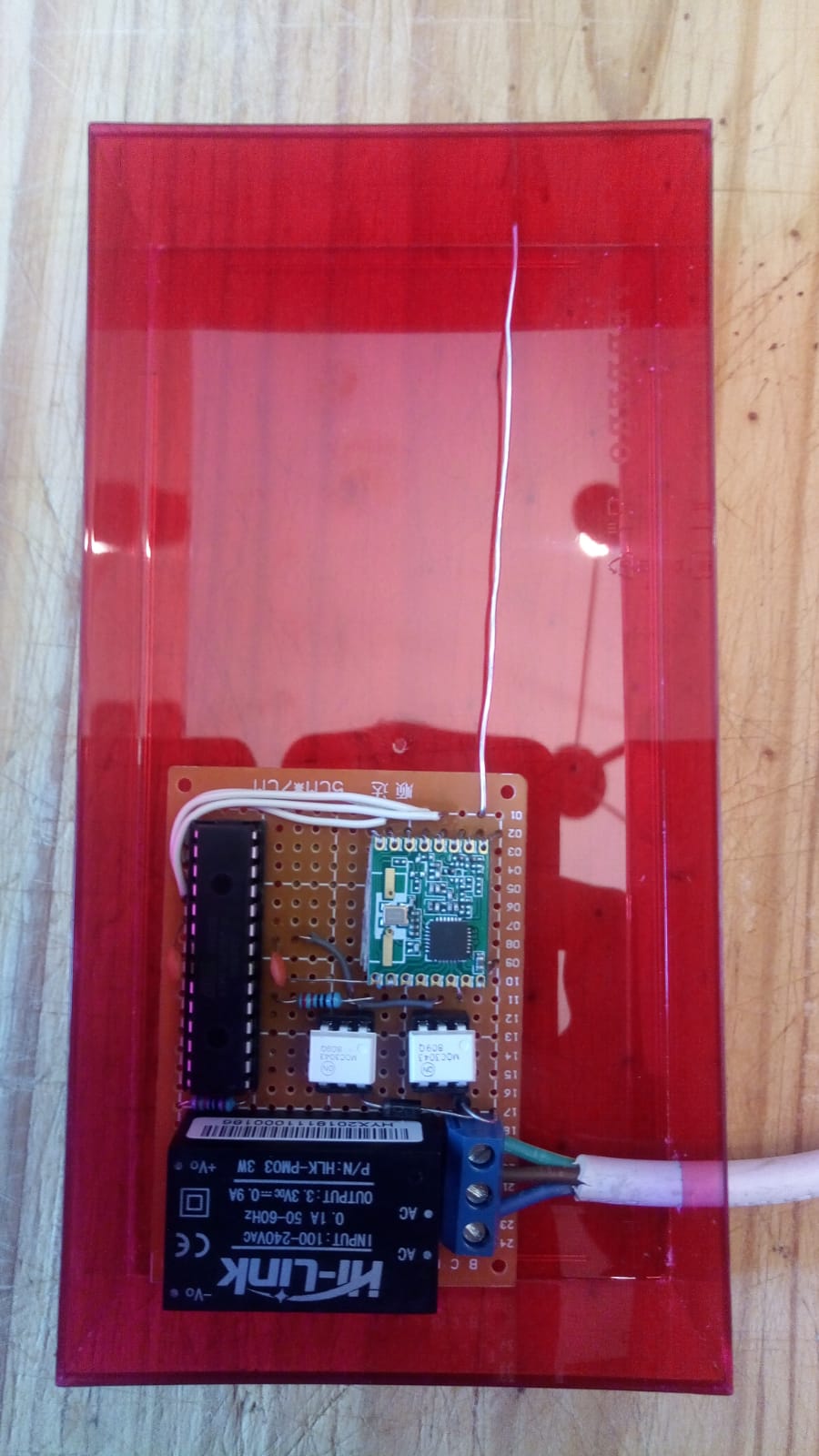
    My pilot wire prototype:
    0_1573388005746_pilot_wire.jpg

    Troubleshooting
  • Login

  • Don't have an account? Register

  • Login or register to search.
  • First post
    Last post
0
  • MySensors
  • OpenHardware.io
  • Categories
  • Recent
  • Tags
  • Popular