Skip to content
  • MySensors
  • OpenHardware.io
  • Categories
  • Recent
  • Tags
  • Popular
Skins
  • Light
  • Brite
  • Cerulean
  • Cosmo
  • Flatly
  • Journal
  • Litera
  • Lumen
  • Lux
  • Materia
  • Minty
  • Morph
  • Pulse
  • Sandstone
  • Simplex
  • Sketchy
  • Spacelab
  • United
  • Yeti
  • Zephyr
  • Dark
  • Cyborg
  • Darkly
  • Quartz
  • Slate
  • Solar
  • Superhero
  • Vapor

  • Default (No Skin)
  • No Skin
Collapse
Brand Logo
J

jlaraujo

@jlaraujo
About
Posts
19
Topics
1
Shares
0
Groups
0
Followers
0
Following
1

Posts

Recent Best Controversial

  • looking for a UPS for raspberry pi 4
    J jlaraujo

    Hi, you can try these power supplies:
    https://www.aliexpress.com/store/group/UPS-Charge-Function-switch-power-supply/1242857_501520362.html?spm=a2g0o.detail.100008.25.56f87402HSB2Og

    The are for 12V, but also support an external battery.

    I have two that work very well.
    General Discussion server ups raspberry pi

  • disable/cancel smartSleep while sleep countdown is running
    J jlaraujo

    Regarding the post sleep message, i believe that the current controllers programming (certainly Domoticz and FHEM it seems) should accept the POST_SLEEP_MESSAGE as an indication that the node is ready to receive messages.
    My understanding of the PRE_SLEEP_MESSAGE was to allow very recent messages to be received by the node, instead it seems that the controllers implementations assume that the node will only receive messages during that period.

    A clarification in the Mysensors documentation to better describe the SmartSleep design would help to sort these behaviors.

    Troubleshooting

  • 💬 RFM69(H)W Arduino Mini Pro Shield
    J jlaraujo

    @556duckvader, like @gohan referred, you can attach the DHT22 to the arduino and not to the shield.
    You can make a simple PCB that will connect to the required ports for the DHT22 to operate.
    If you'd like to have an even smaller footprint, try this design:
    https://www.openhardware.io/view/615
    It is not yet tested in production, probably will be by the end of the week.

    OpenHardware.io rfm69 arduino pro mini shield rfm69hw

  • RFM69(H)W Arduino Mini Pro Shield to offer
    J jlaraujo

    Let's see if the 10 pcbs are fully distributed, please hold until i can confirm that there are any left.

    Hardware

  • RFM69(H)W Arduino Mini Pro Shield to offer
    J jlaraujo

    @alowhum how many do you need?

    Hardware

  • RFM69(H)W Arduino Mini Pro Shield to offer
    J jlaraujo

    @diogoc how many do you need?

    Hardware

  • RFM69(H)W Arduino Mini Pro Shield to offer
    J jlaraujo

    @manutremo how many do you need?

    Hardware

  • RFM69(H)W Arduino Mini Pro Shield to offer
    J jlaraujo

    I'm giving them away. no charge.

    Hardware

  • RFM69(H)W Arduino Mini Pro Shield to offer
    J jlaraujo

    Re: 💬 RFM69(H)W Arduino Mini Pro Shield
    Hi, i have 10 PCB, divided in two to offer, any takers?
    I'm based in Portugal, and i am willing to ship for no cost to Europe. I hope that in this way i can make a small contribution to the community.

    Hardware

  • 💬 RFM69(H)W Arduino Mini Pro Shield
    J jlaraujo

    @stevebus glad it is working i have an updated version of the pcb in the first production run, that will not need any extra wiring, i'll keep you guys updated on the progress.

    OpenHardware.io rfm69 arduino pro mini shield rfm69hw

  • 💬 RFM69(H)W Arduino Mini Pro Shield
    J jlaraujo

    @gohan It seems to be a standard sma size the 1.6mm distance between the legs, anyway if it is bigger you can solder only the top layer, if it is shorter, you can cut some legs.
    Not the best but it should work.

    OpenHardware.io rfm69 arduino pro mini shield rfm69hw

  • 💬 RFM69(H)W Arduino Mini Pro Shield
    J jlaraujo

    @stevebus you are going blind :-D (like me probably) all those pins are in the ground plane, trying to provide a uniform ground to see if it improves the performance of the radio (by reducing outside interference). You can see that clearly on the gnd of the capacitor or in the gnd pad.

    OpenHardware.io rfm69 arduino pro mini shield rfm69hw

  • 💬 RFM69(H)W Arduino Mini Pro Shield
    J jlaraujo

    Glad the project seems interesting, the possibility to it being useful to someone else is the main reason for sharing.

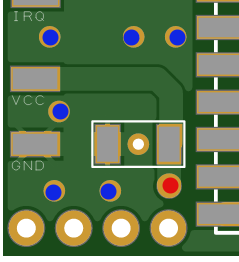
    Regarding the connections, for GND, you can connect to any of the blue dots, for VCC to the red dot, IRQ has no option other than the pad.

    0_1496187001732_upload-f023faee-04de-4454-9623-144db56da374

    My idea in using the pads was to make the board easier to slide below the mini, exactly like you state.
    If you want, i can create a custom board for you with hole instead of pad, i used designspark PCB which is easy(er) to use but does not allow to export to other PCB software formats :-(.

    OpenHardware.io rfm69 arduino pro mini shield rfm69hw

  • 💬 Easy/Newbie PCB (RFM69 HW/W edition) for MySensors
    J jlaraujo

    @sundberg84 I did this in my take of a SMA with a wire Antenna option:
    0_1494632694334_upload-ce399877-38ed-4251-924d-a293c9df13fb , you can see more details here https://www.openhardware.io/view/388/RFM69HW-Arduino-Mini-Pro-Shield.
    Haven't tried with the wire antenna trough.

    OpenHardware.io mysensor easy newbie pcb mysx

  • 💬 RFM69(H)W Arduino Mini Pro Shield
    J jlaraujo

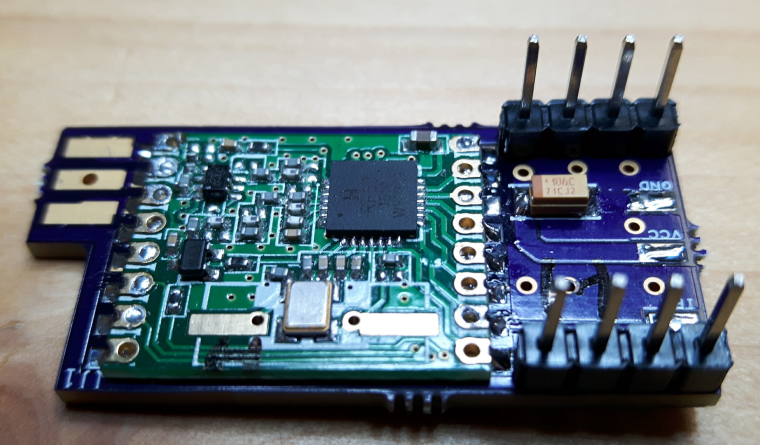
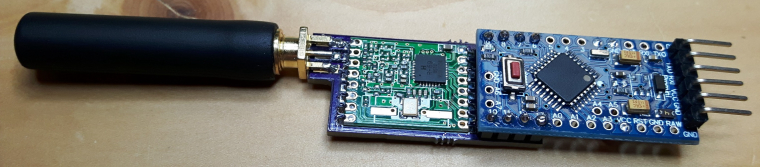
    Updated the project with two pictures, i'm also posting them here.
    0_1494365871132_board with RFM69.jpg
    0_1494365896700_board full.jpg

    Regarding the performance, i haven't done many tests yet, with the limited tests that i have done i suspect that is is better now than just connecting the wires to the Arduino.

    OpenHardware.io rfm69 arduino pro mini shield rfm69hw

  • 💬 RFM69(H)W Arduino Mini Pro Shield
    J jlaraujo

    @sundberg84 Well, it has no antenna, it uses a PCB SMA plug mouted horizontally, also allows a wire antenna to be connected to the SMD pad for flexibility. The library for DesignSpark is here https://github.com/NeuroRoboticTech/NRTDesignSparkLibraries.
    Unfortunately, I don't seem to be able to export the DesignSpark pcb to other format, humm, will have to think if DesignSpark is the way to go forwardm don't want to get stuck on a single platform.
    Anyway, here is the PCB file:0_1494349092804_RFM69H.pcb

    OpenHardware.io rfm69 arduino pro mini shield rfm69hw

  • 💬 RFM69(H)W Arduino Mini Pro Shield
    J jlaraujo

    They are for a better connection to the ground plane, in theory to reduce noise. They were added in the spirit of "it can't hurt".
    Thanks for sharing the interstitial board, i'm currently thinking in improving the design to overlap more of the board with the Mini Pro, i'll post some pictures of the current version already soldered tomorrow.

    OpenHardware.io rfm69 arduino pro mini shield rfm69hw

  • Error Sending switch command
    J jlaraujo

    @macieiks Could't find what my problem was. I've tried changing the gateway code to the sensor, same issue, change the radios, the same thing.

    I ended up downloading again the Mysensors library, the same issue, i then changed the baud rate for the debug and serial gateway to 19200 and that seemed to solve the issue, i can now issue commands to the nodes, thanks for the help.

    My sensor and gateway are all Pro mini, 8v 8Mhz, i remember now that i've read something in the forum, but can't find it now.

    Domoticz

  • Error Sending switch command
    J jlaraujo

    I'm having the same issue, running Version: 2.3530 Build Hash: 9eef872

    The sensor is number 1, and as soon as i try to change the state i get the "Error sending switch command, check device/hardware !"

    This is what the domoticz is sending:
    0;0;3;0;9;send: 0-0-1-1 s=35,c=1,t=2,pt=0,l=1,sg=0,st=fail:1

    It seems that the problems is that the sensor does not reply correctly, how do i parse the message and reply?

    Thanks

    Domoticz
  • Login

  • Don't have an account? Register

  • Login or register to search.
  • First post
    Last post
0
  • MySensors
  • OpenHardware.io
  • Categories
  • Recent
  • Tags
  • Popular