Skip to content
  • MySensors
  • OpenHardware.io
  • Categories
  • Recent
  • Tags
  • Popular
Skins
  • Light
  • Brite
  • Cerulean
  • Cosmo
  • Flatly
  • Journal
  • Litera
  • Lumen
  • Lux
  • Materia
  • Minty
  • Morph
  • Pulse
  • Sandstone
  • Simplex
  • Sketchy
  • Spacelab
  • United
  • Yeti
  • Zephyr
  • Dark
  • Cyborg
  • Darkly
  • Quartz
  • Slate
  • Solar
  • Superhero
  • Vapor

  • Default (No Skin)
  • No Skin
Collapse
Brand Logo
K

keithellis

@keithellis
About
Posts
20
Topics
2
Shares
0
Groups
0
Followers
0
Following
0

Posts

Recent Best Controversial

  • mysensors regularly disconnect from HA
    K keithellis

    I'm still getting this error on mysensors gate upgraded to 2.3.2.

    @BearWithBeard said in mysensors regularly disconnect from HA:

    Have you had a chance to look at the gateway's serial log when it lost connection to Home Assistant?

    No this is on my list to do.

    What version of MySensors are you running by the way? Maybe it's worthwhile to upgrade to 2.3.2 if it isn't already. Home Assistant is also up to date?

    HA is 2010.09.0, I can't upgrade further until I upgrade to Debian Bullseye
    Mysensors gateway is running 2.3.2, some nodes are slightly older.

    The next steps that I would take would be to ...

    • Check that both MySensors and Home Assistant are on a recent version

    Done

    • Watch the gateway serial log for any hints (using a remote debugging library or hooking it up to a server / RPI and writing the serial output to a file)

    On my todo list.

    • Ensure that the power supply is fine and maybe even replace it temporarily, just in case

    Checked, all seems ok

    • Consider adapting the gateway sketch to MQTT (or even serial) and see if the issue still comes up

    Don't really want to do this, but will to as a last result once I've checked gateway serial log.

    Home Assistant

  • mysensors regularly disconnect from HA
    K keithellis

    @keithellis I think I've got it refreshed now. So lets see if this fixes my disconnection issues. thanks all.

    Home Assistant

  • mysensors regularly disconnect from HA
    K keithellis

    @electrik Yes I've found this post, but to be honest I don't no how to change the ESP8266 core. I'm flashing with the Arduino IDE and have used the ESP8266 Community Board. Is using version 2.7.4 of this board manager the same as using a v2 core?

    Home Assistant

  • mysensors regularly disconnect from HA
    K keithellis

    @FarmerEd @BearWithBeard I tried to re-flash the wifi gateway, but it appears I am now stuffed. Apparently it is no longer possible to flash MySensors onto an ESP8266. Where to go now? It is possible to integrate NRF240L01 with a ESPHome gateway?

    Home Assistant

  • mysensors regularly disconnect from HA
    K keithellis

    @BearWithBeard thank you, that gives me a few things to try.

    Home Assistant

  • mysensors regularly disconnect from HA
    K keithellis

    @keithellis This is the log after I reload the integration in HA. Don't know if this is useful.

    2021-10-08 17:31:21 DEBUG (MainThread) [homeassistant.components.mysensors.device.Energy Meter 8 1] deleted ('5629f2f7535b66d050ad7d9cbd60e936', 8, 1, 17) from platform sensor
    2021-10-08 17:31:21 DEBUG (MainThread) [homeassistant.components.mysensors.device.Energy Meter 8 1] deleted ('5629f2f7535b66d050ad7d9cbd60e936', 8, 1, 18) from platform sensor
    2021-10-08 17:31:21 DEBUG (MainThread) [homeassistant.components.mysensors.device.TemperatureAndHumidity 4 0] deleted ('5629f2f7535b66d050ad7d9cbd60e936', 4, 0, 1) from platform sensor
    2021-10-08 17:31:21 DEBUG (MainThread) [homeassistant.components.mysensors.device.TemperatureAndHumidity 4 1] deleted ('5629f2f7535b66d050ad7d9cbd60e936', 4, 1, 0) from platform sensor
    2021-10-08 17:31:21 DEBUG (MainThread) [homeassistant.components.mysensors.device.Sensebender Micro 6 1] deleted ('5629f2f7535b66d050ad7d9cbd60e936', 6, 1, 0) from platform sensor
    2021-10-08 17:31:21 DEBUG (MainThread) [homeassistant.components.mysensors.device.Sensebender Micro 6 2] deleted ('5629f2f7535b66d050ad7d9cbd60e936', 6, 2, 1) from platform sensor
    2021-10-08 17:31:21 DEBUG (MainThread) [homeassistant.components.mysensors.device.TemperatureAndHumidity 3 0] deleted ('5629f2f7535b66d050ad7d9cbd60e936', 3, 0, 1) from platform sensor
    2021-10-08 17:31:21 DEBUG (MainThread) [homeassistant.components.mysensors.device.TemperatureAndHumidity 3 1] deleted ('5629f2f7535b66d050ad7d9cbd60e936', 3, 1, 0) from platform sensor
    2021-10-08 17:31:21 DEBUG (MainThread) [homeassistant.components.mysensors.device.Energy Meter 9 1] deleted ('5629f2f7535b66d050ad7d9cbd60e936', 9, 1, 17) from platform sensor
    2021-10-08 17:31:21 DEBUG (MainThread) [homeassistant.components.mysensors.device.Energy Meter 9 1] deleted ('5629f2f7535b66d050ad7d9cbd60e936', 9, 1, 18) from platform sensor
    2021-10-08 17:31:21 INFO (MainThread) [mysensors.task] Stopping gateway
    2021-10-08 17:31:21 DEBUG (SyncWorker_3) [mysensors.persistence] Loading sensors from persistence file /mnt/data/dietpi_userdata/homeassistantmysensors.json
    2021-10-08 17:31:21 INFO (MainThread) [homeassistant.components.climate] Setting up climate.mysensors
    2021-10-08 17:31:21 INFO (MainThread) [homeassistant.components.cover] Setting up cover.mysensors
    2021-10-08 17:31:21 INFO (MainThread) [homeassistant.components.light] Setting up light.mysensors
    2021-10-08 17:31:21 INFO (MainThread) [homeassistant.components.binary_sensor] Setting up binary_sensor.mysensors
    2021-10-08 17:31:21 INFO (MainThread) [homeassistant.components.sensor] Setting up sensor.mysensors
    2021-10-08 17:31:21 INFO (MainThread) [homeassistant.components.switch] Setting up switch.mysensors
    2021-10-08 17:31:21 DEBUG (SyncWorker_2) [mysensors.persistence] Saving sensors to persistence file /mnt/data/dietpi_userdata/homeassistant/mysensors.json
    2021-10-08 17:31:21 DEBUG (MainThread) [homeassistant.components.mysensors.helpers] Node 0 is missing sketch name
    2021-10-08 17:31:21 DEBUG (MainThread) [homeassistant.components.mysensors.gateway] discovering persistent devices: defaultdict(<class 'list'>, {'sensor': [('5629f2f7535b66d050ad7d9cbd60e936', 8, 1, 17), ('5629f2f7535b66d050ad7d9cbd60e936', 8, 1, 18), ('5629f2f7535b66d050ad7d9cbd60e936', 4, 0, 1), ('5629f2f7535b66d050ad7d9cbd60e936', 4, 1, 0), ('5629f2f7535b66d050ad7d9cbd60e936', 6, 1, 0), ('5629f2f7535b66d050ad7d9cbd60e936', 6, 2, 1), ('5629f2f7535b66d050ad7d9cbd60e936', 3, 0, 1), ('5629f2f7535b66d050ad7d9cbd60e936', 3, 1, 0), ('5629f2f7535b66d050ad7d9cbd60e936', 9, 1, 17), ('5629f2f7535b66d050ad7d9cbd60e936', 9, 1, 18)]})
    2021-10-08 17:31:21 DEBUG (MainThread) [homeassistant.components.mysensors.helpers] Discovering platform sensor with devIds: [('5629f2f7535b66d050ad7d9cbd60e936', 8, 1, 17), ('5629f2f7535b66d050ad7d9cbd60e936', 8, 1, 18), ('5629f2f7535b66d050ad7d9cbd60e936', 4, 0, 1), ('5629f2f7535b66d050ad7d9cbd60e936', 4, 1, 0), ('5629f2f7535b66d050ad7d9cbd60e936', 6, 1, 0), ('5629f2f7535b66d050ad7d9cbd60e936', 6, 2, 1), ('5629f2f7535b66d050ad7d9cbd60e936', 3, 0, 1), ('5629f2f7535b66d050ad7d9cbd60e936', 3, 1, 0), ('5629f2f7535b66d050ad7d9cbd60e936', 9, 1, 17), ('5629f2f7535b66d050ad7d9cbd60e936', 9, 1, 18)]
    2021-10-08 17:31:21 INFO (MainThread) [homeassistant.components.mysensors] Adding new devices: [<Entity Energy Meter 8 1>, <Entity Energy Meter 8 1>, <Entity TemperatureAndHumidity 4 0>, <Entity TemperatureAndHumidity 4 1>, <Entity Sensebender Micro 6 1>, <Entity Sensebender Micro 6 2>, <Entity TemperatureAndHumidity 3 0>, <Entity TemperatureAndHumidity 3 1>, <Entity Energy Meter 9 1>, <Entity Energy Meter 9 1>]
    2021-10-08 17:31:21 DEBUG (MainThread) [homeassistant.components.mysensors.device] Entity update: Energy Meter 8 1: value_type 24, value = 149
    2021-10-08 17:31:21 DEBUG (MainThread) [homeassistant.components.mysensors.device] Entity update: Energy Meter 8 1: value_type 18, value = 0.1490
    2021-10-08 17:31:21 DEBUG (MainThread) [homeassistant.components.mysensors.device] Entity update: Energy Meter 8 1: value_type 17, value = 758
    2021-10-08 17:31:21 DEBUG (MainThread) [homeassistant.components.mysensors.device] Entity update: Energy Meter 8 1: value_type 24, value = 149
    2021-10-08 17:31:21 DEBUG (MainThread) [homeassistant.components.mysensors.device] Entity update: Energy Meter 8 1: value_type 18, value = 0.1490
    2021-10-08 17:31:21 DEBUG (MainThread) [homeassistant.components.mysensors.device] Entity update: Energy Meter 8 1: value_type 17, value = 758
    2021-10-08 17:31:21 DEBUG (MainThread) [homeassistant.components.mysensors.device] Entity update: TemperatureAndHumidity 4 0: value_type 1, value = 93.4
    2021-10-08 17:31:21 DEBUG (MainThread) [homeassistant.components.mysensors.device] Entity update: TemperatureAndHumidity 4 1: value_type 0, value = 19.2
    2021-10-08 17:31:21 DEBUG (MainThread) [homeassistant.components.mysensors.device] Entity update: Sensebender Micro 6 1: value_type 0, value = 20.8
    2021-10-08 17:31:21 DEBUG (MainThread) [homeassistant.components.mysensors.device] Entity update: Sensebender Micro 6 2: value_type 1, value = 67
    2021-10-08 17:31:21 DEBUG (MainThread) [homeassistant.components.mysensors.device] Entity update: TemperatureAndHumidity 3 0: value_type 1, value = 83.6
    2021-10-08 17:31:21 DEBUG (MainThread) [homeassistant.components.mysensors.device] Entity update: TemperatureAndHumidity 3 1: value_type 0, value = 18.7
    2021-10-08 17:31:21 DEBUG (MainThread) [homeassistant.components.mysensors.device] Entity update: Energy Meter 9 1: value_type 24, value = 266854
    2021-10-08 17:31:21 DEBUG (MainThread) [homeassistant.components.mysensors.device] Entity update: Energy Meter 9 1: value_type 18, value = 266.8540
    2021-10-08 17:31:21 DEBUG (MainThread) [homeassistant.components.mysensors.device] Entity update: Energy Meter 9 1: value_type 17, value = 256
    2021-10-08 17:31:21 DEBUG (MainThread) [homeassistant.components.mysensors.device] Entity update: Energy Meter 9 1: value_type 24, value = 266854
    2021-10-08 17:31:21 DEBUG (MainThread) [homeassistant.components.mysensors.device] Entity update: Energy Meter 9 1: value_type 18, value = 266.8540
    2021-10-08 17:31:21 DEBUG (MainThread) [homeassistant.components.mysensors.device] Entity update: Energy Meter 9 1: value_type 17, value = 256
    2021-10-08 17:31:21 INFO (MainThread) [mysensors.gateway_tcp] Trying to connect to ('192.168.54.25', 5003)
    2021-10-08 17:31:22 INFO (MainThread) [mysensors.transport] Connected to <_SelectorSocketTransport fd=46 read=idle write=<idle, bufsize=0>>
    2021-10-08 17:31:22 DEBUG (MainThread) [mysensors.transport] Receiving 0;255;3;0;14;Gateway startup complete.
    2021-10-08 17:31:22 INFO (MainThread) [mysensors.handler] n:0 c:255 t:3 s:14 p:Gateway startup complete.
    2021-10-08 17:31:22 DEBUG (MainThread) [homeassistant.components.mysensors.gateway] Node update: node 0 child 255
    2021-10-08 17:31:22 DEBUG (MainThread) [mysensors.transport] Sending 255;255;3;0;20;
    2021-10-08 17:31:22 DEBUG (MainThread) [mysensors.transport] Receiving 0;255;0;0;18;2.3.2
    2021-10-08 17:31:22 DEBUG (MainThread) [homeassistant.components.mysensors.gateway] Node update: node 0 child 255
    2021-10-08 17:31:22 DEBUG (MainThread) [mysensors.transport] Receiving 9;255;3;0;21;0
    2021-10-08 17:31:22 DEBUG (MainThread) [mysensors.transport] Receiving 9;1;1;0;17;463
    2021-10-08 17:31:22 DEBUG (MainThread) [homeassistant.components.mysensors.gateway] Node update: node 9 child 1
    2021-10-08 17:31:22 DEBUG (MainThread) [mysensors.transport] Receiving 9;1;1;0;24;277598
    2021-10-08 17:31:22 DEBUG (MainThread) [homeassistant.components.mysensors.gateway] Node update: node 9 child 1
    2021-10-08 17:31:22 DEBUG (MainThread) [homeassistant.components.mysensors.device] Entity update: Energy Meter 9 1: value_type 24, value = 277598
    2021-10-08 17:31:22 DEBUG (MainThread) [homeassistant.components.mysensors.device] Entity update: Energy Meter 9 1: value_type 18, value = 266.8540
    2021-10-08 17:31:22 DEBUG (MainThread) [homeassistant.components.mysensors.device] Entity update: Energy Meter 9 1: value_type 17, value = 463
    2021-10-08 17:31:22 DEBUG (MainThread) [mysensors.transport] Receiving 9;1;1;0;18;277.5980
    2021-10-08 17:31:22 DEBUG (MainThread) [homeassistant.components.mysensors.gateway] Node update: node 9 child 1
    2021-10-08 17:31:22 DEBUG (MainThread) [homeassistant.components.mysensors.device] Entity update: Energy Meter 9 1: value_type 24, value = 277598
    2021-10-08 17:31:22 DEBUG (MainThread) [homeassistant.components.mysensors.device] Entity update: Energy Meter 9 1: value_type 18, value = 277.5980
    2021-10-08 17:31:22 DEBUG (MainThread) [homeassistant.components.mysensors.device] Entity update: Energy Meter 9 1: value_type 17, value = 463


    Some of these sensors do not exist any more, for example Energy Meter 8 1

    Home Assistant

  • mysensors regularly disconnect from HA
    K keithellis

    @BearWithBeard Ok, mysensors have just disconnected from HA again today. This is the last few lines of the log

    2021-10-08 01:26:58 DEBUG (MainThread) [homeassistant.components.mysensors.gateway] Node update: node 6 child 1
    2021-10-08 01:26:58 DEBUG (MainThread) [mysensors.transport] Receiving 6;2;1;0;1;67
    2021-10-08 01:26:58 DEBUG (MainThread) [homeassistant.components.mysensors.gateway] Node update: node 6 child 2
    2021-10-08 01:26:58 DEBUG (MainThread) [homeassistant.components.mysensors.device] Entity update: Sensebender Micro 6 1: value_type 0, value = 20.8
    2021-10-08 01:26:58 DEBUG (MainThread) [homeassistant.components.mysensors.device] Entity update: Sensebender Micro 6 2: value_type 1, value = 67
    2021-10-08 01:26:59 DEBUG (MainThread) [mysensors.transport] Receiving 3;0;1;0;1;83.6
    2021-10-08 01:26:59 DEBUG (MainThread) [homeassistant.components.mysensors.gateway] Node update: node 3 child 0
    2021-10-08 01:26:59 DEBUG (MainThread) [homeassistant.components.mysensors.device] Entity update: TemperatureAndHumidity 3 0: value_type 1, value = 83.6
    2021-10-08 01:27:01 DEBUG (MainThread) [mysensors.transport] Receiving 9;1;1;0;17;256
    2021-10-08 01:27:01 DEBUG (MainThread) [homeassistant.components.mysensors.gateway] Node update: node 9 child 1
    2021-10-08 01:27:01 DEBUG (MainThread) [mysensors.transport] Receiving 9;1;1;0;24;266854
    2021-10-08 01:27:01 DEBUG (MainThread) [homeassistant.components.mysensors.gateway] Node update: node 9 child 1
    2021-10-08 01:27:01 DEBUG (MainThread) [homeassistant.components.mysensors.device] Entity update: Energy Meter 9 1: value_type 24, value = 266854
    2021-10-08 01:27:01 DEBUG (MainThread) [homeassistant.components.mysensors.device] Entity update: Energy Meter 9 1: value_type 18, value = 266.8530
    2021-10-08 01:27:01 DEBUG (MainThread) [homeassistant.components.mysensors.device] Entity update: Energy Meter 9 1: value_type 17, value = 256
    2021-10-08 01:27:01 DEBUG (MainThread) [mysensors.transport] Receiving 9;1;1;0;18;266.8540
    2021-10-08 01:27:01 DEBUG (MainThread) [homeassistant.components.mysensors.gateway] Node update: node 9 child 1
    2021-10-08 01:27:01 DEBUG (MainThread) [homeassistant.components.mysensors.device] Entity update: Energy Meter 9 1: value_type 24, value = 266854
    2021-10-08 01:27:01 DEBUG (MainThread) [homeassistant.components.mysensors.device] Entity update: Energy Meter 9 1: value_type 18, value = 266.8540
    2021-10-08 01:27:01 DEBUG (MainThread) [homeassistant.components.mysensors.device] Entity update: Energy Meter 9 1: value_type 17, value = 256
    2021-10-08 01:27:05 DEBUG (SyncWorker_0) [mysensors.persistence] Saving sensors to persistence file /mnt/data/dietpi_userdata/homeassistant/mysensors.json
    2021-10-08 01:27:07 DEBUG (MainThread) [mysensors.transport] Sending 0;255;3;0;2;
    2021-10-08 01:27:07 DEBUG (MainThread) [mysensors.transport] Receiving 0;255;3;0;2;2.3.2
    2021-10-08 01:27:13 DEBUG (MainThread) [mysensors.gateway_tcp] Connection lost with <_SelectorSocketTransport closing fd=78 read=idle write=<idle, bufsize=0>>
    

    Looks like it was all working well up until the last line, then the socket closed. If you can help me understand what is going on, that would be great.

    I grep'ed the log for "mysensors", so if this has missed any important information please let me know and I can have another look.
    Thanks,

    Home Assistant

  • mysensors regularly disconnect from HA
    K keithellis

    @BearWithBeard I've enabled the logging, I'll have to wait for it to drop off now, to see what it shows. Thanks for the info.

    Home Assistant

  • mysensors regularly disconnect from HA
    K keithellis

    @BearWithBeard thank you, I’ll investigate further.

    Home Assistant

  • mysensors regularly disconnect from HA
    K keithellis

    I’ve been using Home Assistant for a while now and have a couple of mysensors temperature/humidity sensors connected to the mysensors integration via a Wi-Fi gateway. Every so often, maybe once every one or two weeks the sensors stop communicating with HA. I use the reload command in the mysensors integration and they start working again. This was not too much of an issue, but I have a pulse meter measuring my energy consumption now and I don’t really want gaps in this data.
    Any idea how I can trouble shoot this issue?

    Home Assistant

  • 💬 Power Meter Pulse Sensor
    K keithellis

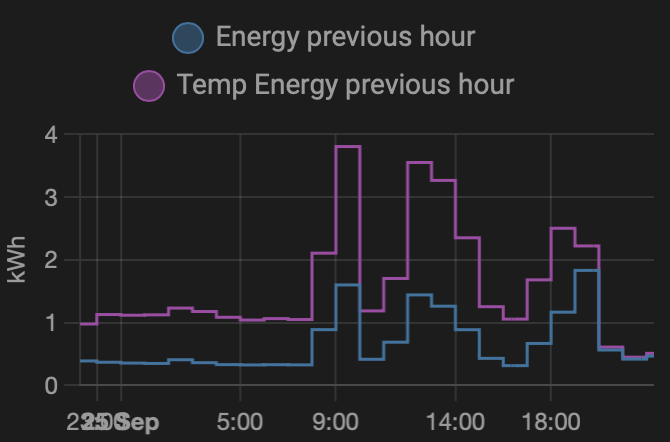
    Got this sensor up and running now. Comparing it to my old clamp meter the kWh reading was reading 2-3 times higher, the Watts was about right. I added a 0.1uF capacity across the ground and data pins of the sensor and it is working well now.
    The graph below shows the comparison of my two sensors. the old clamp meter is Energy previous hour, the new pulse sensor is Temp energy previous hour
    You can see they are not aligned, until about 20:00 when I added the capacitor and they drop in line.Screenshot 2021-09-25 at 22.18.27.png

    Announcements

  • 💬 Power Meter Pulse Sensor
    K keithellis

    @sundberg84 Thanks very much for this post. I was struggling to get the sensor appear in Home-Assistant. Your note on the fact that HA never returns V_VAR1 on first use was very useful and pointed me in the right direction.

    My modifications looked like this:

    } else if (sendTime && !pcReceived) {
    		// No pulse count value received from controller. Try requesting it again.
    		request(CHILD_ID, V_VAR1);
        retryCount++;
    		lastSend = now;
    	} else if (retryCount >= 5 && !pcReceived) {
          //For some controllers, if you dont have any V_VAR1 stored node will not get an answer.
          //Try 5 times, then set V_VAR1 to 0 and update controller
        pcReceived = true;
        retryCount = 0;
        send(pcMsg.set(pulseCount));  // Send pulse count 0 value to gw
        double kWh = ((double)pulseCount / ((double)PULSE_FACTOR));
        send(kWhMsg.set(kWh, 4));  // Send kWh value 0 to gw
        lastSend = now;
      }
    

    The whole sketch is here:

    /*
       The MySensors Arduino library handles the wireless radio link and protocol
       between your home built sensors/actuators and HA controller of choice.
       The sensors forms a self healing radio network with optional repeaters. Each
       repeater and gateway builds a routing tables in EEPROM which keeps track of the
       network topology allowing messages to be routed to nodes.
    
       Created by Henrik Ekblad <henrik.ekblad@mysensors.org>
       Copyright (C) 2013-2019 Sensnology AB
       Full contributor list: https://github.com/mysensors/MySensors/graphs/contributors
    
       Documentation: http://www.mysensors.org
       Support Forum: http://forum.mysensors.org
    
       This program is free software; you can redistribute it and/or
       modify it under the terms of the GNU General Public License
       version 2 as published by the Free Software Foundation.
    
     *******************************
    
       REVISION HISTORY
       Version 1.0 - Henrik Ekblad
       Version 1.1 - Peter Andersson added millis watt calculation if time between pulses > 1h
    
       DESCRIPTION
       This sketch provides an example how to implement a LM393 PCB
       Use this sensor to measure kWh and Watt of your house meter
       You need to set the correct pulsefactor of your meter (blinks per kWh).
       The sensor starts by fetching current kWh value from gateway.
       Reports both kWh and Watt back to gateway.
    
       Unfortunately millis() won't increment when the Arduino is in
       sleepmode. So we cannot make this sensor sleep if we also want
       to calculate/report watt value.
       http://www.mysensors.org/build/pulse_power
    */
    
    // Enable debug prints
    #define MY_DEBUG
    
    // Enable and select radio type attached
    #define MY_RADIO_RF24
    //#define MY_RADIO_NRF5_ESB
    //#define MY_RADIO_RFM69
    //#define MY_RADIO_RFM95
    
    #include <MySensors.h>
    
    #define DIGITAL_INPUT_SENSOR 3  // The digital input you attached your light sensor.  (Only 2 and 3 generates interrupt!)
    #define PULSE_FACTOR 1000       // Number of blinks per kWh of your meter. Normally 1000.
    #define SLEEP_MODE false        // Watt value can only be reported when sleep mode is false.
    #define MAX_WATT 10000          // Max watt value to report. This filters outliers.
    #define CHILD_ID 1              // Id of the sensor child
    
    uint32_t SEND_FREQUENCY =
        20000; // Minimum time between send (in milliseconds). We don't want to spam the gateway.
    double ppwh = ((double)PULSE_FACTOR) / 1000; // Pulses per watt hour
    bool pcReceived = false;
    volatile uint32_t pulseCount = 0;
    volatile uint32_t lastBlinkmicros = 0;
    volatile uint32_t lastBlinkmillis = 0;
    volatile uint32_t watt = 0;
    uint32_t retryCount = 0;  //If value not being returned from controller, increment this counter
    uint32_t oldPulseCount = 0;
    uint32_t oldWatt = 0;
    double oldkWh;
    uint32_t lastSend;
    MyMessage wattMsg(CHILD_ID, V_WATT);
    MyMessage kWhMsg(CHILD_ID, V_KWH);
    MyMessage pcMsg(CHILD_ID, V_VAR1);
    
    #if defined(ARDUINO_ARCH_ESP8266) || defined(ARDUINO_ARCH_ESP32)
    #define IRQ_HANDLER_ATTR ICACHE_RAM_ATTR
    #else
    #define IRQ_HANDLER_ATTR
    #endif
    
    void IRQ_HANDLER_ATTR onPulse()
    {
    	if (!SLEEP_MODE) {
    		uint32_t newBlinkmicros = micros();
    		uint32_t newBlinkmillis = millis();
    		uint32_t intervalmicros = newBlinkmicros - lastBlinkmicros;
    		uint32_t intervalmillis = newBlinkmillis - lastBlinkmillis;
    		if (intervalmicros < 10000L && intervalmillis < 10L) { // Sometimes we get interrupt on RISING
    			return;
    		}
    		if (intervalmillis < 360000) { // Less than an hour since last pulse, use microseconds
    			watt = (3600000000.0 / intervalmicros) / ppwh;
    		} else {
    			watt = (3600000.0 / intervalmillis) /
    			       ppwh; // more thAn an hour since last pulse, use milliseconds as micros will overflow after 70min
    		}
    		lastBlinkmicros = newBlinkmicros;
    		lastBlinkmillis = newBlinkmillis;
    	}
    	pulseCount++;
    }
    
    void setup()
    {
    	// Fetch last known pulse count value from gw
    	request(CHILD_ID, V_VAR1);
    
    	// Use the internal pullup to be able to hook up this sketch directly to an energy meter with S0 output
    	// If no pullup is used, the reported usage will be too high because of the floating pin
    	pinMode(DIGITAL_INPUT_SENSOR, INPUT_PULLUP);
    
    	attachInterrupt(digitalPinToInterrupt(DIGITAL_INPUT_SENSOR), onPulse, RISING);
    	lastSend = millis();
    }
    
    void presentation()
    {
    	// Send the sketch version information to the gateway and Controller
    	sendSketchInfo(F("Energy Meter"), F("1.1"));
    
    	// Register this device as power sensor
    	present(CHILD_ID, S_POWER);
    }
    
    void loop()
    {
    	uint32_t now = millis();
    	// Only send values at a maximum frequency or woken up from sleep
    	bool sendTime = now - lastSend > SEND_FREQUENCY;
    	if (pcReceived && (SLEEP_MODE || sendTime)) {
    		// New watt value has been calculated
    		if (!SLEEP_MODE && watt != oldWatt) {
    			// Check that we don't get unreasonable large watt value, which
    			// could happen when long wraps or false interrupt triggered
    			if (watt < ((uint32_t)MAX_WATT)) {
    				send(wattMsg.set(watt));  // Send watt value to gw
    			}
    			Serial.print("Watt:");
    			Serial.println(watt);
    			oldWatt = watt;
    		}
    
    		// Pulse count value has changed
    		if (pulseCount != oldPulseCount) {
    			send(pcMsg.set(pulseCount));  // Send pulse count value to gw
    			double kWh = ((double)pulseCount / ((double)PULSE_FACTOR));
    			oldPulseCount = pulseCount;
    			if (kWh != oldkWh) {
    				send(kWhMsg.set(kWh, 4));  // Send kWh value to gw
    				oldkWh = kWh;
    			}
    		}
    		lastSend = now;
    	} else if (sendTime && !pcReceived) {
    		// No pulse count value received from controller. Try requesting it again.
    		request(CHILD_ID, V_VAR1);
        retryCount++;
    		lastSend = now;
    	} else if (retryCount >= 5 && !pcReceived) {
          //For some controllers, if you dont have any V_VAR1 stored node will not get an answer.
          //Try 5 times, then set V_VAR1 to 0 and update controller
        pcReceived = true;
        retryCount = 0;
        send(pcMsg.set(pulseCount));  // Send pulse count 0 value to gw
        double kWh = ((double)pulseCount / ((double)PULSE_FACTOR));
        send(kWhMsg.set(kWh, 4));  // Send kWh value 0 to gw
        lastSend = now;
      }
    
    
    	if (SLEEP_MODE) {
    		sleep(SEND_FREQUENCY, false);
    	}
    }
    
    void receive(const MyMessage &message)
    {
    	if (message.getType()==V_VAR1) {
    		pulseCount = oldPulseCount = message.getLong();
    		Serial.print("Received last pulse count value from gw:");
    		Serial.println(pulseCount);
    		pcReceived = true;
    	}
    }
    
    Announcements

  • 💬 Power Meter Pulse Sensor
    K keithellis

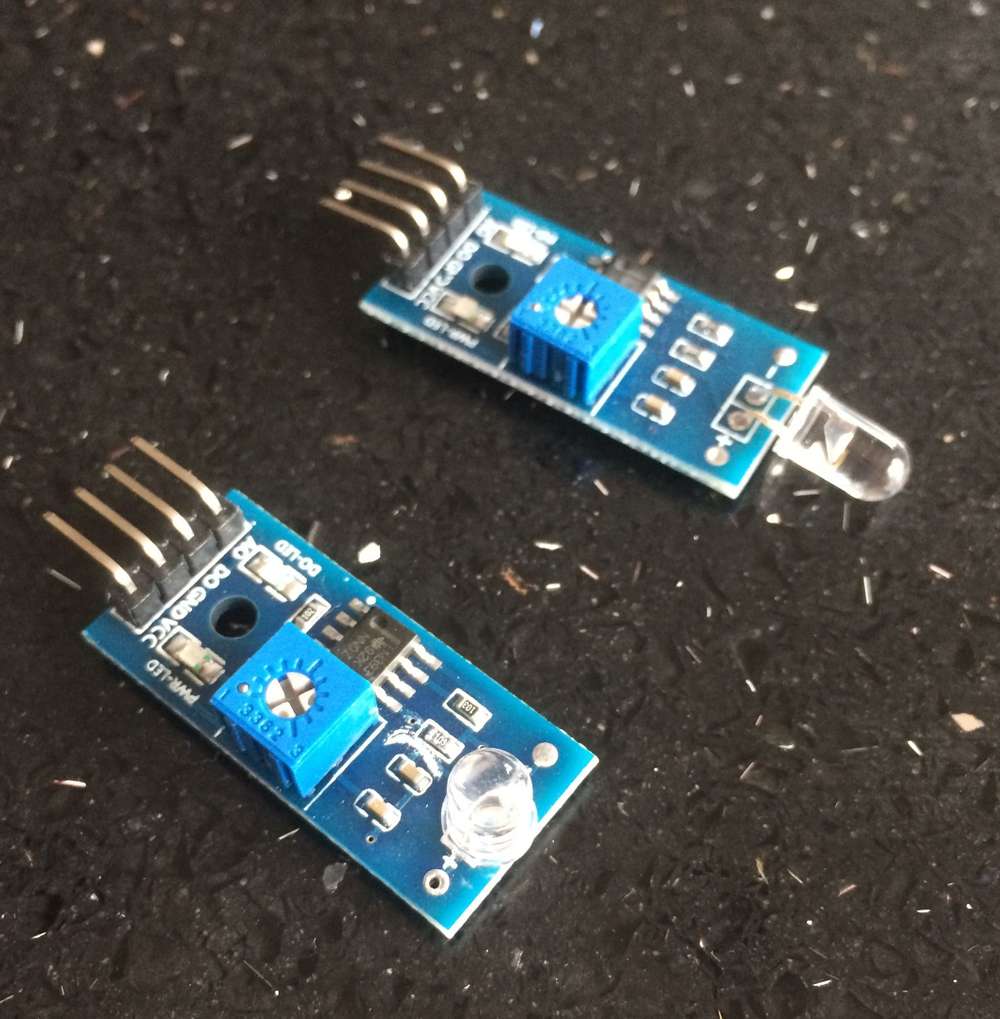
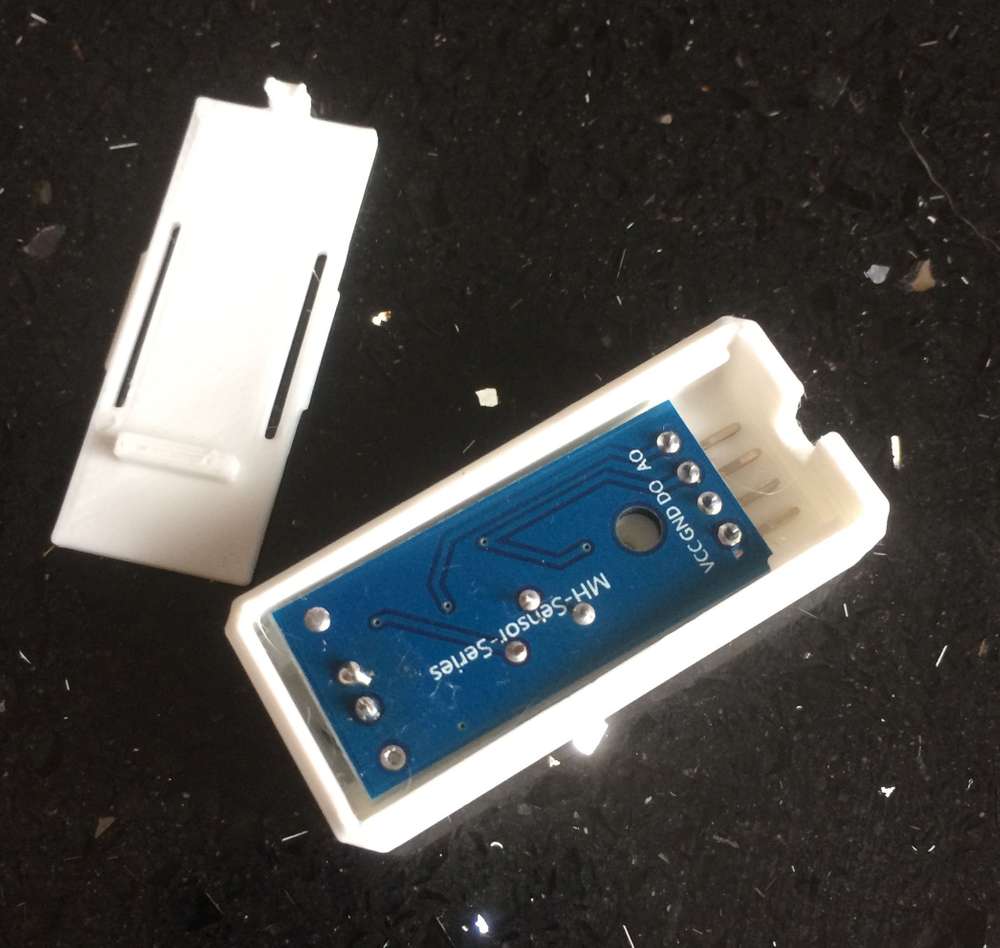
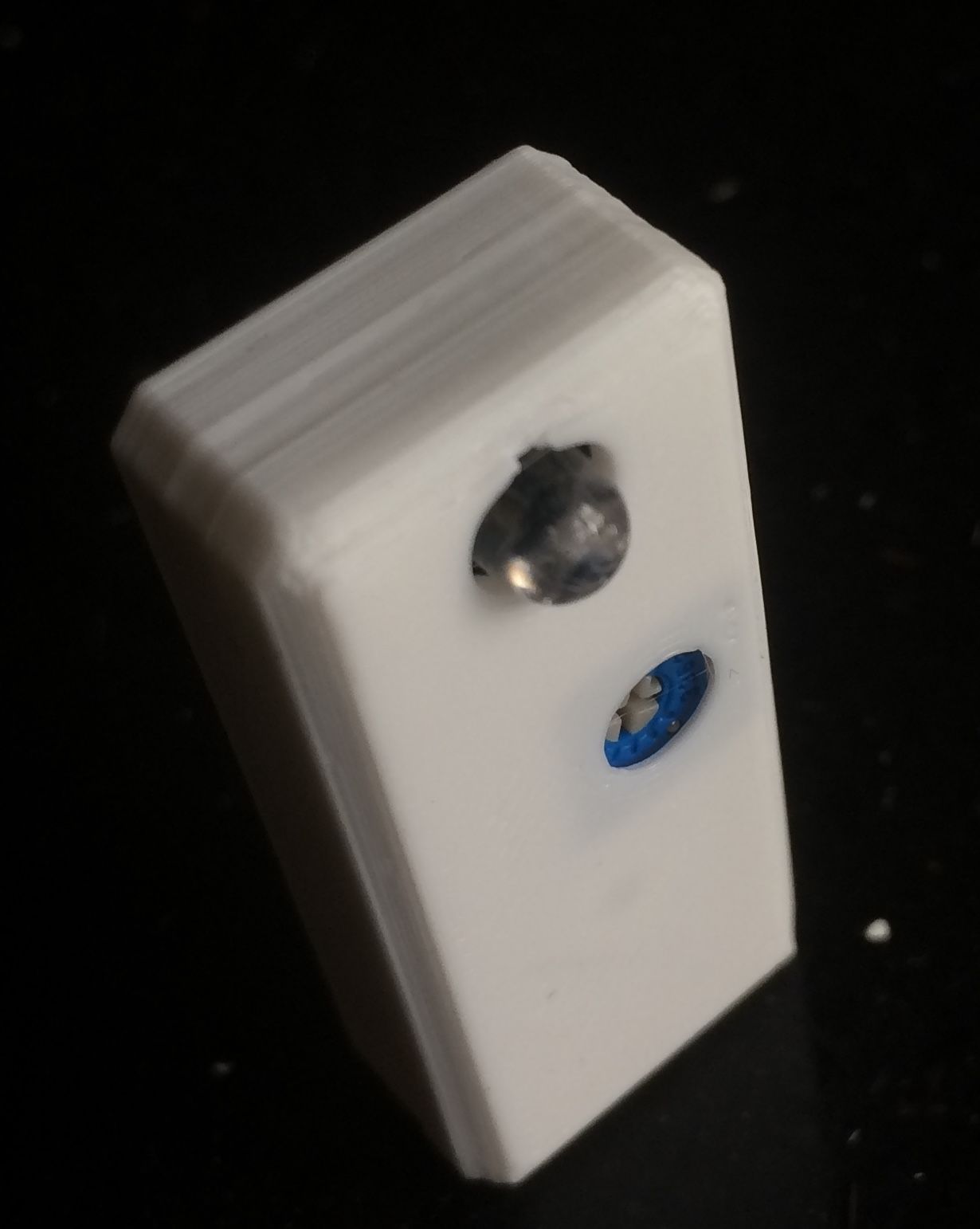
    I've been building one of these pulse meters up, it seems to be working on the bench very nice. Just got to build a case and get a power supply of the Arduino. But I have designed a case to hold the LM393 sensor onto the meter. I removed the light sensor and re-soldered it flush to the board making it easier to mount on the meter. Its a simple box but works quite well.

    IMG_0001.JPG

    IMG_0005.JPG

    IMG_0006.JPG

    The files are on thingiverse here

    Hope this is useful.

    Announcements

  • 💬 Sensebender Micro
    K keithellis

    @mfalkvidd Yes, that’s the one.

    OpenHardware.io temperature atmega328 atsha204a humidity flash mysensors

  • 💬 Sensebender Micro
    K keithellis

    @mfalkvidd Thanks for the response. I was not trying to compile the SecurityPersonalizer sketch, I was trying to compile the Sensebender Micro example sketch, this apparently also needs the sha204xxx files. I copied these files over from the SecurityPersonalizer sketch and it works now. thank you.

    I think sha204xxx files should also be put in the Sensebender Micro folder. Or some directions on the Sensebender Micro page on where to get these files.

    OpenHardware.io temperature atmega328 atsha204a humidity flash mysensors

  • 💬 Sensebender Micro
    K keithellis

    Hi there,
    Just received a couple of Sensebender Micro's, really excited to get them up and running. I'm trying to compile the sample code, but I can't find a library for the sha204, I'm getting the following error:

    sha204_lib_return_codes.h: No such file or directory
    

    Any idea how I can solve this please.
    thank you.

    OpenHardware.io temperature atmega328 atsha204a humidity flash mysensors

  • 💬 Sensebender Micro
    K keithellis

    @tbowmo Thats great, thank you. The URL seems to have changed.

    OpenHardware.io temperature atmega328 atsha204a humidity flash mysensors

  • 💬 Sensebender Micro
    K keithellis

    Hello, really interesting in getting a few of these Sensebender Micros, but it does not seem to be available any more. Will they be coming back into stock?

    OpenHardware.io temperature atmega328 atsha204a humidity flash mysensors

  • Temp Humidity sensor only showing humidity in HA
    K keithellis

    @Matt-McAllister Hi there, I know this is an old topic, but I've been experiencing the same issue. the way I got around it is by putting a:

    delay(500);
    

    between the two presentation statements.

    Home Assistant

  • PinChangeInt.h not found
    K keithellis

    Hello all.

    I'm just getting started with MySensors.org. I'm trying to flash my ProMini 3v3 with the Serial Gateway sketch with Arduino 1.6.4. on a Mac running OSX10.11.1

    I have copied the MySensors library folder into user/documents/arduino/library

    I have opened the SerialGateway sketch from File/Sketchbook/libraries/MySensors/SerialGateway

    Upon verifying the sketch I get the following error in the Arduino IDE

    SerialGateway.ino:52:26: fatal error: PinChangeInt.h: No such file or directory
    compilation terminated.
    Error compiling.
    

    I cannot find the PinChangeInt.h file in the library. Can someone give me a clue on how I move forward. thank you.
    Keith Ellis

    Troubleshooting
  • Login

  • Don't have an account? Register

  • Login or register to search.
  • First post
    Last post
0
  • MySensors
  • OpenHardware.io
  • Categories
  • Recent
  • Tags
  • Popular