Skip to content
  • MySensors
  • OpenHardware.io
  • Categories
  • Recent
  • Tags
  • Popular
Skins
  • Light
  • Brite
  • Cerulean
  • Cosmo
  • Flatly
  • Journal
  • Litera
  • Lumen
  • Lux
  • Materia
  • Minty
  • Morph
  • Pulse
  • Sandstone
  • Simplex
  • Sketchy
  • Spacelab
  • United
  • Yeti
  • Zephyr
  • Dark
  • Cyborg
  • Darkly
  • Quartz
  • Slate
  • Solar
  • Superhero
  • Vapor

  • Default (No Skin)
  • No Skin
Collapse
Brand Logo
S

se-O-matic

@se-O-matic
Unfollow Follow
About
Posts
10
Topics
4
Shares
0
Groups
0
Followers
0
Following
0

Posts

Recent Best Controversial

  • Suddenly after an HA update i get no sensor data anymore
    S se-O-matic

    @nagelc said:

    I'm not very smart at Home Assistant, but 2 things you could look at:
    Your baud rate is being reported as 38400. My gateways run at 115200. I'm not sure how HA determines what the baud rate should be. Edit: for 8 MHz Arduino, 38400 baud rate is correct, so that probably isn't it.
    In Home Assistant>Settings>System>Hardware, pick the System Hardware tab. That will show all the ports and what is attached to them. Maybe there will be a clue there.

    Thanks for your hints. I checked this already. My sensors run at 38400 baud and i see in the debug log, that HA opens the port with the same baud rate.

    @OldSurferDude said:

    Are you running HA on the RPi 3? There have been many reports of HA bloating to beyond the capabilities of the RPi. If this is the case, you'll have to install HA on another computer.

    yes, i run HA as HASSOS version on the RPI3. This worked very well until the one update do something with the mysensors integration.
    This setup run till this date very smooth with a couple of ZigBee devices over the ZHA integration.

    I already thought about running HA in a docker on my homeserver. This is a tiny HP PC (Old Elitedesk 800 G1 Mini) on which run debian and CasaOs.
    I read about problems to get ZigBee working in a docker environment. I use the SonOff zigbee usb stick. And the mysensors serial gateway is connected over USB, too.

    At least I have two possibilities, which both are very time consuming.

    1. Build a ethernet gateway with or without MQTT. I already have a ethernet board ordered to test this. But i have to build this up an a breadboard for testing and i have to update every mysensors sensor to a fixed ID instead of the automatic assigning.
    2. Migrate my homeserver from CasaOs to Zimas (CasaOs is deprecated ...) (btw, i have to do this anyway) and the test HA in a docker with routing usb devices to the container.
    Home Assistant

  • Suddenly after an HA update i get no sensor data anymore
    S se-O-matic

    Hello,
    After installing the Core Update 2026.7.4 HA did not received any data from all my "MySensors" sensors.

    I use the serial gateway on a raspberry pi 3. The connection to this seems to work:

    "2026-08-04 17:45:39.160 INFO (MainThread) [mysensors.transport] Connected to Serial<id=0x7f54ec9a50, open=True>(port='/dev/ttyUSB0', baudrate=38400, bytesize=8, parity='N', stopbits=1, timeout=0, xonxoff=False, rtscts=False, dsrdtr=False)"
    

    I get no more messages from mysensors after the startup.
    I tried a reboot as well as a shut down and a complete power cycle.
    I tried to repower the sensors as well. But this doesnt work either.

    Sometimes, about 2 to 3 times per day, i get a message like this:

    2026-08-05 22:29:42.054 DEBUG (MainThread) [mysensors.transport] Receiving ��D������D��w���^y
    2026-08-05 22:29:42.056 WARNING (MainThread) [mysensors.message] Error decoding message from gateway, bad data received: ��D������D��w���^y
    2026-08-05 22:29:42.057 WARNING (MainThread) [mysensors] Not a valid message: not enough values to unpack (expected 5, got 0)
    

    I tested the serial gateway on my pc. The sensors appear in the serial console:

    8;0;1;0;0;21.59<\n>
    8;1;1;0;1;58.98<\n>
    8;255;3;0;0;85<\n>
    5;0;1;0;0;23.40<\n>
    2;0;1;0;0;19.05<\n>
    2;1;1;0;1;68.34<\n>
    2;255;3;0;0;63<\n>
    

    I am running out of ideas. On github i also created a issue.
    Has someone an idea how can i debug or fix this?
    As last opportunity i can build a MQTT-Gateway.

    regards,
    Sebastian

    Home Assistant

  • Gateway on my PI when i run HA
    S se-O-matic

    With Home Assistant as Operating System it might not work, if the radio is connected to the GPIO of the Pi. The HASS-Os has some restrictions to run software like the Pi gateway beside Homeassistant.

    I have currently a setup with a RFM69 connected to the GPIO for the RPI ethernet gateway. Homeassistant runs in a container and the mysensors plugin connects in Homeassistant to localhost or 127.0.0.1. But I have problems with the stability (I think so) with this combination, as seen in this forum.
    In my opinion is a Serial (USB-Serial-Converter) Gateway with Homeassistant the best choice. So I want to build another gateway and resinstall my Pi with HASS-Os.

    Home Assistant

  • Suddenly a Sensor is Missing, not the whole Node. (RPI Eth Gateway, HA)
    S se-O-matic

    No, it does not recover.

    The Problem is not easy to debug. I now want to build a serial gateway. With that, I am more flexible to test. Maybe to run MySensors on a second raspberry pi with a standard Home Assistant HASS-Os image. Or I check the MySensors network with MyController.
    At this moment i run the whole system on 64 Bit raspbian, with HA in docker, which is a little bit experimental and i had to fix some lines in the ethernet gateway to compile it for 64 bit. So this is experimental, too.

    Troubleshooting

  • Suddenly a Sensor is Missing, not the whole Node. (RPI Eth Gateway, HA)
    S se-O-matic

    Hi,
    thanks for the reply.
    Yes, a restart of the raspberry is enough.

    This is the code of the temperatur sensors:

    /*
     * My Sensors Node for temperature and humidity
     * 
     * Hardware: MSN R00
     * BME280 (temp, hum) at I2C
     * 
     * Runs at 2 x AA batterys
     * 
     */
    
    // RFM69CW at 433 MHz / Raspebrry Pi as ethernet gateway
    #define MY_RADIO_RFM69
    #define MY_RFM69_NEW_DRIVER
    #define MY_RFM69_FREQUENCY RFM69_433MHZ 
    #include <MySensors.h>
    
    // BME280 library from Adafruit, need the Adafruit "Unified Sensor library", too
    #include <Adafruit_BME280.h>
    
    // Define child IDs and messages
    #define CHILD_ID_TEMP  0
    #define CHILD_ID_HUM   1
    MyMessage msgTemp(CHILD_ID_TEMP, V_TEMP);
    MyMessage msgHum(CHILD_ID_HUM, V_HUM);
    
    // Define strings, which are send to the controller
    #define SKETCHSTR "Temp Humidity Sensor"
    #define SKETCHVER "1.0"
    
    // Sleep time for sensor 
    uint32_t SLEEP_TIME = 300000;    // sleep time between reads (seconds * 1000 milliseconds)
    
    // Constructor for sensor
    Adafruit_BME280 bme;
    #define BME280_TEMP_OFFSET -1.0    // calibration ofsset for the temperature
    
    // Battery stuff
    #define EMPTY 536         // Brown Out ATMega   //536 equal to 1.8 V
    #define SCALE 0.2415      // (100/950-EMPTY)    //950 equal to 3.2 V
    int BATTERY_SENSE_PIN = A0;   // select the input pin for the battery sense point
    int batteryPcnt = 0, oldBatteryPcnt = 0;
    
    // Global variables for sensor values
    float temp = 25.0, hum = 50.0;
    float temp_last = 0.0, hum_last = 0.0;
    
    // Helper for calculate battery percentage
    int calc_pcnt(int value){
      int batteryPcnt = ((value - EMPTY) * SCALE);
      batteryPcnt = (batteryPcnt > 100) ? 100 : batteryPcnt;
      batteryPcnt = (batteryPcnt < 0) ? 0 : batteryPcnt;
      return batteryPcnt;
    }
    
    void setup() {
      // use the 1.1 V internal reference
      analogReference(INTERNAL);
    
      //BME280 stuff
      bme.begin(0x77);
      bme.setSampling(Adafruit_BME280::MODE_FORCED,
                      Adafruit_BME280::SAMPLING_X1,   // temperature
                      Adafruit_BME280::SAMPLING_NONE, // pressure
                      Adafruit_BME280::SAMPLING_X1,   // humidity
                      Adafruit_BME280::FILTER_OFF );
    
      oldBatteryPcnt = calc_pcnt(analogRead(BATTERY_SENSE_PIN));
    }
    
    void presentation()
    {
      // Send the sketch version information to the gateway and Controller
      sendSketchInfo(SKETCHSTR, SKETCHVER);
     
      present(CHILD_ID_TEMP, S_TEMP, "Temperature");
      present(CHILD_ID_HUM, S_HUM, "Humidity");
    }
    
    void loop() {
      //read temp and hum and lux
      bme.takeForcedMeasurement();
      temp = bme.readTemperature();
      temp = temp + BME280_TEMP_OFFSET;
      hum = bme.readHumidity();
    
      if(temp != temp_last){
        send(msgTemp.set(temp, 2));
        temp_last = temp;
      }
      if(hum != hum_last){
        send(msgHum.set(hum, 2));
        hum_last = hum;
      }
    
      // send the battery level
      batteryPcnt = calc_pcnt(analogRead(BATTERY_SENSE_PIN));
      if (batteryPcnt < oldBatteryPcnt) {
          sendBatteryLevel(batteryPcnt);
          oldBatteryPcnt = batteryPcnt;
      }
     
      sleep(SLEEP_TIME);
    }
    

    It's also hosted on github: https://github.com/se-o-matic/msn/blob/master/Software/msn_BME280/msn_BME280.ino

    Thanks!

    Troubleshooting

  • Suddenly a Sensor is Missing, not the whole Node. (RPI Eth Gateway, HA)
    S se-O-matic

    Hi,
    i'm running a sensor network for a couple of years without problems. The setup is described below.
    Some days ago i build an other sensor node and now suddenly a random sensor is missing a view days after HomeAssistant restart.
    So, after a restart everything works perfect. But after a view days the temperature reading of one node, not always the same node, didnt work. The values for humidity and battery level still work from this node. After a restart of the Pi everything works again.
    One time I didnt restart for a couple of days, even more temperature sensors failed. And again the humidity readings still work. After a restart everything works again.

    My network:
    A Raspberry Pi 3 with 64 Bit Raspbian. Homeassistant running in Docker.
    A RFM69 rf module is connected to the GPIO of the RPI to run a ethernet gateway. I had to recompile it because of the 64 Bit structure.
    I have several sensors based of an arduino structure and the RFM69 modules:

    • 3 Temperature/Humidity PLUS ONE NEW Temp/Hum sensor
    • 1 Temp/Hum/Light sensor
    • 1 USB charger sensor (report two current values, if switched on)
    • 1 power meter sensor (actually offline to rewrite the code for an new power meter with different protocol)

    Additionally a couple of actuators and switches over zigbee (SonOff USB stick), like curtains and wall plugs.
    And one BTLE temp/hum sensor.


    Now I 'm a little helpless where to start the debugging. I think the problem occurs between the mysensors gateway and HomeAssistant.
    Is this a space problem for storing the data?
    Maybe I can switch to a more convenient setup, like an mysensors USB gateway and the HASS-OS from HomeAssistant instead of the "experimental" docker stuff?

    I hope someone has a good idea to help.

    Thanks!
    se-O-matic

    Troubleshooting

  • HassOS + Serial Gateway OR Docker + RPI Ethernet Gateway
    S se-O-matic

    Hello,

    finally, ... I had time to test the "Option 2".
    Because the stock of all shops are empty, I used my old RPI 3 B+. But after all, the CPU runs at 50%. Even the 1 GB ram is half free.

    The way wasn't as easy as I thought. But now the setup runs pretty good.
    This steps I had to make:

    1. A fresh install of Raspian Lite (I used 64-Bit, if this is needed? I dont know)
    2. Installed "Home Assistant Supervised", which runs in a docker. (I found a tutorial based on this informations: https://github.com/home-assistant/supervised-installer)
    3. Installed the MySensors Gateway with some changes! (https://www.mysensors.org/build/raspberry)
      3b. The manual works fine for 32 Bit raspbian. For 64 Bit you have to edit two files bevor the compile starts. (https://forum.mysensors.org/topic/11456/is-mysensors-rpi-gw-32bit-only/8)
      In my case i have to change the section for the BCM2837 (= RPI3) as described in the post.

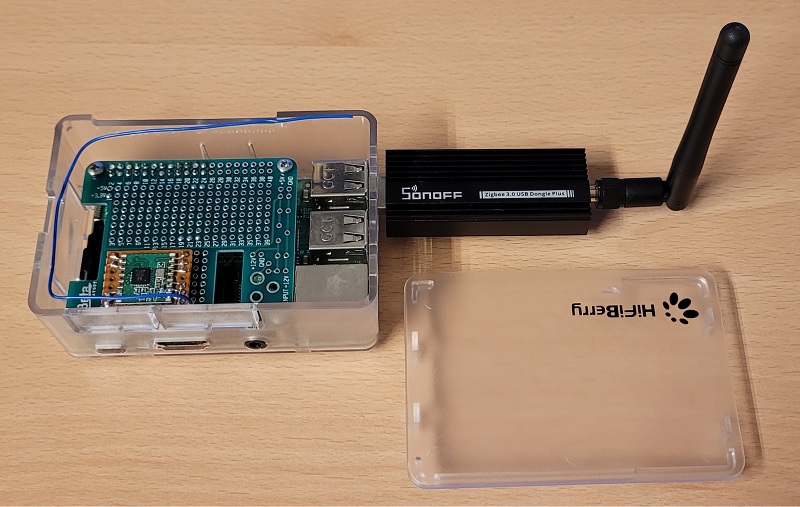
    Now, I have a clean setup for my smarthome with MySensors Nodes and Zigbee Nodes.
    alt text
    The RFM69 ist directly connected to the GPIO of the PI.

    The power consumption is araound 2 W. Somewhat lower when idle.

    Home Assistant

  • HassOS + Serial Gateway OR Docker + RPI Ethernet Gateway
    S se-O-matic

    Thanks for the answers. :-)

    I want to keep the raspberry pi as central. This should fit all my needs in my rental apartment.
    For HA, I have chosen a SD-card with application class A2.

    For a clean setup, i will try to run HA in docker. So can i use the same Raspberry as gateway and for the controller.
    So I dont have to use a "rare" mega328p for a serial gateway.

    I report my results, when I find some time to work on it.

    Home Assistant

  • HassOS + Serial Gateway OR Docker + RPI Ethernet Gateway
    S se-O-matic

    Hi,

    currently I'm using MySensors RPI-Gateway and MyController on the same RPI 2 .
    I connected a RFM69 Modul directly to the GPIO of the Pi.
    This system works fine for many Years.

    Now its time for an upgrade.
    I want to use HA and I want to add ZigBee devices. For that I purchased the SonOff Dongle-P and I grapped a RPI 3 for testing HA parallel to my running setup.

    Now I want to tidy up. Two RPI for a task, which one alone can do is not the best solution.
    The question of all questions is now, how to combine HA, MySensors and Zigbee in the best way?

    Option 1 (I have to build the serial GW, and ICs (328P) are rare at the moment):
    HassOS + MySensors Serial Gateway (RFM69 connected to an ATMEGA328 connected to the UART-pins from the RPI) + ZigBee USB Stick. (I dont want to use a UART<-> USB chip, when a RPI has native UART on the GPIO)

    Option 2 (Favorite, because I dont have to build hardware stuff):
    HA running in Docker + MySensors RPI Gatway (RFM69 connected directly to the GPIO) + ZigBee USB Stick. (I found a tutorial for installing HA in Docker with Supervisor)

    Are there any pitfalls in the Options above?
    Can I use the UART Port "/dev/ttyAMA0" in HassOS?
    Are there any limitations in Option2, when HA running in Docker?

    I hope someone can give some tips.

    Thanks!
    Sebastian

    Home Assistant

  • MySensorsNode (MSN) All-In-One-PCB for easy node building
    S se-O-matic

    Hi
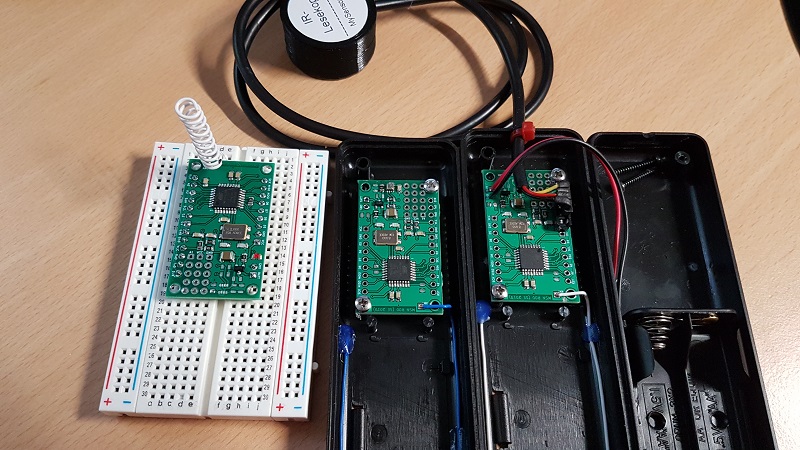
    I made a universal device for mysensors to building easy different nodes. The PCB fits in a small case (Strapubox 6090), so simple sensors can build with minimal effort.
    alt text
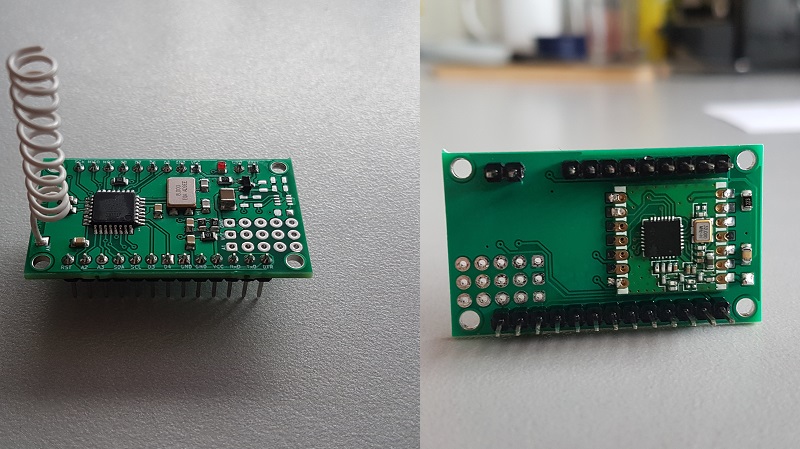
    The minimal assembly consists of a Mega328P microcontroller (as seen on many Arduinos), a RFM69CW rf module with 868 or 433 MHz and some little stuff for reverse protection and battery monitoring.
    alt text

    With different assembly options, this PCB can be used for:

    • Temperature, humidity and pressure measurements (With BME280 assembled)
    • Temp-Sensor above with additional light level (with extra BH1750 on the proto field)
    • Cheap temperature measurement (With DS18B20 assembled on the small proto field)
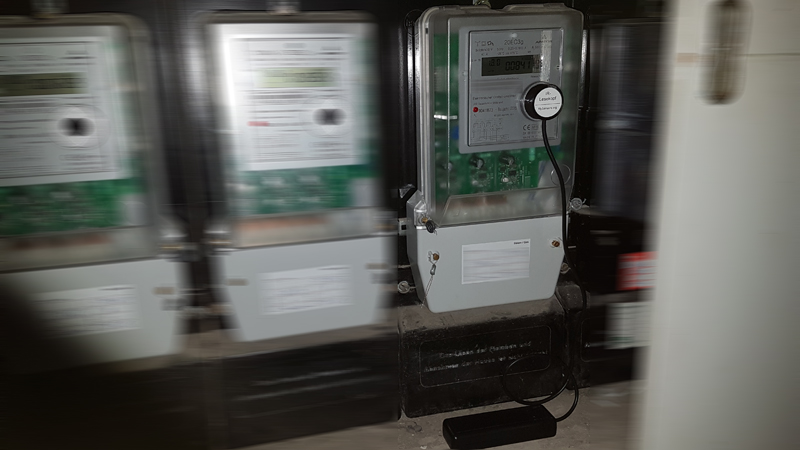
    • IR-reader for digital Power meter (with external IR Head connected to the UART)
    • Prototyping on Breadboards with soldered pin header

    The PCB features also

    • ISP pins are connected to the pin header for easy flashing the bootloader
    • Arduino pro mini compatible pin header for connecting a cheap USB-UART-board without wires
    • Optional LED (for example for active transmission)
    • Mounting holes for fitting in the “Strapubox 6090” case
    • A snap off proto board, which fit under or on top of the MSN PCB.

    Hardware and software can be found on my github repository. Github/se-O-matic/msn/

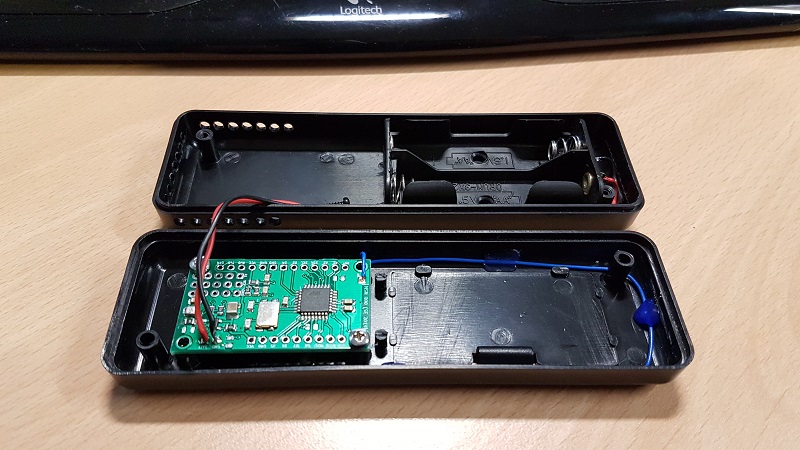
    MSN as temperature sensors (BME280), complete assembly (without batteries):
    alt text

    MSN as power-meter reader with ir-head:
    alt text

    Greets!

    My Project
  • Login

  • Don't have an account? Register

  • Login or register to search.
  • First post
    Last post
0
  • MySensors
  • OpenHardware.io
  • Categories
  • Recent
  • Tags
  • Popular