
Skip to content
  • MySensors
  • OpenHardware.io
  • Categories
  • Recent
  • Tags
  • Popular
Skins
  • Light
  • Brite
  • Cerulean
  • Cosmo
  • Flatly
  • Journal
  • Litera
  • Lumen
  • Lux
  • Materia
  • Minty
  • Morph
  • Pulse
  • Sandstone
  • Simplex
  • Sketchy
  • Spacelab
  • United
  • Yeti
  • Zephyr
  • Dark
  • Cyborg
  • Darkly
  • Quartz
  • Slate
  • Solar
  • Superhero
  • Vapor

  • Default (No Skin)
  • No Skin
Collapse
Brand Logo
W

Woodside

@Woodside
About
Posts
18
Topics
5
Shares
0
Groups
0
Followers
0
Following
0

Posts

Recent Best Controversial

  • [Solved] Support for S_MULTIMETER and V_VOLTAGE in Vera
    W Woodside

    Can anyone confirm if S_MULTIMETER and V_VOLTAGE are supported in Vera?

    L_Arduino.lua indicates it is supported

    Whereas Selecting a Controller, indicates it is not supported

    Using

    MyMessage msgVolt(CHILD_ID_VOLTAGE, V_VOLTAGE);
    

    and

    present(CHILD_ID_VOLTAGE, S_MULTIMETER);
    

    The Multimeter device is created
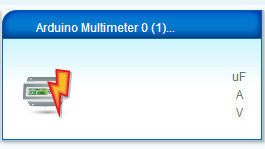
    0_1497189592394_Multimeter blank.JPG
    but the values are blank.

    The Vera log shows the 'Voltage' value is being sent with the correct value

    50      06/11/17 14:25:48.875   luup_log:78: Arduino: Set variable: 1;0;1;0;38;4.79 <0x2ebbe680>
    50      06/11/17 14:25:48.876   luup_log:78: Arduino: Setting variable 'Voltage' to value '4.79' <0x2ebbe680>
    50      06/11/17 14:25:48.876   luup_log:78: Arduino: urn:micasaverde-com:serviceId:EnergyMetering1,Voltage, 4.79, 87 <0x2ebbe680>
    

    Is it possible to get this to appear in the Multimeter device?

    Vera

  • Water flow meter for hozelock hose pipe.
    W Woodside

    I came across this recently that may be suitable, with appropriate hozelock adapters?

    General Discussion
  • Login

  • Don't have an account? Register

  • Login or register to search.
  • First post
    Last post
0
  • MySensors
  • OpenHardware.io
  • Categories
  • Recent
  • Tags
  • Popular