Skip to content
  • MySensors
  • OpenHardware.io
  • Categories
  • Recent
  • Tags
  • Popular
Skins
  • Light
  • Brite
  • Cerulean
  • Cosmo
  • Flatly
  • Journal
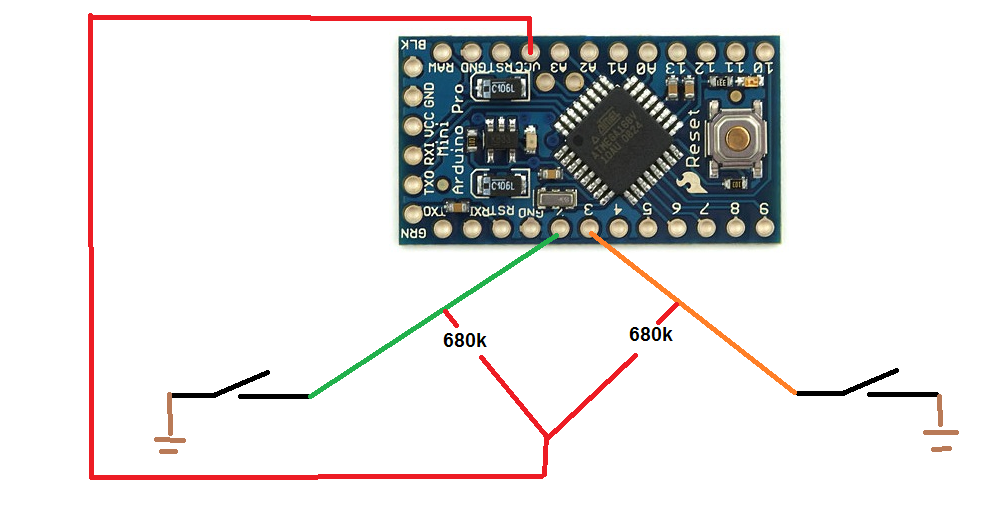
  • Litera
  • Lumen
  • Lux
  • Materia
  • Minty
  • Morph
  • Pulse
  • Sandstone
  • Simplex
  • Sketchy
  • Spacelab
  • United
  • Yeti
  • Zephyr
  • Dark
  • Cyborg
  • Darkly
  • Quartz
  • Slate
  • Solar
  • Superhero
  • Vapor

  • Default (No Skin)
  • No Skin
Collapse
Brand Logo
  1. Home
  2. My Project
  3. Mailbox/Postbox Alert

Mailbox/Postbox Alert

Scheduled Pinned Locked Moved My Project
31 Posts 8 Posters 20.1k Views 7 Watching
  • Oldest to Newest
  • Newest to Oldest
  • Most Votes
Reply
  • Reply as topic
Log in to reply
This topic has been deleted. Only users with topic management privileges can see it.
  • N n3ro

    hmm after some days testing it works very fine, but:

    the battery drains very fast and in dont know why. The Arduino sleeps the whole time and wakes up when the postman is coming (maybe 2 times a week).

    The battery drains 11% in 7 Days :(

    Any Ideas?

    The power LED and regulator is cutted and the fuses are modified.

    Regards
    n3ro

    R Offline
    R Offline
    RJ_Make
    Hero Member
    wrote on last edited by
    #11

    @n3ro Are you using an interrupt to wake everything up?

    RJ_Make

    1 Reply Last reply
    0
    • B Offline
      B Offline
      BulldogLowell
      Contest Winner
      wrote on last edited by BulldogLowell
      #12

      @n3ro

      I'm guessing that your repeat() function is wearing out the battery.

      By the way you can take advantage of the return of sleep( ) here:

      gw.sleep(MAILBOX_FRONT_PIN - 2, CHANGE, MAILBOX_BACK_PIN - 2, CHANGE, 0);
      

      like this (untested):

      #include <MySensor.h>
      #include <SPI.h>
      #include <readVcc.h>
      
      
      #define NODE_ID 21                      // ID of node
      #define CHILD_ID 1                      // Id of the sensor child
      
      #define MAILBOX_FRONT_PIN 2             // Arduino Digital I/O pin for button/reed switch
      #define MAILBOX_BACK_PIN 3              // Arduino Digital I/O pin for button/reed switch
      
      #define MIN_V 1900 // empty voltage (0%)
      #define MAX_V 3200 // full voltage (100%)
      
      
      MySensor gw;
      
      MyMessage msg(CHILD_ID, V_TRIPPED);
      
      boolean post = false;
      boolean lastpost = false;
      int oldBatteryPcnt;
      int repeat = 20;
      
      int trigger = -1;
      unsigned long goToSleepTime;
      
      void setup()
      {
        gw.begin(NULL, NODE_ID, false);
        pinMode(MAILBOX_FRONT_PIN, INPUT);
        pinMode(MAILBOX_BACK_PIN, INPUT);
        digitalWrite(MAILBOX_FRONT_PIN, HIGH);
        digitalWrite(MAILBOX_BACK_PIN, HIGH);
        gw.sendSketchInfo("Mailbox Alert", "1.0");
        gw.present(CHILD_ID, S_MOTION);
        Serial.println("---------- set Mailbox empty");
        msg.set(0);
      }
      
      void loop()
      {
        if (millis() - goToSleepTime > 10UL) //debounce
        {
          switch (trigger) {
            case 0:
              post = true;
              Serial.println("---------- New Mail");
              break;
            case 1:
              post = false;
              Serial.println("---------- Mailbox emptied"); 
              break;
            default:
              Serial.println("---------- I just woke up");
          }
        }
        trigger = -1;
        if (post != lastpost)
        {
          Serial.print("---------- Send Mailboxstate ");
          Serial.println(post ? "full" : "empty");
          msg.set(post);
          lastpost = post;
          sendBattery();
        }
        // Sleep until something happens with the sensor
        goToSleepTime = millis();
        trigger = gw.sleep(MAILBOX_FRONT_PIN - 2, CHANGE, MAILBOX_BACK_PIN - 2, CHANGE, 0);
      }
      
      void sendBattery() // Measure battery
      {
        int batteryPcnt = min(map(readVcc(), MIN_V, MAX_V, 0, 100), 100);
        if (batteryPcnt != oldBatteryPcnt) 
        {
          gw.sendBatteryLevel(batteryPcnt); // Send battery percentage
          oldBatteryPcnt = batteryPcnt;
        }
        Serial.print("---------- Battery: ");
        Serial.println(batteryPcnt);
      }
      
      N 1 Reply Last reply
      0
      • N Offline
        N Offline
        n3ro
        wrote on last edited by n3ro
        #13

        Thx for the tips. I will try it.

        I have just measured the current:

        32uA in sleep and both opened
        when one reen switch is closed: 171uA
        when both closed: 309uA

        i use a internal pullup and dont know why the current is so high when switch is closed :(

        pimatic + MySensors + Homeduino + z-way
        https://github.com/n3roGit/MySensors_n3ro

        1 Reply Last reply
        0
        • N Offline
          N Offline
          n3ro
          wrote on last edited by
          #14

          it is fixed :) changed internal pullup to an external with 680k. now its 32uA with both opened and 47uA with both closed :)

          pimatic + MySensors + Homeduino + z-way
          https://github.com/n3roGit/MySensors_n3ro

          Moshe LivneM 1 Reply Last reply
          2
          • N n3ro

            it is fixed :) changed internal pullup to an external with 680k. now its 32uA with both opened and 47uA with both closed :)

            Moshe LivneM Offline
            Moshe LivneM Offline
            Moshe Livne
            Hero Member
            wrote on last edited by
            #15

            @n3ro how do you do that?

            N 1 Reply Last reply
            0
            • F Offline
              F Offline
              f1dev
              wrote on last edited by
              #16

              Hi!
              I+m trying to do a similar mailbox sensor, but I get different power consumptions hen I ground (pulling down) input pin 2 and 3.

              I´m using a pro mini, 3.3v standard boot loader with removed LED and 470k resistors as external pull-ups.

              In sleep mode with it draws about 65uA
              Roughly the same with input pin 3 -grounded (state 0)
              But when I ground pin 2 it draws 7mA

              Any ideas whats wrong?

              1 Reply Last reply
              0
              • Moshe LivneM Moshe Livne

                @n3ro how do you do that?

                N Offline
                N Offline
                n3ro
                wrote on last edited by
                #17

                @Moshe-Livne just deactivate the this lines:
                //digitalWrite(MAILBOX_FRONT_PIN, HIGH);
                //digitalWrite(MAILBOX_BACK_PIN, HIGH);

                and solder two resistor from 3.3v to pin 2 and 3.

                pimatic + MySensors + Homeduino + z-way
                https://github.com/n3roGit/MySensors_n3ro

                F 1 Reply Last reply
                0
                • N n3ro

                  @Moshe-Livne just deactivate the this lines:
                  //digitalWrite(MAILBOX_FRONT_PIN, HIGH);
                  //digitalWrite(MAILBOX_BACK_PIN, HIGH);

                  and solder two resistor from 3.3v to pin 2 and 3.

                  F Offline
                  F Offline
                  f1dev
                  wrote on last edited by
                  #18

                  Ok, so I found that it is the radio that draws about 7mA when I ground input pin 2, it is connected to IRQ-pin on the radio.
                  @n3ro Have you connected the radio as described on the build-page? [http://www.mysensors.org/build/connect_radio](link url)

                  N 1 Reply Last reply
                  0
                  • F f1dev

                    Ok, so I found that it is the radio that draws about 7mA when I ground input pin 2, it is connected to IRQ-pin on the radio.
                    @n3ro Have you connected the radio as described on the build-page? [http://www.mysensors.org/build/connect_radio](link url)

                    N Offline
                    N Offline
                    n3ro
                    wrote on last edited by
                    #19

                    @f1dev yes. But you don't need irq on a node :)

                    pimatic + MySensors + Homeduino + z-way
                    https://github.com/n3roGit/MySensors_n3ro

                    1 Reply Last reply
                    0
                    • B BulldogLowell

                      @n3ro

                      I'm guessing that your repeat() function is wearing out the battery.

                      By the way you can take advantage of the return of sleep( ) here:

                      gw.sleep(MAILBOX_FRONT_PIN - 2, CHANGE, MAILBOX_BACK_PIN - 2, CHANGE, 0);
                      

                      like this (untested):

                      #include <MySensor.h>
                      #include <SPI.h>
                      #include <readVcc.h>
                      
                      
                      #define NODE_ID 21                      // ID of node
                      #define CHILD_ID 1                      // Id of the sensor child
                      
                      #define MAILBOX_FRONT_PIN 2             // Arduino Digital I/O pin for button/reed switch
                      #define MAILBOX_BACK_PIN 3              // Arduino Digital I/O pin for button/reed switch
                      
                      #define MIN_V 1900 // empty voltage (0%)
                      #define MAX_V 3200 // full voltage (100%)
                      
                      
                      MySensor gw;
                      
                      MyMessage msg(CHILD_ID, V_TRIPPED);
                      
                      boolean post = false;
                      boolean lastpost = false;
                      int oldBatteryPcnt;
                      int repeat = 20;
                      
                      int trigger = -1;
                      unsigned long goToSleepTime;
                      
                      void setup()
                      {
                        gw.begin(NULL, NODE_ID, false);
                        pinMode(MAILBOX_FRONT_PIN, INPUT);
                        pinMode(MAILBOX_BACK_PIN, INPUT);
                        digitalWrite(MAILBOX_FRONT_PIN, HIGH);
                        digitalWrite(MAILBOX_BACK_PIN, HIGH);
                        gw.sendSketchInfo("Mailbox Alert", "1.0");
                        gw.present(CHILD_ID, S_MOTION);
                        Serial.println("---------- set Mailbox empty");
                        msg.set(0);
                      }
                      
                      void loop()
                      {
                        if (millis() - goToSleepTime > 10UL) //debounce
                        {
                          switch (trigger) {
                            case 0:
                              post = true;
                              Serial.println("---------- New Mail");
                              break;
                            case 1:
                              post = false;
                              Serial.println("---------- Mailbox emptied"); 
                              break;
                            default:
                              Serial.println("---------- I just woke up");
                          }
                        }
                        trigger = -1;
                        if (post != lastpost)
                        {
                          Serial.print("---------- Send Mailboxstate ");
                          Serial.println(post ? "full" : "empty");
                          msg.set(post);
                          lastpost = post;
                          sendBattery();
                        }
                        // Sleep until something happens with the sensor
                        goToSleepTime = millis();
                        trigger = gw.sleep(MAILBOX_FRONT_PIN - 2, CHANGE, MAILBOX_BACK_PIN - 2, CHANGE, 0);
                      }
                      
                      void sendBattery() // Measure battery
                      {
                        int batteryPcnt = min(map(readVcc(), MIN_V, MAX_V, 0, 100), 100);
                        if (batteryPcnt != oldBatteryPcnt) 
                        {
                          gw.sendBatteryLevel(batteryPcnt); // Send battery percentage
                          oldBatteryPcnt = batteryPcnt;
                        }
                        Serial.print("---------- Battery: ");
                        Serial.println(batteryPcnt);
                      }
                      
                      N Offline
                      N Offline
                      n3ro
                      wrote on last edited by
                      #20

                      @BulldogLowell could you please explain your changes? I don't understand everything of this :sweat:

                      pimatic + MySensors + Homeduino + z-way
                      https://github.com/n3roGit/MySensors_n3ro

                      1 Reply Last reply
                      0
                      • F Offline
                        F Offline
                        f1dev
                        wrote on last edited by
                        #21

                        @n3ro Ok, thanks! Then I learned something new today.. IRQ is only needed for receiving nodes then, like repeaters and gateways, right?
                        Strange though that my circuit draws so much more current than yours. I have tested different setups, different arduinos and different radios from different suppliers with same result.
                        Well, at least my mailbox are mysensored now! :smiley:

                        1 Reply Last reply
                        0
                        • N Offline
                          N Offline
                          n3ro
                          wrote on last edited by
                          #22

                          I think you need the irq only for the gw. I have a receive node without irq.

                          Do you have changed fuses on your arduino?

                          And remember. All this stuff is cheap China electronic.The devices can vary consume a lot of electricity.

                          pimatic + MySensors + Homeduino + z-way
                          https://github.com/n3roGit/MySensors_n3ro

                          1 Reply Last reply
                          0
                          • F Offline
                            F Offline
                            f1dev
                            wrote on last edited by
                            #23

                            Nope, havent done that yet. It´s a "stock" 3v3 pro mini. Still reading up on how to do that and how to change to MYS-bootloader, curious on how OTA-update works.
                            Big thanks for your respons! :smile:

                            N 1 Reply Last reply
                            0
                            • F f1dev

                              Nope, havent done that yet. It´s a "stock" 3v3 pro mini. Still reading up on how to do that and how to change to MYS-bootloader, curious on how OTA-update works.
                              Big thanks for your respons! :smile:

                              N Offline
                              N Offline
                              n3ro
                              wrote on last edited by
                              #24

                              @f1dev sweebe wrote a very good howto:

                              http://forum.pimatic.org/topic/383/tips-battery-powered-sensors

                              pimatic + MySensors + Homeduino + z-way
                              https://github.com/n3roGit/MySensors_n3ro

                              Moshe LivneM 1 Reply Last reply
                              0
                              • F Offline
                                F Offline
                                f1dev
                                wrote on last edited by
                                #25

                                @n3ro - Thanks, that was really helpfull!:smile:

                                1 Reply Last reply
                                0
                                • N n3ro

                                  @f1dev sweebe wrote a very good howto:

                                  http://forum.pimatic.org/topic/383/tips-battery-powered-sensors

                                  Moshe LivneM Offline
                                  Moshe LivneM Offline
                                  Moshe Livne
                                  Hero Member
                                  wrote on last edited by
                                  #26

                                  @n3ro Brilliant! He recommends to take out the voltage regulator. it is easier (and works better) just to snip off one leg as described here http://www.mysensors.org/build/battery. I'll try his other mods.... hopefully now my nodes will last forever!!!!

                                  1 Reply Last reply
                                  0
                                  • Ashley SavageA Offline
                                    Ashley SavageA Offline
                                    Ashley Savage
                                    wrote on last edited by
                                    #27

                                    quality project, been having a tinker with mixed results. used sketch from original post, but would it be possible to get a circuit diagram showing pull up locations??? bit of a beginner, but have had a few success with rolling out some power operated sensors , this is my first battery operated sensor...

                                    N 1 Reply Last reply
                                    0
                                    • N Offline
                                      N Offline
                                      n3ro
                                      wrote on last edited by
                                      #28

                                      No problem. I make one :) give me a day

                                      pimatic + MySensors + Homeduino + z-way
                                      https://github.com/n3roGit/MySensors_n3ro

                                      1 Reply Last reply
                                      0
                                      • Ashley SavageA Ashley Savage

                                        quality project, been having a tinker with mixed results. used sketch from original post, but would it be possible to get a circuit diagram showing pull up locations??? bit of a beginner, but have had a few success with rolling out some power operated sensors , this is my first battery operated sensor...

                                        N Offline
                                        N Offline
                                        n3ro
                                        wrote on last edited by
                                        #29

                                        @Ashley-Savage plan.png

                                        pimatic + MySensors + Homeduino + z-way
                                        https://github.com/n3roGit/MySensors_n3ro

                                        1 Reply Last reply
                                        0
                                        • Ashley SavageA Offline
                                          Ashley SavageA Offline
                                          Ashley Savage
                                          wrote on last edited by
                                          #30

                                          thanks for the diagram, much appreciated...

                                          1 Reply Last reply
                                          0

                                          Hello! It looks like you're interested in this conversation, but you don't have an account yet.

                                          Getting fed up of having to scroll through the same posts each visit? When you register for an account, you'll always come back to exactly where you were before, and choose to be notified of new replies (either via email, or push notification). You'll also be able to save bookmarks and upvote posts to show your appreciation to other community members.

                                          With your input, this post could be even better 💗

                                          Register Login
                                          Reply
                                          • Reply as topic
                                          Log in to reply
                                          • Oldest to Newest
                                          • Newest to Oldest
                                          • Most Votes


                                          15

                                          Online

                                          12.0k

                                          Users

                                          11.2k

                                          Topics

                                          113.4k

                                          Posts


                                          Copyright 2025 TBD   |   Forum Guidelines   |   Privacy Policy   |   Terms of Service
                                          • Login

                                          • Don't have an account? Register

                                          • Login or register to search.
                                          • First post
                                            Last post
                                          0
                                          • MySensors
                                          • OpenHardware.io
                                          • Categories
                                          • Recent
                                          • Tags
                                          • Popular