
[Tutorial] Raspberry Pi NRF24l01 direct connection
-
(solved)
Hi. Thanks a lot for this implentation and the helpful posts here!I've got the gateway working with a tmp75 temperature sensor on an arduino. The nrf24 is sitting on the raspberry directly (CE pin 22), as a controller i'm using PiMatic. It works very nicely!
There is one small problem however. The PiGatewaySerial will only work if i have called PiGateway before (and closed it again). With working I mean picking up radio transmissions from my sensor node. Everything else seems normal (/dev/ttyPiGatewaySerial and radio details printout).
The details of both configurations might give a clue:
pi@raspberrypi ~/mysensors_rpi $ sudo ./PiGateway
Starting Gateway...
================ SPI Configuration ================
CSN Pin          = CE0 (PI Hardware Driven)
CE Pin           = Custom GPIO25
Clock Speed      = 8 Mhz
================ NRF Configuration ================
STATUS           = 0x0e RX_DR=0 TX_DS=0 MAX_RT=0 RX_P_NO=7 TX_FULL=0
RX_ADDR_P0-1     = 0xa8a8e1fc00 0xa8a8e1fc00
RX_ADDR_P2-5     = 0xff 0xc4 0xc5 0xc6
TX_ADDR          = 0xe7e7e7e7e7
RX_PW_P0-6       = 0x20 0x20 0x20 0x00 0x00 0x00
EN_AA            = 0x3b
EN_RXADDR        = 0x06
RF_CH            = 0x4c
RF_SETUP         = 0x23
CONFIG           = 0x0e
DYNPD/FEATURE    = 0x3f 0x06
Data Rate        = 250KBPS
Model            = nRF24L01+
CRC Length       = 16 bits
PA Power         = PA_LOW
[CALLBACK]0;0;3;0;14;Gateway startup complete.
read: 4-4-0 s=0,c=1,t=0,pt=7,l=5:22.9
[CALLBACK]4;0;1;0;0;22.9
read: 4-4-0 s=0,c=1,t=0,pt=7,l=5:22.9
after closing PiGateway and opening PiGatewaySerial i get this:
pi@raspberrypi ~/mysensors_rpi $ sudo ./PiGatewaySerial
Starting PiGatewaySerial...
Protocol version - 1.4
Created PTY '/dev/pts/3'
Gateway tty: /dev/ttyMySensorsGateway
================ SPI Configuration ================
CSN Pin          = CE0 (PI Hardware Driven)
CE Pin           = Custom GPIO22
Clock Speed      = 8 Mhz
================ NRF Configuration ================
STATUS           = 0x0e RX_DR=0 TX_DS=0 MAX_RT=0 RX_P_NO=7 TX_FULL=0
RX_ADDR_P0-1     = 0xa8a8e1fc00 0xa8a8e1fc00
RX_ADDR_P2-5     = 0xff 0xc4 0xc5 0xc6
TX_ADDR          = 0xe7e7e7e7e7
RX_PW_P0-6       = 0x20 0x20 0x20 0x00 0x00 0x00
EN_AA            = 0x3b
EN_RXADDR        = 0x06
RF_CH            = 0x4c
RF_SETUP         = 0x23
CONFIG           = 0x0e
DYNPD/FEATURE    = 0x3f 0x06
Data Rate        = 250KBPS
Model            = nRF24L01+
CRC Length       = 16 bits
PA Power         = PA_LOW
read: 4-4-0 s=0,c=1,t=0,pt=7,l=5:22.9
read: 4-4-0 s=0,c=1,t=0,pt=7,l=5:22.9
read: 4-4-0 s=0,c=1,t=0,pt=7,l=5:22.9
read: 4-4-0 s=0,c=1,t=0,pt=7,l=5:22.9
read: 4-4-0 s=0,c=1,t=0,pt=7,l=5:22.9
read: 4-4-0 s=0,c=1,t=0,pt=7,l=5:22.9
read: 4-4-0 s=0,c=1,t=0,pt=7,l=5:22.9
read: 4-4-0 s=0,c=1,t=0,pt=7,l=5:22.8
Notice how the CE pins of both SPI configurations are different!
I'm at the point that i want to daemonize the gateway. Which in fact i did, but the same problem persists. Before i hack the startup script to first run and close PiGateway before PiGatewaySerial, i was hoping that someone has an idea what i'm doing wrong.
Thanks in advance!
solved!
I have two RPIs (a Pi 2 B and a Pi B+), which both worked with the pyRF24 lib of TMRh20, so when i had a look in the source of the radio initialization of PiGatewaySerial and found this:#ifdef __PI_BPLUS gw = new MyGateway(RPI_BPLUS_GPIO_J8_15, RPI_BPLUS_GPIO_J8_24, BCM2835_SPI_SPEED_8MHZ, 1); #else gw = new MyGateway(RPI_V2_GPIO_P1_22, BCM2835_SPI_CS0, BCM2835_SPI_SPEED_8MHZ, 1); #endifWhen i changed it to:
#ifdef __PI_BPLUS
	gw = new MyGateway(RPI_V2_GPIO_P1_22, BCM2835_SPI_CS0, BCM2835_SPI_SPEED_8MHZ, 1);
#else
	gw = new MyGateway(RPI_V2_GPIO_P1_22, BCM2835_SPI_CS0, BCM2835_SPI_SPEED_8MHZ, 1);
#endif
and recompiled the gateways,it all started to work. After powerup everything runs :).
The Rpi that is connected now is the Pi 2 B. So i guess either i have my nrf25 wired differently then defined in this lib, or the precompiler was thinking i have a B+ connected. Or both.
I will find out when i get this also working on my B+. -
I'am trying to get this working on my Raspberry Pi 2 B with Raspbian but when using the setup.sh command I get this error:
bcm2835.c: In function ‘bcm2835_init’:
bcm2835.c:1207:28: error: invalid suffix "x" on integer constant
bcm2835.c:1208:28: error: invalid suffix "x" on integer constant
bcm2835.c:1209:28: error: invalid suffix "x" on integer constant
bcm2835.c:1210:28: error: invalid suffix "x" on integer constant
bcm2835.c:1211:28: error: invalid suffix "x" on integer constant
bcm2835.c:1212:28: error: invalid suffix "x" on integer constant
bcm2835.c:1213:28: error: invalid suffix "x" on integer constant
bcm2835.c:1214:28: error: invalid suffix "x" on integer constant
bcm2835.c:1228:83: error: invalid suffix "x" on integer constant
bcm2835.c:1232:81: error: invalid suffix "x" on integer constant
bcm2835.c:1236:81: error: invalid suffix "x" on integer constant
bcm2835.c:1239:83: error: invalid suffix "x" on integer constant
bcm2835.c:1242:83: error: invalid suffix "x" on integer constant
bcm2835.c:1246:83: error: invalid suffix "x" on integer constant
bcm2835.c:1249:83: error: invalid suffix "x" on integer constant
bcm2835.c:1253:79: error: invalid suffix "x" on integer constant
Makefile:52: recipe for target 'bcm2835.o' failed
make: *** [bcm2835.o] Error 1Any idea what is going wrong? Thanks in advance!
-
I'am trying to get this working on my Raspberry Pi 2 B with Raspbian but when using the setup.sh command I get this error:
bcm2835.c: In function ‘bcm2835_init’:
bcm2835.c:1207:28: error: invalid suffix "x" on integer constant
bcm2835.c:1208:28: error: invalid suffix "x" on integer constant
bcm2835.c:1209:28: error: invalid suffix "x" on integer constant
bcm2835.c:1210:28: error: invalid suffix "x" on integer constant
bcm2835.c:1211:28: error: invalid suffix "x" on integer constant
bcm2835.c:1212:28: error: invalid suffix "x" on integer constant
bcm2835.c:1213:28: error: invalid suffix "x" on integer constant
bcm2835.c:1214:28: error: invalid suffix "x" on integer constant
bcm2835.c:1228:83: error: invalid suffix "x" on integer constant
bcm2835.c:1232:81: error: invalid suffix "x" on integer constant
bcm2835.c:1236:81: error: invalid suffix "x" on integer constant
bcm2835.c:1239:83: error: invalid suffix "x" on integer constant
bcm2835.c:1242:83: error: invalid suffix "x" on integer constant
bcm2835.c:1246:83: error: invalid suffix "x" on integer constant
bcm2835.c:1249:83: error: invalid suffix "x" on integer constant
bcm2835.c:1253:79: error: invalid suffix "x" on integer constant
Makefile:52: recipe for target 'bcm2835.o' failed
make: *** [bcm2835.o] Error 1Any idea what is going wrong? Thanks in advance!
-
-
Hello everyone! Great work here! I see this is still running the 1.4 protocol, is that right? I was able to get this working but only my temp sensors would respond. Anything where I had to send data wouldn't work.
Any chance of moving to 1.5 in the near future?
Thanks!
-
It might be a stupid question, but I've been staring at my screen for hours now, and can't find the solution.
How do i install/ connect this gatewatay in domoticz?I have a Raberry Pi (2) with domoticz installed, followd this tutorial and connected the NRF24l01 directly to the gpio, and according to the printout everything works.
So took a Arduino Uno, connected a magnetic doorsensor and a NRF24l01 and uploaded the right sketch, all ok and it even seems that the Raspberry is receiveing the data
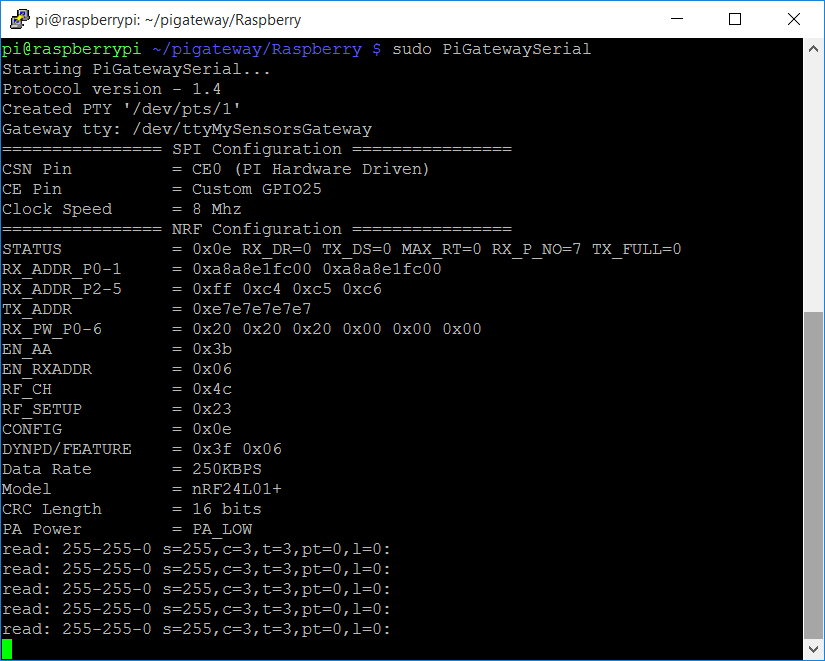
But what kind of gateway do I select in Domoticz?
When I select Mysensors USB gateway I can't choose a serial port (seem legit since there is no usb connected), what hardware do I select?? -
@ArieKanarie Mysensors USB gateway is correct. I think you need to perform the steps mentioned in section "Enable the gateway for use with Domoticz" at http://forum.mysensors.org/topic/2437/step-by-step-procedure-to-connect-the-nrf24l01-to-the-gpio-pins-and-use-the-raspberry-as-a-serial-gateway?page=1
-
@ArieKanarie Mysensors USB gateway is correct. I think you need to perform the steps mentioned in section "Enable the gateway for use with Domoticz" at http://forum.mysensors.org/topic/2437/step-by-step-procedure-to-connect-the-nrf24l01-to-the-gpio-pins-and-use-the-raspberry-as-a-serial-gateway?page=1
@mfalkvidd said in Step-by-step procedure to connect the NRF24L01 to the GPIO pins and use the Raspberry as a Serial Gateway.:
@Eawo Yes, it should work. I ran Domoticz and MySensors Gateway on my Raspberry Pi 1 when I first tried MySensors. If I remember correctly I had to connect CE to pin 15 instead of 22 but I am not sure why. Try using the same connections as on your Raspberry Pi 2 first, and switch CE pin if you get "check wires". Please report back here how it goes, so I can add the necessary information to the original post.
For what it's worth, this is correct. I'm currently running on a Pi 1 and put CE on 15.
I followed these instructions and it worked perfectly with no fuss: http://forum.mysensors.org/topic/1151/tutorial-raspberry-pi-nrf24l01-direct-connection
-
@ArieKanarie Mysensors USB gateway is correct. I think you need to perform the steps mentioned in section "Enable the gateway for use with Domoticz" at http://forum.mysensors.org/topic/2437/step-by-step-procedure-to-connect-the-nrf24l01-to-the-gpio-pins-and-use-the-raspberry-as-a-serial-gateway?page=1
@mfalkvidd Thanks you very much sir!
-
make file has changes and there is no more librf24-bcm. Refer to the readme on the git and follow them
-
Hello all,
I hope someone can help with this.Is there any way to run the generated ./PiGatewaySerial application in the background? I've got mine to work perfectly but only if I SSH into my Pi and execute the app using "sudo ./PiGatewaySerial". I'm looking to run this as a background service/application. Whichever is easier.
Thanks in advance
-
-
-



Hello! It looks like you're interested in this conversation, but you don't have an account yet.
Getting fed up of having to scroll through the same posts each visit? When you register for an account, you'll always come back to exactly where you were before, and choose to be notified of new replies (either via email, or push notification). You'll also be able to save bookmarks and upvote posts to show your appreciation to other community members.
With your input, this post could be even better 💗
Register Login