Skip to content
  • MySensors
  • OpenHardware.io
  • Categories
  • Recent
  • Tags
  • Popular
Skins
  • Light
  • Brite
  • Cerulean
  • Cosmo
  • Flatly
  • Journal
  • Litera
  • Lumen
  • Lux
  • Materia
  • Minty
  • Morph
  • Pulse
  • Sandstone
  • Simplex
  • Sketchy
  • Spacelab
  • United
  • Yeti
  • Zephyr
  • Dark
  • Cyborg
  • Darkly
  • Quartz
  • Slate
  • Solar
  • Superhero
  • Vapor

  • Default (No Skin)
  • No Skin
Collapse
Brand Logo
  1. Home
  2. Troubleshooting
  3. Gateway Not Working

Gateway Not Working

Scheduled Pinned Locked Moved Troubleshooting
43 Posts 5 Posters 16.2k Views 2 Watching
  • Oldest to Newest
  • Newest to Oldest
  • Most Votes
Reply
  • Reply as topic
Log in to reply
This topic has been deleted. Only users with topic management privileges can see it.
  • hekH Offline
    hekH Offline
    hek
    Admin
    wrote on last edited by
    #25

    @clippermiami said:

    Wait a minute... in you previous post you said that gateway AND sensor outputs this:

    Arduino startup complete.

    But that makes no sense. Sensors do not print this at startup... only gateway does. Are you sure you have uploaded the Sensor sketch correctly?

    clippermiamiC 1 Reply Last reply
    0
    • hekH hek

      @clippermiami said:

      Wait a minute... in you previous post you said that gateway AND sensor outputs this:

      Arduino startup complete.

      But that makes no sense. Sensors do not print this at startup... only gateway does. Are you sure you have uploaded the Sensor sketch correctly?

      clippermiamiC Offline
      clippermiamiC Offline
      clippermiami
      Hero Member
      wrote on last edited by
      #26

      @hek I'll do it again, as I said i've done it several times but I'm running out of ideas :)

      Right now i have both devices on the same notebook PC on different USB/Com ports obviously. I'll recompile the light sensor and upload it again, i suppose I could have messed that up along the way.

      1 Reply Last reply
      0
      • clippermiamiC Offline
        clippermiamiC Offline
        clippermiami
        Hero Member
        wrote on last edited by clippermiami
        #27

        @hek
        I have no idea how they got crossed but they were apparently. When I started the sensor I get this. so NOW i apparently have the sensor code running on the senor.

        Started sensor.
        Open ping reading pipe: 255
        Tx: fr=255,to=255,la=255,ne=255,ci=255,mt=4,ty=9,cr=184:
        No relay nodes was found. Trying again in 10 seconds.
        Tx: fr=255,to=255,la=255,ne=255,ci=255,mt=4,ty=9,cr=184:
        No relay nodes was found. Trying again in 10 seconds.

        However, it still not working, the sensor can't find a "relay" node? Nothing happens at the gateway other than the startup complete message

        UPDATE:
        Changed radios again on both ends and restarted with no change.
        BTW, the Sensor code is a cut/paste from the listing on the mysensors.org web site

        1 Reply Last reply
        0
        • clippermiamiC Offline
          clippermiamiC Offline
          clippermiami
          Hero Member
          wrote on last edited by
          #28

          A further update, on the off chance I swapped out the Gateway Arduino Nano board, recompiled and uploaded the Serial Gateway code. Same as before.

          Can someone tell me what this means:
          Tx: fr=255,to=255,la=255,ne=255,ci=255,mt=4,ty=9,cr=184:
          No relay nodes was found. Trying again in 10 seconds.

          And if it offers any guidance as to what is wrong. The Sensor code was a cut/paste from the code on the web site so it ought o be correct.

          hekH 1 Reply Last reply
          0
          • clippermiamiC clippermiami

            A further update, on the off chance I swapped out the Gateway Arduino Nano board, recompiled and uploaded the Serial Gateway code. Same as before.

            Can someone tell me what this means:
            Tx: fr=255,to=255,la=255,ne=255,ci=255,mt=4,ty=9,cr=184:
            No relay nodes was found. Trying again in 10 seconds.

            And if it offers any guidance as to what is wrong. The Sensor code was a cut/paste from the code on the web site so it ought o be correct.

            hekH Offline
            hekH Offline
            hek
            Admin
            wrote on last edited by
            #29

            @clippermiami

            Your sensor is trying to get in contact with either the gateway or an relaying node. It's trying to find the way home so to say.
            Once it get contact with something it will request an unique radio-id.

            So either you haven't started the gateway or having radio-problem. Did you put capacitors on the radios?

            clippermiamiC 1 Reply Last reply
            0
            • hekH hek

              @clippermiami

              Your sensor is trying to get in contact with either the gateway or an relaying node. It's trying to find the way home so to say.
              Once it get contact with something it will request an unique radio-id.

              So either you haven't started the gateway or having radio-problem. Did you put capacitors on the radios?

              clippermiamiC Offline
              clippermiamiC Offline
              clippermiami
              Hero Member
              wrote on last edited by
              #30

              @hek

              Sounds like the sensor end is working. i've put LEDs on the three leads defined in the sketch and there is nothing happening on any of them so I'm guessing that something basic is wrong with the Gateway.

              i've tried the capacitors and no change so far. At this point I'd think that at least one of the LEDs (Tx, TX or Error) would indicate something.

              BTW, i appreciate your patience with a newbie.

              hekH 1 Reply Last reply
              0
              • clippermiamiC clippermiami

                @hek

                Sounds like the sensor end is working. i've put LEDs on the three leads defined in the sketch and there is nothing happening on any of them so I'm guessing that something basic is wrong with the Gateway.

                i've tried the capacitors and no change so far. At this point I'd think that at least one of the LEDs (Tx, TX or Error) would indicate something.

                BTW, i appreciate your patience with a newbie.

                hekH Offline
                hekH Offline
                hek
                Admin
                wrote on last edited by
                #31

                @clippermiami

                And your using the simple radio model on both ends (no amplified radio)?
                Are you really sure the radio-wiring is correct? And no lose contacts (it has happened more than once for me:) ?

                The radios also seems to be very sensitive when it comes to stability of the power feeding (sometimes). Do you have the possibility to feed them through Wall-wart/USB or something else than your computer?

                BulldogLowellB 1 Reply Last reply
                0
                • hekH hek

                  @clippermiami

                  And your using the simple radio model on both ends (no amplified radio)?
                  Are you really sure the radio-wiring is correct? And no lose contacts (it has happened more than once for me:) ?

                  The radios also seems to be very sensitive when it comes to stability of the power feeding (sometimes). Do you have the possibility to feed them through Wall-wart/USB or something else than your computer?

                  BulldogLowellB Offline
                  BulldogLowellB Offline
                  BulldogLowell
                  Contest Winner
                  wrote on last edited by
                  #32

                  @hek said:

                  Are you really sure the radio-wiring is correct? And no lose contacts (it has happened more than once for me:) ?

                  me too. More than I care to admit and more frustrating than anything.

                  @clippermiami

                  did you switch out the jumper wires already, too?

                  1 Reply Last reply
                  0
                  • clippermiamiC Offline
                    clippermiamiC Offline
                    clippermiami
                    Hero Member
                    wrote on last edited by
                    #33

                    I think i've found the problem.

                    In the instructions on mysensors.org under building the USB-Serial Gateway it says
                    [code]
                    Building a USB-connected Gateway

                    NOTE: You must use an Arduino Nano for the USB version of the gateway. The Nano is the officially supported and tested model so if you try a different version, we cannot guarantee that the Vera will recognize it.

                    Start by connecting the radio module.
                    [/code]

                    When you follow the link to "connecting the radio module it leads to a Arduino Pro-Mini configuration NOT a Nano. I used the radio configuration from the Ethernet gateway because it depicts the wiring for a Nano.

                    I found some code on forum.micasaverde.com that was to debug the radio connection and put it in my Gateway code and it says the **radio is not connected properly. **

                    So now i'm confused, what wiring IS correct for the NANO in the USB Serial Gateway?

                    1 Reply Last reply
                    0
                    • hekH Offline
                      hekH Offline
                      hek
                      Admin
                      wrote on last edited by
                      #34

                      Yes, the radio wiring is different for ethernet vs serial version of the gateway.
                      So, like the instructions say, when building the Serial version you should follow the guide here:
                      http://www.mysensors.org/build/connect_radio

                      The pin numbers is identical between pro mini and nano.

                      clippermiamiC 1 Reply Last reply
                      0
                      • hekH hek

                        Yes, the radio wiring is different for ethernet vs serial version of the gateway.
                        So, like the instructions say, when building the Serial version you should follow the guide here:
                        http://www.mysensors.org/build/connect_radio

                        The pin numbers is identical between pro mini and nano.

                        clippermiamiC Offline
                        clippermiamiC Offline
                        clippermiami
                        Hero Member
                        wrote on last edited by
                        #35

                        @hek As I recall the difference is in pins for CE/CSN (from memory here so I may be wrong) in which case my radio is in fact wired incorrectly as it used the Nano pinout from the Ethernet Gateway. I shall fix it and hopefully everything will start to play together. (Fingers, toes, legs, eyes crossed :-) )

                        1 Reply Last reply
                        0
                        • clippermiamiC Offline
                          clippermiamiC Offline
                          clippermiami
                          Hero Member
                          wrote on last edited by
                          #36

                          Well, that didn't do it either. i do however now have a ERR LED indication on SOLID.

                          I have the following wiring (checked, rechecked)
                          Arduino...............Radio
                          Pin 2 IRQ Gray
                          Pin 4 LED Err
                          Pin 5 LED Tx
                          Pin 6 LED Rx
                          Pin 9 CE Org
                          Pin 10 CSN Yel
                          Pin 11 MOSI Blue
                          Pin 12 MISO Violet
                          Pin 13 SCK Grn
                          3.3 V Out Radio Vcc
                          5v Out LEDs
                          GND Radio GND

                          4.7 uF Cap Radio Vcc to Radio GND
                          Changed power supply from Laptop USB to separate 5V USB Wall Wart

                          BulldogLowellB 1 Reply Last reply
                          0
                          • clippermiamiC clippermiami

                            Well, that didn't do it either. i do however now have a ERR LED indication on SOLID.

                            I have the following wiring (checked, rechecked)
                            Arduino...............Radio
                            Pin 2 IRQ Gray
                            Pin 4 LED Err
                            Pin 5 LED Tx
                            Pin 6 LED Rx
                            Pin 9 CE Org
                            Pin 10 CSN Yel
                            Pin 11 MOSI Blue
                            Pin 12 MISO Violet
                            Pin 13 SCK Grn
                            3.3 V Out Radio Vcc
                            5v Out LEDs
                            GND Radio GND

                            4.7 uF Cap Radio Vcc to Radio GND
                            Changed power supply from Laptop USB to separate 5V USB Wall Wart

                            BulldogLowellB Offline
                            BulldogLowellB Offline
                            BulldogLowell
                            Contest Winner
                            wrote on last edited by
                            #37

                            @clippermiami

                            I just had a similar connectivity issue with a project I was completing. I switched to 1.2A 5V cell phone charger and that did it...

                            not enough power...

                            What is the output of your wall wort?

                            clippermiamiC 1 Reply Last reply
                            0
                            • BulldogLowellB BulldogLowell

                              @clippermiami

                              I just had a similar connectivity issue with a project I was completing. I switched to 1.2A 5V cell phone charger and that did it...

                              not enough power...

                              What is the output of your wall wort?

                              clippermiamiC Offline
                              clippermiamiC Offline
                              clippermiami
                              Hero Member
                              wrote on last edited by
                              #38

                              @BulldogLowell Rated 5 volts 1 amp. I'm having a hard time imagining this consuming that kind of power

                              BulldogLowellB 1 Reply Last reply
                              0
                              • hekH Offline
                                hekH Offline
                                hek
                                Admin
                                wrote on last edited by hek
                                #39

                                @clippermiami said:

                                All looks ok from your description.

                                Pin 4 LED Err
                                Pin 5 LED Tx
                                Pin 6 LED Rx

                                ...and resistors in series I hope.

                                Maybe you should go back and run some of the examples in RF24/examples folder. Remember to use the same CE/CSN in constructor when testing Ping sketch for example.

                                1 Reply Last reply
                                0
                                • clippermiamiC clippermiami

                                  @BulldogLowell Rated 5 volts 1 amp. I'm having a hard time imagining this consuming that kind of power

                                  BulldogLowellB Offline
                                  BulldogLowellB Offline
                                  BulldogLowell
                                  Contest Winner
                                  wrote on last edited by
                                  #40

                                  @clippermiami

                                  you are right...

                                  1 Reply Last reply
                                  0
                                  • clippermiamiC Offline
                                    clippermiamiC Offline
                                    clippermiami
                                    Hero Member
                                    wrote on last edited by
                                    #41

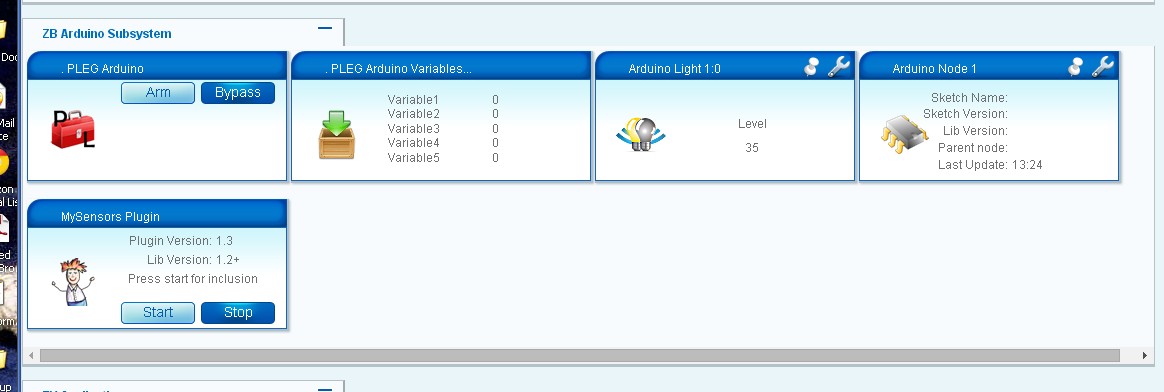
                                    Well, i'm pleased to say that I got my Serial Gateway and first Sensor up. After all the problems with the "scrambled wiring" version I used Ross Kinard's PCB from OSHPark and it came up the first time. It located and included the Light Sensor immediately although it doesn't seem to have picked up all the config data (Photo attached)ScreenHunter_119 May. 11 13.27.jpg.

                                    But after the previous frustrations this is a major victory :)

                                    Thanks to everyone but especially to @Ross for his excellent PCB and @hek for your patience and assistance.

                                    John

                                    petewillP 1 Reply Last reply
                                    0
                                    • clippermiamiC clippermiami

                                      Well, i'm pleased to say that I got my Serial Gateway and first Sensor up. After all the problems with the "scrambled wiring" version I used Ross Kinard's PCB from OSHPark and it came up the first time. It located and included the Light Sensor immediately although it doesn't seem to have picked up all the config data (Photo attached)ScreenHunter_119 May. 11 13.27.jpg.

                                      But after the previous frustrations this is a major victory :)

                                      Thanks to everyone but especially to @Ross for his excellent PCB and @hek for your patience and assistance.

                                      John

                                      petewillP Offline
                                      petewillP Offline
                                      petewill
                                      Admin
                                      wrote on last edited by
                                      #42

                                      @clippermiami said:

                                      ...although it doesn't seem to have picked up all the config data (Photo attached)!

                                      John,

                                      This is happening to me too when I first include the sensor. I just have to power cycle the sensor (light sensor in your case) and then the info appears.

                                      Hope that will work for you too.

                                      Pete

                                      My "How To" home automation video channel: https://www.youtube.com/channel/UCq_Evyh5PQALx4m4CQuxqkA

                                      clippermiamiC 1 Reply Last reply
                                      0
                                      • petewillP petewill

                                        @clippermiami said:

                                        ...although it doesn't seem to have picked up all the config data (Photo attached)!

                                        John,

                                        This is happening to me too when I first include the sensor. I just have to power cycle the sensor (light sensor in your case) and then the info appears.

                                        Hope that will work for you too.

                                        Pete

                                        clippermiamiC Offline
                                        clippermiamiC Offline
                                        clippermiami
                                        Hero Member
                                        wrote on last edited by
                                        #43

                                        @petewill That got it, thanks

                                        1 Reply Last reply
                                        0
                                        Reply
                                        • Reply as topic
                                        Log in to reply
                                        • Oldest to Newest
                                        • Newest to Oldest
                                        • Most Votes


                                        22

                                        Online

                                        11.7k

                                        Users

                                        11.2k

                                        Topics

                                        113.1k

                                        Posts


                                        Copyright 2025 TBD   |   Forum Guidelines   |   Privacy Policy   |   Terms of Service
                                        • Login

                                        • Don't have an account? Register

                                        • Login or register to search.
                                        • First post
                                          Last post
                                        0
                                        • MySensors
                                        • OpenHardware.io
                                        • Categories
                                        • Recent
                                        • Tags
                                        • Popular