Skip to content
  • MySensors
  • OpenHardware.io
  • Categories
  • Recent
  • Tags
  • Popular
Skins
  • Light
  • Brite
  • Cerulean
  • Cosmo
  • Flatly
  • Journal
  • Litera
  • Lumen
  • Lux
  • Materia
  • Minty
  • Morph
  • Pulse
  • Sandstone
  • Simplex
  • Sketchy
  • Spacelab
  • United
  • Yeti
  • Zephyr
  • Dark
  • Cyborg
  • Darkly
  • Quartz
  • Slate
  • Solar
  • Superhero
  • Vapor

  • Default (No Skin)
  • No Skin
Collapse
Brand Logo
  1. Home
  2. Development
  3. SceneController

SceneController

Scheduled Pinned Locked Moved Development
28 Posts 9 Posters 18.5k Views 5 Watching
  • Oldest to Newest
  • Newest to Oldest
  • Most Votes
Reply
  • Reply as topic
Log in to reply
This topic has been deleted. Only users with topic management privileges can see it.
  • D Offline
    D Offline
    dayve218
    wrote on last edited by
    #18

    @Dalhoj thanks for that, it seems super obvious now in retrospect.

    1 Reply Last reply
    0
    • D Dalhoj

      Hi

      After the Node and Scenecontroller shows up in the Vera UI you have to create a scene and then asign the scenecontroller as a trigger:
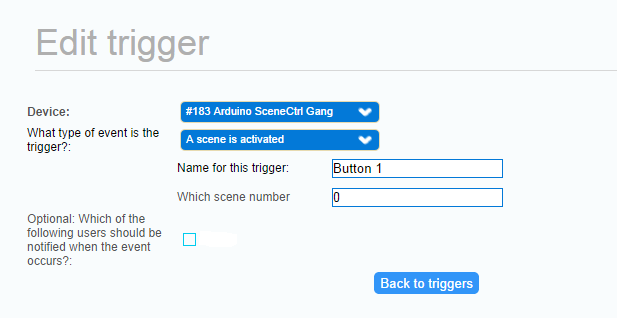
      arduino_trigger.png

      For button 1 the scene number is 0
      for button 2 the scene number is 1 and so on.

      Hope is helps ;-)

      D Offline
      D Offline
      dayve218
      wrote on last edited by
      #19

      @Dalhoj is it possible to have one button stop/start the same scene, as an on/off switch for a light for example?

      K H 2 Replies Last reply
      0
      • D dayve218

        @Dalhoj is it possible to have one button stop/start the same scene, as an on/off switch for a light for example?

        K Offline
        K Offline
        korttoma
        Hero Member
        wrote on last edited by korttoma
        #20

        @dayve218

        If you use PLEG you could do it like this:

        Condition ----------------- Action
        LightOn AND Button = Turn Light Off

        LightOff AND Button = Turn Light On

        • Tomas
        1 Reply Last reply
        0
        • D dayve218

          @Dalhoj is it possible to have one button stop/start the same scene, as an on/off switch for a light for example?

          H Offline
          H Offline
          hek
          Admin
          wrote on last edited by
          #21

          @dayve218

          Some "scene controllers" I've seen triggers "scene off" when you push-and-hold button for say one a second.

          1 Reply Last reply
          0
          • D Offline
            D Offline
            dayve218
            wrote on last edited by dayve218
            #22

            how would i make that happen?

            @korttoma i dont, PLEG is infinitely confusing to me.

            1 Reply Last reply
            0
            • D Offline
              D Offline
              Dalhoj
              wrote on last edited by
              #23

              I dont know if you can have a 1 sec press!

              but i uses LUUP and a simple ex could be turn on a lamp and if the lamp if on turn it off:

              local relay1 = 114 --Light ID

              local relay1_status = luup.variable_get("urn:upnp-org:serviceId:SwitchPower1", "Status", relay1) --Status of Light

              if (relay1_status == "0") then
              luup.call_action("urn:upnp-org:serviceId:SwitchPower1","SetTarget",{ newTargetValue="1" }, relay1)
              else
              luup.call_action("urn:upnp-org:serviceId:SwitchPower1","SetTarget",{ newTargetValue="0" }, relay1)
              end

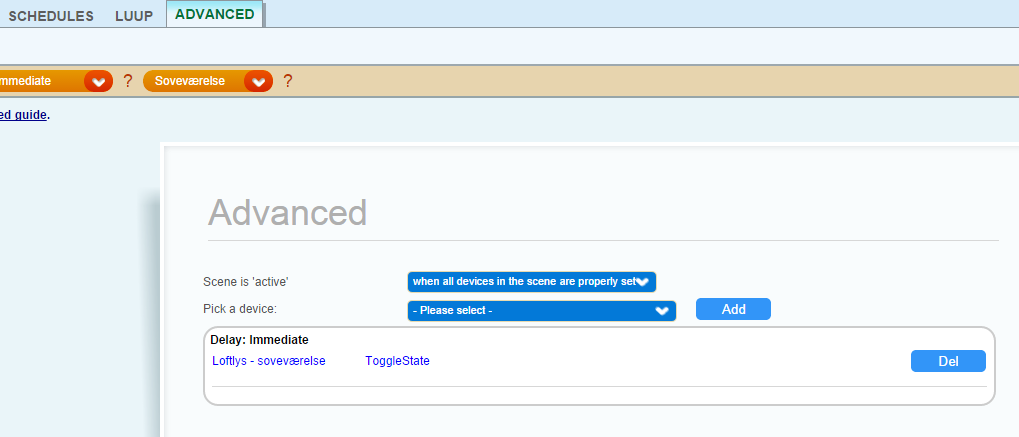
              Or you can use a toggle from the advanced scene menu:
              upload-cb06931d-0aaa-4ee3-b90f-345180b5247c

              That is how I do it.

              H 1 Reply Last reply
              0
              • D Dalhoj

                I dont know if you can have a 1 sec press!

                but i uses LUUP and a simple ex could be turn on a lamp and if the lamp if on turn it off:

                local relay1 = 114 --Light ID

                local relay1_status = luup.variable_get("urn:upnp-org:serviceId:SwitchPower1", "Status", relay1) --Status of Light

                if (relay1_status == "0") then
                luup.call_action("urn:upnp-org:serviceId:SwitchPower1","SetTarget",{ newTargetValue="1" }, relay1)
                else
                luup.call_action("urn:upnp-org:serviceId:SwitchPower1","SetTarget",{ newTargetValue="0" }, relay1)
                end

                Or you can use a toggle from the advanced scene menu:
                upload-cb06931d-0aaa-4ee3-b90f-345180b5247c

                That is how I do it.

                H Offline
                H Offline
                hek
                Admin
                wrote on last edited by
                #24

                @Dalhoj said:

                I dont know if you can have a 1 sec press!

                I mean that the Arduino checks if user presses button for one sec and send the SCENE_OFF. You probably shouldn't let Vera handle this.

                D 1 Reply Last reply
                0
                • N Offline
                  N Offline
                  Nuubi
                  wrote on last edited by
                  #25

                  Hey! Any pictures of scene controller installations? I'm planning on DIY'ing some "aesthetically pleasing" ones :-)

                  1 Reply Last reply
                  0
                  • H hek

                    @Dalhoj said:

                    I dont know if you can have a 1 sec press!

                    I mean that the Arduino checks if user presses button for one sec and send the SCENE_OFF. You probably shouldn't let Vera handle this.

                    D Offline
                    D Offline
                    Dalhoj
                    wrote on last edited by
                    #26

                    @hek said:

                    I mean that the Arduino checks if user presses button for one sec and send the SCENE_OFF. You probably shouldn't let Vera handle this.

                    I would make the Arduino send ie. for button 1 send scene ID 0 at short press and scene ID 1 for long press and so on.

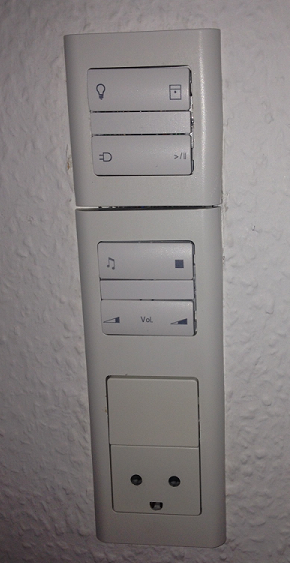
                    @Nuubi Here is two of my scene controllers:

                    The first one is installed in my bedtable upload-c29b281d-083c-4b73-a4df-b27240ee9e31 and is a combination of a scenecontroller and a relaysensor for controling the 3 leds.

                    The 2. is installed in the living room, and is a 8 button scenecontroller.
                    upload-aee5fc51-3dea-4a00-b592-db58744e1e87
                    It controlles

                    • the lights in the living room
                    • Blinds Open / Close
                    • a power outlet On/Off
                    • pause/plays my XBMC Medie Center
                    • starts my Yamaha reciver and starts playing net radio
                    • stops the radion again and turn of the reciver
                    • turns up / down the volume on the reciver

                    That is what I use it for at the moment.

                    S 1 Reply Last reply
                    0
                    • D Dalhoj

                      @hek said:

                      I mean that the Arduino checks if user presses button for one sec and send the SCENE_OFF. You probably shouldn't let Vera handle this.

                      I would make the Arduino send ie. for button 1 send scene ID 0 at short press and scene ID 1 for long press and so on.

                      @Nuubi Here is two of my scene controllers:

                      The first one is installed in my bedtable upload-c29b281d-083c-4b73-a4df-b27240ee9e31 and is a combination of a scenecontroller and a relaysensor for controling the 3 leds.

                      The 2. is installed in the living room, and is a 8 button scenecontroller.
                      upload-aee5fc51-3dea-4a00-b592-db58744e1e87
                      It controlles

                      • the lights in the living room
                      • Blinds Open / Close
                      • a power outlet On/Off
                      • pause/plays my XBMC Medie Center
                      • starts my Yamaha reciver and starts playing net radio
                      • stops the radion again and turn of the reciver
                      • turns up / down the volume on the reciver

                      That is what I use it for at the moment.

                      S Offline
                      S Offline
                      Smelliot
                      wrote on last edited by
                      #27

                      @Dalhoj what enclosures are they? They look really slick!

                      1 Reply Last reply
                      0
                      • D Offline
                        D Offline
                        Dalhoj
                        wrote on last edited by
                        #28

                        Its a danish enclosure: http://www.lk.dk/produkter/afbrydermateriel-lk-fuga/lk-fuga/antibakteriel/underlag/baseline-2-modul-346dd488/ for the button one and: http://www.lk.dk/produkter/afbrydermateriel-lk-fuga/lk-fuga/antibakteriel/underlag/baseline-1-modul-hvid/ for the top one.

                        Its a danish department of Schneider Electric called LK(Lauritz Knudsen)

                        1 Reply Last reply
                        0

                        Hello! It looks like you're interested in this conversation, but you don't have an account yet.

                        Getting fed up of having to scroll through the same posts each visit? When you register for an account, you'll always come back to exactly where you were before, and choose to be notified of new replies (either via email, or push notification). You'll also be able to save bookmarks and upvote posts to show your appreciation to other community members.

                        With your input, this post could be even better 💗

                        Register Login
                        Reply
                        • Reply as topic
                        Log in to reply
                        • Oldest to Newest
                        • Newest to Oldest
                        • Most Votes


                        17

                        Online

                        12.0k

                        Users

                        11.2k

                        Topics

                        113.4k

                        Posts


                        Copyright 2025 TBD   |   Forum Guidelines   |   Privacy Policy   |   Terms of Service
                        • Login

                        • Don't have an account? Register

                        • Login or register to search.
                        • First post
                          Last post
                        0
                        • MySensors
                        • OpenHardware.io
                        • Categories
                        • Recent
                        • Tags
                        • Popular