
beta testers required for MyController 0.0.3-alpha1 release
-
Hi,
After update (and stop/start) I show this:

Pd.
I copied all files and folders..sorry, excuse my ignorance..
Thanks!
Antoni.@anarro said:
Hi,
After update (and stop/start) I show this:
Pd.
I copied all files and folders..sorry, excuse my ignorance..
Thanks!
Antoni.you have to extract bindle zip file. call
mycontroller/bin/start.sh. If you were using old version of MyController.org server. stop it first.
Refresh your browser.(clear cache). -
@anarro said:
Hi,
After update (and stop/start) I show this:
Pd.
I copied all files and folders..sorry, excuse my ignorance..
Thanks!
Antoni.you have to extract bindle zip file. call
mycontroller/bin/start.sh. If you were using old version of MyController.org server. stop it first.
Refresh your browser.(clear cache). -
@jkandasa, I deleted the cache and work fine!!, now let's testing..
Pd.
For the next release, how do we do the updates?... first we need save the file "./conf/mycontroller.property", and data base file (which)?thanks you!!
Antoni.@anarro said:
@jkandasa, I deleted the cache and work fine!!, now let's testing..
Pd.
For the next release, how do we do the updates?... first we need save the file "./conf/mycontroller.property", and data base file (which)?thanks you!!
Antoni.Note: MyController.org going to support upgrade and restore from 0.0.3-alpha1 version.
You can take a backup via GUI and keep safe backup file. Extract new release on different location, point out backup up file and do restore. that's it. -
@anarro said:
@jkandasa, I deleted the cache and work fine!!, now let's testing..
Pd.
For the next release, how do we do the updates?... first we need save the file "./conf/mycontroller.property", and data base file (which)?thanks you!!
Antoni.Note: MyController.org going to support upgrade and restore from 0.0.3-alpha1 version.
You can take a backup via GUI and keep safe backup file. Extract new release on different location, point out backup up file and do restore. that's it. -
-
@anarro said:
Hi,
When I click on "Backup" option its show this:
Thank you,
Antoni.Yes, you will face this issue, when MyController.org server unable to access given backup location.
-
@anarro said:
Hi,
When I click on "Backup" option its show this:
Thank you,
Antoni.Yes, you will face this issue, when MyController.org server unable to access given backup location.
-
@anarro said:
Hi,
When I click on "Backup" option its show this:
Thank you,
Antoni.Yes, you will face this issue, when MyController.org server unable to access given backup location.
-
@jkandasa said:
@anarro said:
Hi,
When I click on "Backup" option its show this:
Thank you,
Antoni.Yes, you will face this issue, when MyController.org server unable to access given backup location.
Yes, where this option is set ?, as I fix it?
@anarro said:
@jkandasa said:
@anarro said:
Hi,
When I click on "Backup" option its show this:
Thank you,
Antoni.Yes, you will face this issue, when MyController.org server unable to access given backup location.
Yes, where this option is set ?, as I fix it?
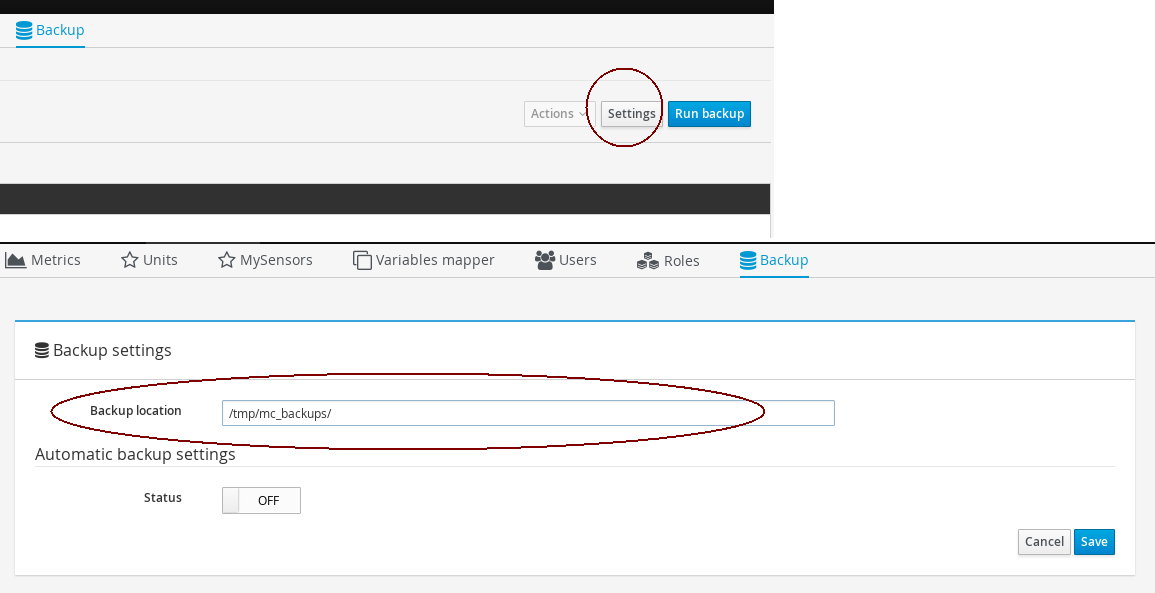
-
-
Hi Sr!,
I think it would require a button to return to the previous window in the backups, it is possible?, you think the same?
Antoni.
-
@anarro said:
Hi Sr!,
I think it would require a button to return to the previous window in the backups, it is possible?, you think the same?
Antoni.
hi, If you click on backup menu on top. it will take you!
-
-
Some typos in English language when adding a widget:
Do a search on ' grpahica' => 'graphical' -
Some typos in English language when adding a widget:
Do a search on ' grpahica' => 'graphical'@hoegaarden_bier said:
Some typos in English language when adding a widget:
Do a search on ' grpahica' => 'graphical'Thank you! I will fix this typo.
-
I noticed that when graphing data in dashboard (mixed sensors graph) for sensors that send data at different intervals (eg 1=5min;2=1min) that the graph and the interactive guide line is showing something what I think is the epoch time and the marker dots do not align (only at start of graph).
Turning off the checkbox ( Use intractive guide line) resolves the issue. -
@hoegaarden_bier said:
Some typos in English language when adding a widget:
Do a search on ' grpahica' => 'graphical'Thank you! I will fix this typo.
Also here "Use
intractiveguide line" => "Use interactive guide line -
When sensor does not have a 'name' (resources-Sensor-sensor details) ,
it shows as eg. 'null-Humidity' in the dashboard (mixed sensors graph).Maybe just show '-Humidity' ignore the null.
-
I noticed that when graphing data in dashboard (mixed sensors graph) for sensors that send data at different intervals (eg 1=5min;2=1min) that the graph and the interactive guide line is showing something what I think is the epoch time and the marker dots do not align (only at start of graph).
Turning off the checkbox ( Use intractive guide line) resolves the issue.@hoegaarden_bier said:
I noticed that when graphing data in dashboard (mixed sensors graph) for sensors that send data at different intervals (eg 1=5min;2=1min) that the graph and the interactive guide line is showing something what I think is the epoch time and the marker dots do not align (only at start of graph).
Turning off the checkbox ( Use intractive guide line) resolves the issue.Yes, It's known issue with nvd3 chart plugin. For that only I gave an option to disable interactive guide
-
@hoegaarden_bier said:
I noticed that when graphing data in dashboard (mixed sensors graph) for sensors that send data at different intervals (eg 1=5min;2=1min) that the graph and the interactive guide line is showing something what I think is the epoch time and the marker dots do not align (only at start of graph).
Turning off the checkbox ( Use intractive guide line) resolves the issue.Yes, It's known issue with nvd3 chart plugin. For that only I gave an option to disable interactive guide
@hoegaarden_bier Thank you for your support!!


Hello! It looks like you're interested in this conversation, but you don't have an account yet.
Getting fed up of having to scroll through the same posts each visit? When you register for an account, you'll always come back to exactly where you were before, and choose to be notified of new replies (either via email, or push notification). You'll also be able to save bookmarks and upvote posts to show your appreciation to other community members.
With your input, this post could be even better 💗
Register Login