Skip to content
  • MySensors
  • OpenHardware.io
  • Categories
  • Recent
  • Tags
  • Popular
Skins
  • Light
  • Brite
  • Cerulean
  • Cosmo
  • Flatly
  • Journal
  • Litera
  • Lumen
  • Lux
  • Materia
  • Minty
  • Morph
  • Pulse
  • Sandstone
  • Simplex
  • Sketchy
  • Spacelab
  • United
  • Yeti
  • Zephyr
  • Dark
  • Cyborg
  • Darkly
  • Quartz
  • Slate
  • Solar
  • Superhero
  • Vapor

  • Default (No Skin)
  • No Skin
Collapse
Brand Logo
  1. Home
  2. Announcements
  3. 💬 Building a Raspberry Pi Gateway

💬 Building a Raspberry Pi Gateway

Scheduled Pinned Locked Moved Announcements
1.1k Posts 173 Posters 428.4k Views 131 Watching
  • Oldest to Newest
  • Newest to Oldest
  • Most Votes
Reply
  • Reply as topic
Log in to reply
This topic has been deleted. Only users with topic management privileges can see it.
  • Patrik SöderströmP Offline
    Patrik SöderströmP Offline
    Patrik Söderström
    wrote on last edited by
    #24

    Just installed MySensors on one of my Raspberry. Works really great! :) Picks up the other node I have over NRF without trouble. Next I will try and add some sensors directly on the Raspberry.
    Big thanks for this!

    1 Reply Last reply
    0
    • M marceloaqno

      @jerseyguy1996 It's probaly related to this: https://www.mysensors.org/build/raspberry#improving-throughput-for-nrf24

      jerseyguy1996J Offline
      jerseyguy1996J Offline
      jerseyguy1996
      wrote on last edited by jerseyguy1996
      #25

      @marceloaqno Oh that makes sense :-) I'm wondering if that is also what is causing my problem with reconnecting when the node loses contact with the gateway. The node connects perfectly when the gateway is running but if it loses the connection for any reason it can't seem to be able to reconnect and just goes into a loop of attempts. Here is the debug info from the node:

      This is the initialization output

      Starting sensor (RNNNA-, 2.0.0)
      TSM:INIT
      TSM:RADIO:OK
      TSP:ASSIGNID:OK (ID=3)
      TSM:FPAR
      TSP:MSG:SEND 3-3-255-255 s=255,c=3,t=7,pt=0,l=0,sg=0,ft=0,st=bc:
      TSP:MSG:READ 0-0-3 s=255,c=3,t=8,pt=1,l=1,sg=0:0
      TSP:MSG:FPAR RES (ID=0, dist=0)
      TSP:MSG:PAR OK (ID=0, dist=1)
      TSM:FPAR:OK
      TSM:ID
      TSM:CHKID:OK (ID=3)
      TSM:UPL
      TSP:PING:SEND (dest=0)
      TSP:MSG:SEND 3-3-0-0 s=255,c=3,t=24,pt=1,l=1,sg=0,ft=0,st=ok:1
      TSP:MSG:READ 0-0-3 s=255,c=3,t=25,pt=1,l=1,sg=0:1
      TSP:MSG:PONG RECV (hops=1)
      TSP:CHKUPL:OK
      TSM:UPL:OK
      TSM:READY
      TSP:MSG:SEND 3-3-0-0 s=255,c=3,t=15,pt=6,l=2,sg=0,ft=0,st=ok:0100
      TSP:MSG:SEND 3-3-0-0 s=255,c=0,t=17,pt=0,l=5,sg=0,ft=0,st=ok:2.0.0
      TSP:MSG:SEND 3-3-0-0 s=255,c=3,t=6,pt=1,l=1,sg=0,ft=0,st=ok:0
      TSP:MSG:READ 0-0-3 s=255,c=3,t=15,pt=6,l=2,sg=0:0100
      TSP:MSG:SEND 3-3-0-0 s=255,c=3,t=11,pt=0,l=11,sg=0,ft=0,st=ok:Sensor Node
      TSP:MSG:SEND 3-3-0-0 s=255,c=3,t=12,pt=0,l=3,sg=0,ft=0,st=ok:1.0
      TSP:MSG:SEND 3-3-0-0 s=1,c=0,t=6,pt=0,l=0,sg=0,ft=0,st=ok:
      TSP:MSG:SEND 3-3-0-0 s=2,c=0,t=6,pt=0,l=0,sg=0,ft=0,st=ok:
      TSP:MSG:SEND 3-3-0-0 s=3,c=0,t=3,pt=0,l=0,sg=0,ft=0,st=ok:
      TSP:MSG:SEND 3-3-0-0 s=4,c=0,t=3,pt=0,l=0,sg=0,ft=0,st=ok:
      TSP:MSG:SEND 3-3-0-0 s=5,c=0,t=3,pt=0,l=0,sg=0,ft=0,st=ok:
      Request registration...
      TSP:MSG:SEND 3-3-0-0 s=255,c=3,t=26,pt=1,l=1,sg=0,ft=0,st=ok:2
      TSP:MSG:READ 0-0-3 s=255,c=3,t=27,pt=1,l=1,sg=0:1
      Node registration=1
      Init complete, id=3, parent=0, distance=1, registration=1
      TSP:MSG:SEND 3-3-0-0 s=1,c=1,t=0,pt=7,l=5,sg=0,ft=0,st=ok:32.00
      TSP:MSG:SEND 3-3-0-0 s=2,c=1,t=24,pt=3,l=2,sg=0,ft=0,st=ok:0
      TSP:MSG:SEND 3-3-0-0 s=3,c=1,t=2,pt=1,l=1,sg=0,ft=0,st=ok:1
      TSP:MSG:SEND 3-3-0-0 s=4,c=1,t=2,pt=1,l=1,sg=0,ft=0,st=ok:1
      TSP:MSG:SEND 3-3-0-0 s=5,c=1,t=2,pt=1,l=1,sg=0,ft=0,st=ok:1
      TSP:MSG:SEND 3-3-0-0 s=255,c=3,t=0,pt=1,l=1,sg=0,ft=0,st=ok:39
      TSP:MSG:SEND 3-3-0-0 s=1,c=1,t=0,pt=7,l=5,sg=0,ft=0,st=ok:32.00
      TSP:MSG:SEND 3-3-0-0 s=2,c=1,t=24,pt=3,l=2,sg=0,ft=0,st=ok:0
      TSP:MSG:SEND 3-3-0-0 s=3,c=1,t=2,pt=1,l=1,sg=0,ft=0,st=ok:1
      TSP:MSG:SEND 3-3-0-0 s=4,c=1,t=2,pt=1,l=1,sg=0,ft=0,st=ok:1
      TSP:MSG:SEND 3-3-0-0 s=5,c=1,t=2,pt=1,l=1,sg=0,ft=0,st=ok:1
      TSP:MSG:SEND 3-3-0-0 s=255,c=3,t=0,pt=1,l=1,sg=0,ft=0,st=ok:76
      

      So far so good!

      Next I shutdown the gateway to simulate a lost connection:

      TSP:MSG:SEND 3-3-0-0 s=1,c=1,t=0,pt=7,l=5,sg=0,ft=0,st=ok:32.00
      TSP:MSG:SEND 3-3-0-0 s=2,c=1,t=24,pt=3,l=2,sg=0,ft=0,st=ok:0
      TSP:MSG:SEND 3-3-0-0 s=3,c=1,t=2,pt=1,l=1,sg=0,ft=0,st=ok:1
      !TSP:MSG:SEND 3-3-0-0 s=4,c=1,t=2,pt=1,l=1,sg=0,ft=0,st=fail:1
      !TSP:MSG:SEND 3-3-0-0 s=5,c=1,t=2,pt=1,l=1,sg=0,ft=1,st=fail:1
      !TSP:MSG:SEND 3-3-0-0 s=255,c=3,t=0,pt=1,l=1,sg=0,ft=2,st=fail:74
      !TSP:MSG:SEND 3-3-0-0 s=1,c=1,t=0,pt=7,l=5,sg=0,ft=3,st=fail:32.00
      !TSP:MSG:SEND 3-3-0-0 s=2,c=1,t=24,pt=3,l=2,sg=0,ft=4,st=fail:0
      !TSP:MSG:SEND 3-3-0-0 s=3,c=1,t=2,pt=1,l=1,sg=0,ft=5,st=fail:1
      !TSP:MSG:SEND 3-3-0-0 s=4,c=1,t=2,pt=1,l=1,sg=0,ft=6,st=fail:1
      !TSP:MSG:SEND 3-3-0-0 s=5,c=1,t=2,pt=1,l=1,sg=0,ft=7,st=fail:1
      !TSP:MSG:SEND 3-3-0-0 s=255,c=3,t=0,pt=1,l=1,sg=0,ft=8,st=fail:72
      

      Its still doing what I expect it to do. It begins attempting to reconnect:

      !TSM:UPL FAIL, SNP
      TSM:FPAR
      TSP:MSG:SEND 3-3-255-255 s=255,c=3,t=7,pt=0,l=0,sg=0,ft=0,st=bc:
      !TSP:SEND:TNR
      !TSP:SEND:TNR
      !TSP:SEND:TNR
      !TSP:SEND:TNR
      !TSP:SEND:TNR
      !TSP:SEND:TNR
      Fixing Transport Layer
      TSM:FPAR
      TSP:MSG:SEND 3-3-255-255 s=255,c=3,t=7,pt=0,l=0,sg=0,ft=0,st=bc:
      TSM:FPAR
      TSP:MSG:SEND 3-3-255-255 s=255,c=3,t=7,pt=0,l=0,sg=0,ft=0,st=bc:
      !TSP:SEND:TNR
      !TSP:SEND:TNR
      !TSP:SEND:TNR
      !TSP:SEND:TNR
      !TSP:SEND:TNR
      !TSP:SEND:TNR
      Fixing Transport Layer
      TSM:FPAR
      TSP:MSG:SEND 3-3-255-255 s=255,c=3,t=7,pt=0,l=0,sg=0,ft=0,st=bc:
      !TSM:FPAR:FAIL
      !TSM:FAILURE
      TSM:PDT
      !TSP:SEND:TNR
      !TSP:SEND:TNR
      !TSP:SEND:TNR
      !TSP:SEND:TNR
      !TSP:SEND:TNR
      !TSP:SEND:TNR
      

      Still working as intended. Next I start the gateway back up to see if it will reconnect. Here is where I have problems.

      Fixing Transport Layer
      TSM:FPAR
      TSP:MSG:SEND 3-3-255-255 s=255,c=3,t=7,pt=0,l=0,sg=0,ft=0,st=bc:
      TSP:MSG:READ 0-0-3 s=255,c=3,t=8,pt=1,l=1,sg=0:0
      TSP:MSG:FPAR RES (ID=0, dist=0)
      TSP:MSG:PAR OK (ID=0, dist=1)
      TSM:FPAR:OK
      TSM:ID
      TSM:CHKID:OK (ID=3)
      TSM:UPL
      TSP:PING:SEND (dest=0)
      !TSP:MSG:SEND 3-3-0-0 s=255,c=3,t=24,pt=1,l=1,sg=0,ft=0,st=fail:1
      TSP:CHKUPL:FAIL (hops=255)
      !TSM:UPL:FAIL
      TSM:FPAR
      TSP:MSG:SEND 3-3-255-255 s=255,c=3,t=7,pt=0,l=0,sg=0,ft=0,st=bc:
      !TSP:SEND:TNR
      !TSP:SEND:TNR
      !TSP:SEND:TNR
      !TSP:SEND:TNR
      !TSP:SEND:TNR
      !TSP:SEND:TNR
      Fixing Transport Layer
      TSM:FPAR
      TSP:MSG:SEND 3-3-255-255 s=255,c=3,t=7,pt=0,l=0,sg=0,ft=0,st=bc:
      TSP:MSG:READ 0-0-3 s=255,c=3,t=8,pt=1,l=1,sg=0:0
      TSP:MSG:FPAR RES (ID=0, dist=0)
      TSP:MSG:PAR OK (ID=0, dist=1)
      TSM:FPAR:OK
      TSM:ID
      TSM:CHKID:OK (ID=3)
      TSM:UPL
      TSP:PING:SEND (dest=0)
      !TSP:MSG:SEND 3-3-0-0 s=255,c=3,t=24,pt=1,l=1,sg=0,ft=0,st=fail:1
      TSP:CHKUPL:FAIL (hops=255)
      !TSM:UPL:FAIL
      TSM:FPAR
      TSP:MSG:SEND 3-3-255-255 s=255,c=3,t=7,pt=0,l=0,sg=0,ft=0,st=bc:
      !TSP:SEND:TNR
      !TSP:SEND:TNR
      !TSP:SEND:TNR
      !TSP:SEND:TNR
      !TSP:SEND:TNR
      !TSP:SEND:TNR
      

      It looks like the first few messages to initialize the reconnect go through okay and then it misses everything afterwards. If I reset the node it will connect again with no problems.
      What do you think might be happening here?

      1 Reply Last reply
      0
      • ysinhY Offline
        ysinhY Offline
        ysinh
        wrote on last edited by
        #26

        A tiny hint for the users of domoticz :
        ./configure --my-gateway=serial --my-serial-is-pty --my-serial-pty=/dev/ttyUSB20
        make
        sudo ./examples_linux/mysGateway -d

        :) i hope this helps
        then in the hardware setup
        MySensors Gateway USB
        serial port: /dev/ttyUSB20

        carlylerC 1 Reply Last reply
        2
        • G Offline
          G Offline
          gvorster
          wrote on last edited by
          #27

          I'm a bit confused about gateway and controller. Can I use a Pi as both gateway and controller?

          1 Reply Last reply
          0
          • hekH Offline
            hekH Offline
            hek
            Admin
            wrote on last edited by
            #28

            @gvorster said:

            I'm a bit confused about gateway and controller. Can I use a Pi as both gateway and controller?

            Yes!

            1 Reply Last reply
            0
            • jerseyguy1996J Offline
              jerseyguy1996J Offline
              jerseyguy1996
              wrote on last edited by
              #29

              I'm using the virtual serial port option and one of the things that I notice is that the port gets created where the tty group only has write access.

              pi@raspberrypi:/dev/pts $ ls -l
              total 0
              crw--w---- 1 root tty  136, 0 Oct 10 18:49 0
              

              I can change it manually but if I reboot the raspberry pi it goes back to write access only. How do I get it to be created with 'rw' access?

              1 Reply Last reply
              1
              • jerseyguy1996J Offline
                jerseyguy1996J Offline
                jerseyguy1996
                wrote on last edited by
                #30

                Nevermind....When I set "--my-serial-groupname=tty" in ./configure it works.

                1 Reply Last reply
                2
                • NiklasON Offline
                  NiklasON Offline
                  NiklasO
                  wrote on last edited by
                  #31

                  Where do I put the security stuff for the signing?

                  GertSandersG 1 Reply Last reply
                  0
                  • NiklasON NiklasO

                    Where do I put the security stuff for the signing?

                    GertSandersG Offline
                    GertSandersG Offline
                    GertSanders
                    Hardware Contributor
                    wrote on last edited by GertSanders
                    #32

                    @NiklasO

                    Signing is not yet supported in the current Raspi Gateway.

                    NiklasON 1 Reply Last reply
                    0
                    • GertSandersG GertSanders

                      @NiklasO

                      Signing is not yet supported in the current Raspi Gateway.

                      NiklasON Offline
                      NiklasON Offline
                      NiklasO
                      wrote on last edited by NiklasO
                      #33

                      @GertSanders said:

                      @NiklasO

                      Signing is not yet supported in the current Raspi Gateway.

                      Ok, thanks.
                      I now see that in this thread. Did not see the earlier discussion in the comments on the main page. Hope to see support soon.

                      I have disabled signing for the time being but I want it on ofc. ;)

                      1 Reply Last reply
                      0
                      • b0rmannB Offline
                        b0rmannB Offline
                        b0rmann
                        wrote on last edited by
                        #34

                        what's about RS485 transport on raspberry pi? especially from wired RS485 mysensors network to MQTT

                        M 1 Reply Last reply
                        0
                        • R Offline
                          R Offline
                          raulandresmoch
                          wrote on last edited by
                          #35

                          Can you use the RP as gateway and also as controller?

                          NiklasON 1 Reply Last reply
                          0
                          • R raulandresmoch

                            Can you use the RP as gateway and also as controller?

                            NiklasON Offline
                            NiklasON Offline
                            NiklasO
                            wrote on last edited by NiklasO
                            #36

                            @raulandresmoch
                            Sure. I use this with Domoticz on my Pi.
                            "MySensors Gateway with LAN interface" as hardware pointing to 127.0.0.1:5003
                            Also, I can connect with other controller software like MYSController from my other computers to my Pi-IP at port 5003.

                            1 Reply Last reply
                            0
                            • b0rmannB b0rmann

                              what's about RS485 transport on raspberry pi? especially from wired RS485 mysensors network to MQTT

                              M Offline
                              M Offline
                              marceloaqno
                              Code Contributor
                              wrote on last edited by
                              #37

                              @b0rmann I could add support for RS485, but I'll need your help to test because I don't have the hardware.

                              b0rmannB 1 Reply Last reply
                              1
                              • DrJeffD Offline
                                DrJeffD Offline
                                DrJeff
                                wrote on last edited by
                                #38

                                The line above
                                ./examples_linux/mysGatewaymsyGateway -h
                                needs to be corrected to
                                ./examples_linux/mysGateway -h
                                Thanks for all the hard work! Awesome!

                                mfalkviddM 1 Reply Last reply
                                1
                                • DrJeffD DrJeff

                                  The line above
                                  ./examples_linux/mysGatewaymsyGateway -h
                                  needs to be corrected to
                                  ./examples_linux/mysGateway -h
                                  Thanks for all the hard work! Awesome!

                                  mfalkviddM Offline
                                  mfalkviddM Offline
                                  mfalkvidd
                                  Mod
                                  wrote on last edited by
                                  #39

                                  @DrJeff Thanks for noticing. It should be fixed now.

                                  1 Reply Last reply
                                  1
                                  • M marceloaqno

                                    @b0rmann I could add support for RS485, but I'll need your help to test because I don't have the hardware.

                                    b0rmannB Offline
                                    b0rmannB Offline
                                    b0rmann
                                    wrote on last edited by
                                    #40

                                    @marceloaqno

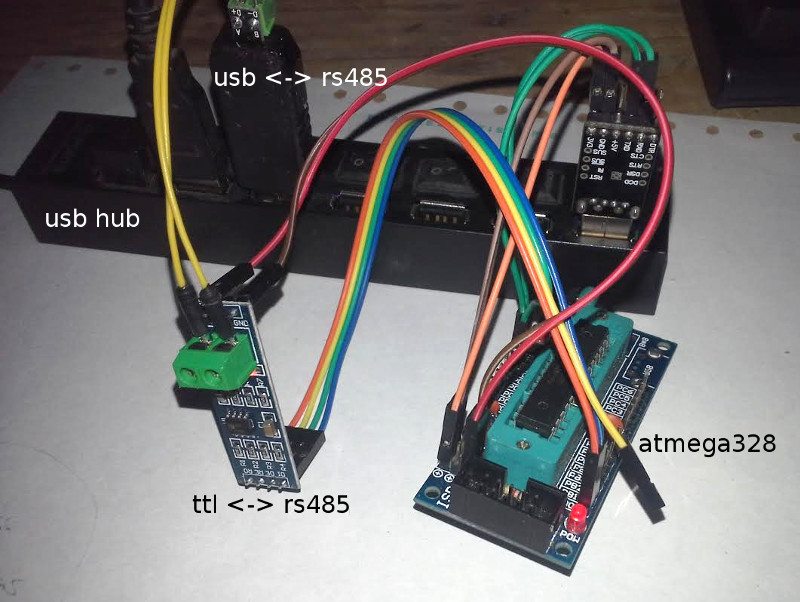
                                    i am ready. after compiled and upload example node sketch i have on rs485 to usb convertor (/dev/ttyUSB0) output nice mysensors data:

                                    01 FF 00 58 07 02 FF FF - FF 02 03 07 FF 03 66 04
                                    01 FF 00 58 07 02 FF FF - FF 02 03 07 FF 03 66 04
                                    01 FF 00 58 07 02 FF FF - FF 02 03 07 FF 03 66 04
                                    01 FF 00 58 07 02 FF FF - FF 02 03 07 FF 03 66 04
                                    01 FF 00 58 07 02 FF FF - FF 02 03 07 FF 03 66 04
                                    01 FF 00 58 07 02 FF FF - FF 02 03 07 FF 03 66 04
                                    01 FF 00 58 07 02 FF FF - FF 02 03 07 FF 03 66 04
                                    01 FF 00 58 07 02 FF FF - FF 02 03 07 FF 03 66 04
                                    

                                    testing playground photo: 0_1476563966730_playground.jpg
                                    1 Reply Last reply
                                    2
                                    • M Offline
                                      M Offline
                                      mvader
                                      wrote on last edited by mvader
                                      #41

                                      I noticed the "improve rf24" section was added. and it mentioned high cpu.
                                      i set mine up a few weeks ago and am not using an interrupt on my radio.
                                      my cpu is only 2-3%
                                      I'm curious if the high cpu problem is seen by many?

                                      also a 2nd question.
                                      if i were to add an interrupt. how can i "re-configure" my setup to include that new -switch
                                      or do i have to remove everything and re-clone from git hub and start over?

                                      1 Reply Last reply
                                      0
                                      • shfgS Offline
                                        shfgS Offline
                                        shfg
                                        wrote on last edited by
                                        #42

                                        Thanks for this excellent port. I'm having an issue running it as an MQTT gateway on the RPi (Model A). It compiles without hassles, but cant make a successful MQTT connection. I get the following:

                                        mysGateway: Starting gateway...
                                        mysGateway: Protocol version - 2.0.1-beta
                                        mysGateway: MCO:BGN:INIT GW,CP=RNNG---,VER=2.0.1-beta
                                        mysGateway: TSF:LRT:OK
                                        mysGateway: TSM:INIT
                                        mysGateway: TSM:INIT:TSP OK
                                        mysGateway: TSM:INIT:GW MODE
                                        mysGateway: TSM:READY
                                        mysGateway: MCO:REG:NOT NEEDED
                                        mysGateway: MCO:BGN:STP
                                        mysGateway: MCO:BGN:INIT OK,ID=0,PAR=0,DIS=0,REG=1
                                        mysGateway: Attempting MQTT connection...
                                        mysGateway: connected to 127.0.0.1
                                        mysGateway: Attempting MQTT connection...
                                        mysGateway: connected to 127.0.0.1
                                        mysGateway: Attempting MQTT connection...
                                        mysGateway: connected to 127.0.0.1

                                        ... those attempts recurring every 15 seconds or so, and in that time, no other activity is processed.
                                        From the code, I would have expected 'MQTT connected' rather than 'connected to 127.0.0.1'?

                                        I have mosquitto running on the pi in this case - which is working perfectly in other tests. Both serial and ethernet gateway modes compile and run perfectly, only the mqtt mode not working.
                                        Has anyone else had a similar issue?

                                        M 1 Reply Last reply
                                        0
                                        • E Offline
                                          E Offline
                                          ericvdb
                                          wrote on last edited by
                                          #43

                                          @marceloaqno what about gpio interrupts, is that supported?

                                          I'm thinking to use a RPi as a pulse counter for water, electricity and gas with no radio, just ethernet or mqtt.
                                          In combination with a I2C display, this could be a nice project ;)

                                          Greetz,
                                          Eric

                                          1 Reply Last reply
                                          0
                                          Reply
                                          • Reply as topic
                                          Log in to reply
                                          • Oldest to Newest
                                          • Newest to Oldest
                                          • Most Votes


                                          15

                                          Online

                                          11.7k

                                          Users

                                          11.2k

                                          Topics

                                          113.1k

                                          Posts


                                          Copyright 2025 TBD   |   Forum Guidelines   |   Privacy Policy   |   Terms of Service
                                          • Login

                                          • Don't have an account? Register

                                          • Login or register to search.
                                          • First post
                                            Last post
                                          0
                                          • MySensors
                                          • OpenHardware.io
                                          • Categories
                                          • Recent
                                          • Tags
                                          • Popular