Skip to content
  • MySensors
  • OpenHardware.io
  • Categories
  • Recent
  • Tags
  • Popular
Skins
  • Light
  • Brite
  • Cerulean
  • Cosmo
  • Flatly
  • Journal
  • Litera
  • Lumen
  • Lux
  • Materia
  • Minty
  • Morph
  • Pulse
  • Sandstone
  • Simplex
  • Sketchy
  • Spacelab
  • United
  • Yeti
  • Zephyr
  • Dark
  • Cyborg
  • Darkly
  • Quartz
  • Slate
  • Solar
  • Superhero
  • Vapor

  • Default (No Skin)
  • No Skin
Collapse
Brand Logo
A

arraWX

@arraWX
About
Posts
39
Topics
7
Shares
0
Groups
0
Followers
0
Following
1

Posts

Recent Best Controversial

  • 💬 Relay
    A arraWX

    Thank you @gohan! Retail solution is not the keyword here. What I am searching for is an authorized/lawful (safe) solution.

    I decided to do my own node (mysensors) with a cheap relay module for the arduino. Once I achieve the desired functionality I will change to some more robust hardware. Following your suggestion this could be a z wave roller shutter (e.g. fibaro or qubino).

    Announcements

  • How to stop execution of code if message is received during wait()...?
    A arraWX

    I am trying to do a very simple node with two relays for control of my venetian blinds.

    When the node receives an ON signal from the controller a relay is going to turn on for x seconds (line 115 in the below sketch). The mysensors function wait() is used to control the time (line 117). If a new message is received from the controller before wait is finished (e.g. OFF), then wait() should stop and the remaining lines of code (lines 118 to 123) should not be executed. How is that achieved? Hope someone can help. Thanks.

    1      // Enable debug prints
    2      // #define MY_DEBUG
    3  
    4      // Enable and select radio type attached
    5      #define MY_RADIO_NRF24
    6  
    7      #include <MySensors.h>
    8  
    9      #define CHILD_ID_BLIND 1
    10 
    11     #define EPROM_BLIND_STATE 1
    12     #define EPROM_SLAT_ANGLE 2
    13 
    14     #define LED_PIN 4
    15 
    16     #define BLIND_OFF 0
    17     #define BLIND_ON 1
    18 
    19     #define SN "Venetian Blind"
    20     #define SV "1.0"
    21 
    22     int16_t LastBlindState = BLIND_OFF;
    23     int16_t LastSlatAngle = 50;
    24 
    25     void setup()
    26     {
    27       // Retreive our last blind state from the eprom
    28       int BlindState = loadState(EPROM_BLIND_STATE);
    29       if (BlindState <= 1) {
    30         LastBlindState = BlindState;
    31         int SlatAngle = loadState(EPROM_SLAT_ANGLE);
    32         if ((SlatAngle >= 0) && (SlatAngle <= 100)) {
    33           LastSlatAngle = SlatAngle;
    34         }
    35         Serial.print("State and angle at setup: ");
    36         Serial.print(LastBlindState);
    37         Serial.print(", ");
    38         Serial.println(LastSlatAngle);
    39 
    40         pinMode(LED_PIN, OUTPUT); // LED for testing purposes
    41       }
    42 
    43       //Here you actualy switch on/off the blinds with the last known slat level
    44       SetCurrentState2Hardware();
    45 
    46       Serial.println( "Node ready to receive messages..." );
    47     }
    48 
    49     void presentation()
    50     {
    51       // Send the Sketch Version Information to the Gateway
    52       sendSketchInfo(SN, SV);
    53 
    54       present(CHILD_ID_BLIND, S_DIMMER );
    55     }
    56 
    57     void loop()
    58     {
    59     }
    60 
    61     void receive(const MyMessage &message)
    62     {
    63       if (message.type == V_STATUS) {
    64         Serial.print( "V_STATUS command received...: " );
    65 
    66         int bstate = atoi( message.data ); // atoi(): Convert string to integer
    67         if ((bstate < 0) || (bstate > 1)) {
    68           Serial.println( "V_STATUS data invalid (should be 0/1)" );
    69           return;
    70         }
    71         LastBlindState = bstate;
    72         Serial.println(LastBlindState);
    73         saveState(EPROM_BLIND_STATE, LastBlindState);
    74 
    75       } else if (message.type == V_PERCENTAGE) {
    76         Serial.print( "V_PERCENTAGE command received...: " );
    77         int slatvalue = atoi( message.data );
    78         if ((slatvalue < 0) || (slatvalue > 100)) {
    79           Serial.println( "V_PERCENTAGE data invalid (should be 0..100)" );
    80           return;
    81         }
    82 
    83         LastBlindState = BLIND_ON;
    84         LastSlatAngle = slatvalue;
    85         Serial.println(LastSlatAngle);
    86         saveState(EPROM_SLAT_ANGLE, LastSlatAngle);
    87         saveState(EPROM_BLIND_STATE, LastBlindState);
    88       }
    89       else {
    90         Serial.println( "Invalid command received..." );
    91         return;
    92       }
    93 
    94       //Here you set the actual light state/level
    95       SetCurrentState2Hardware();
    96     }
    97 
    98     void SetCurrentState2Hardware()
    99     {
    100      digitalWrite(LED_PIN, LOW); // Relays = off
    101      wait(1000);
    102
    103      if (LastBlindState == BLIND_OFF) {
    104        Serial.println( "Light state: OFF" );
    105
    106        digitalWrite(LED_PIN, HIGH); // up-relay on
    107        Serial.println("Going all the way up");
    108        wait(7500); // time to move blind all the way up
    109        digitalWrite(LED_PIN, LOW);  // up-relay off
    110      }
    111      else {
    112        Serial.print( "Light state: ON, Level: " );
    113        Serial.println( LastSlatAngle );
    114
    115        digitalWrite(LED_PIN, HIGH); // down-relay on
    116        Serial.println("Going all the way down");
    117        wait(7500); // time to move blind all the way down
    118        digitalWrite(LED_PIN, LOW);  // down-relay off
    119        wait(1000);
    120        digitalWrite(LED_PIN, HIGH); // up-relay on
    121        Serial.println("Adjusting slat angle");
    122        wait(100 * LastSlatAngle);
    123        digitalWrite(LED_PIN, LOW);  // up-relay off
    124      }
    125    }
    
    Development

  • 💬 Relay
    A arraWX

    Hi!

    I would like to control some 230VAC equipment (for now roller shutters), based on inputs from my mysensors sensors (temperature and light). For controller I use domoticz.

    I would like a safe, robust and preferably authorized/lawful solution (I'm in EU/Denmark).

    I came across the following solutions:

    https://aeotec.com/z-wave-plug-in-switch
    https://sonoff.itead.cc/en/products/sonoff/sonoff-basic
    https://dlidirect.com/products/iot-power-relay

    I think the first one and maybe the second one will be authorized/lawful...? However, I have experience only with mysensors and neither z wave nor sonoff...

    Anyone has some experience/thoughts/suggestions to share?

    Thanks.

    Announcements

  • 💬 FOTA (Wireless Programming)
    A arraWX

    @gohan I recently had some problems with fota and the sensebender sketch you refer to. In this thread @tekka suggested me to enable smart sleep. I used

    smartSleep(MEASURE_INTERVAL);
    

    It seems that the smartSleep function has a "built in" MY_SMART_SLEEP_WAIT_DURATION_MS (which defaults to 500 ms). This makes the OTA_WAIT_PERIOD in the sensebender sketch redundant. I deleted it from the sketch.

    FOTA now works successfully with my sensebender boards.

    Announcements wireless update over the air sensebender fota firmware over the air wireless programming

  • FOTA with MYSController does not work with sleeping Sensebender Micro
    A arraWX

    @tekka Thank you. However, it turned out that your advice was only part of the solution.

    In order to solve the problem I had to also change the sensebender from 2.1.1 to development branch.

    My rpi gateway uses development branch (due to reasons discussed here). Does the version mismatch between node and gateway explain why FOTA was not working?

    Troubleshooting

  • FOTA with MYSController does not work with sleeping Sensebender Micro
    A arraWX

    I use the "official" sketch for the Sensebender Micro. However, with "MEASURE_INTERVAL = 6000" and "FORCE_TRANSMIT_INTERVAL = 1" in order to transmit every 6 seconds.

    Gateway is rpi ethernet.

    MYSController 1.0.0beta (build 3316), "Sensebender board = TRUE", "Battery-powered / sleeping = TRUE" gives the following message but nothing more happens.

    0_1513461114537_Udklip.PNG

    If I replace sleep by wait in the sketch and set "Battery-powered / sleeping = FALSE" in MYSController then FOTA works flawlessly. But then node is not sleeping.

    Anyone knows how to get it working with a sleeping node?

    Troubleshooting

  • 💬 FOTA (Wireless Programming)
    A arraWX

    Using FOTA in myscontroller works only occasionally for me. Sometimes it works fine. But most often I get the following messages and nothing more happens.

    0_1512991929867_Udklip.PNG

    The node is a sensebender micro. Gateway is rpi ethernet.

    Has anyone experienced something similar? Anyone knows how to solve the problem?

    EDIT: Problem solved. Reading this post I now understand that in order to get new fw into the node one has to update the sketch, refresh the repo in MysController and assign it the node.

    Announcements wireless update over the air sensebender fota firmware over the air wireless programming

  • Alternatives for nRF24L01+ ?
    A arraWX

    @NeverDie Thank you!

    To me it seems as if it is not an option to order an antenna from CDEbyte through aliexpress.

    Can I use any 2.4 GHz SMA antenna? Anything to be particularly aware of? Any suggestions?

    General Discussion

  • Alternatives for nRF24L01+ ?
    A arraWX

    @NeverDie This one: https://www.aliexpress.com/item/E01-ML01DP5-Ebyte-2-4GHz-20dBm-2100m-nRF24L01-SPI-Wireless-transceiver-module/32638720689.html

    General Discussion

  • Alternatives for nRF24L01+ ?
    A arraWX

    @Nca78 I am about to order a few of the suggested modules (PA/LNA module from CDEbyte) from aliexpress. My first deal ever on aliexpress. What about antenna? Will I have to order it separately?

    General Discussion

  • 💬 Building a Raspberry Pi Gateway
    A arraWX

    A little hint in the tutorial would have saved me a lot of time too.

    Announcements

  • How to tell if mysensors library starts up successfully?
    A arraWX

    @Boots33 Thank you!

    Those posts provide lots of useful information.

    Development

  • How to tell if mysensors library starts up successfully?
    A arraWX

    @gohan Thank you!

    The node is a sensebender micro. I would like to use the built-in LED.

    I never made a node with the 3 status LEDs. It might be worthwhile for me to look more into that.

    Development

  • How to tell if mysensors library starts up successfully?
    A arraWX

    I would like to turn on a LED if a node cannot find the gateway (e.g. if the distance is too large) when the node is powered up. How can that be done?

    I understand that the send command returns a Boolean that tells whether a message reached the gateway. However, if the node cannot find the gateway on power up the sketch never proceeds beyond #include <MySensors.h>. Is it possible to derive some status from this command?

    Development

  • 💬 Building a Raspberry Pi Gateway
    A arraWX

    Do not know if it is of any help, but mine says: gcc version 4.9.2 (Raspbian 4.9.2-10)

    Announcements

  • 💬 Building a Raspberry Pi Gateway
    A arraWX

    @ricorico94 Yesterday I managed to make a working rpi gateway. I am on rpi3, use a socket adapter board for the radio and use domoticz. I posted all the details here: https://forum.mysensors.org/topic/7793/nrf24l01-problems-in-2-1-1-and-2-2-0-beta/24

    Announcements

  • NRF24L01+ problems in 2.1.1 and 2.2.0 Beta
    A arraWX

    With 2.1.1 I have the exact same problems.

    However, everything seems to be fine with 2.2.0 Beta:

    git clone https://github.com/mysensors/MySensors.git --branch development
    cd MySensors
    ./configure --my-transport=nrf24 --my-gateway=ethernet --my-port=5003 --my-rf24-pa-level=RF24_PA_MAX
    make
    

    In domoticz:
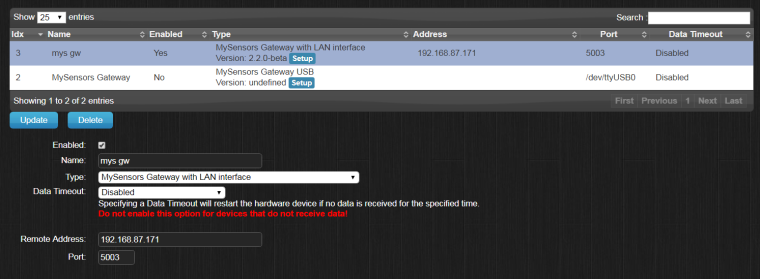
    0_1508010294046_Udklip.PNG

    The result:

    pi@raspberrypi:~/MySensors $ sudo ./bin/mysgw -d
    mysgw: Starting gateway...
    mysgw: Protocol version - 2.2.0-beta
    mysgw: MCO:BGN:INIT GW,CP=RNNGL---,VER=2.2.0-beta
    mysgw: TSF:LRT:OK
    mysgw: TSM:INIT
    mysgw: TSF:WUR:MS=0
    mysgw: TSM:INIT:TSP OK
    mysgw: TSM:INIT:GW MODE
    mysgw: TSM:READY:ID=0,PAR=0,DIS=0
    mysgw: MCO:REG:NOT NEEDED
    mysgw: Listening for connections on 0.0.0.0:5003
    mysgw: MCO:BGN:STP
    mysgw: MCO:BGN:INIT OK,TSP=1
    mysgw: TSF:MSG:READ,2-2-0,s=1,c=1,t=0,pt=7,l=5,sg=0:24.0
    mysgw: TSF:MSG:READ,2-2-0,s=2,c=1,t=1,pt=2,l=2,sg=0:58
    

    After success with 2.2.0 Beta I tried to go back to 2.1.1. However, it still does not work.

    I am on rpi3 and use a socket adapter board for the radio.

    Bug Reports

  • 💬 Building a Raspberry Pi Gateway
    A arraWX

    @skywatch Thank you! That solved my problem.

    Announcements

  • 💬 Building a Raspberry Pi Gateway
    A arraWX

    I followed the instructions carefully. However I get an error. Can someone help?

    git clone https://github.com/mysensors/MySensors.git --branch master
    cd MySensors
    ./configure --my-transport=nrf24 --my-gateway=ethernet
    

    This results in a warning:

    [SECTION] Detecting SPI driver.
      [WARNING] No supported SPI driver detected.
    

    When I run make I get the follwing error:

    In file included from examples_linux/mysgw.cpp:74:0:
    ./MySensors.h:254:2: error: #error No support for nRF24 radio on this platform
     #error No support for nRF24 radio on this platform
      ^
    In file included from ./drivers/RF24/RF24.cpp:23:0,
                     from ./MySensors.h:290,
                     from examples_linux/mysgw.cpp:74:
    ./drivers/RF24/RF24.h:52:17: fatal error: SPI.h: No such file or directory
     #include <SPI.h>
                     ^
    compilation terminated.
    Makefile:114: recipe for target 'build/examples_linux/mysgw.o' failed
    make: *** [build/examples_linux/mysgw.o] Error 1
    

    Hope someone can help. Thanks.

    Announcements
  • Login

  • Don't have an account? Register

  • Login or register to search.
  • First post
    Last post
0
  • MySensors
  • OpenHardware.io
  • Categories
  • Recent
  • Tags
  • Popular

