Skip to content

My Project

Show off and share your great projects here! We love pictures!
962 Topics 13.4k Posts
  • Synchronising Light switch

    light switch
    10
    1
    2 Votes
    10 Posts
    6k Views
    pepsonP
    Hi Can you help me convert this skecth for MySensors 2.2.0 because it was released. I upload to my Arduino MIni Pro this sketch but in Gateway Domoticz not show child to switch relay. Only show repeater child on ID 255. And also if you can please share me ready skecth for 2x releay. /* Relay with button sketch modified to work with no uplink to gateway and try to maintain sync to controller */ #define MY_DEBUG // Enable debug prints to serial monitor #define MY_RADIO_RFM69 #define MY_IS_RFM69HW #define RFM69_868MH #define MY_RFM69_NEW_DRIVER //#define MY_NODE_ID 203 // Node id defaults to AUTO (tries to fetch id from controller) #define MY_TRANSPORT_WAIT_READY_MS 5000 //set how long to wait for transport ready in milliseconds #define MY_REPEATER_FEATURE // Enabled repeater feature for this node #include <MySensors.h> #include <Bounce2.h> #define RELAY_PIN 5 // Arduino Digital I/O pin number for relay #define BUTTON_PIN 3 // Arduino Digital I/O pin number for button #define CHILD_ID 1 // Id of the sensor child #define RELAY_ON 1 #define RELAY_OFF 0 Bounce debouncer = Bounce(); int oldValue = 0; bool uplinkAvailable = true; bool state = false; bool requestState; bool firstStart = true; unsigned long uplinkCheckTime ; // holder for uplink checks unsigned long uplinkCheckPeriod = 30*1000; // time between checks for uplink in milliseconds unsigned long returnWait = 1000; // how long to wait for return from controller in milliseconds.. adjust as needed unsigned long oldTime = 0; unsigned long newTime = 0; MyMessage msg(CHILD_ID, V_STATUS); void setup(){ pinMode(BUTTON_PIN, INPUT_PULLUP); // Setup the button pin, Activate internal pull-up debouncer.attach(BUTTON_PIN); // After setting up the button, setup debouncer debouncer.interval(5); pinMode(RELAY_PIN, OUTPUT); // set relay pin in output mode digitalWrite(RELAY_PIN, RELAY_OFF); // Make sure relay is off when starting up } void presentation() { // Send the sketch version information to the gateway and Controller sendSketchInfo("1xRelay & Button", "2.2.0"); // Register all sensors to gw (they will be created as child devices) present(CHILD_ID, S_BINARY); } void loop(){ if (firstStart) { // this code is only run once at startup Serial.println("First run started"); requestTime(); // get time from controller wait (returnWait); // delay to allow time to return if (oldTime == 0){ // check to see if there was a return from the time request Serial.println("uplink not available"); uplinkAvailable = false; // no uplink established uplinkCheckTime = millis(); } else{ Serial.println("uplink available"); request( CHILD_ID, V_STATUS); // get status of switch on controller wait (returnWait); //wait needed to allow request to return from controller Serial.print("controller state --- "); Serial.println(requestState); if (requestState != state) { // check that controller is corectly showing the current relay state send(msg.set(state), false); // notify controller of current state } } firstStart = false; // set firstStart flag false to prevent code from running again } debouncer.update(); int value = debouncer.read(); // Get the update value if (value != oldValue && value == 0) { // check for new button push state = !state; // Toggle the state digitalWrite(RELAY_PIN, state ? RELAY_ON : RELAY_OFF); // switch the relay to the new state requestTime(); wait (returnWait); // delay to allow time to return if (oldTime != newTime){ // if times are different then uplink is available send(msg.set(state), false); oldTime = newTime; } else{ // if times are the same no uplink is available Serial.println("uplink not available"); uplinkAvailable = false; // no uplink available, set flag false uplinkCheckTime = millis(); // start the timer from now } } oldValue = value; if (!uplinkAvailable && (millis() - uplinkCheckTime > uplinkCheckPeriod) ) { // test to see if function should be called uplinkCheck(); // call uplink checking function } } /*-------------------start of functions--------------------------*/ void receive(const MyMessage &message) { if (message.type == V_STATUS) { // check to see if incoming message is for a switch switch (message.getCommand()) { // message.getCommand will give us the command type of the incomming message case C_SET: //message is a set command from controller to update relay state state = message.getBool(); // get the new state digitalWrite(RELAY_PIN, state ? RELAY_ON : RELAY_OFF); // switch relay to new state uplinkAvailable = true; // uplink established /*---- Write some debug info----*/ Serial.print("Incoming change for sensor:"); Serial.print(message.sensor); Serial.print(", New status: "); Serial.println(message.getBool()); break; case C_REQ: // message is a returning request from controller requestState = message.getBool(); // update requestState with returning state break; } } } void uplinkCheck() { requestTime(); wait (returnWait); // wait for time return.. this may need to be varied for your system if (oldTime != newTime){ Serial.println("uplink re-established"); request( CHILD_ID, V_STATUS); wait (returnWait); //wait needed to allow request to return from controller if (requestState != state) { // check that controller is corectly showing the current relay state send(msg.set(state), false); // notify controller of current state no ack uplinkAvailable = true; // uplink established oldTime = newTime; } } uplinkCheckTime = millis(); // reset the checktime Serial.println("uplinkchecktime reset"); } void receiveTime(unsigned long time) { if (firstStart){ oldTime = time; newTime = time; } else{ newTime = time; } Serial.print("time received---- " ); Serial.println(time); }
  • IP Gateway based on ncat + socat + USB

    5
    1 Votes
    5 Posts
    1k Views
    thazlettT
    I actually didn't know that raspberry pi gateway was a thing! nice, i'll have to try that. I have been using a USB one since 1.5. I guess what i'm doing here is just more generic. I have it running on an orange pi one right now and it's fine. I plan to move it to a r-pi zero w when I have some time. Perhaps put it all in a project box and place it strategically in the house. To explain a little bit about what I did: A problem with socat I had was it seemed to garble the serial data between connected clients, making it useless with more than 1 client(I don't think that's a socat issue though, I think that's because more than one process is trying to access the tty device at once). Ncat fixes that by just repeating anything pushed into it to all connected clients. So it's ttyUSB0/1 <> socat <> ncat <> One of more clients. Hopefully it's useful for people.
  • With MySensors PC cold start!

    6
    1
    0 Votes
    6 Posts
    2k Views
    M
    Yoy need to have two = in the code if (is_Reset == 1 )
  • Philips LivingColors MySensor node

    8
    3 Votes
    8 Posts
    7k Views
    Jonathan PucelJ
    @tias said in Philips LivingColors MySensor node: 74LVC125A Thanks for the reply Tias ! I'm completely noob in electronic ! Another (stupid) question, for the 3.3v regulator, is the 100nf capacitor can be replaced by a 220nf capacitor without consequence ?
  • AC light dimmer with 2x TRIAC

    23
    0 Votes
    23 Posts
    22k Views
    rsaefulR
    @jacikaas did you solve the issued? any luck i also have same problem event now i migrated to mysensors v 2.
  • Poolside Music Player

    10
    5
    4 Votes
    10 Posts
    2k Views
    Nca78N
    @dbemowsk said in Poolside Music Player: I can enjoy some winter days, but when it gets so cold that a breath of air nearly freezes your lungs, that's kind of tough to do. Yes I was just joking, lowest I ever had was around -15°C but with low/no wind and it was already a pain to walk outside. Would switch with @Boots33's place anyway too, it seems we are the same weather but I don't have all those trees. Nice house, warm weather, garden, pool, lots of trees around, and workshop when the MySensors virus makes a comeback. Sounds like a perfect place, any chance you're on AirBnb @Boots33 ? :D
  • My new project : texboard pcb

    9
    5 Votes
    9 Posts
    3k Views
    Nca78N
    @linkos you need to include a capacitor (100-200uF) in parallel to the battery to help it during peak load. And if possible in your sketch add short sleeps between successive TX/RX to let capacitor recharge.
  • Atmega328+Pro Mini+Nano bootloader uploader

    1
    1 Votes
    1 Posts
    846 Views
    No one has replied
  • NEED HELP SERIALPORT ,

    serial port with plc delta
    2
    0 Votes
    2 Posts
    666 Views
    mfalkviddM
    Hi @zago1819, and welcome to the MySensors community. This community is about the MySensors library, so you might not get a lot of help about PLCs and Modbus. Also, could you please write with normal characters instead of ALL CAPS? Most people interpret all caps as yelling, which certainly will get you nowhere.
  • Need help for trying with TTP229

    3
    0 Votes
    3 Posts
    1k Views
    B
    Thank you so much, that's it.
  • CAN bus transport implementation for MYS

    35
    0 Votes
    35 Posts
    13k Views
    Nca78N
    @kimot said in CAN bus transport implementation for MYS: @gasuter CAN FD looks good, until you start to looking for IO chips. MCP2561FD is only CAN bus transceiver ( like MAX485 ) with higher speed ability, then traditional CAN bus drivers. It has no logic "on board". You need something like MCP2517. But try find datasheet, prices etc. for this chip. I think, it will be very expensive way for us, like standard CAN several years ago was. MCP2517 has been released a few months ago and is only around 2$. http://ww1.microchip.com/downloads/en/DeviceDoc/20005688A.pdf
  • US decora wall switch continued

    10
    6
    0 Votes
    10 Posts
    4k Views
    dbemowskD
    It was a bit of work, but I was able to get the 3 original boards posted on the openhardware.io site today. https://www.openhardware.io/view/542/In-wall-scene-controller-multi-switch-board-assembly https://www.openhardware.io/view/541/In-wall-scene-controller-main-board https://www.openhardware.io/view/540/In-wall-scene-controller-PSU
  • Human detecting Sensor

    8
    0 Votes
    8 Posts
    2k Views
    Constantine PoltyrevC
    @wallyllama I experimented a bit with the software that goes with the evaluation board. It looks like the temperature filter should be dynamic as the measured temperature for a single pixel depends on object distance since each pixel has a view angle and the resulting temperature is an average of the covered area which obviously grows with the distance. So in real life you get 24 to 31 Celsius for people in the room if you have the sensor mounted in the middle of the ceiling. Panasonic has some people tracking demo app and they even provide it's source if you sign their SLA, so it also could be a good starting point. I haven't obtained the source yet though.
  • Smart button / scene controller

    8
    4
    1 Votes
    8 Posts
    4k Views
    xydixX
    Thank you. It is solved now. Here is the new sketch reporting battery level using the vcc library. /* Mysensors Smart Button */ #define MY_DEBUG #define MY_RADIO_NRF24 #define MY_NODE_ID 7 #include "OneButton.h" #include <SPI.h> #include <MySensors.h> #include <Vcc.h> #define SN "Kitchen Table" #define SV "1.0" #define CHILD_ID 1 #define SLEEP_PIN 2 // Setup a new OneButton on pin D2. true will set pin high (internal pull up), false will set pin low. OneButton button(2, true); unsigned long previousMillis = 0; unsigned long currentMillis = 0; const long interval = 5000; const float VccMin = 1.9; // Minimum expected Vcc level, in Volts. (NRF can only go to 1.9V) const float VccMax = 3.3; // Maximum expected Vcc level, in Volts. const float VccCorrection = 1.0 / 1.0; // Measured Vcc by multimeter divided by reported Vcc Vcc vcc(VccCorrection); MyMessage on(CHILD_ID, V_SCENE_ON); // setup code here, to run once: void setup() { // link the doubleclick function to be called on a doubleclick event. button.attachClick(click); button.attachDoubleClick(doubleclick); button.attachPress(press); } // setup void presentation() { // Send the sketch version information to the gateway and Controller sendSketchInfo(SN, SV); present(CHILD_ID, S_SCENE_CONTROLLER); } int messageA = 1; int messageB = 2; int messageC = 3; void loop() { currentMillis = millis(); // keep watching the push button: button.tick(); if (currentMillis - previousMillis >= interval) { previousMillis = currentMillis; float p = vcc.Read_Perc(VccMin, VccMax); sendBatteryLevel((uint8_t)p); Serial.println("Sleep"); sleep(SLEEP_PIN - 2, CHANGE, 0); } } // loop // this function will be called when the button was pressed one time void click() { send(on.set(messageA)); } // this function will be called when the button was pressed 2 times in a short timeframe. void doubleclick() { send(on.set(messageB)); } // doubleclick // this function will be called when the button was pressed for about one second void press() { send(on.set(messageC)); }
  • 1 Votes
    5 Posts
    2k Views
    Nca78N
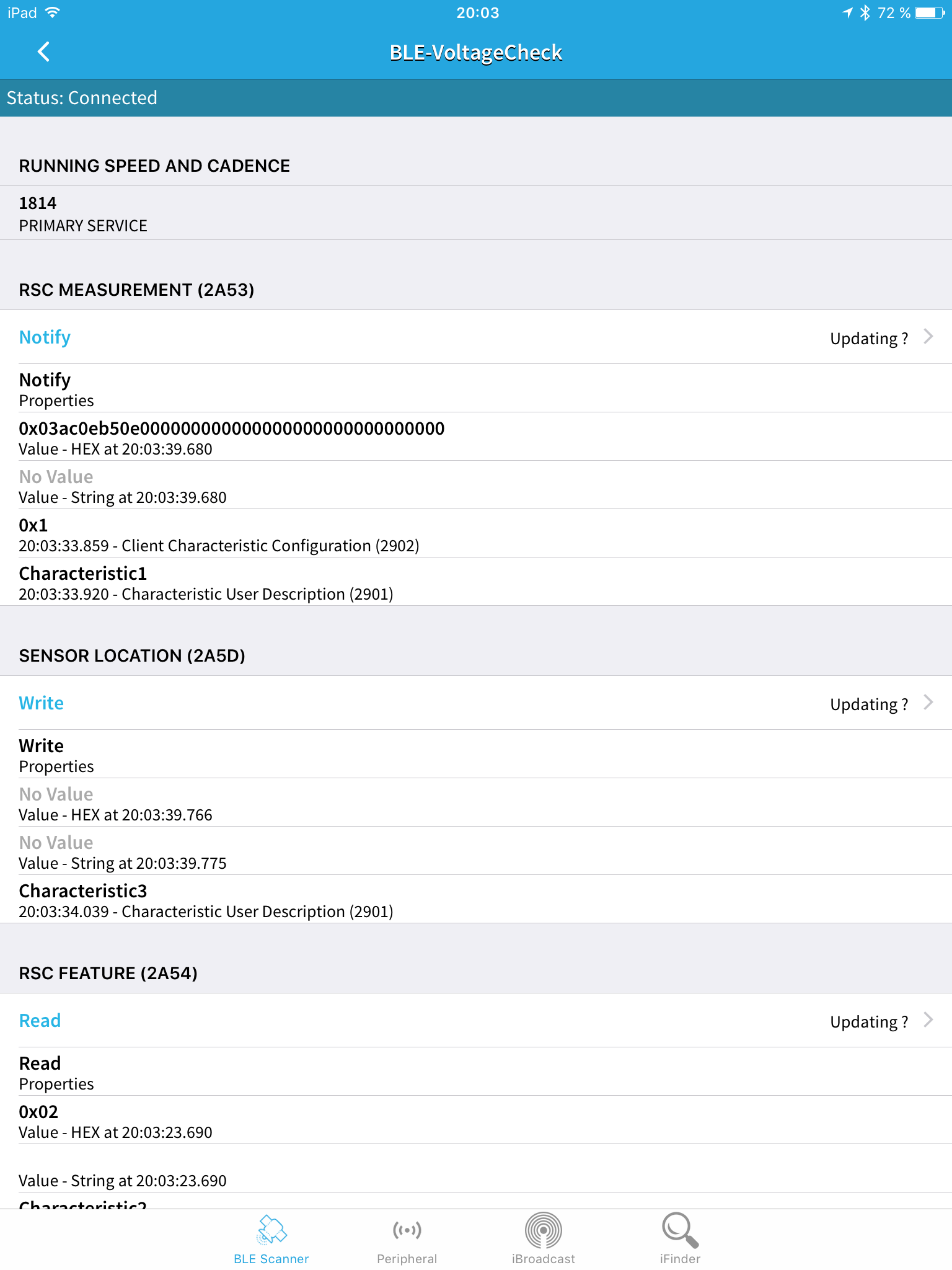
    Nice, thank you for sharing. Not very surprised about the use of running speed and cadence profile as there is no profile for voltage reporting (battery service can only report a percentage).
  • 0 Votes
    8 Posts
    1k Views
    dbemowskD
    @sergio_uno I tend to agree, but I do not have control over the forum or the openhardware.io website. I would mean though that you would have to add the OSH logo to your boards, and probably your identifiers on the cogs.
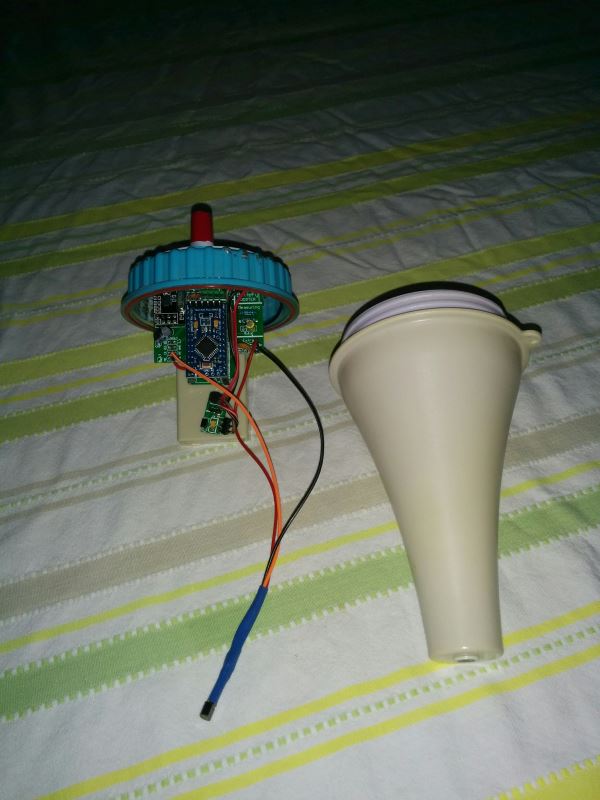
  • Swimming Pool Thermometer

    12
    5
    3 Votes
    12 Posts
    11k Views
    dbemowskD
    @boots33 You could say that. It will get colder too. Probably below 0°F/-18°C at times over the next few months. That's more than a TAD brisk. That's lock me up in a heated box and throw away the key brisk.
  • Controlling a 1st gen. LivingColors lamp

    6
    2 Votes
    6 Posts
    6k Views
    rvendrameR
    @BartE I purchased this module: https://www.aliexpress.com/item/Wireless-Module-CC2500-2-4G-Low-power-Consistency-Stability-Small-Size/32702148262.html?spm=a2g0s.9042311.0.0.L1Dfwj This is the pinout... [image: HTB1SO.JKVXXXXXOXVXXq6xXFXXXY.jpg?size=22112&height=201&width=191&hash=45fd083e34f9a23cfeff846840cccbbf] ... and I'm in doubt how to wire GDO2, GDO0, RFSC above. RFCL - SCK (pin 13)? GDO2 - leave open? GDO0 - CE (pin 9)? RFCS - CS(pin 10)? Would you mind to clarify? Thanks!
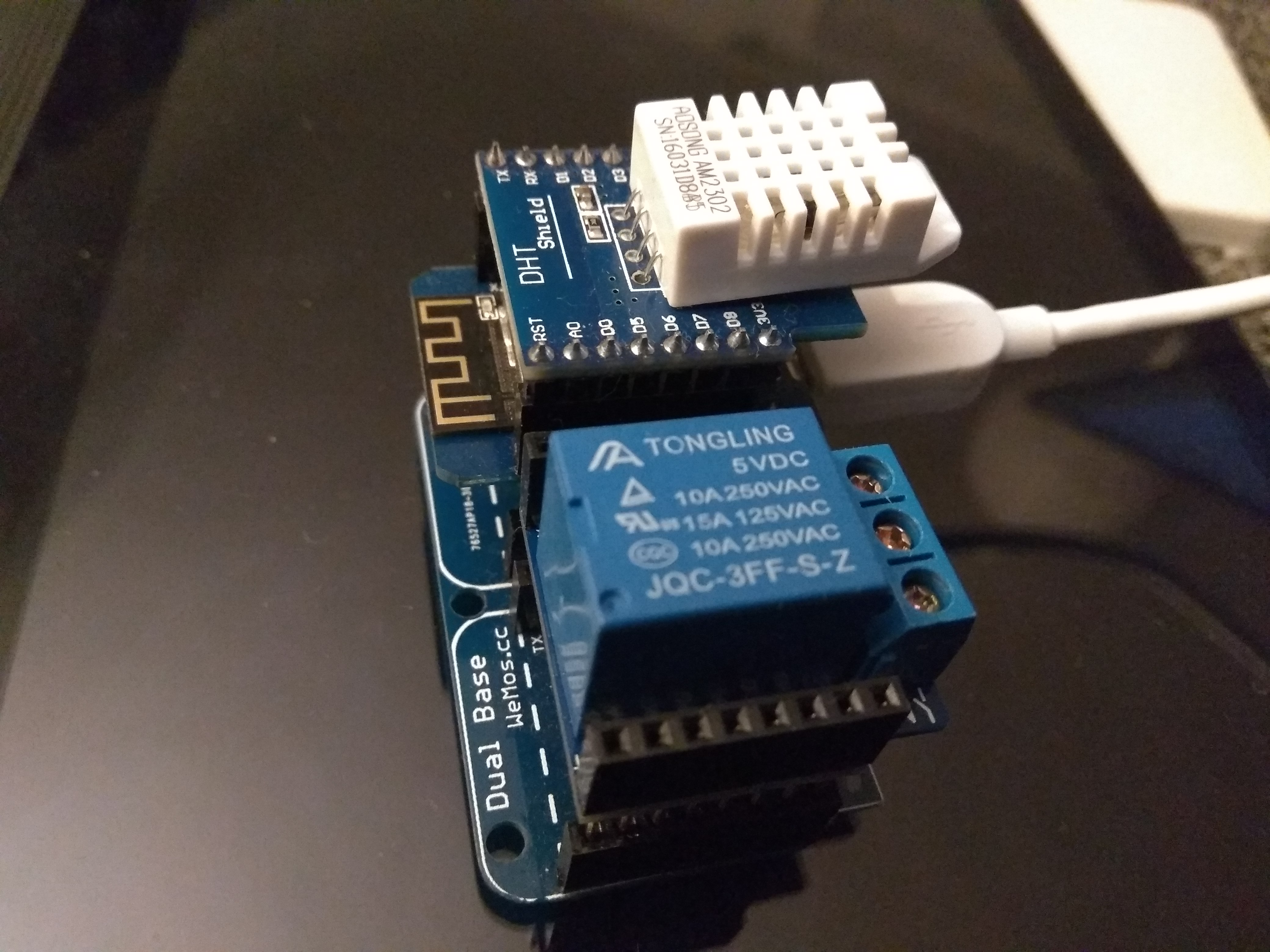
  • Wemos D1 mini GW + DHT22 + Relay shield

    1
    1
    0 Votes
    1 Posts
    3k Views
    No one has replied
  • Looking for bluetooth proximity tracking (+/- 10cm precision) hardware.

    4
    0 Votes
    4 Posts
    1k Views
    A
    @Artmai said in Looking for bluetooth proximity tracking (+/- 10cm precision) hardware.: hardware solution would you recommend me to build a small device sending Bluetooth signals that an iPh any other techno you would recommend to track this though?

13

Online

11.7k

Users

11.2k

Topics

113.1k

Posts