Skip to content

Domoticz

322 Topics 2.3k Posts
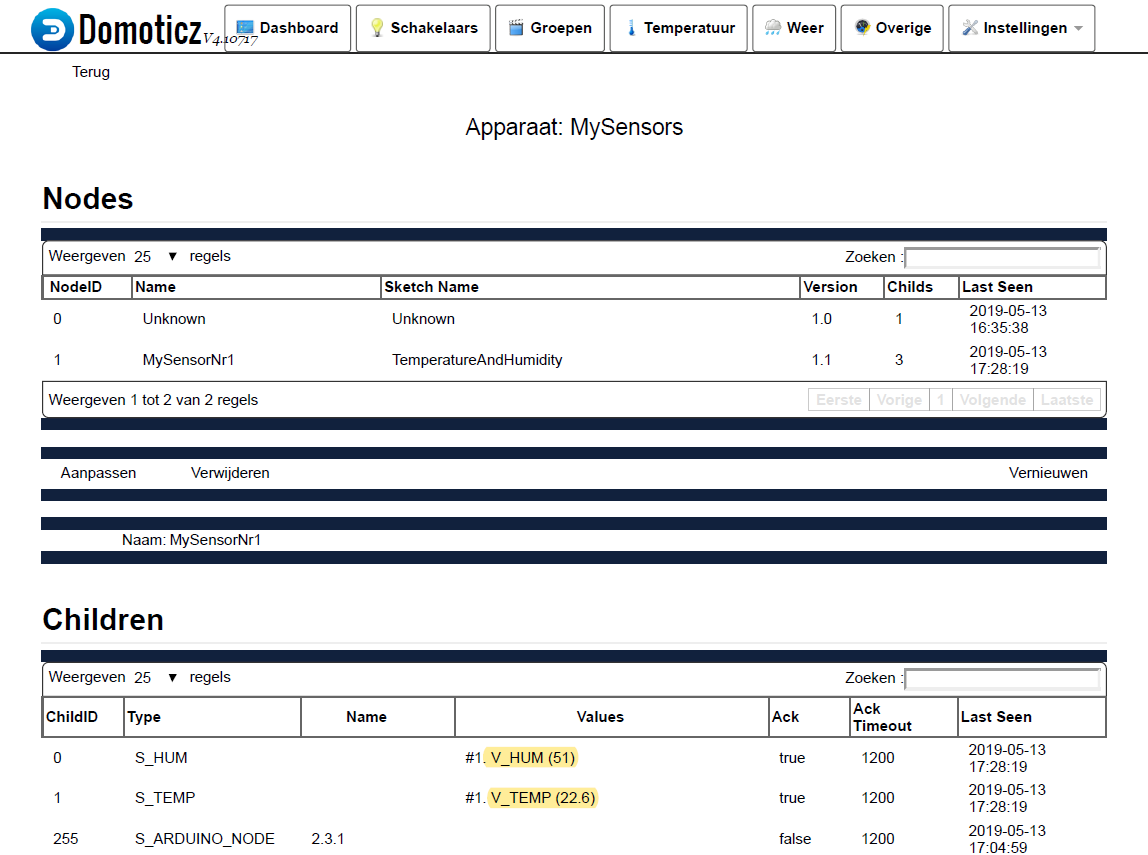
  • Serial Gateway + MySensor working but devices not added in Domoticz

    3
    1
    0 Votes
    3 Posts
    995 Views
    F
    Yes Mikael, but it suddenly hit me that you have to allow Domoticz to add new devices from the console. I can see the Temperature and the Humidity now! Thanks again!
  • questioun using multiple sensors on domoticz

    4
    3
    0 Votes
    4 Posts
    562 Views
    zboblamontZ
    @alowhum Always been curious how Domoticz treats the V and S values, so tended to follow the MySensor API and had a few if unexpected moments and results along the way. You implied that presentation of V_PRESSURE pre-determines an expectation of S_BARO irrespective of whatever further S_? statement follows. Is this understanding correct?
  • Using the "Selector switch" in Domoticz (tutorial)

    8
    8 Votes
    8 Posts
    30k Views
    K
    Hello AWI , is it possible to post the hole example sketch ?
  • help with serial gateway on raspberry pi

    4
    0 Votes
    4 Posts
    733 Views
    fernando alvarez buyllaF
    thanks guys , the solution for me was to add ln -s /dev/ttyMySensorsGateway /dev/ttyUSB020 to rc.local but i will try your idea @mfalkvidd thanks for the help
  • [SOLVED] Error sending switch command

    7
    0 Votes
    7 Posts
    4k Views
    EmeE
    Hello @TheoL I am having the same problem with a slightly similar sketch. the delay didn't have much impart. One second its working fine and the next its breaking into errors. I couldn't find a .1uf Capacitor, so I used electrolytic 1uf instead. Worked fine in the Sprinkler Project, but I don't know if that's the problem here. My sketch is a follows:- // Example sketch showing how to control physical relays. // This example will remember relay state even after power failure. // Enable debug prints #define MY_DEBUG // Enable and select radio type attached #define MY_RADIO_NRF24 #define MY_NODE_ID 6 // Set this to fix your Radio ID or use AUTO or 1 #define MY_REGISTRATION_FEATURE // Forece registration #define MY_REGISTRATION_RETRIES 5 #include <Wire.h> #include <TimeLib.h> #include <SPI.h> #include <MySensors.h> #include <LCD.h> #include <LiquidCrystal.h> #include <LiquidCrystal_I2C.h> // For Debug #ifdef DEBUG_ON #define DEBUG_PRINT(x) Serial.print(x) #define DEBUG_PRINTLN(x) Serial.println(x) #else #define DEBUG_PRINT(x) #define DEBUG_PRINTLN(x) #define SERIAL_START(x) #endif #define RELAY_PIN 2 // Arduino Digital I/O pin number for first relay (second on pin+1 etc) #define NUMBER_OF_RELAYS 4 // Total number of attached relays #define RELAY_ON 0 // GPIO value to write to turn on attached relay #define RELAY_OFF 1 // GPIO value to write to turn off attached relay #define SKETCH_NAME "Swimming Pool Node" #define SKETCH_VERSION "0.1.4" #define CHILD_ID 0 MyMessage msg(1,V_LIGHT); unsigned long SLEEP_TIME = 5000; // Sleep time inbetween reads in milliseconds void setup() { for (int sensor=1, pin=RELAY_PIN; sensor<=NUMBER_OF_RELAYS; sensor++, pin++) { // Then set relay pins in output mode pinMode(pin, OUTPUT); // Set relay to last known state (using eeprom storage) // digitalWrite(pin, loadState(sensor)?RELAY_ON:RELAY_OFF); // to remember last state digitalWrite(pin, loadState? 0 : 0); // Keep everything off after power failure } } void presentation() { sendSketchInfo(SKETCH_NAME, SKETCH_VERSION); // Fetch relay status for (int sensor=1, pin=RELAY_PIN; sensor<=NUMBER_OF_RELAYS; sensor++, pin++) { // Register all sensors to gw (they will be created as child devices) present(sensor, S_BINARY); pinMode(pin, OUTPUT); // Then set relay pins in output mode // boolean savedState = loadState(sensor); // Set relay to last known state (using eeprom storage) // digitalWrite(pin, savedState?RELAY_ON:RELAY_OFF); // send(msg.set(savedState? 0 : 1)); } DEBUG_PRINTLN(F("Sensor Presentation Complete")); } void loop() { // Alway process incoming messages whenever possible // Sleep until interrupt comes in on motion sensor. Send update every two minute. // sleep(digitalPinToInterrupt(msg.sensor-1+RELAY_PIN), CHANGE, SLEEP_TIME); wait(SLEEP_TIME); } void receive(const MyMessage &message){ // Change relay state if message is receieved if (message.type == V_STATUS){ digitalWrite(message.sensor-1+RELAY_PIN, message.getBool()?RELAY_ON:RELAY_OFF); // Store state in eeprom saveState(message.sensor-1+RELAY_PIN, message.getBool()); // Write some debug info Serial.print("Incoming change for sensor ID: "); Serial.print(message.sensor); Serial.print(", New status: "); Serial.println(message.getBool()); } }
  • 0 Votes
    1 Posts
    453 Views
    No one has replied
  • Push button to toggle lights etc

    5
    0 Votes
    5 Posts
    1k Views
    MasMatM
    @lemme said in Push button to toggle lights etc: http://127.0.0.1:8080/json.htm?type=command&dparam=switchlight&idx=42&switchcmd=Toggle Works brilliantly!!
  • Repeater getting NACK

    10
    0 Votes
    10 Posts
    1k Views
    F
    Ad=s far I understand, we're speaking about radio ACK, which just confirm the right reception on the message, what could be sent. Then, that's gateway that can understand message contents. If senders returns NACK, it just means that no radio ACK has been received from the other end within timeout (set to 1500 ms with MySensors' setup, running @ 250 kb/s, with 15 retries). That's exactly what happens when sending message and receiver off. In the current issue, as you're on a repeater, you're in a good position to be in a position of receiving a message, and sending immediately another one (we can also have the same thing if implementing signature), were timing issues may happen.
  • BME280 pressure not shown

    4
    2
    0 Votes
    4 Posts
    609 Views
    mfalkviddM
    @nagelc yes that could be it. I have been fooled by that behavior before :) The log shows that the value was delivered though 20:16:22.561 -> 5255 TSF:MSG:SEND,1-1-0-0,s=6,c=1,t=4,pt=7,l=5,sg=0,ft=0,st=OK:100240.5
  • BMP / BME280 + DS18B20

    Moved
    2
    0 Votes
    2 Posts
    606 Views
    gohanG
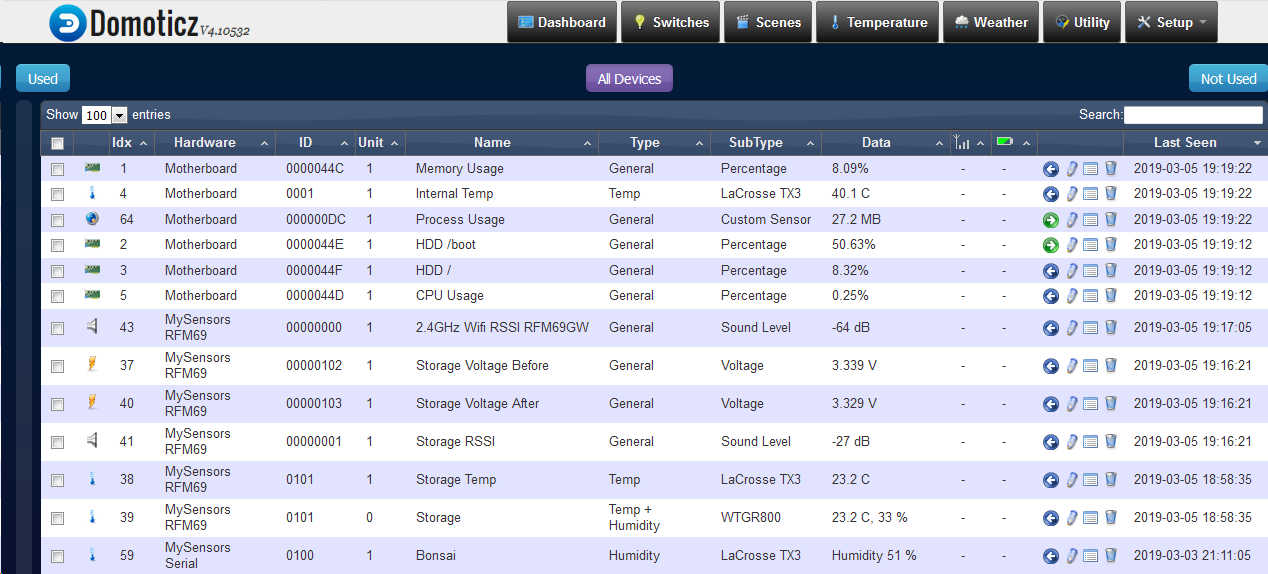
    Did you delete the sensors in domoticz?
  • Any admin from the domoticz forum?

    5
    0 Votes
    5 Posts
    3k Views
    J
    @lennart49e OMG just wasted 10mn of my life unsuccessfully trying to register on https://www.domoticz.com/forum/ucp.php?mode=register because I did not pay attention to that lame CAPTCHA test #FAIL
  • Detect missing/unresponsive sensor.

    12
    0 Votes
    12 Posts
    2k Views
    K
    Again some Domoticz code - for update battery level - it is blocked by default: void MySensorsBase::UpdateNodeBatteryLevel(const int nodeID, const int Level) { std::map<int, _tMySensorNode>::iterator ittNode = m_nodes.find(nodeID); if (ittNode == m_nodes.end()) return; //Not found _tMySensorNode *pNode = &ittNode->second; for (auto & itt : pNode->m_childs) { itt.hasBattery = true; itt.batValue = Level; //Uncomment the below to for a sensor update /* for (const auto & itt2 : itt->values) { if (itt2.second.bValidValue) { _eSetType vType = itt2.first; SendSensor2Domoticz(pNode, &itt, vType); } } */ } } notice - //Uncomment the below to for a sensor update
  • MySensors USB GW

    8
    0 Votes
    8 Posts
    1k Views
    rejoe2R
    @mfalkvidd said in MySensors USB GW: @alexsh1 if there is only one tty, linux has only found one of your usb gateways. Unless linux finds the gateways, there will be no way for Domoticz to talk to them. As basic communication seems not to be an issue (beside the version information that per default only is included in presentation()), especially when rebooting the mc, imo this isn't a problem on the Pi side. It's just the mc booting much faster than the controller... As there's no USB-Serial converter in the setup @alexsh1 uses, the mc will not be reset when communication is (re-) startet from controller side - imo that's all. Some explanation, might be of interest for future discussions on that: I had comparable "problems" using a Pro Micro as a GW; this mc also will not be reset when USB communication is reconnected. Most likely also other mc's providing direct USB communication (e.g. STM32F1xx) will show similar behaviour.
  • sonda PH

    2
    0 Votes
    2 Posts
    866 Views
    N
    Hi, @szybki946 ! Code in your post is working or not? If yes - you want to someone modify it, so it will send your pH to domoticz from MySensors node? If yes - if you use nrf24l01+ radio - maybe you want this code: #include <Average.h> #define MY_NODE_ID 100 //set node fixed id #define MY_BAUD_RATE 9600 //set serial baud rate #define MY_RADIO_RF24 //if you use nrf24l01+ #include <MySensors.h> #define PH_CHILD_ID 0 MyMessage ph_msg(PH_CHILD_ID, V_PH); Average<float> sredniaPH(100); //średnia ze 100 pomiarów void presentation() { sendSketchInfo("PH_meter", "1.0"); // Send the sketch version information to the gateway and Controller present(PH_CHILD_ID, S_WATER_QUALITY, "average_ph"); } void setup() { //Serial.begin(9600); //don't need it because of #define MY_BAUD_RATE 9600 } void loop() { int Volty = analogRead(A7); float V =(float) Volty * 5.0 / 1024.0; float peha =(float) V*3.5; sredniaPH.push(peha); sredniaPH.mean(); float pH =((float) sredniaPH.mean()); Serial.println(pH); send(ph_msg.set(pH, 2)); //2 = number of digits after comma wait(1000); //in mysensors do not use delay - use wait() or sleep() } (change IDs, texts and numbers of digits after comma as you want)
  • GW with MY_RFM69_ENABLE_ENCRYPTION in Domoticz?

    9
    0 Votes
    9 Posts
    1k Views
    alexsh1A
    I have abandoned an encryption idea for now as I do not have too much time to troubleshoot it.
  • bme280 sensor missing/combining/domoticz heartbeat and battery level

    1
    0 Votes
    1 Posts
    575 Views
    No one has replied
  • Domoticz Newby question: Access Error: 404 - Not Found, on Windows

    1
    0 Votes
    1 Posts
    644 Views
    No one has replied
  • V_LIGHT_LEVEL data not displayed in Domoticz

    3
    1
    0 Votes
    3 Posts
    988 Views
    alexsh1A
    @ricmail85 Every time after a major update I lose sensors in Domoticz. This is very annoying. The old sensors stop working and new ones appear and as I have lua scripts - they have to be updated as well.
  • Slow Power Meter Update speed

    9
    0 Votes
    9 Posts
    2k Views
    gusG
    I don't know how, but now it seems to work. Restarted Domoticz, thats all. Now the value on the dashboard updates direct when a new data comes. Thanks for your inputs!
  • Heartbeat working or not?

    8
    0 Votes
    8 Posts
    2k Views
    S
    @pjr I am still a noob when it comes to C. And I have not had the time to examine the Domoticz source code. But at first glance those lines seems as V_PERCENTAGE, V_SCENE_OFF, V_STOP and V_RGBW that updates the last seen on heartbeat. I have had my node running now for 2 days just checking this heartbeat. And I can for shore sasy that is only working for the door sensor. Which presents it self as S_DOOR and sends V_TRIPPED messages. It is not working for the motion sensor presenting it self as S_MOTION and also sends V_TRIPPED messages. And one more really strange thing is that it is only working on the door sensor when the door is open. Not closed!

16

Online

11.7k

Users

11.2k

Topics

113.1k

Posts