
new Sensebender Micro node but no temp/humidity devices showing up.
-
I have an eithernet gateway, vera see's it
I got my new Sensebender Micro sensors in the mail. I hooked up the radio and ran in the inclusion.
vera picked up 1 device and added 1 node.
but that's it.
i don't see any temp devices or humidity devices or anything like that.
just the new node.
does the vera plugin/xml files need to be updated to work with the sensebender board? or should it work fine. -
-
-
-
Guys,
it was a very long day to get this point but I finally got the gateway working, the first temperature sensor working and included. With that said I now see this which is an Arduino node but no temperature data but instead all the sensor firmware data.
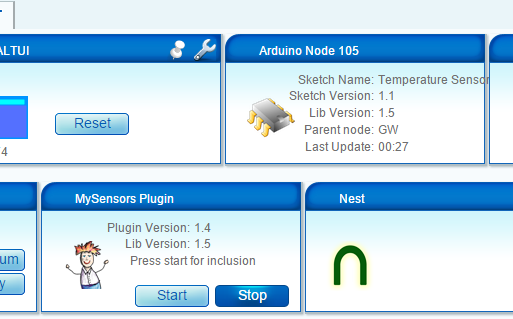
How do i get a proper temperature device into Vera with this please?
I tried the reboot advise above but that didn't change anything.
Thanks in advance.
-
Guys,
it was a very long day to get this point but I finally got the gateway working, the first temperature sensor working and included. With that said I now see this which is an Arduino node but no temperature data but instead all the sensor firmware data.
How do i get a proper temperature device into Vera with this please?
I tried the reboot advise above but that didn't change anything.
Thanks in advance.
@Pseudomizer You should have seen two devices included - the node (which you have) and the sensor (it should be called 'Arduino Temp 105:1', initially). Was there another device created? If not, you should try re-including the node. What sketch are you using?
-
I only see one node and it said that it found one node instead of two. I am using the standard DallasTemperature sketch.
-
I only see one node and it said that it found one node instead of two. I am using the standard DallasTemperature sketch.
@Pseudomizer I think you might have a hardware problem, most likely a wiring or powering issue.
To clarify terms, a 'node' represents your Arduino. The 'devices' include each sensor (or child devices) attached to the node as well as the node (the parent device) itself. If you have one temp sensor attached to your arduino, you should have two devices show up when you include them. However, the Dallas Temperature sketch works a little differently from most of the other device sketches in that it polls the number of DS18b20 attached before presenting them to the gateway/controller.
First it presents the node to the controller:
// Send the sketch version information to the gateway and Controller
  gw.sendSketchInfo("Temperature Sensor", "1.1");
...and then it counts the dallas sensors and presents each one to the GW/controller:
// Fetch the number of attached temperature sensors
  numSensors = sensors.getDeviceCount();

  // Present all sensors to controller
  for (int i=0; i<numSensors && i<MAX_ATTACHED_DS18B20; i++) {
     gw.present(i, S_TEMP);
As you only have the node (parent) being created when you include the node, the sketch apparently could not find any dallas sensors (child devices) when it looks for them or it was unsuccessful when trying to gw.present them.
First thing to check is the serial log, what does it say when the node starts up? Does it attempt to gw.present the temp sensor? If not, check your wiring or try a different DS18b20.
If it does attempt to present the sensor but fails, you should look at power as a potential problem. Do you have a capacitor on your radio? You could also try adding a short gw.delay in your setup between the device count and gw.present to allow the radio time to recover from presenting the sketch..

Hello! It looks like you're interested in this conversation, but you don't have an account yet.
Getting fed up of having to scroll through the same posts each visit? When you register for an account, you'll always come back to exactly where you were before, and choose to be notified of new replies (either via email, or push notification). You'll also be able to save bookmarks and upvote posts to show your appreciation to other community members.
With your input, this post could be even better 💗
Register Login