
Scrolling Text sensor node with new V_TEXT
-
-
-
-
-
-
-
-
found this library for scrolling effect https://code.google.com/p/arudino-maxmatrix-library/.
-
found this library for scrolling effect https://code.google.com/p/arudino-maxmatrix-library/.
-
Umm, this is awesome! Looks like I have a tinker project coming up!
-
Looks great. Is it posible (Or do you think it will be) to sen dynamic values to the display from Domoticz? Like the temperature or soil moist procentage.
-
Looks great. Is it posible (Or do you think it will be) to sen dynamic values to the display from Domoticz? Like the temperature or soil moist procentage.
@popunonkok it is very possible. In fact this is what I'm doing. You need to work on the controller side. For domoticz you can use a lua time script which sends new text every x time. For long messages you will need to script a fifo with multiple text messages.
-
Is it possible to send text to the node without a request call from the node itself?
The example is not clear on this point and the json example only sets the text value within Domoticz, right?
-
Is it possible to send text to the node without a request call from the node itself?
The example is not clear on this point and the json example only sets the text value within Domoticz, right?
@GertSanders Domoticz does not "push" the Text value when changed. The published sketch "asks" periodically for the Text value. What I do now is create a Switch (S_BINARY/ light) with function "New text available". This switch triggers the polling sequence.
-
@GizMoCuz : It would be nice to be able to define the text of the S_INFO sensor in de UI of Domoticz, instead of only via json. I'm not capable of programming that myself, but it would make the use of text easier. I already log all incoming SMS messages into my SMS connected sensor in V_TEXT and have it this way a nice view on what nodes are sending to my SMS passthrough node or what SMS messages are received into my MySensors network. I know Domoticz has it's own SMS interface, but my node is capable of switching on stuff based on directly received SMS commands, and with V_TEXT I can now follow what is happening without needing a serial connection to the node. I should be clear that I'm a big fan of Domoticz :-)
-
-
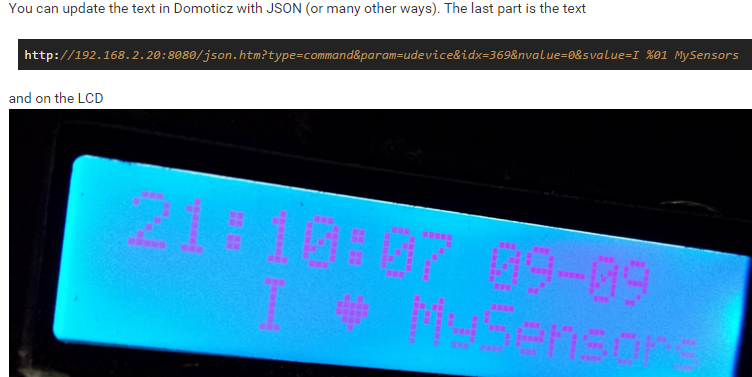
You can send messages as done here? http://forum.mysensors.org/topic/1957/lcd-clock-and-text-sensor-node-with-new-v_text
-
What am i missing, Because i get this when i try to compile it
Arduino:1.6.5 (Mac OS X), Kort:"Arduino Nano, ATmega328"
ScrollingText:55: error: 'V_TEXT' was not declared in this scope
ScrollingText.ino: In function 'void setup()':
ScrollingText:166: error: 'S_INFO' was not declared in this scope
ScrollingText:170: error: 'V_TEXT' was not declared in this scope
ScrollingText.ino: In function 'void loop()':
ScrollingText:191: error: 'V_TEXT' was not declared in this scope
ScrollingText.ino: In function 'void incomingMessage(const MyMessage&)':
ScrollingText:210: error: 'V_TEXT' was not declared in this scope
'V_TEXT' was not declared in this scope -
What am i missing, Because i get this when i try to compile it
Arduino:1.6.5 (Mac OS X), Kort:"Arduino Nano, ATmega328"
ScrollingText:55: error: 'V_TEXT' was not declared in this scope
ScrollingText.ino: In function 'void setup()':
ScrollingText:166: error: 'S_INFO' was not declared in this scope
ScrollingText:170: error: 'V_TEXT' was not declared in this scope
ScrollingText.ino: In function 'void loop()':
ScrollingText:191: error: 'V_TEXT' was not declared in this scope
ScrollingText.ino: In function 'void incomingMessage(const MyMessage&)':
ScrollingText:210: error: 'V_TEXT' was not declared in this scope
'V_TEXT' was not declared in this scope -
Okey, That can explain, Byt when i use the Dev Branch
I get this ErrorsScrollingText:52: error: 'MyTransportNRF24' does not name a type
ScrollingText:53: error: 'MySensor' does not name a type
ScrollingText.ino: In function 'void setup()':
ScrollingText:163: error: 'gw' was not declared in this scope
ScrollingText.ino: In function 'void loop()':
ScrollingText:177: error: 'gw' was not declared in this scope
'MyTransportNRF24' does not name a type



Hello! It looks like you're interested in this conversation, but you don't have an account yet.
Getting fed up of having to scroll through the same posts each visit? When you register for an account, you'll always come back to exactly where you were before, and choose to be notified of new replies (either via email, or push notification). You'll also be able to save bookmarks and upvote posts to show your appreciation to other community members.
With your input, this post could be even better 💗
Register Login