Skip to content
  • MySensors
  • OpenHardware.io
  • Categories
  • Recent
  • Tags
  • Popular
Skins
  • Light
  • Brite
  • Cerulean
  • Cosmo
  • Flatly
  • Journal
  • Litera
  • Lumen
  • Lux
  • Materia
  • Minty
  • Morph
  • Pulse
  • Sandstone
  • Simplex
  • Sketchy
  • Spacelab
  • United
  • Yeti
  • Zephyr
  • Dark
  • Cyborg
  • Darkly
  • Quartz
  • Slate
  • Solar
  • Superhero
  • Vapor

  • Default (No Skin)
  • No Skin
Collapse
Brand Logo
  1. Home
  2. My Project
  3. My Relay Module

My Relay Module

Scheduled Pinned Locked Moved My Project
21 Posts 8 Posters 26.0k Views 6 Watching
  • Oldest to Newest
  • Newest to Oldest
  • Most Votes
Reply
  • Reply as topic
Log in to reply
This topic has been deleted. Only users with topic management privileges can see it.
  • N Nicola Reina

    Bello GiGi! Nice GiGi.

    If you want pm me as I understand we are from the same country.
    May be we can exchange some experience in italian ;-)
    Will copy your design

    G Offline
    G Offline
    gigi
    wrote on last edited by
    #6

    @Nicola-Reina Ok

    Vera lite - mysensors Ethernet gateway - AirWik sensor - Relay Module

    1 Reply Last reply
    0
    • J Offline
      J Offline
      jemish
      wrote on last edited by
      #7

      if we put this box in wall then power supply will safe or not?

      5v power supply adapter's temperature will afact or not?

      1 Reply Last reply
      0
      • D Offline
        D Offline
        dayve218
        wrote on last edited by
        #8

        any one care to confirm whats happening with the AC wires in this? i cant quite make it out from the photos

        1 Reply Last reply
        0
        • Michel - ItM Offline
          Michel - ItM Offline
          Michel - It
          wrote on last edited by
          #9

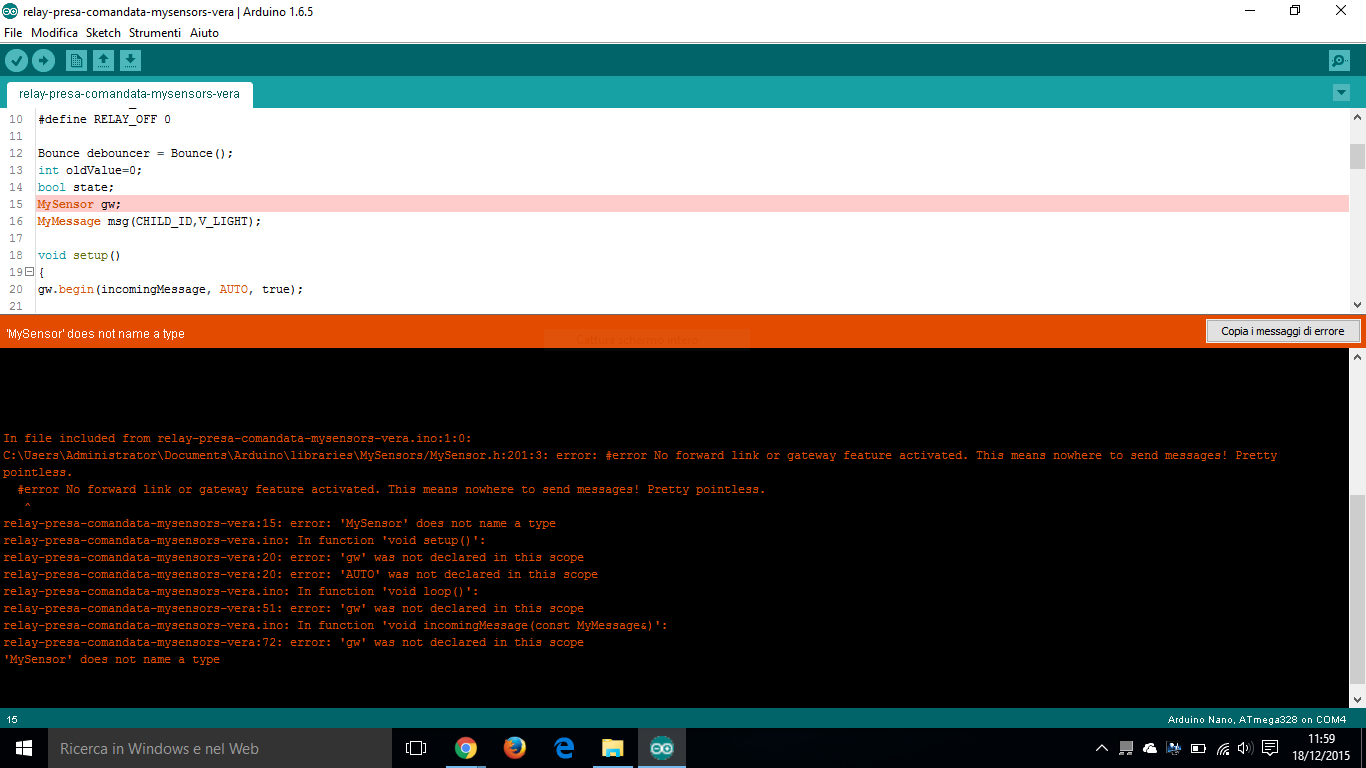
          Hello everyone , I have a problem . maybe it's stupid , I have a server with raspberry domoticz , I downloaded code, but by the following errorCattura.PNG

          1 Reply Last reply
          0
          • H Offline
            H Offline
            hek
            Admin
            wrote on last edited by
            #10

            You seem to have downloaded the development branch of the MySensors library. The code you're trying to run is 1.5.

            1 Reply Last reply
            0
            • Michel - ItM Offline
              Michel - ItM Offline
              Michel - It
              wrote on last edited by Michel - It
              #11

              I downloaded this , https://github.com/mysensors/Arduino . I Submitted libraries entirely within the zip file in my briefcase Arduino library.
              however it from the library is the 1.5 readme. Where am I wrong ?
              il codice è il seguente

              #include <MySensor.h>
              
              #include <SPI.h>
              #include <Bounce2.h>
              
              #define RELAY_PIN 4 // Arduino Digital I/O pin number for relay
              #define BUTTON_PIN 3 // Arduino Digital I/O pin number for button
              #define CHILD_ID 1 // Id of the sensor child
              #define RELAY_ON 1
              #define RELAY_OFF 0
              
              Bounce debouncer = Bounce();
              int oldValue=0;
              bool state;
              MySensor gw;
              MyMessage msg(CHILD_ID,V_LIGHT);
              
              void setup()
              {
              gw.begin(incomingMessage, AUTO, true);
              
              // Send the sketch version information to the gateway and Controller
              gw.sendSketchInfo("Relay & Button", "1.0");
              
              // Setup the button
              pinMode(BUTTON_PIN,INPUT);
              // Activate internal pull-up
              digitalWrite(BUTTON_PIN,HIGH);
              
              // After setting up the button, setup debouncer
              debouncer.attach(BUTTON_PIN);
              debouncer.interval(5);
              
              // Register all sensors to gw (they will be created as child devices)
              gw.present(CHILD_ID, S_LIGHT);
              
              // Make sure relays are off when starting up
              digitalWrite(RELAY_PIN, RELAY_OFF);
              // Then set relay pins in output mode
              pinMode(RELAY_PIN, OUTPUT);
              
              // Set relay to last known state (using eeprom storage)
              state = gw.loadState(CHILD_ID);
              digitalWrite(RELAY_PIN, state?RELAY_ON:RELAY_OFF);
              }
              /*
              * Example on how to asynchronously check for new messages from gw
              */
              void loop()
              {
              gw.process();
              debouncer.update();
              // Get the update value
              int value = debouncer.read();
              if (value != oldValue && value==0) {
              gw.send(msg.set(state?false:true), true); // Send new state and request ack back
              }
              oldValue = value;
              }
              
              void incomingMessage(const MyMessage &message) {
              // We only expect one type of message from controller. But we better check anyway.
              if (message.isAck()) {
              Serial.println("This is an ack from gateway");
              }
              
              if (message.type == V_LIGHT) {
              // Change relay state
              state = message.getBool();
              digitalWrite(RELAY_PIN, state?RELAY_ON:RELAY_OFF);
              // Store state in eeprom
              gw.saveState(CHILD_ID, state);
              
              // Write some debug info
              Serial.print("Incoming change for sensor:");
              Serial.print(message.sensor);
              Serial.print(", New status: ");
              Serial.println(message.getBool());
              }
              }```
              1 Reply Last reply
              0
              • H Offline
                H Offline
                hek
                Admin
                wrote on last edited by
                #12

                mysensors.org/download/

                1 Reply Last reply
                0
                • Michel - ItM Offline
                  Michel - ItM Offline
                  Michel - It
                  wrote on last edited by
                  #13

                  thank you! I apologize for my level , I hope to fix with your help.

                  1 Reply Last reply
                  0
                  • Michel - ItM Offline
                    Michel - ItM Offline
                    Michel - It
                    wrote on last edited by Michel - It
                    #14

                    Here is the improved code that I used on my Arduino Mega to create a home automation controller

                    New optimized code to arduino mega

                    https://codebender.cc/sketch:206446

                    1 Reply Last reply
                    0
                    • Michel - ItM Offline
                      Michel - ItM Offline
                      Michel - It
                      wrote on last edited by Michel - It
                      #15

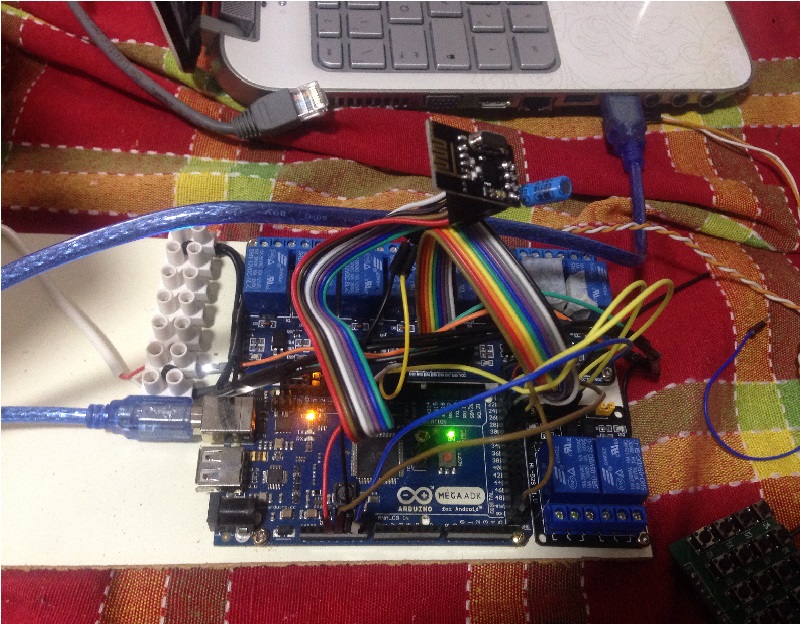
                      Update: Forget it, the code works with Arduino Mini and 2 relay. I tried one after the code of Arduino Mega and not working. Something wrong but I do not know what I require help
                      picture.jpg

                      I found mistakes on Arduino Mega solvable at the following link
                      http://forum.mysensors.org/topic/2161/the-mysensor-1-5-code-is-not-compiling-for-my-arduino-mega-2560-board/1
                      but I do not have this kind of problem you can get support? I connected NRF24L01 to Arduino Mega, as if it were an Arduino Nano, right?

                      1 Reply Last reply
                      0
                      • H Offline
                        H Offline
                        hek
                        Admin
                        wrote on last edited by
                        #16

                        The SPI pins has different pin numbers on the Mega.

                        Here is an example that runs the the Mega:
                        http://www.mysensors.org/build/scene_controller

                        1 Reply Last reply
                        0
                        • Michel - ItM Offline
                          Michel - ItM Offline
                          Michel - It
                          wrote on last edited by
                          #17

                          I connected the radio module as follows

                          AtMega 2650 Arduino Step Down Module/Radio
                          GND > GND
                          5V > Step Down module VCC
                          14 > SCK
                          15 > MOSI
                          16 > MISO
                          17 > CE
                          18 > CSN
                          I tried but it did not work I tried to connect also IrQ
                          2 > IRQ
                          it did not work. I tried to connect to 3v3 with the capacitor. it did not work. I tried adding the line in the code
                          #include <MyTransportNRF24.h>
                          #include <MyHwATMega328.h>
                          but to no avail. I am groping in the dark

                          1 Reply Last reply
                          0
                          • H Offline
                            H Offline
                            hek
                            Admin
                            wrote on last edited by
                            #18

                            You haven't said what problem you experience. Logs or anything else...

                            1 Reply Last reply
                            0
                            • Michel - ItM Offline
                              Michel - ItM Offline
                              Michel - It
                              wrote on last edited by Michel - It
                              #19

                              I have "check wires" error on the serial arduino....
                              where do I fit in debug mode there is a guide?
                              I saw a video that uses MQTT program on mac.
                              I have downloaded windows MYSController I can be of help? How do I connect my PC? It is all new and are a little confused. :dizzy_face: :u7a7a:

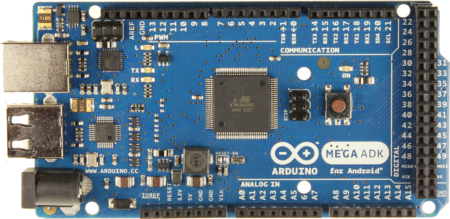
                              I "atmega adk" is a problem?
                              https://www.arduino.cc/en/uploads/Main/ArduinoADK_R3_Front_450px.jpg

                              1 Reply Last reply
                              0
                              • P Offline
                                P Offline
                                pjr
                                wrote on last edited by
                                #20

                                Have you defined using softspi since using those pins?

                                I'm using different pins with mega and everything started to work after adding capacitor to radio:
                                GND > GND
                                3.3 > VCC
                                52 > SCK
                                51 > MOSI
                                50 > MISO
                                9 > CE
                                10 > CSN
                                2 > IRQ

                                1 Reply Last reply
                                0
                                • Michel - ItM Offline
                                  Michel - ItM Offline
                                  Michel - It
                                  wrote on last edited by Michel - It
                                  #21

                                  soon as I finish the project it will create a new post in the category myproject
                                  @pjr unfortunately I read your seat now but I confirm that pins are those that use exact thank - @salvato that helped me as an angel.

                                  the irq pin does not need to be connected

                                  1 Reply Last reply
                                  0

                                  Hello! It looks like you're interested in this conversation, but you don't have an account yet.

                                  Getting fed up of having to scroll through the same posts each visit? When you register for an account, you'll always come back to exactly where you were before, and choose to be notified of new replies (either via email, or push notification). You'll also be able to save bookmarks and upvote posts to show your appreciation to other community members.

                                  With your input, this post could be even better 💗

                                  Register Login
                                  Reply
                                  • Reply as topic
                                  Log in to reply
                                  • Oldest to Newest
                                  • Newest to Oldest
                                  • Most Votes


                                  18

                                  Online

                                  12.0k

                                  Users

                                  11.2k

                                  Topics

                                  113.4k

                                  Posts


                                  Copyright 2025 TBD   |   Forum Guidelines   |   Privacy Policy   |   Terms of Service
                                  • Login

                                  • Don't have an account? Register

                                  • Login or register to search.
                                  • First post
                                    Last post
                                  0
                                  • MySensors
                                  • OpenHardware.io
                                  • Categories
                                  • Recent
                                  • Tags
                                  • Popular