
Error compiling - ATSHA204.h not Found
-
Hi there,
I am pretty much new to mysensors. I started by following the example video on your demostration page. Once I tried to upload the "SerialGateway" code to my Arduino nano, I get an error related to a missing driver.
Now I wonder if the error has to do with where I pasted the "driver" folder. I simply dropped it in the main Arduino directory (C:\Program Files (x86)\Arduino\drivers), and I can easily see the "ATSHA204.h" driver in the driver list. I restarted the Arduino and my computer, still no luck.
Also, I found it very confusing to get the "mesensors" libraries as it is not in the zip file of your latest version (i.e. 2.0.0). So I had to download the older versions and try to import their libraries, and then update them from the core folder of version 2. A bit explanation would really help.
Thank you so much for your help,
I got the following error:
Arduino: 1.7.10 (Windows 7), Board: "Arduino Nano, ATmega328"
In file included from C:\Program Files (x86)\Arduino\libraries\MySensors/MySigningNone.h:32:0,
from SerialGateway.ino:41:C:\Program Files (x86)\Arduino\libraries\MySensors/MySigning.h:479:39: fatal error: drivers/ATSHA204/ATSHA204.h: No such file or directory
#include "drivers/ATSHA204/ATSHA204.h"
^compilation terminated.
Error compiling.
-
Yes it looks like you may not have the Mysensors folder in the right place.
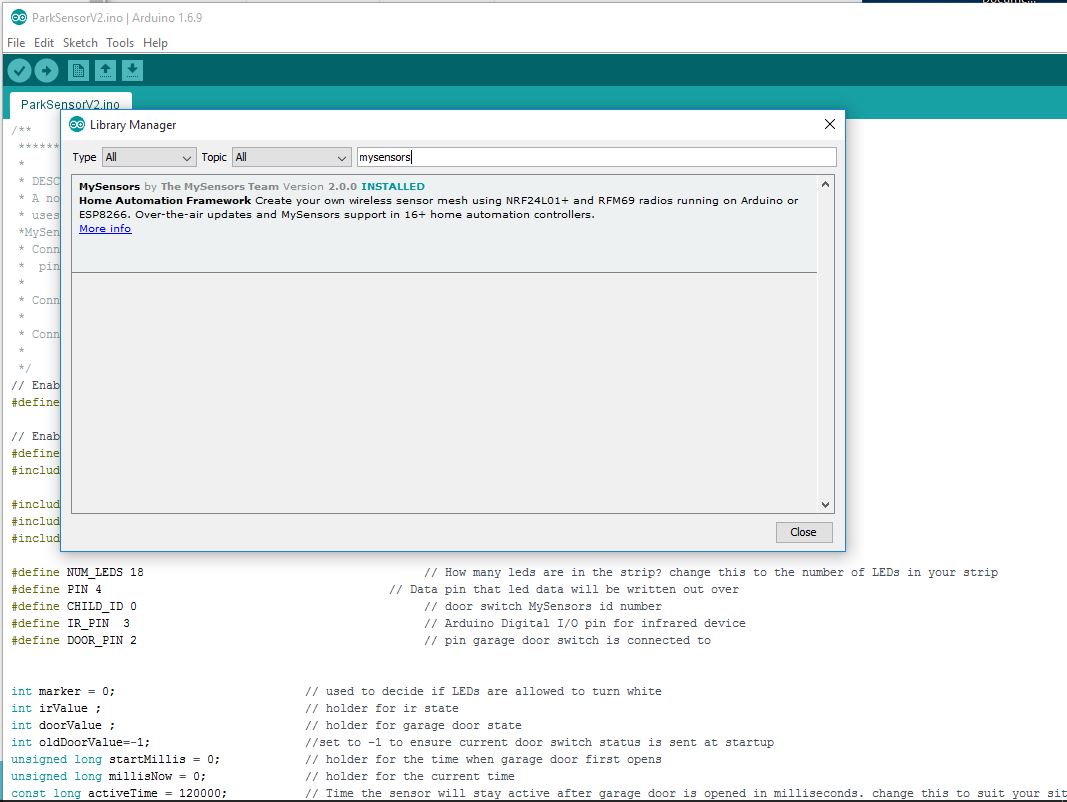
The easiest way to install MySensors V2 is using the library manager built in to the arduino IDE.
It can be accessed via the sketch menu as shown below
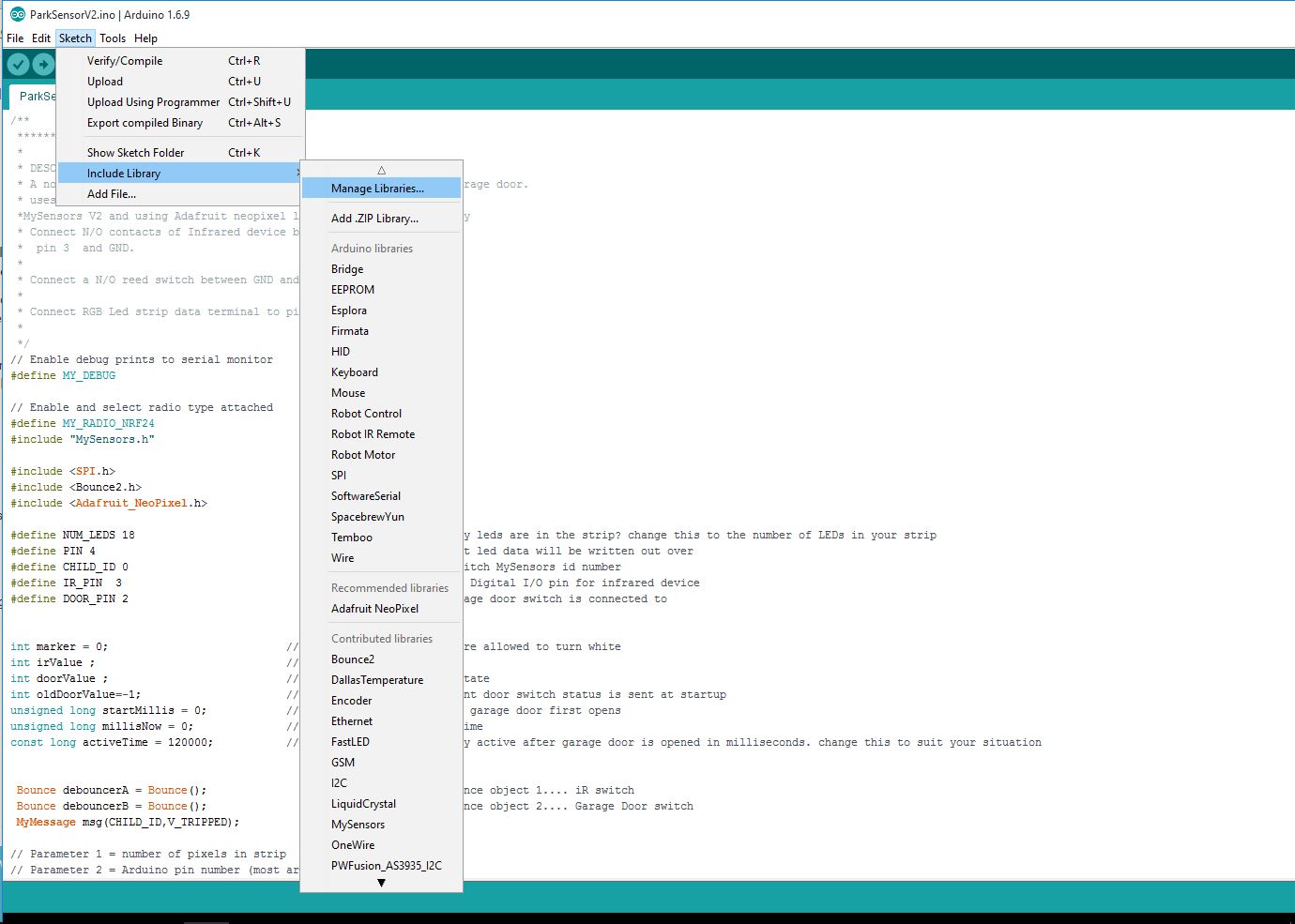
that will open up the manager , you can then do a search for mysensors and install it from there
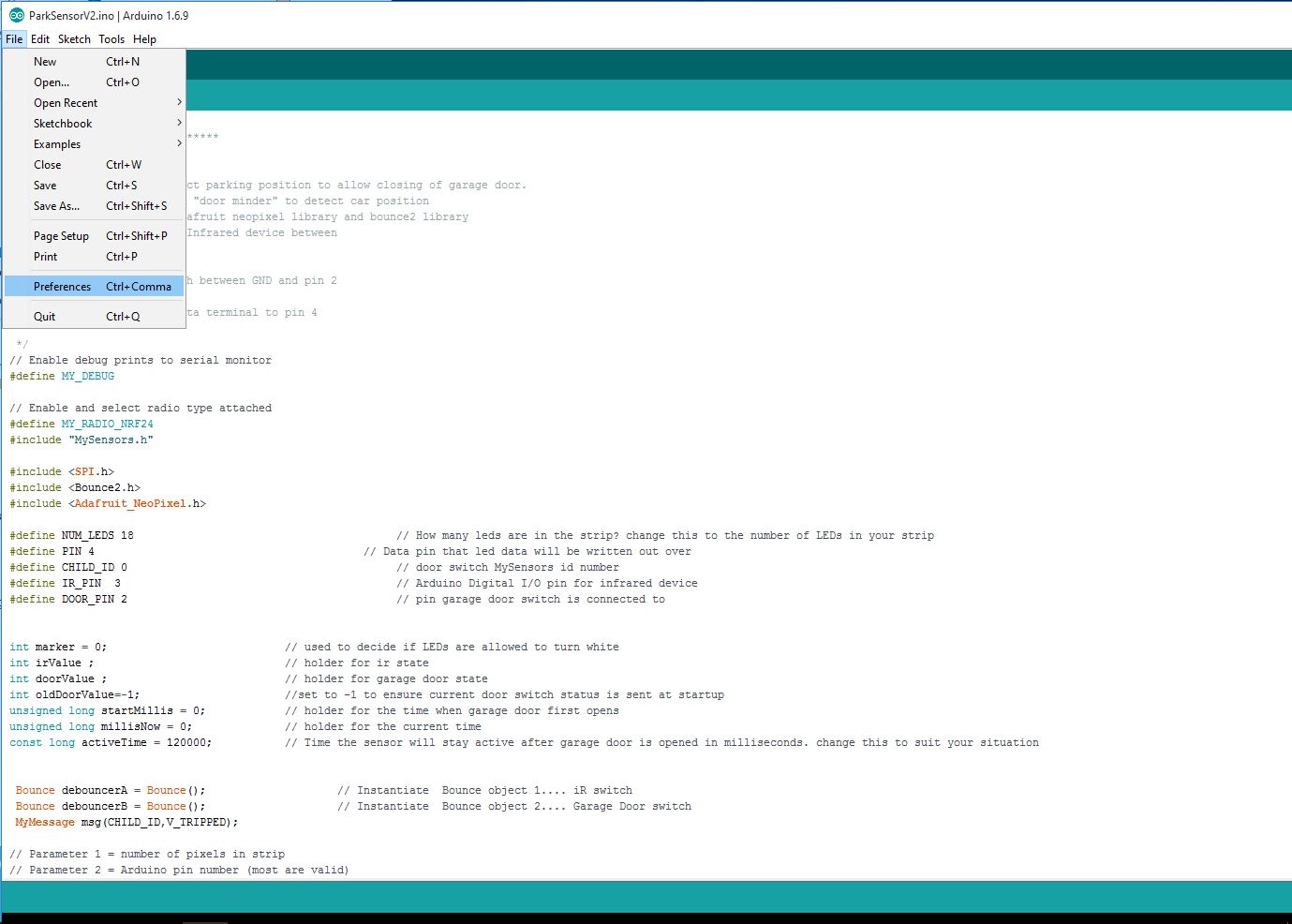
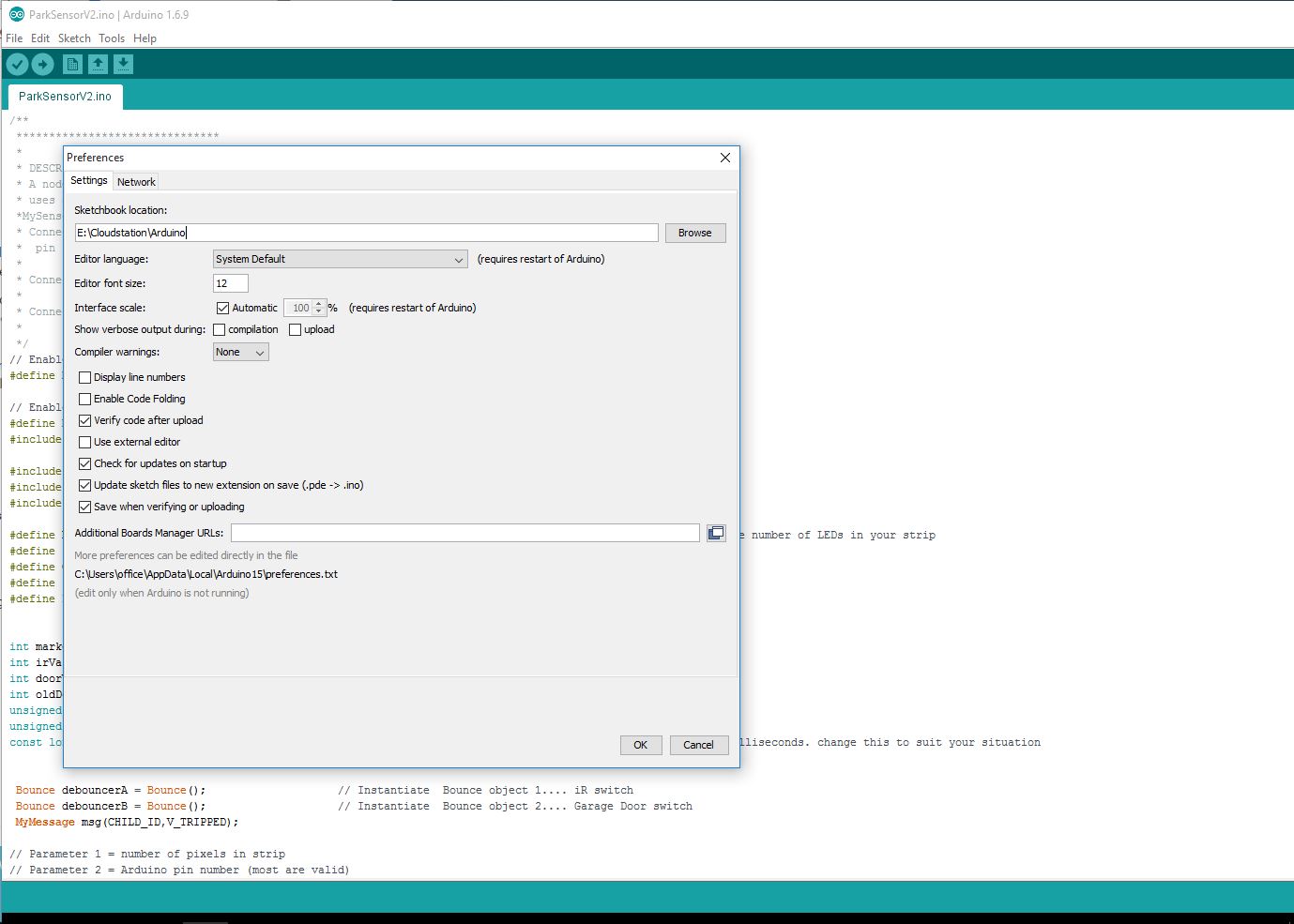
If you want to install it manually. First find out where your libraries folder is located, this will normally be Documents\Arduino\libraries but you can check as shown below
Select File...Preferences
You can see the sketchbook location shown at the top line. Your libraries folder should be located in there. In my case it will be E:Cloudstation\Arduino\libraries
-
Very comprehensive and prompt reply !!! :+1: I will follow your steps today and update you on the outcome.
Thank you so much for your help. -
Ok, I tired the steps as explained and everything seems to be working.
[Some Observations]:
-
Strangely, I had Arduino version 1.7 which did not have "Manage Libraries" button in the sketch tab at all. So I uninstalled it and installed the 1.6.11 version and then I found the "Manage Libraries" and successfully installed the "mysensors" library. I also compiled and uploaded some example sketches to my Arduino nano!
-
In the video of the demonstration of how to start with my sensors (made by petewill), it says to locate an example named "SerialGateway", but in my library it is named "GatewaySerial", are they the same thing ?
-
I would really appreciate if I can have some sort of tutorials on how to start using the wifi modules, or put simple, how to get the best out of mysensors.org ? At the moment, I have all the components but yet to find out how I can really utilise the "mysensors.org" capability.
Again, thank you so much for all your help !
Cheers,
Mehrdad -
-
Ok, I tired the steps as explained and everything seems to be working.
[Some Observations]:
-
Strangely, I had Arduino version 1.7 which did not have "Manage Libraries" button in the sketch tab at all. So I uninstalled it and installed the 1.6.11 version and then I found the "Manage Libraries" and successfully installed the "mysensors" library. I also compiled and uploaded some example sketches to my Arduino nano!
-
In the video of the demonstration of how to start with my sensors (made by petewill), it says to locate an example named "SerialGateway", but in my library it is named "GatewaySerial", are they the same thing ?
-
I would really appreciate if I can have some sort of tutorials on how to start using the wifi modules, or put simple, how to get the best out of mysensors.org ? At the moment, I have all the components but yet to find out how I can really utilise the "mysensors.org" capability.
Again, thank you so much for all your help !
Cheers,
Mehrdad@mehrdad.silatani said
Strangely, I had Arduino version 1.7 which did not have "Manage Libraries" button in the sketch tab at all. So I uninstalled it and installed the 1.6.11 version and then I found the "Manage Libraries" and successfully installed the "mysensors" library. I also compiled and uploaded some example sketches to my Arduino nano!
Yes this is a real tragedy. The original developers of Arduino have had a falling out and split into two different groups. Each are developing their own version of the IDE. From the original site https://www.arduino.cc/en/Main/Software you will get version 1.6.11 and from the other group at http://www.arduino.org/downloads you will get version 1.7.10
I have always used the arduino.cc version FWIW
the GatewaySerial sketch is the v2 serialgateway sketch so yes use that.
Being open source all the work on Mysensors is done by volunteers in their spare time. You have to remember these people have many other commitments as well. Version 2 has not long been released so the site is still in the process of being updated in some places.
The forum is a great place to get info, I have learnt a lot just reading through the posts and looking at other peoples sketches and projects. If you get stuck there will usually be someone willing to help on there.
-
-
Thank you so much for your elaborate explanations ! It really cleared up some questions I had in mind, especially about the Arduino versions !
Also, I did not know that "Mysensors" is run entirely by volunteers! I will try to become one of those useful volunteers that helps others (like you :) ) rather than coming up with questions all the time ;) :)


Hello! It looks like you're interested in this conversation, but you don't have an account yet.
Getting fed up of having to scroll through the same posts each visit? When you register for an account, you'll always come back to exactly where you were before, and choose to be notified of new replies (either via email, or push notification). You'll also be able to save bookmarks and upvote posts to show your appreciation to other community members.
With your input, this post could be even better 💗
Register Login