
Wall mounted 'mood light' v2
-
FIXED!
Happy :)Issue was so obvious...
I was supplying Neopixel LED's with 5V trought Arduino pro mini... so when node was starting everything was ok till sending light pattern to node. When data was send, LED's took to much Watts, and radio was crashing...
So now I just powered LED's with 5V parerall to the node ( LED's are supplied before node).Now, I need to understand your code, how "buttonPin" is working and how to set patterns. It seems that the code is acting wired sometimes, but I think that's due to my less knowledge about it now.
Thanks for guidlines!
-
@AWI
Amasing! I have been using your v1 sketch on 5 different nodes.
I was just about to make another one when i saw that you had released another version.I have made a similar hack to your v1 with a dimmer/selector switch in domoticz as pattern selector. But your code looks way better :)
-
If I wanted to add a effect like:
#include "FastLED.h"
#define NUM_LEDS 60
CRGB leds[NUM_LEDS];
#define PIN 6

void setup()
{
  FastLED.addLeds<WS2811, PIN, GRB>(leds, NUM_LEDS).setCorrection( TypicalLEDStrip );
}

// *** REPLACE FROM HERE ***
void loop() {
  // ---> here we call the effect function <---
}

// ---> here we define the effect function <---
// *** REPLACE TO HERE ***

void showStrip() {
 #ifdef ADAFRUIT_NEOPIXEL_H
   // NeoPixel
   strip.show();
 #endif
 #ifndef ADAFRUIT_NEOPIXEL_H
   // FastLED
   FastLED.show();
 #endif
}

void setPixel(int Pixel, byte red, byte green, byte blue) {
 #ifdef ADAFRUIT_NEOPIXEL_H
   // NeoPixel
   strip.setPixelColor(Pixel, strip.Color(red, green, blue));
 #endif
 #ifndef ADAFRUIT_NEOPIXEL_H
   // FastLED
   leds[Pixel].r = red;
   leds[Pixel].g = green;
   leds[Pixel].b = blue;
 #endif
}

void setAll(byte red, byte green, byte blue) {
  for(int i = 0; i < NUM_LEDS; i++ ) {
    setPixel(i, red, green, blue);
  }
  showStrip();
}
void loop() { SnowSparkle(0x10, 0x10, 0x10, 20, random(100,1000)); } void SnowSparkle(byte red, byte green, byte blue, int SparkleDelay, int SpeedDelay) { setAll(red,green,blue); int Pixel = random(NUM_LEDS); setPixel(Pixel,0xff,0xff,0xff); showStrip(); delay(SparkleDelay); setPixel(Pixel,red,green,blue); showStrip(); delay(SpeedDelay); }What would I need to change/add in the code?
-
-
Hi there, I am very happy with this project. Somehow with the transition to the current stable library (2.0) the lights won't turn off completely. I can't figure out what is wrong. Anyone has some suggestions?
@Jurik Happened to me too... change the auto increments in the
updateLightBrightness()routine to++actualBrightnessand--actualBrightness.See below
// Update the light brightness if time void updateLightBrightness(){ // global: curBrightness, actualBrightness, updateBrightnessDelay, lastBrightnessUpdate ; static byte actualBrightness ; // store real brightness state for slow dim unsigned long now = millis() ; if (now > lastBrightnessUpdate + updateBrightnessDelay){// check if time for update if ( actualBrightness > curBrightness) { FastLED.setBrightness( --actualBrightness); FastLED.show(); } else if ( actualBrightness < curBrightness){ FastLED.setBrightness( ++actualBrightness ); FastLED.show(); } lastBrightnessUpdate = now ; } } -
@AWI what does this mean: "const int numPixel = 16 ; // set to number of pixels (x top / y bottom)" ?
If I have a strip with 72 leds that are in a row up/down, should I just enter 72?I also can't figure out how to control the leds from domoticz. I have copied your sketch and I see the device in domoticz under nrf-radio-gateway (with 7 childs)
I have tried to create a dummy selector and have tried to add this:
http://192.168.0.175:8080/json.htm?type=command¶m=switchlight&idx=1094&switchcmd=Set Level&level=pFire
http://192.168.0.175:8080/json.htm?type=command¶m=switchlight&idx=1094&switchcmd=Set Level&level=0
http://192.168.0.175:8080/json.htm?type=command¶m=switchlight&idx=1094&switchcmd=Set Level&level=1
http://192.168.0.175:8080/json.htm?type=command¶m=switchlight&idx=1094&switchcmd=Set Level&level=2
http://192.168.0.175:8080/json.htm?type=command¶m=switchlight&idx=1094&switchcmd=Set Level&level=pOnBut nothing seams to work, I have also tried the commands directly in the chrome url bar with no effect. What am I missing?
-
Ahhh, the effects start at 4 ? when trying numbers 4-10 I get effects for most numbers but a few like 8-9 is blank and 0-2 turns strip off. When fiddeling about, I managed to get the alarm at number 4 to speed up somehow. I tried to read the sketch but cant quite understand.
-
@AWI Thanx for the advice! i will try it as soon as i get the chance. Great work!! thanx.
@Cliff-Karlsson Afaik, the numPixels correspond to the total number of leds combined with up/down or left/right. So 16 will make it an 8x8 wall light and 2 would make it a 1 by 1, 72 would make it 36x36. As far as the triggers in Domoticz, i am also new at this. I did manage to get the alarm running and the patterns through the dimmer function, but am unable to set up the patterns on a switch. Domoticz won't let me somehow. Will try to give this more prio.
Keep trying! and posting please
-
-
Hey @AWI
I have some trouble using this with MqTT messages.
I can get alarm to go off by sending a payload of '1' to 'InMQTT/62/4/1/0/2' and subsequently turn it off with any other value.But I can't get the rest of your functions to work!
If I read your code correct, to set a solid color I would have to send several MqTT messages to the children?
Ex, I would have to send 'InMQTT/62/1/1/0/40' and payload ex 'Candle' first.
Then 'InMQTT/62/1/1/0/2' with payload of '1' to turn it on?
I was looking at the serial protocol and do not find what V_Dimmer is for type. (https://www.mysensors.org/download/serial_api_20#variable-types)Anyways, i cant get it to work properly, maybe you could shed some light (pun not intended :+1: ) )?
-
If someone still needs it, I managed to control it via mqtt (node-red). I am about to integrate it into the openhab, it might be easier to start that but I wanted to have good control over it (and understand mqtt a bit better).
In sketch I had to change} else if (message.type == V_DIMMER) { // if DIMMER type, adjust brightnessto V_PERCENTAGE for latest api/mqtt
and I am still struggling a bit to turn all LEDs off completely. Only way I could achieve this was to set color to black (000000). code as it is always leaves my LEDs to 1% or something. But that might be due to node-red implementation, as I do not have response from node-red on "questions" from the node (at some point in code node will ask controller about some values (color if I remember correctly), but I just send the color and brightness manually via injectors). I guess this can be fixed on the controller side, and most likely works with openhab implementation.
Here are the triggers in node-red
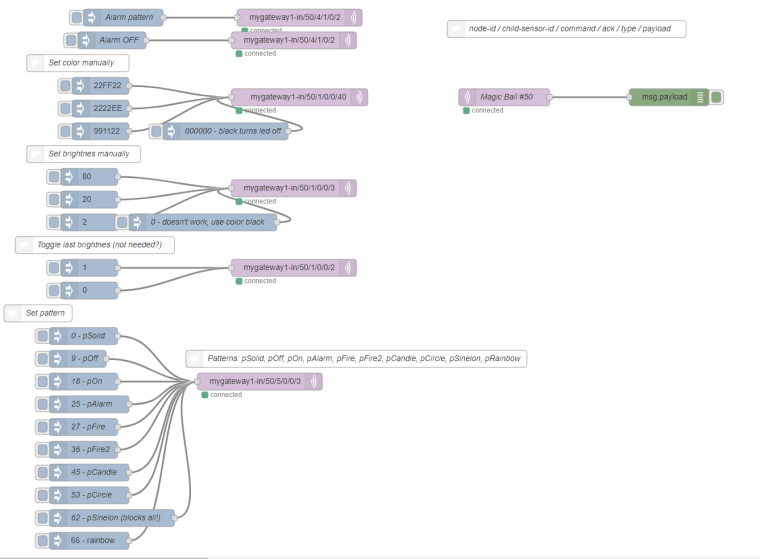
Here is the node-red code
[{"id":"8f6785a0.874838","type":"debug","z":"8cfe95c3.331248","name":"","active":true,"console":"false","complete":"false","x":1210,"y":180,"wires":[]},{"id":"a300f395.f6e59","type":"mqtt out","z":"8cfe95c3.331248","name":"","topic":"mygateway1-in/50/5/0/0/3","qos":"","retain":"","broker":"9daccc99.b6c71","x":490,"y":680,"wires":[]},{"id":"45adf375.e59b6c","type":"inject","z":"8cfe95c3.331248","name":"9 - pOff","topic":"","payload":"9","payloadType":"str","repeat":"","crontab":"","once":false,"x":170,"y":640,"wires":[["a300f395.f6e59"]]},{"id":"859588e.a1bec78","type":"mqtt out","z":"8cfe95c3.331248","name":"","topic":"mygateway1-in/50/1/0/0/40","qos":"","retain":"","broker":"9daccc99.b6c71","x":560,"y":180,"wires":[]},{"id":"39b0ef0e.94ef","type":"inject","z":"8cfe95c3.331248","name":"","topic":"","payload":"22FF22","payloadType":"str","repeat":"","crontab":"","once":false,"x":210,"y":160,"wires":[["859588e.a1bec78"]]},{"id":"9dabd8f3.6033b8","type":"inject","z":"8cfe95c3.331248","name":"Alarm pattern","topic":"","payload":"1","payloadType":"str","repeat":"","crontab":"","once":false,"x":250,"y":40,"wires":[["3a117d06.451d12"]]},{"id":"3a117d06.451d12","type":"mqtt out","z":"8cfe95c3.331248","name":"","topic":"mygateway1-in/50/4/1/0/2","qos":"","retain":"","broker":"9daccc99.b6c71","x":560,"y":40,"wires":[]},{"id":"e3c2d218.e92dc","type":"mqtt out","z":"8cfe95c3.331248","name":"","topic":"mygateway1-in/50/4/1/0/2","qos":"","retain":"","broker":"9daccc99.b6c71","x":550,"y":80,"wires":[]},{"id":"5325f52d.2549fc","type":"inject","z":"8cfe95c3.331248","name":"Alarm OFF","topic":"","payload":"0","payloadType":"str","repeat":"","crontab":"","once":false,"x":230,"y":80,"wires":[["e3c2d218.e92dc"]]},{"id":"f9bc44c0.c1f2d8","type":"mqtt in","z":"8cfe95c3.331248","name":"Magic Ball #50","topic":"mygateway1-out/50/#","qos":"2","broker":"9daccc99.b6c71","x":920,"y":180,"wires":[["8f6785a0.874838"]]},{"id":"6a07f043.d5e8a","type":"comment","z":"8cfe95c3.331248","name":"node-id / child-sensor-id / command / ack / type / payload","info":"","x":1030,"y":60,"wires":[]},{"id":"f71ad6cd.2044a8","type":"inject","z":"8cfe95c3.331248","name":"","topic":"","payload":"2222EE","payloadType":"str","repeat":"","crontab":"","once":false,"x":210,"y":200,"wires":[["859588e.a1bec78"]]},{"id":"44e58ecb.748fb","type":"inject","z":"8cfe95c3.331248","name":"","topic":"","payload":"991122","payloadType":"str","repeat":"","crontab":"","once":false,"x":210,"y":240,"wires":[["859588e.a1bec78"]]},{"id":"a91be428.b74eb8","type":"comment","z":"8cfe95c3.331248","name":"Set color manually","info":"","x":170,"y":120,"wires":[]},{"id":"90b541d2.c2abf","type":"mqtt out","z":"8cfe95c3.331248","name":"","topic":"mygateway1-in/50/1/0/0/3","qos":"","retain":"","broker":"9daccc99.b6c71","x":550,"y":340,"wires":[]},{"id":"91fe4122.027e3","type":"inject","z":"8cfe95c3.331248","name":"","topic":"","payload":"80","payloadType":"str","repeat":"","crontab":"","once":false,"x":190,"y":320,"wires":[["90b541d2.c2abf"]]},{"id":"47bc1da0.380374","type":"inject","z":"8cfe95c3.331248","name":"","topic":"","payload":"20","payloadType":"str","repeat":"","crontab":"","once":false,"x":190,"y":360,"wires":[["90b541d2.c2abf"]]},{"id":"baa820db.90109","type":"inject","z":"8cfe95c3.331248","name":"","topic":"","payload":"2","payloadType":"str","repeat":"","crontab":"","once":false,"x":190,"y":400,"wires":[["90b541d2.c2abf"]]},{"id":"709b3196.8abe","type":"comment","z":"8cfe95c3.331248","name":"Set brightnes manually","info":"","x":180,"y":280,"wires":[]},{"id":"1cf7aba7.c34224","type":"mqtt out","z":"8cfe95c3.331248","name":"","topic":"mygateway1-in/50/1/0/0/2","qos":"","retain":"","broker":"9daccc99.b6c71","x":550,"y":480,"wires":[]},{"id":"4263529d.67e44c","type":"inject","z":"8cfe95c3.331248","name":"","topic":"","payload":"1","payloadType":"str","repeat":"","crontab":"","once":false,"x":190,"y":480,"wires":[["1cf7aba7.c34224"]]},{"id":"2528b5c4.d1bc6a","type":"inject","z":"8cfe95c3.331248","name":"","topic":"","payload":"0","payloadType":"str","repeat":"","crontab":"","once":false,"x":190,"y":520,"wires":[["1cf7aba7.c34224"]]},{"id":"e2707070.7e9dc","type":"comment","z":"8cfe95c3.331248","name":"Toggle last brightnes (not needed?)","info":"","x":200,"y":440,"wires":[]},{"id":"3b8f804c.e92f7","type":"inject","z":"8cfe95c3.331248","name":"18 - pOn","topic":"","payload":"18","payloadType":"str","repeat":"","crontab":"","once":false,"x":180,"y":680,"wires":[["a300f395.f6e59"]]},{"id":"d9d700e9.90d03","type":"inject","z":"8cfe95c3.331248","name":"27 - pFire","topic":"","payload":"27","payloadType":"str","repeat":"","crontab":"","once":false,"x":180,"y":760,"wires":[["a300f395.f6e59"]]},{"id":"b2cd2709.3706e8","type":"inject","z":"8cfe95c3.331248","name":"0 - pSolid","topic":"","payload":"0","payloadType":"str","repeat":"","crontab":"","once":false,"x":180,"y":600,"wires":[["a300f395.f6e59"]]},{"id":"a3c976d.8dbe488","type":"comment","z":"8cfe95c3.331248","name":"Patterns: pSolid, pOff, pOn, pAlarm, pFire, pFire2, pCandle, pCircle, pSinelon, pRainbow","info":"","x":660,"y":640,"wires":[]},{"id":"667c092c.9b9298","type":"inject","z":"8cfe95c3.331248","name":"36 - pFire2","topic":"","payload":"36","payloadType":"str","repeat":"","crontab":"","once":false,"x":180,"y":800,"wires":[["a300f395.f6e59"]]},{"id":"ca6823c6.a674","type":"inject","z":"8cfe95c3.331248","name":"25 - pAlarm","topic":"","payload":"25","payloadType":"str","repeat":"","crontab":"","once":false,"x":190,"y":720,"wires":[["a300f395.f6e59"]]},{"id":"75c152f3.3c287c","type":"inject","z":"8cfe95c3.331248","name":"45 - pCandle","topic":"","payload":"45","payloadType":"str","repeat":"","crontab":"","once":false,"x":190,"y":840,"wires":[["a300f395.f6e59"]]},{"id":"6da316d0.eebd68","type":"inject","z":"8cfe95c3.331248","name":"53 - pCircle","topic":"","payload":"53","payloadType":"str","repeat":"","crontab":"","once":false,"x":190,"y":880,"wires":[["a300f395.f6e59"]]},{"id":"2c15c208.c1db0e","type":"inject","z":"8cfe95c3.331248","name":"62 - pSinelon (blocks all!)","topic":"","payload":"62","payloadType":"str","repeat":"","crontab":"","once":false,"x":230,"y":920,"wires":[["a300f395.f6e59"]]},{"id":"431aad05.60f7e4","type":"inject","z":"8cfe95c3.331248","name":"","topic":"","payload":"66 - rainbow","payloadType":"str","repeat":"","crontab":"","once":false,"x":190,"y":960,"wires":[["a300f395.f6e59"]]},{"id":"b1b44b6e.1492a8","type":"comment","z":"8cfe95c3.331248","name":"Set pattern","info":"","x":100,"y":560,"wires":[]},{"id":"70d088e7.889c98","type":"inject","z":"8cfe95c3.331248","name":"0 - doesn't work, use color black","topic":"","payload":"0","payloadType":"str","repeat":"","crontab":"","once":false,"x":390,"y":400,"wires":[["90b541d2.c2abf"]]},{"id":"d5d24b03.2a6288","type":"inject","z":"8cfe95c3.331248","name":"000000 - black turns led off","topic":"","payload":"000000","payloadType":"str","repeat":"","crontab":"","once":false,"x":430,"y":240,"wires":[["859588e.a1bec78"]]},{"id":"9daccc99.b6c71","type":"mqtt-broker","z":"","broker":"localhost","port":"1883","clientid":"","usetls":false,"compatmode":false,"keepalive":"60","cleansession":true,"willTopic":"","willQos":"0","willPayload":"","birthTopic":"","birthQos":"0","birthPayload":""}] -
-
Hello all, many thanks to @AWI for this great sketch - it performs very well and is my 'go to' for a WS28XX interface with Mysensors and Openhab.
I am however, starting to experience problems introduced with the FastLED 'wait' commands and the radio receiving a command - essentially, if I command the node to a pattern that is particularly blocking - I cant them command it to off, solid colour or another pattern.
Anyone solved this problem - or able to point me in the direction of solving. I'd be happy to refresh the sketch and re-share.
-
Morning all, apologies for waking up an old thread, but it's pertinent to this chain of thought:
I'd like to build on this code and introduce a few more LED settings according to the percentage figure sent in the RGB dimmer.
Can anyone explain which part looks at the percentage and translates it out to the pattern?
How would I go about adding a new pattern to a chosen percentage value?Many thanks
Adam/* PROJECT: MySensors / RGB light NEOPIXEL PROGRAMMER: AWI DATE: october 10, 2015/ last update: september 20, 2016 FILE: AWI_Wall_LIght_x.ino LICENSE: Public domain https://forum.mysensors.org/topic/4934/wall-mounted-mood-light-v2 Hardware: Nano and MySensors 2.0, Wall light 16 WS2812B leds (neopixel) Special: uses Fastled library with NeoPixel (great & fast RBG/HSV universal library) https://github.com/FastLED/FastLED SUMMARY: Different patterns and brightness settings Button switches on/off and cycles through all Color patterns on long press Remarks: Fixed node-id Change log: 20160915 - Updated to MySensors 2.0 20160920 - Changed state change to dimmer i.s.o. switch() */ /* RGB Dimmer percentages = pattern 0 - 6 = Solid Colour 7 - 19 = Dim (think supposed to be off) 20 - 26 - Alarm (white and red light) 27 - 34 = Fire 35 - 46 = Fire2 47 - = one way Runner (set the colour first) = Two way Runner (White) You will be limited by RAM as to how many LEDs you can run Using a Mega you can run 2000 LEDs Arduino Nano = 2kb ram = 600 pixels Arduino Uno = 2kb ram = 600 pixels Arduino Mega = 8kb ram = 2400 pixels */ //**** MySensors ***** // Enable debug prints to serial monitor #define MY_DEBUG //#define MY_RADIO_NRF24 // Enable and select radio type attached //#define MY_RF24_CHANNEL 80 // radio channel, default = 76 #define MY_RS485 #define MY_RS485_DE_PIN 2 #define MY_RS485_BAUD_RATE 9600 #define MY_NODE_ID 2 #define NODE_TXT "WS2812 N2" // Text to add to sensor name // #define MY_RF24_CE_PIN 7 // Ceech board, 3.3v (7,8) (pin default 9,10) // #define MY_RF24_CS_PIN 8 // helpers #define LOCAL_DEBUG // enable if print wanted #ifdef LOCAL_DEBUG #define Sprint(a) (Serial.print(a)) // macro as substitute for print, enable if no print wanted #define Sprintln(a) (Serial.println(a)) // macro as substitute for println #else #define Sprint(a) #define Sprintln(a) #endif #include <SPI.h> // My Sensors #include <MySensors.h> #include <FastLED.h> // https://github.com/FastLED/FastLED #include "JC_Button.h" // https://github.com/JChristensen/Button const int stripPin = 4 ; // pin where 2812 LED strip is connected const int buttonPin = 5 ; // push button const int numPixel = 156 ; // set to number of pixels (x top / y bottom) const int RGB_LightChild = 0 ; // Child Id's, standard light child on/off/ dim const int RGB_RGBChild = 1 ; // RGB light child (on/off/dim/color, if controller supports V_RBG)) const int RGB_SolidColorChild = 2 ; // when set, node reads Color text from ColorTextChild const int RGB_TextColorChild = 3 ; // Holds Text value for color (custom colors from controller) const int RGB_AlarmPatternChild = 4 ; // Switches to alarm status const int RGB_NextPatternChild = 5 ; // Move to next pattern when set CRGB leds[numPixel]; // Kelving colors: Light & daylight (in Fastled reference only) /// 1900 Kelvin Candle=0xFF9329 /* 1900 K, 255, 147, 41 */, /// 2600 Kelvin Tungsten40W=0xFFC58F /* 2600 K, 255, 197, 143 */, /// 2850 Kelvin Tungsten100W=0xFFD6AA /* 2850 K, 255, 214, 170 */, /// 3200 Kelvin Halogen=0xFFF1E0 /* 3200 K, 255, 241, 224 */, /// 5200 Kelvin CarbonArc=0xFFFAF4 /* 5200 K, 255, 250, 244 */, /// 5400 Kelvin HighNoonSun=0xFFFFFB /* 5400 K, 255, 255, 251 */, /// 6000 Kelvin DirectSunlight=0xFFFFFF /* 6000 K, 255, 255, 255 */, /// 7000 Kelvin OvercastSky=0xC9E2FF /* 7000 K, 201, 226, 255 */, /// 20000 Kelvin ClearBlueSky=0x409CFF /* 20000 K, 64, 156, 255 */ char setRGBvalue[] = "FFC58F"; // Controller sent RGB value, default tungsten40W uint16_t curBrightness = 0x7F, setBrightness = 0x7F ; // Brightness globals (actualBrightness) unsigned long updateBrightnessDelay, lastBrightnessUpdate ; // Brightness timers int RGBonoff ; // OnOff flag enum { pSolid, pOff, pOn, pAlarm, pFire, pFire2, pCandle, pCircle, pSinelon, pRainbow} ; // Pattern states (stored in int for convenience) const int lastPatternIdx = pRainbow + 1 ; // use last pattern for patterncount int curPattern = pSolid ; // current pattern int setPattern = pSolid ; // set pattern (controller) unsigned long updatePatternDelay, lastPatternUpdate ; // Pattern timers unsigned long idleTimer = millis() ; // return to idle timer const unsigned long idleTime = 10000UL; // return to idle after 10 secs const unsigned long dimTime = 1000UL; // dim period const unsigned long heartbeatInterval = 1 * 60UL * 1000UL ; // heartbeatinterval, just to let the controller know I am alive unsigned long heartbeatCounter = 0 ; MyMessage lightRGBMsg(RGB_LightChild, V_RGB); // standard messages, light MyMessage lightdimmerMsG(RGB_LightChild ,V_DIMMER); MyMessage lightOnOffMessage(RGB_LightChild, V_STATUS); Button myBtn(buttonPin, true, true, 20); //Declare the button (pin, pull_up, invert, debounce_ms) // Simple state machine for button state enum {sIdle, sBrightness, sPattern} ; // simple state machine for button press int State ; void setup() { FastLED.addLeds<WS2812B, stripPin, RGB >(leds, numPixel); // initialize led strip (NEOPIXEL =WS...) for(int i = 0 ; i < 6 ; i++) { // get color value from EEPROM (6 char) setRGBvalue[i] = loadState(i) ; } setLightPattern(pSolid, 0) ; // default controller Solid FastLED.show(); State = sIdle ; // Initial state //randomSeed(analogRead(0)); } void presentation(){ // MySensors sendSketchInfo("AWI RGB Wall " NODE_TXT, "2.0"); present(RGB_RGBChild, S_RGB_LIGHT, "RGB Wall RGB " NODE_TXT);// present to controller present(RGB_LightChild, S_LIGHT, "RGB Wall Light " NODE_TXT); present(RGB_SolidColorChild, S_LIGHT, "RGB Set Solid color (text) " NODE_TXT); present(RGB_TextColorChild, S_INFO, "RGB Wall textcolor " NODE_TXT); present(RGB_AlarmPatternChild, S_BINARY, "RGB Wall Alarm " NODE_TXT); present(RGB_NextPatternChild, S_DIMMER, "RGB Wall Pattern " NODE_TXT); } // read button and act accordingly // short press: on/off // longer press: set patterns with following short press // long press: set brightness increase void loop() { myBtn.read(); //Read the button (only read) unsigned long now = millis(); // loop timer reference switch (State) { case sIdle: // default state, browse through patterns if (myBtn.wasReleased()){ // light on/ off in idle RGBonoff = !RGBonoff ; // invert light state setLightBrightness((RGBonoff == 1)?setBrightness:0, dimTime); send(lightOnOffMessage.set(RGBonoff)); // and update controller } else if (myBtn.pressedFor(800)){ // move to Pattern update state with long press idleTimer = now ; // return to idle after ... State = sPattern ; } break ; case sPattern: // entered after long press if (myBtn.pressedFor(4000)){ // when press even longer move to Brightness update State = sBrightness ; } else if (myBtn.wasPressed()){ setPattern = (setPattern + 1) % lastPatternIdx ; // increase pattern and wrap setLightPattern((setPattern), 500 ); idleTimer = now ; } else if ( now > idleTime + idleTimer ){ // return to idle after ... State = sIdle ; } break ; case sBrightness: // entered after looong press if (myBtn.wasPressed()){ // if pressed again increase brightness setLightBrightness((curBrightness+0x1F) % 0xFF, 0) ; // increase brightness and wrap (0..0xFF) idleTimer = now ; } else if ( now > idleTime + idleTimer ){ // return to idle after ... State = sIdle ; } break ; default : State = sIdle ; break ; } updateLightBrightness(); // update Brightness if time updateLightPattern(); // update Pattern if time if ( now > heartbeatCounter + heartbeatInterval){ // heartbeat every hour sendHeartbeat(); heartbeatCounter = now ; } } // Sets the light brightness, takes value and time (ms) as input void setLightBrightness(int newBrightness, unsigned long updateTime){ // global: curBrightness, actualBrightness, updateBrightnessDelay updateBrightnessDelay = updateTime / 0xFF ; // delay = time / max steps curBrightness = newBrightness ; // set curBrightness to new value, rest is done in update } // Update the light brightness if time void updateLightBrightness(){ // global: curBrightness, actualBrightness, updateBrightnessDelay, lastBrightnessUpdate ; static byte actualBrightness ; // store real brightness state for slow dim unsigned long now = millis() ; if (now > lastBrightnessUpdate + updateBrightnessDelay){// check if time for update if ( actualBrightness > curBrightness) { FastLED.setBrightness( --actualBrightness ); FastLED.show(); } else if ( actualBrightness < curBrightness){ FastLED.setBrightness( ++actualBrightness ); FastLED.show(); } lastBrightnessUpdate = now ; } } // **** Pattern routines ***** // Sets and initializes the light pattern if nescessary void setLightPattern( int newPattern, unsigned long updateDelay){ // global: curPattern, updatePatternDelay static int lastPattern = pSolid ; // last pattern for pOn / pOff virtual patterns if (newPattern == pOff) lastPattern = curPattern ; // remember last pattern if (newPattern == pOn) curPattern = lastPattern ; // only for pOn switch to last pattern else curPattern = newPattern ; updatePatternDelay = updateDelay ; // delay for next pattern update, can be changed in pattern switch(curPattern){ case pSolid: // solid is set value in all pixels (and on) for(int i = 0 ; i < numPixel ; i++) leds[i] = strtol( setRGBvalue, NULL, 16); setLightBrightness(setBrightness, dimTime) ; // slow dim to on FastLED.show(); break ; case pOn: // On is set Brightness in all pixels setLightBrightness(setBrightness, dimTime) ; // slow dim to on FastLED.show(); break ; case pOff: // off state all pixels off (add dim and pOn) setLightBrightness(0, dimTime) ; // slow dim to off FastLED.show(); break ; case pCircle: // all pixels off for(int i = 0 ; i < numPixel ; i++) leds[i] = 0 ; for(int i = 0 ; i < 2 ; i++){ leds[i] = strtol( setRGBvalue, NULL, 16) ; // 1 pixel on } FastLED.show(); break ; default : setLightBrightness(setBrightness, dimTime) ; // slow dim to on FastLED.show(); break ; } } // Update the light pattern when time for it void updateLightPattern(){ // global: curPattern, updatePatternDelay, lastPatternUpdate unsigned long now = millis() ; if (now > lastPatternUpdate + updatePatternDelay){ // check if time for update switch (curPattern) { case pAlarm: // flash light patternAlarm(); break ; case pFire: // wild fire patternFire(); break ; case pFire2: // cosy fire patternFire2(); break ; case pCandle: // flame patternCandle(); break ; case pCircle: // flame patternCircle(); break ; case pRainbow: // rotating rainbow patternRainbow(); break ; case pSinelon: // rotating rainbow patternSinelon(); break ; case pSolid: // do nothing fall through case pOff: case pOn: default : // def break ; } lastPatternUpdate = now ; } } // Define the different patterns // Alarm - intermittent white and red color, full intensity, intermittent top & bottom half void patternAlarm() { static boolean topBot ; // indicates direction for next entry const CRGB colorTop = CRGB(0xFF, 0, 0 ); // red color const CRGB colorBottom = CRGB(0xFF, 0xFF, 0xFF ); // white color FastLED.setBrightness(0xFF); // set the strip brightness to max for Alarm for(int i=0; i <= (numPixel / 2 - 1) ; i++) { // for half of strip size leds[i] = topBot?colorTop:colorBottom ; leds[i+ (numPixel/2)] = topBot?colorBottom:colorTop ; } topBot = !topBot ; // switch direction FastLED.show(); } // Simulate fire with red color, varying number of leds intensity & tempo void patternFire() { byte numberLeds = random(0,numPixel); // start number and end of led's for flickering int lum = ((random(100,255) * curBrightness)) / 0xFF ; // set brightness and scale CRGB color = CRGB(200, random(70,230),0 ); // get red color with varying green for(int i=0; i <= numberLeds; i++) { leds[i] = color ; FastLED.setBrightness(lum); // set the strip brightness FastLED.show(); wait(random(0,10)); // (blocking, need to be changed) } updatePatternDelay = 100 ; } // Simulate fire with red color and varying intensity & tempo void patternFire2() { CRGB color = CRGB(200, random(100,150),0); // get red color with varying green for (byte p=0; p < numPixel; p++) { leds[p] = color; } FastLED.setBrightness((random(50,255) * curBrightness)/ 0xFF ); // set Brightness and scale FastLED.show(); updatePatternDelay = random(20,300); // variable delay } // Simulate candle based on fire with red color, varying number of leds intensity & tempo void patternCandle() { byte numberLeds = random(0,numPixel); // start number and end of led's for flickering byte lum = ((random(100, 255) * curBrightness)/ 0xFF); // set brightness CRGB color = CRGB(200, random(90,130),0 ); // get red color with varying green for(int i=0; i <= numberLeds; i++) { leds[i] = color ; FastLED.setBrightness(lum); // set the strip brightness FastLED.show(); wait(random(5,10)); // (blocking, need to be changed) } updatePatternDelay = 100 ; } // a colored dot sweeping back and forth, with fading trails, adapted from Fastled sinelon void patternSinelon() { fadeToBlackBy( leds, numPixel, 10); // fade all leds a small amount int pos = beatsin8(25,0,numPixel); // get a new position for the led (BPM = 13, min, max, ) leds[pos] += strtol( setRGBvalue, NULL, 16); FastLED.show(); updatePatternDelay = 2 ; } // Rotate all Leds with current content and trail void patternCircle() { static int currentLed ; // indicated current led to light // CRGB tempLed = leds[0]; // temporary variable for color fadeToBlackBy( leds, numPixel, 128); // fade all leds for trail.. leds[currentLed] = strtol( setRGBvalue, NULL, 16); // set to current color currentLed = (currentLed + 1) % numPixel ; // wrap FastLED.show(); updatePatternDelay = 100 ; } void patternRainbow() { static uint16_t hue ; // starting color FastLED.clear(); // for(hue=10; hue<255*3; hue++) { hue = (hue+1) % 0xFF ; // incerease hue and wrap fill_rainbow( leds, numPixel , hue /*static hue value */, 1);// set a rainbow from hue to last in stepsize 1 FastLED.show(); updatePatternDelay = 100 ; } // Incoming messages from MySensors void receive(const MyMessage &message) { int ID = message.sensor; Serial.print("Sensor: "); Serial.println(ID); switch (ID){ case RGB_LightChild: // same behaviour as RGB child/ fall through case RGB_RGBChild: // if controller can handle V_RGB if (message.type == V_RGB) { // check for RGB type strcpy(setRGBvalue, message.getString()); // get the payload setLightPattern(pSolid, 0); // and set solid pattern } else if (message.type == V_DIMMER) { // if DIMMER type, adjust brightness setBrightness = map(message.getInt(), 0, 100, 0, 255); setLightBrightness(setBrightness, dimTime) ; } else if (message.type == V_STATUS) { // if on/off type, toggle brightness RGBonoff = message.getInt(); setLightBrightness((RGBonoff == 1)?setBrightness:0, dimTime); } break ; case RGB_SolidColorChild: // request color from controller if (message.type == V_STATUS) { // if get color from text child request(RGB_TextColorChild, V_TEXT); setLightPattern(pSolid, 0); // and set solid pattern (if not alre) } break ; case RGB_TextColorChild: // Text color from controller if (message.type == V_TEXT) { // if get color from text child strcpy(setRGBvalue, message.getString()); // get the payload for(int i = 0 ; i < 6 ; i++) { // save color value to EEPROM (6 char) saveState(i, setRGBvalue[i]) ;} // Save to EEPROM } break ; case RGB_AlarmPatternChild: // set Alarm pattern if (message.type == V_STATUS) { // if get color from text child if (message.getInt() == 1){ setLightPattern(pAlarm, 500); // set slow alarm pattern } else { setLightPattern(setPattern, 0); // and reset pattern FastLED.setBrightness(setBrightness); } } break ; case RGB_NextPatternChild: // next pattern if (message.type == V_PERCENTAGE) { // Percentage indicates the pattern setPattern = map(message.getInt(), 0, 100, 0, 15) % lastPatternIdx ; // mapper dimmer value to state 0..9 and wrap setLightPattern((setPattern), 500 ); Sprint("Pattern: ") ; Sprintln(setPattern) ; } else if (message.type == V_STATUS){ // if off switch pattern to default == 0 setPattern = 0 ; setLightPattern((setPattern), 500 ); Sprint("Pattern: ") ; Sprintln(setPattern) ; } break ; } FastLED.show(); dispRGBstat(); } // debug // display the status of all RGB: controller, requested, real void dispRGBstat(void){ Serial.print(" Color: "); Serial.print(setRGBvalue); Serial.print(" Brightness: "); Serial.println(setBrightness); } -
Hi @adds666 . I think it is this bit in the receive() function near the bottom of the code. It gets the value from the V_PERCENTAGE message and maps into the setPattern value:
case RGB_NextPatternChild: // next pattern if (message.type == V_PERCENTAGE) { // Percentage indicates the pattern setPattern = map(message.getInt(), 0, 100, 0, 15) % lastPatternIdx ; // mapper dimmer value to state 0..9 and wrap setLightPattern((setPattern), 500 ); Sprint("Pattern: ") ; Sprintln(setPattern) ; } else if (message.type == V_STATUS){ // if off switch pattern to default == 0 setPattern = 0 ; setLightPattern((setPattern), 500 ); Sprint("Pattern: ") ; Sprintln(setPattern) ; } break ; -
Hi @nagelc , thanks for coming back to me - Apologies I didn't realise you'd replied nearer the time.
Am I right in thinking, so long as I define the new patterns function later on in the sketch - I can include it in the switch of function updateLightPattern, and it will be added to the mapping?
How do we know what definitive figures the 0 to 100 percentage map to in 0 to 15? Or is that basic arithmetic and each switch state will be called in each 'chunk'. I also only count 10 items in the switch state. Does that mean we can add 5 more? and if wanting more than 15 simply change our mapping size to have more?
Appreciate the help.
void updateLightPattern(){ // global: curPattern, updatePatternDelay, lastPatternUpdate unsigned long now = millis() ; if (now > lastPatternUpdate + updatePatternDelay){ // check if time for update switch (curPattern) { case pAlarm: // flash light patternAlarm(); break ; case pFire: // wild fire patternFire(); break ; case pFire2: // cosy fire patternFire2(); break ; case pCandle: // flame patternCandle(); break ; case pCircle: // flame patternCircle(); break ; case pRainbow: // rotating rainbow patternRainbow(); break ; case pSinelon: // rotating rainbow patternSinelon(); break ; case pSolid: // do nothing fall through case pOff: case pOn: default : // def break ; } lastPatternUpdate = now ; } } -
Hi @nagelc , thanks for coming back to me - Apologies I didn't realise you'd replied nearer the time.
Am I right in thinking, so long as I define the new patterns function later on in the sketch - I can include it in the switch of function updateLightPattern, and it will be added to the mapping?
How do we know what definitive figures the 0 to 100 percentage map to in 0 to 15? Or is that basic arithmetic and each switch state will be called in each 'chunk'. I also only count 10 items in the switch state. Does that mean we can add 5 more? and if wanting more than 15 simply change our mapping size to have more?
Appreciate the help.
void updateLightPattern(){
  // global: curPattern, updatePatternDelay, lastPatternUpdate
  unsigned long now = millis() ;
  if (now > lastPatternUpdate + updatePatternDelay){    // check if time for update
    switch (curPattern) {
      case pAlarm:                  // flash light
        patternAlarm();
        break ;
      case pFire:                   // wild fire
        patternFire();
        break ;
      case pFire2:                  // cosy fire
        patternFire2();
        break ;
      case pCandle:                 // flame
        patternCandle();
        break ;
      case pCircle:                 // flame
        patternCircle();
        break ;
      case pRainbow:                  // rotating rainbow
        patternRainbow();
        break ;
      case pSinelon:                  // rotating rainbow
        patternSinelon();
        break ;
      case pSolid:                  // do nothing fall through
      case pOff:
      case pOn:
      default :                   // def
        break ;
      }
    lastPatternUpdate = now ;
    }
  }






Hello! It looks like you're interested in this conversation, but you don't have an account yet.
Getting fed up of having to scroll through the same posts each visit? When you register for an account, you'll always come back to exactly where you were before, and choose to be notified of new replies (either via email, or push notification). You'll also be able to save bookmarks and upvote posts to show your appreciation to other community members.
With your input, this post could be even better 💗
Register Login