
[SOLVED] ESP8266 fails to boot with NRF24L01+ connected
-
Debugging futher...
So if I understand correctly from the ESP8266 docs: boot mode 7, means boot from SPI FLASH (7 = 0111).I can disconnect 3 types of wires to get the boot procedure to run with:
boot mode:(3,x)
The boot flow changes if I disconnect either the VCC, GROUND or the CSN wire... But the boot is not always the same, I'll try to summarize:All pins of the NRF connected:
boot mode:(7,7)- not booting
Disconnect VCC pin, reset, reconnect after 1s:boot mode:(3,7)- booting, gateway working
All pins connected:boot mode:(7,7)- not booting
Disconnect CSN pin, reset, reconnect after 1s:boot mode:(3,7)- booting, gateway working
All pins connected:boot mode:(7,7)- not bootingSo, this boot changes if I leave the pin disconnected for the full boot process (you'll get a radio init fail of course)
All pins of the NRF connected:
boot mode:(7,7)- not booting
Disconnect VCC pin:boot mode:(3,7)- booting, gateway not working
Reconnect VCC pin before reset:boot mode: (7,6)- not booting
Disconnect VCC pin:boot mode:(3,6)- booting, gateway not workingSo guessing on the bootmodes: if the first integer is a 7, there is an error with the boot sequence, the second integer seems to be related to the NRF, did it fully run last time -> a 7, if I keep it out for a full boot sequence (including running of the gateway) we get a 6. Strange......
-
Got it solved!
Ok, after debugging for a while: the problem is with the CSN pin on GPIO pin 15. Pin 15 is also used in the ESP8266 to define boot from SD card. Somehow, at least in my case, after a reset, the NRF chip sets the CSN pin to high (measured it with a multimeter), causing the ESP8266 to start the SD-card procedure, which fails of course. The solution for me is swapping the pins for inclusion with the CSN pin:
So:
CSN -> GPIO 5 -> D1
Inclusion mode -> GPIO 15 -> D78One question though: I also seem to have SPI pins on the other side of the Devkit, why aren't those used?
-
-
Ok, another small update from my side. I think I localized the root cause of what was putting my CSN in a high state.
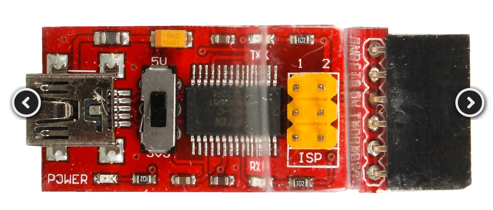
Last couple of days I was testing with a sensor connected with power through a FTDI adapter, the adapter had a nice switch to chose between 3.3v and 5v. The sensor was actually having a problem, this problem to be precise, the sensor fails after a couple of hours. At first I didn't think much about it, since the switch was on 3.3v. After having 2 NRF chips failing, I measured the output of the 3.3v pin on the arduino pro mini, you guessed it: 5V! :sob:
The funny thing is, the first chip that failed, I used on the gateway to test if it was working, because it did work without a reset, I didn't think much about it. Now I know that the 5V Probaly fried something in the chip, causing to output high on the CSN in some cases...
Attached a photo of the second chip that fried even more (the right one with the 2 black blobs below the chip). Anyway, thanks for the help folks, finally can start building something!

-
-
Ok, another small update from my side. I think I localized the root cause of what was putting my CSN in a high state.
Last couple of days I was testing with a sensor connected with power through a FTDI adapter, the adapter had a nice switch to chose between 3.3v and 5v. The sensor was actually having a problem, this problem to be precise, the sensor fails after a couple of hours. At first I didn't think much about it, since the switch was on 3.3v. After having 2 NRF chips failing, I measured the output of the 3.3v pin on the arduino pro mini, you guessed it: 5V! :sob:
The funny thing is, the first chip that failed, I used on the gateway to test if it was working, because it did work without a reset, I didn't think much about it. Now I know that the 5V Probaly fried something in the chip, causing to output high on the CSN in some cases...
Attached a photo of the second chip that fried even more (the right one with the 2 black blobs below the chip). Anyway, thanks for the help folks, finally can start building something!
-
-
It's not really a brand... It's this one: http://www.aliexpress.com/item/FT232RL-3-3V-5-5V-FTDI-USB-to-TTL-Serial-Adapter-Module-For-Arduino-TE321/32574619454.html
-
-
-




Hello! It looks like you're interested in this conversation, but you don't have an account yet.
Getting fed up of having to scroll through the same posts each visit? When you register for an account, you'll always come back to exactly where you were before, and choose to be notified of new replies (either via email, or push notification). You'll also be able to save bookmarks and upvote posts to show your appreciation to other community members.
With your input, this post could be even better 💗
Register Login