Skip to content
  • MySensors
  • OpenHardware.io
  • Categories
  • Recent
  • Tags
  • Popular
Skins
  • Light
  • Brite
  • Cerulean
  • Cosmo
  • Flatly
  • Journal
  • Litera
  • Lumen
  • Lux
  • Materia
  • Minty
  • Morph
  • Pulse
  • Sandstone
  • Simplex
  • Sketchy
  • Spacelab
  • United
  • Yeti
  • Zephyr
  • Dark
  • Cyborg
  • Darkly
  • Quartz
  • Slate
  • Solar
  • Superhero
  • Vapor

  • Default (No Skin)
  • No Skin
Collapse
Brand Logo
  1. Home
  2. Controllers
  3. Vera
  4. Pffff lib 2.0 ethernet module not working

Pffff lib 2.0 ethernet module not working

Scheduled Pinned Locked Moved Vera
17 Posts 3 Posters 2.7k Views 3 Watching
  • Oldest to Newest
  • Newest to Oldest
  • Most Votes
Reply
  • Reply as topic
Log in to reply
This topic has been deleted. Only users with topic management privileges can see it.
  • riochickenR Offline
    riochickenR Offline
    riochicken
    wrote on last edited by
    #1

    Hi guys,

    I guess I should never have updated my gateway and library to 2.0, the gateway is not functioning anymore although it says in Vera it's connected, but it does not show the lib version, I even pulled out a new Nano to make sure it was not defective, I must oversee something somewhere but I ran out of ideas, I even reuploaded the files to my vera but no luck, last resort is to use the old files and retry... I do remember from the old version you had to enable softspi for a w5100 module in the myconfig.h module but that one is not included anymore in the new w5100ethernet ino... When I enable it in the w5100 ino the device does not work anymore, which seems only logical since other pins are used...

    Anybody any ideas?

    Thanks in advance!!

    Richard

    blaceyB 1 Reply Last reply
    0
    • riochickenR riochicken

      Hi guys,

      I guess I should never have updated my gateway and library to 2.0, the gateway is not functioning anymore although it says in Vera it's connected, but it does not show the lib version, I even pulled out a new Nano to make sure it was not defective, I must oversee something somewhere but I ran out of ideas, I even reuploaded the files to my vera but no luck, last resort is to use the old files and retry... I do remember from the old version you had to enable softspi for a w5100 module in the myconfig.h module but that one is not included anymore in the new w5100ethernet ino... When I enable it in the w5100 ino the device does not work anymore, which seems only logical since other pins are used...

      Anybody any ideas?

      Thanks in advance!!

      Richard

      blaceyB Offline
      blaceyB Offline
      blacey
      Admin
      wrote on last edited by
      #2

      @riochicken I'm not sure these issues are the root cause for your problem, but a couple Ethernet issues have been resolved since the release 2.0 in July. You may want to try the development version to see if you have better luck.

      1 Reply Last reply
      0
      • hekH Offline
        hekH Offline
        hek
        Admin
        wrote on last edited by
        #3

        The new sketch automatically enables soft-spi for the rf24 radio. So the wiring should be identical to the older version of the gateway.

        Are you able to connect to it using nc or some other terminal program?

        What does the serial log say?

        riochickenR 2 Replies Last reply
        0
        • hekH hek

          The new sketch automatically enables soft-spi for the rf24 radio. So the wiring should be identical to the older version of the gateway.

          Are you able to connect to it using nc or some other terminal program?

          What does the serial log say?

          riochickenR Offline
          riochickenR Offline
          riochicken
          wrote on last edited by
          #4

          @hek: I tried the developers library as well, but that do any good! After compiling and uploading I couldnt ping at all anymore, after putting back the 2.0 library and compiling I was able to ping it and connect to it via a telnet session on port 5003, the serial output is:
          IP: 192.168.1.91
          0;255;3;0;9;Starting gateway (RNNGA-, 2.0.0)
          0;255;3;0;9;TSM:INIT
          0;255;3;0;9;TSM:RADIO:OK
          0;255;3;0;9;TSM:GW MODE
          0;255;3;0;9;TSM:READY

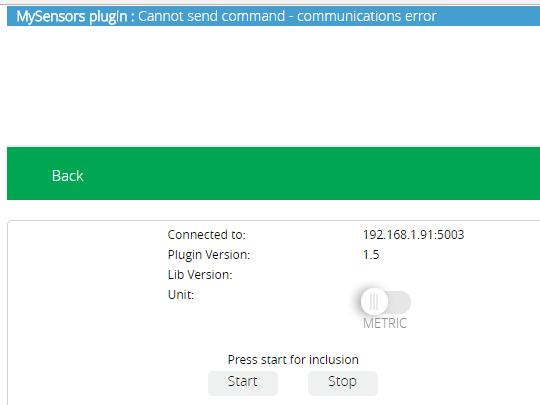
          So everything seems to be working, until I look at my Vera, the mysensors pictogram is showing a connected to 192.168.1.91 5003 but when you go to settings to include a device, it show the below screenshot. After a while after clicking start it shows the error, cannot send command - communications error....

          0_1481218571190_upload-226f85a6-d97d-4147-9b22-ef76626bc7d5

          1 Reply Last reply
          0
          • hekH hek

            The new sketch automatically enables soft-spi for the rf24 radio. So the wiring should be identical to the older version of the gateway.

            Are you able to connect to it using nc or some other terminal program?

            What does the serial log say?

            riochickenR Offline
            riochickenR Offline
            riochicken
            wrote on last edited by
            #5

            @hek I've just used the latest development version but now I cannot ping the GW at all... :(

            1 Reply Last reply
            0
            • hekH Offline
              hekH Offline
              hek
              Admin
              wrote on last edited by
              #6

              Very strange indeed. You are running the UI7 branch of the vera plugin? https://github.com/mysensors/Vera/tree/UI7

              The only thing I can think of is that you have some network problem or powering issue. Are you powering the gateway identically when connecting to it from your computer vs vera?

              riochickenR 1 Reply Last reply
              0
              • hekH hek

                Very strange indeed. You are running the UI7 branch of the vera plugin? https://github.com/mysensors/Vera/tree/UI7

                The only thing I can think of is that you have some network problem or powering issue. Are you powering the gateway identically when connecting to it from your computer vs vera?

                riochickenR Offline
                riochickenR Offline
                riochicken
                wrote on last edited by riochicken
                #7

                @hek I feel kinda stupid at the moment, I did import the library in the arduino software but did not activate it apparently.. I am now able to ping the gateway with the latest development library but still no luck with the inclusion... I am getting a little frustrated here.. at first (I stepped back to an UNO) I tried it on my local USB port, and because of your comment, I tried it on a separate USB power supply but still no luck... Ow and Yes I am using the UI7 branch, even removed it from my Vera and uploaded it again...

                1 Reply Last reply
                0
                • hekH Offline
                  hekH Offline
                  hek
                  Admin
                  wrote on last edited by
                  #8

                  Is the inclusion mode feature enabled in your gateway?

                  riochickenR 1 Reply Last reply
                  0
                  • hekH hek

                    Is the inclusion mode feature enabled in your gateway?

                    riochickenR Offline
                    riochickenR Offline
                    riochicken
                    wrote on last edited by
                    #9

                    @hek It worked before so I guess Yes... I do get the error: WARNING: Spurious .tools folder in 'MySensors' library when using the development version, seen before? It does upload to the Arduino Uno but it is not pingable...

                    1 Reply Last reply
                    0
                    • hekH Offline
                      hekH Offline
                      hek
                      Admin
                      wrote on last edited by
                      #10

                      You enable it in the sketch (look through the defines) before compiling/uploading.

                      riochickenR 1 Reply Last reply
                      0
                      • hekH hek

                        You enable it in the sketch (look through the defines) before compiling/uploading.

                        riochickenR Offline
                        riochickenR Offline
                        riochicken
                        wrote on last edited by
                        #11

                        @hek Could it be that that is causing my gateway not to work? And maybe a newby question but I have no clue how I can enable it...

                        PS: Thank you for your time to help me out...

                        1 Reply Last reply
                        0
                        • hekH Offline
                          hekH Offline
                          hek
                          Admin
                          wrote on last edited by
                          #12

                          Hmm. no, probably not (looking at the screenshot).

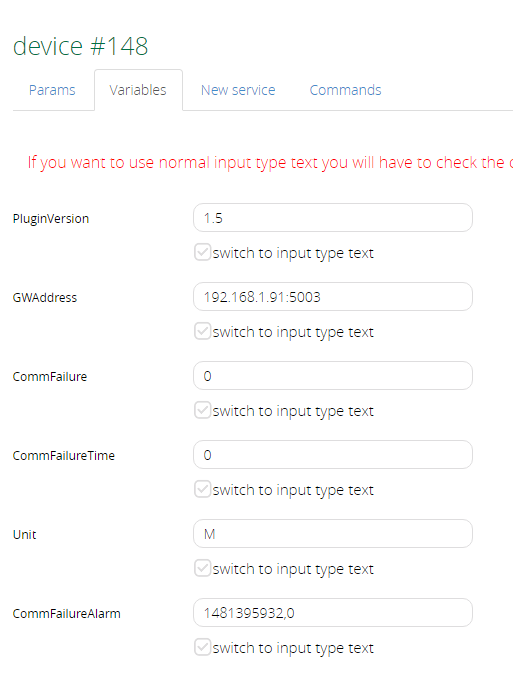
                          If you look at the advanced tab in the gateway device (vera) does it have a "CommFailure" field? What happens if you set it to "0".

                          riochickenR 1 Reply Last reply
                          0
                          • hekH hek

                            Hmm. no, probably not (looking at the screenshot).

                            If you look at the advanced tab in the gateway device (vera) does it have a "CommFailure" field? What happens if you set it to "0".

                            riochickenR Offline
                            riochickenR Offline
                            riochicken
                            wrote on last edited by riochicken
                            #13

                            @hek Yes it has a CommFailure filed and it is already set to 0..

                            0_1481404664094_upload-40a3135d-99ab-411a-a2fb-bf2c00eed77f

                            1 Reply Last reply
                            0
                            • hekH Offline
                              hekH Offline
                              hek
                              Admin
                              wrote on last edited by
                              #14

                              Ok, guess you'd better start analysing the log file on Vera. So search for "ssh vera log file" on how to get access to it.

                              riochickenR 2 Replies Last reply
                              0
                              • hekH hek

                                Ok, guess you'd better start analysing the log file on Vera. So search for "ssh vera log file" on how to get access to it.

                                riochickenR Offline
                                riochickenR Offline
                                riochicken
                                wrote on last edited by riochicken
                                #15

                                @hek ok, will do and will post it as soon as I know something more.. Thanks for your help so far...

                                1 Reply Last reply
                                0
                                • hekH hek

                                  Ok, guess you'd better start analysing the log file on Vera. So search for "ssh vera log file" on how to get access to it.

                                  riochickenR Offline
                                  riochickenR Offline
                                  riochicken
                                  wrote on last edited by
                                  #16

                                  @hek The serial gateway works fine, I'll stick to the serial gateway for as long as it takes... thank you for your help!

                                  1 Reply Last reply
                                  0
                                  • hekH Offline
                                    hekH Offline
                                    hek
                                    Admin
                                    wrote on last edited by
                                    #17

                                    Ok, great! Hopefully the ethernet problems will be sorted out

                                    1 Reply Last reply
                                    0
                                    Reply
                                    • Reply as topic
                                    Log in to reply
                                    • Oldest to Newest
                                    • Newest to Oldest
                                    • Most Votes


                                    15

                                    Online

                                    11.7k

                                    Users

                                    11.2k

                                    Topics

                                    113.1k

                                    Posts


                                    Copyright 2025 TBD   |   Forum Guidelines   |   Privacy Policy   |   Terms of Service
                                    • Login

                                    • Don't have an account? Register

                                    • Login or register to search.
                                    • First post
                                      Last post
                                    0
                                    • MySensors
                                    • OpenHardware.io
                                    • Categories
                                    • Recent
                                    • Tags
                                    • Popular