
Inexpensive, analog, temperature and light sensor
-
Hi,
I couldn't find a similar project already posted here so in case somebody is interested in a very inexpensive temperature and light sensor, this can be easily implemented with a thermistor and a LDR (light dependent resistor). Probably the measurement is not as accurate as with other more complex sensors but in all my tests I've never had significant bias.
The BOM is really cheap since a Thermistor can cost around 0.08$ (https://www.aliexpress.com/store/product/10pcs-Free-Shipping-10k-OHM-NTC-Thermistor-Resistor-NTC-MF52AT-10K-1-3950/110055_32412200713.html?spm=2114.12010615.0.0.iB5eTq) and a LDR around 0.04$ (https://www.aliexpress.com/store/product/Free-shiping-1000pcs-x-5528-Light-Dependent-Resistor-LDR-5MM-Photoresistor-wholesale-and-retail-Photoconductive-resistance/110055_2041703245.html?spm=2114.12010615.0.0.I9uWY1) so a pro mini + RF24 + the two sensors can be all even below the 3$.
Wiring is simple as well, both the thermistor and the LDR have a pin connected to ground and the other connected to a (different) 10k resistor and an analog input. The resistors' other pin goes to vcc. In the (bad) picture below, the black connector goes to GND, the orange to VCC, the white to A1, the green to A2.
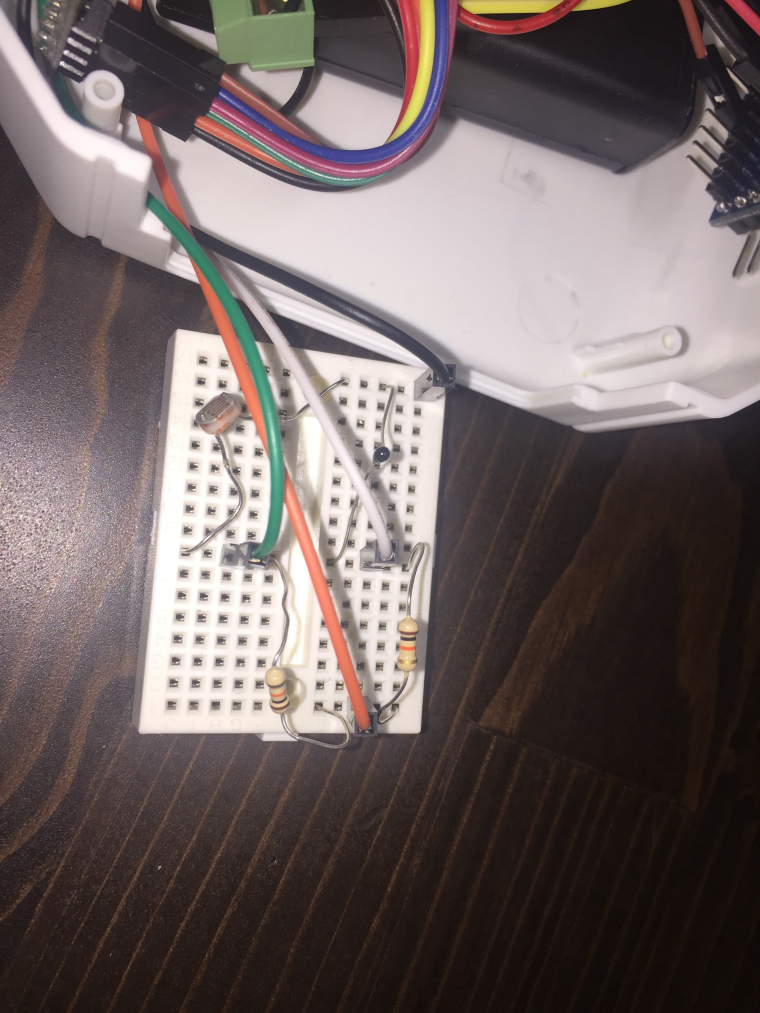
Code is pretty simple as well. You basically need to read the analog input and in case of the thermistor apply its formula (https://en.wikipedia.org/wiki/Thermistor) while for the LDR if you like normalize the value to a percentage and invert it (when dark the analog read would be 1024 so I prefer having 0% in this case).
I'm using my NodeManager (https://sourceforge.net/projects/mynodemanager/) to make things simple, having the node sleeping and reporting both the measures every 10 minutes and power on the sensors with two arduino pins just before reading the measures (otherwise even if sleeping, there will be some current going from VCC to GND):
// load user settings
#include "config.h"
// load MySensors library
#include <MySensors.h>
// load NodeManager library
#include "NodeManager.h"

// create a NodeManager instance
NodeManager nodeManager;

// before
void before() {
  // setup the serial port baud rate
  Serial.begin(9600);
  // instruct the board to sleep for 10 minutes for each cycle
  nodeManager.setSleep(SLEEP,10,MINUTES);
  // all the sensors' vcc and ground are connected to pin 6 (ground) and 7 (vcc. NodeManager will enable the vcc pin every time just before loop() and wait for 100ms for the sensors to settle
  nodeManager.setPowerPins(6,7,100);
  // register the sensors
  nodeManager.registerSensor(SENSOR_THERMISTOR,A1);
  nodeManager.registerSensor(SENSOR_LDR,A2);

  nodeManager.before();
}

// presentation
void presentation() {
  // Send the sketch version information to the gateway and Controller
	sendSketchInfo("AnalogTemperatureLight", "1.0");
  // call NodeManager presentation routine
  nodeManager.presentation();

}

// setup
void setup() {
}

// loop
void loop() {
  // call NodeManager loop routine
  nodeManager.loop();

}

// receive
void receive(const MyMessage &message) {
  // call NodeManager receive routine
  nodeManager.receive(message);
}
If you want to read the values in the traditional way, the code would look like the following for the thermistor:
    int _nominal_resistor = 10000;
    int _nominal_temperature = 25;
    int _b_coefficient = 3950;
    int _series_resistor = 10000;
  // read the voltage across the thermistor
  float adc = analogRead(_pin);
  // calculate the temperature
  float reading = (1023 / adc)  - 1;
  reading = _series_resistor / reading;
  float temperature;
  temperature = reading / _nominal_resistor;     // (R/Ro)
  temperature = log(temperature);                  // ln(R/Ro)
  temperature /= _b_coefficient;                   // 1/B * ln(R/Ro)
  temperature += 1.0 / (_nominal_temperature + 273.15); // + (1/To)
  temperature = 1.0 / temperature;                 // Invert
  temperature -= 273.15;                         // convert to C
  if (! getControllerConfig().isMetric) temperature = temperature * 1.8 + 32;
And this for the LDR:
  // read the value
  int adc= analogRead(_pin);
  value = 1024 - adc;
  // calculate the percentage
  int percentage = 0;
  float value = (float)adc;
  // scale the percentage based on the range provided
  float percentage = ((value - 0) / (1024 - 0)) * 100;
  if (percentage > 100) percentage = 100;
  if (percentage < 0) percentage = 0;
Thanks
-
-
How accurate are your measurements? I am testing the thermistore but I'm not really satisfied with the accuracy and consistency over time
Difficult for me to say how accurate it is since I don't have any professional tool to verify but comparing its measurements with the temperatures I get from other common sensors (DHT22, SHT21, ds18b20, etc.), it is not that different (+-0.5C). Of course I'm not considering it an accurate source but good enough for some situations
-
Hi
Found this great thread.
If anyone's using this setup, what kind of temperature range does this have? I was thinking of getting readings from the exterior of my hot water heater so it would have to do 3-70deg C in general. Not sure how the resistor works with that.Anyone?
-
-
Hi
Found this great thread.
If anyone's using this setup, what kind of temperature range does this have? I was thinking of getting readings from the exterior of my hot water heater so it would have to do 3-70deg C in general. Not sure how the resistor works with that.Anyone?
@MasMat why don't you use an encased DS18 so you can put it directly in the water ?
Or a normal DS18 taped to the side of your heater if you can't put anything inside.
It will be much more accurate and still very cheap.This is an example of the encased DS18 (just first result showing this type on Aliexpress, not a recommendation of the seller)
https://www.aliexpress.com/item/Stainless-steel-package-Waterproof-DS18b20-temperature-probe-temperature-sensor-18B20-For-Arduino/32236998050.html -
It's an older model with no chance of getting direct readings or reading it's circuits non-invasively.
The easiest I could figure is making a very small hole in the PU shielding close to the top and pushing that thermistor or DS18 to contact the metal surface and get a ball park reading. Maybe with some thermal paste to improve contact. I'd say I'm happy with anything within a few degrees of the truth. AND I have thermistors lying around.Anyway, going to try it. If it's bad, I'll report the results and proceed to order something like that DS18.



Hello! It looks like you're interested in this conversation, but you don't have an account yet.
Getting fed up of having to scroll through the same posts each visit? When you register for an account, you'll always come back to exactly where you were before, and choose to be notified of new replies (either via email, or push notification). You'll also be able to save bookmarks and upvote posts to show your appreciation to other community members.
With your input, this post could be even better 💗
Register Login