Skip to content
  • MySensors
  • OpenHardware.io
  • Categories
  • Recent
  • Tags
  • Popular
Skins
  • Light
  • Brite
  • Cerulean
  • Cosmo
  • Flatly
  • Journal
  • Litera
  • Lumen
  • Lux
  • Materia
  • Minty
  • Morph
  • Pulse
  • Sandstone
  • Simplex
  • Sketchy
  • Spacelab
  • United
  • Yeti
  • Zephyr
  • Dark
  • Cyborg
  • Darkly
  • Quartz
  • Slate
  • Solar
  • Superhero
  • Vapor

  • Default (No Skin)
  • No Skin
Collapse
Brand Logo
G

Glenn Byron

@gbfromhb
About
Posts
45
Topics
3
Shares
0
Groups
0
Followers
0
Following
0

Posts

Recent Best Controversial

  • Combine ReSpeaker Pi-hat and NRF24 on same Pi?
    G gbfromhb

    I was able to get the following working. Home Assistant (hass.io), Google Assistant installed, and The old Google Voice kit. Right now I'm not using any of the Google software that is part of the manual, I'm using the two mics on the very cool Pi hat that comes with it. The kit is about $10.00.

    https://www.amazon.com/Google-GOOGLEAIY-V1-AIY-Voice/dp/B075SFLWKX/ref=sm_n_au_dka_ZZ_pr_olt_0_0?adId=B075SFLWKX&creativeASIN=B075SFLWKX&linkId=d9de87057170326c19dfe4769e92dc96&tag=kliknfindbanner-20&linkCode=w41&ref-refURL=https%3A%2F%2Fwww.kliknfind.com%2Fproducts%2Fgoogle-aiy-voice-kit&slotNum=2&imprToken=xf4aT-G03J.Kv9kIRH14sA&adType=smart&adMode=auto&adFormat=grid&impressionTimestamp=1534179505633

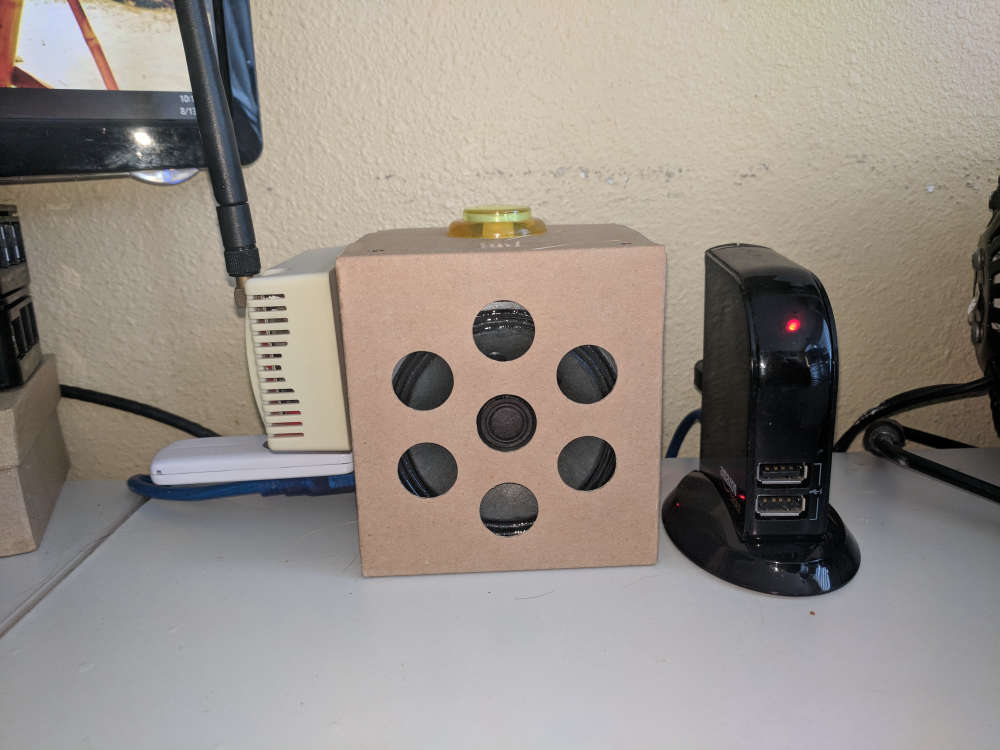
    Here is my Raspberry Pi with the Google voice hat, hass.io, MySensors serial gateway, and Aeon Labs series 2 Z-Stick, and powered USB hub to get the amps it needs.

    0_1534180756360_IMG_20180813_101037.jpg

    Hardware

  • Old user returning to Vera/MySensors
    G gbfromhb

    It seems we are going down similar paths. I had not touched my Vera in about 2 years, and started reading how things have changed. 2 years ago when I discontinued my Home Automation adventure, my thoughts were, I was not getting enough return on the time invested. The time spent, effort required and fragility of the whole thing was just not creating enough benefit. So I jumped back into Home Automation again about a month and a half ago, and am real happy.

    I did abandoned Vera and went with Home Assistant (hass.io), Aeotec Z-Stick Gen5 (z-wave), and Node-Red on a Raspberry Pi and am real happy. I pulled out my old MySensors I had built and updated them, connected the serial gateway to a powered hub connected to the Raspberry Pi with hass.io, and they are all working fine. It is still not for the faint of heart, but it is so much easier for me then with Vera as the foundation. I'm able to fairly easily integrate, Z-Wave, Google Home Assistant, Cast Audio & Video, Hook hub, Rachio Irrigation, MotionEye cameras, and Tasmota flashed Sonoff devices to name a few pretty seamlessly.

    With my current direction I am getting great results, I'm real happy with the way all the different components integrate, and the feeling that the fragility has been reduced tremendously is making this feel like it was the right foundation choice for me, and is going to be a part of my home for years to come.

    Vera

  • mysdb not finding node_sqlite3.node
    G gbfromhb

    @tbowmo thanks for the quick response. I had started with Raspian Stretch.
    To install node-red I used the following:

    bash <(curl -sL https://raw.githubusercontent.com/node-red/raspbian-deb-package/master/resources/update-nodejs-and-nodered)
    

    I then installed sqlite3, and phliteadmin, and finally mySensors.

    I just started over, and skipped the whole sqlite3 and phpliteAdmin, and it seems to be working great, thanks again for the response.

    Node-RED

  • mysdb not finding node_sqlite3.node
    G gbfromhb

    Here is what I'm getting when I start node-red:

    
    Start Node-RED
    
    Once Node-RED has started, point a browser at http://192.168.1.168:1880
    On Pi Node-RED works better with the Firefox or Chrome browser
    
    Use   node-red-stop                          to stop Node-RED
    Use   node-red-start                         to start Node-RED again
    Use   node-red-log                           to view the recent log output
    Use   sudo systemctl enable nodered.service  to autostart Node-RED at every boot
    Use   sudo systemctl disable nodered.service to disable autostart on boot
    
    To find more nodes and example flows - go to http://flows.nodered.org
    
    Starting as a systemd service.
    Started Node-RED graphical event wiring tool.
    25 Jun 01:15:56 - [info]
    Welcome to Node-RED
    ===================
    25 Jun 01:15:56 - [info] Node-RED version: v0.18.7
    25 Jun 01:15:56 - [info] Node.js  version: v8.11.3
    25 Jun 01:15:56 - [info] Linux 4.14.50-v7+ arm LE
    25 Jun 01:15:57 - [info] Loading palette nodes
    25 Jun 01:16:03 - [info] Dashboard version 2.9.4 started at /ui
    25 Jun 01:16:06 - [warn] ------------------------------------------------------
    25 Jun 01:16:06 - [warn] [node-red-contrib-mysensors/mysdb] Error: Cannot find module '/home/pi/.node-red/node_modules/sqlite/node_modules/sqlite3/lib/binding/node-v57-linux-arm/node_sqlite3.node'
    25 Jun 01:16:06 - [warn] ------------------------------------------------------
    25 Jun 01:16:06 - [info] Settings file  : /home/pi/.node-red/settings.js
    25 Jun 01:16:06 - [info] User directory : /home/pi/.node-red
    25 Jun 01:16:06 - [warn] Projects disabled : editorTheme.projects.enabled=false
    25 Jun 01:16:06 - [info] Flows file     : /home/pi/.node-red/flows_HS-HomeAuto.json
    25 Jun 01:16:06 - [info] Server now running at http://127.0.0.1:1880/
    25 Jun 01:16:06 - [info] Starting flows
    25 Jun 01:16:06 - [info] Started flows
    25 Jun 01:16:06 - [info] [sqlitedb:d9370fe2.50bc5] opened /home/pi/dbFiles/ByronWorld.db ok
    

    If I was to guess it is not finding the sqlite database file. If this is the case I already had sqlite installed before I added node-red-contrib-mysensors, and have a folder I have an other database file in. Can I configure this to have the db files in the same directory?

    If I'm completely off on what I think is going on here, and somebody can guide me on getting this resolved, I would be great-full.

    Thanks Glenn

    Node-RED

  • Your Multi Room Audio System
    G gbfromhb

    Very cool stuff you are doing here.

    I have been messing with my Media Center and ways of getting all this media played easily anywhere whether it is movies, TV shows or music for several years. I also wanted all my media to be stored in a single place and be available not only in the house, but also anywhere I have internet access. Here is most of what the latest version look likes. I currently have two Raspberry Pi running Kodi in my office and Family room. I have a third Raspberry Pi running MySQL to store the common media's meta data in for both media centers. This is great stuff. One of them is my DNLA media server, and I use Kodi to setup the connections to the network shares on my NAS for use in the DNLA server.

    About 2 years ago I put together the following. I have one of these in the master bedroom and the backyard. They have been working very well.

    1. Raspberry Pi
    2. HiFiBerry Amp+
    3. A case that works with both of these.
    4. Bookshelf speakers
    5. And this is how I made it all work.
      http://blog.scphillips.com/posts/2014/05/playing-music-on-a-raspberry-pi-using-upnp-and-dlna-v3/
      0_1464925716545_20160602_204436.jpg

    The other part of my adventure has been a BubbleUPnP server and BubbleUPnP android app on my phone. The sever brings some additional features.

    1. Secure access to my media from the internet.

    2. It enables you to create a second OpenHome DNLA render for every one on your network. This lets you queue up your music or videos using your phone and be able to leave to go get some beer during the party and not loose the music.

    3. Re-encode on the fly my Blu-Ray quality movie files to a smaller size so I can watch them remotely through via internet.

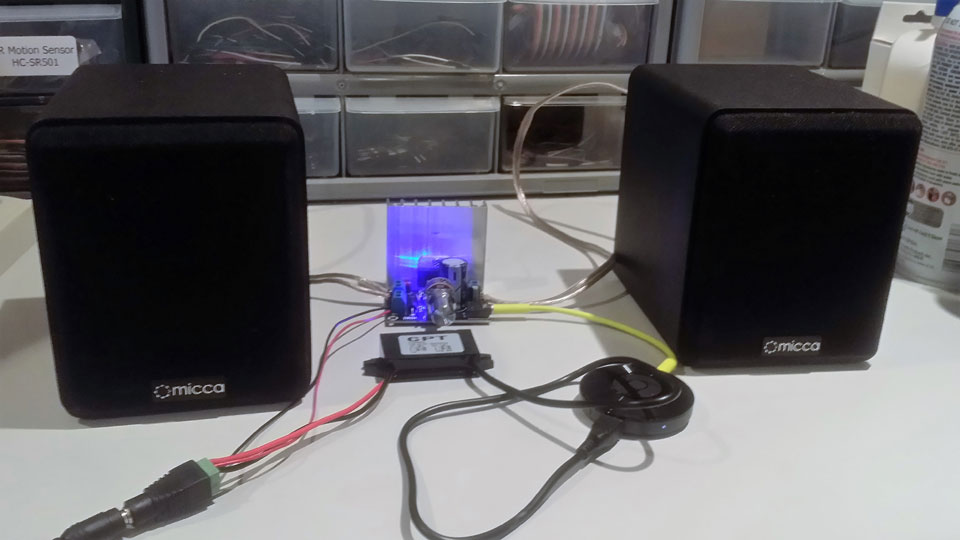
    I am right in the middle of my next generation Music rendering adventure. It will be using Chomecast Audio. You are now able to group more then one of these together to be able to play the same music in multiple rooms for very little money. I will be connecting one of these to my stereo in my office and family room. I will be putting something close to the following in the living room, backyard and side yard. The BubbleUPnp app on my phone and the BubbleUPnP server app has added additional features to the Chromcast Audio to make this even better.

    1. http://www.amazon.com/DROK-Amplifier-Dual-channel-Bookshelf-Speakers/dp/B0181Z4M4A?ie=UTF8&psc=1&redirect=true&ref_=oh_aui_detailpage_o03_s00

    2. http://www.amazon.com/Yeeco-Waterproof-Converter-Converters-Transformer/dp/B00QTJWRFW?ie=UTF8&psc=1&redirect=true&ref_=oh_aui_detailpage_o00_s01

    3. http://www.amazon.com/Adapter-JACKYLED-Switching-Converter-Transformers/dp/B017CJK4TS?ie=UTF8&psc=1&redirect=true&ref_=oh_aui_detailpage_o00_s00

    4. http://www.amazon.com/Micca-COVO-S-Compact-Bookshelf-Speakers/dp/B00N8265I8?ie=UTF8&psc=1&redirect=true&ref_=oh_aui_detailpage_o05_s00. These will be used for a couple of them.

    0_1464926544740_ChromecastMusicAmp.jpg

    Good luck everyone on your DIY adventures.

    Glenn

    General Discussion

  • Merry Christmas and a Happy New 2016
    G gbfromhb

    Merry Christmas & Happy New Year from Huntington Beach, California USA.

    Announcements

  • MyNetSensors (closed)
    G gbfromhb

    @Zelenaar Yes the latest build of Windows IoT has opened up those pins to help with getting more flexibility when working with Serial ports. Rumor has it that if I follow this example:

    https://ms-iot.github.io/content/en-US/win10/samples/SerialSample.htm

    and use the latest build it could work. I now have all the hardware I need. I have not yet gotten around to testing this yet. Thanks for the input.

    MyNodes.NET

  • MyNetSensors (closed)
    G gbfromhb

    It's very interesting out there with the whole JavaScript adventure. Its use is sky rocketing and is being used across the whole stack. One thing that is very interesting to watch is the adaptation of Microsoft's TypeScript and I read something the other day that the Google V8 JavaScript engine that is what Node.JS uses will have an option to use Strong data Typing. Having the data strong typed makes it a lot easier for IDE applications like Visual Studio to provide all the features you get using C#.

    MyNodes.NET

  • MyNetSensors (closed)
    G gbfromhb

    @derwish I have downloaded you new code. Very nice work.

    MyNodes.NET

  • MyNetSensors (closed)
    G gbfromhb

    @derwish Yes it would replace IIS. One of the big things is the small footprint and it would run anywhere. Microsoft seems to be putting a lot effort into getting it into the Visual Studio world. Which you know how working in Visual Studio is a great deal. Using Node.js, Express, TypeScript, Bootstrap & Angular to name a few looks very interesting to me. As you may know I'm messing around with Windows 10 IoT (core) on a Raspberry Pi. It just seems like it could turn into a nice Automation Hub, but if this is done right it could work on a lot of platforms. You could start with a headless Raspberry Pi and make it as powerful as you need.

    MyNodes.NET

  • MyNetSensors (closed)
    G gbfromhb

    @derwish no. I was having the same concern about putting any time in this. I think you made the right choice. Have you looked into node.js and angular?

    MyNodes.NET

  • Many nodes with simple sketches or less nodes with complex sketches?
    G gbfromhb

    Yes depending on the controller (Arduino) you choose will determine the number of sensors or actions a node may support. I will take into consideration if the node can be hidden, or it needs to be small and/or presentable where it is going to be located. This may effect your choices for the controller.

    I will also look at the tasks I'm trying to accomplish for a given objective. Some tasks like knowing if a door or window is open or closed and a motion sensor may not play well with each other in a node.

    Determine if it is going to be using batteries or get power from my house curcit (for example via a wall wart). When determining the power source I will look at the tasks I have defined. One of the tasks could determine if you are able to resonable use batteries to power it. For example a task like knowing if a door or window is open or closed most likely will not be run on batteries.

    If using a battery you should put your controller and radio to sleep as long and often as you can. If you have to use a small controller then the number of interrupts available will be limited and most likely be one. Some tasks will use an interrupt to override the sleep timer, for example a motion sensor. If more then one task (like a motion sensor) needs an interrupt and you are using a small controller you will need to split it up to more then one node or redefine your objective.

    These are just some thoughts I have been running with for now. Any other persectives are greatly appreciated. There are several of you that have a lot more experience with this adventure then I do.

    General Discussion

  • MyNetSensors (closed)
    G gbfromhb

    Here is that latest update on getting it to work on the Raspberry PI. The Raspberry PI is having issues with FTDI USB to Serial. There is currently no drivers officially available. It looks like some people have gotten to work with in the foreground which this app is, but not in the background (headless). I so far have not gotten it to work with MyNetSensors.

    Here are the best links I have found on this issue so far.:

    http://embedded101.com/Blogs/David-Jones/entryid/695/Win-10-IoT-Core-FTDI-Serial-Driver-Headless-Startup-Task-problem

    http://embedded101.com/Blogs/David-Jones/entryid/702/Win-10-IoT-Core-FTDI-Issue-Update

    MyNodes.NET

  • MyNetSensors (closed)
    G gbfromhb

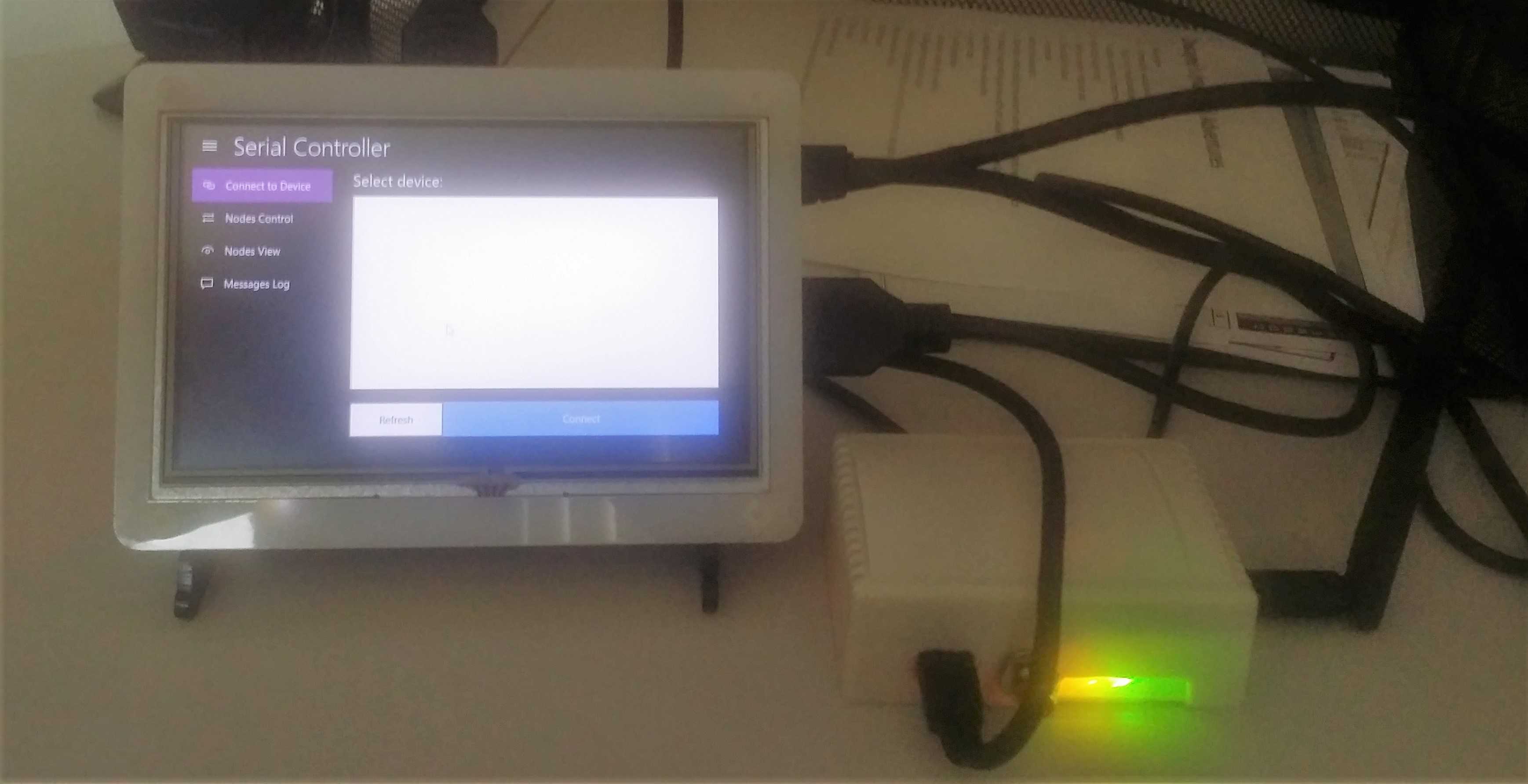
    @derwish sorry about the delay in getting back to you. I have it running on a Raspberry PI 2 with a 5" screen running at 800x480. I have a serial gateway plugged into Raspberry PI and there is no devices found. I suspected that this would happen there is a whole bunch of adventures with serial ports on the Raspberry PI with Windows 10 IoT.

    It may be a while before I can get to this again, but I will see what I can come up with.

    20151016_155143 (2).jpg

    MyNodes.NET

  • Vera Lite U17 - Serial Can't Detect Device
    G gbfromhb

    Thank you @Tmaster. I put this project away a while ago, and just recently realized after some unrelated reading what the issue must be with this adventure. I'm pretty sure this is what is going on and just have not had the time to get back to it.

    Vera cant detect serial gateway vera lite u17

  • MyNetSensors (closed)
    G gbfromhb

    I have installed your source and have gotten to compile. I may not be able to jump on it right away, but I will see how it goes with Window IoT on Raspberry PI.

    MyNodes.NET

  • MyNetSensors (closed)
    G gbfromhb

    I noticed you said this should work on a Raspberry Pi running Windows 10. Have you tested this on Windows 10 IoT on a Raspberry Pi? I was having an adventure getting the serial gateway to work with the Raspberry Pi. FTDI USB to Serial driver issue.

    MyNodes.NET

  • nodered "injected" between domoticz and mysensors
    G gbfromhb

    @bpair

    "One thing to know about node-red is that it is single threaded. I don't think it is an issue with a small setup and with small node-red sketches but if you have a large number of messages you could start to see a delay in processing."

    This single thread will handle a trimenduse load, because of the way it is done. It receives a request, and then asynchronously processes this request, it then looks to see if any asynchronous promises have completed (callback). The only concern I have with this single thread is if you were doing CPU intensive calculations

    Node-RED

  • Solar Powered Mini-Weather Station
    G gbfromhb

    @hek I like the following library https://github.com/adafruit/DHT-sensor-library (ladyada).

    This seems to be working fine with the Arduino Pro Mini 8mhz.
    Here is a MySensors example using this library:

    /**
     * The MySensors Arduino library handles the wireless radio link and protocol
     * between your home built sensors/actuators and HA controller of choice.
     * The sensors forms a self healing radio network with optional repeaters. Each
     * repeater and gateway builds a routing tables in EEPROM which keeps track of the
     * network topology allowing messages to be routed to nodes.
     *
     * Created by Henrik Ekblad <henrik.ekblad@mysensors.org>
     * Copyright (C) 2013-2015 Sensnology AB
     * Full contributor list: https://github.com/mysensors/Arduino/graphs/contributors
     *
     * Documentation: http://www.mysensors.org
     * Support Forum: http://forum.mysensors.org
     *
     * This program is free software; you can redistribute it and/or
     * modify it under the terms of the GNU General Public License
     * version 2 as published by the Free Software Foundation.
     *
     *******************************
     *
     * REVISION HISTORY
     * Version 1.0 - Henrik EKblad
     * Version 1.1 - Glenn Byron - September 6, 2015 - Converted to new DHT library written by ladyada 
     * 
     * DESCRIPTION
     * This sketch provides an example how to implement a humidity/temperature
     * sensor using DHT11, DHT21, DHT-22 
     * http://www.mysensors.org/build/humidity
     */
     
    #include <SPI.h>
    #include <MySensor.h> 
    #include <DHT.h>  
    
    #define CHILD_ID_HUM 0
    #define CHILD_ID_TEMP 1
    #define HUMIDITY_SENSOR_DIGITAL_PIN 2
    #define DHTTYPE DHT22
    // DHTTYPE choices: DHT11, DHT21, DHT22
    
    unsigned long SLEEP_TIME = 30000; // Sleep time between reads (in milliseconds)
    
    MySensor gw;
    DHT dht(HUMIDITY_SENSOR_DIGITAL_PIN, DHTTYPE);
    float lastTemp;
    float lastHum;
    boolean metric = false; 
    MyMessage msgHum(CHILD_ID_HUM, V_HUM);
    MyMessage msgTemp(CHILD_ID_TEMP, V_TEMP);
    
    void setup()  
    { 
      Serial.begin(115200);
      Serial.flush();
      Serial.println("MySensors: DHT example");
      
      gw.begin();
      dht.begin();
    
      // Send the Sketch Version Information to the Gateway
      gw.sendSketchInfo("Humidity", "1.0");
    
      // Register all sensors to gw (they will be created as child devices)
      gw.present(CHILD_ID_HUM, S_HUM);
      gw.present(CHILD_ID_TEMP, S_TEMP);
      
      metric = gw.getConfig().isMetric;
    
      delay(2000);
    }
    
    void loop()      
    {  
      float temperature = dht.readTemperature(!metric);
      if (isnan(temperature)) {
          Serial.println("Failed reading temperature from DHT");
      } else if (temperature != lastTemp) {
        lastTemp = temperature;
        gw.send(msgTemp.set(temperature, 1));
        Serial.print("Temperature: ");
        Serial.println(temperature);
      }
      
      float humidity = dht.readHumidity();
      if (isnan(humidity)) {
          Serial.println("Failed reading humidity from DHT");
      } else if (humidity != lastHum) {
          lastHum = humidity;
          gw.send(msgHum.set(humidity, 1));
          Serial.print("Humidity: ");
          Serial.println(humidity);
      }
    
      gw.sleep(SLEEP_TIME); //sleep a bit
    }
    
    My Project
  • Login

  • Don't have an account? Register

  • Login or register to search.
  • First post
    Last post
0
  • MySensors
  • OpenHardware.io
  • Categories
  • Recent
  • Tags
  • Popular