Skip to content
  • MySensors
  • OpenHardware.io
  • Categories
  • Recent
  • Tags
  • Popular
Skins
  • Light
  • Brite
  • Cerulean
  • Cosmo
  • Flatly
  • Journal
  • Litera
  • Lumen
  • Lux
  • Materia
  • Minty
  • Morph
  • Pulse
  • Sandstone
  • Simplex
  • Sketchy
  • Spacelab
  • United
  • Yeti
  • Zephyr
  • Dark
  • Cyborg
  • Darkly
  • Quartz
  • Slate
  • Solar
  • Superhero
  • Vapor

  • Default (No Skin)
  • No Skin
Collapse
Brand Logo
N

niclas

@niclas
About
Posts
32
Topics
4
Shares
0
Groups
0
Followers
0
Following
0

Posts

Recent Best Controversial

  • I_VERSION message repeated forever
    N niclas

    Hi!

    I recently changed my setup from a Serial gateway to a TCP Gateway using the Sensebender as my hardware. In my homeassistant logs I see the following:

    2021-04-06 21:37:07 DEBUG (MainThread) [mysensors.transport] Sending 0;255;3;0;2;
    2021-04-06 21:37:07 DEBUG (MainThread) [mysensors.transport] Receiving 0;255;3;0;2;2.3.2
    2021-04-06 21:37:13 INFO (SyncWorker_4) [root] Sending handshake.
    2021-04-06 21:37:17 DEBUG (MainThread) [mysensors.transport] Sending 0;255;3;0;2;
    2021-04-06 21:37:17 DEBUG (MainThread) [mysensors.transport] Receiving 0;255;3;0;2;2.3.2
    2021-04-06 21:37:23 INFO (SyncWorker_3) [root] Sending handshake.
    2021-04-06 21:37:27 DEBUG (MainThread) [mysensors.transport] Sending 0;255;3;0;2;
    2021-04-06 21:37:27 DEBUG (MainThread) [mysensors.transport] Receiving 0;255;3;0;2;2.3.2
    2021-04-06 21:37:33 INFO (SyncWorker_5) [root] Sending handshake.
    2021-04-06 21:37:37 DEBUG (MainThread) [mysensors.transport] Sending 0;255;3;0;2;
    2021-04-06 21:37:37 DEBUG (MainThread) [mysensors.transport] Receiving 0;255;3;0;2;2.3.2
    2021-04-06 21:37:43 INFO (SyncWorker_4) [root] Sending handshake.
    2021-04-06 21:37:47 DEBUG (MainThread) [mysensors.transport] Sending 0;255;3;0;2;
    2021-04-06 21:37:47 DEBUG (MainThread) [mysensors.transport] Receiving 0;255;3;0;2;2.3.2
    2021-04-06 21:37:53 INFO (SyncWorker_3) [root] Sending handshake.
    2021-04-06 21:37:57 DEBUG (MainThread) [mysensors.transport] Sending 0;255;3;0;2;
    2021-04-06 21:37:57 DEBUG (MainThread) [mysensors.transport] Receiving 0;255;3;0;2;2.3.2
    2021-04-06 21:38:03 INFO (SyncWorker_5) [root] Sending handshake.
    2021-04-06 21:38:07 DEBUG (MainThread) [mysensors.transport] Sending 0;255;3;0;2;
    2021-04-06 21:38:07 DEBUG (MainThread) [mysensors.transport] Receiving 0;255;3;0;2;2.3.2
    2021-04-06 21:38:13 INFO (SyncWorker_4) [root] Sending handshake.
    2021-04-06 21:38:17 DEBUG (MainThread) [mysensors.transport] Sending 0;255;3;0;2;
    2021-04-06 21:38:17 DEBUG (MainThread) [mysensors.transport] Receiving 0;255;3;0;2;2.3.2
    2021-04-06 21:38:23 INFO (SyncWorker_3) [root] Sending handshake.
    2021-04-06 21:38:27 DEBUG (MainThread) [mysensors.transport] Sending 0;255;3;0;2;
    2021-04-06 21:38:27 DEBUG (MainThread) [mysensors.transport] Receiving 0;255;3;0;2;2.3.2

    Going on forever and ever.

    Anyone have any ideas about what is happening? Anything I can try to narrow down the problem?
    When I changed to a TCP Gateway I upgraded home assistant which means that I am now using the mysensors integration in Lovelace.

    Niclas
    Home Assistant

  • Which radio / wireless module to choose? Please recommend
    N niclas

    I have tried the nRF24 and sx1278 and have had success with both. I ended up choosing the sx1278 even before exploring the world of mysensors mainly because I really liked the library by Sandeep Mistry. I never had an issue with range. In my old apartment I collected pulses from my electricity meter which was located four concrete stories below without a problem.

    Regarding the 9V battery I also did some experimenting with this and the key, if I remember correctly, is to find a VR with very low Iq( quiescent current). In the end I ended up going with dual AA batteries which worked to a surprisingly low voltage. There is a lot written about battery powered electronics if you start to dig a little bit.

    Hardware

  • Issues when upgrading EnergyMeterPulseSensor from 1.5.x to 2.3.2
    N niclas

    Not really sure what to make of the log. To me it looks like it isn't connecting properly with the gateway but the picture from MYSController (I have never tried the software) looks promising as it has exchanged information about sketch name, version and so on. I'm also new to MySensors so i'm not able to say what has changed from the two versions. What was the default parameters for nRF24 in 1.5? Amplification and so on.

    Hopefully someone else could be of more help...

    Development

  • Issues when upgrading EnergyMeterPulseSensor from 1.5.x to 2.3.2
    N niclas

    What happens after the TSM:FPAR:OK ? It seems like the interesting stuffs happens after that part?

    Development

  • 986/5000 first steps with battery node
    N niclas

    @sindrome73 Like @BearWithBeard wrote, reading Nick Gammons guide is a must! I read it and used most of the stuff in there when I was making my battery node. The analog converter is super easy to turn of, ADCSRA = 0 does it. It's also in the guide by Gammon.

    Regarding the Minicore definitions, see here: https://github.com/MCUdude/MiniCore
    Just follow the "how to install" and when it's added in Arduino IDE you select the relevant options in the Tools menu under "board". Then select your programmer (also in tools menu) and finally "Burn bootloader".

    Edit:
    Did a quick google on the sensor. Found this: https://www.iot-experiments.com/pir-sensors-hc-sr501/
    I just took a quick glance but it seems relevant.

    Troubleshooting

  • 986/5000 first steps with battery node
    N niclas

    For manipulating fuses I use the minicore board definitions by mcudude( Google for the GitHub) in Arduino IDE. It's really nice to be able to set the BOD level. It's also handy when writing to atmega 328pb if you try that in the future. One of the big things drawing current is the analog converter. Disabling it saved quite a lot if I remember correctly.

    What is the current draw of the sensor itself?

    Troubleshooting

  • [Solved] Arduino Nanos don't work as nodes
    N niclas

    @Avamander Found the documentation you were referring to and yes. Seems to be true for the RF24 which I haven't used in a long time.

    #define MY_RX_MESSAGE_BUFFER_FEATURE
    
    This enables the receiving buffer feature.
    
    This feature is currently not supported for anything but RF24. Require MY_RF24_IRQ_PIN to be set.
    
    Note: Not supported on ESP8266, ESP32, STM32, nRF5 and sketches that use SoftSPI. See below issue for details https://github.com/mysensors/MySensors/issues/1128
    
    Definition at line 2406 of file MyConfig.h.
    
    
    Hardware

  • [Solved] Arduino Nanos don't work as nodes
    N niclas

    @Avamander Regarding the interrupt pin, at least when using the RFM95 I need to have the pin connected to be able to receive anything. It doesnt poll the module to check for incoming messages. Maybe its different with nRF24.

    I haven't tried messing with the MY_RX_MESSAGE_BUFFER_FEATURE so I wouldnt know about that.

    Hardware

  • [Solved] Arduino Nanos don't work as nodes
    N niclas

    @Avamander I meant, have you erased the EEPROM of the gateway?

    Hardware

  • RFM69/95 won't run
    N niclas

    @cYnd Well I'm out of ideas. Could be a hardware issue, perhaps you shorted something when handling the module or you exposed it to 5V?

    Is the VCC output from the Mini 5V or 3.3V? If you supply the mini board with 3.3V you should connect the module VCC to 'raw' if i remember correctly.

    I use the RA-01 and RA-02 all the time so hopefully you will be very pleased with them. Good luck!

    Hardware

  • [Solved] Arduino Nanos don't work as nodes
    N niclas

    I'm not super experienced using mysensors but I do have 3 nodes working and when first settings things up I had some problems with NODE IDs. It looks like you are setting a Static node Id? Is that ID "free" in the gateway? Have you tried powering of all the nodes you have running, wiping the EEPROM of the gateway, powering up the gateway and shortly after powering up the node?

    Someone else perhaps knows this better but, if the gateway don't want to include the node, does that generate the FPAR:No reply?

    And also, how is the interrupt pin connected?

    Hardware

  • RFM95 + Sensebender Gateway
    N niclas

    @mfalkvidd
    Yes that did it!

    Using the following defines:
    #define MY_RFM95_CS_PIN (29u)
    #define MY_RFM95_IRQ_PIN (31u)
    #define MY_RFM95_IRQ_NUM (31u)

    I have now restored my variant.h file and all is well.

    Also tried to find information about how the RFM95 and SX127x relates to each other. Seems like they share the exact same registers but one is semtech and one the hoperf? Did Hoperf make it the same on purpose or do they license the modem from semtech?

    Hardware

  • RFM95 + Sensebender Gateway
    N niclas

    Well... At last I got some time to dig in to the problem and it turns out it was a quick 10-minute fix. The fix is quick and dirty and if someone have an idea of how to make it prettier that would be nice.

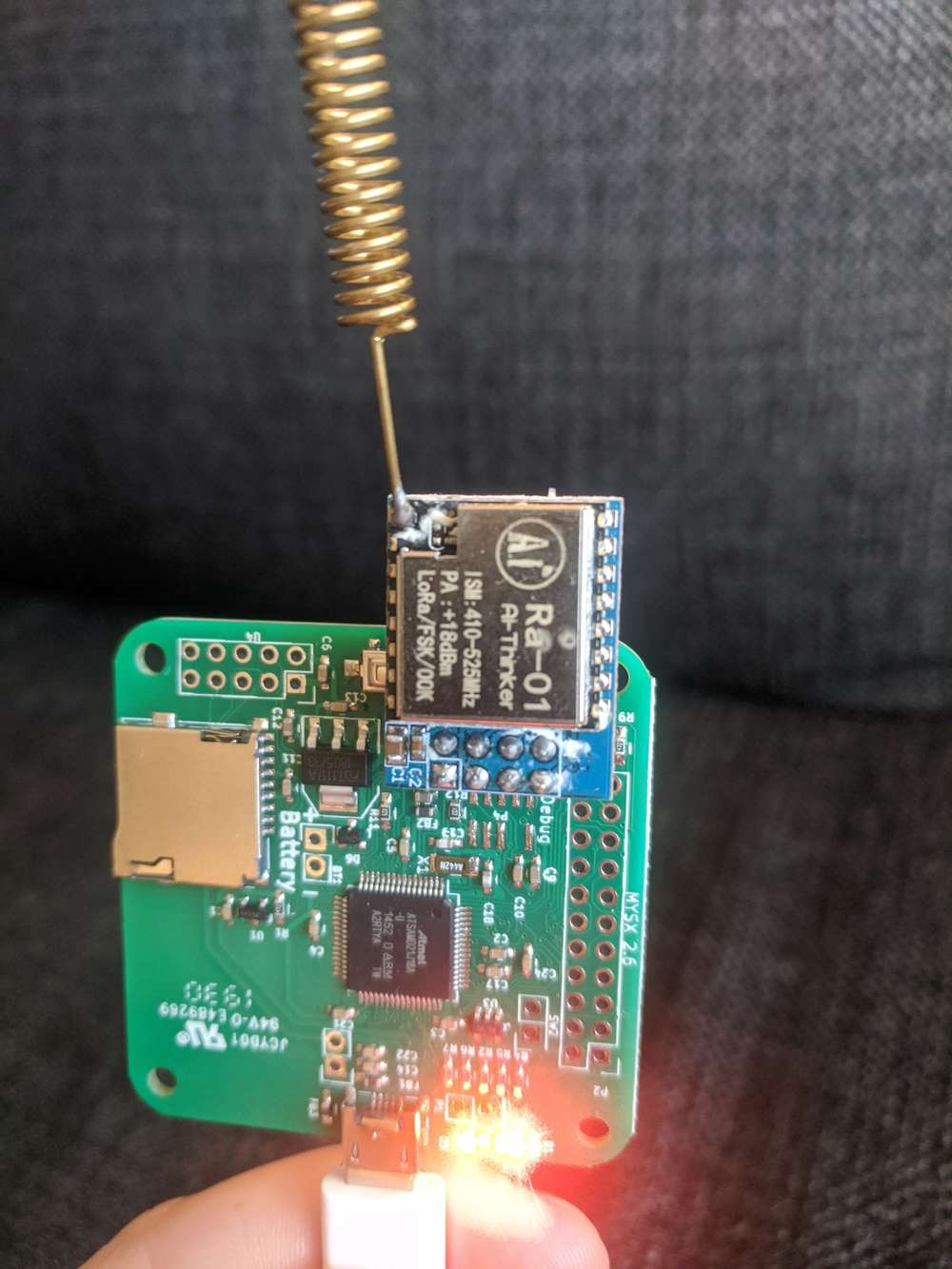
    Anyways.. I really like the RA-01 and RA-02 from AI-thinker and I have been using them for many types of projects so when I saw that the pinout was the same on my module and the nrf24 I was quite happy. Upon plugging the module in and activating MY_DEBUG_VERBOSE_RFM95 option it prints the following:

    RFM95:INIT:PIN,CS=24,IQP=32,IQN=32,RST=43
    !RFM95:INIT:SANCHK FAIL
    

    Checking the documentation I see that the rfm24 uses different pins on the SAMD compared to the rfm69hw.

    I then went in to the variant.h file of the Sensebender and from row 245 and on the definitions needs to be altered.
    #define MY_RFM95_SPI_CS (29ul) // Changed from 30
    #define MY_RFM95_IRQ_PIN (31ul) // Changed from 32
    #define MY_RFM95_IRQ_NUM (31ul) // Changed from 32

    Upon compiling and uploading i get:

    RFM95:INIT:PIN,CS=24,IQP=32,IQN=32,RST=43
    !RFM95:INIT:SANCHK FAIL
    

    So i notice the CS-pin is 24 even though i defined MY_RFM95_SPI_CS as 29.
    Searching the variant.h file for 24u I find change the following on row 156:
    #define PIN_SPI_SS (29u) // Changed from 24

    Upon compiling and uploading I see:

    0;255;3;0;9;3932 RFM95:INIT
    0;255;3;0;9;3937 RFM95:INIT:PIN,CS=29,IQP=31,IQN=31,RST=43
    0;255;3;0;9;3947 RFM95:PTX:LEVEL=13
    0;255;3;0;9;3948 TSM:INIT:TSP OK
    0;255;3;0;9;3948 TSM:INIT:GW MODE
    0;255;3;0;9;3948 TSM:READY:ID=0,PAR=0,DIS=0
    0;255;3;0;9;3948 MCO:REG:NOT NEEDED
    0;255;3;0;14;Gateway startup complete.
    0;255;0;0;18;2.3.2
    0;255;3;0;9;3949 MCO:BGN:STP
    0;255;3;0;9;3949 MCO:BGN:INIT OK,TSP=1
    0;255;3;0;9;3949 TSM:READY:NWD REQ
    0;255;3;0;9;3949 RFM95:SWR:SEND,TO=255,SEQ=0,RETRY=0
    0;255;3;0;9;4010 ?TSF:MSG:SEND,0-0-255-255,s=255,c=3,t=20,pt=0,l=0,sg=0,ft=0,st=NACK:
    0;255;3;0;9;21316 RFM95:SAC:SEND ACK,TO=3,SEQ=1636,RSSI=-60,SNR=10
    0;255;3;0;9;22566 TSF:MSG:READ,3-3-0,s=2,c=1,t=17,pt=5,l=4,sg=0:351
    

    The messages are coming in!

    I tried doing the defines in my sketch but the PIN_SPI_SS is overwritten.

    IMG_20200526_204210.jpg

    So for anyone wanting to use the RA-01 or RA-02 (SX1278) instead of the nRF24, go ahead!
    I am not really sure I understand why the HAL is using the "PIN_SPI_SS" instead of the "MY_RFM95_SPI_CS"
    Isn't CE,SS,CS all different names for the same thing?

    Hardware

  • RFM69/95 won't run
    N niclas

    @cYnd IMG_20200526_055536.jpg

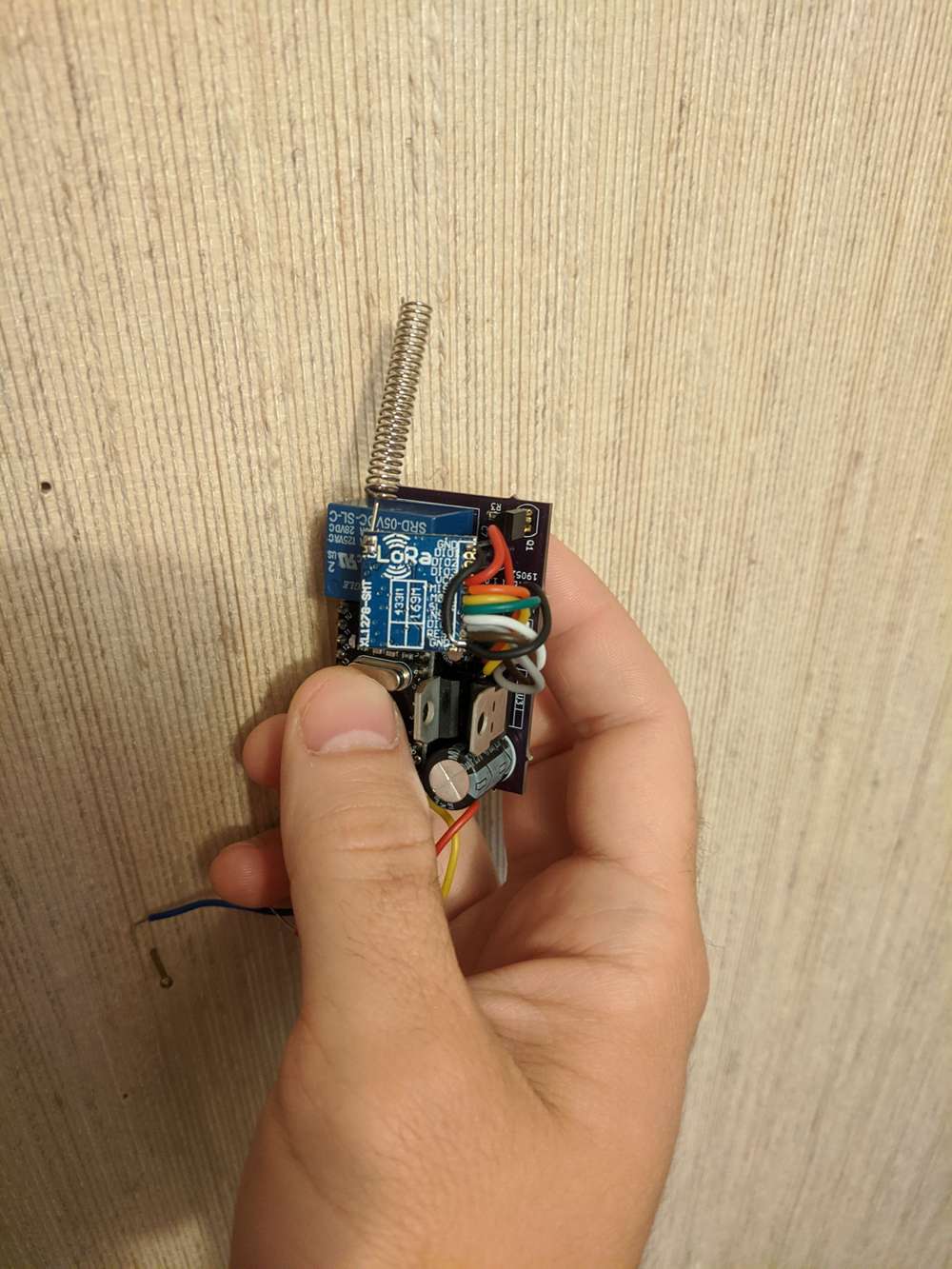
    Found a picture of my node. I hooked up both the GND pads. Can't remember if it was necessary.

    Still no luck with your module?

    Hardware

  • RFM69/95 won't run
    N niclas

    @cYnd hmm.. too bad..

    I guess I would start by downloading the Lora library by Sandeep Mistry in Arduino IDE and just run the example provided, I think one is called dump_registers. If that doesn't work I would start to suspect hardware failure or some problem with the wires.

    And also, check that all the gnd pads of the module are connected to each other. I used a Bluetooth module once that needed all the gnd pins connected.

    Hardware

  • Check if (and which) SPI devices is connected (NRF24L01 and SX1278 LoRa modules)
    N niclas

    Well.. The quick answer I guess would be Yes, it is possible. But I imagine you would need to know a little bit about how the different components work. I also use the LoRa library from Sandeep Mistry and if you take a look at the code that initializes the card you find the following:

      // check version
      uint8_t version = readRegister(REG_VERSION);
      if (version != 0x12) {
        return 0;
      }
    

    Which is using the function readRegister:

    uint8_t LoRaClass::readRegister(uint8_t address)
    {
      return singleTransfer(address & 0x7f, 0x00);
    }
    

    Which is using the function singleTransfer:

    uint8_t LoRaClass::singleTransfer(uint8_t address, uint8_t value)
    {
      uint8_t response;
    
      digitalWrite(_ss, LOW);
    
      _spi->beginTransaction(_spiSettings);
      _spi->transfer(address);
      response = _spi->transfer(value);
      _spi->endTransaction();
    
      digitalWrite(_ss, HIGH);
    
      return response;
    }
    

    Which is using pretty simple SPI commands. So perhaps you could do the same and select the LoRa library if the version is 0x12 or else select the nRF library.

    I don't know if there is enough space on the 328p to load both the libraries? And if you want to use the mysensors library it would be more complicated i suppose..

    Development

  • RFM95 + Sensebender Gateway
    N niclas

    Hello!

    I just got the Sensebender gateway and tried plugging in a SX1278 equipped LoRa module using the 2x4 input "reserved" for a nrf24 module. The pinout is the same for the two modules but I suspect that the mysensors HAL is looking at other pins when using RFM95.

    So my question is.. Is anybody here up and running with Sensebender Gateway + SX1278 module connected to the 2x4 pin connection?

    Hardware

  • RFM69/95 won't run
    N niclas

    @cYnd Hi! Sorry for really late answer. I must have missed the e-mail notification. Have you solved the issue yet?

    I just read your first post and it says: MISO (D11), MOSI (D12). This is swapped according to for instance https://www.circuito.io/blog/arduino-uno-pinout/

    MOSI->MOSI and MISO->MISO is correct but the pin number on the pro mini seems wrong?

    Hardware

  • V_UNIT_PREFIX not working/recognised for Air Quality sensor CSS811
    N niclas

    @Sebex
    Hmm... Too bad. Then I guess something could be wrong with your code.

    This is my post: https://forum.mysensors.org/topic/10976/unit-of-measurement-for-pressure-sensor
    Perhaps the other solution setting the unit in home assistant could work?

    Here is my temperature/pressure sensor code, I couldn't find anything wrong with your code but perhaps you could find something.

    #define CHILD_ID_TEMP 0
    #define CHILD_ID_PA 1
    
    #define I2C_ADDRESS 0x77
    BMP180I2C bmp180(I2C_ADDRESS);


    MyMessage msg_temp(CHILD_ID_TEMP, V_TEMP);
    MyMessage msg_pa(CHILD_ID_PA, V_PRESSURE);
    MyMessage msgPrefix(CHILD_ID_PA, V_UNIT_PREFIX);  // Custom unit message.
    
    
    float temperature = 4;
    float pressure = 4;
    
    void presentation()
    {
      Wire.begin();
        //begin() initializes the interface, checks the sensor ID and reads the calibration parameters.  
      if (!bmp180.begin())
      {
        Serial.println("begin() failed. check your BMP180 Interface and I2C Address.");
        while (1);
      }
      //reset sensor to default parameters.
      bmp180.resetToDefaults();
    
      //enable ultra high resolution mode for pressure measurements
      bmp180.setSamplingMode(BMP180MI::MODE_UHR);
      
      sendSketchInfo("Temp_pa sensor", "1.1");
      present(CHILD_ID_TEMP, S_TEMP, "temp1");
      present(CHILD_ID_PA, S_BARO, "pres1");
    
    }
    
    bool once = false;
    
    void loop()
    {
      //start a temperature measurement
      if (!bmp180.measureTemperature())
      {
        Serial.println("could not start temperature measurement, is a measurement already running?");
        return;
      }
    
      //wait for the measurement to finish. proceed as soon as hasValue() returned true.
      do
      {
        delay(100);
      } while (!bmp180.hasValue());
    
      temperature = bmp180.getTemperature();
      send(msg_temp.set(temperature, 1));
    
      if (!bmp180.measurePressure())
      {
        Serial.println("could not start perssure measurement, is a measurement already running?");
        return;
      }
    
      //wait for the measurement to finish. proceed as soon as hasValue() returned true. 
      do
      {
        delay(100);
      } while (!bmp180.hasValue());
      
      pressure = bmp180.getPressure() / 100.0;
    
      if(!once){
      send(msgPrefix.set("mbar"));  // Set custom unit.
      once = true;
      }
      send(msg_pa.set(pressure, 1));
    
    
      Serial.println(temperature);
      Serial.println(pressure);
    
      sleep(10000);
    
    }
    
    Troubleshooting

  • Local sensor warning messages
    N niclas

    Haha.. Works perfect! Thank you.

    Home Assistant
  • Login

  • Don't have an account? Register

  • Login or register to search.
  • First post
    Last post
0
  • MySensors
  • OpenHardware.io
  • Categories
  • Recent
  • Tags
  • Popular