Skip to content
  • MySensors
  • OpenHardware.io
  • Categories
  • Recent
  • Tags
  • Popular
Skins
  • Light
  • Brite
  • Cerulean
  • Cosmo
  • Flatly
  • Journal
  • Litera
  • Lumen
  • Lux
  • Materia
  • Minty
  • Morph
  • Pulse
  • Sandstone
  • Simplex
  • Sketchy
  • Spacelab
  • United
  • Yeti
  • Zephyr
  • Dark
  • Cyborg
  • Darkly
  • Quartz
  • Slate
  • Solar
  • Superhero
  • Vapor

  • Default (No Skin)
  • No Skin
Collapse
Brand Logo
OliverDogO

OliverDog

@OliverDog
About
Posts
40
Topics
5
Shares
0
Groups
0
Followers
0
Following
0

Posts

Recent Best Controversial

  • Mi-Light controller for Mysensors
    OliverDogO OliverDog

    Hi.
    is this thread still alive?

    Can I use this to solve my problem?
    This is the problem:

    • I want to control my pool lights (controlled by RGB-FUT037 from milight - 2.4ghz) using the original Mi-Light Wall Panel Controller T3 - which sends 2.4ghz... but both are in different floors. Fut037 is inside que pool's machine house and the Wall Panel is on Gourmet's Balcony.

    What I need:

    • An arduino node receives the code from Wall Panel using maybe a NRF24L01 module, then send to another arduino node through wifi (NodeMCU / ESP8266), which finally, reproduces the code using another NRF24L01, reaching the FUT037.
    My Project

  • Water Leak Detection
    OliverDogO OliverDog

    Yes, I understand how to make a reed talk to my Home Automation, but I don't see any wires outcomming from those Class D @zboblamont posted above.

    My Newbie question was about those Class D beeing a reed sensor, or electronic switch, that sends a open/close signal or if I would need a DIY way to read a ordinary water flow meter...

    But after check Datasheet from V200H I could notice a small plug on top and the wired pulse info... so It would act like a reed sensor with a pulse for each liter spent!
    Now I got it.

    But How much does it cost???
    And won't be better an external sensor, just like that I posted, called Flume Water Monitor, once Class D could lower pressure from system?

    Hardware

  • Water Leak Detection
    OliverDogO OliverDog

    Sorry about newbie question, but how could I read water flow on Home Assistant using those Class D? Do they send measurement wirelessly or do I need to build some reading sensor outside?

    By the way, have you seen Flume Water Monitor? For $ 199,00

    https://www.flumetech.com/

    It has already been integrated with HASS
    https://www.home-assistant.io/integrations/flume/

    Hardware

  • Water Leak Detection
    OliverDogO OliverDog

    @NeverDie

    @chrismyers81 and @TD22057, from arduino forum, found a way to use it. Check here:
    https://forum.arduino.cc/index.php?topic=256231.msg2494469#msg2494469

    But this rope will certainly disagree with my wife's idea of ​​beautiful decor! :sweat_smile:

    Despite all the work on finding the best place to place the sensor, accidents can occur, of course, but have those people worked on finding that place properly?

    I think the best way avoiding those disasters is reading the main water flow and create automations based on volume of water, linked with others events, just like garden irrigation, people in the bathrooms, pool filling, car wash, time of day and, of course, flood sensors at strategic points. This is the way I will do!

    The problem is how to measur water flow without adding chinese components in contact with your water!

    Hardware

  • Water Leak Detection
    OliverDogO OliverDog

    @TD22057

    Great work, and thanks for the quick answer!
    I will try using it...

    I noticed you have coded a sonar sensor library as well.
    I have another projeto for auto flushing an urinal, and got this sensor:
    https://www.aliexpress.com/item/32332773388.html?spm=a2g0s.9042311.0.0.3b60b90avbfLZ9

    Could it work with your library?

    Thanks again!!!

    Hardware

  • Water Leak Detection
    OliverDogO OliverDog

    Great job @TD22057

    Could you share your sketch???

    I´m working in something similar, but without the water sensor.
    The valve is similar as well, buy it has 3 way, but still with 5 wires.

    Do you remender, or could check, how did you configured the valve sensor? Debouncering or not?

    I want select water from two different places, so the 3 way...

    My project has a button to local valve operation, two leds to indicate from where water is comming, H-bridge to control the valve motor, and I use Home Assistant receiving and controlling valve status, and receiving the signal from valve´s status sensor.

    Here is my code:

    #define MY_DEBUG
    #define MY_RADIO_NRF24
    #define MY_REPEATER_FEATURE
    #define MY_NODE_ID 10
    
    #include <SPI.h>
    #include <MySensors.h>
    #include <DHT.h>  
    // #include <Bounce2.h>
    
    // PINAGEM
    #define int1 6   // ATUADOR PRA H BRIDGE
    #define int2 7   // ATUADOR PRA H BRIDGE
    #define button 4    // BOTAO LOCAL PARA MUDANÇA
    #define info_rua 11   // SENSOR RETORNO DA VALVULA QUANDO RUA SELECIONADO
    #define info_cist 12  // SENSOR RETORNO DA VALVULA QUANDO CISTERNA SELECIONADO
    #define led_rua 9    // LED ACENDE PRA ÁGUA DA RUA
    #define led_cist 10   // LED ACENDE PRA ÁGUA DA CISTERNA
    
    #define CHILD_ID_ACT 0   
    #define CHILD_ID_ESTADO 1     
    
    // MOTOR
    boolean buttonState = LOW;
    int rotDirection = 0;     // 0 PRA CISTERNA E 1 PRA RUA
    int pressed = false;
    bool initialValueSent = false;
    bool state;
    
    //sensores de fim de curso
    int valor_rua = 0; 
    int valor_cist = 0; 
    
    MyMessage msgSwitch(CHILD_ID_ACT, V_STATUS);   // SWITCH PARA MUDAR O ESTADO
    MyMessage msgState(CHILD_ID_ESTADO, V_TRIPPED);  //SENSOR DO ESTADO
    
    void presentation()  
    { 
      sendSketchInfo("Seletor Agua", "1.0");
      wait(200);
      present(CHILD_ID_ACT, S_SPRINKLER);
      wait(200);
      present(CHILD_ID_ESTADO, S_SPRINKLER);
    }
    
    void setup()  { 
      pinMode(int1, INPUT);
      pinMode(int2, INPUT);
      pinMode(button, INPUT);
      pinMode(info_rua, INPUT);
      pinMode(info_cist, INPUT);
      pinMode(led_rua, OUTPUT);
      pinMode(led_cist, OUTPUT);
    
      //definir estado inicial da valvula
      digitalWrite(int1, LOW);
      digitalWrite(int2, HIGH);
      digitalWrite(led_rua, LOW);
      digitalWrite(led_cist, HIGH);
      send(msgSwitch.set(0));
      
      // setup do botao e dos sensores de fim de curso
      digitalWrite(button, HIGH);
      digitalWrite(info_rua, HIGH);
      digitalWrite(info_cist, HIGH);
    }
    
    
    void loop()  { 
      valor_rua = digitalRead(info_rua);
      valor_cist = digitalRead(info_cist);
      
      // valores iniciais
      if (!initialValueSent) {
        Serial.println("Sending initial value");
        send(msgSwitch.set(0));
        send(msgState.set(0));
        Serial.println("Requesting initial value from controller");
        request(CHILD_ID_ACT, V_STATUS);
        wait(2000, C_SET, V_STATUS);
      }
      
      // ler estado do botão
      if (digitalRead(button) == true) {
        pressed = !pressed;
      }
      while (digitalRead(button) == true);
      wait(20);
      
      // se botao pressionado
      if (pressed == true & rotDirection == 0) {
        digitalWrite(int1, HIGH);
        digitalWrite(int2, LOW);
        digitalWrite(led_cist, LOW);
        rotDirection = 1;
        send(msgSwitch.set(1));
        wait(20);
      }
      if (pressed == true & rotDirection == 1) {
        digitalWrite(int1, LOW);
        digitalWrite(int2, HIGH);
        digitalWrite(led_rua, LOW);
        digitalWrite(led_cist, HIGH);
        rotDirection = 0;
        send(msgSwitch.set(0));
        wait(20);
      }
      
      if (valor_rua == 1) {
        digitalWrite(led_rua, HIGH);
      }
      if (valor_rua == 0) {
        digitalWrite(led_rua, LOW);
      }
      if (valor_cist == 1) {
        digitalWrite(led_cist, HIGH);
      }
      if (valor_cist == 0) {
        digitalWrite(led_cist, LOW);
      }
      
    }
    
    void receive(const MyMessage &message) {
      if (message.isAck()) {
         Serial.println("This is an ack from gateway");
      }
    
      if (message.type == V_STATUS) {
        if (!initialValueSent) {
          Serial.println("Receiving initial value from controller");
          initialValueSent = true;
        }
        state = message.getBool();
        if (state == 0) { 
          digitalWrite(int1, LOW);
          digitalWrite(int2, HIGH);
          digitalWrite(led_rua, LOW);
          digitalWrite(led_cist, HIGH);
          rotDirection = 0;
          send(msgSwitch.set(0));
        }
        if (state == 1) { 
          digitalWrite(int1, HIGH); 
          digitalWrite(int2, LOW);
          digitalWrite(led_rua, HIGH);
          digitalWrite(led_cist, LOW);
          rotDirection = 1;
          send(msgSwitch.set(1));
        }
      }
    }
    
    Hardware

  • How to cheat thermostats?
    OliverDogO OliverDog

    Hi!
    After 1 year, Did this post result in any sketch?

    I want to use a similar valve @executivul suggested, with 5 wires as well!

    Did you get success using mysensors @KimmoHop ?

    Tks

    General Discussion

  • Video How To: Battery Powered Chair Occupancy (Contact) Sensor
    OliverDogO OliverDog

    I had just cleaned it!!! My wife gave up caring about this desk...:smirk:

    I found my multimeter fuse was burned... so I wired its base poles and now I can measure:

    Sleeping + Reed Disconnected - most time 6 uA
    Sleeping + Reed Connected - most time 9 uA
    When sending new status to gateway - 25 - 230 uA (around 140 uA most times)
    Sending time was less than 1 second.

    2 AA will give me 29 years (battery certainly will die first)
    2 AAA - 12 years.
    1 CR2032 - 2,5 years.

    Thanks for the help...

    My Project

  • Video How To: Battery Powered Chair Occupancy (Contact) Sensor
    OliverDogO OliverDog

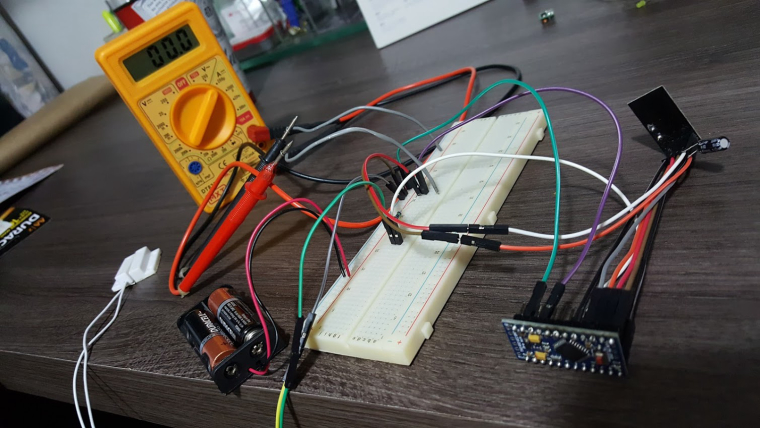
    Great!!! Got it working, but can't measure the consumption...
    My multimeter shows always 000.
    The sensors is working fine and reporting properly while connected to multimeter, but always 0 current...
    Tried 200u, 2000u, 20m and 200m, always reporting zero... Is is that low?

    Did I connect something wrong??? (multimeter in series with positive battery pole and circuit line in (Radio+APM+1M ResistorPin3)
    Or is my aliexpress multimeter that bad???

    0_1502410544175_20170810_210709.jpg

    My Project

  • Video How To: Battery Powered Chair Occupancy (Contact) Sensor
    OliverDogO OliverDog

    Thanks for sharing this awesome project...

    I want to install all my windows with reed sensors powered by 2AA alcaline batteries and would like they last more than 5 years... and I think your project fits perfectly
    How long do those used batteries last?

    Did you implement what @Nca78 suggested?

    I have already cut LED and Power Regulator from Arduino Pro Mini 3.3v and will change bootloader.
    Have you choosen the best (lowest power consumption) bootloader to use?

    I would try the MYSBootloader_1MHz.hex from MySensors GitHub.
    Would the optiboot_atmega328_01M_009600_NOLED from GertSanders better for low power?

    Thanks for the help...

    My Project

  • RGB LED strip
    OliverDogO OliverDog

    @maghac I have posted the issue (not working VAR1 and VAR2 on Home Assistant) on the HA forum, and got steps for asking the implement...
    I will ask for such implement and it may work later...
    Thanks for the help...

    By the way, I did not test the switches but seems doing the job...

    My Project

  • RGB LED strip
    OliverDogO OliverDog

    the new sketch is even better... it responds faster than the other...

    but I still don't have fading effects... just the one that you have configured on the sketch (20) which is awesome by the way...

    It seems that Home Assistant does not send neither V_VAR1 nor V_VAR2 messages...

    the command:
    {"entity_id":"light.rgb_leds_12_1", "color_name":"green", "brightness_pct": 15, "transition":20}

    shows the same effect that the command:
    {"entity_id":"light.rgb_leds_12_1", "color_name":"green", "brightness_pct": 15, "transition":1}

    I will try HASS forum!
    Thank you very much.

    My Project

  • RGB LED strip
    OliverDogO OliverDog

    @maghac , great work!!!

    I want to build a battery powered Mood Light based on your sketch and RGB Common Cathode Leds (4 or 5 of them).

    Before getting those RGB leds yet (already ordered but it takes 2 months to receive) I tested your sketch with three ordinary 3 mm colored leds - Green, Red and Yellow (should be blue but I don´t have it) and got it running on Home Assistant. On batteries as well. Color selection and Dimmer working as well...

    But I don´t get fading effects (called by transition time on Home Assistant). No matter how long I ask the transition it changes the same time I ask.

    Serial monitor never shows that V_VAR1 message type. Was it supposed to show it?
    What did I miss?

    Thanks.

    My Project

  • RGB Leds Light - Mood Light
    OliverDogO OliverDog

    I tried another sketch from
    https://forum.mysensors.org/topic/6765/rgb-led-strip

    It worked with HASS but there is no response based on transitions time.

    /**
     * This program is free software; you can redistribute it and/or
     * modify it under the terms of the GNU General Public License
     * version 2 as published by the Free Software Foundation.
     *
     * LED STRIP sketch for Mysensors
     *******************************
     *
     * REVISION HISTORY
     * 1.0 
     *   Based on the example sketch in mysensors
     * 1.1
     *   fadespeed parameter (send as V_VAR1 message)
     *   HomeAssistant compatible (send status to ack)
     */
    
    #define MY_NODE_ID AUTO
    #define MY_DEBUG
    #define MY_RADIO_NRF24
    
    #include <MySensors.h>
    
    #define CHILD_ID_LIGHT 1
    
    #define SN "LED Strip"
    #define SV "1.1"
    
    MyMessage lightMsg(CHILD_ID_LIGHT, V_LIGHT);
    MyMessage rgbMsg(CHILD_ID_LIGHT, V_RGB);
    MyMessage dimmerMsg(CHILD_ID_LIGHT, V_DIMMER);
    
    byte red = 255;
    byte green = 255;
    byte blue = 255;
    byte r0 = 255;
    byte g0 = 255;
    byte b0 = 255;
    char rgbstring[] = "ffffff";
    
    int on_off_status = 0;
    int dimmerlevel = 100;
    int fadespeed = 0;
    
    #define REDPIN 6
    #define GREENPIN 5
    #define BLUEPIN 3
    
    void setup()
    {
      // Fix the PWM timer. Without this the LEDs will flicker.
      TCCR0A = _BV(COM0A1) | _BV(COM0B1) | _BV(WGM00);
    
      // Output pins
      pinMode(REDPIN, OUTPUT);
      pinMode(GREENPIN, OUTPUT);
      pinMode(BLUEPIN, OUTPUT);
      
    }
    
    void presentation()
    {
    	// Send the Sketch Version Information to the Gateway
    	sendSketchInfo(SN, SV);
    	present(CHILD_ID_LIGHT, S_RGB_LIGHT);
    }
    
    void loop()
    {
      static bool first_message_sent = false;
      if ( first_message_sent == false ) {
        Serial.println( "Sending initial state..." );
        set_hw_status();
        send_status();
        first_message_sent = true;
      }
    }
    
    void receive(const MyMessage &message)
    {
      int val;
      
    	if (message.type == V_RGB) {
    		Serial.println( "V_RGB command: " );
        Serial.println(message.data);
        long number = (long) strtol( message.data, NULL, 16);
    
        // Save old value
        strcpy(rgbstring, message.data);
        
        // Split it up into r, g, b values
        red = number >> 16;
        green = number >> 8 & 0xFF;
        blue = number & 0xFF;
    
        send_status();
        set_hw_status();
    
    	} else if (message.type == V_LIGHT || message.type == V_STATUS) {
        Serial.println( "V_LIGHT command: " );
        Serial.println(message.data);
        val = atoi(message.data);
        if (val == 0 or val == 1) {
          on_off_status = val;
          send_status();
          set_hw_status();
        }
        
      } else if (message.type == V_DIMMER || message.type == V_PERCENTAGE) {
        Serial.print( "V_DIMMER command: " );
        Serial.println(message.data);
        val = atoi(message.data);
        if (val >= 0 and val <=100) {
          dimmerlevel = val;
          send_status();
          set_hw_status();
        }
        
      } else if (message.type == V_VAR1 ) {
        Serial.print( "V_VAR1 command: " );
        Serial.println(message.data);
        val = atoi(message.data);
        if (val >= 0 and val <= 2000) {
          fadespeed = val;
        }
        
    	} else {
    		Serial.println( "Invalid command received..." );
    		return;
    	}
    
    }
    
    void set_rgb(int r, int g, int b) {
      analogWrite(REDPIN, r);
      analogWrite(GREENPIN, g);
      analogWrite(BLUEPIN, b);
    }
    
    void set_hw_status() {
      int r = on_off_status * (int)(red * dimmerlevel/100.0);
      int g = on_off_status * (int)(green * dimmerlevel/100.0);
      int b = on_off_status * (int)(blue * dimmerlevel/100.0);
    
      if (fadespeed >0) {
        
        float dr = (r - r0) / float(fadespeed);
        float db = (b - b0) / float(fadespeed);
        float dg = (g - g0) / float(fadespeed);
        
        for (int x = 0;  x < fadespeed; x++) {
          set_rgb(r0 + dr*x, g0 + dg*x, b0 + db*x);
          delay(100);
        }
      }
    
      set_rgb(r, g, b);
     
      r0 = r;
      b0 = b;
      g0 = g;
      
    }
    
    
    void send_status() {
      send(rgbMsg.set(rgbstring));
      send(lightMsg.set(on_off_status));
      send(dimmerMsg.set(dimmerlevel));
    }
    
    Development

  • RGB Leds Light - Mood Light
    OliverDogO OliverDog

    Finally I tried this weekend but no success...

    First I have updated your sketch to 2.0 version (I think I made everything right)
    Didn't work on Home Assistant because the sketch don't send an initial value for each configuration of the Leds, such as Dimmer, RGB, Light, Fade, etc.

    I did not figure out how to create an initial value loop because there are no MyMessage msg(Child_, V_) on the sketch...

    Could you help me again?
    Thanks very much...

    Here is the updated sketch:

    // RBG led strip plug in.
    // by Bart Eversdijk (c) 2015.
    
    #define MY_DEBUG
    #define MY_RADIO_NRF24
    #define MY_NODE_ID 3
    
    #include <MySensors.h>
    #include <SPI.h>
    
    #define SUBID  1  // sensor number needed in the custom devices set up
    
    #define RED   6  // Arduino PWM pin for Red
    #define GREEN 5 // Arduino PWM pin for Green
    #define BLUE  3  // Arduino PWM pin for Blue
    #define NODENAME "RGB Led2"
    
    enum ANIMATIOMODES {RAINBOW=0,RANDONMIZE,FADERGB,FADEMULTICOLR,FLASHCOLOR,LAST_PROGRAM};
    
    byte FADE_RGB_COLOR_MODES[]   = {0b0010,0b0011,0b0100,0b0101,0b1000,0b1001, 0xFF};
    byte FADE_MULTI_COLOR_MODES[] = {0b0010,0b0011,0b0110,0b0111,0b0100,0b0101,0b1100,0b1101,0b1000,0b1001,0b1010,0b1011,0xFF};
    
    static bool first_message_sent = false;
    
    byte rgb_pins[]   = {RED, GREEN, BLUE};
    byte ledOffValues[] = {0, 0, 0, 0};
    byte rgb_values[]   = {0, 0, 0, 0};
    
    
    void incomingMessage(const MyMessage &message);
    #define NUM_OF_COLORS sizeof(rgb_pins)
    int speedtable[] = { 0, 100, 50, 2 };
    #define NUM_OF_SPEEDS sizeof(speedtable)
    
    struct
    {
       byte values[4];
       byte speedsetting;
       byte mode;
       bool status;
    } rgb = { {0,0,0,0}, 0, RAINBOW, false};
    
    bool    flashOn      = true;
    int     syscounter   = 0;
    int     lastUpdate   = 0;
    bool    newSetting   = false;
    
    void before() {
        // Set the rgb(w) pins in output mode
        for (int i = 0; i < NUM_OF_COLORS; i++) {
            pinMode(rgb_pins[i], OUTPUT);
        }
        recallEeprom();
        setLedValues(rgb.values, true);
        
        Serial.println("Init done");
    }
    
    void presentation()
    {
      sendSketchInfo(NODENAME, "1.0");
      present(SUBID, S_RGB_LIGHT);
    }
    
    void loop()
    {
        // Alway process incoming messages whenever possible
        if (speedtable[rgb.speedsetting] > 0) {
            if ((syscounter % speedtable[rgb.speedsetting]) == 0) {
               switch (rgb.mode)
               {
                   case RAINBOW:
                     animateRainbowStep();
                     break;
    
                   case FADERGB:
                     animateFadeColorStep(FADE_RGB_COLOR_MODES);
                     break;
    
                   case FADEMULTICOLR:
                     animateFadeColorStep(FADE_MULTI_COLOR_MODES);
                     break;
                 
                  case FLASHCOLOR:
                     setLedValues(flashOn ? ledOffValues : rgb.values, false);
                     flashOn = !flashOn;
                     break;
                                 
                   case RANDONMIZE:
                     long number = random(0, 0xFFFFFF);
                     rgb_values[0] = number >> 16 & 0xFF ;
                     rgb_values[1] = number >> 8 & 0xFF ;
                     rgb_values[2] = number & 0xFF;
                     setLedValues(rgb_values, false);
                     break;
               }
            }
            delay(rgb.mode == RANDONMIZE || rgb.mode == FLASHCOLOR ? 50 : 1);
        }
        if (newSetting && (lastUpdate + 30000 < syscounter)) {   
            // Wait for a couple of seconds be fore actual storing the current setting in to EEPROM
            // This will save the EEPROM's life time, when playing around with colors
            Serial.println(" Store EERPOM");
            storeEeprom();
            newSetting = false;
        } 
        delay(1);
        syscounter++;
    }
    
    void animateRainbowStep()
    {    
        static float counter = 0;
        float        pi      = 3.14159; 
        counter++;
        rgb_values[0] = map(sin(counter/100         )*1000,-1000,1000,0,255);
        rgb_values[1] = map(sin(counter/100 + pi*2/3)*1000,-1000,1000,0,255);
        rgb_values[2] = map(sin(counter/100 + pi*4/3)*1000,-1000,1000,0,255);
        setLedValues(rgb_values, false);
    }
    
    void animateFadeColorStep(byte *modes)
    {    
        static int modecnt = 0;
        if (updateRGBValues(modes[modecnt] >> 1, (modes[modecnt] & 0x1) == 0x1)) { 
            modecnt = (modes[modecnt+1] == 0xFF ? 0 : modecnt + 1);
        }
    }
    
    bool updateRGBValues(byte mode, bool down)
    {
        bool endReached = false;
        for (byte i = 0; i < 3; i++) {
            if (((mode >> i) & 0x1) == 0x1) {
               rgb_values[i] += (down ? -1 : 1);
               endReached    |= (down && (rgb_values[i] == 0x00)) || (!down && (rgb_values[i] == 0xFF));
            }
        }
        setLedValues(rgb_values, false);
        return endReached;
    }
    
    
    void incomingMessage(const MyMessage &message) {
        if (message.type == V_RGB || message.type == V_RGBW) {
      // starting to process the hex code
            String hexstring = message.getString();
    
            long number;
    #ifdef RGBW
            char white[3];
            white[0] = hexstring[6];
            white[1] = hexstring[7];
            white[2] = 0;
            number = (long) strtol( &white[0], NULL, 16);
            rgb.values[3] = number & 0xFF;
    #endif        
            hexstring[6] = 0;
            number = (long) strtol( &hexstring[0], NULL, 16);
            rgb.values[0] = number >> 16 & 0xFF ;
            rgb.values[1] = number >> 8 & 0xFF ;
            rgb.values[2] = number & 0xFF;
            
            rgb.speedsetting = 0;
            setLedValues(rgb.values, true);
            lastUpdate = syscounter;
            newSetting = true;
        }
        
        if (message.type == V_STATUS) {
          if (message.getBool()) {
              Serial.println("ON: Switch to last known color values");
              setLedValues(rgb_values, true);
          } else {
             Serial.println("OFF: Switch colors off");
             setLedValues(ledOffValues, true);
          }
          rgb.speedsetting = 0;
          rgb.status = message.getBool();
          lastUpdate = syscounter;
          newSetting = true;
        }
        
        if (message.type == V_VAR1) {
           Serial.println("Set speed and program value"); 
           byte newsetting = message.getByte();
           rgb.speedsetting = (newsetting >> 4) & 0x0F;
           byte newmode = newsetting & 0x0F;
    
           if (newmode != rgb.mode) {
               for (byte i = 0; i < NUM_OF_COLORS; i++) {
                   rgb_values[i] = 0;
               }
               rgb.mode = newmode;
           }
           if (rgb.speedsetting > 0) {
             rgb.status = true;
           }
           lastUpdate = syscounter;
           newSetting = true;
          
           Serial.print("Data 0x");
           Serial.print(newsetting, HEX);
           Serial.print(" speed:");
           Serial.print(rgb.speedsetting);
           Serial.print(" mode:");
           Serial.println(rgb.mode);
        }
    }
    
    void setLedValues(byte *rgb, bool show)
    {
        for (int i = 0; i < NUM_OF_COLORS; i++) {
            analogWrite(rgb_pins[i], rgb[i]);
        }  
     
        if (show) {
          Serial.print("Red: " );
          Serial.print(rgb[0], HEX);
          Serial.print("  Green: " );
          Serial.print(rgb[1], HEX);
          Serial.print("  Blue: " );
          Serial.print(rgb[2], HEX);
     #ifdef RGBW
            Serial.print("  White is " );
            Serial.print(rgb[3], HEX);
     #endif
          Serial.println();
        }
    }
    
    void storeEeprom()
    {
        byte address = 0;
        byte *p = (byte *)&(rgb);
        for (byte i = 0; i < sizeof(rgb); i++) {
           saveState(address++, p[i]);
        }
    }
    
    void recallEeprom()
    {
        byte address = 0;
        byte *p = (byte *)&(rgb);
        for (byte i = 0; i < sizeof(rgb); i++) {
           p[i] = loadState(address++);
        }
    }

    
    Development

  • RGB Leds Light - Mood Light
    OliverDogO OliverDog

    Thanks @BartE !

    Three more questions:

    • Will it work with a single 4 pin RGB LED common cathode instead of a LED strip?
    • Will it work with Home Assistant Controller like a ordinary RGB Light?
    • Could it run on batteries?

    Thanks again.

    Development

  • 💬 Building a Raspberry Pi Gateway
    OliverDogO OliverDog

    @OliverDog said in 💬 Building a Raspberry Pi Gateway:

    Why do Tx and Rx Leds blink every 5 to 6 seconds?
    Is it about communication between RPi and Gateway?
    Is there a way to disable it and keep blinks only with nodes communication?

    Is there an answer for that?
    Thanks again

    Announcements

  • RGB Leds Light - Mood Light
    OliverDogO OliverDog

    I think most people have already seen that 15 dollars multisensor build by Ben from BruhAutomation.
    Here is the link: https://www.youtube.com/watch?v=jpjfVc-9IrQ

    Unfortunately (at least for this community) he uses a NomeMCU board instead of using a MySensors connection.

    It would be awesome porting that whole sketch and project to a MySensors battery powered node... sorry if I am missing somebody´s work that already did that.

    All the sensors together are relatively easy to build on mysensor, but what I can´t figure out is that awesome RGB LED wich turns into a complete Light Component, with fade, color changing and transitions.

    Could someone share a mysensors node or help porting that Bruh Sketch, specially the RGB Led part?

    It would be something like a Mood Light!

    Here is original code:
    https://github.com/bruhautomation/ESP-MQTT-JSON-Multisensor

    Development

  • 💬 Building a Raspberry Pi Gateway
    OliverDogO OliverDog

    Why do Tx and Rx Leds blink every 5 to 6 seconds?

    Is it about communication between RPi and Gateway?

    Is there a way to disable it and keep blinks only with nodes communication?

    Announcements

  • RPi3 GPIO MySensors Gateway + LEDs + LNA Radio + DLink enclosure
    OliverDogO OliverDog

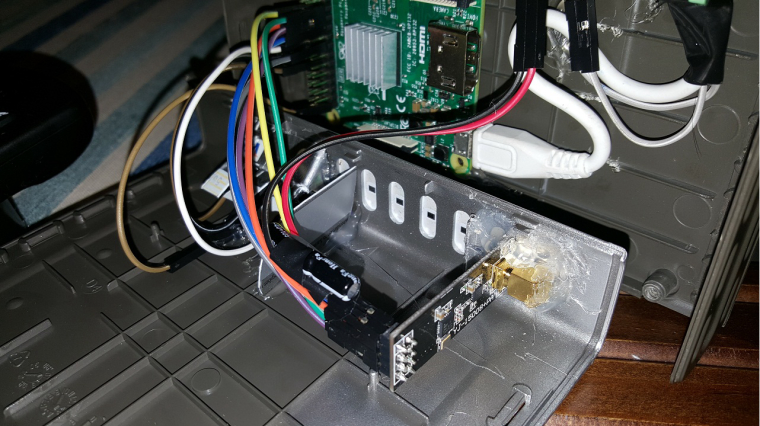
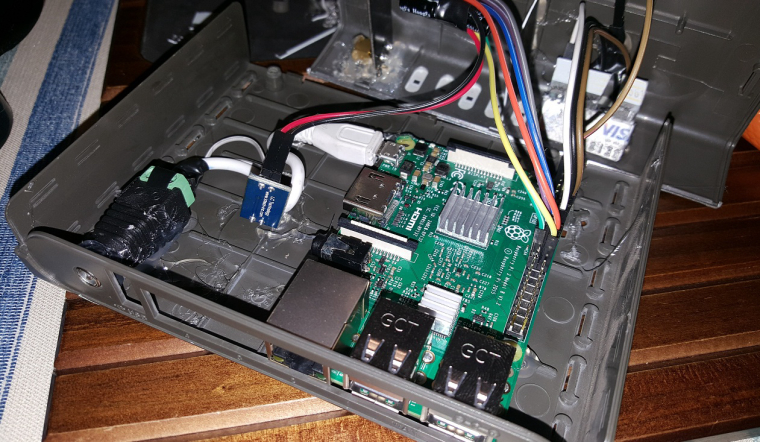
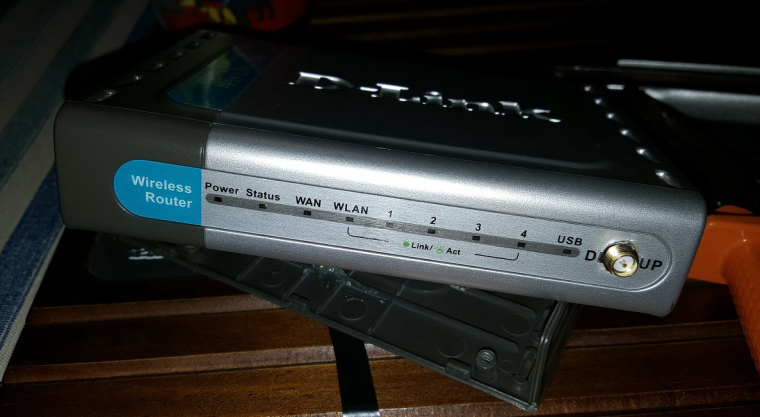
    2_1498570291465_1 - Cópia (4).jpg 1_1498570291464_1 - Cópia (3).jpg 0_1498570291463_1 - Cópia (2).jpg

    My Project
  • Login

  • Don't have an account? Register

  • Login or register to search.
  • First post
    Last post
0
  • MySensors
  • OpenHardware.io
  • Categories
  • Recent
  • Tags
  • Popular