Skip to content
  • MySensors
  • OpenHardware.io
  • Categories
  • Recent
  • Tags
  • Popular
Skins
  • Light
  • Brite
  • Cerulean
  • Cosmo
  • Flatly
  • Journal
  • Litera
  • Lumen
  • Lux
  • Materia
  • Minty
  • Morph
  • Pulse
  • Sandstone
  • Simplex
  • Sketchy
  • Spacelab
  • United
  • Yeti
  • Zephyr
  • Dark
  • Cyborg
  • Darkly
  • Quartz
  • Slate
  • Solar
  • Superhero
  • Vapor

  • Default (No Skin)
  • No Skin
Collapse
Brand Logo
  1. Home
  2. Troubleshooting
  3. multiple DS18D20 does not report temperature

multiple DS18D20 does not report temperature

Scheduled Pinned Locked Moved Troubleshooting
27 Posts 4 Posters 12.9k Views 2 Watching
  • Oldest to Newest
  • Newest to Oldest
  • Most Votes
Reply
  • Reply as topic
Log in to reply
This topic has been deleted. Only users with topic management privileges can see it.
  • H Offline
    H Offline
    hek
    Admin
    wrote on last edited by
    #10

    That seems wrong.

    What if you update the libraries and sketch to latest on github. There was an update to the Onewire/Dallas library recently to make in none-blocking...

    1 Reply Last reply
    0
    • Tomasz PazioT Offline
      Tomasz PazioT Offline
      Tomasz Pazio
      wrote on last edited by
      #11

      log is now different
      send: 3-3-0-0 s=255,c=0,t=17,pt=0,l=3,sg=0,st=ok:1.5
      send: 3-3-0-0 s=255,c=3,t=6,pt=1,l=1,sg=0,st=ok:0
      read: 0-0-3 s=255,c=3,t=6,pt=0,l=1,sg=0:M
      sensor started, id=3, parent=0, distance=1
      send: 3-3-0-0 s=255,c=3,t=11,pt=0,l=18,sg=0,st=ok:Temperature Sensor
      send: 3-3-0-0 s=255,c=3,t=12,pt=0,l=3,sg=0,st=ok:1.1
      send: 3-3-0-0 s=0,c=0,t=6,pt=0,l=0,sg=0,st=ok:
      send: 3-3-0-0 s=1,c=0,t=6,pt=0,l=0,sg=0,st=ok:

      but still no readings on vera :(

      1 Reply Last reply
      0
      • H Offline
        H Offline
        hek
        Admin
        wrote on last edited by
        #12

        I cannot see any temp readings in the debug log...

        Are you powering your 9 Dallas sensors directly from the Arduino or separately? I'm not sure how much they draw but 9 is quite much...

        1 Reply Last reply
        0
        • Tomasz PazioT Offline
          Tomasz PazioT Offline
          Tomasz Pazio
          wrote on last edited by
          #13

          Now trying with one and two. No more.

          1 Reply Last reply
          0
          • Tomasz PazioT Offline
            Tomasz PazioT Offline
            Tomasz Pazio
            wrote on last edited by
            #14

            There are two parts of issue:
            problem with no data on vera was on this part:
            // Only send data if temperature has changed and no error
            #if COMPARE_TEMP == 1
            if (lastTemperature[i] != temperature && temperature != -127.00 && temperature != 85.00) {
            #else
            if (temperature != -127.00 && temperature != 85.00) {
            #endif

            my reading is now -127.00
            changed to -200 and now I can see the data on vera.
            however this is not correct data because should be something like 27 Celsius.
            so there is something with conversion as well :(

            1 Reply Last reply
            0
            • H Offline
              H Offline
              hek
              Admin
              wrote on last edited by
              #15

              -127 means something is wrong when reading your dallas sensors. It is a an error code. So you actually only have an issue with your temp sensors.

              1 Reply Last reply
              0
              • Tomasz PazioT Offline
                Tomasz PazioT Offline
                Tomasz Pazio
                wrote on last edited by
                #16

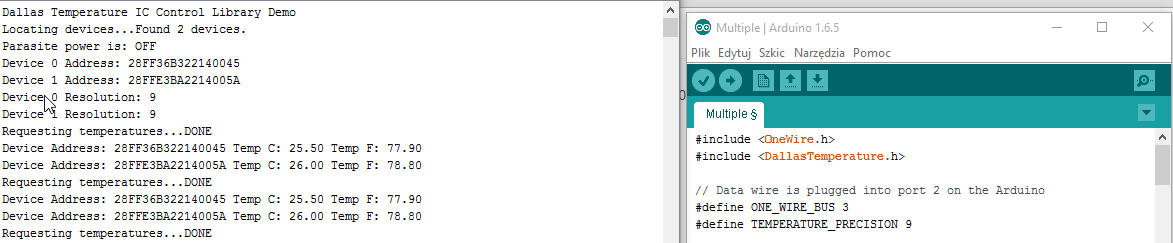
                2015-08-01 15_47_46-Poczta.png
                when I use Example for Dallas multiple sensors it works fine.
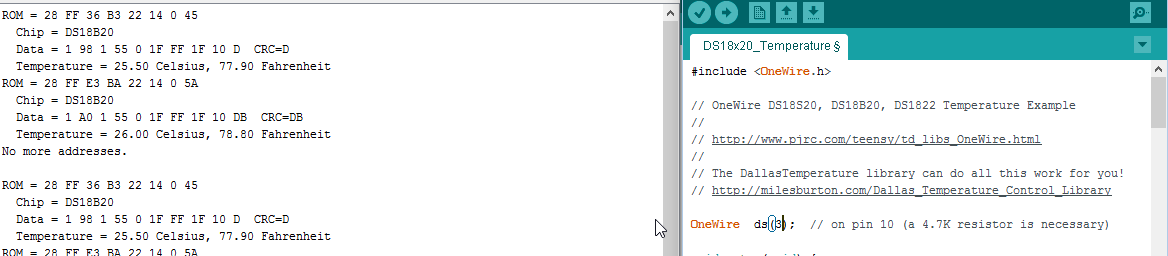
                2015-08-01 15_49_37-Poczta.png
                when I use example for one-wire temperature sensor ds18.... it works fine as well
                so i can reed but can not use Mysensors sketch :(

                1 Reply Last reply
                0
                • H Offline
                  H Offline
                  hek
                  Admin
                  wrote on last edited by
                  #17

                  Very strange. Are you using the same OneWire library in both cases?

                  1 Reply Last reply
                  0
                  • Tomasz PazioT Offline
                    Tomasz PazioT Offline
                    Tomasz Pazio
                    wrote on last edited by
                    #18

                    yes the same.

                    1 Reply Last reply
                    0
                    • Tomasz PazioT Offline
                      Tomasz PazioT Offline
                      Tomasz Pazio
                      wrote on last edited by
                      #19

                      any idea?

                      1 Reply Last reply
                      0
                      • H Offline
                        H Offline
                        hek
                        Admin
                        wrote on last edited by
                        #20

                        No, must be hundreds of users running Dallas sensors here. Trying to figure out if anything has changed in the library/dependencies but I don't see anything except the thing I mentioned earlier here.

                        And you can get the sensor running without MySensors library loaded...

                        Guess I have to hook up a Dallas sensor myself to check (tomorrow or so..)

                        1 Reply Last reply
                        0
                        • R Offline
                          R Offline
                          rvendrame
                          Hero Member
                          wrote on last edited by
                          #21

                          Are you powering your Dallas sensor using the 'one-wire' method? Is your arduino 5V or 3.3V?

                          Home Assistant / Vera Plus UI7
                          ESP8266 GW + mySensors 2.3.2
                          Alexa / Google Home

                          1 Reply Last reply
                          0
                          • Tomasz PazioT Offline
                            Tomasz PazioT Offline
                            Tomasz Pazio
                            wrote on last edited by Tomasz Pazio
                            #22

                            exactly like o the example so power from arduino 5V (not parasite)

                            1 Reply Last reply
                            0
                            • R Offline
                              R Offline
                              rvendrame
                              Hero Member
                              wrote on last edited by
                              #23

                              Can you post the serial monitor logs, from both gateway and node?

                              Home Assistant / Vera Plus UI7
                              ESP8266 GW + mySensors 2.3.2
                              Alexa / Google Home

                              1 Reply Last reply
                              0
                              • Tomasz PazioT Offline
                                Tomasz PazioT Offline
                                Tomasz Pazio
                                wrote on last edited by
                                #24

                                @rvendrame, why You need log from gateway? When no values are sent from node than nothing on Vera. When use some dummy values which are visible in node log - than those values are in Vera.

                                1 Reply Last reply
                                0
                                • H Offline
                                  H Offline
                                  hek
                                  Admin
                                  wrote on last edited by
                                  #25

                                  @hek said:

                                  Guess I have to hook up a Dallas sensor myself to check (tomorrow or so..)

                                  Ok, tried latest from 1.5 branch and it works fine here with 2 hooked up DS18D20.

                                  sensor started, id=200, parent=0, distance=1
                                  send: 200-200-0-0 s=255,c=3,t=11,pt=0,l=18,sg=0,st=ok:Temperature Sensor
                                  send: 200-200-0-0 s=255,c=3,t=12,pt=0,l=3,sg=0,st=ok:1.1
                                  send: 200-200-0-0 s=0,c=0,t=6,pt=0,l=0,sg=0,st=ok:
                                  send: 200-200-0-0 s=1,c=0,t=6,pt=0,l=0,sg=0,st=ok:
                                  send: 200-200-0-0 s=0,c=1,t=0,pt=7,l=5,sg=0,st=ok:27.9
                                  send: 200-200-0-0 s=1,c=1,t=0,pt=7,l=5,sg=0,st=ok:28.0
                                  send: 200-200-0-0 s=0,c=1,t=0,pt=7,l=5,sg=0,st=ok:31.5
                                  send: 200-200-0-0 s=1,c=1,t=0,pt=7,l=5,sg=0,st=ok:32.0
                                  
                                  1 Reply Last reply
                                  0
                                  • Tomasz PazioT Offline
                                    Tomasz PazioT Offline
                                    Tomasz Pazio
                                    wrote on last edited by
                                    #26

                                    removed all Arduino related stuff from PC
                                    Installed new IDE and libs from https://github.com/mysensors/Arduino/archive/master.zip
                                    now I have progress, there are no readings no mater on which sketch hahaha.

                                    1 Reply Last reply
                                    0
                                    • C Offline
                                      C Offline
                                      clio75
                                      wrote on last edited by
                                      #27

                                      Hi,

                                      I have the same problem. No temperature is transported to GW.
                                      This log is from Sensor:
                                      req id
                                      send: 255-255-0-0 s=255,c=3,t=3,pt=0,l=0,sg=0,st=ok:
                                      sensor started, id=255, parent=0, distance=1
                                      req id
                                      send: 255-255-0-0 s=255,c=3,t=3,pt=0,l=0,sg=0,st=ok:
                                      req id
                                      send: 255-255-0-0 s=255,c=3,t=3,pt=0,l=0,sg=0,st=ok:
                                      req id
                                      send: 255-255-0-0 s=255,c=3,t=3,pt=0,l=0,sg=0,st=ok:

                                      I have added some exstra lines in serial printout so I know that ds1820 is found and read.

                                      req id
                                      send: 255-255-0-0 s=255,c=3,t=3,pt=0,l=0,sg=0,st=ok:
                                      sensor started, id=255, parent=0, distance=1
                                      req id
                                      send: 255-255-0-0 s=255,c=3,t=3,pt=0,l=0,sg=0,st=ok:
                                      req id
                                      send: 255-255-0-0 s=255,c=3,t=3,pt=0,l=0,sg=0,st=ok:
                                      **Sensors found
                                      1
                                      **req id
                                      send: 255-255-0-0 s=255,c=3,t=3,pt=0,l=0,sg=0,st=ok:
                                      temp :
                                      23.80

                                      But This value is not transported to GW.
                                      Any idee ?

                                      Thanx

                                      1 Reply Last reply
                                      0

                                      Hello! It looks like you're interested in this conversation, but you don't have an account yet.

                                      Getting fed up of having to scroll through the same posts each visit? When you register for an account, you'll always come back to exactly where you were before, and choose to be notified of new replies (either via email, or push notification). You'll also be able to save bookmarks and upvote posts to show your appreciation to other community members.

                                      With your input, this post could be even better 💗

                                      Register Login
                                      Reply
                                      • Reply as topic
                                      Log in to reply
                                      • Oldest to Newest
                                      • Newest to Oldest
                                      • Most Votes


                                      17

                                      Online

                                      12.0k

                                      Users

                                      11.2k

                                      Topics

                                      113.4k

                                      Posts


                                      Copyright 2025 TBD   |   Forum Guidelines   |   Privacy Policy   |   Terms of Service
                                      • Login

                                      • Don't have an account? Register

                                      • Login or register to search.
                                      • First post
                                        Last post
                                      0
                                      • MySensors
                                      • OpenHardware.io
                                      • Categories
                                      • Recent
                                      • Tags
                                      • Popular