Skip to content
  • MySensors
  • OpenHardware.io
  • Categories
  • Recent
  • Tags
  • Popular
Skins
  • Light
  • Brite
  • Cerulean
  • Cosmo
  • Flatly
  • Journal
  • Litera
  • Lumen
  • Lux
  • Materia
  • Minty
  • Morph
  • Pulse
  • Sandstone
  • Simplex
  • Sketchy
  • Spacelab
  • United
  • Yeti
  • Zephyr
  • Dark
  • Cyborg
  • Darkly
  • Quartz
  • Slate
  • Solar
  • Superhero
  • Vapor

  • Default (No Skin)
  • No Skin
Collapse
Brand Logo
  1. Home
  2. Development
  3. implementing multiple sensors

implementing multiple sensors

Scheduled Pinned Locked Moved Development
83 Posts 28 Posters 87.1k Views 15 Watching
  • Oldest to Newest
  • Newest to Oldest
  • Most Votes
Reply
  • Reply as topic
Log in to reply
This topic has been deleted. Only users with topic management privileges can see it.
  • W Offline
    W Offline
    waynehead99
    wrote on last edited by
    #48

    How did you get 3 options for the sleep interrupt? Whenever I would try and add the sleep_time option it would give me compile errors.

    1 Reply Last reply
    0
    • mountainmanM mountainman

      Here is a version I'm currently using that makes use of interrupts so might be more suitable for a battery driven DHT/Motion multi sensor. It also includes the battery monitoring. Any feedback or improvements would be appreciated.

      #include <SPI.h>
      #include <MySensor.h>
      #include <DHT.h>
      
      #define CHILD_ID_HUM 0
      #define CHILD_ID_TEMP 1
      #define CHILD_ID_MOTION 2   // Id of the sensor child
      
      #define HUMIDITY_SENSOR_DIGITAL_PIN 4
      #define DIGITAL_INPUT_SENSOR 3   // The digital input you attached your motion sensor.  (Only 2 and 3 generates interrupt!)
      #define INTERRUPT DIGITAL_INPUT_SENSOR-2 // Usually the interrupt = pin -2 (on uno/nano anyway)
      
      unsigned long SLEEP_TIME = F; // Sleep time between reports (in milliseconds)
      
      
      int BATTERY_SENSE_PIN = A0;  // select the input pin for the battery sense point
      int oldValue=-1;
      
      MySensor gw;
      DHT dht;
      float lastTemp;
      float lastHum;
      boolean metric = false;
      
      int oldBatteryPcnt = 0;
      int battLoop =0;
      
      MyMessage msgHum(CHILD_ID_HUM, V_HUM);
      MyMessage msgTemp(CHILD_ID_TEMP, V_TEMP);
      // Initialize motion message
      MyMessage msg(CHILD_ID_MOTION, V_TRIPPED);
      
      boolean pinTriggered=0;//waitTime is number of seconds to hol in while loop
      long lastDebounceTime = 0;  // the last time the output pin was toggled
      long debounceDelay = 50;    // the debounce time; increase if the output flickers
      
      
      void setup()
      {
      
        // use the 1.1 V internal reference
        analogReference(INTERNAL);
      
        gw.begin();
        dht.setup(HUMIDITY_SENSOR_DIGITAL_PIN);
      
        // Send the Sketch Version Information to the Gateway
        gw.sendSketchInfo("Motion Humidity w/ Batt", "1.0");
      
        // Register all sensors to gw (they will be created as child devices)
        gw.present(CHILD_ID_HUM, S_HUM);
        gw.present(CHILD_ID_TEMP, S_TEMP);
        gw.present(CHILD_ID_MOTION, S_MOTION);
      
        pinMode(DIGITAL_INPUT_SENSOR,INPUT);      // sets the motion sensor digital pin as input
        digitalWrite(DIGITAL_INPUT_SENSOR,HIGH);   // Activate internal pull-up
      
        metric = gw.getConfig().isMetric;
      
        check_batt();
      
      }
      
      void loop()
      {
        if (pinTriggered)
        {
      	Serial.println(millis()-lastDebounceTime);
      	// Read digital motion value
      	boolean value = digitalRead(DIGITAL_INPUT_SENSOR);
      	// If the switch changed, due to noise or pressing
      	if (value != oldValue) {
      	  {
      		lastDebounceTime = millis();
      		// Send in the new value
      		gw.send(msg.set(value==HIGH ? 1 : 0));
      		battLoop++;
      		oldValue = value;
      		Serial.print("Mot: ");
      		Serial.println(value);
      	  }
      	}
      
      	pinTriggered=0;
      	// }
        }
        else
        {
      
      	delay(dht.getMinimumSamplingPeriod());
      
      	float temperature = dht.getTemperature();
      	if (isnan(temperature))
      	{
      	  Serial.println("Failed reading temperature from DHT");
      	}
      	else if (temperature != lastTemp)
      	{
      	  lastTemp = temperature;
      	  if (!metric)
      	  {
      		temperature = dht.toFahrenheit(temperature);
      	  }
      	  gw.send(msgTemp.set(temperature, 1));
      	  battLoop++;
      	  Serial.print("T: ");
      	  Serial.println(temperature);
      	}
      
      	float humidity = dht.getHumidity();
      	if (isnan(humidity))
      	{
      	  Serial.println("Failed reading humidity from DHT");
      	}
      	else if (humidity != lastHum)
      	{
      	  lastHum = humidity;
      	  gw.send(msgHum.set(humidity, 1));
      	  battLoop++;
      	  Serial.print("H: ");
      	  Serial.println(humidity);
      	}
      
      
      	if (battLoop > 10)
      	{
      	  check_batt();
      	  battLoop=0;
      	}
        }
      
        // Sleep until interrupt comes in on motion sensor. Send update every two minute.
        pinTriggered = gw.sleep(INTERRUPT, CHANGE, SLEEP_TIME);
      }
      
      
      void check_batt()
      {
        // get the battery Voltage
        int sensorValue = analogRead(BATTERY_SENSE_PIN);
        Serial.println(sensorValue);
      
        // 1M, 470K divider across battery and using internal ADC ref of 1.1V
        // Sense point is bypassed with 0.1 uF cap to reduce noise at that point
        // ((1e6+470e3)/470e3)*1.1 = Vmax = 3.44 Volts
        // 3.44/1023 = Volts per bit = 0.003363075
        float batteryV  = sensorValue * 0.003363075;
        int batteryPcnt = sensorValue / 10;
      
        Serial.print("Battery Voltage: ");
        Serial.print(batteryV);
        Serial.println(" V");
      
        Serial.print("Battery percent: ");
        Serial.print(batteryPcnt);
        Serial.println(" %");
      
        if (oldBatteryPcnt != batteryPcnt) {
      	// Power up radio after sleep
      	gw.sendBatteryLevel(batteryPcnt);
      	oldBatteryPcnt = batteryPcnt;
        }
      }
      
      T Offline
      T Offline
      Tibus
      wrote on last edited by Tibus
      #49

      @mountainman
      Thank you verry much, exactly what i need!

      For child's id, if you have two sensor you have to change the ID in the second?

      Sensor 1 :
      #define CHILD_ID_HUM 0
      #define CHILD_ID_TEMP 1
      #define CHILD_ID_MOTION 2

      Sensor 2:
      #define CHILD_ID_HUM 3
      #define CHILD_ID_TEMP 4
      #define CHILD_ID_MOTION 5

      1 Reply Last reply
      0
      • mountainmanM Offline
        mountainmanM Offline
        mountainman
        wrote on last edited by
        #50

        @waynehead99 Are you using the new 1.4 Lib?

        1 Reply Last reply
        0
        • E egbertje

          Somebody has good result in a working multisensor and wants to share his code?

          NuubiN Offline
          NuubiN Offline
          Nuubi
          wrote on last edited by Nuubi
          #51

          @egbertje Good Question :-) It would be nice to learn from existing working sketches..

          1 Reply Last reply
          0
          • AnticimexA Offline
            AnticimexA Offline
            Anticimex
            Contest Winner
            wrote on last edited by
            #52

            @waynehead99 you most likely need 1.4 Lib for the new sleep constructor. I have not used sleep on 1.3 so I do not remember what arguments you had available there.
            I have also extended sleep with an additional constructor which @hek has pulled into the release branch of 1.4 that permits you to use two external interrupts with independent triggers for sleep in addition to a timeout. Great for nodes with multiple sensors that still run on battery.

            Do you feel secure today? No? Start requiring some signatures and feel better tomorrow ;)

            1 Reply Last reply
            0
            • E Offline
              E Offline
              egbertje
              wrote on last edited by egbertje
              #53

              @Mountainman ;

              Im trying your code and its almost what im looking for.
              I have two questions about it:
              1 : Is it possible that the battery info has is own child id?
              2 : Why dont you implement a light sensor like an LDR?

              I think that including LDR/light then you have the ideal multisensor ; light + temp/hum + motion + batt monitoring !
              But for now im playing with your code and try to implement light.

              1 Reply Last reply
              0
              • mountainmanM mountainman

                Here is a version I'm currently using that makes use of interrupts so might be more suitable for a battery driven DHT/Motion multi sensor. It also includes the battery monitoring. Any feedback or improvements would be appreciated.

                #include <SPI.h>
                #include <MySensor.h>
                #include <DHT.h>
                
                #define CHILD_ID_HUM 0
                #define CHILD_ID_TEMP 1
                #define CHILD_ID_MOTION 2   // Id of the sensor child
                
                #define HUMIDITY_SENSOR_DIGITAL_PIN 4
                #define DIGITAL_INPUT_SENSOR 3   // The digital input you attached your motion sensor.  (Only 2 and 3 generates interrupt!)
                #define INTERRUPT DIGITAL_INPUT_SENSOR-2 // Usually the interrupt = pin -2 (on uno/nano anyway)
                
                unsigned long SLEEP_TIME = F; // Sleep time between reports (in milliseconds)
                
                
                int BATTERY_SENSE_PIN = A0;  // select the input pin for the battery sense point
                int oldValue=-1;
                
                MySensor gw;
                DHT dht;
                float lastTemp;
                float lastHum;
                boolean metric = false;
                
                int oldBatteryPcnt = 0;
                int battLoop =0;
                
                MyMessage msgHum(CHILD_ID_HUM, V_HUM);
                MyMessage msgTemp(CHILD_ID_TEMP, V_TEMP);
                // Initialize motion message
                MyMessage msg(CHILD_ID_MOTION, V_TRIPPED);
                
                boolean pinTriggered=0;//waitTime is number of seconds to hol in while loop
                long lastDebounceTime = 0;  // the last time the output pin was toggled
                long debounceDelay = 50;    // the debounce time; increase if the output flickers
                
                
                void setup()
                {
                
                  // use the 1.1 V internal reference
                  analogReference(INTERNAL);
                
                  gw.begin();
                  dht.setup(HUMIDITY_SENSOR_DIGITAL_PIN);
                
                  // Send the Sketch Version Information to the Gateway
                  gw.sendSketchInfo("Motion Humidity w/ Batt", "1.0");
                
                  // Register all sensors to gw (they will be created as child devices)
                  gw.present(CHILD_ID_HUM, S_HUM);
                  gw.present(CHILD_ID_TEMP, S_TEMP);
                  gw.present(CHILD_ID_MOTION, S_MOTION);
                
                  pinMode(DIGITAL_INPUT_SENSOR,INPUT);      // sets the motion sensor digital pin as input
                  digitalWrite(DIGITAL_INPUT_SENSOR,HIGH);   // Activate internal pull-up
                
                  metric = gw.getConfig().isMetric;
                
                  check_batt();
                
                }
                
                void loop()
                {
                  if (pinTriggered)
                  {
                	Serial.println(millis()-lastDebounceTime);
                	// Read digital motion value
                	boolean value = digitalRead(DIGITAL_INPUT_SENSOR);
                	// If the switch changed, due to noise or pressing
                	if (value != oldValue) {
                	  {
                		lastDebounceTime = millis();
                		// Send in the new value
                		gw.send(msg.set(value==HIGH ? 1 : 0));
                		battLoop++;
                		oldValue = value;
                		Serial.print("Mot: ");
                		Serial.println(value);
                	  }
                	}
                
                	pinTriggered=0;
                	// }
                  }
                  else
                  {
                
                	delay(dht.getMinimumSamplingPeriod());
                
                	float temperature = dht.getTemperature();
                	if (isnan(temperature))
                	{
                	  Serial.println("Failed reading temperature from DHT");
                	}
                	else if (temperature != lastTemp)
                	{
                	  lastTemp = temperature;
                	  if (!metric)
                	  {
                		temperature = dht.toFahrenheit(temperature);
                	  }
                	  gw.send(msgTemp.set(temperature, 1));
                	  battLoop++;
                	  Serial.print("T: ");
                	  Serial.println(temperature);
                	}
                
                	float humidity = dht.getHumidity();
                	if (isnan(humidity))
                	{
                	  Serial.println("Failed reading humidity from DHT");
                	}
                	else if (humidity != lastHum)
                	{
                	  lastHum = humidity;
                	  gw.send(msgHum.set(humidity, 1));
                	  battLoop++;
                	  Serial.print("H: ");
                	  Serial.println(humidity);
                	}
                
                
                	if (battLoop > 10)
                	{
                	  check_batt();
                	  battLoop=0;
                	}
                  }
                
                  // Sleep until interrupt comes in on motion sensor. Send update every two minute.
                  pinTriggered = gw.sleep(INTERRUPT, CHANGE, SLEEP_TIME);
                }
                
                
                void check_batt()
                {
                  // get the battery Voltage
                  int sensorValue = analogRead(BATTERY_SENSE_PIN);
                  Serial.println(sensorValue);
                
                  // 1M, 470K divider across battery and using internal ADC ref of 1.1V
                  // Sense point is bypassed with 0.1 uF cap to reduce noise at that point
                  // ((1e6+470e3)/470e3)*1.1 = Vmax = 3.44 Volts
                  // 3.44/1023 = Volts per bit = 0.003363075
                  float batteryV  = sensorValue * 0.003363075;
                  int batteryPcnt = sensorValue / 10;
                
                  Serial.print("Battery Voltage: ");
                  Serial.print(batteryV);
                  Serial.println(" V");
                
                  Serial.print("Battery percent: ");
                  Serial.print(batteryPcnt);
                  Serial.println(" %");
                
                  if (oldBatteryPcnt != batteryPcnt) {
                	// Power up radio after sleep
                	gw.sendBatteryLevel(batteryPcnt);
                	oldBatteryPcnt = batteryPcnt;
                  }
                }
                
                C Offline
                C Offline
                codenea
                wrote on last edited by
                #54

                @mountainman Is there any instructions on how to wire/setup the hardware to work with your code?

                1 Reply Last reply
                0
                • mountainmanM Offline
                  mountainmanM Offline
                  mountainman
                  wrote on last edited by
                  #55

                  @egbertje;

                  The battery percentage is associated with the parent Arduino Node in the vera UI.
                  I have some LDRs ordered from Ebay so that is the next step. I had previously used the BH1750 I2C sensor in a multi sensor with the 1.3 lib but I want to debug on its own as it seemed to be giving unexpected readings.

                  @codenea The instructions are pretty much from the main page although if I get a chance I try to draw it up and post some pics. My setup not very pretty yet with perf board and jumper wires. A dedicated PCB would be nice.

                  1 Reply Last reply
                  0
                  • epierreE Offline
                    epierreE Offline
                    epierre
                    Hero Member
                    wrote on last edited by
                    #56

                    Hello,

                    Here is my combo to make a Home Monitoring solution:
                    https://github.com/empierre/arduino/blob/master/MQv01dgi_1_4.ino

                    It includes (currently on a Mega):

                    • Barometer : BMP085
                    • Temperature + Humidity DHT11
                    • Particle sensor
                    • Gas sensors MQ2 MQ6 MQ131 MQ135 TGS2600 2SH12

                    To be added when stabilized:

                    • Sound level in DB

                    Could be added:

                    • Light sensor
                    • Vibration sensor
                    • PIR

                    z-wave - Vera -&gt; Domoticz
                    rfx - Domoticz &lt;- MyDomoAtHome &lt;- Imperihome
                    mysensors -&gt; mysensors-gw -&gt; Domoticz

                    1 Reply Last reply
                    0
                    • pgoP Offline
                      pgoP Offline
                      pgo
                      wrote on last edited by pgo
                      #57

                      Hi guys,

                      this is a one node with publishing DS temperatures and listening for relay commands I finished and tested yesterday>
                      https://github.com/pgo-sk/mysensors/blob/master/arduino/DS_and_Relay.ino
                      feel free to comment/use/publish...

                      I combined the Dalas and Relay examples together - you have to deactivate the sleep for the relays to listen 100% of time.
                      MQTT identification on openHAB:
                      MyMQTT/20/0/V_TEMP - DS sensor(s)
                      MyMQTT/20/1/V_LIGHT - relay 1
                      MyMQTT/20/2/V_LIGHT - relay 2

                      If somebody is interested I can post the maps/items files for openHAB

                      Regards,
                      Pego
                      PS I am working on an home automation system with solar hot air panels control/solar hot water panels and all the common stuff like lights/temperatures/weather etc.. More here: https://github.com/pgo-sk/mysensors/wiki/Home-automation-using-mysensors-and-openHAB

                      1 Reply Last reply
                      1
                      • I Offline
                        I Offline
                        integlikewhoa
                        wrote on last edited by
                        #58

                        I'm also following along interested in the Temp, Humidity, and motion sensor.

                        T 1 Reply Last reply
                        0
                        • I integlikewhoa

                          I'm also following along interested in the Temp, Humidity, and motion sensor.

                          T Offline
                          T Offline
                          Tibus
                          wrote on last edited by
                          #59

                          @integlikewhoa check this :

                          http://forum.mysensors.org/topic/404/3-in-1-humidity-temp-and-motion

                          1 Reply Last reply
                          0
                          • pgoP Offline
                            pgoP Offline
                            pgo
                            wrote on last edited by pgo
                            #60

                            https://github.com/pgo-sk/mysensors/blob/master/arduino/DS_Light_Relay

                            • DS18B20 (up to 16 like in original temp sketch)
                            • TEMT6000 reporting LUX light values
                            • 2x Relays
                              running and tested
                              Sensor <-> MQTT gateway <-> openHAB/PC

                            When interested can post the openHAB items/sitemap(s) settings

                            Screenshots - over teamviewer, sorry for the quality.

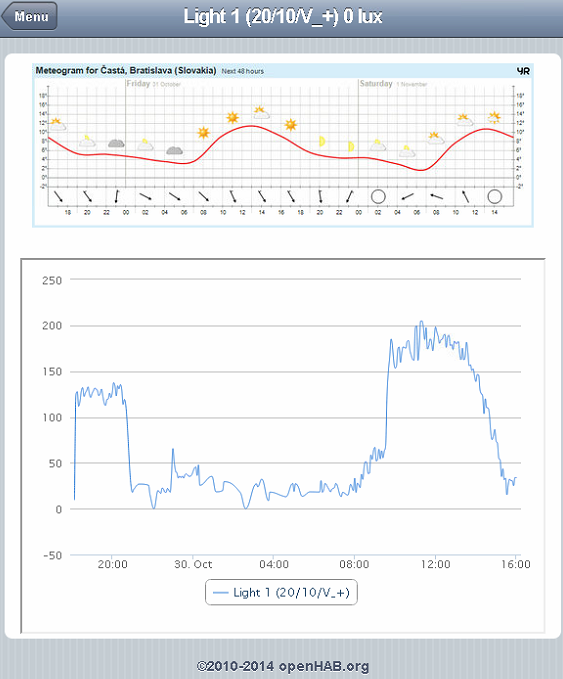
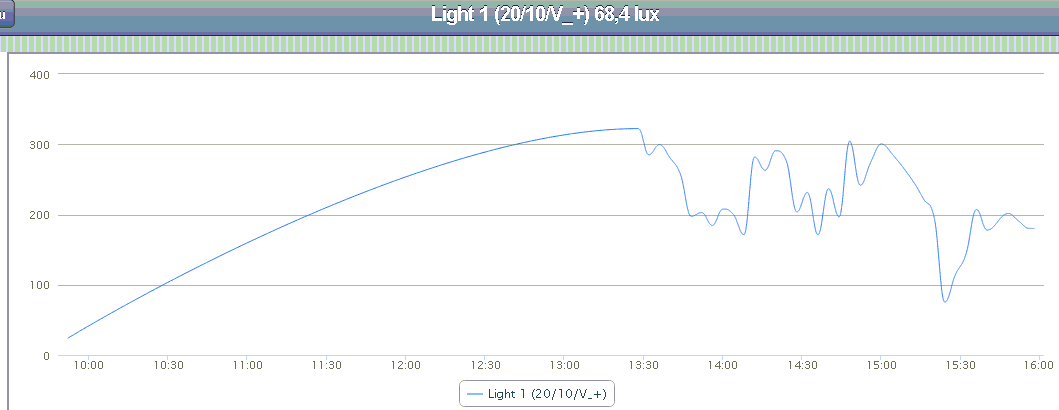
                            Here the TEMT6000 output - in a quite dark room and changing weather today>
                            upload-42ac73c1-61cf-4b90-9ec5-14a994a3b50a
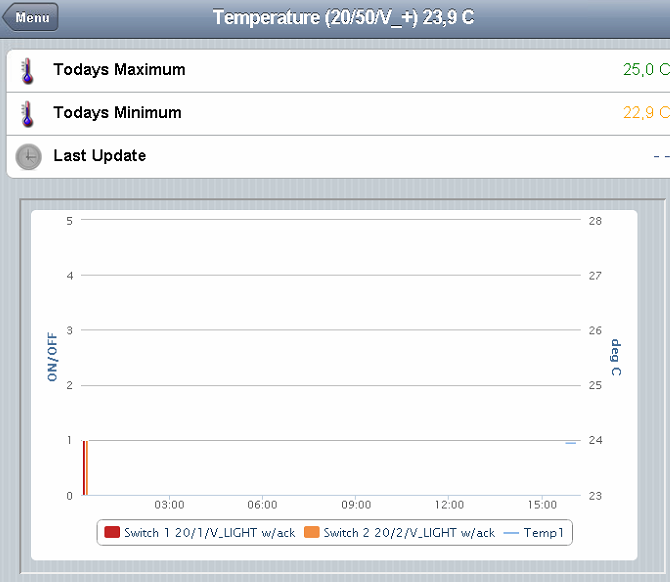
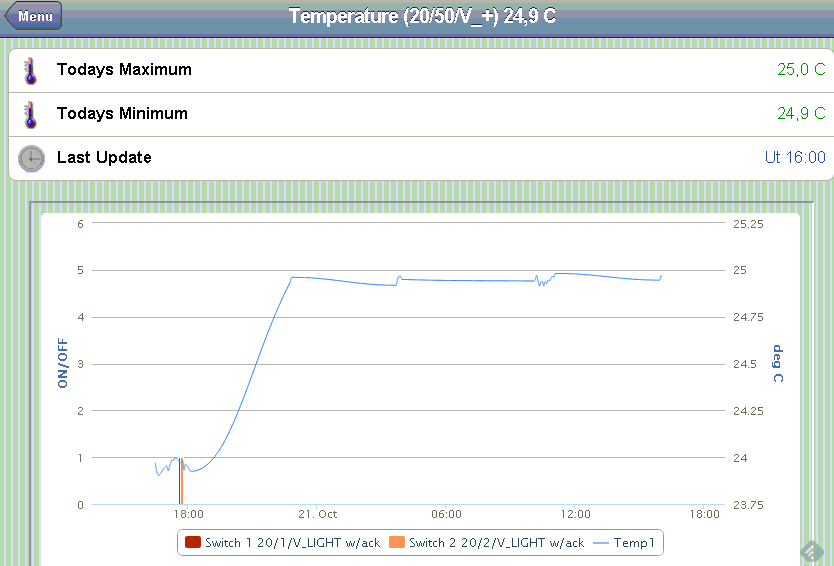
                            Here the temperature and relays:
                            upload-86825c33-2cc2-4018-9e08-2020007af3a9
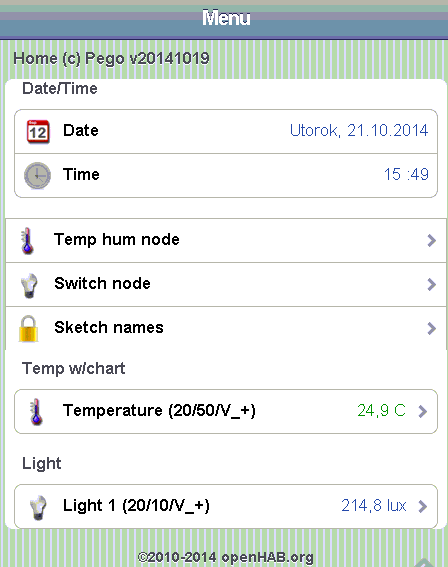
                            Menu:
                            upload-adf5c382-2803-49b9-a461-eb25beb572c0

                            aquaproA 1 Reply Last reply
                            0
                            • D Offline
                              D Offline
                              Dany
                              wrote on last edited by
                              #61

                              Has anyone made ​​RGB LED strip node? I am looking for a working example program ...

                              N 1 Reply Last reply
                              0
                              • blaceyB Offline
                                blaceyB Offline
                                blacey
                                Admin
                                wrote on last edited by
                                #62

                                @Dany - yes. Checkout http://www.mysensors.org/build/dimmer

                                D 1 Reply Last reply
                                0
                                • korttomaK Offline
                                  korttomaK Offline
                                  korttoma
                                  Hero Member
                                  wrote on last edited by
                                  #63

                                  Or here is an example I'm using:

                                  https://codebender.cc/sketch:44740

                                  • Tomas
                                  1 Reply Last reply
                                  1
                                  • pgoP pgo

                                    https://github.com/pgo-sk/mysensors/blob/master/arduino/DS_Light_Relay

                                    • DS18B20 (up to 16 like in original temp sketch)
                                    • TEMT6000 reporting LUX light values
                                    • 2x Relays
                                      running and tested
                                      Sensor <-> MQTT gateway <-> openHAB/PC

                                    When interested can post the openHAB items/sitemap(s) settings

                                    Screenshots - over teamviewer, sorry for the quality.

                                    Here the TEMT6000 output - in a quite dark room and changing weather today>
                                    upload-42ac73c1-61cf-4b90-9ec5-14a994a3b50a
                                    Here the temperature and relays:
                                    upload-86825c33-2cc2-4018-9e08-2020007af3a9
                                    Menu:
                                    upload-adf5c382-2803-49b9-a461-eb25beb572c0

                                    aquaproA Offline
                                    aquaproA Offline
                                    aquapro
                                    wrote on last edited by aquapro
                                    #64

                                    @pgo said:

                                    When interested can post the openHAB items/sitemap(s) settings

                                    Hi, I'm interested. :-)
                                    Or is this the latest version ?

                                    pgoP 1 Reply Last reply
                                    0
                                    • aquaproA aquapro

                                      @pgo said:

                                      When interested can post the openHAB items/sitemap(s) settings

                                      Hi, I'm interested. :-)
                                      Or is this the latest version ?

                                      pgoP Offline
                                      pgoP Offline
                                      pgo
                                      wrote on last edited by pgo
                                      #65

                                      @aquapro said:

                                      Hi, I'm interested. :-)
                                      Or is this the latest version ?

                                      Yes :), for the sketches mentioned earlier.
                                      <Comment to myself: Have to switch to some versioning as now I am already deeper in the project including cameras, weather forcasts etc.>

                                      1 Reply Last reply
                                      0
                                      • aquaproA Offline
                                        aquaproA Offline
                                        aquapro
                                        wrote on last edited by
                                        #66

                                        I could not decide yet on a platform. OpenHAB should be my next test.

                                        pgoP 1 Reply Last reply
                                        0
                                        • pgoP Offline
                                          pgoP Offline
                                          pgo
                                          wrote on last edited by pgo
                                          #67

                                          test1.items
                                          test1.sitemap
                                          test1.rules
                                          webcam.png
                                          webcam.png -icon for webcam - put in openhab/webapps/images

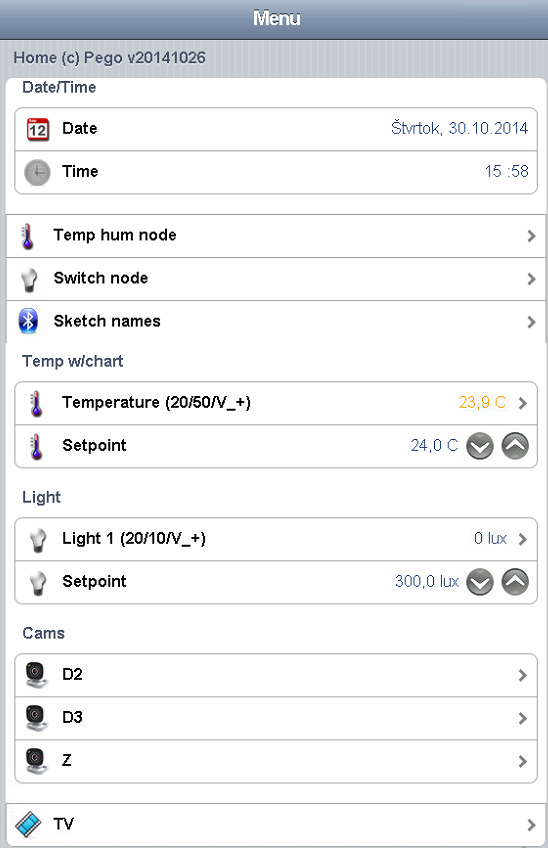
                                          My Current openHAB items/sitemap. 1 multisensor with Temp/Lux/Humidity sensor, 1 ethernet/MQTT gateway.

                                          Also weather forcast from yr.no and Samsung TV remote controls (Mute working, rest not so much)

                                          • openHAB v 1.5.1
                                          • Addons :
                                            \openhab\addons>
                                            org.openhab.binding.http-1.5.1.jar
                                            org.openhab.binding.mqtt-1.6.0-SNAPSHOT.jar
                                            org.openhab.binding.ntp-1.5.1.jar
                                            org.openhab.binding.samsungtv-1.6.0-SNAPSHOT.jar
                                            org.openhab.binding.zwave-1.6.0-SNAPSHOT.jar
                                            org.openhab.io.habmin-1.6.0-SNAPSHOT.jar
                                            org.openhab.persistence.exec-1.5.1.jar
                                            org.openhab.persistence.logging-1.5.1.jar
                                            org.openhab.persistence.mqtt-1.6.0-SNAPSHOT.jar
                                            org.openhab.persistence.rrd4j-1.5.1.jar

                                          HABmin conf with graphs:
                                          charts.xml -put in openhab/etc/habmin

                                          In habmin.cfg specify the IP of your MQTT arduino and port>
                                          '#'mqtt:<broker>.clientId=<clientId>
                                          mqtt:mysensor.url=tcp://192.168.1.234:1883
                                          mqtt:mysensor.clientId=MQTT
                                          mqtt:mysensor.qos=0
                                          mqtt:mysensor.retain=true
                                          mqtt:mysensor.async=true

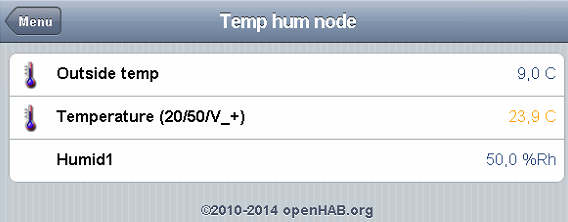
                                          Here some screenshots:
                                          Menu.PNG
                                          Light.PNG
                                          Temp-Hum.PNG
                                          Temp-chart.PNG
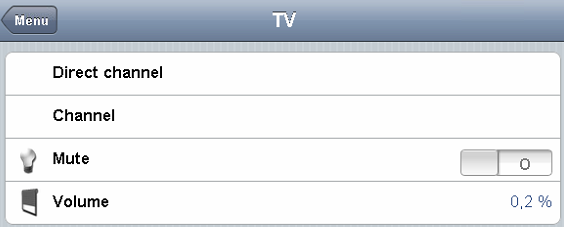
                                          TV.PNG
                                          These (Direct channel/Channel/Volume) does not work yet... Mute is OK and Volume displays only the current TV volume.


                                          1 Reply Last reply
                                          0
                                          Reply
                                          • Reply as topic
                                          Log in to reply
                                          • Oldest to Newest
                                          • Newest to Oldest
                                          • Most Votes


                                          12

                                          Online

                                          11.7k

                                          Users

                                          11.2k

                                          Topics

                                          113.1k

                                          Posts


                                          Copyright 2025 TBD   |   Forum Guidelines   |   Privacy Policy   |   Terms of Service
                                          • Login

                                          • Don't have an account? Register

                                          • Login or register to search.
                                          • First post
                                            Last post
                                          0
                                          • MySensors
                                          • OpenHardware.io
                                          • Categories
                                          • Recent
                                          • Tags
                                          • Popular