Skip to content
  • MySensors
  • OpenHardware.io
  • Categories
  • Recent
  • Tags
  • Popular
Skins
  • Light
  • Brite
  • Cerulean
  • Cosmo
  • Flatly
  • Journal
  • Litera
  • Lumen
  • Lux
  • Materia
  • Minty
  • Morph
  • Pulse
  • Sandstone
  • Simplex
  • Sketchy
  • Spacelab
  • United
  • Yeti
  • Zephyr
  • Dark
  • Cyborg
  • Darkly
  • Quartz
  • Slate
  • Solar
  • Superhero
  • Vapor

  • Default (No Skin)
  • No Skin
Collapse
Brand Logo
  1. Home
  2. Development
  3. implementing multiple sensors

implementing multiple sensors

Scheduled Pinned Locked Moved Development
83 Posts 28 Posters 95.5k Views 15 Watching
  • Oldest to Newest
  • Newest to Oldest
  • Most Votes
Reply
  • Reply as topic
Log in to reply
This topic has been deleted. Only users with topic management privileges can see it.
  • M Offline
    M Offline
    mikeones
    wrote on last edited by
    #44

    The sensor is not running on battery power so I did not spend much time with the interrupt/sleep options.

    1 Reply Last reply
    0
    • T Offline
      T Offline
      Tibus
      wrote on last edited by
      #45

      is it the same process with the new 1.4 library version?

      Could you please give us a exemple here or on github to have multiple sensor type on the same arduino with the new 1.4 library?

      if it's the same implementation, we could write multiple "gw.present(ID, XXXX);" and send a message for each child ID type?

      Thank's very much.

      1 Reply Last reply
      0
      • T Offline
        T Offline
        Tibus
        wrote on last edited by
        #46

        Sorry, I found the new implementation in the "DallasTemperatureSensor" Example

        1 Reply Last reply
        0
        • mountainmanM Offline
          mountainmanM Offline
          mountainman
          wrote on last edited by mountainman
          #47

          Here is a version I'm currently using that makes use of interrupts so might be more suitable for a battery driven DHT/Motion multi sensor. It also includes the battery monitoring. Any feedback or improvements would be appreciated.

          #include <SPI.h>
          #include <MySensor.h>
          #include <DHT.h>
          
          #define CHILD_ID_HUM 0
          #define CHILD_ID_TEMP 1
          #define CHILD_ID_MOTION 2   // Id of the sensor child
          
          #define HUMIDITY_SENSOR_DIGITAL_PIN 4
          #define DIGITAL_INPUT_SENSOR 3   // The digital input you attached your motion sensor.  (Only 2 and 3 generates interrupt!)
          #define INTERRUPT DIGITAL_INPUT_SENSOR-2 // Usually the interrupt = pin -2 (on uno/nano anyway)
          
          unsigned long SLEEP_TIME = F; // Sleep time between reports (in milliseconds)
          
          
          int BATTERY_SENSE_PIN = A0;  // select the input pin for the battery sense point
          int oldValue=-1;
          
          MySensor gw;
          DHT dht;
          float lastTemp;
          float lastHum;
          boolean metric = false;
          
          int oldBatteryPcnt = 0;
          int battLoop =0;
          
          MyMessage msgHum(CHILD_ID_HUM, V_HUM);
          MyMessage msgTemp(CHILD_ID_TEMP, V_TEMP);
          // Initialize motion message
          MyMessage msg(CHILD_ID_MOTION, V_TRIPPED);
          
          boolean pinTriggered=0;//waitTime is number of seconds to hol in while loop
          long lastDebounceTime = 0;  // the last time the output pin was toggled
          long debounceDelay = 50;    // the debounce time; increase if the output flickers
          
          
          void setup()
          {
          
            // use the 1.1 V internal reference
            analogReference(INTERNAL);
          
            gw.begin();
            dht.setup(HUMIDITY_SENSOR_DIGITAL_PIN);
          
            // Send the Sketch Version Information to the Gateway
            gw.sendSketchInfo("Motion Humidity w/ Batt", "1.0");
          
            // Register all sensors to gw (they will be created as child devices)
            gw.present(CHILD_ID_HUM, S_HUM);
            gw.present(CHILD_ID_TEMP, S_TEMP);
            gw.present(CHILD_ID_MOTION, S_MOTION);
          
            pinMode(DIGITAL_INPUT_SENSOR,INPUT);      // sets the motion sensor digital pin as input
            digitalWrite(DIGITAL_INPUT_SENSOR,HIGH);   // Activate internal pull-up
          
            metric = gw.getConfig().isMetric;
          
            check_batt();
          
          }
          
          void loop()
          {
            if (pinTriggered)
            {
          	Serial.println(millis()-lastDebounceTime);
          	// Read digital motion value
          	boolean value = digitalRead(DIGITAL_INPUT_SENSOR);
          	// If the switch changed, due to noise or pressing
          	if (value != oldValue) {
          	  {
          		lastDebounceTime = millis();
          		// Send in the new value
          		gw.send(msg.set(value==HIGH ? 1 : 0));
          		battLoop++;
          		oldValue = value;
          		Serial.print("Mot: ");
          		Serial.println(value);
          	  }
          	}
          
          	pinTriggered=0;
          	// }
            }
            else
            {
          
          	delay(dht.getMinimumSamplingPeriod());
          
          	float temperature = dht.getTemperature();
          	if (isnan(temperature))
          	{
          	  Serial.println("Failed reading temperature from DHT");
          	}
          	else if (temperature != lastTemp)
          	{
          	  lastTemp = temperature;
          	  if (!metric)
          	  {
          		temperature = dht.toFahrenheit(temperature);
          	  }
          	  gw.send(msgTemp.set(temperature, 1));
          	  battLoop++;
          	  Serial.print("T: ");
          	  Serial.println(temperature);
          	}
          
          	float humidity = dht.getHumidity();
          	if (isnan(humidity))
          	{
          	  Serial.println("Failed reading humidity from DHT");
          	}
          	else if (humidity != lastHum)
          	{
          	  lastHum = humidity;
          	  gw.send(msgHum.set(humidity, 1));
          	  battLoop++;
          	  Serial.print("H: ");
          	  Serial.println(humidity);
          	}
          
          
          	if (battLoop > 10)
          	{
          	  check_batt();
          	  battLoop=0;
          	}
            }
          
            // Sleep until interrupt comes in on motion sensor. Send update every two minute.
            pinTriggered = gw.sleep(INTERRUPT, CHANGE, SLEEP_TIME);
          }
          
          
          void check_batt()
          {
            // get the battery Voltage
            int sensorValue = analogRead(BATTERY_SENSE_PIN);
            Serial.println(sensorValue);
          
            // 1M, 470K divider across battery and using internal ADC ref of 1.1V
            // Sense point is bypassed with 0.1 uF cap to reduce noise at that point
            // ((1e6+470e3)/470e3)*1.1 = Vmax = 3.44 Volts
            // 3.44/1023 = Volts per bit = 0.003363075
            float batteryV  = sensorValue * 0.003363075;
            int batteryPcnt = sensorValue / 10;
          
            Serial.print("Battery Voltage: ");
            Serial.print(batteryV);
            Serial.println(" V");
          
            Serial.print("Battery percent: ");
            Serial.print(batteryPcnt);
            Serial.println(" %");
          
            if (oldBatteryPcnt != batteryPcnt) {
          	// Power up radio after sleep
          	gw.sendBatteryLevel(batteryPcnt);
          	oldBatteryPcnt = batteryPcnt;
            }
          }
          
          T C 2 Replies Last reply
          0
          • W Offline
            W Offline
            waynehead99
            wrote on last edited by
            #48

            How did you get 3 options for the sleep interrupt? Whenever I would try and add the sleep_time option it would give me compile errors.

            1 Reply Last reply
            0
            • mountainmanM mountainman

              Here is a version I'm currently using that makes use of interrupts so might be more suitable for a battery driven DHT/Motion multi sensor. It also includes the battery monitoring. Any feedback or improvements would be appreciated.

              #include <SPI.h>
              #include <MySensor.h>
              #include <DHT.h>
              
              #define CHILD_ID_HUM 0
              #define CHILD_ID_TEMP 1
              #define CHILD_ID_MOTION 2   // Id of the sensor child
              
              #define HUMIDITY_SENSOR_DIGITAL_PIN 4
              #define DIGITAL_INPUT_SENSOR 3   // The digital input you attached your motion sensor.  (Only 2 and 3 generates interrupt!)
              #define INTERRUPT DIGITAL_INPUT_SENSOR-2 // Usually the interrupt = pin -2 (on uno/nano anyway)
              
              unsigned long SLEEP_TIME = F; // Sleep time between reports (in milliseconds)
              
              
              int BATTERY_SENSE_PIN = A0;  // select the input pin for the battery sense point
              int oldValue=-1;
              
              MySensor gw;
              DHT dht;
              float lastTemp;
              float lastHum;
              boolean metric = false;
              
              int oldBatteryPcnt = 0;
              int battLoop =0;
              
              MyMessage msgHum(CHILD_ID_HUM, V_HUM);
              MyMessage msgTemp(CHILD_ID_TEMP, V_TEMP);
              // Initialize motion message
              MyMessage msg(CHILD_ID_MOTION, V_TRIPPED);
              
              boolean pinTriggered=0;//waitTime is number of seconds to hol in while loop
              long lastDebounceTime = 0;  // the last time the output pin was toggled
              long debounceDelay = 50;    // the debounce time; increase if the output flickers
              
              
              void setup()
              {
              
                // use the 1.1 V internal reference
                analogReference(INTERNAL);
              
                gw.begin();
                dht.setup(HUMIDITY_SENSOR_DIGITAL_PIN);
              
                // Send the Sketch Version Information to the Gateway
                gw.sendSketchInfo("Motion Humidity w/ Batt", "1.0");
              
                // Register all sensors to gw (they will be created as child devices)
                gw.present(CHILD_ID_HUM, S_HUM);
                gw.present(CHILD_ID_TEMP, S_TEMP);
                gw.present(CHILD_ID_MOTION, S_MOTION);
              
                pinMode(DIGITAL_INPUT_SENSOR,INPUT);      // sets the motion sensor digital pin as input
                digitalWrite(DIGITAL_INPUT_SENSOR,HIGH);   // Activate internal pull-up
              
                metric = gw.getConfig().isMetric;
              
                check_batt();
              
              }
              
              void loop()
              {
                if (pinTriggered)
                {
              	Serial.println(millis()-lastDebounceTime);
              	// Read digital motion value
              	boolean value = digitalRead(DIGITAL_INPUT_SENSOR);
              	// If the switch changed, due to noise or pressing
              	if (value != oldValue) {
              	  {
              		lastDebounceTime = millis();
              		// Send in the new value
              		gw.send(msg.set(value==HIGH ? 1 : 0));
              		battLoop++;
              		oldValue = value;
              		Serial.print("Mot: ");
              		Serial.println(value);
              	  }
              	}
              
              	pinTriggered=0;
              	// }
                }
                else
                {
              
              	delay(dht.getMinimumSamplingPeriod());
              
              	float temperature = dht.getTemperature();
              	if (isnan(temperature))
              	{
              	  Serial.println("Failed reading temperature from DHT");
              	}
              	else if (temperature != lastTemp)
              	{
              	  lastTemp = temperature;
              	  if (!metric)
              	  {
              		temperature = dht.toFahrenheit(temperature);
              	  }
              	  gw.send(msgTemp.set(temperature, 1));
              	  battLoop++;
              	  Serial.print("T: ");
              	  Serial.println(temperature);
              	}
              
              	float humidity = dht.getHumidity();
              	if (isnan(humidity))
              	{
              	  Serial.println("Failed reading humidity from DHT");
              	}
              	else if (humidity != lastHum)
              	{
              	  lastHum = humidity;
              	  gw.send(msgHum.set(humidity, 1));
              	  battLoop++;
              	  Serial.print("H: ");
              	  Serial.println(humidity);
              	}
              
              
              	if (battLoop > 10)
              	{
              	  check_batt();
              	  battLoop=0;
              	}
                }
              
                // Sleep until interrupt comes in on motion sensor. Send update every two minute.
                pinTriggered = gw.sleep(INTERRUPT, CHANGE, SLEEP_TIME);
              }
              
              
              void check_batt()
              {
                // get the battery Voltage
                int sensorValue = analogRead(BATTERY_SENSE_PIN);
                Serial.println(sensorValue);
              
                // 1M, 470K divider across battery and using internal ADC ref of 1.1V
                // Sense point is bypassed with 0.1 uF cap to reduce noise at that point
                // ((1e6+470e3)/470e3)*1.1 = Vmax = 3.44 Volts
                // 3.44/1023 = Volts per bit = 0.003363075
                float batteryV  = sensorValue * 0.003363075;
                int batteryPcnt = sensorValue / 10;
              
                Serial.print("Battery Voltage: ");
                Serial.print(batteryV);
                Serial.println(" V");
              
                Serial.print("Battery percent: ");
                Serial.print(batteryPcnt);
                Serial.println(" %");
              
                if (oldBatteryPcnt != batteryPcnt) {
              	// Power up radio after sleep
              	gw.sendBatteryLevel(batteryPcnt);
              	oldBatteryPcnt = batteryPcnt;
                }
              }
              
              T Offline
              T Offline
              Tibus
              wrote on last edited by Tibus
              #49

              @mountainman
              Thank you verry much, exactly what i need!

              For child's id, if you have two sensor you have to change the ID in the second?

              Sensor 1 :
              #define CHILD_ID_HUM 0
              #define CHILD_ID_TEMP 1
              #define CHILD_ID_MOTION 2

              Sensor 2:
              #define CHILD_ID_HUM 3
              #define CHILD_ID_TEMP 4
              #define CHILD_ID_MOTION 5

              1 Reply Last reply
              0
              • mountainmanM Offline
                mountainmanM Offline
                mountainman
                wrote on last edited by
                #50

                @waynehead99 Are you using the new 1.4 Lib?

                1 Reply Last reply
                0
                • E egbertje

                  Somebody has good result in a working multisensor and wants to share his code?

                  N Offline
                  N Offline
                  Nuubi
                  wrote on last edited by Nuubi
                  #51

                  @egbertje Good Question :-) It would be nice to learn from existing working sketches..

                  1 Reply Last reply
                  0
                  • A Offline
                    A Offline
                    Anticimex
                    Contest Winner
                    wrote on last edited by
                    #52

                    @waynehead99 you most likely need 1.4 Lib for the new sleep constructor. I have not used sleep on 1.3 so I do not remember what arguments you had available there.
                    I have also extended sleep with an additional constructor which @hek has pulled into the release branch of 1.4 that permits you to use two external interrupts with independent triggers for sleep in addition to a timeout. Great for nodes with multiple sensors that still run on battery.

                    Do you feel secure today? No? Start requiring some signatures and feel better tomorrow ;)

                    1 Reply Last reply
                    0
                    • E Offline
                      E Offline
                      egbertje
                      wrote on last edited by egbertje
                      #53

                      @Mountainman ;

                      Im trying your code and its almost what im looking for.
                      I have two questions about it:
                      1 : Is it possible that the battery info has is own child id?
                      2 : Why dont you implement a light sensor like an LDR?

                      I think that including LDR/light then you have the ideal multisensor ; light + temp/hum + motion + batt monitoring !
                      But for now im playing with your code and try to implement light.

                      1 Reply Last reply
                      0
                      • mountainmanM mountainman

                        Here is a version I'm currently using that makes use of interrupts so might be more suitable for a battery driven DHT/Motion multi sensor. It also includes the battery monitoring. Any feedback or improvements would be appreciated.

                        #include <SPI.h>
                        #include <MySensor.h>
                        #include <DHT.h>
                        
                        #define CHILD_ID_HUM 0
                        #define CHILD_ID_TEMP 1
                        #define CHILD_ID_MOTION 2   // Id of the sensor child
                        
                        #define HUMIDITY_SENSOR_DIGITAL_PIN 4
                        #define DIGITAL_INPUT_SENSOR 3   // The digital input you attached your motion sensor.  (Only 2 and 3 generates interrupt!)
                        #define INTERRUPT DIGITAL_INPUT_SENSOR-2 // Usually the interrupt = pin -2 (on uno/nano anyway)
                        
                        unsigned long SLEEP_TIME = F; // Sleep time between reports (in milliseconds)
                        
                        
                        int BATTERY_SENSE_PIN = A0;  // select the input pin for the battery sense point
                        int oldValue=-1;
                        
                        MySensor gw;
                        DHT dht;
                        float lastTemp;
                        float lastHum;
                        boolean metric = false;
                        
                        int oldBatteryPcnt = 0;
                        int battLoop =0;
                        
                        MyMessage msgHum(CHILD_ID_HUM, V_HUM);
                        MyMessage msgTemp(CHILD_ID_TEMP, V_TEMP);
                        // Initialize motion message
                        MyMessage msg(CHILD_ID_MOTION, V_TRIPPED);
                        
                        boolean pinTriggered=0;//waitTime is number of seconds to hol in while loop
                        long lastDebounceTime = 0;  // the last time the output pin was toggled
                        long debounceDelay = 50;    // the debounce time; increase if the output flickers
                        
                        
                        void setup()
                        {
                        
                          // use the 1.1 V internal reference
                          analogReference(INTERNAL);
                        
                          gw.begin();
                          dht.setup(HUMIDITY_SENSOR_DIGITAL_PIN);
                        
                          // Send the Sketch Version Information to the Gateway
                          gw.sendSketchInfo("Motion Humidity w/ Batt", "1.0");
                        
                          // Register all sensors to gw (they will be created as child devices)
                          gw.present(CHILD_ID_HUM, S_HUM);
                          gw.present(CHILD_ID_TEMP, S_TEMP);
                          gw.present(CHILD_ID_MOTION, S_MOTION);
                        
                          pinMode(DIGITAL_INPUT_SENSOR,INPUT);      // sets the motion sensor digital pin as input
                          digitalWrite(DIGITAL_INPUT_SENSOR,HIGH);   // Activate internal pull-up
                        
                          metric = gw.getConfig().isMetric;
                        
                          check_batt();
                        
                        }
                        
                        void loop()
                        {
                          if (pinTriggered)
                          {
                        	Serial.println(millis()-lastDebounceTime);
                        	// Read digital motion value
                        	boolean value = digitalRead(DIGITAL_INPUT_SENSOR);
                        	// If the switch changed, due to noise or pressing
                        	if (value != oldValue) {
                        	  {
                        		lastDebounceTime = millis();
                        		// Send in the new value
                        		gw.send(msg.set(value==HIGH ? 1 : 0));
                        		battLoop++;
                        		oldValue = value;
                        		Serial.print("Mot: ");
                        		Serial.println(value);
                        	  }
                        	}
                        
                        	pinTriggered=0;
                        	// }
                          }
                          else
                          {
                        
                        	delay(dht.getMinimumSamplingPeriod());
                        
                        	float temperature = dht.getTemperature();
                        	if (isnan(temperature))
                        	{
                        	  Serial.println("Failed reading temperature from DHT");
                        	}
                        	else if (temperature != lastTemp)
                        	{
                        	  lastTemp = temperature;
                        	  if (!metric)
                        	  {
                        		temperature = dht.toFahrenheit(temperature);
                        	  }
                        	  gw.send(msgTemp.set(temperature, 1));
                        	  battLoop++;
                        	  Serial.print("T: ");
                        	  Serial.println(temperature);
                        	}
                        
                        	float humidity = dht.getHumidity();
                        	if (isnan(humidity))
                        	{
                        	  Serial.println("Failed reading humidity from DHT");
                        	}
                        	else if (humidity != lastHum)
                        	{
                        	  lastHum = humidity;
                        	  gw.send(msgHum.set(humidity, 1));
                        	  battLoop++;
                        	  Serial.print("H: ");
                        	  Serial.println(humidity);
                        	}
                        
                        
                        	if (battLoop > 10)
                        	{
                        	  check_batt();
                        	  battLoop=0;
                        	}
                          }
                        
                          // Sleep until interrupt comes in on motion sensor. Send update every two minute.
                          pinTriggered = gw.sleep(INTERRUPT, CHANGE, SLEEP_TIME);
                        }
                        
                        
                        void check_batt()
                        {
                          // get the battery Voltage
                          int sensorValue = analogRead(BATTERY_SENSE_PIN);
                          Serial.println(sensorValue);
                        
                          // 1M, 470K divider across battery and using internal ADC ref of 1.1V
                          // Sense point is bypassed with 0.1 uF cap to reduce noise at that point
                          // ((1e6+470e3)/470e3)*1.1 = Vmax = 3.44 Volts
                          // 3.44/1023 = Volts per bit = 0.003363075
                          float batteryV  = sensorValue * 0.003363075;
                          int batteryPcnt = sensorValue / 10;
                        
                          Serial.print("Battery Voltage: ");
                          Serial.print(batteryV);
                          Serial.println(" V");
                        
                          Serial.print("Battery percent: ");
                          Serial.print(batteryPcnt);
                          Serial.println(" %");
                        
                          if (oldBatteryPcnt != batteryPcnt) {
                        	// Power up radio after sleep
                        	gw.sendBatteryLevel(batteryPcnt);
                        	oldBatteryPcnt = batteryPcnt;
                          }
                        }
                        
                        C Offline
                        C Offline
                        codenea
                        wrote on last edited by
                        #54

                        @mountainman Is there any instructions on how to wire/setup the hardware to work with your code?

                        1 Reply Last reply
                        0
                        • mountainmanM Offline
                          mountainmanM Offline
                          mountainman
                          wrote on last edited by
                          #55

                          @egbertje;

                          The battery percentage is associated with the parent Arduino Node in the vera UI.
                          I have some LDRs ordered from Ebay so that is the next step. I had previously used the BH1750 I2C sensor in a multi sensor with the 1.3 lib but I want to debug on its own as it seemed to be giving unexpected readings.

                          @codenea The instructions are pretty much from the main page although if I get a chance I try to draw it up and post some pics. My setup not very pretty yet with perf board and jumper wires. A dedicated PCB would be nice.

                          1 Reply Last reply
                          0
                          • E Offline
                            E Offline
                            epierre
                            Hero Member
                            wrote on last edited by
                            #56

                            Hello,

                            Here is my combo to make a Home Monitoring solution:
                            https://github.com/empierre/arduino/blob/master/MQv01dgi_1_4.ino

                            It includes (currently on a Mega):

                            • Barometer : BMP085
                            • Temperature + Humidity DHT11
                            • Particle sensor
                            • Gas sensors MQ2 MQ6 MQ131 MQ135 TGS2600 2SH12

                            To be added when stabilized:

                            • Sound level in DB

                            Could be added:

                            • Light sensor
                            • Vibration sensor
                            • PIR

                            z-wave - Vera -&gt; Domoticz
                            rfx - Domoticz &lt;- MyDomoAtHome &lt;- Imperihome
                            mysensors -&gt; mysensors-gw -&gt; Domoticz

                            1 Reply Last reply
                            0
                            • P Offline
                              P Offline
                              pgo
                              wrote on last edited by pgo
                              #57

                              Hi guys,

                              this is a one node with publishing DS temperatures and listening for relay commands I finished and tested yesterday>
                              https://github.com/pgo-sk/mysensors/blob/master/arduino/DS_and_Relay.ino
                              feel free to comment/use/publish...

                              I combined the Dalas and Relay examples together - you have to deactivate the sleep for the relays to listen 100% of time.
                              MQTT identification on openHAB:
                              MyMQTT/20/0/V_TEMP - DS sensor(s)
                              MyMQTT/20/1/V_LIGHT - relay 1
                              MyMQTT/20/2/V_LIGHT - relay 2

                              If somebody is interested I can post the maps/items files for openHAB

                              Regards,
                              Pego
                              PS I am working on an home automation system with solar hot air panels control/solar hot water panels and all the common stuff like lights/temperatures/weather etc.. More here: https://github.com/pgo-sk/mysensors/wiki/Home-automation-using-mysensors-and-openHAB

                              1 Reply Last reply
                              1
                              • I Offline
                                I Offline
                                integlikewhoa
                                wrote on last edited by
                                #58

                                I'm also following along interested in the Temp, Humidity, and motion sensor.

                                T 1 Reply Last reply
                                0
                                • I integlikewhoa

                                  I'm also following along interested in the Temp, Humidity, and motion sensor.

                                  T Offline
                                  T Offline
                                  Tibus
                                  wrote on last edited by
                                  #59

                                  @integlikewhoa check this :

                                  http://forum.mysensors.org/topic/404/3-in-1-humidity-temp-and-motion

                                  1 Reply Last reply
                                  0
                                  • P Offline
                                    P Offline
                                    pgo
                                    wrote on last edited by pgo
                                    #60

                                    https://github.com/pgo-sk/mysensors/blob/master/arduino/DS_Light_Relay

                                    • DS18B20 (up to 16 like in original temp sketch)
                                    • TEMT6000 reporting LUX light values
                                    • 2x Relays
                                      running and tested
                                      Sensor <-> MQTT gateway <-> openHAB/PC

                                    When interested can post the openHAB items/sitemap(s) settings

                                    Screenshots - over teamviewer, sorry for the quality.

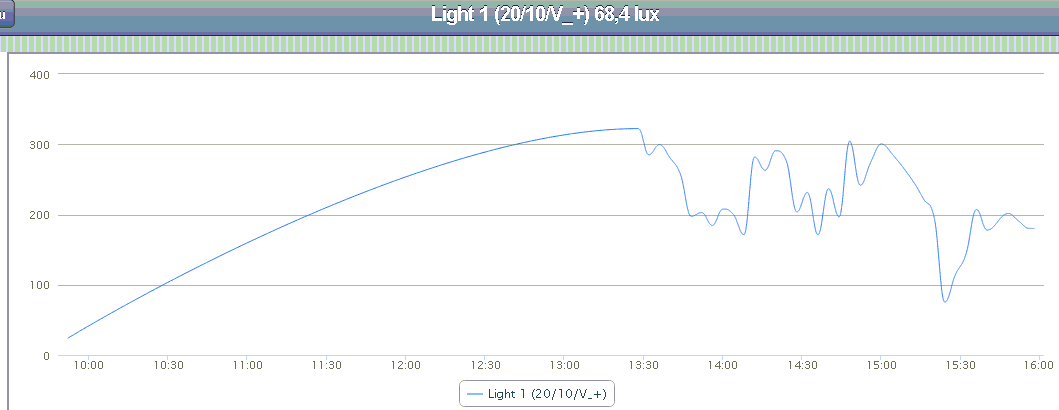
                                    Here the TEMT6000 output - in a quite dark room and changing weather today>
                                    upload-42ac73c1-61cf-4b90-9ec5-14a994a3b50a
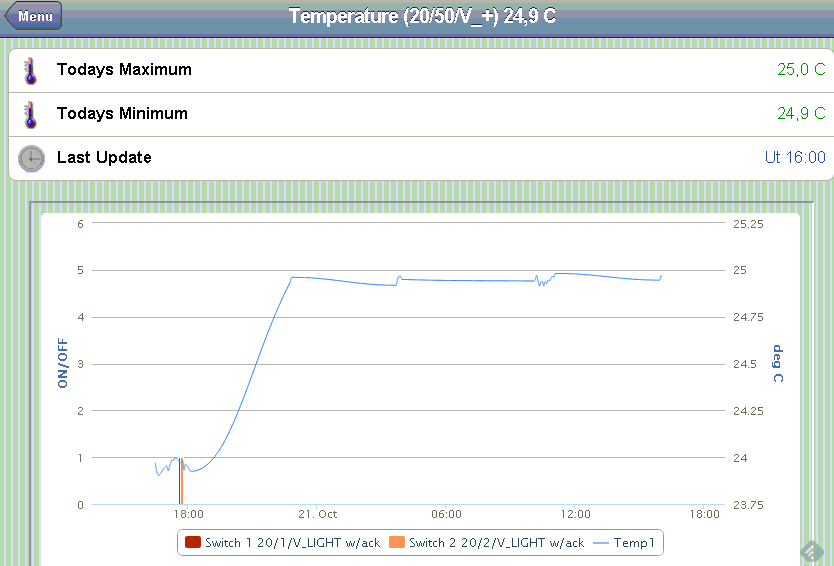
                                    Here the temperature and relays:
                                    upload-86825c33-2cc2-4018-9e08-2020007af3a9
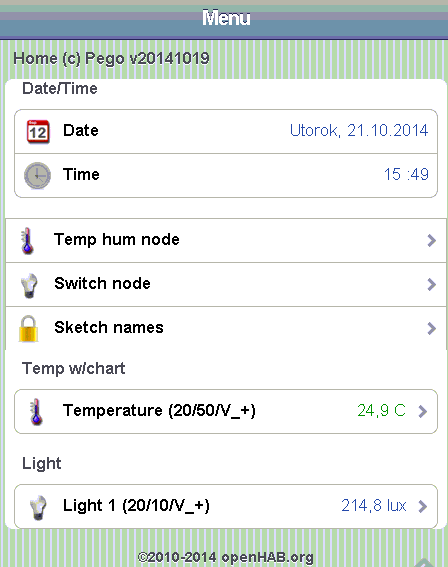
                                    Menu:
                                    upload-adf5c382-2803-49b9-a461-eb25beb572c0

                                    A 1 Reply Last reply
                                    0
                                    • D Offline
                                      D Offline
                                      Dany
                                      wrote on last edited by
                                      #61

                                      Has anyone made ​​RGB LED strip node? I am looking for a working example program ...

                                      N 1 Reply Last reply
                                      0
                                      • B Offline
                                        B Offline
                                        blacey
                                        Admin
                                        wrote on last edited by
                                        #62

                                        @Dany - yes. Checkout http://www.mysensors.org/build/dimmer

                                        D 1 Reply Last reply
                                        0
                                        • K Offline
                                          K Offline
                                          korttoma
                                          Hero Member
                                          wrote on last edited by
                                          #63

                                          Or here is an example I'm using:
                                          https://codebender.cc/sketch:44740

                                          • Tomas
                                          1 Reply Last reply
                                          1

                                          Hello! It looks like you're interested in this conversation, but you don't have an account yet.

                                          Getting fed up of having to scroll through the same posts each visit? When you register for an account, you'll always come back to exactly where you were before, and choose to be notified of new replies (either via email, or push notification). You'll also be able to save bookmarks and upvote posts to show your appreciation to other community members.

                                          With your input, this post could be even better 💗

                                          Register Login
                                          Reply
                                          • Reply as topic
                                          Log in to reply
                                          • Oldest to Newest
                                          • Newest to Oldest
                                          • Most Votes


                                          14

                                          Online

                                          12.0k

                                          Users

                                          11.2k

                                          Topics

                                          113.4k

                                          Posts


                                          Copyright 2025 TBD   |   Forum Guidelines   |   Privacy Policy   |   Terms of Service
                                          • Login

                                          • Don't have an account? Register

                                          • Login or register to search.
                                          • First post
                                            Last post
                                          0
                                          • MySensors
                                          • OpenHardware.io
                                          • Categories
                                          • Recent
                                          • Tags
                                          • Popular