Skip to content
  • MySensors
  • OpenHardware.io
  • Categories
  • Recent
  • Tags
  • Popular
Skins
  • Light
  • Brite
  • Cerulean
  • Cosmo
  • Flatly
  • Journal
  • Litera
  • Lumen
  • Lux
  • Materia
  • Minty
  • Morph
  • Pulse
  • Sandstone
  • Simplex
  • Sketchy
  • Spacelab
  • United
  • Yeti
  • Zephyr
  • Dark
  • Cyborg
  • Darkly
  • Quartz
  • Slate
  • Solar
  • Superhero
  • Vapor

  • Default (No Skin)
  • No Skin
Collapse
Brand Logo
  1. Home
  2. Troubleshooting
  3. Energy Meter - not sending at expected

Energy Meter - not sending at expected

Scheduled Pinned Locked Moved Troubleshooting
18 Posts 4 Posters 5.9k Views 3 Watching
  • Oldest to Newest
  • Newest to Oldest
  • Most Votes
Reply
  • Reply as topic
Log in to reply
This topic has been deleted. Only users with topic management privileges can see it.
  • F Offline
    F Offline
    flopp
    wrote on last edited by flopp
    #9

    It was working for a few hours then not sending any data, even with my new sketch. I changed to Arduino UNO and since then it has been working perfect. So it was my NRF(maybe) and my Nano that was not working correctly.

    1 Reply Last reply
    0
    • F Offline
      F Offline
      flopp
      wrote on last edited by flopp
      #10

      But I found something weird about the division
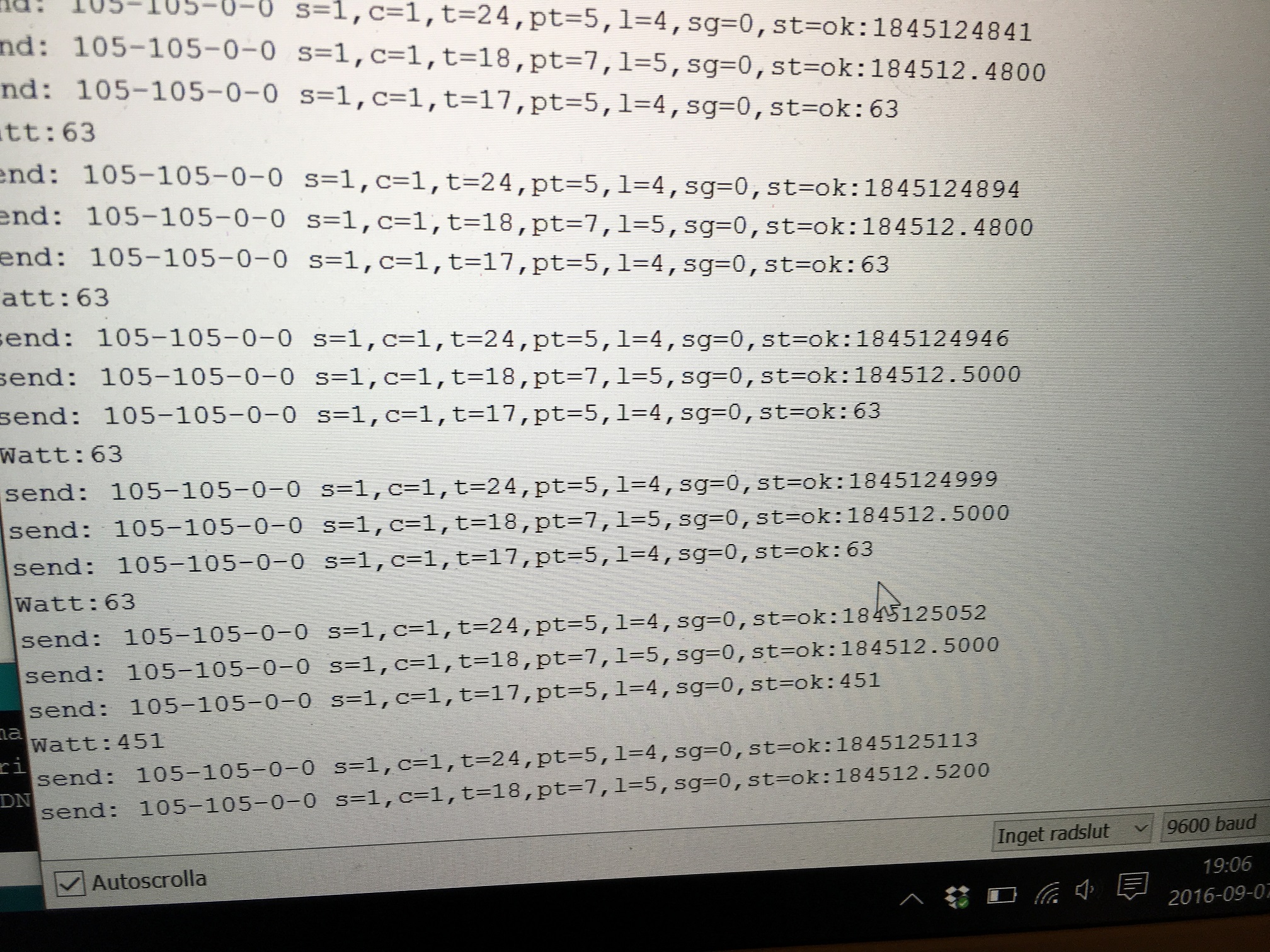
      0_1473320473986_IMG_2818.JPG

      Why doesn't it send the exact value?

      My pulseCount is 1845124894 and it is sent to Controller correct, then it will use below function
      My PULSE_FACTOR is 10000

      double kwh = ((double)pulseCount/((double)PULSE_FACTOR));
      

      and send the divided value to Controller, but it doesn't send correct value, it is missing the two last numbers "94" it is absolutely not a big problem but why send 4 decimals when the two last it always 0(zero)

      Look at last row, 1845125113 = 184512.5200?

      Is this because double values is rounding up? But 5113 should be 5100.

      Y 1 Reply Last reply
      0
      • F flopp

        But I found something weird about the division

        0_1473320473986_IMG_2818.JPG

        Why doesn't it send the exact value?

        My pulseCount is 1845124894 and it is sent to Controller correct, then it will use below function
        My PULSE_FACTOR is 10000

        double kwh = ((double)pulseCount/((double)PULSE_FACTOR));
        

        and send the divided value to Controller, but it doesn't send correct value, it is missing the two last numbers "94" it is absolutely not a big problem but why send 4 decimals when the two last it always 0(zero)

        Look at last row, 1845125113 = 184512.5200?

        Is this because double values is rounding up? But 5113 should be 5100.

        Y Offline
        Y Offline
        Yveaux
        Mod
        wrote on last edited by
        #11

        @flopp could be because 'double' is actually float on Arduino, and therefore precision is limited. Have to do so maths though to know for sure.

        http://yveaux.blogspot.nl

        F 1 Reply Last reply
        0
        • Y Yveaux

          @flopp could be because 'double' is actually float on Arduino, and therefore precision is limited. Have to do so maths though to know for sure.

          F Offline
          F Offline
          flopp
          wrote on last edited by
          #12

          @Yveaux
          OK thanks

          1 Reply Last reply
          0
          • F Offline
            F Offline
            flopp
            wrote on last edited by
            #13

            still working with UNO.

            this is the sketch i am running

            #include <SPI.h>
            #include <MySensor.h>  
            
            #define DIGITAL_INPUT_SENSOR 3  // The digital input you attached your light sensor.  (Only 2 and 3 generates interrupt!)
            #define PULSE_FACTOR 10000       // Nummber of blinks per KWH of your meeter
            #define SLEEP_MODE false        // Watt-value can only be reported when sleep mode is false.
            #define MAX_WATT 15000          // Max watt value to report. This filetrs outliers.
            #define INTERRUPT DIGITAL_INPUT_SENSOR-2 // Usually the interrupt = pin -2 (on uno/nano anyway)
            #define CHILD_ID 1              // Id of the sensor child
            unsigned long SEND_FREQUENCY = 5*60000; // Minimum time between send (in milliseconds). We don't wnat to spam the gateway.
            MySensor gw;
            double ppwh = ((double)PULSE_FACTOR)/1000; // Pulses per watt hour
            boolean pcReceived = false;
            volatile unsigned long pulseCount = 0;   
            volatile unsigned long lastBlink = 0;
            volatile unsigned long watt = 0;
            unsigned long oldPulseCount = 0;   
            unsigned long oldWatt = 0;
            double oldKwh;
            unsigned long lastSend;
            MyMessage wattMsg(CHILD_ID,V_WATT);
            MyMessage kwhMsg(CHILD_ID,V_KWH);
            MyMessage pcMsg(CHILD_ID,V_VAR1);
            
            
            void setup()  
            {  
              gw.begin(incomingMessage);
            
              // Send the sketch version information to the gateway and Controller
              gw.sendSketchInfo("Energy Meter", "1.1");
              //1.1 no check for old value, always send
              
              // Register this device as power sensor
              gw.present(CHILD_ID, S_POWER);
            
              // Fetch last known pulse count value from gw
              gw.request(CHILD_ID, V_VAR1);
              
              attachInterrupt(INTERRUPT, onPulse, RISING);
              lastSend=millis();
            }
            
            
            void loop()     
            { 
              gw.process();
              unsigned long now = millis();
              // Only send values at a maximum frequency or woken up from sleep
              bool sendTime = now - lastSend > SEND_FREQUENCY;
              if (pcReceived && (SLEEP_MODE || sendTime)) {
                
                // New watt value has been calculated  
                   
                // Check that we dont get unresonable large watt value. 
                // could hapen when long wraps or false interrupt triggered
                if (watt<((unsigned long)MAX_WATT)) {
                
                  gw.send(wattMsg.set(watt));  // Send watt value to gw 
                }  
                Serial.print("Watt:");
                Serial.println(watt);
                oldWatt = watt;
                 
                // Pulse cout has changed
                
                if (pulseCount != oldPulseCount) {
                
                  gw.send(pcMsg.set(pulseCount));  // Send pulse count value to gw 
                  double kwh = ((double)pulseCount/((double)PULSE_FACTOR));     
                  oldPulseCount = pulseCount;
                     
                  gw.send(kwhMsg.set(kwh, 4));  // Send kwh value to gw 
                  oldKwh = kwh;
                  
                }    
                lastSend = now;
              } else if (sendTime && !pcReceived) {
                // No count received. Try requesting it again
                gw.request(CHILD_ID, V_VAR1);
                lastSend=now;
              }
              
              if (SLEEP_MODE) {
                gw.sleep(SEND_FREQUENCY);
              }
            }
            
            void incomingMessage(const MyMessage &message) {
              if (message.type==V_VAR1) {  
                pulseCount = oldPulseCount = message.getLong();
                Serial.print("Received last pulse count from gw:");
                Serial.println(pulseCount);
                pcReceived = true;
              }
            }
            
            void onPulse()     
            { 
              if (!SLEEP_MODE) {
                unsigned long newBlink = micros();  
                unsigned long interval = newBlink-lastBlink;
                if (interval<10000L) { // Sometimes we get interrupt on RISING
                  return;
                }
                watt = (3600000000.0 /interval) / ppwh;
                
                lastBlink = newBlink;
              } 
              pulseCount++;
            }
            
            1 Reply Last reply
            0
            • F Offline
              F Offline
              flopp
              wrote on last edited by
              #14

              There must be something wrong with my code. Since 1 February my Arduino is 3 kWh before the real energy value for my house.
              My second Arduino is measuring kWh on my heating system and that one is running correct.
              For my house I use Nano(clone) for heating system I use UNO(original)
              Can the hardware be the bad guy here?
              It should be same code in both Arduino but tomorrow I will use an UNO(org) for my house and wait 1 week.

              Y 1 Reply Last reply
              0
              • F flopp

                There must be something wrong with my code. Since 1 February my Arduino is 3 kWh before the real energy value for my house.
                My second Arduino is measuring kWh on my heating system and that one is running correct.
                For my house I use Nano(clone) for heating system I use UNO(original)
                Can the hardware be the bad guy here?
                It should be same code in both Arduino but tomorrow I will use an UNO(org) for my house and wait 1 week.

                Y Offline
                Y Offline
                Yveaux
                Mod
                wrote on last edited by
                #15

                @flopp how do you count the pulses from your meter? Could that be the issue?

                http://yveaux.blogspot.nl

                F 1 Reply Last reply
                0
                • Y Yveaux

                  @flopp how do you count the pulses from your meter? Could that be the issue?

                  F Offline
                  F Offline
                  flopp
                  wrote on last edited by
                  #16

                  @Yveaux
                  I don't know the name but I think it is a photo resistor, which I have connected to a LM393 then Arduino counts the interrupts.
                  Same hardware for both House and Heating.
                  Same sketch.

                  1 Reply Last reply
                  0
                  • F Offline
                    F Offline
                    flopp
                    wrote on last edited by flopp
                    #17

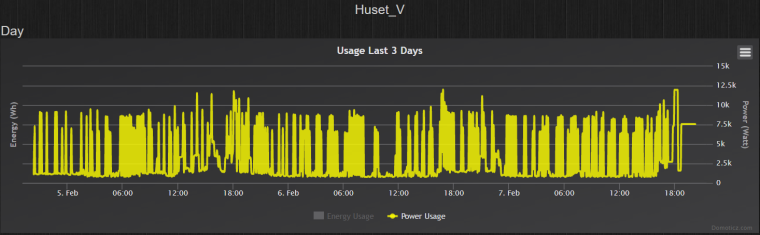
                    I changed to a UNO now my Watt is showing the same value!!
                    EDIT: this was because the WATT was above 15000 and then it didn't send any data to Controller. I had values up to 110000.
                    It must be something with the Watt calculation. Anyone seen this before?
                    0_1486495276398_elhuset.png

                    1 Reply Last reply
                    0
                    • F Offline
                      F Offline
                      flopp
                      wrote on last edited by
                      #18

                      I think I found it.

                      if (interval<10000L) { // Sometimes we get interrupt on RISING
                            return;
                          }
                      

                      It seems to be that my interrupt is to quick. above code is default if I change to

                      if (interval<35000L) { // Sometimes we get interrupt on RISING
                            return;
                          }
                      

                      it will calculate Watt as I think it should be.
                      I will let it run for a week and see if kWh is OK now.

                      1 Reply Last reply
                      0

                      Hello! It looks like you're interested in this conversation, but you don't have an account yet.

                      Getting fed up of having to scroll through the same posts each visit? When you register for an account, you'll always come back to exactly where you were before, and choose to be notified of new replies (either via email, or push notification). You'll also be able to save bookmarks and upvote posts to show your appreciation to other community members.

                      With your input, this post could be even better 💗

                      Register Login
                      Reply
                      • Reply as topic
                      Log in to reply
                      • Oldest to Newest
                      • Newest to Oldest
                      • Most Votes


                      21

                      Online

                      12.0k

                      Users

                      11.2k

                      Topics

                      113.4k

                      Posts


                      Copyright 2025 TBD   |   Forum Guidelines   |   Privacy Policy   |   Terms of Service
                      • Login

                      • Don't have an account? Register

                      • Login or register to search.
                      • First post
                        Last post
                      0
                      • MySensors
                      • OpenHardware.io
                      • Categories
                      • Recent
                      • Tags
                      • Popular