
Gateway update?
-
Hi,
Here's my debug from Ethernet (Arduino Uno + shield) gateway:
0;255;3;0;9;Starting gateway (RNNGA-, 2.0.0)
0;255;3;0;9;TSM:INIT
0;255;3;0;9;TSM:RADIO:OK
0;255;3;0;9;TSM:GW MODE
0;255;3;0;9;TSM:READY
IP: 10.0.0.104
0;255;3;0;9;No registration required
0;255;3;0;9;Init complete, id=0, parent=0, distance=0, registration=1
0;255;3;0;9;TSP:MSG:READ 21-21-0 s=1,c=1,t=0,pt=7,l=5,sg=0:26.0
0;255;3;0;9;TSP:MSG:READ 21-21-0 s=1,c=1,t=0,pt=7,l=5,sg=0:25.9
0;255;3;0;9;TSP:MSG:READ 8-8-0 s=0,c=1,t=37,pt=7,l=5,sg=0:50.87
0;255;3;0;9;TSP:MSG:READ 8-8-0 s=2,c=1,t=0,pt=7,l=5,sg=0:22.0
0;255;3;0;9;TSP:MSG:READ 8-8-0 s=0,c=1,t=37,pt=7,l=5,sg=0:61.50
0;255;3;0;9;TSP:MSG:READ 8-8-0 s=2,c=1,t=0,pt=7,l=5,sg=0:21.9
0;255;3;0;9;TSP:MSG:READ 8-8-0 s=1,c=1,t=1,pt=7,l=5,sg=0:40.7
0;255;3;0;9;TSP:MSG:READ 8-8-0 s=0,c=1,t=37,pt=7,l=5,sg=0:51.34
0;255;3;0;9;TSP:MSG:READ 21-21-0 s=1,c=1,t=0,pt=7,l=5,sg=0:26.0
0;255;3;0;9;TSP:MSG:READ 3-3-0 s=13,c=1,t=0,pt=7,l=5,sg=0:27.7
0;255;3;0;9;TSP:MSG:READ 21-21-0 s=1,c=1,t=0,pt=7,l=5,sg=0:25.9
0;255;3;0;9;TSP:MSG:READ 8-8-0 s=0,c=1,t=37,pt=7,l=5,sg=0:37.04
0;255;3;0;9;TSP:MSG:READ 21-21-0 s=1,c=1,t=0,pt=7,l=5,sg=0:26.0
0;255;3;0;9;TSP:MSG:READ 21-21-0 s=1,c=1,t=0,pt=7,l=5,sg=0:25.9
0;255;3;0;9;TSP:MSG:READ 21-21-0 s=1,c=1,t=0,pt=7,l=5,sg=0:26.0
0;255;3;0;9;TSP:MSG:READ 8-8-0 s=2,c=1,t=0,pt=7,l=5,sg=0:22.0
My nodes are sending data.
Want to add new node and here's the problem:
0 MCO:BGN:INIT NODE,CP=RNNNA--,VER=2.1.0
3 TSM:INIT
6 TSF:WUR:MS=0
13 !TSM:INIT:TSP FAIL
15 TSM:FAIL:CNT=1
16 TSM:FAIL:PDT
10019 TSM:FAIL:RE-INIT
10021 TSM:INIT
10028 !TSM:INIT:TSP FAIL
10031 TSM:FAIL:CNT=2
10032 TSM:FAIL:PDT
20035 TSM:FAIL:RE-INIT
20037 TSM:INIT
20043 !TSM:INIT:TSP FAIL
It seems that I have newer version on node (2.1.0) than gateway (2.0.0).
How to fix that?
Should I update gateway - how?
If yes, should I update also all remaning nodes - how? -
Hi,
Here's my debug from Ethernet (Arduino Uno + shield) gateway:
0;255;3;0;9;Starting gateway (RNNGA-, 2.0.0)
0;255;3;0;9;TSM:INIT
0;255;3;0;9;TSM:RADIO:OK
0;255;3;0;9;TSM:GW MODE
0;255;3;0;9;TSM:READY
IP: 10.0.0.104
0;255;3;0;9;No registration required
0;255;3;0;9;Init complete, id=0, parent=0, distance=0, registration=1
0;255;3;0;9;TSP:MSG:READ 21-21-0 s=1,c=1,t=0,pt=7,l=5,sg=0:26.0
0;255;3;0;9;TSP:MSG:READ 21-21-0 s=1,c=1,t=0,pt=7,l=5,sg=0:25.9
0;255;3;0;9;TSP:MSG:READ 8-8-0 s=0,c=1,t=37,pt=7,l=5,sg=0:50.87
0;255;3;0;9;TSP:MSG:READ 8-8-0 s=2,c=1,t=0,pt=7,l=5,sg=0:22.0
0;255;3;0;9;TSP:MSG:READ 8-8-0 s=0,c=1,t=37,pt=7,l=5,sg=0:61.50
0;255;3;0;9;TSP:MSG:READ 8-8-0 s=2,c=1,t=0,pt=7,l=5,sg=0:21.9
0;255;3;0;9;TSP:MSG:READ 8-8-0 s=1,c=1,t=1,pt=7,l=5,sg=0:40.7
0;255;3;0;9;TSP:MSG:READ 8-8-0 s=0,c=1,t=37,pt=7,l=5,sg=0:51.34
0;255;3;0;9;TSP:MSG:READ 21-21-0 s=1,c=1,t=0,pt=7,l=5,sg=0:26.0
0;255;3;0;9;TSP:MSG:READ 3-3-0 s=13,c=1,t=0,pt=7,l=5,sg=0:27.7
0;255;3;0;9;TSP:MSG:READ 21-21-0 s=1,c=1,t=0,pt=7,l=5,sg=0:25.9
0;255;3;0;9;TSP:MSG:READ 8-8-0 s=0,c=1,t=37,pt=7,l=5,sg=0:37.04
0;255;3;0;9;TSP:MSG:READ 21-21-0 s=1,c=1,t=0,pt=7,l=5,sg=0:26.0
0;255;3;0;9;TSP:MSG:READ 21-21-0 s=1,c=1,t=0,pt=7,l=5,sg=0:25.9
0;255;3;0;9;TSP:MSG:READ 21-21-0 s=1,c=1,t=0,pt=7,l=5,sg=0:26.0
0;255;3;0;9;TSP:MSG:READ 8-8-0 s=2,c=1,t=0,pt=7,l=5,sg=0:22.0
My nodes are sending data.
Want to add new node and here's the problem:
0 MCO:BGN:INIT NODE,CP=RNNNA--,VER=2.1.0
3 TSM:INIT
6 TSF:WUR:MS=0
13 !TSM:INIT:TSP FAIL
15 TSM:FAIL:CNT=1
16 TSM:FAIL:PDT
10019 TSM:FAIL:RE-INIT
10021 TSM:INIT
10028 !TSM:INIT:TSP FAIL
10031 TSM:FAIL:CNT=2
10032 TSM:FAIL:PDT
20035 TSM:FAIL:RE-INIT
20037 TSM:INIT
20043 !TSM:INIT:TSP FAIL
It seems that I have newer version on node (2.1.0) than gateway (2.0.0).
How to fix that?
Should I update gateway - how?
If yes, should I update also all remaning nodes - how?@1kohm to update the nodes, re-upload the original sketch to the nodes.
Mixing nodes within the same major version (2.x can coexist) should be OK , so you don't need to update everything.
TSM:INIT:TSP FAIL means that the Arduino is unable to communicate with its radio. Double-check the wiring and if the wiring is correct, try another radio module to determine if the current module is broken.
-
Hi,
radio was the issue (placed oposite.., by bad)
Now, I've uploaded node ver.2.0.0.
Starting sensor (RNNNA-, 2.0.0)
TSM:INIT
TSM:RADIO:OK
TSP:ASSIGNID:OK (ID=4)
TSM:FPAR
TSP:MSG:SEND 4-4-255-255 s=255,c=3,t=7,pt=0,l=0,sg=0,ft=0,st=bc:
TSP:MSG:READ 0-0-4 s=255,c=3,t=8,pt=1,l=1,sg=0:0
TSP:MSG:FPAR RES (ID=0, dist=0)
TSP:MSG:PAR OK (ID=0, dist=1)
TSM:FPAR:OK
TSM:ID
TSM:CHKID:OK (ID=4)
TSM:UPL
TSP:PING:SEND (dest=0)
TSP:MSG:SEND 4-4-0-0 s=255,c=3,t=24,pt=1,l=1,sg=0,ft=0,st=ok:1
TSP:MSG:READ 0-0-4 s=255,c=3,t=25,pt=1,l=1,sg=0:1
TSP:MSG:PONG RECV (hops=1)
TSP:CHKUPL:OK
TSM:UPL:OK
TSM:READY
TSP:MSG:SEND 4-4-0-0 s=255,c=3,t=15,pt=6,l=2,sg=0,ft=0,st=ok:0100
TSP:MSG:SEND 4-4-0-0 s=255,c=0,t=17,pt=0,l=5,sg=0,ft=0,st=ok:2.0.0
TSP:MSG:SEND 4-4-0-0 s=255,c=3,t=6,pt=1,l=1,sg=0,ft=0,st=ok:0
TSP:MSG:READ 0-0-4 s=255,c=3,t=15,pt=6,l=2,sg=0:0100
TSP:MSG:READ 0-0-4 s=255,c=3,t=6,pt=0,l=1,sg=0:M
TSP:MSG:SEND 4-4-0-0 s=255,c=3,t=11,pt=0,l=25,sg=0,ft=0,st=ok:Double Relay & Button tes
TSP:MSG:SEND 4-4-0-0 s=255,c=3,t=12,pt=0,l=3,sg=0,ft=0,st=ok:0.3
TSP:MSG:SEND 4-4-0-0 s=8,c=0,t=3,pt=0,l=0,sg=0,ft=0,st=ok:
TSP:MSG:SEND 4-4-0-0 s=9,c=0,t=3,pt=0,l=0,sg=0,ft=0,st=ok:
Request registration...
TSP:MSG:SEND 4-4-0-0 s=255,c=3,t=26,pt=1,l=1,sg=0,ft=0,st=ok:2
TSP:MSG:READ 0-0-4 s=255,c=3,t=27,pt=1,l=1,sg=0:1
Node registration=1
Init complete, id=4, parent=0, distance=1, registration=1
Debug looks perfect..., but cannot see the node in Domoticz i Devices tab :(
I can see the node under Hardware -> MySensorsGateway only:
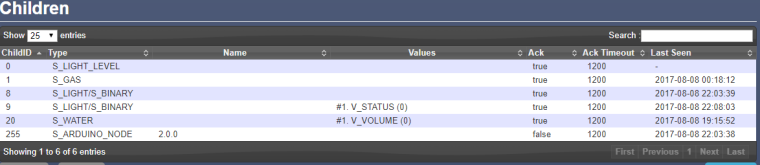
I want to test gas meter IN-Z61.
-
Hi,
radio was the issue (placed oposite.., by bad)
Now, I've uploaded node ver.2.0.0.
Starting sensor (RNNNA-, 2.0.0)
TSM:INIT
TSM:RADIO:OK
TSP:ASSIGNID:OK (ID=4)
TSM:FPAR
TSP:MSG:SEND 4-4-255-255 s=255,c=3,t=7,pt=0,l=0,sg=0,ft=0,st=bc:
TSP:MSG:READ 0-0-4 s=255,c=3,t=8,pt=1,l=1,sg=0:0
TSP:MSG:FPAR RES (ID=0, dist=0)
TSP:MSG:PAR OK (ID=0, dist=1)
TSM:FPAR:OK
TSM:ID
TSM:CHKID:OK (ID=4)
TSM:UPL
TSP:PING:SEND (dest=0)
TSP:MSG:SEND 4-4-0-0 s=255,c=3,t=24,pt=1,l=1,sg=0,ft=0,st=ok:1
TSP:MSG:READ 0-0-4 s=255,c=3,t=25,pt=1,l=1,sg=0:1
TSP:MSG:PONG RECV (hops=1)
TSP:CHKUPL:OK
TSM:UPL:OK
TSM:READY
TSP:MSG:SEND 4-4-0-0 s=255,c=3,t=15,pt=6,l=2,sg=0,ft=0,st=ok:0100
TSP:MSG:SEND 4-4-0-0 s=255,c=0,t=17,pt=0,l=5,sg=0,ft=0,st=ok:2.0.0
TSP:MSG:SEND 4-4-0-0 s=255,c=3,t=6,pt=1,l=1,sg=0,ft=0,st=ok:0
TSP:MSG:READ 0-0-4 s=255,c=3,t=15,pt=6,l=2,sg=0:0100
TSP:MSG:READ 0-0-4 s=255,c=3,t=6,pt=0,l=1,sg=0:M
TSP:MSG:SEND 4-4-0-0 s=255,c=3,t=11,pt=0,l=25,sg=0,ft=0,st=ok:Double Relay & Button tes
TSP:MSG:SEND 4-4-0-0 s=255,c=3,t=12,pt=0,l=3,sg=0,ft=0,st=ok:0.3
TSP:MSG:SEND 4-4-0-0 s=8,c=0,t=3,pt=0,l=0,sg=0,ft=0,st=ok:
TSP:MSG:SEND 4-4-0-0 s=9,c=0,t=3,pt=0,l=0,sg=0,ft=0,st=ok:
Request registration...
TSP:MSG:SEND 4-4-0-0 s=255,c=3,t=26,pt=1,l=1,sg=0,ft=0,st=ok:2
TSP:MSG:READ 0-0-4 s=255,c=3,t=27,pt=1,l=1,sg=0:1
Node registration=1
Init complete, id=4, parent=0, distance=1, registration=1
Debug looks perfect..., but cannot see the node in Domoticz i Devices tab :(
I can see the node under Hardware -> MySensorsGateway only:I want to test gas meter IN-Z61.
-
-
Want to present the device as S_GAS
void presentation()
{
    // Send the sketch version information to the gateway and Controller
    sendSketchInfo("Gas Meter", "1.1");

    // Register this device as Waterflow sensor
    present(CHILD_ID, S_GAS);
}
Sketch I use:
/** * The MySensors Arduino library handles the wireless radio link and protocol * between your home built sensors/actuators and HA controller of choice. * The sensors forms a self healing radio network with optional repeaters. Each * repeater and gateway builds a routing tables in EEPROM which keeps track of the * network topology allowing messages to be routed to nodes. * * Created by Henrik Ekblad <henrik.ekblad@mysensors.org> * Copyright (C) 2013-2015 Sensnology AB * Full contributor list: https://github.com/mysensors/Arduino/graphs/contributors * * Documentation: http://www.mysensors.org * Support Forum: http://forum.mysensors.org * * This program is free software; you can redistribute it and/or * modify it under the terms of the GNU General Public License * version 2 as published by the Free Software Foundation. * ******************************* * * REVISION HISTORY * Version 1.0 - Henrik Ekblad * Version 1.1 - GizMoCuz * * DESCRIPTION * Use this sensor to measure volume and flow of your house watermeter. * You need to set the correct pulsefactor of your meter (pulses per m3). * The sensor starts by fetching current volume reading from gateway (VAR 1). * Reports both volume and flow back to gateway. * * Unfortunately millis() won't increment when the Arduino is in * sleepmode. So we cannot make this sensor sleep if we also want * to calculate/report flow. * http://www.mysensors.org/build/pulse_water */ // Enable debug prints to serial monitor #define MY_DEBUG // Enable and select radio type attached #define MY_RADIO_NRF24 //#define MY_RADIO_NRF5_ESB //#define MY_RADIO_RFM69 //#define MY_RADIO_RFM95 #include <MySensors.h> #define DIGITAL_INPUT_SENSOR 7 // The digital input you attached your sensor. (Only 2 and 3 generates interrupt!) #define PULSE_FACTOR 1000 // Nummber of blinks per m3 of your meter (One rotation/liter) #define SLEEP_MODE false // flowvalue can only be reported when sleep mode is false. #define MAX_FLOW 40 // Max flow (l/min) value to report. This filters outliers. #define CHILD_ID 1 // Id of the sensor child unsigned long SEND_FREQUENCY = 3000; // Minimum time between send (in milliseconds). We don't want to spam the gateway. MyMessage flowMsg(CHILD_ID,V_FLOW); MyMessage volumeMsg(CHILD_ID,V_VOLUME); MyMessage lastCounterMsg(CHILD_ID,V_VAR1); double ppl = ((double)PULSE_FACTOR)/1000; // Pulses per liter volatile unsigned long pulseCount = 0; volatile unsigned long lastBlink = 0; volatile double flow = 0; bool pcReceived = false; unsigned long oldPulseCount = 0; unsigned long newBlink = 0; double oldflow = 0; double volume =0; double oldvolume =0; unsigned long lastSend =0; unsigned long lastPulse =0; void setup() { // initialize our digital pins internal pullup resistor so one pulse switches from high to low (less distortion) pinMode(DIGITAL_INPUT_SENSOR, INPUT_PULLUP); pulseCount = oldPulseCount = 0; // Fetch last known pulse count value from gw request(CHILD_ID, V_VAR1); lastSend = lastPulse = millis(); attachInterrupt(digitalPinToInterrupt(DIGITAL_INPUT_SENSOR), onPulse, FALLING); } void presentation() { // Send the sketch version information to the gateway and Controller sendSketchInfo("Gas Meter", "1.1"); // Register this device as Waterflow sensor present(CHILD_ID, S_GAS); } void loop() { unsigned long currentTime = millis(); // Only send values at a maximum frequency or woken up from sleep if (SLEEP_MODE || (currentTime - lastSend > SEND_FREQUENCY)) { lastSend=currentTime; if (!pcReceived) { //Last Pulsecount not yet received from controller, request it again request(CHILD_ID, V_VAR1); return; } if (!SLEEP_MODE && flow != oldflow) { oldflow = flow; Serial.print("l/min:"); Serial.println(flow); // Check that we dont get unresonable large flow value. // could hapen when long wraps or false interrupt triggered if (flow<((unsigned long)MAX_FLOW)) { send(flowMsg.set(flow, 2)); // Send flow value to gw } } // No Pulse count received in 2min if(currentTime - lastPulse > 120000) { flow = 0; } // Pulse count has changed if ((pulseCount != oldPulseCount)||(!SLEEP_MODE)) { oldPulseCount = pulseCount; Serial.print("pulsecount:"); Serial.println(pulseCount); send(lastCounterMsg.set(pulseCount)); // Send pulsecount value to gw in VAR1 double volume = ((double)pulseCount/((double)PULSE_FACTOR)); if ((volume != oldvolume)||(!SLEEP_MODE)) { oldvolume = volume; Serial.print("volume:"); Serial.println(volume, 3); send(volumeMsg.set(volume, 3)); // Send volume value to gw } } } if (SLEEP_MODE) { sleep(SEND_FREQUENCY); } } void receive(const MyMessage &message) { if (message.type==V_VAR1) { unsigned long gwPulseCount=message.getULong(); pulseCount += gwPulseCount; flow=oldflow=0; Serial.print("Received last pulse count from gw:"); Serial.println(pulseCount); pcReceived = true; } } void onPulse() { if (!SLEEP_MODE) { unsigned long newBlink = micros(); unsigned long interval = newBlink-lastBlink; if (interval!=0) { lastPulse = millis(); if (interval<500000L) { // Sometimes we get interrupt on RISING, 500000 = 0.5sek debounce ( max 120 l/min) return; } flow = (60000000.0 /interval) / ppl; } lastBlink = newBlink; } pulseCount++; } -



Hello! It looks like you're interested in this conversation, but you don't have an account yet.
Getting fed up of having to scroll through the same posts each visit? When you register for an account, you'll always come back to exactly where you were before, and choose to be notified of new replies (either via email, or push notification). You'll also be able to save bookmarks and upvote posts to show your appreciation to other community members.
With your input, this post could be even better 💗
Register Login