
only 1 device found while including sensor
-
Hi!
Have a problem to include DallasTemperatureSensor to Vera
Then I press Start at Vera web interface and reset sensor, only 1 device appears in vera.
Only Arduino node.x00x00sensor started, id 0
send: 0-0-0-0 s=255,c=0,t=17,pt=0,l=5,st=ok:1.4.1
send: 0-0-0-0 s=255,c=3,t=6,pt=1,l=1,st=ok:0
send: 0-0-0-0 s=255,c=3,t=11,pt=0,l=18,st=fail:Temperature Sensor
send: 0-0-0-0 s=255,c=3,t=12,pt=0,l=3,st=fail:1.0
send: 0-0-0-0 s=0,c=0,t=6,pt=0,l=5,st=fail:1.4.1
send: 0-0-0-0 s=0,c=1,t=0,pt=7,l=5,st=ok:79.3Gateway:
0;0;3;0;5;0
0;0;3;0;2;Get Version
0;0;3;0;2;1.4.1
0;0;3;0;9;read: 0-0-0 s=255,c=0,t=17,pt=0,l=5:1.4.1
0;255;0;0;17;1.4.1
0;0;3;0;9;read: 0-0-0 s=255,c=3,t=6,pt=1,l=1:0
0;0;3;0;9;read: 0-0-0 s=255,c=3,t=11,pt=0,l=18:Temperature Sensor
0;0;3;0;9;read: 0-0-0 s=255,c=3,t=12,pt=0,l=3:1.0
0;0;3;0;9;read: 0-0-0 s=0,c=0,t=6,pt=0,l=5:1.4.1
0;0;0;0;6;1.4.1
0;0;3;0;9;read: 0-0-0 s=0,c=1,t=0,pt=7,l=5:79.7
0;0;1;0;0;79.7
0;0;3;0;9;read: 0-0-0 s=0,c=1,t=0,pt=7,l=5:79.5
0;0;1;0;0;79.5
0;0;3;0;9;read: 0-0-0 s=0,c=1,t=0,pt=7,l=5:79.7
0;0;1;0;0;79.7
0;0;3;0;9;read: 0-0-0 s=255,c=0,t=17,pt=0,l=5:1.4.1
0;255;0;0;17;1.4.1
0;0;3;0;9;read: 0-0-0 s=255,c=3,t=6,pt=1,l=1:0
0;0;3;0;9;read: 0-0-0 s=255,c=3,t=11,pt=0,l=18:Temperature Sensor
0;0;3;0;9;read: 0-0-0 s=255,c=3,t=12,pt=0,l=3:1.0
0;0;3;0;9;read: 0-0-0 s=0,c=0,t=6,pt=0,l=5:1.4.1
0;0;0;0;6;1.4.1
0;0;3;0;9;read: 0-0-0 s=0,c=1,t=0,pt=7,l=5:79.7
0;0;1;0;0;79.7
0;0;3;0;9;read: 0-0-0 s=255,c=0,t=17,pt=0,l=5:1.4.1
0;255;0;0;17;1.4.1
0;0;3;0;9;read: 0-0-0 s=255,c=3,t=6,pt=1,l=1:0
0;0;3;0;9;read: 0-0-0 s=255,c=3,t=11,pt=0,l=18:Temperature Sensor
0;0;3;0;9;read: 0-0-0 s=255,c=3,t=12,pt=0,l=3:1.0
0;0;3;0;9;read: 0-0-0 s=0,c=0,t=6,pt=0,l=5:1.4.1
0;0;0;0;6;1.4.1
0;0;3;0;9;read: 0-0-0 s=0,c=1,t=0,pt=7,l=5:79.7
0;0;1;0;0;79.7
0;0;3;0;9;read: 0-0-0 s=0,c=1,t=0,pt=7,l=5:79.5
0;0;1;0;0;79.5
0;0;3;0;9;read: 0-0-0 s=0,c=1,t=0,pt=7,l=5:79.7
0;0;1;0;0;79.7
0;0;3;0;9;read: 0-0-0 s=0,c=1,t=0,pt=7,l=5:79.5
0;0;1;0;0;79.5
0;0;3;0;2;Get Version
0;0;3;0;2;1.4.1
0;0;3;0;9;read: 0-0-0 s=0,c=1,t=0,pt=7,l=5:79.7
0;0;1;0;0;79.7
0;0;3;0;9;read: 0-0-0 s=0,c=1,t=0,pt=7,l=5:79.5
0;0;1;0;0;79.5
0;0;3;0;9;read: 0-0-0 s=0,c=1,t=0,pt=7,l=5:79.7
0;0;1;0;0;79.7Sometimes after including I see one device temperature sensor without arduino node.
And finally gw.getConfig().isMetric always == 0. But in web interface UNIT set to "M".
Please help.
Arduino 1.6.0
LIbrary 1.4.1
Vera lite UI5 -
-
Gateway already has stabilised power source (with capacitors). Sensor powered by usb from macbook. Just added capacitors to sensor too.
No changes.
Strange with this:
normal sensor start:
send: 0-0-0-0 s=255,c=0,t=17,pt=0,l=5,st=ok:1.4.1
send: 0-0-0-0 s=255,c=3,t=6,pt=1,l=1,st=ok:0
send: 0-0-0-0 s=255,c=3,t=11,pt=0,l=18,st=ok:Temperature Sensor
send: 0-0-0-0 s=255,c=3,t=12,pt=0,l=3,st=ok:1.0
1 #number of DS
send: 0-0-0-0 s=0,c=0,t=6,pt=0,l=5,st=ok:1.4.1
send: 0-0-0-0 s=0,c=1,t=0,pt=7,l=5,st=ok:86.6
0 #result of gw.getConfig().isMetric
86.60 #temperature in F, but needed in C.Sensor start in inclusion mode:
x00x00sensor started, id 0
send: 0-0-0-0 s=255,c=0,t=17,pt=0,l=5,st=ok:1.4.1
send: 0-0-0-0 s=255,c=3,t=6,pt=1,l=1,st=ok:0
send: 0-0-0-0 s=255,c=3,t=11,pt=0,l=18,st=fail:Temperature Sensor
send: 0-0-0-0 s=255,c=3,t=12,pt=0,l=3,st=fail:1.0
1
send: 0-0-0-0 s=0,c=0,t=6,pt=0,l=5,st=fail:1.4.1
send: 0-0-0-0 s=0,c=1,t=0,pt=7,l=5,st=ok:80.1
0
80.10After pressing several times reset while including. I have 2 devices. Node and temperature. Bu temperature stil in F and Mysensor plugin doesn't react on changing Metric/Imperial settings. Vera doesn't show "Save" button.
-
-
My guess is that you should try tuning the gatewasy power supply / decoupling capacitor .. It does not look good. That would explain problems when sending out messages to your node (and the ack problem)
-
What I always do is I keep the sensor connected to my macbook with the serial monitor running. I start the Gateway on the Vera dashboard and I reset the sensor. I watch the serial monitor to see what is "ok" and at the same time watch what the Gateway found in the way of devices.when it goes through the devices in the serial monitor and not all the devices have been found by the Gateway, I then reset the sensor again.
I keep doing this until all the executed devices are found. This has been working for me :-)
-
I have the exact same issue. No matter what I do this sketch only creates one device.
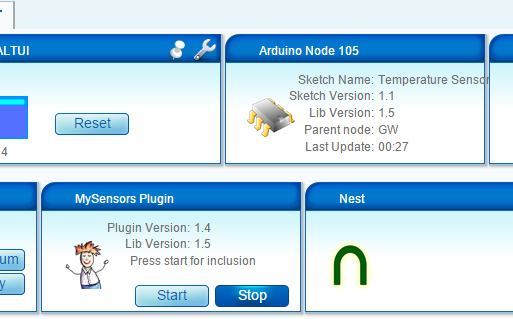
How did you solve that problem?

Hello! It looks like you're interested in this conversation, but you don't have an account yet.
Getting fed up of having to scroll through the same posts each visit? When you register for an account, you'll always come back to exactly where you were before, and choose to be notified of new replies (either via email, or push notification). You'll also be able to save bookmarks and upvote posts to show your appreciation to other community members.
With your input, this post could be even better 💗
Register Login