
MQ7 sensor (CO) + Arduino Mega 2560 + Expansion shield
-
Hey !
Sorry to bother you with what it seems a simple project but I have some difficulties regarding the electronical assembly.
Here are the different parts of my assembly :
-
Arduino Mega 2560
-
Shield E/S Gravity V7 DFR0265
https://wiki.dfrobot.com/IO_Expansion_Shield_for_Arduino_V7_SKU_DFR0265 -
MQ7 sensor
https://sha256systems.eu/Gravity-Analog-Carbon-Monoxide-Sensor-MQ7-For-Arduino/fr
=> The datasheet is at the botton of the site if you continue to scroll down. -
Breadboard, wires, R, C, ...
The code I want to do with my Arduino Mega 2560 :
// Ingo Lohs, works with Particle Photon v0.7.0-rc.1
// MQ-7 Carbon Monoxide Sensor: It is sensitive to gases like Alcohol (hand sanitizer), Butane (a lighter) and Difluoroethane (compressed "air" duster), among other gasses.
// 31.08.2017, v1.0
// datasheet found here: http://cvrr.ucsd.edu/ece156/ECE156Sensors/Carbon_Monoxide.pdf

// MQ-7 wiring
#define analogMQ7 A0      // Signal
#define ledPin D7         // Device internal LED
int MQ7sensorValue = 0;   // value read from the sensor

// *********************************

void setup()
{
    Serial.begin(9600);
    Serial.println(F("MQ-7 Gas Sensor Flying-Fish started"));

    pinMode(analogMQ7, INPUT);
    pinMode(ledPin, OUTPUT);
}

// *********************************

void loop() {

  // A) preparation
    // turn the heater fully on
    analogWrite(analogMQ7, HIGH); // HIGH = 255
    // heat for 1 min
    delay(60000);
    // now reducing the heating power: turn the heater to approx 1,4V
    analogWrite(analogMQ7, 71.4); // 255x1400/5000
    // heat for 90 sec
    delay(90000);

  // B) reading
    // CO2 via MQ7: we need to read the sensor at 5V, but must not let it heat up. So hurry!
    analogWrite(analogMQ7, HIGH);
    delay(50); // Getting an analog read apparently takes 100uSec
    MQ7sensorValue = analogRead(analogMQ7);

  // C) print the results to the serial monitor
    Serial.print("MQ-7 PPM: ");
    Serial.println(MQ7sensorValue);

  // D) interpretation
    // Detecting range: 20ppm-2000ppm carbon monoxide
    // air quality-cases: < 200 perfect, 200 - 800 normal, > 800 - 1800 high, > 1800 abnormal

    if (MQ7sensorValue <= 200)
    {
        Serial.println("Air-Quality: CO perfect");
    }
    else if ((MQ7sensorValue > 200) || (MQ7sensorValue <= 800)) // || = or
    {
        Serial.println("Air-Quality: CO normal");
    }
    else if ((MQ7sensorValue > 800) || (MQ7sensorValue <= 1800))
    {
        Serial.println("Air-Quality: CO high");
    }
    else if (MQ7sensorValue > 1800)
    {
        digitalWrite(ledPin, HIGH); // optical information in case of emergency
        Serial.println("Air-Quality: ALARM CO very high");
        delay(3000);
        digitalWrite(ledPin, LOW);
    }
    else
    {
        Serial.println("MQ-7 - cant read any value - check the sensor!");
    }
}
In order to do that, I have to follow the pattern below :
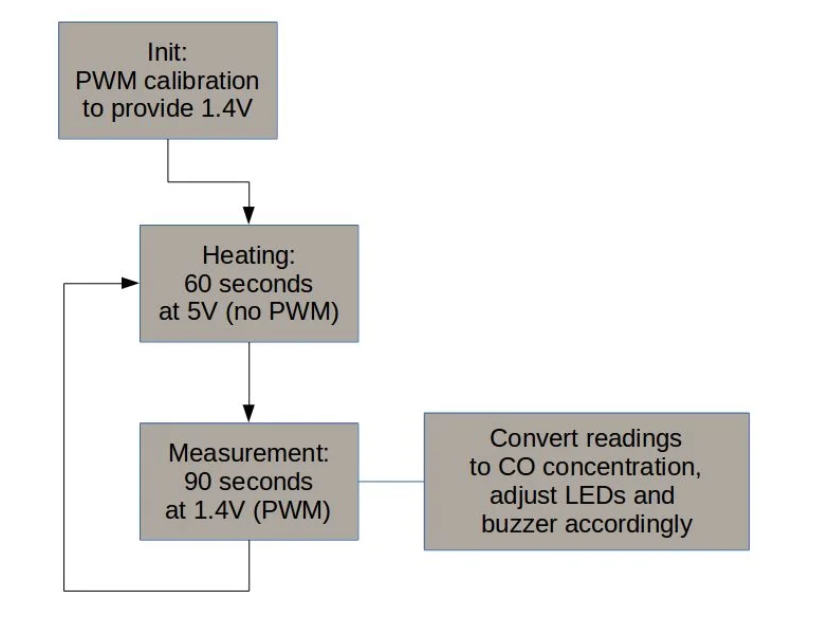
Extracted from : https://www.instructables.com/id/Arduino-CO-Monitor-Using-MQ-7-Sensor/The thing is that I don't know how to make this works.
Another problem is :
<< *But here's the problem: Arduino can't provide enough power to run this sensor from its pins - sensor's heater requires 150 mA, while Arduino pin can provide no more than 40 mA, so if attached directly, Arduino pin will burn and sensor still won't work. So we must use some kind of current amplifier that takes small input current to control large output current.
Another problem is getting 1.4V. The only way to reliably get this value without introducing a lot of analog components is to use PWM (Pulse Width Modulation) approach with feedback that will control output voltage.NPN transistor solves both problems: when it is constantly turned on, voltage across the sensor is 5V and it is heating for high-temperature phase. When we apply PWM to its input, current is pulsing, then it is smoothed by the capacitor, and the average voltage is kept constant. If we use high frequency PWM (in the sketch it has frequency of 62.5KHz) and average a lot of analog readings (in the sketch we average over ~1000 readings), then the result is quite reliable.
It is critical to add capacitors according to schematics. Images here illustrate difference in signal with and without C2 capacitor: without it, PWM ripple is clearly visible and it significantly distorts readings.* >>
So I'm looking for help to make it works !
Cheers.
-
-
TBH if I were you I'd skip the hassle with the MQ sensor and save up for a better more expensive one.
The MQ range are sensitive to a variety of gasses and unless you have a known concentration of the gas to calibrate them to, then they are only indicative of rising or falling amounts of detectable gasses.

Hello! It looks like you're interested in this conversation, but you don't have an account yet.
Getting fed up of having to scroll through the same posts each visit? When you register for an account, you'll always come back to exactly where you were before, and choose to be notified of new replies (either via email, or push notification). You'll also be able to save bookmarks and upvote posts to show your appreciation to other community members.
With your input, this post could be even better 💗
Register Login