Skip to content
  • MySensors
  • OpenHardware.io
  • Categories
  • Recent
  • Tags
  • Popular
Skins
  • Light
  • Brite
  • Cerulean
  • Cosmo
  • Flatly
  • Journal
  • Litera
  • Lumen
  • Lux
  • Materia
  • Minty
  • Morph
  • Pulse
  • Sandstone
  • Simplex
  • Sketchy
  • Spacelab
  • United
  • Yeti
  • Zephyr
  • Dark
  • Cyborg
  • Darkly
  • Quartz
  • Slate
  • Solar
  • Superhero
  • Vapor

  • Default (No Skin)
  • No Skin
Collapse
Brand Logo
  1. Home
  2. Troubleshooting
  3. Soil Sensor analog values differ on Uno vs Pro Mini

Soil Sensor analog values differ on Uno vs Pro Mini

Scheduled Pinned Locked Moved Troubleshooting
soil sensorunopro mini
28 Posts 8 Posters 14.4k Views 1 Watching
  • Oldest to Newest
  • Newest to Oldest
  • Most Votes
Reply
  • Reply as topic
Log in to reply
This topic has been deleted. Only users with topic management privileges can see it.
  • daulagariD daulagari

    @murdog You write the Pro Mini is powered at 3.3 V but you do not write how the Uno is powered but I guess it is powered at 5 V.

    If so, that can explain things I think.

    M Offline
    M Offline
    murdog
    wrote on last edited by
    #3

    @daulagari Yes Uno is powered via USB@5v, but the soil sensor is connected to the 3.3v regulated supply.

    daulagariD 1 Reply Last reply
    0
    • hekH Offline
      hekH Offline
      hek
      Admin
      wrote on last edited by
      #4

      Did you try setting pit to input mode?

      pinMode(SOIL_SENSOR_ANALOG_PIN, INPUT);
      
      M 1 Reply Last reply
      0
      • hekH hek

        Did you try setting pit to input mode?

        pinMode(SOIL_SENSOR_ANALOG_PIN, INPUT);
        
        M Offline
        M Offline
        murdog
        wrote on last edited by
        #5

        @hek I was playing around with it alot last night and yes that is one of the things I did try before doing a read, but still 1023. I will confirm again when home. Any ideas of what I should be seeing for the baseline on the soil sensor?

        1 Reply Last reply
        0
        • M murdog

          @daulagari Yes Uno is powered via USB@5v, but the soil sensor is connected to the 3.3v regulated supply.

          daulagariD Offline
          daulagariD Offline
          daulagari
          Hero Member
          wrote on last edited by
          #6

          @murdog said:

          Yes Uno is powered via USB@5v, but the soil sensor is connected to the 3.3v regulated supply.

          So is the full-ADC scale (1023) not the same as the voltage supply?

          682/1023 * 5 Volt = 3.33 Volt and that would clip the 3.3 V ADC of the Pro Mini so therefore it is giving 1023.

          1 Reply Last reply
          0
          • Z Offline
            Z Offline
            Zeph
            Hero Member
            wrote on last edited by
            #7

            OK, the soil sensor is connected to a 3.3v regulated supply.

            But the Arduino sounds like it's still running at 5v, and by default the ADC reference is VCC. So at full scale soil sensor reading of 3.3v will be only about 2/3 of that 5v reference. (but 100% of a 3.3v reference).

            So they are both right, just using different ADC references.

            The 5V reference is probably fine, you lose a little bit of resolution (less than one bit) but soil moisture sensors are not exactly precise.

            If it mattered, you can connect the 3.3v supply to the Aref input and set the ADC to use Aref as it's reference, in which case you'll get the full resolution 0..1023 for 0..3.3v. In this case I probably wouldn't bother.

            M 1 Reply Last reply
            1
            • Z Zeph

              OK, the soil sensor is connected to a 3.3v regulated supply.

              But the Arduino sounds like it's still running at 5v, and by default the ADC reference is VCC. So at full scale soil sensor reading of 3.3v will be only about 2/3 of that 5v reference. (but 100% of a 3.3v reference).

              So they are both right, just using different ADC references.

              The 5V reference is probably fine, you lose a little bit of resolution (less than one bit) but soil moisture sensors are not exactly precise.

              If it mattered, you can connect the 3.3v supply to the Aref input and set the ADC to use Aref as it's reference, in which case you'll get the full resolution 0..1023 for 0..3.3v. In this case I probably wouldn't bother.

              M Offline
              M Offline
              murdog
              wrote on last edited by
              #8

              @Zeph @daulagari Awesome thanks guys, that makes perfect sense!

              1 Reply Last reply
              0
              • daulagariD Offline
                daulagariD Offline
                daulagari
                Hero Member
                wrote on last edited by
                #9

                @murdog: You should probably also have a look at the New library to read Arduino VCC supply level without resistors for battery powered sensor nodes that do not use a voltage regulator but connect directly to the batteries thread.

                If you want to make the code generic, you should have the code measure the VCC and scale the measured value according to what you read for VCC.

                YveauxY 1 Reply Last reply
                1
                • daulagariD daulagari

                  @murdog: You should probably also have a look at the New library to read Arduino VCC supply level without resistors for battery powered sensor nodes that do not use a voltage regulator but connect directly to the batteries thread.

                  If you want to make the code generic, you should have the code measure the VCC and scale the measured value according to what you read for VCC.

                  YveauxY Offline
                  YveauxY Offline
                  Yveaux
                  Mod
                  wrote on last edited by
                  #10

                  @daulagari Finally someone who appreciates my little library ;-) :+1:

                  http://yveaux.blogspot.nl

                  1 Reply Last reply
                  0
                  • Moshe LivneM Offline
                    Moshe LivneM Offline
                    Moshe Livne
                    Hero Member
                    wrote on last edited by
                    #11

                    Can you please share your sketch? I have tried modifying the digital version of the sketch to analog but I have no idea what to write in the sensor type.

                    1 Reply Last reply
                    0
                    • Moshe LivneM Offline
                      Moshe LivneM Offline
                      Moshe Livne
                      Hero Member
                      wrote on last edited by
                      #12

                      Managed to make it a humidity sensor, which is probably close enough. Here is my sketch:
                      #include <SPI.h>
                      #include <MySensor.h>

                      #define ANALOG_INPUT_SOIL_SENSOR A0
                      #define CHILD_ID 0 // Id of the sensor child

                      MySensor gw;
                      MyMessage msg(CHILD_ID, V_HUM);
                      int lastSoilValue = -1;

                      void setup()
                      {
                      gw.begin();

                      // Send the sketch version information to the gateway and Controller
                      gw.sendSketchInfo("Soil Moisture Sensor - analog", "1.0");
                      // sets the soil sensor analog pin as input
                      pinMode(ANALOG_INPUT_SOIL_SENSOR, INPUT);
                      // Register all sensors to gw (they will be created as child devices)
                      gw.present(CHILD_ID, S_HUM);
                      }

                      void loop()
                      {
                      // Read analog soil value
                      int soilValue = analogRead(ANALOG_INPUT_SOIL_SENSOR);

                      if (soilValue != lastSoilValue) {
                      Serial.println(soilValue);
                      gw.send(msg.set(static_cast<int>(static_cast<float>(1023 - soilValue))/1023*100)); // Send the relative moisture. this will probably work only on nano or uno as I used 1023
                      lastSoilValue = soilValue;
                      }
                      // Power down the radio and arduino until analog input changes.
                      gw.sleep(1000);
                      }

                      F 1 Reply Last reply
                      0
                      • Moshe LivneM Offline
                        Moshe LivneM Offline
                        Moshe Livne
                        Hero Member
                        wrote on last edited by
                        #13

                        Oh, sleep should probably be set to 3600000 or more to get long sleep periods between measurements as I don't think soil moisture should be measured every second....

                        1 Reply Last reply
                        0
                        • Moshe LivneM Moshe Livne

                          Managed to make it a humidity sensor, which is probably close enough. Here is my sketch:
                          #include <SPI.h>
                          #include <MySensor.h>

                          #define ANALOG_INPUT_SOIL_SENSOR A0
                          #define CHILD_ID 0 // Id of the sensor child

                          MySensor gw;
                          MyMessage msg(CHILD_ID, V_HUM);
                          int lastSoilValue = -1;

                          void setup()
                          {
                          gw.begin();

                          // Send the sketch version information to the gateway and Controller
                          gw.sendSketchInfo("Soil Moisture Sensor - analog", "1.0");
                          // sets the soil sensor analog pin as input
                          pinMode(ANALOG_INPUT_SOIL_SENSOR, INPUT);
                          // Register all sensors to gw (they will be created as child devices)
                          gw.present(CHILD_ID, S_HUM);
                          }

                          void loop()
                          {
                          // Read analog soil value
                          int soilValue = analogRead(ANALOG_INPUT_SOIL_SENSOR);

                          if (soilValue != lastSoilValue) {
                          Serial.println(soilValue);
                          gw.send(msg.set(static_cast<int>(static_cast<float>(1023 - soilValue))/1023*100)); // Send the relative moisture. this will probably work only on nano or uno as I used 1023
                          lastSoilValue = soilValue;
                          }
                          // Power down the radio and arduino until analog input changes.
                          gw.sleep(1000);
                          }

                          F Offline
                          F Offline
                          fred97
                          wrote on last edited by
                          #14

                          @Moshe-Livne said:

                          Managed to make it a humidity sensor, which is probably close enough. Here is my sketch:
                          #include <SPI.h>
                          #include <MySensor.h>

                          #define ANALOG_INPUT_SOIL_SENSOR A0
                          #define CHILD_ID 0 // Id of the sensor child

                          MySensor gw;
                          MyMessage msg(CHILD_ID, V_HUM);
                          int lastSoilValue = -1;

                          void setup()
                          {
                          gw.begin();

                          // Send the sketch version information to the gateway and Controller
                          gw.sendSketchInfo("Soil Moisture Sensor - analog", "1.0");
                          // sets the soil sensor analog pin as input
                          pinMode(ANALOG_INPUT_SOIL_SENSOR, INPUT);
                          // Register all sensors to gw (they will be created as child devices)
                          gw.present(CHILD_ID, S_HUM);
                          }

                          void loop()
                          {
                          // Read analog soil value
                          int soilValue = analogRead(ANALOG_INPUT_SOIL_SENSOR);

                          if (soilValue != lastSoilValue) {
                          Serial.println(soilValue);
                          gw.send(msg.set(static_cast<int>(static_cast<float>(1023 - soilValue))/1023*100)); // Send the relative moisture. this will probably work only on nano or uno as I used 1023
                          lastSoilValue = soilValue;
                          }
                          // Power down the radio and arduino until analog input changes.
                          gw.sleep(1000);
                          }

                          hello ,

                          i want to do same , but can you explaind the calcul is made ?

                          for now i use light sensor sketch with analog input , but i ant to modify by /10 for having a moisture meter reading value 0to100% or maybe there is a S_Percentage come in next version of mysensors ?

                          i use domotiz with gateway and for now only Light sensor work for read analog value .

                          thanks

                          Moshe LivneM 1 Reply Last reply
                          0
                          • F fred97

                            @Moshe-Livne said:

                            Managed to make it a humidity sensor, which is probably close enough. Here is my sketch:
                            #include <SPI.h>
                            #include <MySensor.h>

                            #define ANALOG_INPUT_SOIL_SENSOR A0
                            #define CHILD_ID 0 // Id of the sensor child

                            MySensor gw;
                            MyMessage msg(CHILD_ID, V_HUM);
                            int lastSoilValue = -1;

                            void setup()
                            {
                            gw.begin();

                            // Send the sketch version information to the gateway and Controller
                            gw.sendSketchInfo("Soil Moisture Sensor - analog", "1.0");
                            // sets the soil sensor analog pin as input
                            pinMode(ANALOG_INPUT_SOIL_SENSOR, INPUT);
                            // Register all sensors to gw (they will be created as child devices)
                            gw.present(CHILD_ID, S_HUM);
                            }

                            void loop()
                            {
                            // Read analog soil value
                            int soilValue = analogRead(ANALOG_INPUT_SOIL_SENSOR);

                            if (soilValue != lastSoilValue) {
                            Serial.println(soilValue);
                            gw.send(msg.set(static_cast<int>(static_cast<float>(1023 - soilValue))/1023*100)); // Send the relative moisture. this will probably work only on nano or uno as I used 1023
                            lastSoilValue = soilValue;
                            }
                            // Power down the radio and arduino until analog input changes.
                            gw.sleep(1000);
                            }

                            hello ,

                            i want to do same , but can you explaind the calcul is made ?

                            for now i use light sensor sketch with analog input , but i ant to modify by /10 for having a moisture meter reading value 0to100% or maybe there is a S_Percentage come in next version of mysensors ?

                            i use domotiz with gateway and for now only Light sensor work for read analog value .

                            thanks

                            Moshe LivneM Offline
                            Moshe LivneM Offline
                            Moshe Livne
                            Hero Member
                            wrote on last edited by
                            #15

                            @fred97 , i also use domoticz. If you read this thread form the start, you will see that the arduino converts the moisture reading to something in the range 0-1023 (or 682 if you use mini pro). 1023 is 0 moisture, 0 is 100% moisture. so, moisture content is (1023 - reading)/1023*100.

                            Hope this answers your question!

                            Moshe

                            1 Reply Last reply
                            0
                            • F Offline
                              F Offline
                              fred97
                              wrote on last edited by
                              #16

                              thanks you ,

                              i have try your sketch but don't work send only O

                              send: 2-2-0-0 s=0,c=1,t=1,pt=2,l=2,st=ok:0
                              444
                              send: 2-2-0-0 s=0,c=1,t=1,pt=2,l=2,st=ok:0
                              470
                              send: 2-2-0-0 s=0,c=1,t=1,pt=2,l=2,st=ok:0
                              1023
                              send: 2-2-0-0 s=0,c=1,t=1,pt=2,l=2,st=ok:0
                              

                              i think the problem is inside converter in percentage ....

                              240 when is in water and 1023 when completly dry .

                              1 Reply Last reply
                              0
                              • Moshe LivneM Offline
                                Moshe LivneM Offline
                                Moshe Livne
                                Hero Member
                                wrote on last edited by Moshe Livne
                                #17

                                @fred97 did you change anything in the calculation? the values in the println seems correct. do not remove the static casts - they are essential.

                                BulldogLowellB 1 Reply Last reply
                                0
                                • Moshe LivneM Moshe Livne

                                  @fred97 did you change anything in the calculation? the values in the println seems correct. do not remove the static casts - they are essential.

                                  BulldogLowellB Offline
                                  BulldogLowellB Offline
                                  BulldogLowell
                                  Contest Winner
                                  wrote on last edited by
                                  #18

                                  @Moshe-Livne said:

                                  Serial.println(soilValue);
                                  gw.send(msg.set(static_cast<int>(static_cast<float>(1023 - soilValue))/1023*100))

                                  how about just using the map() function...

                                  Serial.println(soilValue);
                                  gw.send(msg.set(map(soilValue, 0, 1023, 0 ,100));
                                  
                                  Moshe LivneM 1 Reply Last reply
                                  0
                                  • BulldogLowellB BulldogLowell

                                    @Moshe-Livne said:

                                    Serial.println(soilValue);
                                    gw.send(msg.set(static_cast<int>(static_cast<float>(1023 - soilValue))/1023*100))

                                    how about just using the map() function...

                                    Serial.println(soilValue);
                                    gw.send(msg.set(map(soilValue, 0, 1023, 0 ,100));
                                    
                                    Moshe LivneM Offline
                                    Moshe LivneM Offline
                                    Moshe Livne
                                    Hero Member
                                    wrote on last edited by
                                    #19

                                    @BulldogLowell would have used it if I knew it existed.... would it work is reverse? (1023,0, 0, 100)?

                                    BulldogLowellB 1 Reply Last reply
                                    0
                                    • Moshe LivneM Moshe Livne

                                      @BulldogLowell would have used it if I knew it existed.... would it work is reverse? (1023,0, 0, 100)?

                                      BulldogLowellB Offline
                                      BulldogLowellB Offline
                                      BulldogLowell
                                      Contest Winner
                                      wrote on last edited by BulldogLowell
                                      #20

                                      @Moshe-Livne

                                      Try it!!

                                      int soilValue = 250;
                                      
                                      void setup() 
                                      {
                                        Serial.begin(115200);
                                        Serial.println(map(soilValue, 1023,0,100,0));
                                      }
                                      
                                      void loop() 
                                      {
                                        
                                      }
                                      

                                      have you run into 123dcircuits yet?
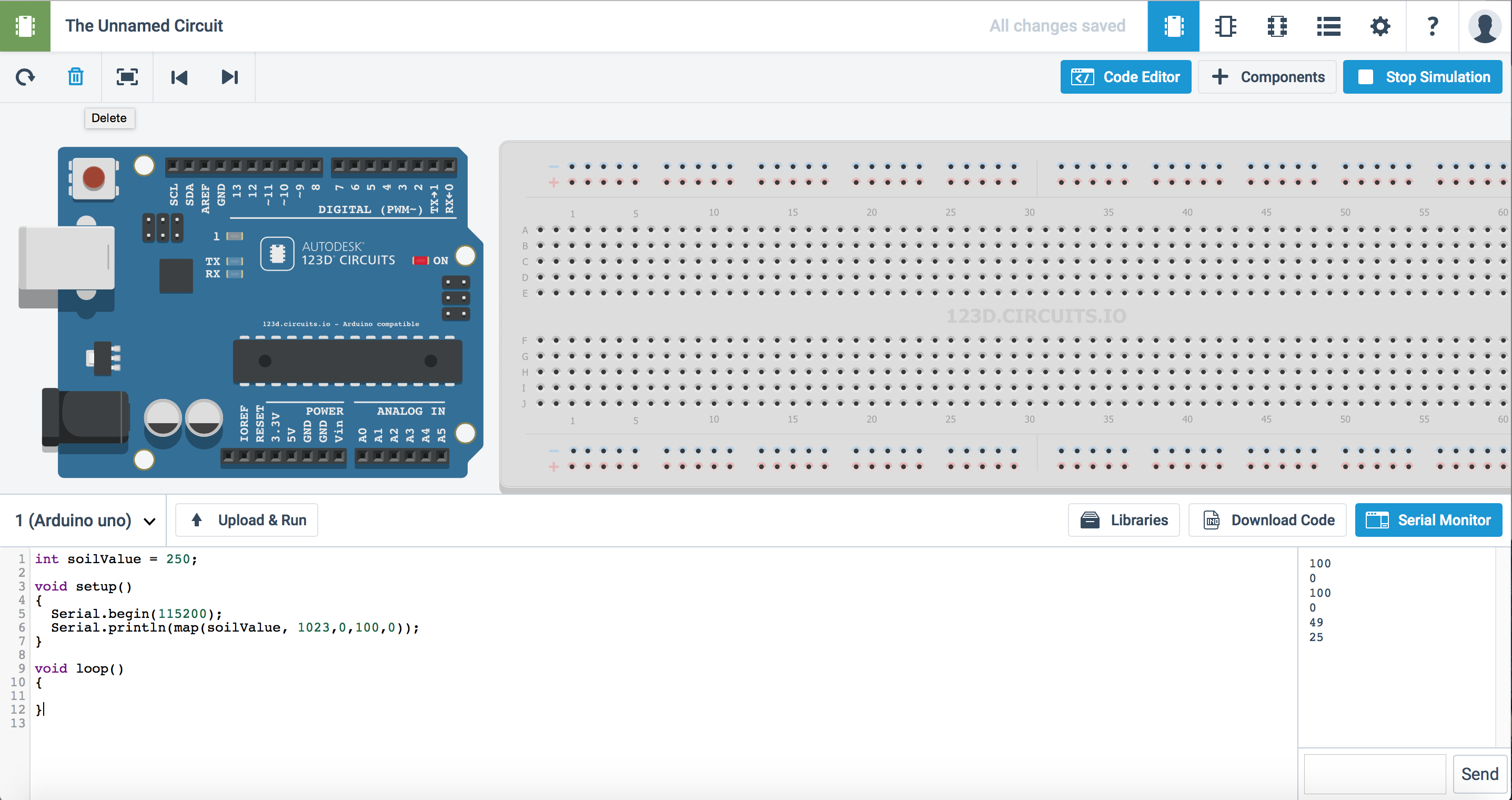
                                      Screen Shot 2015-05-24 at 6.26.37 AM.png

                                      Moshe LivneM 1 Reply Last reply
                                      0
                                      • BulldogLowellB BulldogLowell

                                        @Moshe-Livne

                                        Try it!!

                                        int soilValue = 250;
                                        
                                        void setup() 
                                        {
                                          Serial.begin(115200);
                                          Serial.println(map(soilValue, 1023,0,100,0));
                                        }
                                        
                                        void loop() 
                                        {
                                          
                                        }
                                        

                                        have you run into 123dcircuits yet?

                                        Screen Shot 2015-05-24 at 6.26.37 AM.png

                                        Moshe LivneM Offline
                                        Moshe LivneM Offline
                                        Moshe Livne
                                        Hero Member
                                        wrote on last edited by
                                        #21

                                        @BulldogLowell not yet!!! my first encounter with arduino was only a few weeks ago.... so much to learn! the wood are lovely dark and deep, but i have promises to keep....

                                        1 Reply Last reply
                                        0
                                        • F Offline
                                          F Offline
                                          fred97
                                          wrote on last edited by
                                          #22

                                          hello

                                          it's working but is not inverted :+1:

                                          314
                                          send: 2-2-0-0 s=0,c=1,t=1,pt=4,l=4,st=ok:30
                                          294
                                          send: 2-2-0-0 s=0,c=1,t=1,pt=4,l=4,st=ok:28
                                          287
                                          send: 2-2-0-0 s=0,c=1,t=1,pt=4,l=4,st=ok:28
                                          299
                                          send: 2-2-0-0 s=0,c=1,t=1,pt=4,l=4,st=ok:29
                                          313
                                          send: 2-2-0-0 s=0,c=1,t=1,pt=4,l=4,st=ok:30
                                          1023
                                          send: 2-2-0-0 s=0,c=1,t=1,pt=4,l=4,st=ok:100
                                          

                                          100 is when is dry and 220/250 is when the sensor is in water .
                                          i just need little more help for invert value , 100 = in water and 0 when is dry

                                          thx

                                          BulldogLowellB 1 Reply Last reply
                                          0
                                          Reply
                                          • Reply as topic
                                          Log in to reply
                                          • Oldest to Newest
                                          • Newest to Oldest
                                          • Most Votes


                                          37

                                          Online

                                          11.7k

                                          Users

                                          11.2k

                                          Topics

                                          113.1k

                                          Posts


                                          Copyright 2025 TBD   |   Forum Guidelines   |   Privacy Policy   |   Terms of Service
                                          • Login

                                          • Don't have an account? Register

                                          • Login or register to search.
                                          • First post
                                            Last post
                                          0
                                          • MySensors
                                          • OpenHardware.io
                                          • Categories
                                          • Recent
                                          • Tags
                                          • Popular