
Separate msg.payload into Temperature,Humidity,Luminosity objects.
-
Hi,
I am trying to read sensor data from a telosb and I am using node-red to save the data but first I wanted to display it correctly. I have used a serial port listener node as an input and it shows the output in the debug pane like this (due tot he printf function in the coding):
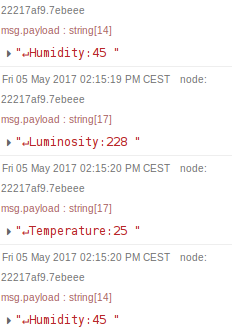
I usedmsg.payload=temp.match(/[a-zA-Z]+|[0-9]+/g);to somehow separate them into ["Humidity","45"] and tried to create message topics to divide.msg.payload = {temp:temp.match(/\d+/)[0],hum:temp.match(/\d+/)[0],light:temp.match(/\d+/)[0]};I shows this: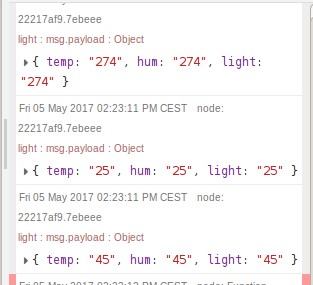 Which I know is totally wrong. I cannot seem to figure out how to "tell" which value is for temperature, which for humidity since all it does is output it as a string and I want to save it into csv file or a database.
I am a beginner in all this so please be patience :) -
Hi,
I am trying to read sensor data from a telosb and I am using node-red to save the data but first I wanted to display it correctly. I have used a serial port listener node as an input and it shows the output in the debug pane like this (due tot he printf function in the coding):
I usedmsg.payload=temp.match(/[a-zA-Z]+|[0-9]+/g);to somehow separate them into ["Humidity","45"] and tried to create message topics to divide.msg.payload = {temp:temp.match(/\d+/)[0],hum:temp.match(/\d+/)[0],light:temp.match(/\d+/)[0]};I shows this: Which I know is totally wrong. I cannot seem to figure out how to "tell" which value is for temperature, which for humidity since all it does is output it as a string and I want to save it into csv file or a database.
I am a beginner in all this so please be patience :)@maggie How about something like this?
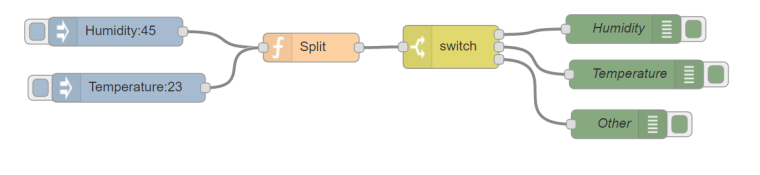
The Humidity/Temperature injects simulated data coming in from your sensors.
This data gets split on a semicolon:var fields = msg.payload.trim().split(':'); msg.type = fields[0]; msg.value = parseInt(fields[1]); return msg;and the switch determines on msg.type where to route the data.
If you want to try this code then just copy/paste he following block into Node-Red:
[{"id":"d56d943.4bfae68","type":"switch","z":"3ce68302.c3197c","name":"","property":"type","propertyType":"msg","rules":[{"t":"cont","v":"Humidity","vt":"str"},{"t":"cont","v":"Temperature","vt":"str"},{"t":"else"}],"checkall":"true","outputs":3,"x":500.8333511352539,"y":823.6666984558105,"wires":[["7f9e7e7f.48016"],["e23d0ce6.78b9d"],["82fc1542.5faa18"]]},{"id":"68c3690d.519a88","type":"inject","z":"3ce68302.c3197c","name":"","topic":"","payload":"Humidity:45","payloadType":"str","repeat":"","crontab":"","once":false,"x":150.8333282470703,"y":807.6667022705078,"wires":[["9e7dc36.f3b074"]]},{"id":"4da4d5e4.5a276c","type":"inject","z":"3ce68302.c3197c","name":"","topic":"","payload":"Temperature:23","payloadType":"str","repeat":"","crontab":"","once":false,"x":164.3333282470703,"y":866.3333129882812,"wires":[["9e7dc36.f3b074"]]},{"id":"9e7dc36.f3b074","type":"function","z":"3ce68302.c3197c","name":"Split","func":"var fields = msg.payload.trim().split(':');\nmsg.type = fields[0];\nmsg.value = parseInt(fields[1]);\nreturn msg;","outputs":1,"noerr":0,"x":354.83333587646484,"y":824.3333625793457,"wires":[["d56d943.4bfae68"]]},{"id":"7f9e7e7f.48016","type":"debug","z":"3ce68302.c3197c","name":"Humidity","active":true,"console":"false","complete":"value","x":680.8333282470703,"y":805.0000152587891,"wires":[]},{"id":"e23d0ce6.78b9d","type":"debug","z":"3ce68302.c3197c","name":"Temperature","active":true,"console":"false","complete":"value","x":694.3333129882812,"y":852.3333129882812,"wires":[]},{"id":"82fc1542.5faa18","type":"debug","z":"3ce68302.c3197c","name":"Other","active":true,"console":"false","complete":"value","x":676.3333129882812,"y":904.3333129882812,"wires":[]}]

Hello! It looks like you're interested in this conversation, but you don't have an account yet.
Getting fed up of having to scroll through the same posts each visit? When you register for an account, you'll always come back to exactly where you were before, and choose to be notified of new replies (either via email, or push notification). You'll also be able to save bookmarks and upvote posts to show your appreciation to other community members.
With your input, this post could be even better 💗
Register Login