Skip to content
  • MySensors
  • OpenHardware.io
  • Categories
  • Recent
  • Tags
  • Popular
Skins
  • Light
  • Brite
  • Cerulean
  • Cosmo
  • Flatly
  • Journal
  • Litera
  • Lumen
  • Lux
  • Materia
  • Minty
  • Morph
  • Pulse
  • Sandstone
  • Simplex
  • Sketchy
  • Spacelab
  • United
  • Yeti
  • Zephyr
  • Dark
  • Cyborg
  • Darkly
  • Quartz
  • Slate
  • Solar
  • Superhero
  • Vapor

  • Default (No Skin)
  • No Skin
Collapse
Brand Logo
F

flopp

@flopp
About
Posts
591
Topics
54
Shares
0
Groups
0
Followers
2
Following
0

Posts

Recent Best Controversial

  • Solar Powered Soil Moisture Sensor
    F flopp

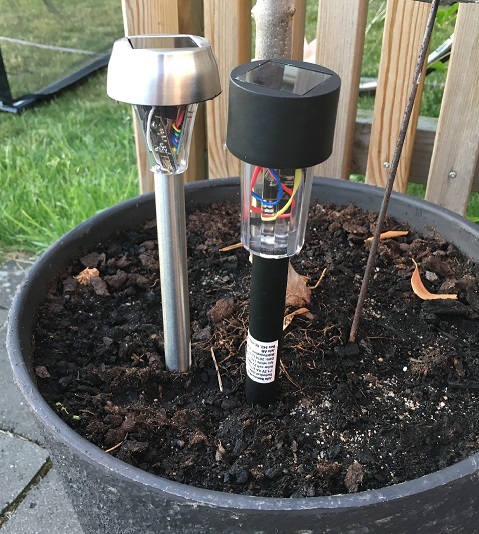
    I have build an Solar panel-powered Soil moisture sensor.

    Photos

    I bought the lamps on Jula.
    Lamp1 Battery 2/3 AAA 100 mAh, 10 SEK, 1 euro
    Lamp2 Battery 2/3 AA 200 mAh, 5 SEK, 0,5 euro
    Lamp3 Battery LR44 40 mAh, 10 SEK, 1 euro, NOT TESTED YET

    I removed all the electronic on the PCB and used the PCB as a connection board.
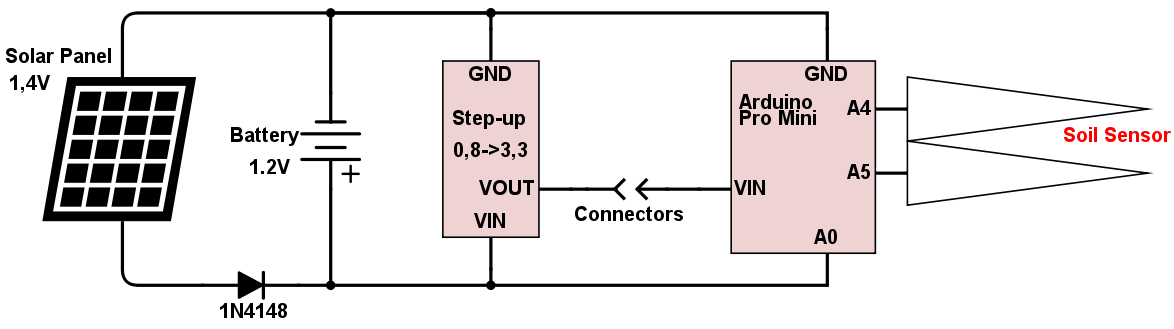
    The solar panel gives around 1,4 V during a very sunny day.
    I had to add a step-up(0,8->3,3V) to be able to run a ATMEGA. My first idea was to connect 2 batteries in series, but that was too much work. Now everything fits in the parts that is included.

    Lamp1 is using a Pro Mini(fake), glued soil sensor on "arrow"
    Lamp2 is using my designed PCB with ATMEGA328p, soil sensor just put in soil, not glued at all.
    Both MCU are using Optiboot, https://forum.mysensors.org/topic/3018/tutorial-how-to-burn-1mhz-8mhz-bootloader-using-arduino-ide-1-6-5-r5.
    Pro Mini:Power-on LED removed and also step-down. Activity-LED is still in use.
    My designed PCB:https://oshpark.com/shared_projects/F7esJEMY, also with LED for startup and send OK

    I am using @mfalkvidd sketch, thank you. I have only add a few rows(LED and resend function)
    It sends data(Humidity/Volt/VoltPercent every 10 second, just for testing the hardware later on I will send maybe twice an hour or once an hour.
    I am measuring the battery voltage on a analog input.

    #include <SPI.h>
    #include <MySensor.h>
    
    #define round(x) ((x)>=0?(long)((x)+0.5):(long)((x)-0.5))
    #define N_ELEMENTS(array) (sizeof(array)/sizeof((array)[0]))
    
    #define CHILD_ID_MOISTURE 0
    #define CHILD_ID_BATTERY 1
    #define SLEEP_TIME 10000 // Sleep time between reads (in milliseconds)
    #define THRESHOLD 1.1 // Only make a new reading with reverse polarity if the change is larger than 10%.
    #define STABILIZATION_TIME 1000 // Let the sensor stabilize before reading
    default BOD settings.
    const int SENSOR_ANALOG_PINS[] = {A4, A5}; // Sensor is connected to these two pins. Avoid A3 if using ATSHA204. A6 and A7 cannot be used because they don't have pullups.
    
    MySensor gw;
    MyMessage msg(CHILD_ID_MOISTURE, V_HUM);
    MyMessage voltage_msg(CHILD_ID_BATTERY, V_VOLTAGE);
    long oldvoltage = 0;
    byte direction = 0;
    int oldMoistureLevel = -1;
    float batteryPcnt;
    float batteryVolt;
    int LED = 5;
    
    void setup()
    {
      pinMode(LED, OUTPUT);
      digitalWrite(LED, HIGH);
      delay(200);
      digitalWrite(LED, LOW);
      delay(200);
      digitalWrite(LED, HIGH);
      delay(200);
      digitalWrite(LED, LOW);
      
      gw.begin();
    
      gw.sendSketchInfo("Plant moisture w solar", "1.0");
    
      gw.present(CHILD_ID_MOISTURE, S_HUM);
      delay(250);
      gw.present(CHILD_ID_BATTERY, S_MULTIMETER);
      for (int i = 0; i < N_ELEMENTS(SENSOR_ANALOG_PINS); i++) {
        pinMode(SENSOR_ANALOG_PINS[i], OUTPUT);
        digitalWrite(SENSOR_ANALOG_PINS[i], LOW);
      }
    }
    
    void loop()
    {
      int moistureLevel = readMoisture();
    
      // Send rolling average of 2 samples to get rid of the "ripple" produced by different resistance in the internal pull-up resistors
      // See http://forum.mysensors.org/topic/2147/office-plant-monitoring/55 for more information
      if (oldMoistureLevel == -1) { // First reading, save current value as old
        oldMoistureLevel = moistureLevel;
      }
      if (moistureLevel > (oldMoistureLevel * THRESHOLD) || moistureLevel < (oldMoistureLevel / THRESHOLD)) {
        // The change was large, so it was probably not caused by the difference in internal pull-ups.
        // Measure again, this time with reversed polarity.
        moistureLevel = readMoisture();
      }
      gw.send(msg.set((moistureLevel + oldMoistureLevel) / 2.0 / 10.23, 1));
      oldMoistureLevel = moistureLevel;
      
      int sensorValue = analogRead(A0);
      Serial.println(sensorValue);
      float voltage=sensorValue*(3.3/1023);
      Serial.println(voltage);
      batteryPcnt = (sensorValue - 248) * 0.72;
      batteryVolt = voltage;
      gw.sendBatteryLevel(batteryPcnt);
      resend((voltage_msg.set(batteryVolt, 3)), 10);
    
      digitalWrite(LED, HIGH);
      delay(200);
      digitalWrite(LED, LOW);
      
      gw.sleep(SLEEP_TIME);
    }
    
    void resend(MyMessage &msg, int repeats)
    {
      int repeat = 1;
      int repeatdelay = 0;
      boolean sendOK = false;
    
      while ((sendOK == false) and (repeat < repeats)) {
        if (gw.send(msg)) {
          sendOK = true;
        } else {
          sendOK = false;
          Serial.print("Error ");
          Serial.println(repeat);
          repeatdelay += 500;
        } repeat++; delay(repeatdelay);
      }
    }
    
    
    int readMoisture() {
      pinMode(SENSOR_ANALOG_PINS[direction], INPUT_PULLUP); // Power on the sensor
      analogRead(SENSOR_ANALOG_PINS[direction]);// Read once to let the ADC capacitor start charging
      gw.sleep(STABILIZATION_TIME);
      int moistureLevel = (1023 - analogRead(SENSOR_ANALOG_PINS[direction]));
    
      // Turn off the sensor to conserve battery and minimize corrosion
      pinMode(SENSOR_ANALOG_PINS[direction], OUTPUT);
      digitalWrite(SENSOR_ANALOG_PINS[direction], LOW);
    
      direction = (direction + 1) % 2; // Make direction alternate between 0 and 1 to reverse polarity which reduces corrosion
      return moistureLevel;
    }


    0_1465299264398_IMG_1337.JPG
    0_1465928822164_SolarPanel (2).png

    My Project

  • Merry X-mas and Happy New 2018
    F flopp

    Merry Christmas and a Happy New Year and as thank you I donated some money to you.

    Announcements

  • LUA, send email when device has not report
    F flopp

    I had lots of problem for my nodes that they sometimes didn't send data and I could never know when, I wanted to know when it happen just to know if I did something with Domoticz or something else I did.
    This script will read when the Device sent data last time and if it is more than 30 minutes Domoticz will send me an email, when the Device has sent within 30 minutes it send a new email. I now have 100% control when it is not working.
    I also add a function to write to a file, so I could see if it stopped working on same time of day or it was something else.
    I have written the file content to be possible to view in a PHP file, to see the OK and NOT OK easier

    PHP file looks like this

    <html>
    <head>
    <title>Title</title>
    <body bgcolor="white">
    <meta http-equiv="Content-Type" content="text/html;charset=utf-8" / >
    </head>
    
    <?php
        $myfilename = "c:\progra~2\domoticz\sensor.txt";
        if(file_exists($myfilename)){
          echo file_get_contents($myfilename);
        }
    ?>
    </html>
    

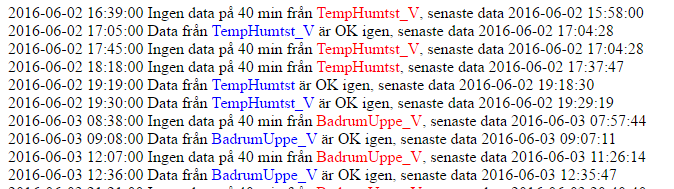
    picture how it looks in PHP
    0_1466712672460_sensor.png

    Translation first row
    YYYY-MM-DD HH:MM:SS No data for 40 minutes from "device", last data was YYYY-MM-DD HH:MM:SS
    Translation seconds row
    Data from "device" is OK again, last data YYYY-MM-DD HH:MM:SS

    In Domoticz create a new Event, LUA and Device as trigger
    You also need to create a Variable(integer) with the same name as the Device, value=0
    Name your device a unique name, like "flopp" :) when it works you can rename it
    LUA code

    commandArray = {}
    local function update(cmd)
    vari = "Variable:"  .. cmd --add Variable: before device
    t1 = os.time() --get date/time right now in seconds
    t3  = os.date("%Y-%m-%d %H:%M:%S") --get date/time right now in normal format
    s = otherdevices_lastupdate[cmd] --read last date/time for device
    --print(cmd)
    --print(s)
    year = string.sub(s, 1, 4)
    month = string.sub(s, 6, 7)
    day = string.sub(s, 9, 10)
    hour = string.sub(s, 12, 13)
    minutes = string.sub(s, 15, 16)
    seconds = string.sub(s, 18, 19)
    
    t2 = os.time{year=year, month=month, day=day, hour=hour, min=minutes, sec=seconds}
    difference = (os.difftime (t1, t2)) --compare right now with device
    
    if (difference > 2400) and (uservariables[cmd] == 0) then --if device date/time is more than 30 minutes
        file = io.open("sensor.txt", "a") -- Opens a file named sensor.txt(stored under Domoticz folder) in append mode
        commandArray['SendEmail']=''..cmd..' äldre än 40 min#'..s..' är senaste tid#abc@hotmail.com' --send mail
        commandArray[vari] = "1" --set variable to 1
        --write to opened file
        file:write(t3 .. " Ingen data på 40 min från ")
        file:write("<font color=red>")
        file:write(cmd .."</font>")
        file:write(", senaste data " .. s .."<br>","\n")
        file:close() --closes the open file
        
    elseif (difference < 2400) and (uservariables[cmd] == 1) then --if device date/time is less than 30 minutes
        file = io.open("sensor.txt", "a")
        commandArray[vari] = "0"
        commandArray['SendEmail']=''..cmd..' ok igen#'..s..' är senaste tid#abc@hotmail.com'
        file:write(t3 .. " Data från ")
        file:write("<font color=blue>")
        file:write(cmd .."</font>")
        file:write(" är OK igen, senaste data " .. s .. "<br>","\n")
        file:close()
    end 
    
    end
    
    update ('Ute_V') --device name can be temperature or voltage
    update ('AppleTV')
    update ('PS3')
    update ('Stereo')
    update ('Captest')
    update ('Captest_V')
    
    return commandArray
    
    Domoticz

  • IKEA Spöke/Spoke(ghost)
    F flopp

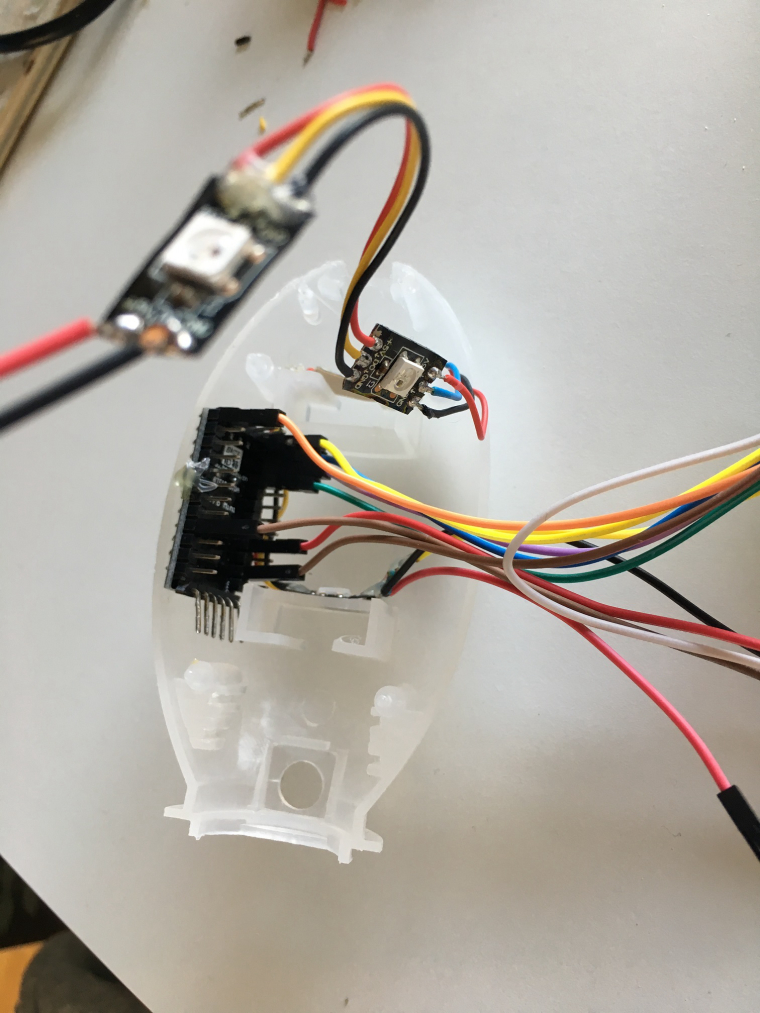
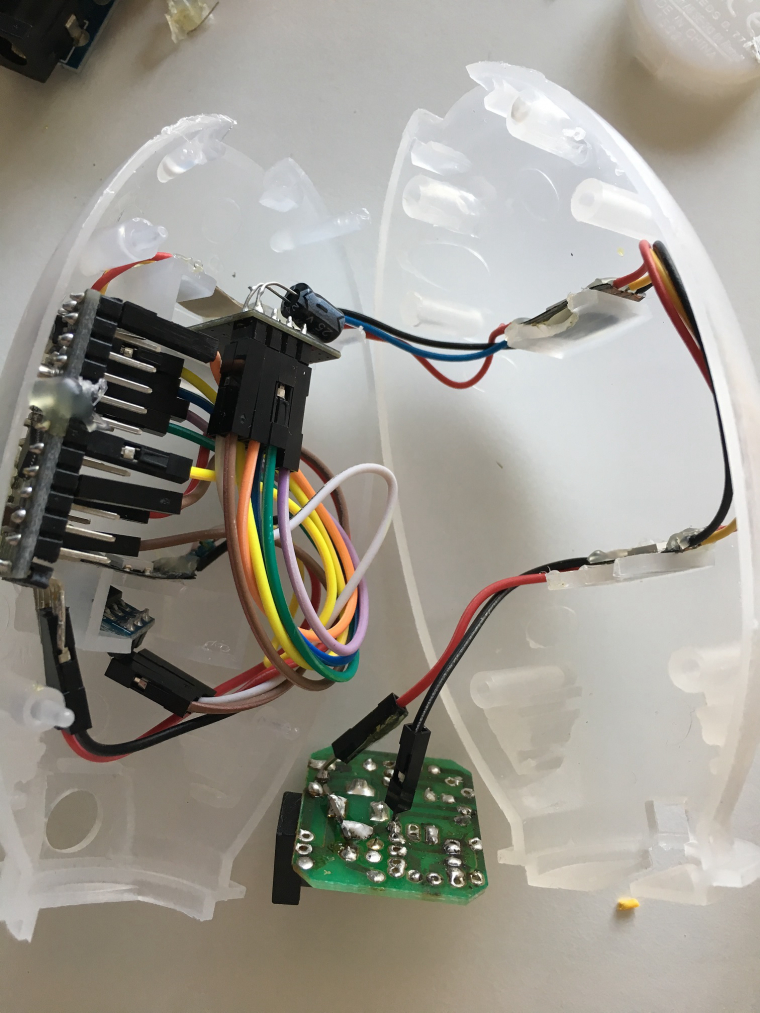
    I have rebuilt IKEA Spöke(ghost) to be used with MyS and Pro Mini 5V
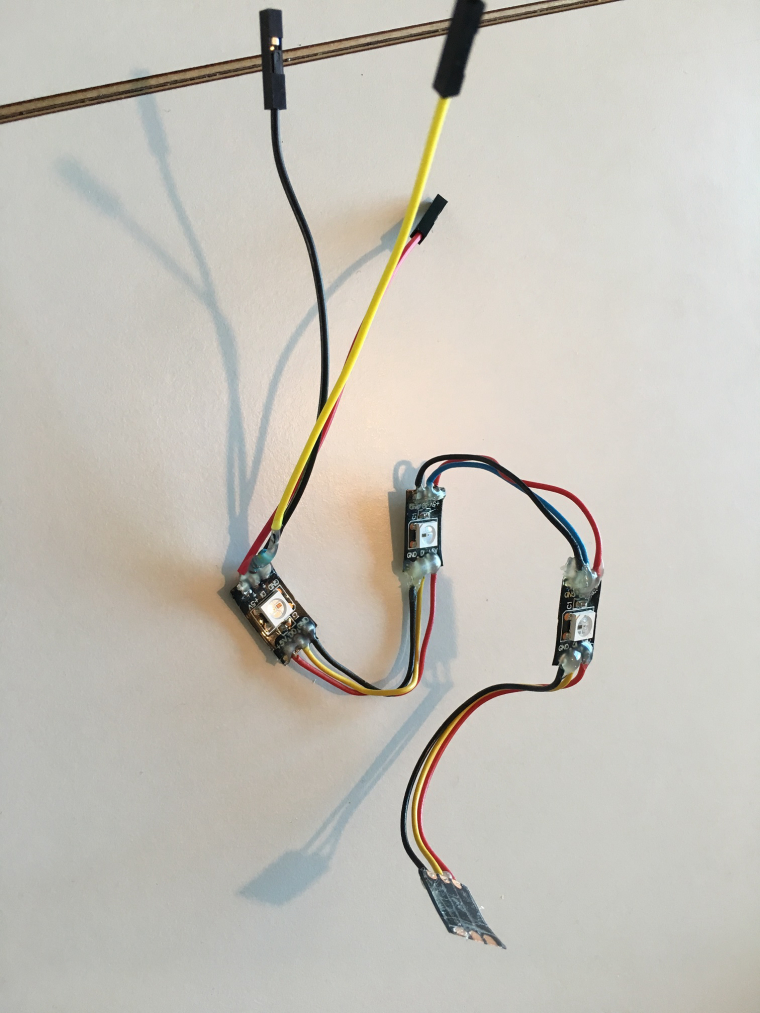
    I replaced LED with 4 pcs WS2812B LED's.
    Removed all components on POWER PCB, I only use the PCB to get 5V.
    Button is removed.
    No battery is used, only power from 5v adapter. To drive nRF I used step-down 5->3.3V
    When you solder the Ground pin on the PCB, check carefully from where you take the GND, when the plug is inserted you will NOT get GND from all GND spots/places.
    If you will build this think about this/next version:
    Use more LED's, maybe 6 or 8. Change in sketch!!
    Remove LED on step-down and LED on Pro Mini, will light up alot during night if lamp is off
    Add function for button, so you can start it without access to your controller
    Add Repeater function, why not it is on power all the time

    Video: https://youtu.be/sNSBahc-79s
    Link to IKEA Spoke http://www.ikea.com/gb/en/products/childrens-ikea-products/children-3-7/childrens-lighting/spöka-led-night-light-animal-white-turquoise-art-00150985/

    I use the color to tell my kids when it is OK to wake up :), sometimes they wake up at 6 am!!. When time is ok to go up from bed it shows green otherwise it shows red/purple light during whole night.

    To put the silicon back I forst used a lot of power, then I tried with alcohol it was a piece of cake. The alcohol will vaporize.
    This is the sketch

    /*PROJECT: MySensors / RGB test for Light & Sensor
     PROGRAMMER: AWI/GizMoCuz
     DATE: september 27, 2015/ last update: October 10, 2015
     FILE: AWI_RGB.ino
     LICENSE: Public domain
    
     Hardware: Nano and MySensors 1.5
        
     Special:
      uses Fastled library with NeoPixel (great & fast RBG/HSV universal library)       https://github.com/FastLED/FastLED
     
     Remarks:
      Fixed node-id
      Added option to request/apply last light state from gateway
      
     Domoticz typicals - 2015 10 10:
      - Domoticz is using HUE values internally, there might be a slight difference then using direct RGB colors.
    */
    
    #include <MySensor.h>
    #include <SPI.h>
    #include <FastLED.h>
    
    
    const int stripPin = 4 ;                  // pin where 2812 LED strip is connected
    
    const int numPixel = 4 ;                  // set to number of pixels
    
    #define NODE_ID 254                       // fixed MySensors node id
    
    #define CHILD_ID 0                  // Child Id's
    
    CRGB leds[numPixel];
    
    char actRGBvalue[] = "000000";               // Current RGB value
    uint16_t actRGBbrightness = 0xFF ;         // Controller Brightness 
    int actRGBonoff=0;                        // OnOff flag
    
    MySensor gw;
    
    MyMessage lastColorStatusMsg(CHILD_ID,V_VAR1);
    
    void setup() {
      FastLED.addLeds<NEOPIXEL, stripPin >(leds, numPixel); // initialize led strip
    
      gw.begin(incomingMessage, AUTO, false);      // initialize MySensors
      gw.sendSketchInfo("AWI RGB Light", "1.1");
      gw.present(CHILD_ID, S_RGB_LIGHT);        // present to controller
    
      // Flash the "hello" color sequence: R, G, B, black. 
      colorBars();
    
      //Request the last stored colors settings
      gw.request(CHILD_ID, V_VAR1);
    }
    
    void loop() {
      gw.process();                       // wait for incoming messages
    }
    
    void colorBars()
    {
      SendColor2AllLEDs( CRGB::Red );   FastLED.show(); delay(500);
      SendColor2AllLEDs( CRGB::Green ); FastLED.show(); delay(500);
      SendColor2AllLEDs( CRGB::Blue );  FastLED.show(); delay(500);
      SendColor2AllLEDs( CRGB::Black ); FastLED.show(); delay(500);
    } 
    
    void SendColor2AllLEDs(const CRGB lcolor)
    {
      for(int i = 0 ; i < numPixel ; i++) {
        leds[i] = lcolor;
      }
    }
    
    void SendLastColorStatus()
    {
      String cStatus=actRGBvalue+String("&")+String(actRGBbrightness)+String("&")+String(actRGBonoff);
      gw.send(lastColorStatusMsg.set(cStatus.c_str()));
    }
    
    String getValue(String data, char separator, int index)
    {
     int found = 0;
      int strIndex[] = {0, -1};
      int maxIndex = data.length()-1;
      for(int i=0; i<=maxIndex && found<=index; i++){
      if(data.charAt(i)==separator || i==maxIndex){
      found++;
      strIndex[0] = strIndex[1]+1;
      strIndex[1] = (i == maxIndex) ? i+1 : i;
      }
     }
      return found>index ? data.substring(strIndex[0], strIndex[1]) : "";
    }
    
    void incomingMessage(const MyMessage &message) {
      if (message.type == V_RGB) {            // check for RGB type
        actRGBonoff=1;
        strcpy(actRGBvalue, message.getString());    // get the payload
        SendColor2AllLEDs(strtol(actRGBvalue, NULL, 16));
        SendLastColorStatus();
      }
      else if (message.type == V_DIMMER) {           // if DIMMER type, adjust brightness
        actRGBonoff=1;
        actRGBbrightness = map(message.getLong(), 0, 100, 0, 255);
        FastLED.setBrightness( actRGBbrightness );
        SendLastColorStatus();
      }
      else if (message.type == V_STATUS) {           // if on/off type, toggle brightness
        actRGBonoff = message.getInt();
        FastLED.setBrightness((actRGBonoff == 1)?actRGBbrightness:0);
        SendLastColorStatus();
      }
      else if (message.type==V_VAR1) {            // color status
        String szMessage=message.getString();
        strcpy(actRGBvalue, getValue(szMessage,'&',0).c_str());
        actRGBbrightness=atoi(getValue(szMessage,'&',1).c_str());
        actRGBonoff=atoi(getValue(szMessage,'&',2).c_str());
        SendColor2AllLEDs(strtol(actRGBvalue, NULL, 16));
        FastLED.setBrightness((actRGBonoff == 1)?actRGBbrightness:0);
      }
      FastLED.show();
    }


    0_1485641197144_IMG_3696.JPG
    0_1485641206076_IMG_3698.JPG
    0_1485641215595_IMG_3694.JPG

    My Project

  • nRF24L01+ long range, learn from my mistake
    F flopp

    If you would like to buy a new nRF24L01+ so you can get more range, don't do like I did. I will tell you what i did.
    I bought this(link below) and was waiting and waiting and today finally it arrives, yeah. Kids had gone to bed and I was going around my house checking range before change.
    Changed the nRF24L01+ with standard PCB antenna to new NRF(link), checked mA and the new NRF was 1 mA below!!!, I have heard that long range NRF should draw much more that you need external power source. Not this one!!! :worried:
    PCB antenna ~13 mA, long range 60 mA maybe?
    I walked around my house again and still same range like old NRF, strange. Went in to this forum and found my mistake.
    I had bought a normal NRF but with an SMA antenna, WHAT???:rage: Like always I am so excite to order quickly so I didn't see that this is NOT PA and NOT LNA.

    So before you order check that the NRF is PA and LNA. Sometimes I order same item but from 2 different sellers and sometimes even from 2 different placed like ebay and aliexpress, if the item disappear or take extra long time to arrive. I checked my second order and that was a PA and LNA, yeah, so now i am back to wait until it arrives. Puhh

    Good luck:smiley:

    http://www.ebay.com/itm/281962954019?_trksid=p2060353.m2749.l2649&ssPageName=STRK%3AMEBIDX%3AIT

    Hardware

  • Merry Christmas and Happy New Year
    F flopp

    Replying to an old topic.

    Happy christmas everyone.

    Please donate to mysensors project, so this very good project gets even better.

    General Discussion

  • Raspberry Pi2 GPIO interface for NRF24L01+
    F flopp

    @mfalkvidd said:

    @flopp feeding the nrf with 5V is a bad idea. It wants 3.3V.

    I was not clear enough. I have edit my text.
    Thanks

    OpenHardware.io raspberry nrf24l01 gpio

  • LUA, send email when Temperature is high
    F flopp

    I am using this script to detect if the drawer is open for my "TV-electronics". My kids start PS3 but forget to open the drawer. That's why I made this :)

    Create a user variable named "AppleTVVarm", of course you can name it to what you like but use my names first then after you tested it and it works you can change the names. Device name must be change to your device name If variable is 1 it means that the temperature has reached its limit.
    If the temperature get above 35 it will send me an email and when it goes below 30 it will send a new email, so I know it gets cooled down.
    Varm means Warm
    Sval means cool

    commandArray = {}
    
    local function update(cmd)
    if devicechanged[cmd] then
        local vari = "Variable:"  .. cmd .. "Varm" --add Varibale: before device and Varm after device
        local varm = cmd .. "Varm" --add Varm after device
        --print(cmd)
        --print(varm)
        --print(vari)
    
        temperature = tonumber(devicechanged[''..cmd..'_Temperature']) --read temperature from device, if device have more than only temperature
        if (temperature > 35) and (uservariables[varm] == 0) then --if temperature is above 35 for the first time
            commandArray['SendEmail']=''..cmd..' varm#""#abc@hotmail.com' --send email
            commandArray[vari] = "1" --set variable to 1
        end
        if (temperature < 30) and (uservariables[varm] == 1) then --if temperature is below 30
            commandArray['SendEmail']=''..cmd..' sval#""#abc@hotmail.com' --send email
            commandArray[vari] = "0" --set variable to 0
        end
    end
    
    end
    
    update ('AppleTV') --device to read temperature from
    update ('PS3')
    update ('Stereo')
    
    return commandArray
    

    copy the code and create a new script in Domoticz, select LUA and Device otherwise it will not work

    Domoticz

  • Power external sensors on demand
    F flopp

    That I am also using.

    Read here https://forum.mysensors.org/topic/2147/office-plant-monitoring/64 and here https://forum.mysensors.org/topic/4045/solar-powered-soil-moisture-sensor/45

    Hardware

  • MySensors protocol page improvement recommendation
    F flopp

    also found typo
    V_STATUS missing S_BINARY, S_WATER_QUALITY
    V_LIGHT missing S_BINARY
    V_WATT missing S_BINARY, S_RGB_LIGHT, S_RGBW_LIGHT
    V_PERCENTAGE missing S_COVER
    V_TEMP missing S_WATER_QUALITY
    S_HEATER missing V_STATUS, V_HVAC_SETPOINT_HEAT
    S_HVAC missing V_STATUS, V_TEMP, V_HVAC_SPEED

    V_HVAC_SETPOINT_COLD is missing

    General Discussion

  • Solar Powered Soil Moisture Sensor
    F flopp

    @NeverDie said:

    Interesting project. To what degree, if any, has corrosion been a problem after you switched to soldered connections? Obviously the operating environment (near the ground outdoors) can be intrinsically humid.

    I have not checked how the sensor look like now, but I have only run it for 6 months. I have always used soldered connections.

    Also, can someone please post a larger photo of how the sensor is attached at the base?

    1_1479545970922_20160606_131714652_iOS.jpg 0_1479545970922_20160606_131710115_iOS.jpg

    My Project

  • Repeater Node, problems
    F flopp

    RPi with Domoticz, MySensors 1.5.1

    I had an Ethernet GW(UNO) and a Repeater Node(NANO clone) working OK but sometimes the nodes couldn't send data, maybe 4 times per day, I could live with that but of course 100% data is much nicer :) my nodes sends data every 30/60 min.

    I changed to a Serial GW because my router sometimes stopped working so I had no connection to Ethernet GW.
    Since that time I lost lots of data, I have always though the problem was the Serial GW until yesterday. I checked my Logfile that write every time a node is not sending data for more than 70 minutes, it was always the nodes that was sending data through the Repeater Node, since the nodes are far away from Serial GW.

    Yesterday I changed to have NO DEBUG and from baud rate from 57600 to 9600 and since then I have data all the time.

    Can it be that critical to NOT have DEBUG?
    Could it be the baud rate that made my problems before?
    Maybe the sketch was not 100% complete and after I upload the new sketch it was 100% correct?

    Domoticz

  • New 2.2.0 Signal report function
    F flopp

    I tried to send RSSI with nRF and it seemed to work, I could get a value that was changing if I moved away from Gateway.

    i was using this variable, transportGetSignalReport(SR_TX_RSSI)

    so to send the RSSI create a Child, I think you can pick anyone that can handle value from 0-1024 then use below message to send the value

    send(RSSIMsg.set(transportGetSignalReport(SR_TX_RSSI)));

    I am using Domoticz as Controller

    Hardware

  • Solar Powered Soil Moisture Sensor
    F flopp

    WARNING!!!
    I opened one of my items which didn't worked since many weeks ago.
    I putted it on a table and should just open the stuff when I saw some brown water coming out from the pole.
    My first guess was that it was water mixed with mud but the smell was strange. It can be that the battery has leaked.

    If you will build this item please seal the battery to 100%. I just put the battery in the pole but unfortunately water came in and what I think destroyed the battery!

    Be careful

    My Project

  • Copy code from posts
    F flopp

    I have seen on some pages that there is a button to copy the code easy or similar Select all.

    Would that be possible to implement?

    Feature Requests

  • MySensors 2.3.0 released
    F flopp

    @nagelc said in MySensors 2.3.0 released:

    I recently upgraded my NRF24 serial gateway from 1.5 to 2.3.0 and did not have any issues. I upgraded my RFM69 gateway a while ago with no issues. If it is RFM 69, check the frequency because MyConfig.h will have gone back to the default (I use 915 mhx which is not default). Do you get any error messages? Maybe one of the more experienced MySensors users could help with those.

    Thank you, you put me in the right direction.
    I created a network for my friend(on 2.3)on different channel than I use, I didn’t change the channel in myconfig.h before I updated my GW

    Announcements

  • two energy meter
    F flopp

    I couldn't just lay down in the sofa so I started to test and now I got a code that seems to work. I have tested it for a few days and it seems to count correct.

    I made some changes so it will send data every minute and it will send Watt-value even if it is the same value since last time.

    I am using VAR2 for second energy meter since I don't know how to config Incomingmessage and seperate VAR1 from different Child_IDs.

    I change corrupted interrupts from 10000L to 40000L otherwise it reported interrupts twice.

    /**
     * The MySensors Arduino library handles the wireless radio link and protocol
     * between your home built sensors/actuators and HA controller of choice.
     * The sensors forms a self healing radio network with optional repeaters. Each
     * repeater and gateway builds a routing tables in EEPROM which keeps track of the
     * network topology allowing messages to be routed to nodes.
     *
     * Created by Henrik Ekblad <henrik.ekblad@mysensors.org>
     * Copyright (C) 2013-2015 Sensnology AB
     * Full contributor list: https://github.com/mysensors/Arduino/graphs/contributors
     *
     * Documentation: http://www.mysensors.org
     * Support Forum: http://forum.mysensors.org
     *
     * This program is free software; you can redistribute it and/or
     * modify it under the terms of the GNU General Public License
     * version 2 as published by the Free Software Foundation.
     *
     *******************************
     *
     * REVISION HISTORY
     * Version 1.0 - Henrik Ekblad
     * 
     * DESCRIPTION
     * Use this sensor to measure kWh and Watt of your house meter
     * You need to set the correct pulsefactor of your meter (blinks per kWh).
     * The sensor starts by fetching current kWh value from gateway.
     * Reports both kWh and Watt back to gateway.
     *
     * Unfortunately millis() won't increment when the Arduino is in 
     * sleepmode. So we cannot make this sensor sleep if we also want 
     * to calculate/report watt-number.
     * http://www.mysensors.org/build/pulse_power
     */
    
    #include <SPI.h>
    #include <MySensor.h>  
    unsigned long SEND_FREQUENCY = 60000; // Minimum time between send (in milliseconds). We don't want to spam the gateway.
    #define SLEEP_MODE false        // Watt-value can only be reported when sleep mode is false.
    
    //sensor 1
    #define DIGITAL_INPUT_SENSOR_1 2 // The digital input you attached your light sensor.  (Only 2 and 3 generates interrupt!)
    #define PULSE_FACTOR_1 1000       // Number of blinks per KWH of your meeter
    #define MAX_WATT_1 10000          // Max watt value to report. This filters outliers.
    #define INTERRUPT_1 DIGITAL_INPUT_SENSOR_1-2 // Usually the interrupt = pin -2 (on uno/nano anyway)
    #define CHILD_ID_1 1              // Id of the sensor child
    
    //sensor 2
    #define DIGITAL_INPUT_SENSOR_2 3 // The digital input you attached your light sensor.  (Only 2 and 3 generates interrupt!)
    #define PULSE_FACTOR_2 10000       // Number of blinks per KWH of your meeter
    #define MAX_WATT_2 10000          // Max watt value to report. This filters outliers.
    #define INTERRUPT_2 DIGITAL_INPUT_SENSOR_2-2 // Usually the interrupt = pin -2 (on uno/nano anyway)
    #define CHILD_ID_2 2              // Id of the sensor child
    
    MySensor gw;
    
    //sensor 1
    double ppwh_1 = ((double)PULSE_FACTOR_1)/1000; // Pulses per watt hour
    boolean pcReceived_1 = false;
    volatile unsigned long pulseCount_1 = 0;   
    volatile unsigned long lastBlink_1 = 0;
    volatile unsigned long watt_1 = 0;
    unsigned long oldPulseCount_1 = 0;   
    unsigned long oldWatt_1 = 0;
    double oldKwh_1;
    unsigned long lastSend_1;
    
    //sensor 2
    double ppwh_2 = ((double)PULSE_FACTOR_2)/1000; // Pulses per watt hour
    boolean pcReceived_2 = false;
    volatile unsigned long pulseCount_2 = 0;   
    volatile unsigned long lastBlink_2 = 0;
    volatile unsigned long watt_2 = 0;
    unsigned long oldPulseCount_2 = 0;   
    unsigned long oldWatt_2 = 0;
    double oldKwh_2;
    unsigned long lastSend_2;
    
    //sensor 1
    MyMessage wattMsg_1(CHILD_ID_1,V_WATT);
    MyMessage kwhMsg_1(CHILD_ID_1,V_KWH);
    MyMessage pcMsg_1(CHILD_ID_1,V_VAR1);
    
    //sensor 2
    MyMessage wattMsg_2(CHILD_ID_2,V_WATT);
    MyMessage kwhMsg_2(CHILD_ID_2,V_KWH);
    MyMessage pcMsg_2(CHILD_ID_2,V_VAR2);
    
    
    void setup()  
    {  
      gw.begin(incomingMessage);
    
      // Send the sketch version information to the gateway and Controller
      gw.sendSketchInfo("Energy Double", "1.0");
    
      // Register this device as power sensor
      //sensor 1
      gw.present(CHILD_ID_1, S_POWER);
      //sensor 2
      gw.present(CHILD_ID_2, S_POWER);
    
      //Send new VAR to Gateway
      //gw.send(pcMsg_1.set(xxxxxxxxx));  // Send pulse count value to gw 
      //gw.send(pcMsg_2.set(1895931000));  // Send pulse count value to gw 
      
      // Fetch last known pulse count value from gw
      //sensor 1
      gw.request(CHILD_ID_1, V_VAR1);
      //sensor 2
      gw.request(CHILD_ID_2, V_VAR2);
    
      //sensor 1
      attachInterrupt(INTERRUPT_1, onPulse_1, RISING);
      //sensor 2
      attachInterrupt(INTERRUPT_2, onPulse_2, RISING);
      
      lastSend_1=millis();
      lastSend_2=millis();
    }
    
    
    void loop()     
    { 
      gw.process();
    
      //sensor 1
      unsigned long now_1 = millis();
      // Only send values at a maximum frequency or woken up from sleep
      bool sendTime_1 = now_1 - lastSend_1 > SEND_FREQUENCY;
      if (pcReceived_1 && (SLEEP_MODE || sendTime_1)) {
        // New watt value has been calculated  
        //if (!SLEEP_MODE && watt_1 != oldWatt_1) {
          // Check that we dont get unresonable large watt value. 
          // could hapen when long wraps or false interrupt triggered
          if (watt_1<((unsigned long)MAX_WATT_1)) {
            gw.send(wattMsg_1.set(watt_1));  // Send watt value to gw 
          }  
          Serial.print("Watt_1:");
          Serial.println(watt_1);
          oldWatt_1 = watt_1;
        //}    
      
        // Pulse cout has changed
        if (pulseCount_1 != oldPulseCount_1) {
          gw.send(pcMsg_1.set(pulseCount_1));  // Send pulse count value to gw 
          double kwh_1 = ((double)pulseCount_1/((double)PULSE_FACTOR_1));     
          oldPulseCount_1 = pulseCount_1;
          //if (kwh_1 != oldKwh_1) {
            gw.send(kwhMsg_1.set(kwh_1, 4));  // Send kwh value to gw 
            oldKwh_1 = kwh_1;
          //}
        }    
        lastSend_1 = now_1;
      } else if (sendTime_1 && !pcReceived_1) {
        // No count received. Try requesting it again
        gw.request(CHILD_ID_1, V_VAR1);
        lastSend_1=now_1;
      }
    
        //sensor 2
      unsigned long now_2 = millis();
      // Only send values at a maximum frequency or woken up from sleep
      bool sendTime_2 = now_2 - lastSend_2 > SEND_FREQUENCY;
      if (pcReceived_2 && (SLEEP_MODE || sendTime_2)) {
        // New watt value has been calculated  
        //if (!SLEEP_MODE && watt_2 != oldWatt_2) {
          // Check that we dont get unresonable large watt value. 
          // could hapen when long wraps or false interrupt triggered
          if (watt_2<((unsigned long)MAX_WATT_2)) {
            gw.send(wattMsg_2.set(watt_2));  // Send watt value to gw 
          }  
          Serial.print("Watt_2:");
          Serial.println(watt_2);
          oldWatt_2 = watt_2;
        //}    
      
        // Pulse cout has changed
        if (pulseCount_2 != oldPulseCount_2) {
          gw.send(pcMsg_2.set(pulseCount_2));  // Send pulse count value to gw 
          double kwh_2 = ((double)pulseCount_2/((double)PULSE_FACTOR_2));     
          oldPulseCount_2 = pulseCount_2;
          //if (kwh_2 != oldKwh_2) {
            gw.send(kwhMsg_2.set(kwh_2, 4));  // Send kwh value to gw 
            oldKwh_2 = kwh_2;
          //}
        }    
        lastSend_2 = now_2;
      } else if (sendTime_2 && !pcReceived_2) {
        // No count received. Try requesting it again
        gw.request(CHILD_ID_2, V_VAR2);
        lastSend_2=now_2;
      }
      
      if (SLEEP_MODE) {
        gw.sleep(SEND_FREQUENCY);
      }
    }
    
    void incomingMessage(const MyMessage &message) {
      if (message.type==V_VAR1) {  
        pulseCount_1 = oldPulseCount_1 = message.getLong();
        Serial.print("Received_1 last pulse count from gw:");
        Serial.println(pulseCount_1);
        pcReceived_1 = true;
      }
      if (message.type==V_VAR2) {  
        pulseCount_2 = oldPulseCount_2 = message.getLong();
        Serial.print("Received_2 last pulse count from gw:");
        Serial.println(pulseCount_2);
        pcReceived_2 = true;
      }
    }
    
    void onPulse_1()     
    { 
      if (!SLEEP_MODE) {
        unsigned long newBlink_1 = micros();  
        unsigned long interval_1 = newBlink_1-lastBlink_1;
        if (interval_1<40000L) { // Sometimes we get interrupt on RISING
          return;
        }
        watt_1 = (3600000000.0 /interval_1) / ppwh_1;
        lastBlink_1 = newBlink_1;
      } 
      //Serial.println(pulseCount_1);
      pulseCount_1++;
      //Serial.println(pulseCount_1);
    }
    
    void onPulse_2()     
    { 
      if (!SLEEP_MODE) {
        unsigned long newBlink_2 = micros();  
        unsigned long interval_2 = newBlink_2-lastBlink_2;
        if (interval_2<40000L) { // Sometimes we get interrupt on RISING
          return;
        }
        watt_2 = (3600000000.0 /interval_2) / ppwh_2;
        lastBlink_2 = newBlink_2;
      } 
      //Serial.println(pulseCount_2);
        pulseCount_2++;
      //Serial.println(pulseCount_2);
    }
    
    
    My Project

  • Energy Meter - not sending at expected
    F flopp

    @sundberg84
    i also had a lot of problem with my Rain data in Domoticz.
    read more here https://www.domoticz.com/forum/viewtopic.php?f=28&t=11088

    if your Sensor timeout is 2 hours you need to send rain VAR within 2 hours otherwise your graph will look strange.

    Yes, if you change the VAR during the day to a lower value you will get minus value. Took me a few days to understand how Domoticz DB file was working.

    Keep up the good work :punch:

    Troubleshooting

  • Water leak sensor
    F flopp

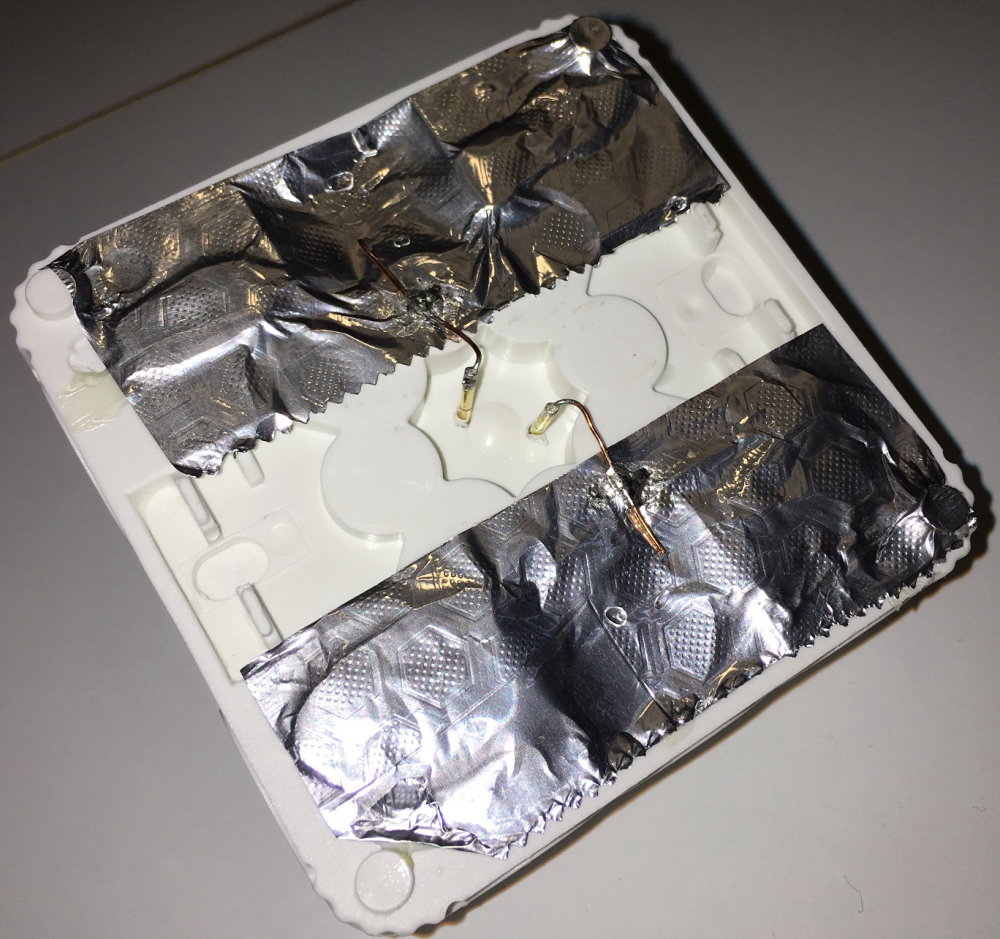
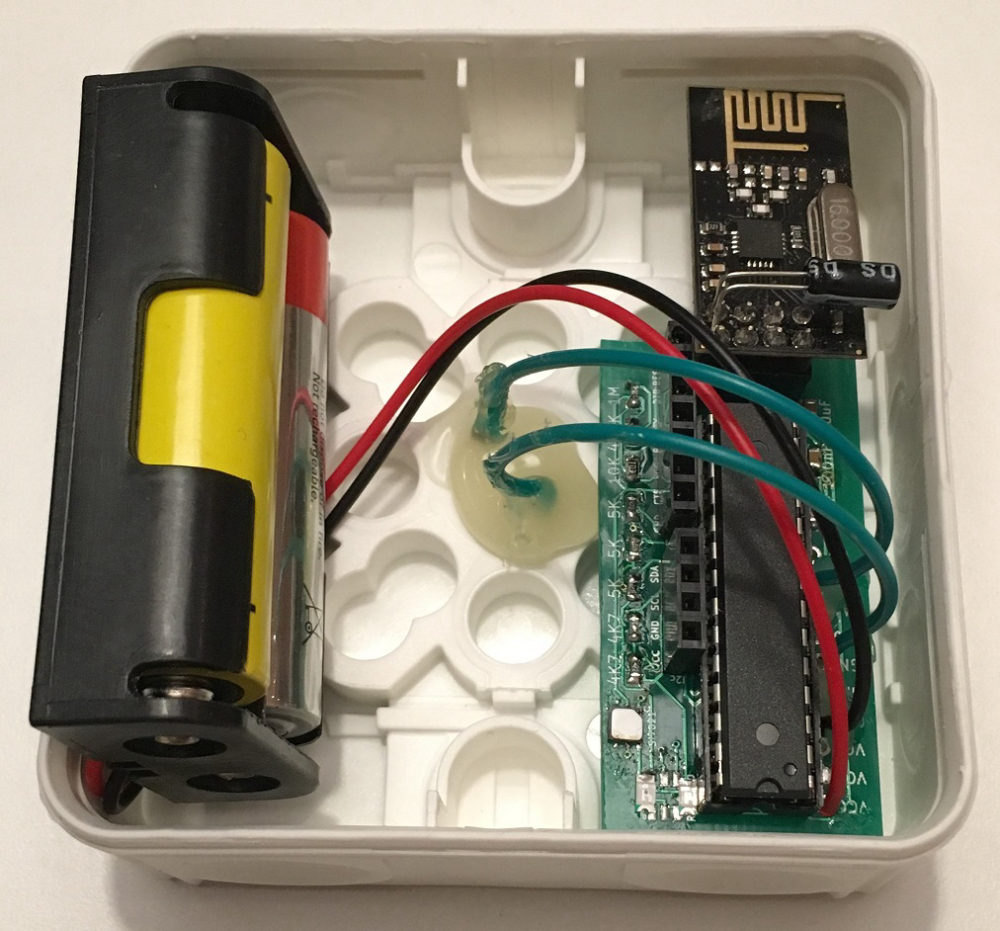
    Finally I made my water leak sensor that I have been dreaming about for a long time now :)
    I used those items:
    Enclosure
    2 x AA batteris incl holder
    nRF24L01+
    Home made PCB with ATmega328P-PU
    red, green LED
    si7021, temp & hum
    some capactitors and resistors
    Kitchen aluminum foil
    Copper wire

    I am measuring temperature and humidity with a Si7021, measuring battery voltage with voltage divider and internal reference, just to test which one that shows most correct.

    /**
     * The MySensors Arduino library handles the wireless radio link and protocol
     * between your home built sensors/actuators and HA controller of choice.
     * The sensors forms a self healing radio network with optional repeaters. Each
     * repeater and gateway builds a routing tables in EEPROM which keeps track of the
     * network topology allowing messages to be routed to nodes.
     *
     * Created by Henrik Ekblad <henrik.ekblad@mysensors.org>
     * Copyright (C) 2013-2015 Sensnology AB
     * Full contributor list: https://github.com/mysensors/Arduino/graphs/contributors
     *
     * Documentation: http://www.mysensors.org
     * Support Forum: http://forum.mysensors.org
     *
     * This program is free software; you can redistribute it and/or
     * modify it under the terms of the GNU General Public License
     * version 2 as published by the Free Software Foundation.
     *
     *******************************
     *
     * REVISION HISTORY
     * Version 1.0 - Henrik EKblad
     * 
     */
    // Enable and select radio type attached
    #define MY_RADIO_NRF24
    
    // Enable debug prints to serial monitor
    #define MY_DEBUG
    
    #define MY_NODE_ID 27
    
    #include <SPI.h>
    #include <MySensors.h>
    #include <Wire.h>
    #include <SI7021.h>
    
    #define CHILD_SIHUM 0
    #define CHILD_SITEMP 1
    #define CHILD_BATT 2
    #define CHILD_SIDEW 3
    #define CHILD_BATTRES 4
    
    #define CHILD_WATER 10
    
    #define CHILD_FAILS 250
    #define CHILD_PARENT 251
    #define CHILD_DISTANCE 252
    #define CHILD_SLEEPTIME 253
    
    //LED
    int GREEN = 7;
    int RED = 8;
    
    //Water alarm
    int Interrupt = 1; // pin 3 on UNO/Nano
    
    //SleepTime
    float SleepTime = 30; // Sleep time between reads (in minutes)
    int OldSleepTime = -1;
    int SleepTimeLoopCount = 10;
    
    //ReadVCC
    long result;
    float BatteryVolt;
    float OldBatteryVolt;
    int BatteryVoltLoopCount = 5;
    
    //ReadVCCRes
    int sensorValue;
    float BatteryResVolt;
    int BATTERY_SENSE_PIN = A2;  // select the input pin for the battery sense point
    
    //SI7021
    SI7021 SI;
    int SILoopCount = 5;
    int SIHum;
    int OldSIHum = -1;
    float SITemp;
    float OldSITemp = -1;
    float SIDew;
    float OldSIDew = -1;
    
    //NRF
    int Fails = 0;
    int OldFails = -1;
    int FailsLoopCount = 10;
    int OldParentNode = -1;
    int ParentNodeLoopCount = 10;
    int OldDistanceNode = -1;
    int DistanceLoopCount = 10;
    
    MyMessage msgSIHum(CHILD_SIHUM, V_HUM);
    MyMessage msgSITemp(CHILD_SITEMP, V_TEMP);
    MyMessage msgSIDew(CHILD_SIDEW, V_TEMP);
    MyMessage msgBatt(CHILD_BATT, V_VOLTAGE);
    MyMessage msgBattRes(CHILD_BATTRES, V_VOLTAGE);
    
    MyMessage msgWater(CHILD_WATER, V_TRIPPED);
    
    MyMessage msgFails(CHILD_FAILS, V_VA);
    MyMessage msgParent(CHILD_PARENT, V_VA);
    MyMessage msgDistance(CHILD_DISTANCE, V_VA);
    MyMessage msgSleepTime(CHILD_SLEEPTIME, V_VA);
    
    void setup() {
    
      //Water Alarm
      pinMode(3, INPUT_PULLUP);
      attachInterrupt(Interrupt, Water, FALLING);
    
      //Battery measurement
      analogReference(INTERNAL); // use the 1.1 V internal reference
      sensorValue = analogRead(BATTERY_SENSE_PIN); // read once to activate the change of reference
    
      pinMode(GREEN, OUTPUT);
      pinMode(RED, OUTPUT);
      digitalWrite(GREEN, HIGH);
      digitalWrite(RED, HIGH);
      delay(200);
      digitalWrite(GREEN, LOW);
      digitalWrite(RED, LOW);
    
      SI.begin();
    }
    void presentation() {
      // Send the sketch version information to the gateway and Controller
      sendSketchInfo("Temp/Humidity/WaterLeak", "20180226");
      // Register all sensors to gateway (they will be created as child devices)
      present(CHILD_SIHUM, S_HUM, "SIHum");
      present(CHILD_SITEMP, S_TEMP, "SITemp");
      present(CHILD_SIDEW, S_TEMP, "SIDew");
      present(CHILD_BATT, S_MULTIMETER, "Volt");
      present(CHILD_BATTRES, S_MULTIMETER, "VoltRes");
    
      present(CHILD_WATER, S_WATER_LEAK, "Water Alarm");
      
      present(CHILD_FAILS, S_POWER, "Fails");
      present(CHILD_PARENT, S_POWER, "Parent");
      present(CHILD_DISTANCE, S_POWER, "Distance");  
      present(CHILD_SLEEPTIME, S_DIMMER, "SleepTime");
    }
    void loop() {
      //Voltage
      readVcc();
      sensorValue = analogRead(BATTERY_SENSE_PIN);
      BatteryResVolt  = sensorValue * 0.003363075;
      
      //SI read both temperature and humidity
      si7021_env SIdata = SI.getHumidityAndTemperature();
      
      //SI Humidity  
      SIHum = SIdata.humidityPercent;
      //Serial.print("SIHum=");
      //Serial.println(SIHum);
      if(SIHum >99)
      {
        SIHum = 99;
      }
      if(SIHum < 1)
      {
        SIHum = 0;
      }
      
      //SI Temperature
      SITemp = SIdata.celsiusHundredths / 100.0;
      SITemp = round(SITemp*10)/10.0;
      //Serial.print("SITemp=");
      //Serial.println(SITemp,1);
    
      //SI Dew
      double a = 17.271;
      double b = 237.7;
      double dewtemp = (a * SITemp) / (b + SITemp) + log(SIHum*0.01);
      SIDew = (b * dewtemp) / (a - dewtemp);
    
      //Get SleepTime from controller
      request(CHILD_SLEEPTIME, V_PERCENTAGE);
      wait(1000);
    
      //Water Alarm
      int WaterLeak = digitalRead(3);
      if (WaterLeak == 0){
        resend((msgWater.set(1)), 100);
      } 
      else{
        resend((msgWater.set(0)), 100);
      }
    
      //Send data to controller
      if ((OldBatteryVolt != BatteryVolt) | (BatteryVoltLoopCount >= 5))
      {
        send(msgBatt.set(BatteryVolt, 3));
        send(msgBattRes.set(BatteryResVolt, 3));
        OldBatteryVolt = BatteryVolt;
        BatteryVoltLoopCount = 0;
      }
        
      if ((OldSIHum != SIHum) | (OldSITemp != SITemp) | (OldSIDew != SIDew) | (SILoopCount >= 5))
      {
        resend((msgSIHum.set(SIHum)), 1);
        resend((msgSITemp.set(SITemp, 1)), 1);
        resend((msgSIDew.set(SIDew, 1)), 1);
        OldSIHum = SIHum;
        OldSITemp = SITemp;
        OldSIDew = SIDew;
        SILoopCount = 0;
      }
      
      if ((OldParentNode != _transportConfig.parentNodeId) | (ParentNodeLoopCount >= 10))
      {
        resend((msgParent.set(_transportConfig.parentNodeId)),1);
        OldParentNode = _transportConfig.parentNodeId;
        ParentNodeLoopCount = 0;
      }
        
      if ((OldDistanceNode != _transportConfig.distanceGW) | (DistanceLoopCount >= 10))
      {
        resend((msgDistance.set(_transportConfig.distanceGW)),1);
        OldDistanceNode = _transportConfig.distanceGW;
        DistanceLoopCount = 0;
      }
    
      if ((OldSleepTime != SleepTime) | (SleepTimeLoopCount >= 10))
      {
        resend((msgSleepTime.set(SleepTime,0)),10);
        OldSleepTime = SleepTime;
        SleepTimeLoopCount = 0;
      }
    
      if ((OldFails != Fails) | (FailsLoopCount >= 10))
      {
        failsend((msgFails.set(Fails)),1);
        OldFails = Fails;
        FailsLoopCount = 0;
      }
         
      BatteryVoltLoopCount++;
      SILoopCount++;
      ParentNodeLoopCount++;
      DistanceLoopCount++;
      SleepTimeLoopCount++;
      FailsLoopCount++;
    
      digitalWrite(GREEN, HIGH);
      delay(200);
      digitalWrite(GREEN, LOW);
      
      sleep(SleepTime*60000); //sleep a bit
    }
    void readVcc() {
      //Serial.println("readVcc");
      // Read 1.1V reference against AVcc
      ADMUX = _BV(REFS0) | _BV(MUX3) | _BV(MUX2) | _BV(MUX1);
      delay(2); // Wait for Vref to settle
      ADCSRA |= _BV(ADSC); // Convert
      while (bit_is_set(ADCSRA, ADSC));
      result = ADCL;
      result |= ADCH << 8;
      result = 1126400L / result; // Back-calculate AVcc in mV
      //batteryPcnt = (result - 1900) * 0.090909;
      BatteryVolt = result / 1000.000;
      //sendBatteryLevel(batteryPcnt);
      //Serial.print("battery volt:");
      //Serial.println(batteryVolt, 3);
      //Serial.print("battery percent:");
      //Serial.println(batteryPcnt);
    }
    void resend(MyMessage & msg, int repeats) {
      int repeat = 0;
      int repeatdelay = 0;
      boolean sendOK = false;
      while ((sendOK == false) and(repeat < repeats))
      {
        if (send(msg))
        {
          sendOK = true;
        }
        else
        {
          
          digitalWrite(RED, HIGH);
          delay(200);
          digitalWrite(RED, LOW);
          Fails++;
          sendOK = false;
          Serial.print("Error ");
          Serial.println(repeat);
          repeatdelay += 250;
          repeat++;
          sleep(repeatdelay);
        }
      }
    }
    
    void failsend(MyMessage &msg, int repeats) {
      int repeat = 0;
      int repeatdelay = 0;
      boolean sendOK = false;
    
      while ((sendOK == false) and (repeat < repeats)) {
        if (send(msg))
        {
          Fails = 0;
          sendOK = true;
        }
        else
        {
          Fails++;
          sendOK = false;
          Serial.print("Error ");
          Serial.println(repeat);
          repeatdelay += 250;
          repeat++;
          sleep(repeatdelay);
        }
      }
    }
    
    void receive(const MyMessage &message) {
      if (message.sender == 0) {
        if(message.type == V_PERCENTAGE) {
          //Serial.println( "V_PERCENTAGE command received..." );
          SleepTime = atoi(message.data);
          if ((SleepTime <= 0) | (SleepTime >= 700))
          {
            SleepTime = 30;
          }
          else
          {
            SleepTime = SleepTime / 6.6;
            //Serial.println(SleepTime);
            if (SleepTime < 1)
            {
              SleepTime = 1;  
            }
          }
          //Serial.println(SleepTime);
        }
      } 
    }
    
    void Water() {
      Serial.println("Water");
      resend((msgWater.set(1)), 1000);
      digitalWrite(GREEN, HIGH);
      delay(200);
      digitalWrite(GREEN, LOW);
    }
    

    0_1519677466024_20180226_193839617_iOS.jpg
    0_1519677539241_20180226_193922845_iOS.jpg

    My Project

  • Shunt motor/valve
    F flopp

    My heating system was not putting out any heated water to our radiators. A friend gave the idea to put an accelerator-meter to the pin.

    This is what I made.
    https://youtu.be/dXlzkhmw8aU

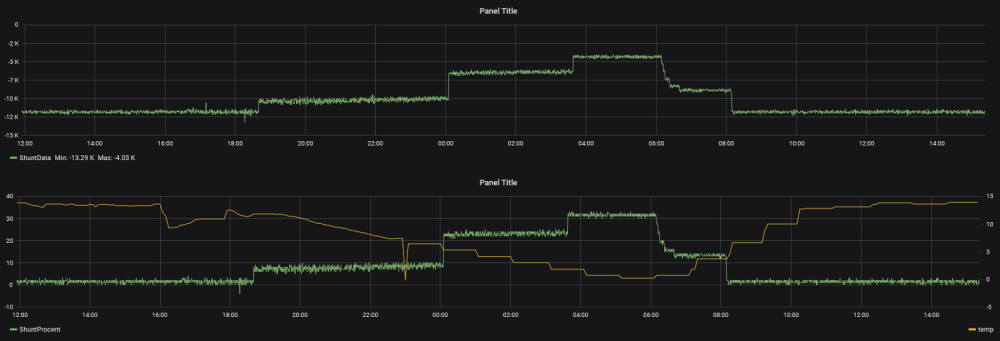
    On the monitor you see 2666, that is the raw value from the sensor, below that you see how much the shunt is opened in percent.

    Grapg from Grafana, top graph shows raw value from accelerator-meter, bottom graph with percent opened and outdoor temp:
    0_1557840289633_db87a8e8-79cb-4596-8661-3f5019c8e26f-image.png

    The code I am using:

    // I2C device class (I2Cdev) demonstration Arduino sketch for MPU6050 class
    // 10/7/2011 by Jeff Rowberg <jeff@rowberg.net>
    // Updates should (hopefully) always be available at https://github.com/jrowberg/i2cdevlib
    //
    // Changelog:
    //      2013-05-08 - added multiple output formats
    //                 - added seamless Fastwire support
    //      2011-10-07 - initial release
    
    /* ============================================
    I2Cdev device library code is placed under the MIT license
    Copyright (c) 2011 Jeff Rowberg
    
    Permission is hereby granted, free of charge, to any person obtaining a copy
    of this software and associated documentation files (the "Software"), to deal
    in the Software without restriction, including without limitation the rights
    to use, copy, modify, merge, publish, distribute, sublicense, and/or sell
    copies of the Software, and to permit persons to whom the Software is
    furnished to do so, subject to the following conditions:
    
    The above copyright notice and this permission notice shall be included in
    all copies or substantial portions of the Software.
    
    THE SOFTWARE IS PROVIDED "AS IS", WITHOUT WARRANTY OF ANY KIND, EXPRESS OR
    IMPLIED, INCLUDING BUT NOT LIMITED TO THE WARRANTIES OF MERCHANTABILITY,
    FITNESS FOR A PARTICULAR PURPOSE AND NONINFRINGEMENT. IN NO EVENT SHALL THE
    AUTHORS OR COPYRIGHT HOLDERS BE LIABLE FOR ANY CLAIM, DAMAGES OR OTHER
    LIABILITY, WHETHER IN AN ACTION OF CONTRACT, TORT OR OTHERWISE, ARISING FROM,
    OUT OF OR IN CONNECTION WITH THE SOFTWARE OR THE USE OR OTHER DEALINGS IN
    THE SOFTWARE.
    ===============================================
    */
    
    /**
     * The MySensors Arduino library handles the wireless radio link and protocol
     * between your home built sensors/actuators and HA controller of choice.
     * The sensors forms a self healing radio network with optional repeaters. Each
     * repeater and gateway builds a routing tables in EEPROM which keeps track of the
     * network topology allowing messages to be routed to nodes.
     *
     * Created by Henrik Ekblad <henrik.ekblad@mysensors.org>
     * Copyright (C) 2013-2015 Sensnology AB
     * Full contributor list: https://github.com/mysensors/Arduino/graphs/contributors
     *
     * Documentation: http://www.mysensors.org
     * Support Forum: http://forum.mysensors.org
     *
     * This program is free software; you can redistribute it and/or
     * modify it under the terms of the GNU General Public License
     * version 2 as published by the Free Software Foundation.
     *
     *******************************
    */
    
    // Enable and select radio type attached
    #define MY_RADIO_RF24
    
    // Enable debug prints to serial monitor
    #define MY_DEBUG
    
    #include <SPI.h>
    #include <MySensors.h>
    #include <Wire.h>
    
    #define CHILD_SHUNT 0
    #define CHILD_SHUNTDATA 1
    
    #define CHILD_FAILS 250
    #define CHILD_PARENT 251
    #define CHILD_DISTANCE 252
    
    //NRF
    int Fails = 0;
    int OldFails = -1;
    int FailsLoopCount = 10;
    int OldParentNode = -1;
    int ParentNodeLoopCount = 10;
    int OldDistanceNode = -1;
    int DistanceLoopCount = 10;
    
    MyMessage msgShunt(CHILD_SHUNT, V_WATT);
    MyMessage msgShuntData(CHILD_SHUNTDATA, V_WATT);
    
    MyMessage msgFails(CHILD_FAILS, V_VA);
    MyMessage msgParent(CHILD_PARENT, V_VA);
    MyMessage msgDistance(CHILD_DISTANCE, V_VA);
    
    // I2Cdev and MPU6050 must be installed as libraries, or else the .cpp/.h files
    // for both classes must be in the include path of your project
    #include "I2Cdev.h"
    #include "MPU6050.h"
    
    // Arduino Wire library is required if I2Cdev I2CDEV_ARDUINO_WIRE implementation
    // is used in I2Cdev.h
    #if I2CDEV_IMPLEMENTATION == I2CDEV_ARDUINO_WIRE
        #include "Wire.h"
    #endif
    
    // class default I2C address is 0x68
    // specific I2C addresses may be passed as a parameter here
    // AD0 low = 0x68 (default for InvenSense evaluation board)
    // AD0 high = 0x69
    MPU6050 accelgyro;
    //MPU6050 accelgyro(0x69); // <-- use for AD0 high
    
    int16_t ax, count;
    long axx;


    // uncomment "OUTPUT_READABLE_ACCELGYRO" if you want to see a tab-separated
    // list of the accel X/Y/Z and then gyro X/Y/Z values in decimal. Easy to read,
    // not so easy to parse, and slow(er) over UART.
    #define OUTPUT_READABLE_ACCELGYRO
    
    // uncomment "OUTPUT_BINARY_ACCELGYRO" to send all 6 axes of data as 16-bit
    // binary, one right after the other. This is very fast (as fast as possible
    // without compression or data loss), and easy to parse, but impossible to read
    // for a human.
    //#define OUTPUT_BINARY_ACCELGYRO
    
    void setup() {
        // join I2C bus (I2Cdev library doesn't do this automatically)
        #if I2CDEV_IMPLEMENTATION == I2CDEV_ARDUINO_WIRE
            Wire.begin();
        #elif I2CDEV_IMPLEMENTATION == I2CDEV_BUILTIN_FASTWIRE
            Fastwire::setup(400, true);
        #endif
    
        // initialize serial communication
        // (38400 chosen because it works as well at 8MHz as it does at 16MHz, but
        // it's really up to you depending on your project)
        //Serial.begin(38400);
    
        // initialize device
        Serial.println("Initializing I2C devices...");
        accelgyro.initialize();
    
        // verify connection
        Serial.println("Testing device connections...");
        Serial.println(accelgyro.testConnection() ? "MPU6050 connection successful" : "MPU6050 connection failed");
    
        // use the code below to change accel/gyro offset values
        /*
        Serial.println("Updating internal sensor offsets...");
        // -76	-2359	1688	0	0	0
        Serial.print(accelgyro.getXAccelOffset()); Serial.print("\t"); // -76
        Serial.print(accelgyro.getYAccelOffset()); Serial.print("\t"); // -2359
        Serial.print(accelgyro.getZAccelOffset()); Serial.print("\t"); // 1688
        Serial.print(accelgyro.getXGyroOffset()); Serial.print("\t"); // 0
        Serial.print(accelgyro.getYGyroOffset()); Serial.print("\t"); // 0
        Serial.print(accelgyro.getZGyroOffset()); Serial.print("\t"); // 0
        Serial.print("\n");
        accelgyro.setXGyroOffset(220);
        accelgyro.setYGyroOffset(76);
        accelgyro.setZGyroOffset(-85);
        Serial.print(accelgyro.getXAccelOffset()); Serial.print("\t"); // -76
        Serial.print(accelgyro.getYAccelOffset()); Serial.print("\t"); // -2359
        Serial.print(accelgyro.getZAccelOffset()); Serial.print("\t"); // 1688
        Serial.print(accelgyro.getXGyroOffset()); Serial.print("\t"); // 0
        Serial.print(accelgyro.getYGyroOffset()); Serial.print("\t"); // 0
        Serial.print(accelgyro.getZGyroOffset()); Serial.print("\t"); // 0
        Serial.print("\n");
        */
    
    }
    
    void presentation() {
      // Send the sketch version information to the gateway and Controller
      sendSketchInfo("Shuntventil", "20190505");
      // Register all sensors to gateway (they will be created as child devices)
      present(CHILD_SHUNT, S_POWER, "Procent");
      present(CHILD_SHUNTDATA, S_POWER, "ShuntData");  
      present(CHILD_FAILS, S_POWER, "Fails");
      present(CHILD_PARENT, S_POWER, "Parent");
      present(CHILD_DISTANCE, S_POWER, "Distance");  
    }
    
    void loop() {
        for (count = 0 ; count < 10 ; count++) {
        
        // read raw accel/gyro measurements from device
        //accelgyro.getMotion6(&ax, &ay, &az, &gx, &gy, &gz);
    
        // these methods (and a few others) are also available
        //accelgyro.getAcceleration(&ax, &ay, &az);
        //accelgyro.getRotation(&gx, &gy, &gz);
        ax = accelgyro.getAccelerationX();
        #ifdef OUTPUT_READABLE_ACCELGYRO
            // display tab-separated accel/gyro x/y/z values
            //Serial.print("a/g:\t");
            //Serial.print(ax);// Serial.print("\t");
            //Serial.println(axa);// Serial.print("\t");
            //Serial.print(az); Serial.print("\t");
            //Serial.print(gx); Serial.print("\t");
            //Serial.print(gy); Serial.print("\t");
            //Serial.println(gz);
        #endif
    
        
        axx = axx + ax;  
       
        }
        axx = axx / 10;
        //Serial.println(axx);
        resend((msgShuntData.set(axx)),3);
        long y = map(axx,-12300,12500,0,100);
        //Serial.println(y);
        resend((msgShunt.set(y)),3);
        axx = 0;
    
        if ((OldParentNode != _transportConfig.parentNodeId) | (ParentNodeLoopCount >= 10))
      {
        resend((msgParent.set(_transportConfig.parentNodeId)),3);
        OldParentNode = _transportConfig.parentNodeId;
        ParentNodeLoopCount = 0;
      }
        
      if ((OldDistanceNode != _transportConfig.distanceGW) | (DistanceLoopCount >= 10))
      {
        resend((msgDistance.set(_transportConfig.distanceGW)),3);
        OldDistanceNode = _transportConfig.distanceGW;
        DistanceLoopCount = 0;
      }
    
      if ((OldFails != Fails) | (FailsLoopCount >= 3))
      {
        failsend((msgFails.set(Fails)),3);
        OldFails = Fails;
        FailsLoopCount = 0;
      }
         
      ParentNodeLoopCount++;
      DistanceLoopCount++;
      FailsLoopCount++;
    
        sleep(30000);
    }
    
    //skicka axx(som är delat på 10) till DZ, så man kan kalibrera värden
    
    
    void resend(MyMessage & msg, int repeats) {
      int repeat = 0;
      int repeatdelay = 0;
      boolean sendOK = false;
      while ((sendOK == false) and(repeat < repeats))
      {
        if (send(msg))
        {
          sendOK = true;
        }
        else
        {
          Fails++;
          sendOK = false;
          Serial.print("Error ");
          Serial.println(repeat);
          repeatdelay += 250;
          repeat++;
          sleep(repeatdelay);
        }
      }
    }
    
    void failsend(MyMessage &msg, int repeats) {
      int repeat = 1;
      int repeatdelay = 0;
      boolean sendOK = false;
    
      while ((sendOK == false) and (repeat < repeats)) {
        if (send(msg))
        {
          Fails = 0;
          sendOK = true;
        }
        else
        {
          Fails++;
          sendOK = false;
          Serial.print("Error ");
          Serial.println(repeat);
          repeatdelay += 250;
          repeat++;
          sleep(repeatdelay);
        }
      }
    }
    
    My Project
  • Login

  • Don't have an account? Register

  • Login or register to search.
  • First post
    Last post
0
  • MySensors
  • OpenHardware.io
  • Categories
  • Recent
  • Tags
  • Popular