Skip to content

Development

Discuss Arduino programming, library tips, share example sketches and post your general programming questions.
1.5k Topics 13.5k Posts

Subcategories


  • 56 578
    56 Topics
    578 Posts
    HJ_SKH
    Hi2All! Surprising is here. After about 24hours I refresh HA and suddenly my motion sensor was integrated. There is also second entity > battery : 0 , have to look deeper into that for understanding. Need to change little in the sketch, because don't want every short time 'no movement' so only when there is motion and maybe once a hour indication sensor is alive. Meantime I found 3 other good threats: https://forum.mysensors.org/topic/11200/finally-progress-evidence-based-radio-testing-method-and-capacitors https://forum.mysensors.org/topic/1664/which-are-the-best-nrf24l01-modules/27 https://forum.mysensors.org/topic/9550/build-a-reliable-power-supply-chain Very usefull for me also finally progress because of lacking time in the past. Great jobs are done here! Thanks for this all of you guys or girls!
  • Problem with dimmable LED actuator with encoder

    17
    0 Votes
    17 Posts
    3k Views
    I
    Hi, i have similar problem with domoticz and mysensors. Firstly, i can't get current dim level from domoticz on startup. Secondly if i start arduino and controll it over domoticz only, dimming and on/off works. If i turn the rotary knob, domoticz commands won't work. In serial monitor i see that new dim value has been received: Serial.print("Fading level: "); Serial.println(dimValue); but output doesn't change. If i turn knob on rotary, value in domoticz changes. I removed eeprom writes and rotary button. Only dims to off/on or domoticz commands off/on. Domoticz 4.10171, Mysensors 2.3.1, ide 1.8.10 // Enable debug prints to serial monitor #define MY_DEBUG #define MY_RADIO_RF24 #define MY_NODE_ID 10 #define MY_REPEATER_FEATURE #define MY_TRANSPORT_WAIT_READY_MS 10 //ajaviide ms, kuni läheb tööle ilma serverita #include <MySensors.h> #include <Encoder.h> #define KNOB_ENC_PIN_1 5 // Rotary encoder input pin 1 #define KNOB_ENC_PIN_2 4 // Rotary encoder input pin 2 #define SEND_THROTTLE_DELAY 500 // Number of milliseconds before sending after user stops turning knob #define CHILD_ID_Light 1 #define SN "DimmableLED" #define SV "1.1" #define LED_PIN 3 // Arduino pin attached to MOSFET Gate pin #define FADE_DELAY 10 // Delay in ms for each percentage fade up/down (10ms = 1s full-range dim) int dimValue; int fadeTo; int fadeDelta; bool changedByKnob = false; bool sendDimValue = false; unsigned long lastFadeStep; unsigned long sendDimTimeout; //char convBuffer[10]; static int16_t currentLevel ; // Current dim level... MyMessage dimmerMsg(CHILD_ID_Light, V_DIMMER); MyMessage lightMsg(CHILD_ID_Light, V_LIGHT); Encoder knob(KNOB_ENC_PIN_1, KNOB_ENC_PIN_2); /*** Dimmable LED initialization method */ void setup() { // Pull the gateway's current dim level - restore light level upon node power-up request( CHILD_ID_Light, V_DIMMER); // wait(3000); } void presentation() { // Register the LED Dimmable Light with the gateway present(CHILD_ID_Light, S_DIMMER ); sendSketchInfo(SN, SV); } /*** Dimmable LED main processing loop */ void loop() { // Check if someone turned the rotary encode checkRotaryEncoder(); // Fade light to new dim value fadeStep(); } void receive(const MyMessage &message) { if (message.type == V_STATUS || message.type == V_PERCENTAGE) { // Retrieve the power or dim level from the incoming request message fadeTo = atoi( message.data ); // Adjust incoming level if this is a V_LIGHT variable update [0 == off, 1 == on] fadeTo *= ( message.type == V_LIGHT ? 100 : 1 ); // Clip incoming level to valid range of 0 to 100 fadeTo = fadeTo > 100 ? 100 : fadeTo; fadeTo = fadeTo < 0 ? 0 : fadeTo; //startFade(); Serial.print("New light level received: "); Serial.println(fadeTo); if (!changedByKnob) knob.write(fadeTo << 1); //### need to multiply by two (using Shift left) // Cancel send if user turns knob while message comes in changedByKnob = false; sendDimValue = false; // Stard fading to new light level startFade(); // // Inform the gateway of the current DimmableLED's SwitchPower1 and LoadLevelStatus value... // send(lightMsg.set(dimValue > 0)); // // // hek comment: Is this really nessesary? // send( dimmerMsg.set(dimValue) ); } } void checkRotaryEncoder() { long encoderValue = knob.read() >> 1 ; //### Divide by 2 (using shift right) if (encoderValue > 100) { encoderValue = 100; knob.write(200); //### max value now 200 due to divide by 2 } else if (encoderValue < 0) { encoderValue = 0; knob.write(0); } if (encoderValue != fadeTo) { fadeTo = encoderValue; changedByKnob = true; startFade(); } } void startFade() { fadeDelta = ( fadeTo - dimValue ) < 0 ? -1 : 1; lastFadeStep = millis(); } // This method provides a graceful none-blocking fade up/down effect void fadeStep() { unsigned long currentTime = millis(); if ( dimValue != fadeTo && currentTime > lastFadeStep + FADE_DELAY) { dimValue += fadeDelta; analogWrite( LED_PIN, (int)(dimValue / 100. * 255 ) ); lastFadeStep = currentTime; Serial.print("Fading level: "); Serial.println(dimValue); if (fadeTo == dimValue && changedByKnob) { sendDimValue = true; sendDimTimeout = currentTime; } } // Wait a few millisecs before sending in new value (if user still turns the knob) if (sendDimValue && currentTime > sendDimTimeout + SEND_THROTTLE_DELAY) { // We're done fading.. send in new dim-value to controller. // Send in new dim value with ack (will be picked up in incomingMessage) send(dimmerMsg.set(dimValue)); // Send new dimmer value and request ack back sendDimValue = false; } }```

  • I am in need of some programming help.

    5
    0 Votes
    5 Posts
    392 Views
    skywatchS
    @bc123 Read and understand the posting rules here. I know this is your first post here... but how is that? How did you find your last 'programmer' for mys if not here> Just curious. Post code in code tags (as per the instructions) - i.e. choose the </> in the options above. Then paste 'your' code (if the original code is under any NDS or copyright then you do so at your own risk). Pictures of the wiring, as installed and wiring diagrams. Oh, and a full spec of what you expect and how it is all supposed to work would be a good start. Seasons greetings all the same to you.! ;) I'm off to drink more alcohol than any sane person would.... :) - Apparently it is 'that' time of year.
  • Power ON node

    8
    0 Votes
    8 Posts
    681 Views
    A
    @tbowmo Thank you, supercap idea works fine, my first experience with supercaps.
  • WDT or internal heartbeat

    2
    0 Votes
    2 Posts
    265 Views
    mfalkviddM
    @apl2017 most MySensors nodes are battery-powered and sleep to conserve power, which means they aren't "on". With that said, most examples transmit on regular intervals. The interval is configurable, so you can set it to a short interval if you are not concerned with battery consumption.
  • This topic is deleted!

    1
    0 Votes
    1 Posts
    1 Views
    No one has replied
  • Sleep

    3
    0 Votes
    3 Posts
    362 Views
    J
    Thanks I will try
  • Sending custom messages from a Raspberry Pi Gateway to Arduino node

    3
    0 Votes
    3 Posts
    323 Views
    monteM
    If you compile Mysensors for Raspberry Pi as an ethernet gateway, you will be able to send commands to a socket on an IP of your Raspberry. You can use netcat command, or a python script, as described here: https://forum.mysensors.org/post/88439 This way, you won't need any controller software, if you are not planning anything big.
  • Launch a function instead of control a relay, is it possible ?

    2
    0 Votes
    2 Posts
    273 Views
    alowhumA
    Sounds possible. Just try it, and enjoy learning.
  • Depreciated Code

    3
    0 Votes
    3 Posts
    410 Views
    F
    @mfalkvidd , I see. That makes sense, thanks.
  • Function to wait for software ACK

    1
    1 Votes
    1 Posts
    236 Views
    No one has replied
  • Understanding, c++ & MySensors lib

    1
    0 Votes
    1 Posts
    295 Views
    No one has replied
  • 0 Votes
    3 Posts
    413 Views
    M
    @mfalkvidd Use the W5100 module instead (if you need ethernet) Good idea, thanks! Same code, but only W5100 based: Sketch uses 17190 bytes (...) Global variables use 853 bytes (41%) Using W5500 ( Ethernet2.h ) gives even better: Sketch uses 14712 bytes (...) Global variables use 809 bytes (39%) If you don’t need ethernet, use usb or wifi since those options also use less ram. I need some kind of 25m wire so options are ethernet, RS-485 or PJON
  • MySensors 2.3 and RFM69 new driver. Problems and solutions

    10
    5
    11 Votes
    10 Posts
    4k Views
    R
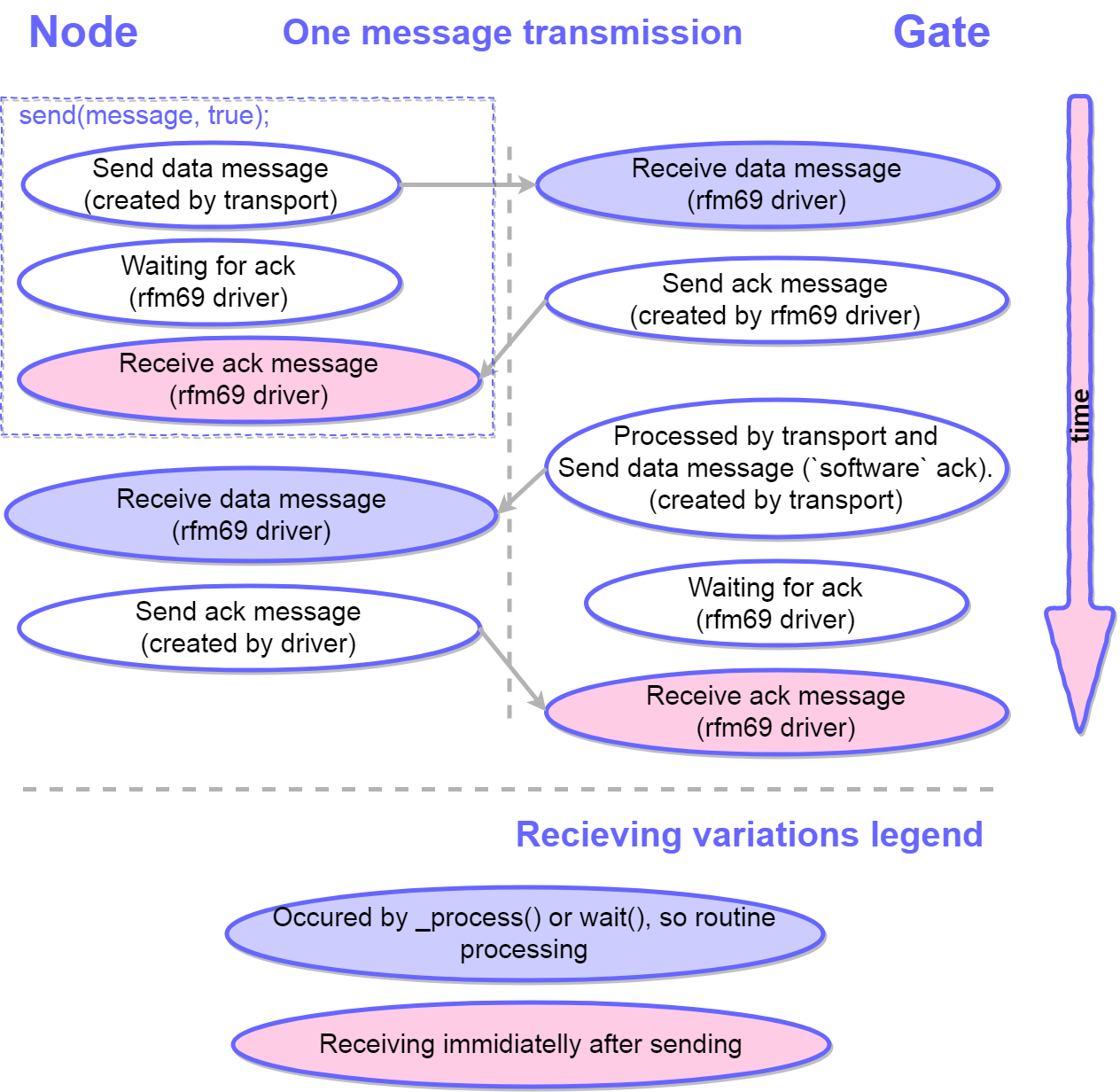
    @robvk said in MySensors 2.3 and RFM69 new driver. Problems and solutions: #define MY_PASSIVE_NODE Oh no I totally missed this line! This statement disables ACK and other transport-related stuff. Case closed.
  • [SOLVED] Error building ESP32 node: multiple definition of `app_main'

    9
    0 Votes
    9 Posts
    3k Views
    dsieeD
    Just to add for those using Arduino IDE, downloading the latest development version of MySensors fixes the same issue. Just go to https://github.com/mysensors/MySensors and hit "Clone/Download Zip", Download the zip then add to Arduino (Sketch -> Include Library -> Add .Zip Library then select the zip you downloaded). You may need to delete the old library folder from Documents\Arduino\libraries to ensure the new version is used. This will be fixed with MySensors 2.3.2.
  • WS2812B neopixel sketch help

    6
    0 Votes
    6 Posts
    533 Views
    YveauxY
    @grumpazoid If you need inspiration, I wrote a number of sketches used in the MySensors Dollhouse setup, e.g. the Fireplace sketch. They can be found here: https://github.com/Yveaux/Dollhouse_sketches
  • irq pin for nrf24l01

    14
    1 Votes
    14 Posts
    5k Views
    mfalkviddM
    @zen85 unfortunately not. See https://www.mysensors.org/apidocs-beta/group__RF24SettingGrpPub.html#ga6b3dbadceeb1dfca62b2e920d926bd4a for details (MY_RX_MESSAGE_BUFFER_FEATURE section)
  • How can I monitor the humidity of a wall (house)

    17
    0 Votes
    17 Posts
    2k Views
    AffordableTechA
    Hi @pierrot10 and others, Sorry, I was called away unexpectedly... I've had no experience using nails other than testing the gyprock ones in the link I sent. I think your idea of 9 pairs spread across the wall is excellent as the key data you seek is the moisture source and how it progress across the wall. You can just connect the 9 sensors to one of those analog switch modules and the Feather and start logging data. You biggest problem will probably working out the distance between the 2 nails. Once it setup (in summer), you can make sure they all read the same value by a software 'calibration value' for each pair. I'd also suggest putting a newer BMP680 device in the room, perhaps 3" to 6 " away from the wall, just to have a temp, humidity and barometric pressure. I don't know exactly what it my tell you, but one thing I have learned is 'data is like money', there is no such thing as too much! (especially when you only get one shot at it a year). I think your chances of success look good as long as the distance between the two nails give you a sufficient data range. Good luck, and I look forward to reading how it turns out. Paul
  • 0 Votes
    11 Posts
    533 Views
    T
    @electrik Oh yes, that did the trick. Thank you so much
  • Sketch kills batteries in 2-3 days

    8
    0 Votes
    8 Posts
    646 Views
    tbowmoT
    @wahid As an example, I have 4 sensebender micros, which has been deployed since june 2015, I have not changed batteries in them yet, and they still report temperature / humidity (that's more than 4 years battery life!). The batteries are cheap AA alkaline types (2 pieces).. I'm not doing anything special (hardware wise) to power off the radio, or any other peripherals on the board. Only using standard software powerdown where available.
  • MySensors on ATTiny84 and RFM69CW

    4
    0 Votes
    4 Posts
    750 Views
    B
    @nca78 said in MySensors on ATTiny84 and RFM69CW: Hello, you should not use delay() with MySensors but wait(), which will poll the NRF24 regularly to receive incoming messages. You are surely right, that using delay isn't normally a good idea for a MySensors program. In my case I only want to implement a passive node to measure temperature and humidity. So my program don't wait for any incoming messages and delay wouldn't be a problem for this reason. But for the final version delay wouldn't be a good solution for another reason: battery life. But I have now a working sleep function for the ATTiny84 which needs only approximately 6µA during sleep. In the meantime I found the reasons for my problems. My program just uses to much RAM (only 512 Byte on ATTiny84 available), so the stack destroys other variables and the program behaves strange. But I now found a solution for a working passive MySensors Node for temperature and humidity on ATTiny84 with RFM69 radio module and the BME280 as temperature/humidity sensor. I will show my solution here anytime soon, maybe it is of interest for others who try something similar.

14

Online

11.8k

Users

11.2k

Topics

113.2k

Posts