
Arduino Uno R3 Ethernet Gateway + 4 Relay + Motion + Magnetic Switch
-
Hello ,
I'm trying to build the gateway with all attached sensors
But when I inclusion, only appears the 4 relays in Vera , what is wrong with the code?
not appear --> motion and Magnetic Switch
Setup:
Arduino Uno R3
W5100 Shield
4 Relay - pin 5,6,7,8
1 motion - pin 3
1 magnetic switch - pin 4// Enable debug prints to serial monitor #define MY_DEBUG // Enable gateway ethernet module type #define MY_GATEWAY_W5100 #define MY_IP_ADDRESS 192,168,1,169 // If this is disabled, DHCP is used to retrieve address // The port to keep open on node server mode / or port to contact in client mode #define MY_PORT 5003 // The MAC address can be anything you want but should be unique on your network. // Newer boards have a MAC address printed on the underside of the PCB, which you can (optionally) use. // Note that most of the Ardunio examples use "DEAD BEEF FEED" for the MAC address. #define MY_MAC_ADDRESS 0xDE, 0xAD, 0xBE, 0xEF, 0xFE, 0xED // Enable inclusion mode #define MY_INCLUSION_MODE_FEATURE // Enable Inclusion mode button on gateway // #define MY_INCLUSION_BUTTON_FEATURE // Set inclusion mode duration (in seconds) #define MY_INCLUSION_MODE_DURATION 60 // Digital pin used for inclusion mode button // #define MY_INCLUSION_MODE_BUTTON_PIN 4 #include <SPI.h> #include <Ethernet.h> #include <MySensor.h> #include <Bounce2.h> #define RELAY_1 5 // Arduino Digital I/O pin number for first relay (second on pin+1 etc) #define NUMBER_OF_RELAYS 4 // Total number of attached relays #define RELAY_ON 1 // GPIO value to write to turn on attached relay #define RELAY_OFF 0 // GPIO value to write to turn off attached relay #define DIGITAL_INPUT_SENSOR 3 // The digital input you attached your motion sensor. (Only 2 and 3 generates interrupt!) #define CHILD_ID 3 // Id of the sensor child #define ID 4 #define OPEN 1 #define CLOSE 0 #define BUTTON_PIN 4 // Arduino Digital I/O pin for button/reed switc boolean lastTripped = 0; Bounce debouncer = Bounce(); int oldValue=-1; // Initialize motion message MyMessage msg(CHILD_ID, V_TRIPPED); MyMessage msgdoor(ID,V_TRIPPED); void before() { for (int sensor=1, pin=RELAY_1; sensor<=NUMBER_OF_RELAYS;sensor++, pin++) { // Then set relay pins in output mode pinMode(pin, OUTPUT); // Set relay to last known state (using eeprom storage) digitalWrite(pin, loadState(sensor)?RELAY_ON:RELAY_OFF); } } void setup() { pinMode(BUTTON_PIN,INPUT_PULLUP); debouncer.attach(BUTTON_PIN); debouncer.interval(5); present(ID, S_LIGHT); // S_DOOR } void presentation() { // Send the sketch version information to the gateway and Controller sendSketchInfo("Relay", "1.0"); for (int sensor=1, pin=RELAY_1; sensor<=NUMBER_OF_RELAYS;sensor++, pin++) { // Register all sensors to gw (they will be created as child devices) present(sensor, S_LIGHT); } pinMode(DIGITAL_INPUT_SENSOR, INPUT); // sets the motion sensor digital pin as input // Register all sensors to gw (they will be created as child devices) present(CHILD_ID, S_MOTION); } void loop() { // Read digital motion value boolean tripped = digitalRead(DIGITAL_INPUT_SENSOR) == HIGH; if (lastTripped != tripped ) { send(msg.set(tripped?"1":"0")); // Send new state and request ack back Serial.println(tripped); lastTripped=tripped; } debouncer.update(); int value = debouncer.read(); if (value != oldValue) { Serial.print("Door value: "); Serial.println(value); send(msgdoor.set(value==HIGH ? 1 : 0)); oldValue = value; } } void receive(const MyMessage &message) { // We only expect one type of message from controller. But we better check anyway. if (message.type==V_LIGHT) { // Change relay state digitalWrite(message.sensor-1+RELAY_1, message.getBool()?RELAY_ON:RELAY_OFF); // Store state in eeprom saveState(message.sensor, message.getBool()); // Write some debug info Serial.print("Incoming change for sensor:"); Serial.print(message.sensor); Serial.print(", New status: "); Serial.println(message.getBool()); } }``` -
-
@hek tks, motion sensor now appear but magnetic switch no :( need resistor ?
Update code
// Enable debug prints to serial monitor #define MY_DEBUG // Enable gateway ethernet module type #define MY_GATEWAY_W5100 #define MY_IP_ADDRESS 192,168,1,169 // If this is disabled, DHCP is used to retrieve address // The port to keep open on node server mode / or port to contact in client mode #define MY_PORT 5003 // The MAC address can be anything you want but should be unique on your network. // Newer boards have a MAC address printed on the underside of the PCB, which you can (optionally) use. // Note that most of the Ardunio examples use "DEAD BEEF FEED" for the MAC address. #define MY_MAC_ADDRESS 0xDE, 0xAD, 0xBE, 0xEF, 0xFE, 0xED // Enable inclusion mode #define MY_INCLUSION_MODE_FEATURE // Enable Inclusion mode button on gateway // #define MY_INCLUSION_BUTTON_FEATURE // Set inclusion mode duration (in seconds) #define MY_INCLUSION_MODE_DURATION 60 // Digital pin used for inclusion mode button // #define MY_INCLUSION_MODE_BUTTON_PIN 4 #include <SPI.h> #include <Ethernet.h> #include <MySensor.h> #include <Bounce2.h> #define RELAY_1 5 // Arduino Digital I/O pin number for first relay (second on pin+1 etc) #define NUMBER_OF_RELAYS 4 // Total number of attached relays #define RELAY_ON 1 // GPIO value to write to turn on attached relay #define RELAY_OFF 0 // GPIO value to write to turn off attached relay #define DIGITAL_INPUT_SENSOR 3 // The digital input you attached your motion sensor. (Only 2 and 3 generates interrupt!) #define CHILD_ID 69 // Id of the sensor child #define ID 70 #define OPEN 1 #define CLOSE 0 #define BUTTON_PIN 4 // Arduino Digital I/O pin for button/reed switc boolean lastTripped = 0; Bounce debouncer = Bounce(); int oldValue=-1; // Initialize motion message MyMessage msg(CHILD_ID, V_TRIPPED); MyMessage msgdoor(ID,V_TRIPPED); void before() { for (int sensor=1, pin=RELAY_1; sensor<=NUMBER_OF_RELAYS;sensor++, pin++) { // Then set relay pins in output mode pinMode(pin, OUTPUT); // Set relay to last known state (using eeprom storage) digitalWrite(pin, loadState(sensor)?RELAY_ON:RELAY_OFF); } } void setup() { pinMode(BUTTON_PIN,INPUT_PULLUP); debouncer.attach(BUTTON_PIN); debouncer.interval(5); present(ID, S_DOOR); // S_DOOR } void presentation() { // Send the sketch version information to the gateway and Controller sendSketchInfo("Relay", "1.0"); for (int sensor=1, pin=RELAY_1; sensor<=NUMBER_OF_RELAYS;sensor++, pin++) { // Register all sensors to gw (they will be created as child devices) present(sensor, S_LIGHT); } pinMode(DIGITAL_INPUT_SENSOR, INPUT); // sets the motion sensor digital pin as input // Register all sensors to gw (they will be created as child devices) present(CHILD_ID, S_MOTION); } void loop() { // Read digital motion value boolean tripped = digitalRead(DIGITAL_INPUT_SENSOR) == HIGH; if (lastTripped != tripped ) { send(msg.set(tripped?"1":"0")); // Send new state and request ack back Serial.println(tripped); lastTripped=tripped; } debouncer.update(); int value = debouncer.read(); if (value != oldValue) { Serial.print("Door value: "); Serial.println(value); send(msgdoor.set(value==HIGH ? 1 : 0)); oldValue = value; } } void receive(const MyMessage &message) { // We only expect one type of message from controller. But we better check anyway. if (message.type==V_LIGHT) { // Change relay state digitalWrite(message.sensor-1+RELAY_1, message.getBool()?RELAY_ON:RELAY_OFF); // Store state in eeprom saveState(message.sensor, message.getBool()); // Write some debug info Serial.print("Incoming change for sensor:"); Serial.print(message.sensor); Serial.print(", New status: "); Serial.println(message.getBool()); } }``` -
-
-
If the presentation fails to be received by the controller, you could introduce a small delay (to let radio "re-change") between the transmits to the controller.
wait(200);at the top of the loop should be enough.Still not working :\
void loop() { wait(200); // Read digital motion value boolean tripped = digitalRead(DIGITAL_INPUT_SENSOR) == HIGH; if (lastTripped != tripped ) { send(msg.set(tripped?"1":"0")); // Send new state and request ack back Serial.println(tripped); lastTripped=tripped; } debouncer.update(); int value = debouncer.read(); if (value != oldValue) { Serial.print("Door value: "); Serial.println(value); send(msgdoor.set(value==HIGH ? 1 : 0)); oldValue = value; } } -
-
Working!!!! Tks
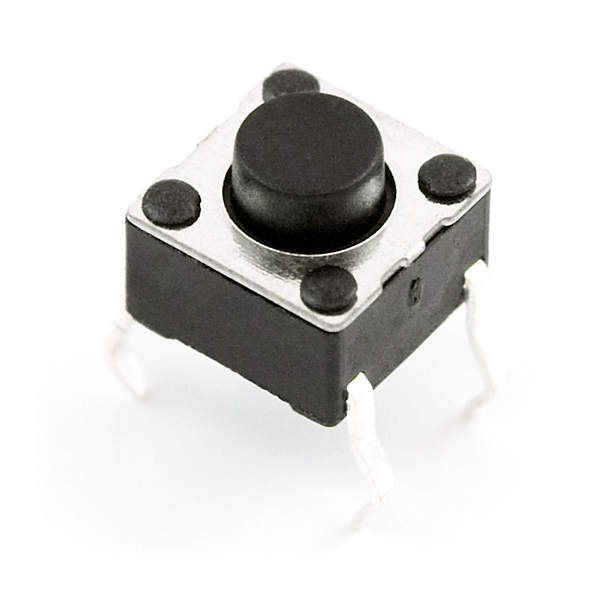
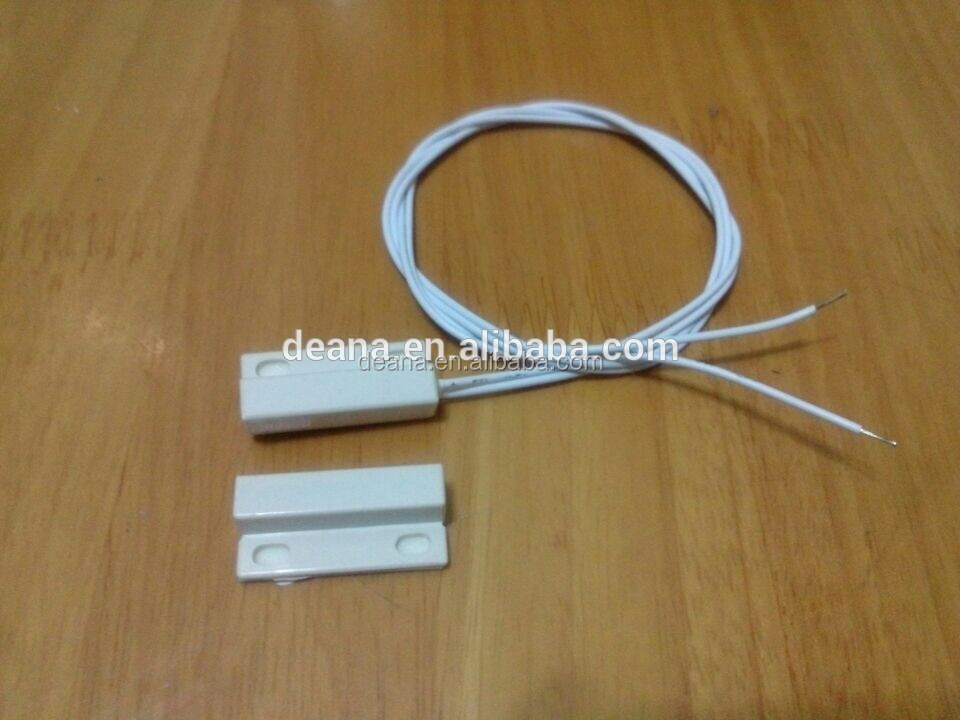
I only have one more problem, with simple button switch ( like that ) simulate door open/close , I receive message "Door value:0 and 1" and status in vera changed, but with reed switch ( like that ) door status no change with magnetic , I bought 5 reed switch and any works :(
Reed switch problem right ?
-
Working!!!! Tks
I only have one more problem, with simple button switch ( like that ) simulate door open/close , I receive message "Door value:0 and 1" and status in vera changed, but with reed switch ( like that ) door status no change with magnetic , I bought 5 reed switch and any works :(
Reed switch problem right ?
-
Update
Finally after changing reed switch all works !
However , sometimes mysensors gateway stop responding (few weeks works fine), I try to ping Ip of the gateway and no have any reply, solution is power off gateway .
It is possible to place the gateway (mysensors) to ping a network address and if it does not answer automatically make a restart and wait/limit to a restart every 20 minutes? (to prevent the restart loop)


Hello! It looks like you're interested in this conversation, but you don't have an account yet.
Getting fed up of having to scroll through the same posts each visit? When you register for an account, you'll always come back to exactly where you were before, and choose to be notified of new replies (either via email, or push notification). You'll also be able to save bookmarks and upvote posts to show your appreciation to other community members.
With your input, this post could be even better 💗
Register Login