Skip to content

Hardware

1.8k Topics 18.4k Posts

Talk about fun sensor hardware, MCUs, PCBs and how to power your sensors here.

  • Newbie: confused by the jargon, needing simple guidance...

    newbie
    6
    0 Votes
    6 Posts
    2k Views
    M
    Gawd bless ya @OldSurferDude , that just about answered every question I have to date, I especially thank you for indicating whether the item named is a software or hardware product. On reading into the Cerbo GX capabilities I was very impressed with its sophistication and, just as you said, I will have to break the complicated parts down into bite-sized pieces and build from there. It started with an idea for a project, essentially to take data on battery state of charge (SoC) from the Cerbo GX and use an Arduino Nano or ESP8266 to build a strategy so that I would have sufficient hot water in the morning, consistent with having enough battery power left in the evening. Only on further inspection did it occur that the Node Red software built into the Cerbo GX could do this for me...and thus the possibility that a wireless hot water temperature sensor (transducer) could be fabricated to feed that data into the Cerbo GX; hence my path to here. I've dabbled in programming in C, mainly through the Arduino IDE, and in a previous life part of my work involved programming PLCs for industrial automation, so I am somewhat familiar with 'tech', but I lost interest once most systems seemed to go Windows based. In the intervening years the 'tech' has moved on apace and has left me behind, which is why I've struggled to follow the jargon, akin to trying to fit the second piece in a large jigsaw puzzle. Once the fundamentals are there I'll catch on. So please, kind contributors, be tolerant of the silly questions we newbies ask, we won't always be newbies, and I'll be back for sensors stuff once I've tamed the red-hot node and sorted out my LBQTTs Best wishes....MM
  • Newbie questions

    2
    0 Votes
    2 Posts
    1k Views
    A
    Great project! With some guidance, KiCad and AVR will click again!
  • Best time of year to buy higher quality small project solar panels?

    5
    1 Votes
    5 Posts
    2k Views
    M
    It probably has to do with fewer people buying them once summer ends, so companies might lower prices to clear out stock before winter.
  • Sleep mode for bmp280

    7
    4 Votes
    7 Posts
    5k Views
    __isded___
    Just wanted to say thanks for this, it is still relevant and useful six years later !
  • "Remote Irrigation with LoRaWAN: LM27313 Challenges and PCB Design"

    10
    0 Votes
    10 Posts
    2k Views
    E
    @wrendral said in "Remote Irrigation with LoRaWAN: LM27313 Challenges and PCB Design": I will go with a Li-Po Battery type: 304048 3.7V 1200mAh Might work, but maybe the internal protection will trigger with the high current peaks. I'd suggest you plan a 0 Ohm, (2512/THT) resistor as R2 and then replace it with a 100Ohm/1Watt if the protection triggers.
  • Does MySensors require Arduino Timer 2?

    mysensors interrupt interrupts nano esp
    2
    0 Votes
    2 Posts
    1k Views
    OldSurferDudeO
    I have success! (oops, that's suppose to be Timer1) I only sample for 1/60 of a second. What I did was to back up all the timer registered I used and then resorted them after I was done sampling. (As opposed to initializing the registers in setup and then starting the timer when needed.) Now I have a Nano sampling the data and sending it to a MySensors Gateway on an RPi3B+ which then sends it to an MQTT broker runing on an old laptop. Also running on the laptop is Home Assistant running inside of VirtualBox. If MySensors does use Timer1, it appears that restoring the registers allows it to be shared. //------------------------------------------------------ISR ISR(TIMER1_OVF_vect){ // interrupt service routine for overflow TCNT1 = TimerPreloadValue; // must be first line! starts the timer counting again digitalWrite(TRIGGER_START_SAMPLE_PIN,HIGH); samplesVolts[--sample]=analogRead(VOLTS_IN_PIN); // decrement before capturing samplesCurrent[sample]=analogRead(CURRENT_IN_PIN); digitalWrite(TRIGGER_START_SAMPLE_PIN,LOW); if (!sample){ // count down to zero digitalWrite(TRIGGER_START_SAMPLE_PERIOD_PIN,LOW); // indicate that sampling is complete samplingEnd = micros(); TCCR1B &= 248; // turns off timer } } //------------------------------------------------------sampleOneCycle void sampleOneCycle(){ // back up timer registers uint8_t TCNT1_b = TCNT1; uint8_t TCCR1B_b = TCCR1B; uint8_t TCCR1A_b = TCCR1A; uint8_t TIMSK1_b = TIMSK1; // configure timer which starts the sampling noInterrupts(); // disable all interrupts TCCR1A = 0; TCCR1B = 0; TCNT1 = TimerPreloadValue; // preload timer //TCCR1B |= (1 << CS10)|(1 << CS12); // 1024 prescaler TCCR1B &= 248; // turns off timer? TIMSK1 |= (1 << TOIE1); // enable timer overflow interrupt ISR // demark sampling sample = NUMBER_OF_SAMPLES; // count down to zero digitalWrite(TRIGGER_START_SAMPLE_PERIOD_PIN,HIGH); samplingStart = micros(); TCNT1 = 65535; // first trigger right away! TCCR1B |= 1; // turns on timer interrupts(); // enable all interrupts // wait for sampling to be complete while(digitalRead(TRIGGER_START_SAMPLE_PERIOD_PIN)){}; samplingEnd = micros(); // restore timer registers TCNT1 = TCNT1_b; TCCR1B = TCCR1B_b; TCCR1A = TCCR1A_b; TIMSK1 = TIMSK1_b; }
  • Arduino Nano Every problem

    6
    1 Votes
    6 Posts
    1k Views
    OldSurferDudeO
    I bought the Every because it implied it was backward compatible with the nano. No, it's not, as we found out. Be that as it may, any word on a getting the Every working with mySensors?
  • Best VOC sensor for detecting a wide range of VOC's?

    3
    1 Votes
    3 Posts
    3k Views
    N
    @eiten I haven't yet made any progress on finding a good VOC sensor, but along the way I did find out something interesting regarding CO2: namely, if you sleep with your bedroom door closed at night, then the odds are good that the CO2 levels rise to surprisingly high and unhealthy levels. The better CO2 sensors are factory calibrated and never again need recalibration for the life of the sensor (usually around 10 years or so), because they are used in HVAC systems to control fresh air intake to guarantee indoor air quality. As a for instance, here is one such CO2 sensor: https://www.digikey.com/en/products/detail/senseair/006-0-0008/15790694 At around $50 for just the sensor element itself, it's not exactly cheap, but then again, I'd say it's worth it, because who wants to be burdened by remembering to calibrate their CO2 sensors? Ideally, I'd like to find a sensitive VOC sensor that also will never require calibration. Nearly all, and maybe all, of the off-the-shelf IAQ montoring stuff that you might buy for, say, $300 or less seems to require periodic calibration. For that reason, this might be one of those occasions where build is rather than buy.
  • hlk-pm01 are to noisy for rfm69?

    5
    0 Votes
    5 Posts
    1k Views
    zboblamontZ
    @Tmaster Never assume the original PCB was just a circuit of components, the PCB can incorporate RF shields and antenna radio ground planes...
  • Sensors and more

    1
    0 Votes
    1 Posts
    627 Views
    No one has replied
  • Which one should i choose? PIR or microwave sensor

    8
    0 Votes
    8 Posts
    3k Views
    N
    Supposedly PIR doesn't work through glass (e.g. if looking for motion through a window), whereas I presume a microwave sensor might still work.
  • New user has questions

    7
    0 Votes
    7 Posts
    1k Views
    C
    I am new in this forum and I have a question regarding mysensors and iobroker. I did not work with mysensors up to now. Since some weeks I use iobroker installed on a raspberrypi. Now I want to integrate my 433 Mhz doorbell in iobroker. I know, that there is an adapter for mysensors in iobroker. My question is: Is it possible to get a notification in iobroker if someone is pressing the button on my doorbell? As I understood, I have to connect the receiver to an arduino nano and connect the arduino to my rasberrypi on which iobroker is running.
  • Node with only sendBatteryLevel into Home Assistant

    9
    0 Votes
    9 Posts
    2k Views
    E
    Great! I'm glad it works and thank you very much for reporting back!
  • nRF5 Multi Sensor Board (12-14€)

    52
    5 Votes
    52 Posts
    28k Views
    monteM
    https://github.com/sandeepmistry/arduino-nRF5 Install this and find libraries for whatever sensors you have on that board. @basaksts said in nRF5 Multi Sensor Board (12-14€): Also I need an bootloader No, you really don't. You need ST-Link, or J-Link SWD programmer/debugger. Connect it to SWDIO, SWCLK, 3.3V and GND and program it using Arduino IDE.
  • My HW gives me wrong battery voltage

    7
    2
    0 Votes
    7 Posts
    1k Views
    zboblamontZ
    It's an awfully convoluted way of doing things but suspect your error lies in misunderstanding calculations mixing ints and floats and something screwy with your resistor bridge - It is always worth checking the bridge with a multimeter and raw voltage to verify the expectation. If you have 3v at the top of your voltage divider, you should be getting 0.9593v applied on the ADC pin which will be read as 892 against the 1.1v internal reference. The easiest way I found was to define a multiplier needed to derive the raw voltage, in this case (((R1+R2)x1.1)/R2) - For your resistor arrangement the max you can read is 3.4404v before exceeding the 1.1v internal reference. To reverse the ADC reading of 892 to raw voltage is (892x3.4404)/1023 = 2.9984 v. Perhaps this is a simpler way to do it float MULTIPLIER= (((1000+470)*1.1)/470);//Resistor bridge values in k and Vref int sensorValue = analogRead(BATTERY_SENSE_PIN); float batteryV = (sensorValue * MULTIPLIER)/1023.0; //Note the trailing decimal point on the 1023 for calculations involving floats
  • sx1262 and LLCC68 support.

    4
    0 Votes
    4 Posts
    2k Views
    C
    @__isded__ from what is explained in this page it seems it is based on the Semtech SX1278 : https://www.makerfabs.com/sx1278-lora-module-433m-10km-ra-02.html
  • Gateway + Oled ?

    7
    0 Votes
    7 Posts
    1k Views
    F
    Hello Jeelet, Thank you for the encouragements. Your advice to save (protect) the Oled screen is also welcome, thank you. My code expects it, the text is mini and moves every 3 seconds. Press a key and the menu returns. [image: 1674245032109-mysensors2d.png] Cordially.
  • 0 Votes
    32 Posts
    7k Views
    Edwin De BockE
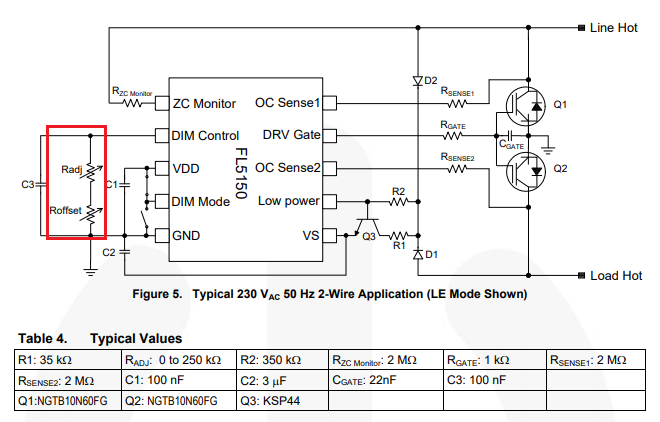
    I just tested 2 led types with no flicker on my attiny circuit. It is funny, the expensive leds like from philips: Dimmable 3.8W Warm White have a flickering behavior . A cheap one available in Action from LSC 6.3W, Dim to Warm and 460 Lumen has no flickering behavior. Another one from Osram Par 1650: 5.5W Dimmable Warm White, 350 Lumen also has no flickering. The philips has the best Energy savings though : 4kWh compared to 7kWh for the LSC one. Is there a relation between energy savings and dim quality ?
  • Seeeduino Xiao nRF52840

    1
    0 Votes
    1 Posts
    1k Views
    No one has replied
  • Local Sensors on Raspberry Pi Gateway

    5
    0 Votes
    5 Posts
    1k Views
    OldSurferDudeO
    @mfalkvidd I finally got it to work. Look at my post on the Home Assistant forum. There is an amazing thing that someone in the MySensors world did that makes RPi I/O very easy! Just like the Arduino, one uses the code: pinMode(MphysicalPin, OUTPUT); I couldn't believe my eyes when I saw that. And then got double flabbergasted when I discovered that pin is the physical pin of the RPi! No mapping of GPIOi to the pins. Whew! So the I/O was easier than both of us could have imagined! @mfalkvidd if you know who did this, send them praise and thanks. OSD

22

Online

12.1k

Users

11.2k

Topics

113.4k

Posts