
See my documentation here for what I did for fuel oil, all will be applicable to water..
L
lafleur
@lafleur
Posts
-
VL53L0X with water tanks -
Ultrasonic sensor JSN-SR04TTo provide a large enough pulse to drive the ceramic transducer , you need a lot of energy, so they pump up the 5v with an inductor/transformer to provide a high voltage pulse. This is 60v or more…
The more Energy you produce the farther the pulse will travel….Everything thing else on the board run at 3.3 to 5V.
Add a large Capacitor of 100 µF are so between the 5v and ground on the device, this may clean up your problem.. Some CPU modules just can’t supply enough current quick enough that’s needed when the pulse is triggered.
These are very inexpensive device, we’re luck to see them work at 1/2 the spec range.
-
💬 STM32 Sensor NodeIt would be nice if you could post a .pdf of the schematic.... not everyone has the tool to see the board from the .sch file.
-
8Bit or 32Bit processors -
💬 Sensebender Micro mk2Well, that news to me. I've always use the HCW variant and did NOT noticed the pin change. My error for not looking at the detail... (This was not the case with the RFM69W and HW radios, both shared the same pin-out)
but again, using the HCW allow one to also use the RFM95 radios, and if you keep power below +13, power consumption is about the same... also the new RFM69 radio driver in 2.2b use adaptive power control as an option, this keep power use to a minimum saving power.
I just re-checked the data sheets, RFM95 and RFM69HCW do share the same pin-out.
-
💬 Sensebender Micro mk2Yes, The H = High Power version, C = Compact version 16x16mm pkg, vis 16x19mm pkg
My error, RFM69CW and RFM69HCW are available, also note that if you do not use the power over +13dbm, power consumption is about the same between the radios.
https://lowpowerlab.com/forum/rf-range-antennas-rfm69-library/rfm69w-and-rfm69hw-current-consumption/ [0_1496604219131_RFM69CW-V1.1.pdf](/assets/uploads/files/1496604221362-rfm69cw-v1.1.pdf) -
💬 Sensebender Micro mk2Both the RFM69HC and RFM69HCW are available in the smaller package.... again, this would allow RFM95 to be used.
Thanks...
[0_1496601875842_RFM69HC_DataSheet_v1.1.pdf](/assets/uploads/files/1496601877634-rfm69hc_datasheet_v1.1.pdf) -
💬 Sensebender Micro mk2Is this board using the RFM69HCW footprint so that one could also use an RFM95??
If not, please consider this change and you might want to consider as an option for DIO-1 connected to an I/O pin on the CPU.. (this would also make it compatible with LoRaWan network)Thanks
-
8Bit or 32Bit processorsI use the standard Arduino IDE for most things but moving to PlatformIO as it's editor is so much better that the brain dead one in the Arduino IDE
-
8Bit or 32Bit processors -
8Bit or 32Bit processorsYou should also add this to your test code to see debug messages from the MySensor stack.. Also add to gateway, so that you can see what happening on both ends....
/* Enable debug prints to serial monitor on port 0 */ #define MY_DEBUG // used by MySensor #define MY_DEBUG_VERBOSE_RFM69 -
8Bit or 32Bit processorsAs manufacturing of chips goes to smaller and smaller die size, chip cost go down and preformance goes up..... older processors cost more to build that newer parts!
It all means better performance, less power and more features for less money...
The intel 8080 when it was introduced was $360, power hungry, no ram, no storage, no I/O, needed a lot of support chips.... we have come a long way!!!!
-
8Bit or 32Bit processorsThe M0 chip cost less that the 8bit 328, so building your own boards, it cost less...
Then you need to add a radio, $2 to $9. Crystal, $.50, connectors, flash, voltage regulators, leds, capacitors, resistors, pcb board.... ect, all add cost....
But vendors building board, need to make a profit to stay alive, so you pay for their work....
So yes, finish boards in small quantity cost $20 to $40 or so.... not a bad price for what you get.....
-
8Bit or 32Bit processorsI'm on travel, and do not have any hardware to test with...
some notes:
Use generic M0 processor definition tool-->board--> Arduino zero (native USB port)
If I remember, 2.1.1 has NOT yet implemented sleep for M0 processors
Here is a striped down version of your code.... get it to work first sending messages to your gateway, then start adding your real code back.... This complies, but I DID NOT HAVE ANY HW to test it on...
Make sure you check the radio pins on the feather and that they are correct.
/** * The MySensors Arduino library handles the wireless radio link and protocol * between your home built sensors/actuators and HA controller of choice. * The sensors forms a self healing radio network with optional repeaters. Each * repeater and gateway builds a routing tables in EEPROM which keeps track of the * network topology allowing messages to be routed to nodes. * * Created by Henrik Ekblad <henrik.ekblad@mysensors.org> * Copyright (C) 2013-2015 Sensnology AB * Full contributor list: https://github.com/mysensors/Arduino/graphs/contributors * * Documentation: http://www.mysensors.org * Support Forum: http://forum.mysensors.org * * This program is free software; you can redistribute it and/or * modify it under the terms of the GNU General Public License * version 2 as published by the Free Software Foundation. * ******************************* * * DESCRIPTION * * Example sketch showing how to send in DS1820B OneWire temperature readings back to the controller * http://www.mysensors.org/build/temp */ // Enable debug prints to serial monitor //#define MY_DEBUG // Enable and select radio type attached //#define MY_RADIO_NRF24 #define MY_RADIO_RFM69 #include <SPI.h> #include <MySensors.h> unsigned long SEND_FREQUENCY = 10000; // Minimum time between send (in milliseconds). We don't want to spam the gateway. unsigned long currentTime = 0; unsigned long lastSendTime = 0; unsigned long keepaliveTime = 0; #define MY_RF69_SPI_CS 8 #define MY_RF69_IRQ_PIN 7 #define MY_RF69_IRQ_NUM 4 // Initialize temperature message MyMessage msg(0,V_TEMP); /* ******************************************** */ void before() { } /* ******************************************** */ void setup() { } /* ******************************************** */ void presentation() { // Send the sketch version information to the gateway and Controller sendSketchInfo("Temperature Sensor", "1.1"); //present(0, S_TEMP); } /* ******************************************** */ void loop() { currentTime = millis(); /* ***************** Send Sensor Data ***************** */ if (currentTime - lastSendTime >= SEND_FREQUENCY) // Only send values at a maximum rate { Serial.println("*** Sending Sensor Data"); lastSendTime = currentTime; // lets send some data float temperature = 67.4; // Send in the new temperature send(msg.setSensor(0).set(temperature,1)); } // end of if } // end of loop -
Trace to antenna?These are a good starting point...
http://pdfserv.maximintegrated.com/en/an/AN2093.pdf
http://www.analog.com/media/en/training-seminars/tutorials/MT-094.pdfYes, it all maters, having 50 ohms from the radio to the antenna will lower the VSWR and make transfer of more power to the antenna.
-
8Bit or 32Bit processorsA number of people have ask me about why I'm using 32bit processors when an 8bit will do. Well its simple, for small development projects of less that a few hundreds unit, the larger flash, larger ram, faster CPU, lower power devices, and cheaper raw devices, allow for faster code development... no time wasted on how to save flash or ram space.. seldom having to concern myself about CPU speed.
If I'm doing a project that requires very large volume, or special needs, I will again consider an 8 or 16bit processor, but again, these days often the 32bit devices are cheaper and more functional.
Below are a number of CPU boards with RFM69 or RFM95 Radios attach that can be used with MySensor.
In MySensor space, for my projects, my favorite 32bit processor board is:
RocketScream M0 ultra pro Ver2, RFM69 or RFM95 radio, battery connector/charger, USB port, EUI64 chip, large external flash, very low power, u.FL or SMA connector, great support...
http://www.rocketscream.com/blog/product/mini-ultra-pro-v2-with-radio/Other 32 Bit:
Adafruit Feather LoRa M0, NO EUI64, No External flash, battery connector
https://www.adafruit.com/product/3178 RFM95
https://www.adafruit.com/product/3176 RFM69Non 32 bit processors:
MoteinoMega LoRa, ATmega1284P, RFM69 or RFM95, EUI64 chip, large external flash, u.FL or SMA connector
https://lowpowerlab.com/shop/product/119Moteino LoRa, ATmega328P, RFM69 or RFM95, large external flash, NO EUI64 chip
https://lowpowerlab.com/shop/product/99Adafruit Feather LoRa, ATmega32U4 CPU, NO EUI64, No External flash, battery connector, RFM69 or RFM95
https://www.adafruit.com/product/3078 -
New high power variant of the RFM95 --> RFM95PW +30dBmHopeRF has started selling a 1watt, +30dBm, version of the LoRa RFM95 radio. Aliexpress has them at $120/5.
The pin-out is the same, except for the 3.3v input pin is now VCC (5 to 6.4v) and pin 9, was GND now 3.3v out.
Width is 18mm vers 16mm on the old part, length is 35.4mm. Pin spacing is the same at 2mm.
Power requirements are ~700ma at TX, 15ma RX.
Their are no register changes... Its just a power amp on the basic RFM95.http://www.hoperf.com/rf_transceiver/Enhanced_Power/RFM95PW.htm
In my testing on a farm to measure soil moisture, water level and gate status, where the gateway is over 2.5 mi away, their performance has been excellent.... Radios have a 3dBi antenna, gateway has a 6dBi antenna.
They are connected with a 5 watt solar panel and a 6000ma battery, it my test with no solar panel connected for 7 days, battery is only down 3%, they report back 24 time a day.
So yes, it nice to have an option of a +30dBi radio... they do work!
-
Sensor IDs, best practices?I solved the issue by using extra I/O pins and assign a static node address from a base address + ID bits... In my case below, I used 3 ID pin's.
/* **************************************************************************** */ /* Before */ /* **************************************************************************** */ // Before is part of MySensor core void before() { // need to set up pins prior to reading them... pinMode(ID0, INPUT_PULLUP); pinMode(ID1, INPUT_PULLUP); pinMode(ID2, INPUT_PULLUP); myNodeID = !digitalRead (ID0); // ID bit are 0 = on, so we invert them myNodeID |= (!digitalRead(ID1) << 1); myNodeID |= (!digitalRead(ID2) << 2); myNodeID += NodeID_Base; // set our node ID // We no longer need these pins, so remove pullups to save power pinMode(ID0, INPUT); pinMode(ID1, INPUT); pinMode(ID2, INPUT); } -
Water flow and pressure SensorWaterMeter-MS-3.0i-RFM95
Data from the MySensor node to MQTT-gateway to MQTT to Telegraf to InFluxdb to Grafana.
Controller function via NODE.RED connected via MQTT.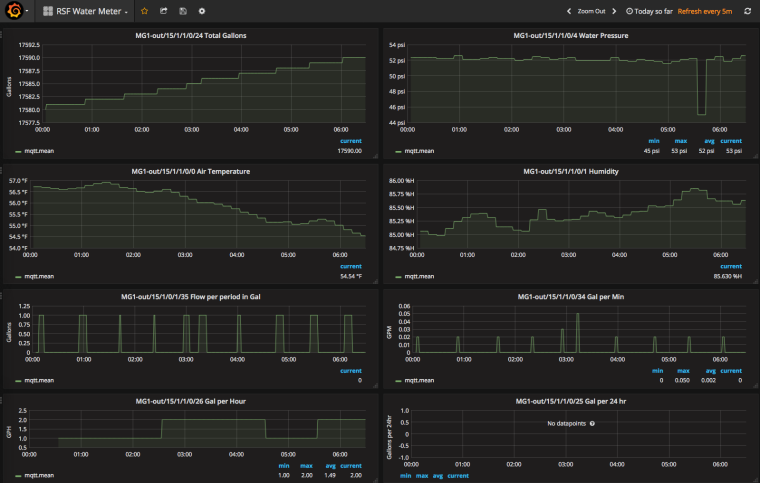
It measures water flow from a Dwyer WMT2 water meter in pulse per gallon.
Used a 0 to 100PSI pressure sensor (from ebay), via an analog port.
Support MCP9800 or Si7021 (humidity also) for air temp.
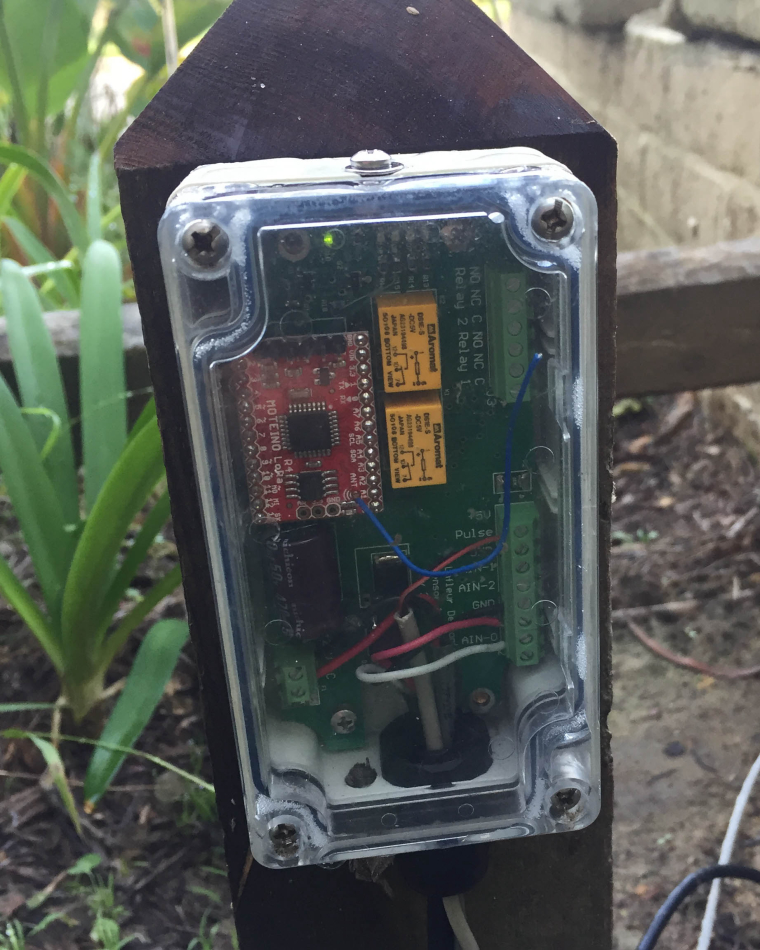
Two relay outputs
3 Analog inputs
MAX6816 or analog filter for contact de-bouncing for water meter
Powered via an 8 to 28v AC or DC external power source
(Board is designed to fit in a Hammond 1554 case)
Processor is a Moteino R4 LoRa with a RFM95
Sends:
- Gal per minutes
- Gal per hour
- Gal per day
- Gal of current flow
- Total gallons
- Air Temperature
- Humidity
- Water pressure
- Excessive Flow Message
https://www.dwyer-inst.com/Product/Flow/WaterMeters/SeriesWMT2
https://lowpowerlab.com/shop/product/99
design file are located at:
https://github.com/trlafleur/WaterMeter-MS-3.0i-RFM95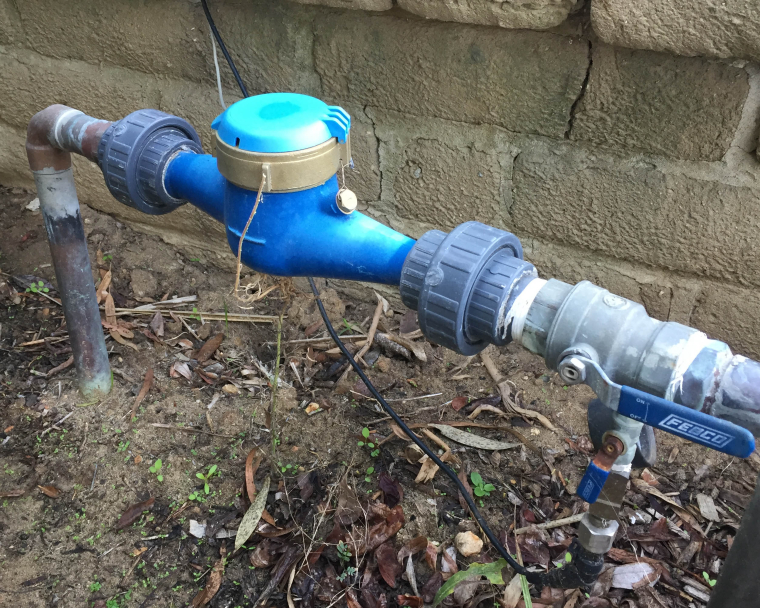
-
RFM95 Sleep ModeI have been using the transportinit() and transportpowerdown(), as suggested and it has been working fine if I was just sending data...
But when I needed to receive data from the controller, I was never receiving any data from the controller, even if I allowed a RX window of 20 sec or more.
On Wake up, If I remove the call to transportinit(), all work fine again... TX and RX work just fine...
What going on here?? Why is system working without the need to call transportinit() as you suggested.
using a SAMD processor M0
IDE 1.8.1
MySensor 2.1.1My current code base:
https://github.com/trlafleur/Soil_Moisture_Sensor_MS_R1.1-RFM95/* **************** System Sleep ******************* */ void systemSleep() { debug1(PSTR("\n*** Going to Sleep ***\n")); wait (100); // put led's, radio and flash to sleep // Turn off LED's // Put Flash to sleep // Put Radio and transport to Sleep transportPowerDown(); // Shut down radio and MySensor transport interrupts(); // make sure interrupts are on... LowPower.standby(); // SAMD sleep from LowPower systems // .... we will wake up from sleeping here if triggered from an interrupt interrupts(); // make sure interrupts are on... } /* **************** System Wake-up from Sleep ******************* */ void systemWakeUp() { // re enable LED's if needed // wake up Flash if needed // wake up MySensor transport and Radio from Sleep //transportInit(); // as MySensor had NO sleep or Watch Dog for SAMD, this will // wake us up so that we can send and receive messages while (!isTransportReady()) { // Make sure transport is ready _process(); interrupts(); // make sure interrupts are on... }