Skip to content
  • MySensors
  • OpenHardware.io
  • Categories
  • Recent
  • Tags
  • Popular
Skins
  • Light
  • Brite
  • Cerulean
  • Cosmo
  • Flatly
  • Journal
  • Litera
  • Lumen
  • Lux
  • Materia
  • Minty
  • Morph
  • Pulse
  • Sandstone
  • Simplex
  • Sketchy
  • Spacelab
  • United
  • Yeti
  • Zephyr
  • Dark
  • Cyborg
  • Darkly
  • Quartz
  • Slate
  • Solar
  • Superhero
  • Vapor

  • Default (No Skin)
  • No Skin
Collapse
Brand Logo
T

therik

@therik
About
Posts
53
Topics
7
Shares
0
Groups
0
Followers
0
Following
0

Posts

Recent Best Controversial

  • Home Assistant update changed USB port name
    T therik

    Just updated to the latest Home Assistant version 2024.1.3 and the USB port that my serial gateway was changed from USB0 to USB1 and I need to change this setting inside of HA, but I can't find the location to change the MySensors integration to make this change.

    I can create another serial gateway device in HA and assign it to USB1, but then I would need to re-add all my sensors. I would like to avoid this.

    So, anyone know of where I can change the serial gateway port from within HA?

    Home Assistant

  • Sensebender Gateway and Node not talking !TSM:FPAR:NO REPLY
    T therik

    Reporting back.

    I previously had working a REV1 PCB of a battery powered sensor node; powering the nRF radio directly from the battery. No capacitor on the radio needed.

    I built up the REV2 of the sensor PCB which included nice things like a power switch and and a reset button, etc. Radio was powered directly from the battery just as before, but the was not receiving signals from the gateway. Put the pro-mini back on the REV1 PCB and it was working. Only difference was the switch in the path between the radio and the battery. I measured the resistance between the battery input and the radio Vcc with a 121GW multimeter.

    REV1 board (no switch): 0.03 ohm
    REV2 board (with switch): 0.5 ohm

    The switch had added a tiny bit of resistance. I shorted out the switch on the REV2 board and radio was working. I added a 10 µF cap to the radio just for good measure, also added a 220 µF polymer cap near the battery, again for good measure. and things have been stable ever since.

    Lesson learned; extra resistance in the power path can add enough voltage drop to destabilize the radio (when the radio wakes up/switches between Tx and Rx, etc). A capacitor can help with the problem. And another best practice, I believe, is to make the Vcc path as low resistance as possible.

    Troubleshooting

  • Sensebender Gateway and Node not talking !TSM:FPAR:NO REPLY
    T therik

    @magpern
    Yep, I'm just setting up a new MySensors network and I'm having the exact same problem. Did you manage to fix it?

    Maybe some setting the GW? I'm using a VeraPlus for a controller.

    Troubleshooting

  • 3dprint case for motion, temp and humidity sensors with radio and batteries
    T therik

    My solution was to use a low drop out voltage high ripple rejection ratio voltage regulator 3V0 to power the PIR. That special voltage regulator is fed from the booster 3V3, that keeps the voltage to the PIR rock solid. The booster is noisy especially when the arduino goes from sleep to wake and back.

    My Project

  • Windows GUI/Controller for MySensors
    T therik

    Sorry, just getting around to try to get MYSController setup and I can't seem to get it sorted out to connect to my serial GW that is attached to my VeraLite.

    Here is what I have done to try to get connected:

    1. ssh into Vera and enter this command.
    ser2net -C 5003:raw:0:/dev/ttyACM0:115200
    

    I also tried

    ser2net -C 5003:raw:0:/dev/ttyUSB0:115200
    

    Next I launch MYSController on my PC and in the config window under TCP/IP tab set the IP to the IP of Vera and port to 5003.

    Hit connect and I get the following....

    2/17/2016 13:04:54	INFO	Connected to 192.168.0.108:5003
    2/17/2016 13:04:54	INFO	Unknown message, Msg=
    Port already in use by another process, dc=1
    2/17/2016 13:04:54	RX	
    Port already in use by another process
    

    For those of you have have done this before...any suggestion?

    Controllers myscontroller mysbootloader

  • Battery powered PIR
    T therik

    A couple of questions.

    1. Did you remove the voltage regulator from the PIR?
      a. if not, I would suspect that the voltage regulator on the PIR drops out and cannot supply the voltage for the PIR IC below 4V5.
    2. Where do you derive the power for the PIR?
      a. If it is from the µC, the µC may be adding noise on the voltage supply to the PIR and with the PIR voltage regulator removed the supply voltage may be too noisy.
    Hardware

  • Battery powered PIR
    T therik

    @darazs Good to know. I think the output of the booster is very dependent on the current draw and, of course, every booster is a little different.

    Hardware

  • Battery powered PIR
    T therik

    @mrlynx
    Downside to using 3xAA would be size.

    @Andreas-Maurer
    I would prefer to use the 3 pin header and not have wires coming from multiple places, but you are correct.

    Hardware

  • Battery powered PIR
    T therik

    This post outlines how to run a PIR sensor with 2xAA batteries and use interrupts to sleep a 3V3 8 MHz Arduino between both tripped and not-tripped states. This seems pretty straight forward, however there are a couple subtleties.

    1. The stock PIR is outfitted with a voltage regulator that requires ~4V5.
    2. Voltage ripple from the voltage booster (2xAA boost to 3V3) can cause certain sensitive sensors to reset and oscillate. Especially when entering sleep (SLEEP_MODE_PWR_DOWN), because of the large change in operating current. The reduction of the operating current, when entering sleep, will cause the booster to change frequency and magnitude of the output voltage ripple.

    Here, I will describe how I overcame this problem by modifying the PIR to work at 3V0.

    Steps:

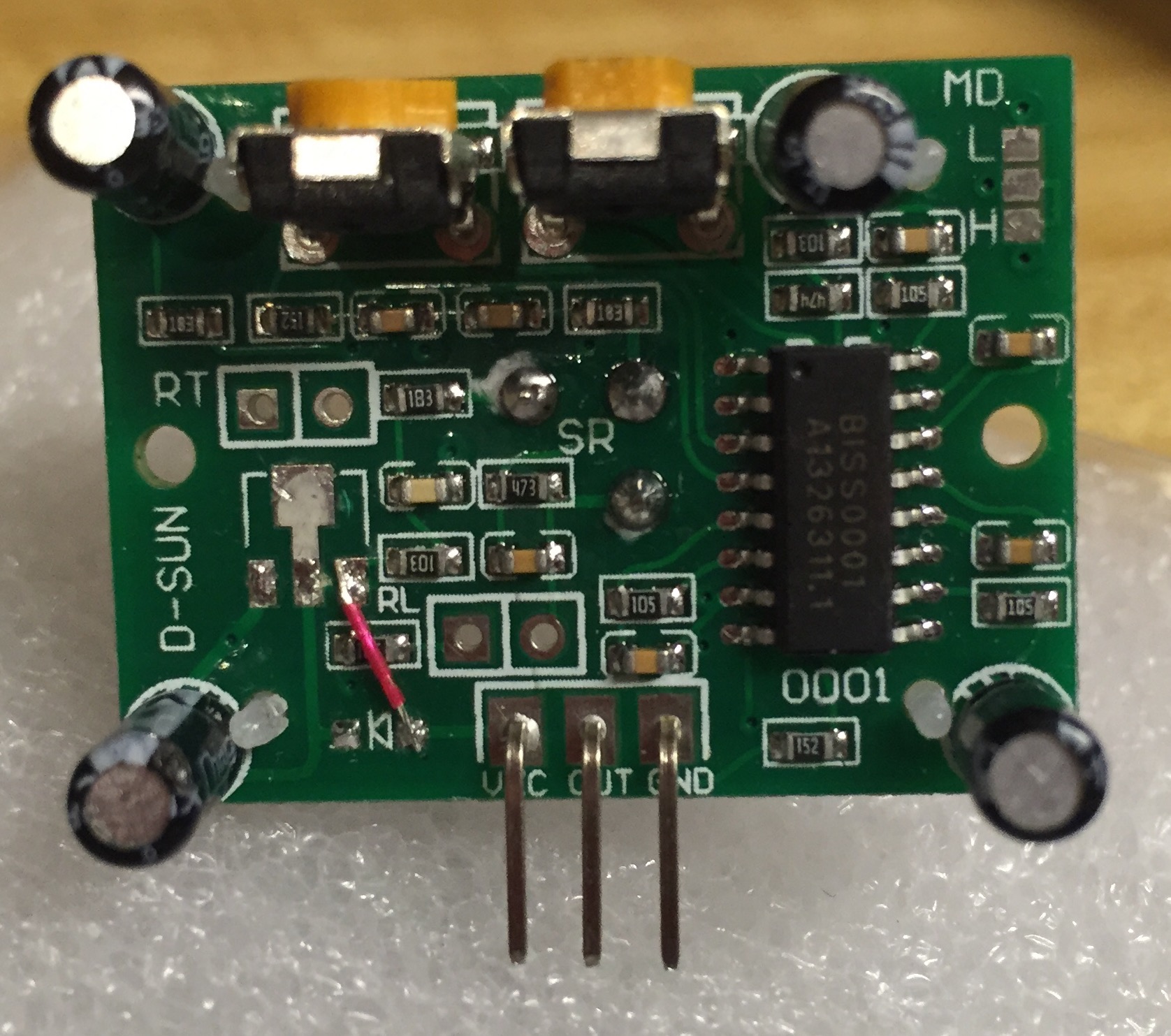
    PIR PCB modification

    1. Remove the voltage regulator and diode from the PIR PCB
    2. Solder a wire (red wire in the photo) from the VCC pin to the former location of the output pin of the voltage regulator

    The board should look like the photo shown below

    PIR.jpg

    Prepare the power source for the PIR

    1. The voltage from the 2xAA batteries (in my case) are boosted by a XC9140 low quiescent current 3V3 voltage regulator to power the Arduino pro mini. The radio is powered directly from the 2xAA batteries as it has its own regulator and can operate down to 1V9.
    2. The PIR sensor is based on the BISS0001 which as a supply voltage range of ~3-5 V. The modification done in earlier makes the module very sensitive to voltage ripple. In fact, the voltage ripple that occurs when switching from an awake to sleeping Arduino is enough, I believe, to cause the BISS0001 to reset and either oscillate or freeze.
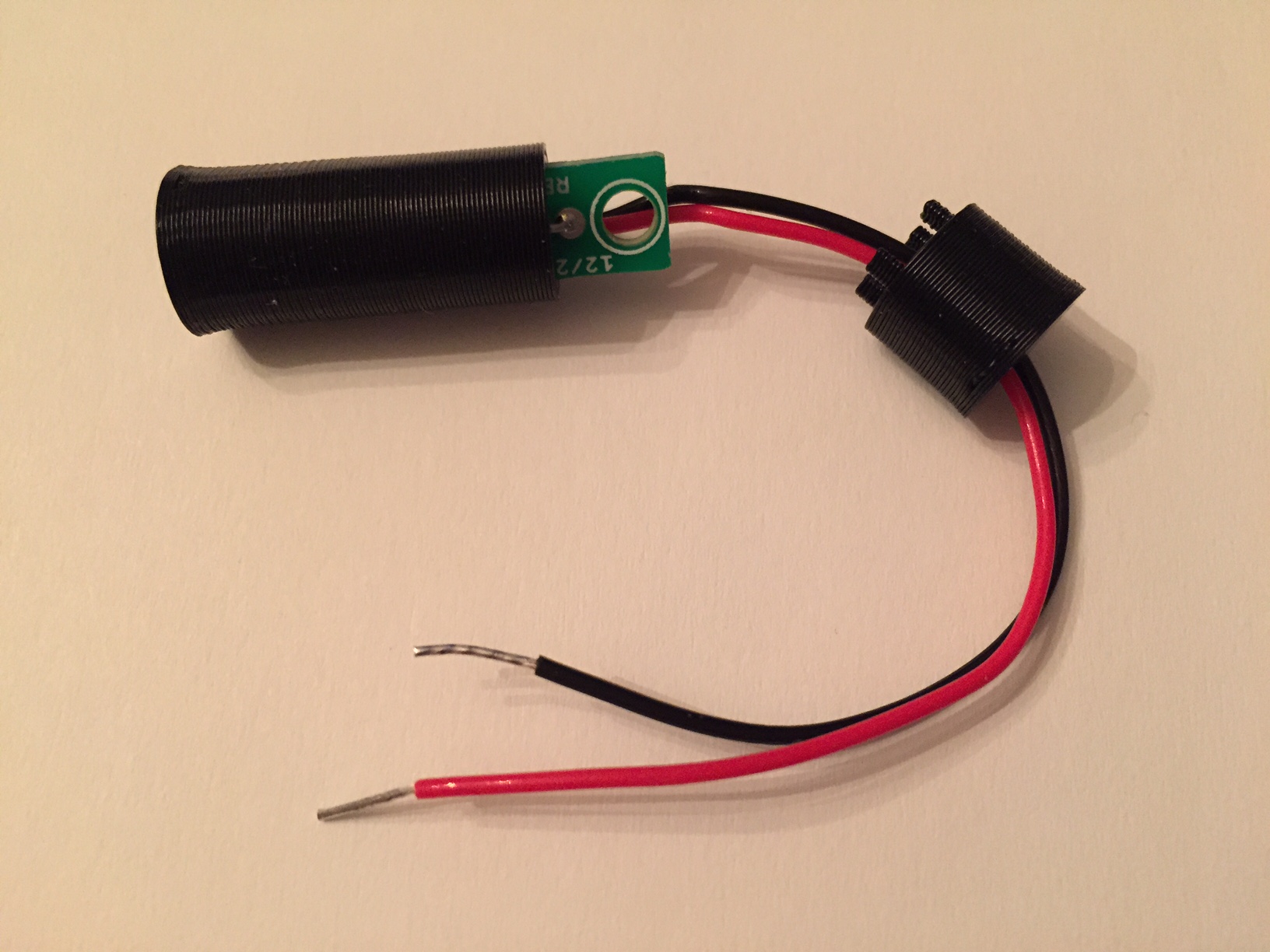
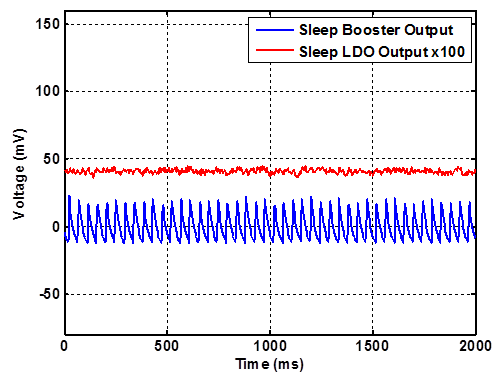
    3. I investigated a couple of solutions, but the best is to use a low-drop-out-voltage high-ripple-rejection-ratio regulator (FT531IA, 3V0, 36 µA supply current) to reduce the 3V3 boosted high-ripple supply to a steady 3V0. I know this seems silly to boost and then regulate down to another voltage but the data speaks for itself, below.

    booster_vs_LDO.png
    Figure 1. Comparison of the output of the 3V3 booster and the LDO 3V0 regulator while the Arduino is sleeping. AC coupled scope termination. Note: the LDO is multiplied by 100 and offset for clarity.

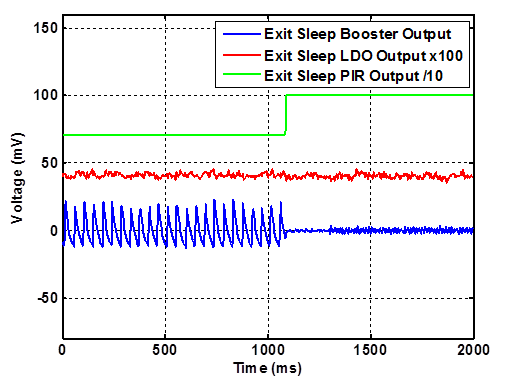
    wake_up.png
    Figure 2. Motion at around 1100 ms causes the PIR output to go high and the Arduino to wake up. Note the output from the booster quiets down and the output from the LDO is smooth. PIR and LDO outputs are offset for clarity.

    sleep.png
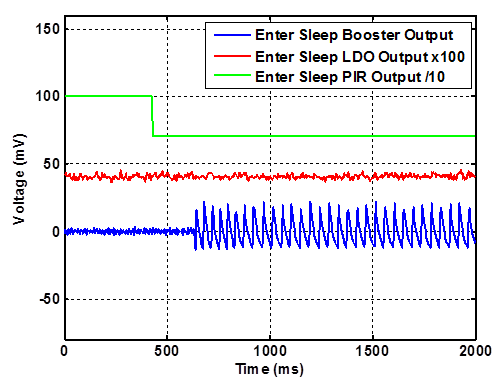
    Figure 3. Entering sleep once the PIR goes from tripped to non-tripped state. Once the Arduino starts to sleep, the output from the booster becomes noisy, while the LDO is smooth. PIR and LDO outputs are offset for clarity.

    Here is my example code (nothing fancy and much of it is borrowed from various places).

    //This program will test the PIR using interrupts 
    #include <avr/sleep.h>
    #include <avr/interrupt.h>
    
    
    void setup() 
    { 
    Serial.begin(115200);
    pinMode(3,INPUT);
    digitalWrite(3, LOW);
    pinMode(4,OUTPUT);
    //Signal PIR startup by flashing an LED 
    digitalWrite(4,HIGH);
    delay(5000);
    digitalWrite(4,LOW);
    delay(200);
    }
    
    void loop() 
    {
      //Come out of sleep and read state of PIR pin
      bool flag = digitalRead(3);
      if (flag == true)
      {
        Serial.println("tripped");
        digitalWrite(4,HIGH);
      }
      else
      {
        Serial.println("not tripped");
        digitalWrite(4,LOW);
      }
      delay(100);
      sleepNow();
    }
    
    void sleepNow()
    {
        Serial.println("Entering Sleep");
        // Set pin 3 as interrupt and attach handler:
            attachInterrupt(1, wakeUp, CHANGE);
            delay(100);
            // Choose our preferred sleep mode:
            set_sleep_mode(SLEEP_MODE_PWR_DOWN);
           
        // Set sleep enable (SE) bit:
        sleep_enable();
    
    // Put the device to sleep:
    sleep_mode();
    
    // Upon waking up, sketch continues from this point.
    sleep_disable();
    }
    
    void wakeUp(void)
    {
        detachInterrupt(1);
    }
    

    One last thing, it is necessary to attach a pull-down resistor on the PIR output pin in order to help the signal line go low when transitioning to the non-tripped state.

    Hardware

  • Help sending payload with more decimal places
    T therik

    @hek okay, I guess I was being stupid....

    With this msg constructor...

    MyMessage msgVolt(CHILD_ID_VOLT, V_VAR1);
    

    With this type def...

     float batteryV  = sensorValue * 0.003363075;
    

    I had the following thinking that I had turned on auto ack...

      gw.send(msgVolt.set(batteryV, 1));
    

    but that sets the decimal places to "1". So, if I want to set the decimal places to "2" and enable auto ack it would look like this...?

      gw.send(msgVolt.set(batteryV, 2),1);
    

    Thanks again.

    Development

  • Help sending payload with more decimal places
    T therik

    Hey guys,

    Just wondering if someone would be so kind as to help me figure out how to use setters to send a payload with more decimal places than the standard custom variable.

    I saw that perhaps I could construct the msg "on the fly", but I don't know the proper syntax to get that accomplished. Even easier, I would simply like to send a custom variable with two decimal places (or however many one should like). Right now the default is a single decimal place as I gather from the data that is being sent currently.

    In the plainest terms, I would like to send the battery voltage in a format X.XX using a custom variable, but using the standard custom variable constructor the payload is X.X.

    Thanks for your help.

    Development

  • [security] Introducing signing support to MySensors
    T therik

    Awesome, when I order new boards I will include this feature. One question, does your implementation require the use of both SDA and SCL pins or just SDA? I think I prefer the larger SOT-23 package that only has SDA pin. I guess simply, one-wire or I2C?

    Thanks.

    Development security

  • Windows GUI/Controller for MySensors
    T therik

    Thank you for this excellent work. I look forward to using it in my network. I just have a couple questions regarding setting up the GUI. I've read through this thread several times, but still have a couple of gaps in my understanding.

    1. Is the gateway that interfaces with the GUI an additional gateway which listens to, and sends node messages and updates? That is, additional to one that is interfaced with the controller (in my case a serial gateway connected to a Vera controller)?

    2. If my the answer to my first question is, yes, it is an additional gateway, is the code defining the operation different such that is does not interfere with the 'true' gateway? Or is the code the same (standard serial gateway sketch) but simply does not interfere?

    3. Do the nodes require the MYSBootloader in order to show up in the 'messages' tab, or will 'messages' tab show all node traffic regardless of bootloader? Of course for over the air (OTA) sketch updates it needs the MYSBootloader.

    4. Are these the correct steps to setup operation:

    a) download and extract the files.

    'b) place the bootloader folder into /arduino/hardware path such that the MYSBootloader and the associated boards show up in the 'tools->boards' menu.

    c) connect an Arduino with the gateway sketch to a computer using a USB cable (for the serial connection).

    d) run MYSController.exe (on windows) and select the COM port of the serial gateway in the configuration.

    e) hit connect and node traffic will show up in the 'messages' tab.

    If this is correct (and now that I write it down) it seems pretty straightforward, but I didn't see it explicitly described elsewhere. Sorry to be such a beginner, and thanks for straightening me out if I'm incorrect in any step.

    Controllers myscontroller mysbootloader

  • Reed Switch normally open or normally closed
    T therik

    One more thing...the actuator magnet I'm using is 1/4" diameter x 1/16" thick. (6.35mm x 1.56mm). So, I think this actuator magnet is also much smaller.

    Hardware hardware 3d print

  • Reed Switch normally open or normally closed
    T therik

    @gadu sure! But these are 1/10 the cost (good for when one needs ~30-40), and I'm not sure the commercial ones can be changed from normally closed to normally open with sense magnet nearby like this example. BTW, this one is 10mm x 32mm, so about the same size as in the first link you suggested.

    Hardware hardware 3d print

  • Reed Switch normally open or normally closed
    T therik

    Hi everyone,

    I'd like to show you a recently completed project. A reed switch-based sensor that can be implemented either normally open to normally closed. (I like normally open (with sense magnet) for low/no current draw, but normally closed (with sense magnet) can also be realized).

    If one does a bit of research on reed switches, it can be found that the switches can utilize two magnets for making a normally open switch (without sense magnet) a "normally closed" switch (without sense magnet).

    The idea is to drill a 7/16" hole in the jamb of a door and imbed the reed switch, then imbed a magnet into the door to complete the install. One wouldn't even know it is there; I would have a node close by to connect directly to the switch in the wall, (for me, new construction will allow this). Have a look, let me know your thoughts.

    I have designed a PCB and case (3D printed) for the switch. The PCB is straight forward, I'll leave that to anyone who'll want to replicate it, but the case took a few revs. Here is the prototype.
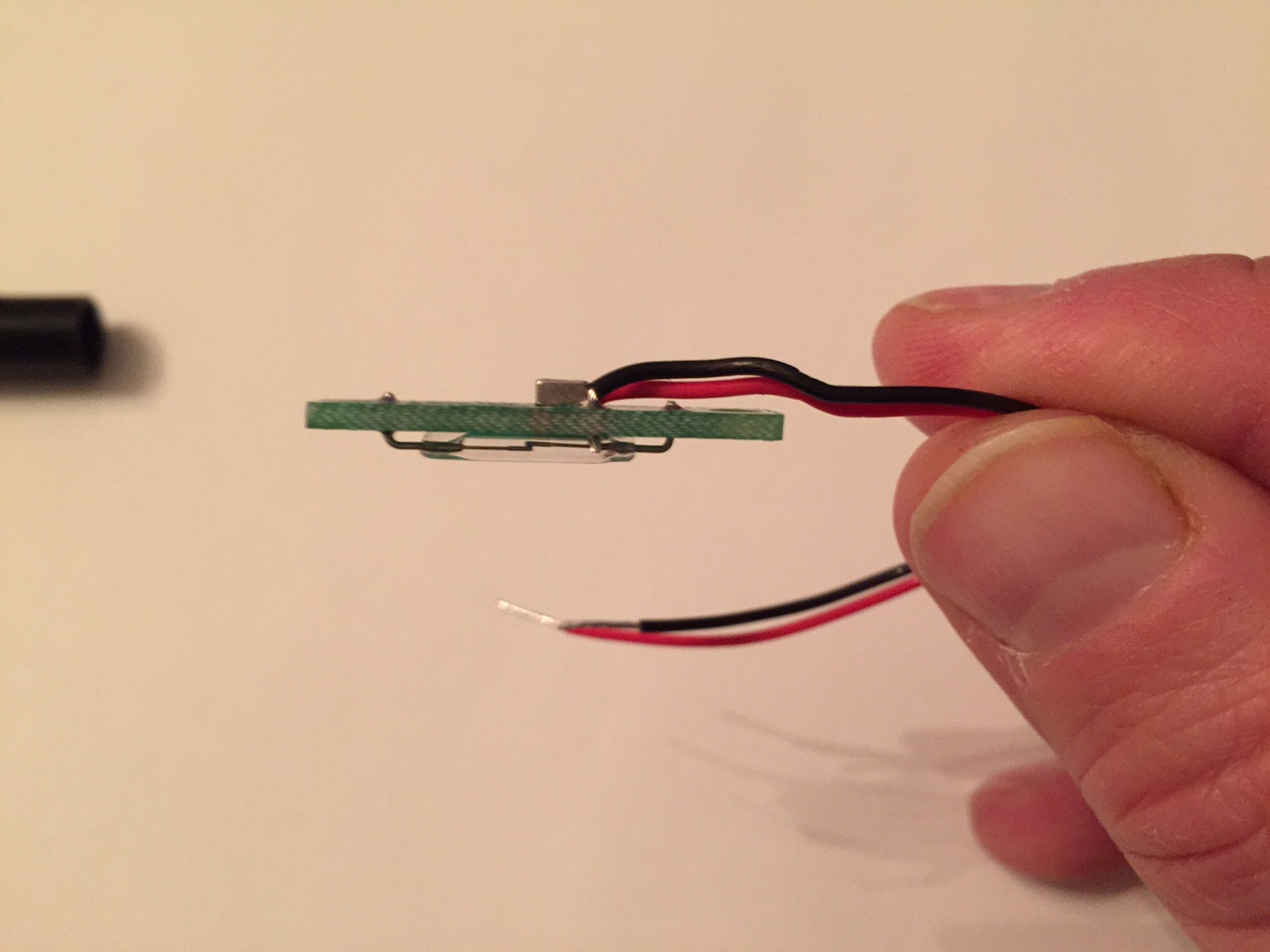
    image4.JPG
    Figure 1. Side view of the switch PCB. The switch is the glass tube; on the other side, I super-glued a magnet to the PCB to change the switch from normally open to "closed" (conducting). In this configuration the switch is closed (conducting), and when another magnet (sense magnet) is brought near (must be opposite polarity) the switch changes to open.
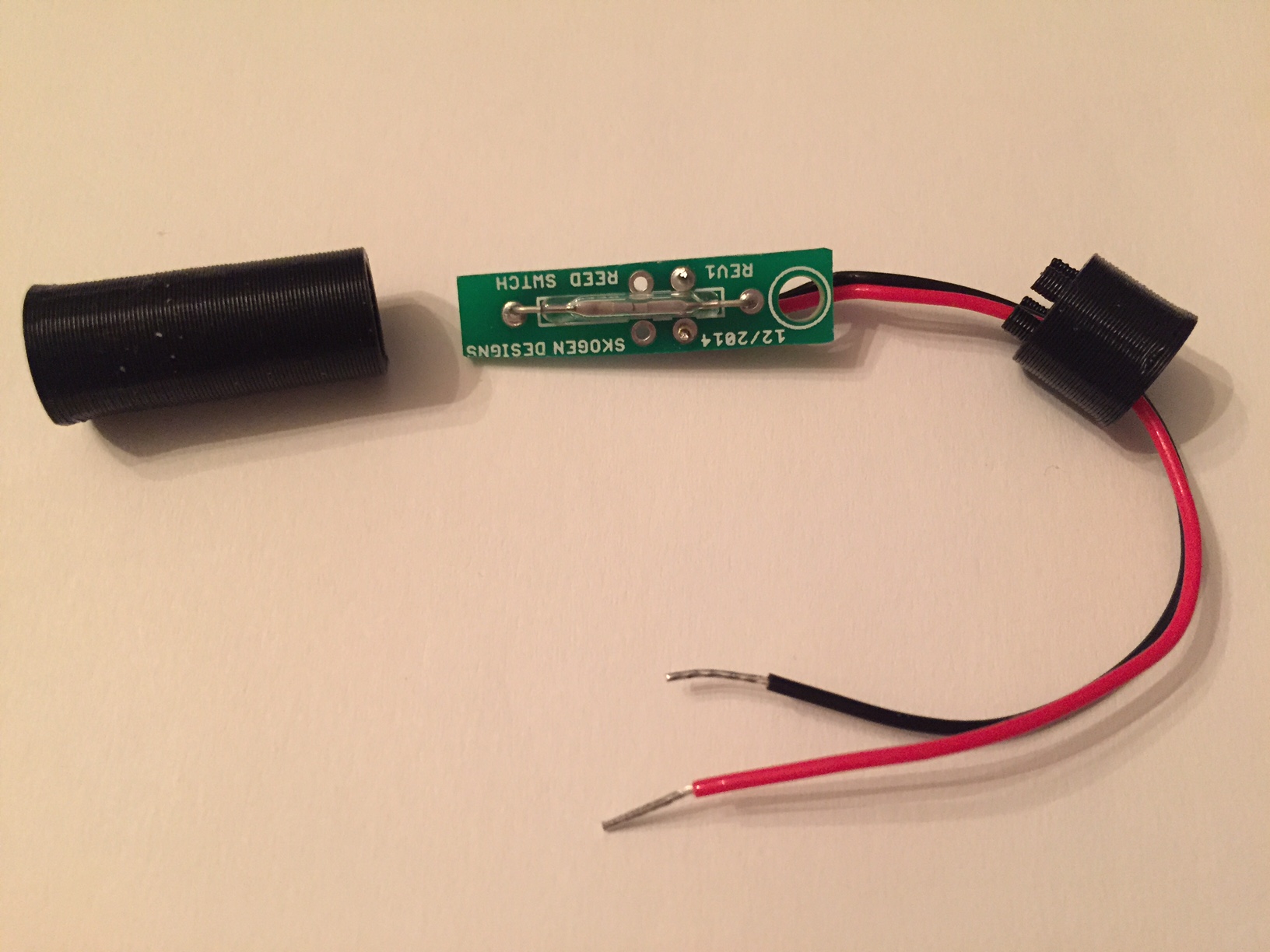
    image3.JPG
    Figure 2. Reed switch PCB and case.

    image2.JPG
    Figure 3. Reed switch fitting into case.
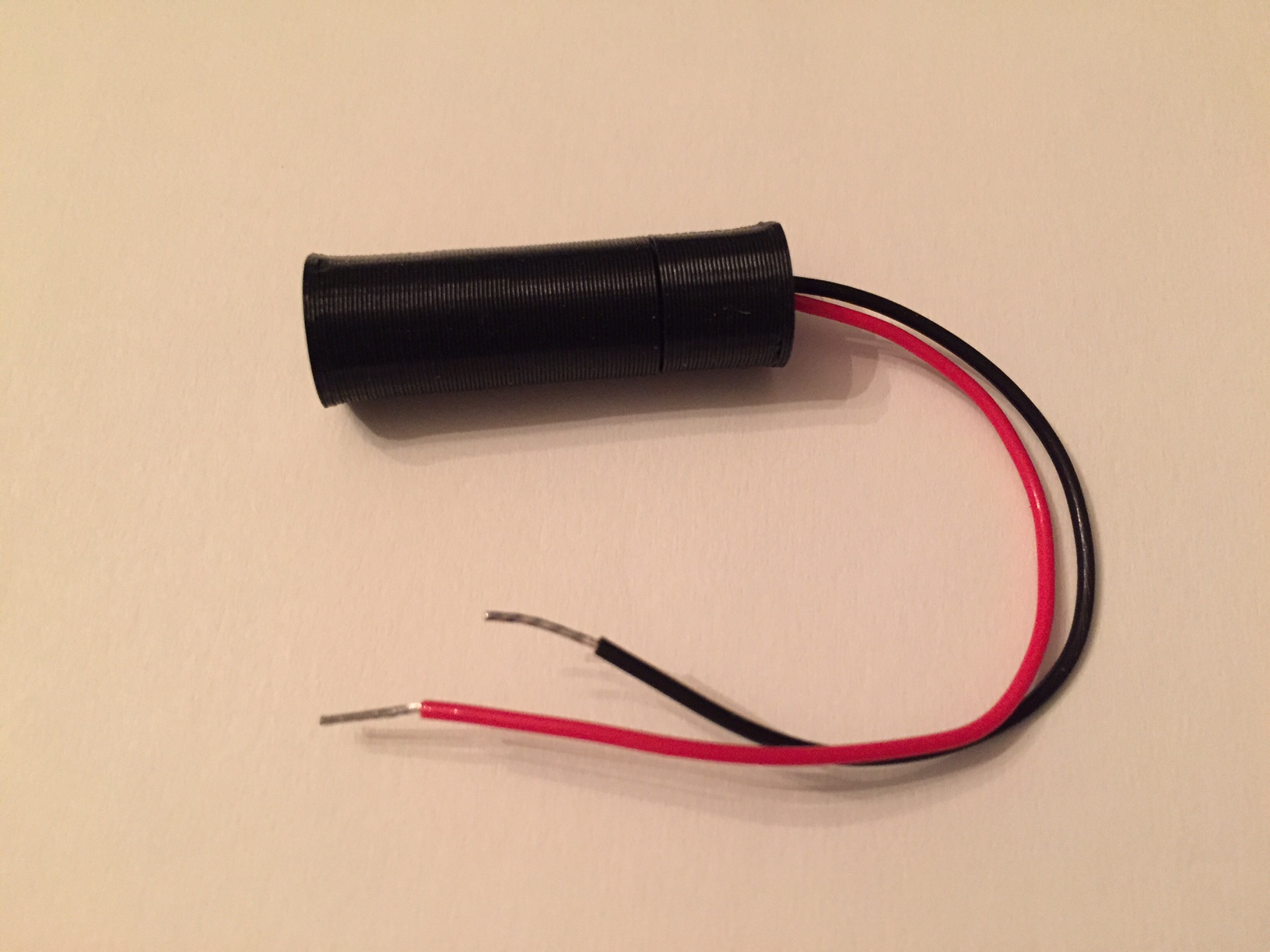
    image1.JPG
    Figure 4. Reed switch inside case. ready to be inserted into drilled hole in door jamb. The wires would travel to a node through a smaller hole at the end of the case. (if that makes sense). The sense magnet will be brought close to the 'top' of the cylinder when the door is closed making the switch 'open'. In this configuration, I believe a burglar would have a very hard time cutting wires that are inside a wall, so, no worries and I value normally low power (no current) operation.

    Here is the SketchUp file used to create the 3D print...you should install the "export to .STL" extension and then print away. The PCB is 1.6 mm thick. ReedSwitch_WorkingSet.skp

    Oh, and for those in the USA, I get the magnets from K&J Magnetics

    Hardware hardware 3d print

  • Question about NRF24L01+ and signal issues
    T therik

    A question for you in your setup...where is your antenna positioned relative to other nearby objects?

    I've noticed that there are several examples here and elsewhere where the PCB antenna is positioned over a metallic object or over another PCB with copper traces or ground plane. After talking with an antenna expert, he commented that doing so can de-tune the antenna, from 2.4 GHz to something like 2.2 GHz, which will greatly reduce the efficiency (and therefore range).

    Hardware nrf24l01

  • Another possible board - ATMega328, nRF socket, DHT22 socket, MOSFET, Uno pinout
    T therik

    @axillent said:

    @bjornhallberg said:

    The xc6210 looks promising though! What's the catch here?

    I'm using for a long time xc206, it s one of the best to power NRF24
    xc6210 should be also good. Any good proposals on pricing?

    xc6206 i was purchased $5 per 100pcs

    Just to add another option...I've been using the Fremont Micro Devices USA FT531JA. It has higher ripple rejection ratio than either of the above and is ~$20 for 100. Not as cheap as the xc6206, but much, much better ripple rejection. So, just another option that I found, it also has the same pin-out as the xc6210!! So, we can try them both with the same PCB design, cool.

    Hardware board

  • NRF24L01+ with external antenna - don't work
    T therik

    @johnr said:

    And I also had to change transmit power from max to high.

    Any idea why changing from max to high made it work? Do you think that the max setting was drawing more current than what you were supplying?

    Troubleshooting

  • My 1AA battery sensor
    T therik

    The longer it takes to find out, the better, right? ;)

    My Project prototype powered battery low
  • Login

  • Don't have an account? Register

  • Login or register to search.
  • First post
    Last post
0
  • MySensors
  • OpenHardware.io
  • Categories
  • Recent
  • Tags
  • Popular