
Pro Mini issues
-
Hi All.
I'm using a 3V Pro Mini and having issues loading the BinarySwitchSleepSensor2 app straight from web site. Sketch fails after a few seconds of loading.Details:
Sketch uses 12768 bytes (41%) of program storage space. Maximum is 30720 bytes.
Global variables use 446 bytes (21%) of dynamic memory, leaving 1602 bytes for local variables. Maximum is 2048 bytes.
avrdude: verification error, first mismatch at byte 0x1c55
0x7f != 0x5f
avrdude: verification error; content mismatch
avrdude: verification error; content mismatchThe Pro Mini loads and runs Blink app and others but fails with this. The nRF24L01 radio is hooked up as shown in Guide, although this doesn't matter. Won't load without the radio attached either.
The app loads and runs just fine on the ESP8266. Has anyone else had issues with the pro mini?
Thanks,
Dan -
Hi All.
I'm using a 3V Pro Mini and having issues loading the BinarySwitchSleepSensor2 app straight from web site. Sketch fails after a few seconds of loading.Details:
Sketch uses 12768 bytes (41%) of program storage space. Maximum is 30720 bytes.
Global variables use 446 bytes (21%) of dynamic memory, leaving 1602 bytes for local variables. Maximum is 2048 bytes.
avrdude: verification error, first mismatch at byte 0x1c55
0x7f != 0x5f
avrdude: verification error; content mismatch
avrdude: verification error; content mismatchThe Pro Mini loads and runs Blink app and others but fails with this. The nRF24L01 radio is hooked up as shown in Guide, although this doesn't matter. Won't load without the radio attached either.
The app loads and runs just fine on the ESP8266. Has anyone else had issues with the pro mini?
Thanks,
Dan@dpcons Are you using the Arduino IDE as your programmer? Did you select the correct arduino and com port? When I program my pro minis, I have to watch when I compile and send. As soon as it gets done compiling and gets ready to send, I hit the reset button on the pro mini. Sounds like you may already know all of that, but I just mentioned it in case you didn't. One other thing that you may not know is that you NEED to have your FTDI adapter set to 3.3v and NOT 5v. Depending how you had it wired with your nRF24 radio, if you tried programming at 5v, you may have fried the radio.
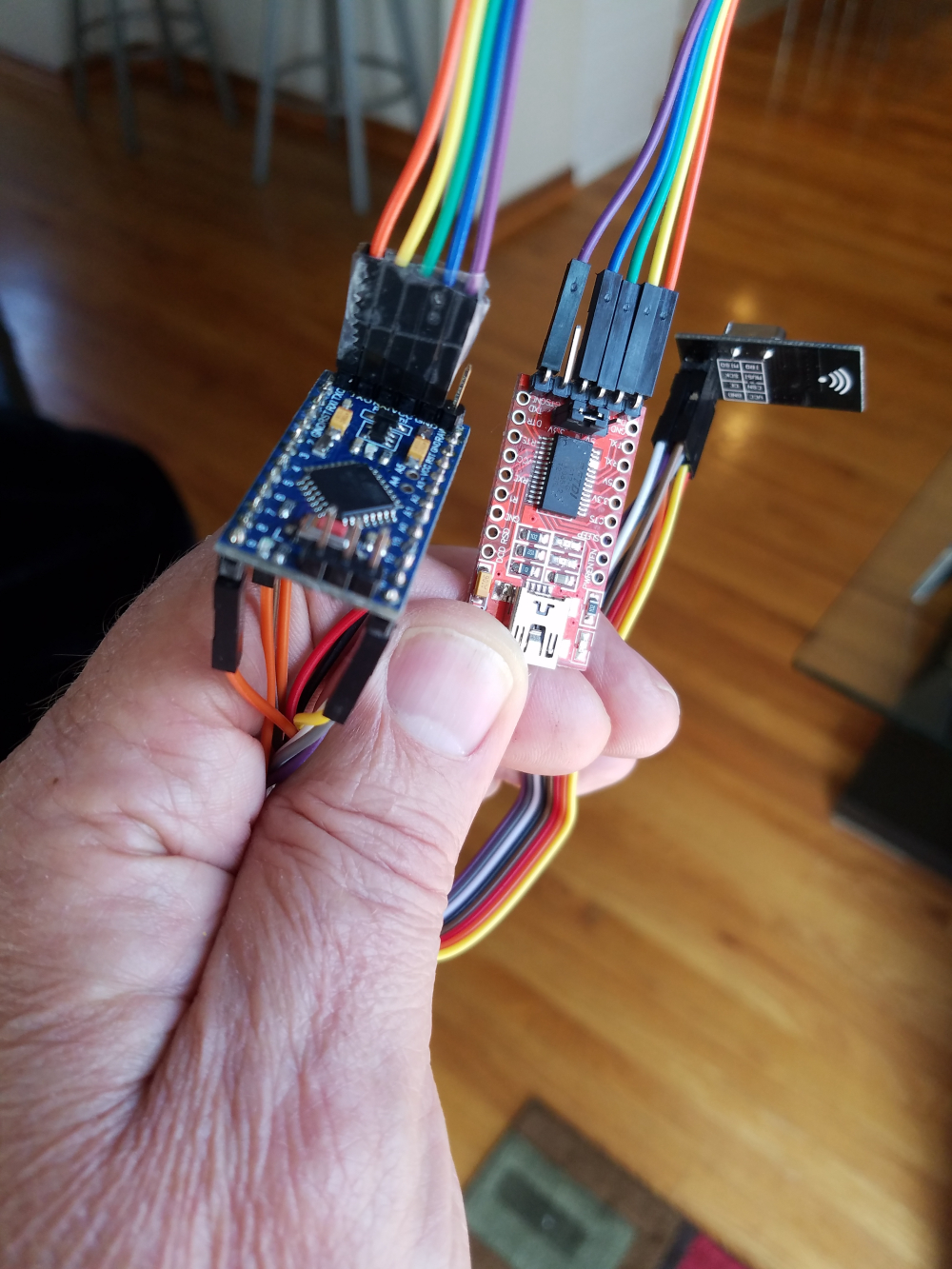
Can you show a pic of how you have this wired?
-
-
Hi All.
I'm using a 3V Pro Mini and having issues loading the BinarySwitchSleepSensor2 app straight from web site. Sketch fails after a few seconds of loading.Details:
Sketch uses 12768 bytes (41%) of program storage space. Maximum is 30720 bytes.
Global variables use 446 bytes (21%) of dynamic memory, leaving 1602 bytes for local variables. Maximum is 2048 bytes.
avrdude: verification error, first mismatch at byte 0x1c55
0x7f != 0x5f
avrdude: verification error; content mismatch
avrdude: verification error; content mismatchThe Pro Mini loads and runs Blink app and others but fails with this. The nRF24L01 radio is hooked up as shown in Guide, although this doesn't matter. Won't load without the radio attached either.
The app loads and runs just fine on the ESP8266. Has anyone else had issues with the pro mini?
Thanks,
Dan -
Hey Guys,
Thanks for the response. I've uploaded a jpg to show the connections. Yes, it's a 3V device. Before I use the minis I put 5V on RAW and check VCC. I've also selected the correct 328 configuration in the Arduino IDE. I've checked DTR with a scope and it's working fine, but I've held the reset button before programming, just to be safe. I've also used different Hub ports and cables as well as different FTDI programmers and Pro Mini boards. I even went back to the old version of the Arduino AVR Library. That's the reason for the posting. I've just started using the mysensors library, so I wasn't sure if all the examples worked on all devices and I didn't want to dig in the code. If you're telling me the Mini works with this code, then I can continue to look into other areas. Again, thanks to all! I appreciate your interest.
Dan
-
Hey Guys,
Thanks for the response. I've uploaded a jpg to show the connections. Yes, it's a 3V device. Before I use the minis I put 5V on RAW and check VCC. I've also selected the correct 328 configuration in the Arduino IDE. I've checked DTR with a scope and it's working fine, but I've held the reset button before programming, just to be safe. I've also used different Hub ports and cables as well as different FTDI programmers and Pro Mini boards. I even went back to the old version of the Arduino AVR Library. That's the reason for the posting. I've just started using the mysensors library, so I wasn't sure if all the examples worked on all devices and I didn't want to dig in the code. If you're telling me the Mini works with this code, then I can continue to look into other areas. Again, thanks to all! I appreciate your interest.
Dan
@dpcons Not that it matters too much to this situation, but when programming the pro minis, all that is needed is GND, VCC, RX and TX. Because you need to do a manual reset when programming, the DTR line is not necessary.
Vera Plus running UI7 with MySensors, Sonoffs and 1-Wire devices
Visit my website for more Bits, Bytes and Ramblings from me: http://dan.bemowski.info/ -
-
@dpcons Not that it matters too much to this situation, but when programming the pro minis, all that is needed is GND, VCC, RX and TX. Because you need to do a manual reset when programming, the DTR line is not necessary.
-
-
@bgunnarb said in Pro Mini issues:
@dbemowsk Strange! I have never made a manual reset when programming my Pro Minis.
I need to manually reset all my chinese Arduino clones as well. I either press the reset button right after the IDE finishes compiling the sketch and shows “uploading” or if I miss that mment, I’ll have to reset the *duino couple times while the IDE retries uploading.
-
-
This problem has been resolved. It appears my ANKER 10 port USB Hub is the problem. It's associated with the lower 4 ports of the hub. The remaining 6 are OK. I'm not sure what the actual problem is yet. The hub has a 60W power supply attached so I doubt it's a power issue...maybe noise? I now have a 10 port Amazon Hub which works well. As for the DTR signal, I've always used it and have seldom used the reset buttons. Also, I think most of the Arduinos and clones have it implemented through the serial convertor chip as well. It's also on all the ESP32 and ESP 8266 clones I've used. Again, thanks everyone for your comments and suggestions.






Hello! It looks like you're interested in this conversation, but you don't have an account yet.
Getting fed up of having to scroll through the same posts each visit? When you register for an account, you'll always come back to exactly where you were before, and choose to be notified of new replies (either via email, or push notification). You'll also be able to save bookmarks and upvote posts to show your appreciation to other community members.
With your input, this post could be even better 💗
Register Login