MyController version 2.0.0.Final
There is no version in MyController 2.0.0.Final I think it should be 1.6.x or 2.0.0-devel?

MyController version 2.0.0.Final
There is no version in MyController 2.0.0.Final I think it should be 1.6.x or 2.0.0-devel?
@Greg-Bowers can you elaborate the issue you are facing with MyController? also please provide the MyController version details
@hek I see that MySensors logo is missing in the forum
Thanks @hek !
Hello, MySensors forum search feature is not working? I tried with Incognito window too, but nothing changed.

CC @hek @mfalkvidd
@JeeLet the value, you have to set.
V_STATUS is not available in MyController, since it is not reported yet.
adding in setup sends the data only once. If you would like to retain the old status from MyController in your node, remove the send(msg.set(value==HIGH ? 1 : 0)); from your setup and create V_STATUS manually in MyController
Resources >> Fields >> Add,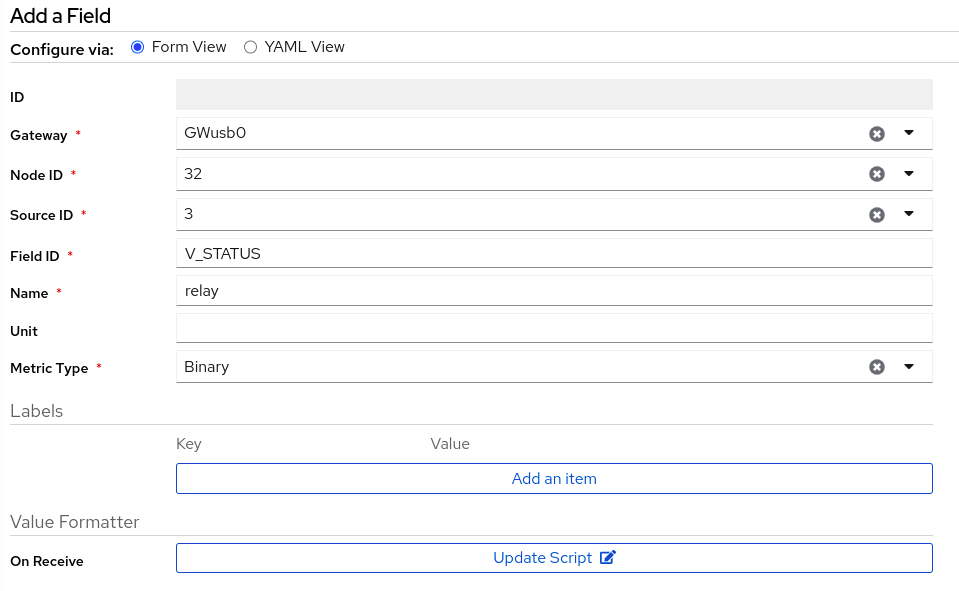
@JeeLet can you add send(msg.set(value==HIGH ? 1 : 0)); // Relay in your setup(){} function?
message.getType - returns the type of the message. you can see different types in https://www.mysensors.org/download/serial_api_20 under set, reqmessage.getBool - returns the boolean value of your payload. MySensors sends and receives all the payload in string format. in the arduino sketch with this different type of get functions you can get exact payload without additional steps. more details on https://www.mysensors.org/apidocs/classMyMessage.html@qobouky You are correct, the Binary type sensors should be visible here.
I just revisited your sketch and I found a conflict on the allocated sensors id
#define CHILD_ID_HUM 0
#define CHILD_ID_TEMP 1
#define CHILD_ID_CO2 2

#define NUMBER_OF_RELAYS 3 // Total number of attached relays
void presentation()  {
present(CHILD_ID_HUM, S_HUM);
present(CHILD_ID_TEMP, S_TEMP);
present(CHILD_ID_CO2, S_AIR_QUALITY);

 for (int sensor=1, pin=RELAY_PIN; sensor<=NUMBER_OF_RELAYS; sensor++, pin++) {
    // Register all sensors to gw (they will be created as child devices)
    present(sensor, S_BINARY);
  }
}
your relay sensor id should start from 3 or above.
I do not see the use of pin=RELAY_PIN.
You can present the status of your relay's, that can create V_STATUS on MyController
example:
#define RELAY_SENSOR 3 // Relay sensor starts at 3

void presentation()  {
....
MyMessage relayMsg(RELAY_SENSOR, V_STATUS);
for (int sensor=RELAY_SENSOR; sensor < (RELAY_SENSOR + NUMBER_OF_RELAYS); sensor++) {
    // Register all sensors to gw (they will be created as child devices)
    present(sensor, S_BINARY);
    relayMsg.sensor = sensor;
    send(relayMsg.set(loadState(sensor))); // current status of the relay
  }
}
NOTE: You have to update your relay code on setup and in receive too
@RagoTube looks like we need a gateway in a sensor network and with the help of gateway node-node communication can happen. The beauty of MySensors gateway is, you can use your gateway as a node.
I just updated my example shown here. Now the display node is a gateway node.
@RagoTube
Note: I didn't test this code. I believe it should work.
#define MY_DEBUG
#define MY_RADIO_RF24
#define MY_NODE_ID 21

#define DISPLAY_NODE_ID 0

#define TEMPERATURE_SENSOR_ID 0

#include "MySensors.h"

// triggering interval
static const uint32_t trigger_ms = 10000; // 10 seconds

uint32_t lastTrigger = 0;
MyMessage msgGeneral(TEMPERATURE_SENSOR_ID, V_TEMP);

void setup() {
}

void presentation() {
  sendSketchInfo("Temperature node 1", "1.0");
  present(TEMPERATURE_SENSOR_ID, S_TEMP, "Temperature");
}

void loop() {
  if (millis() - lastTrigger > trigger_ms) {
    lastTrigger = millis();
    // set destination address
    msgGeneral.setDestination(DISPLAY_NODE_ID);

    // get temperature from your temperature sensor
    float lastTemperature = 0.0; // update from your sensor

    // send message to display node
    send(msgGeneral.set(lastTemperature));
  }
}
#define MY_DEBUG
#define MY_RADIO_RF24
#define MY_GATEWAY_SERIAL

#define TEMPERATURE_SENSOR_ID 0
#define TEMPERATURE_NODE_ID 21

#include "MySensors.h"

float lastTemperature = 0.0;

void presentation() {
  sendSketchInfo("Display node / Gateway", "1.0");
}

void setup() {
}

void loop() {
}

void updateDisplay() {
  // update your display with "lastTemperature"
}

void receive(const MyMessage &message) {
  if (message.sender == TEMPERATURE_NODE_ID) { // message from temperature node
    if (message.sensor == TEMPERATURE_SENSOR_ID && message.type == V_TEMP) { // message from temperature sensor
      lastTemperature = message.getFloat();
      updateDisplay(); // update display
    }
  }
}
@RagoTube examples are there in,
The following sketch can help you to get your setup,
https://github.com/mysensors/MySensors/blob/development/examples/Node2Node/Node2Node.ino
@qobouky to get V_STATUS, you can do it two ways
S_BINARY sensors in MyController on this node. You can add a V_STATUS variable on each S_BINARY sensor in MyControllerYou will get a control option for your relays.
@qobouky seems you have problem with MyController and serial port communication. I do not see the node 0 too (gateway node).
can you check the MyController log file, is there any error? Also check the baud rate and port number of your serial device.
@qobouky your attachments are not available. can you please add it again?
do not you get your node by running discover on MyController?
@Yveaux said in serial, Ethernet to MQTT:
Of course, but MySensors MQTT gateway runs just as fine when connected over cabled ethernet, as when connected over wifi
I do not know that :)
Now on this tool, I do not see much benefit from ethernet to MQTT ;)
Still, it is good from serial to MQTT.
@Yveaux Some people keep wants to use serial or ethernet for security reason. They do not want to use WiFi.
But still, they can enjoy the benefits of MQTT
Hi,
I have developed a new MQTT bridge to convert from serial, ethernet to mqtt.
Supports for MySensors.
You can have more than one serial ports and/or ethernet connections.
If you are interested in, https://github.com/mycontroller-org/2mqtt
Thanks!