Skip to content
  • MySensors
  • OpenHardware.io
  • Categories
  • Recent
  • Tags
  • Popular
Skins
  • Light
  • Brite
  • Cerulean
  • Cosmo
  • Flatly
  • Journal
  • Litera
  • Lumen
  • Lux
  • Materia
  • Minty
  • Morph
  • Pulse
  • Sandstone
  • Simplex
  • Sketchy
  • Spacelab
  • United
  • Yeti
  • Zephyr
  • Dark
  • Cyborg
  • Darkly
  • Quartz
  • Slate
  • Solar
  • Superhero
  • Vapor

  • Default (No Skin)
  • No Skin
Collapse
Brand Logo
parachutesjP

parachutesj

@parachutesj
About
Posts
155
Topics
16
Shares
0
Groups
0
Followers
0
Following
0

Posts

Recent Best Controversial

  • fallback MQTT gateway
    parachutesjP parachutesj

    I didn't find a solution to this on gateway code. What I did and seems to be working more or less.

    I have two instances running MQTT and OpenHAB. One is active, other is inactive. Both obviously do have separate IP addresses, however I have managed with "keepalive" to put a virtual IP in front. All I had to do was reflashing my gateway to the virtual IP.
    So if one of the nodes is going down, the other one becomes the master and binds to the virtual IP.
    In addition to have this seemless, the MQTT servers have a subscription to the other one. This solves the issue, that in case of a failure, there is no current data on that instance.
    OpenHAB itself was always setup in a manner that I am able to run two instances (development and production) side by side and get updates on stats of all items.

    On hardware level, I run a server on Ubuntu with VirtualBox where the instances run. On top, I have another standy node running on a RasPi.

    Feature Requests

  • MySensors --> MQTT --> OpenHab 2.5
    parachutesjP parachutesj

    @TRS-80 sorry should have been more specific and edited my post above. I don't know if it still sucks but in the beginning it wasn't working very well and I didn't want to change all my configuration just to have exactly the same. Still a question of time.
    So I stick with MQTT 1 without MySensors binding - same, just what you have started with, stick with it until there is a real need.

    OpenHAB

  • MySensors --> MQTT --> OpenHab 2.5
    parachutesjP parachutesj

    @TRS-80 true, MQTT v1. The updated binding sucks IMHO
    EDIT: I should have been more specific. The MQTT binding was not migrated to 2.x for a long time and over time I got a lot of connected things via MQTT. Once 2.x was released it wasn't really stable in the beginning and later it was just not worth to do the upgrade IMHO. Once OH 3.x comes out and we have to adapt again, I might think about a migration but until then, I am happy with MQTT 1

    OpenHAB

  • Looking for recommendations, advice, and insights
    parachutesjP parachutesj

    @iamtheghost I am running exactly what you tried. Started with OpenHAB 1.x and migrated to 2.x. The serial gateway was exchanged with MQTT due to "open standard". I struggled a lot with hardware issues for actuators with relays but besides it always worked very well and reliable.
    Just for sensor data, I cannot think of something better than MySensors.

    General Discussion

  • Looking for a door monitor setup/circuit
    parachutesjP parachutesj

    @jamzm what are you looking for in particular?
    I use a ProMini with the Door/Window/Button switch. The sketch is modified to always sleep and wake up on change. (https://www.mysensors.org/build/binary), with a reed switch (https://www.aliexpress.com/item/32468849883.html?spm=a2g0s.9042311.0.0.27424c4dYn4UwZ)

    The sensor is powered with two AAA batteries. The case is actually from a real door/alarm system from aliexpress which I first wanted to hack but then decided to strip the electrnics out and build it myself. I use a NC reed switch to save additional power (when door is closed mainly).

    If you are interested more in the other part of my answer, I use OpenHAB as a controller. I have extensive rules to react base on an "uncontrolled" opening of a door or window.
    This could be anything from turning lights on to send an email to your phone, triggering an external security company or enabling your sprinkler ;-)

    General Discussion

  • Looking for a door monitor setup/circuit
    parachutesjP parachutesj

    I have multiple door/window sensors on 2 AAA batteries and they last forever. They permanently sleep and only send an update on change (open or close) and go back to sleep immediately. Within my controller I can track or take further actions e.g. trigger an alarm, send an email or turn lights on or whatever can be imagined. I would not mix up „dumb“ sensors with piezo buzzers etc. this will need additional power and space at the door/window and at the end it is much more efficient if you have a central control.

    General Discussion

  • MySensors --> MQTT --> OpenHab 2.5
    parachutesjP parachutesj

    @P72endragon
    I also use MQTT instead of the binding. Major reason: when I started, it wasn't out and I had the serialGW connected. Once realized I want the controller in a different place, I switched to MQTT and never regret. I feel I have more control with the text files than I have with the UI-driven way.

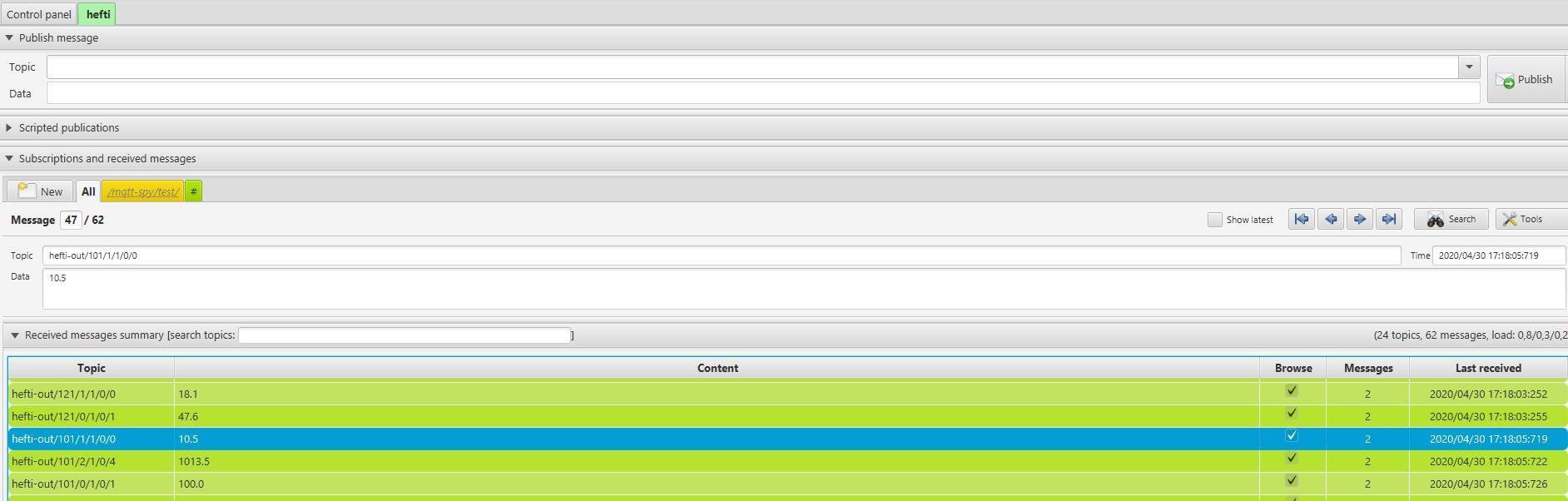
    First of all, I highly recommend you download MQTT-spy or similar, this will help a lot in figuring out the right notation in OpenHAB. It will just listen to the traffic and log it. You could also use it to send test messages etc.

    Example:
    Gateway configuration

    // Set this node's subscribe and publish topic prefix
    #define MY_MQTT_PUBLISH_TOPIC_PREFIX "hefti-out"
    #define MY_MQTT_SUBSCRIBE_TOPIC_PREFIX "hefti-in"
    
    // Set MQTT client id
    #define MY_MQTT_CLIENT_ID "hefti-1"
    

    Node configuration (temperature sensor)

    #define CHILD_ID_TEMP 1
    MyMessage msgTemp(CHILD_ID_TEMP, V_TEMP);
    present(CHILD_ID_TEMP, S_TEMP);
    

    OH example.items

    Number  roofTemp01              "Temperature roof [%.1f °C]" <temperature> (Temperature, Outdoor) {mqtt="<[mosquitto:hefti-out/101/1/1/0/0:state:default]"}
    

    MQTT spy of a recent message:
    mqtt-spy.JPG
    That is basically it. Depending on how you want to display the result (sitemap, PaperUI etc). As you see, the item is displayed in Temperature and Outdoor but you could also specify it directly in the sitemap but I guess this is going too far here.
    Hope that helped.

    OpenHAB

  • Serial GW and motion sensor functionning, but no activity between them
    parachutesjP parachutesj

    @Rolland don't bother with official Arduino (imho). the clones work flawless. I have a lot here in my home and they work well. It is just not worth it to pay 10x the price

    Troubleshooting

  • Serial GW and motion sensor functionning, but no activity between them
    parachutesjP parachutesj

    @Rolland unfortunately I have to confirm what @skywatch said: the radios are crap. I had those and never made good experience with them. Also the amplified long range radios are not really needed in most cases and if, then they need a really good power source to run otherwise I never got stable connections.
    Besides, any cheap NRF24 from China worked quite well for me. Some very few were faulty but if you get 10 for 7 USD you can live with that
    https://www.aliexpress.com/item/32518935864.html?spm=a2g0o.productlist.0.0.686fe77cXL8wSb&algo_pvid=ad7873cd-c5ff-4de5-8f42-f1648f896a0b&algo_expid=ad7873cd-c5ff-4de5-8f42-f1648f896a0b-1&btsid=0ab6d70515882563711402031e6ae8&ws_ab_test=searchweb0_0,searchweb201602_,searchweb201603_
    Not saying those are the best, but easier than the PA-ones.

    Troubleshooting

  • Serial GW and motion sensor functionning, but no activity between them
    parachutesjP parachutesj

    almost forgot:
    to just eliminate the issues with ID, missing controller etc. You could test the radios with a simple NRF24 test script, just google "NRF24 test code" and you will find a bunch to test if the communication works between nodes and radios are ok.

    Troubleshooting

  • Serial GW and motion sensor functionning, but no activity between them
    parachutesjP parachutesj

    @mfalkvidd true.
    this is the log if the radio works and it does not have an ID. just uploaded to a blank Nano

    0 MCO:BGN:INIT NODE,CP=RNNNA--,VER=2.1.1
    3 TSM:INIT
    4 TSF:WUR:MS=0
    11 TSM:INIT:TSP OK
    13 TSM:FPAR
    15 TSF:MSG:SEND,255-255-255-255,s=255,c=3,t=7,pt=0,l=0,sg=0,ft=0,st=OK:
    1024 TSF:MSG:READ,0-0-255,s=255,c=3,t=8,pt=1,l=1,sg=0:0
    1029 TSF:MSG:FPAR OK,ID=0,D=1
    2022 TSM:FPAR:OK
    2023 TSM:ID
    2024 TSM:ID:REQ
    2027 TSF:MSG:SEND,255-255-0-0,s=255,c=3,t=3,pt=0,l=0,sg=0,ft=0,st=OK:
    4034 TSM:ID
    4035 TSM:ID:REQ
    4037 TSF:MSG:SEND,255-255-0-0,s=255,c=3,t=3,pt=0,l=0,sg=0,ft=0,st=OK:
    6045 TSM:ID
    6046 TSM:ID:REQ
    6048 TSF:MSG:SEND,255-255-0-0,s=255,c=3,t=3,pt=0,l=0,sg=0,ft=0,st=OK:
    

    and like this if the NODE_ID was set (here to 155)

    0 MCO:BGN:INIT NODE,CP=RNNNA--,VER=2.1.1
    3 TSM:INIT
    4 TSF:WUR:MS=0
    11 TSM:INIT:TSP OK
    13 TSM:INIT:STATID=155
    15 TSF:SID:OK,ID=155
    16 TSM:FPAR
    53 TSF:MSG:SEND,155-155-255-255,s=255,c=3,t=7,pt=0,l=0,sg=0,ft=0,st=OK:
    146 TSF:MSG:READ,0-0-155,s=255,c=3,t=8,pt=1,l=1,sg=0:0
    151 TSF:MSG:FPAR OK,ID=0,D=1
    2060 TSM:FPAR:OK
    2061 TSM:ID
    2062 TSM:ID:OK
    2064 TSM:UPL
    2067 TSF:MSG:SEND,155-155-0-0,s=255,c=3,t=24,pt=1,l=1,sg=0,ft=0,st=OK:1
    2079 TSF:MSG:READ,0-0-155,s=255,c=3,t=25,pt=1,l=1,sg=0:1
    2084 TSF:MSG:PONG RECV,HP=1
    2086 TSM:UPL:OK
    2088 TSM:READY:ID=155,PAR=0,DIS=1
    2093 TSF:MSG:SEND,155-155-0-0,s=255,c=3,t=15,pt=6,l=2,sg=0,ft=0,st=OK:0100
    2100 TSF:MSG:READ,0-0-155,s=255,c=3,t=15,pt=6,l=2,sg=0:0100
    2108 TSF:MSG:SEND,155-155-0-0,s=255,c=0,t=17,pt=0,l=5,sg=0,ft=0,st=OK:2.1.1
    2116 TSF:MSG:SEND,155-155-0-0,s=255,c=3,t=6,pt=1,l=1,sg=0,ft=0,st=OK:0
    4125 TSF:MSG:SEND,155-155-0-0,s=255,c=3,t=11,pt=0,l=13,sg=0,ft=0,st=OK:Motion Sensor
    4134 TSF:MSG:SEND,155-155-0-0,s=255,c=3,t=12,pt=0,l=3,sg=0,ft=0,st=OK:1.0
    4143 TSF:MSG:SEND,155-155-0-0,s=1,c=0,t=1,pt=0,l=0,sg=0,ft=0,st=OK:
    4149 MCO:REG:REQ
    4155 TSF:MSG:SEND,155-155-0-0,s=255,c=3,t=26,pt=1,l=1,sg=0,ft=0,st=OK:2
    4170 TSF:MSG:READ,0-0-155,s=255,c=3,t=27,pt=1,l=1,sg=0:1
    4175 MCO:PIM:NODE REG=1
    4177 MCO:BGN:STP
    4178 MCO:BGN:INIT OK,TSP=1
    0
    4188 TSF:MSG:SEND,155-155-0-0,s=1,c=1,t=16,pt=0,l=1,sg=0,ft=0,st=OK:0
    4194 MCO:SLP:MS=120000,SMS=0,I1=1,M1=1,I2=255,M2=255
    4199 MCO:SLP:TPD
    

    if I "kill" the radio, it looks like this, which is still different than what @Rolland got. But would be worth a try to replace the radio.

    0 MCO:BGN:INIT NODE,CP=RNNNA--,VER=2.1.1
    3 TSM:INIT
    4 TSF:WUR:MS=0
    11 !TSM:INIT:TSP FAIL
    12 TSM:FAIL:CNT=1
    14 TSM:FAIL:PDT
    
    Troubleshooting

  • Serial GW and motion sensor functionning, but no activity between them
    parachutesjP parachutesj

    @Rolland and you should put this into your code from both (if not there yet)

    #define MY_DEBUG 
    
    Troubleshooting

  • Serial GW and motion sensor functionning, but no activity between them
    parachutesjP parachutesj

    @Rolland as far as I know, you need a controller which assigns the node ID's - this of course means that you need a fully functioning setup from the beginning e.g. your gateway connected to a controller.
    As a workaround you could specify the node ID manually. see my other post.

    Troubleshooting

  • Serial GW and motion sensor functionning, but no activity between them
    parachutesjP parachutesj

    try and put this into your code of the node

    #define MY_NODE_ID 2
    

    replace the number (2) for each further node with numbers between 1 and 255

    what happens then?

    Troubleshooting

  • TV on/off monitor using TV USB port
    parachutesjP parachutesj

    @rvendrame battery powered should work. Always sleep and only wake on change. My door/window sensors run ‚since forever‘ on the first battery.

    Hardware

  • TV on/off monitor using TV USB port
    parachutesjP parachutesj

    @tomvanderputte I don‘t think it will harm the hardware if it powers down. I just don‘t like „to be out of control“. You don‘t know if it powered down or just dropped a heartbeat. Also I do some things in the evening once the TV powers down. This will obvious be delayed if you just kill the node and for traffic pollution you should not send updates to often.

    Hardware

  • Serial GW and motion sensor functionning, but no activity between them
    parachutesjP parachutesj

    @Rolland
    Did you give your node an ID?
    You could set via code or burn into ROM. This is needed. Can you post your node-code?

    Troubleshooting

  • TV on/off monitor using TV USB port
    parachutesjP parachutesj

    @tomvanderputte
    I don‘t like the idea of shutting off the node once USB power turns off... but you could use the Expire-Binding in OH for finding out.
    I‘d rather mount a photo cell to the front LED (if it turns off once powerded on) or on a scart interface, you could sense power once turned on. Or of course the USB if it turns on/off.

    Hardware

  • Can I run multiple Analog capacitive moisture sensors per nano
    parachutesjP parachutesj

    I am not sure if this is feasible to have 25' cables... Each needs 3 wires to connect.
    I am running the capacitive soil sensors in single mode with 3.3V ProMini on Battery. I do not see issues having 2-3 sensors per Arduino but more seems to be a wiring nightmare all over the garden.

    General Discussion

  • Anyone help with 4 relays please?
    parachutesjP parachutesj

    @petr-nosek
    sure with the 2nd power supply it looks different. However mine were all in-wall and there is just not enough space for this.

    Troubleshooting
  • Login

  • Don't have an account? Register

  • Login or register to search.
  • First post
    Last post
0
  • MySensors
  • OpenHardware.io
  • Categories
  • Recent
  • Tags
  • Popular