Skip to content
  • MySensors
  • OpenHardware.io
  • Categories
  • Recent
  • Tags
  • Popular
Skins
  • Light
  • Brite
  • Cerulean
  • Cosmo
  • Flatly
  • Journal
  • Litera
  • Lumen
  • Lux
  • Materia
  • Minty
  • Morph
  • Pulse
  • Sandstone
  • Simplex
  • Sketchy
  • Spacelab
  • United
  • Yeti
  • Zephyr
  • Dark
  • Cyborg
  • Darkly
  • Quartz
  • Slate
  • Solar
  • Superhero
  • Vapor

  • Default (No Skin)
  • No Skin
Collapse
Brand Logo
T

TimO

@TimO
Hero Member
About
Posts
511
Topics
7
Shares
0
Groups
2
Followers
13
Following
1

Posts

Recent Best Controversial

  • openHAB 2.0 binding
    T TimO

    Features

    • Serial Gateway supported (with variable baud rate)
    • Ethernet Gateway supported
    • Supported sensors: S_TEMP, S_HUM, S_VOLTAGE, S_LIGHT, S_POWER, S_BARO, S_DOOR, S_MOTION, S_SMOKE, S_DIMMER, S_COVER (Stop not implemented in OH2 yet), S_WIND, S_RAIN, S_UV, S_WEIGHT, S_DISTANCE, S_LIGHT_LEVEL
    • Request for an ID is answered (random free number is given)
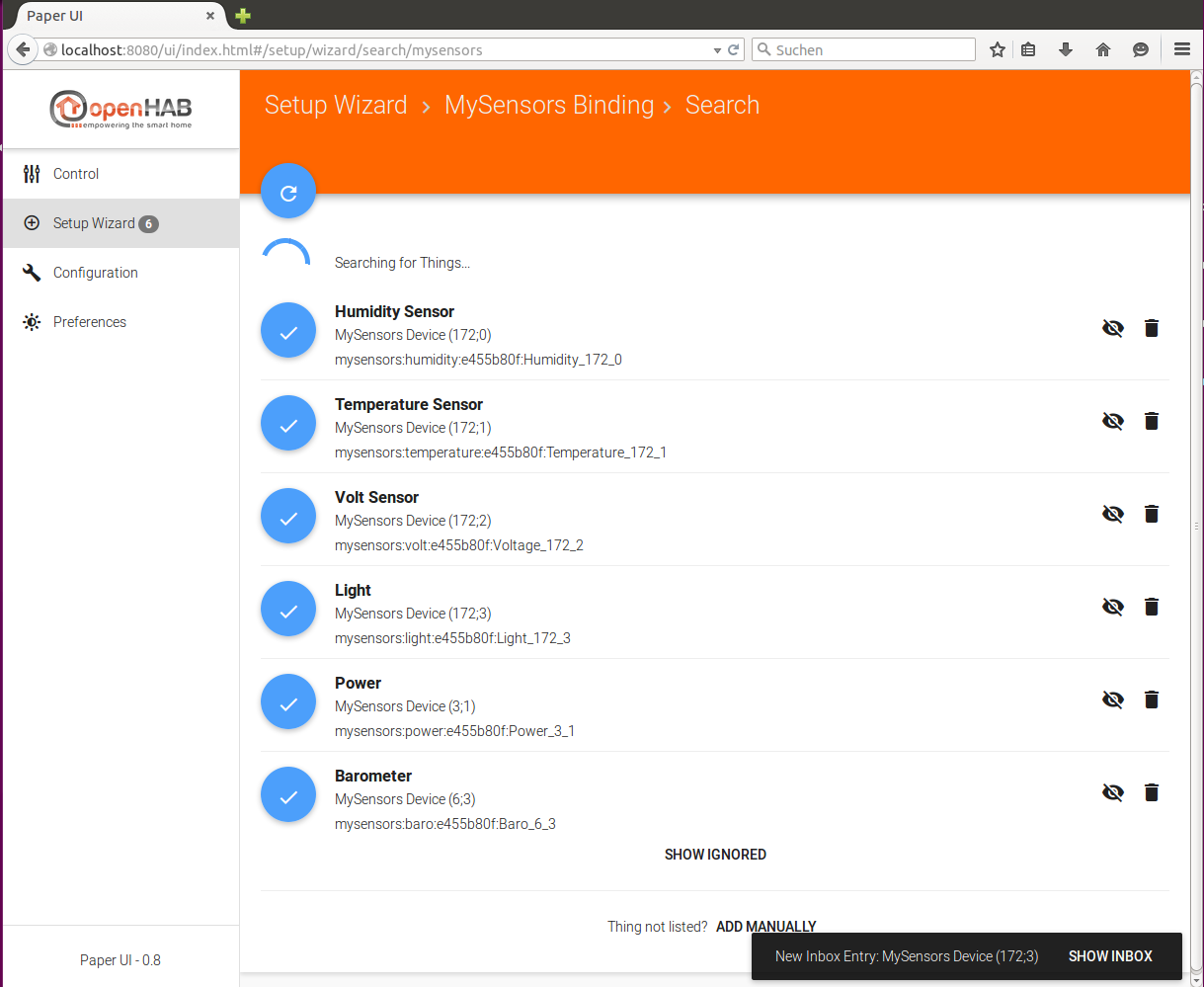
    • Discovery of devices, to use it: start the scan for devices in OpenHAB 2.0 and restart your nodes

    Pictures
    Discovery:
    openhab2-mysensors-discovery-2015-07-27.png

    What is not working yet:

    • no reconnect after lost connection

    How to test:

    Visit the wiki on the GitHub Repo.

    OpenHAB

  • [Tutorial] openHAB with serial gateway
    T TimO

    As it is now possible to use a serial gateway with openHAB I've written a simple (as simple as possible) entry tutorial.

    What do we need?

    • a MySensors serial gateway
    • a linux system (like a RPi, example based on Ubuntu)
    • a MySensors sensor (for example with a DHT22 and a fixed NODE_ID of 101)

    Where to start?

    Start with the serial gateway.

    Build it: http://www.mysensors.org/build/serial_gateway

    If you see something like this in the serial monitor for arduino you're done:

     0;0;3;0;14;Gateway startup complete.
    

    Connect the serial gateway to the linux system and execute "dmesg". You should see something like:

    [  186.047748] usb 2-1.5: new full-speed USB device number 7 using ehci-pci
    [  186.147030] usb 2-1.5: New USB device found, idVendor=0403, idProduct=6001
    [  186.147036] usb 2-1.5: New USB device strings: Mfr=1, Product=2, SerialNumber=3
    [  186.147040] usb 2-1.5: Product: FT232R USB UART
    [  186.147044] usb 2-1.5: Manufacturer: FTDI
    [  186.147047] usb 2-1.5: SerialNumber: A40360T2
    [  186.149618] ftdi_sio 2-1.5:1.0: FTDI USB Serial Device converter detected
    [  186.149659] usb 2-1.5: Detected FT232RL
    [  186.149663] usb 2-1.5: Number of endpoints 2
    [  186.149667] usb 2-1.5: Endpoint 1 MaxPacketSize 64
    [  186.149670] usb 2-1.5: Endpoint 2 MaxPacketSize 64
    [  186.149673] usb 2-1.5: Setting MaxPacketSize 64
    [  186.150205] usb 2-1.5: FTDI USB Serial Device converter now attached to ttyUSB0
    

    As we see the serial gateway is now accessible through "ttyUSB0" like: /dev/ttyUSB0. But the Number may change. It depends on the FTDI Chip and could also be something like "/dev/ttyACM0".

    But we don't want to look for the correct name after every reboot or after we plugged out and in the serial gateway, so we add the following in "/etc/udev/rules.d/99-usb-serial.rules"

    SUBSYSTEM=="tty", ATTRS{idVendor}=="0403", ATTRS{idProduct}=="6001", ATTRS{serial}=="A40360T2", SYMLINK+="ttyUSB99"
    

    Look at the output from "dmesg" above and change "0403", "6001" and "A40360T2" according to your hardware.

    Now plug out and plug in the serial gateway.

    The serial gateway will now be accessible through "/dev/ttyUSB99".

    Install openHAB

    It is important to install a version like or above 1.7.0. This version is not stable yet so download a snapshot from cloudbees:

    https://openhab.ci.cloudbees.com/job/openHAB/

    You need:

    distribution-1.7.0-SNAPSHOT-addons.zip
    distribution-1.7.0-SNAPSHOT-runtime.zip

    Move to the "/opt" directory and extract the files:

    cd /opt
    mkdir openhab
    cd openhab
    unzip /tmp/distribution-1.7.0-SNAPSHOT-runtime.zip
    cd addons
    unzip /tmp/distribution-1.7.0-SNAPSHOT-addons.zip org.openhab.binding.serial-1.7.0-SNAPSHOT.jar
    

    We will keep it simple and just use the serial binding.

    Configure openHAB

    At first we need to configure openHAB to use the serial binding to connect with the gateway. So we switch to the "configurations" directory:

    cd /opt/openhab/configurations
    

    There we create a file named "demo.items" in the "items" directory:

    vi items/demo.items
    

    Insert the following content:

    String Arduino "Arduino" { serial="/dev/ttyUSB99@115200" }
    Number          livingTemp01                            "Temperatur [%.1f °C]" <temperature> 
    Number          livingHum01                             "Feuchtigkeit [%.1f %%]" <temperature>
    

    We keep it simple and just assume we just want to read out a DHT22.

    Start up openHAB with "/opt/openhab/start.sh". You should see something like:

    2015-04-02 20:05:30.731 [INFO ] [runtime.busevents             ] - Arduino state updated to 0;0;3;0;14;Gateway startup complete.
    

    If that is the case: very good!!

    Now we need rules that reads the information that is received by openHAB via /dev/ttyUSB99 and show it.

    vi rules/demo.rules
    

    Content (that is the hardest part):

    import org.openhab.core.library.types.*
    import org.openhab.core.persistence.*
    import org.openhab.model.script.actions.*
    import org.joda.time.*
    import java.util.*
    import org.eclipse.xtext.xbase.lib.*
    import org.openhab.core.items.*
    
    
    var String ArduinoUpdate = ""
    var String sketchName = ""
    
    var int V_TEMP = 0
    var int V_HUM = 1
    var int V_LIGHT = 2
    var int V_DIMMER = 3
    var int V_PRESSURE = 4
    var int V_FORECAST = 5
    var int V_RAIN = 6
    var int V_RAINRATE = 7
    var int V_WIND = 8
    var int V_GUST = 9
    var int V_DIRECTION = 10
    var int V_UV = 11
    var int V_WEIGHT = 12
    var int V_DISTANCE = 13
    var int V_IMPEDANCE = 14
    var int V_ARMED = 15
    var int V_TRIPPED = 16
    var int V_WATT = 17
    var int V_KWH = 18
    var int V_SCENE_ON = 19
    var int V_SCENE_OFF = 20
    var int V_HEATER = 21
    var int V_HEATER_SW = 22
    var int V_LIGHT_LEVEL = 23
    var int V_VAR1 = 24
    var int V_VAR2 = 25
    var int V_VAR3 = 26
    var int V_VAR4 = 27
    var int V_VAR5 = 28
    var int V_UP = 29
    var int V_DOWN = 30
    var int V_STOP = 31
    var int V_IR_SEND = 32
    var int V_IR_RECEIVE = 33
    var int V_FLOW = 34
    var int V_VOLUME = 35
    var int V_LOCK_STATUS = 36
    var int V_DUST_LEVEL = 37
    var int V_VOLTAGE = 38
    var int V_CURRENT = 39
    var int msgPresentation = 0
    var int msgSet = 1
    var int msgReq = 2
    var int msgInternal = 3
    var int msgStream = 4
    var int alarmArmor = 1
    
    // Internal Commands
    
    var int I_BATTERY_LEVEL = 0
    var int I_TIME = 1
    var int I_VERSION = 2
    var int I_ID_REQUEST = 3
    var int I_ID_RESPONSE = 4
    var int I_INCLUSION_MODE = 5
    var int I_CONFIG = 6
    var int I_FIND_PARENT = 7
    var int I_FIND_PARENT_RESPONSE = 8
    var int I_LOG_MESSAGE = 9
    var int I_CHILDREN = 10
    var int I_SKETCH_NAME = 11
    var int I_SKETCH_VERSION = 12
    var int I_REBOOT = 13
    var int I_GATEWAY_READY = 14
    
    // Mappings
    var HashMap<String, String> sensorToItemsMap = newLinkedHashMap(
        "101;0;"            -> "livingHum01",
        "livingHum01"       -> "101;0;",
        "101;1;"            -> "livingTemp01",
        "livingTemp01"      -> "101;1;"
    )
        
    
    //receiving msg from mysensors gateway
    rule "Arduino sends to Openhab"
        when
            Item Arduino received update
        then
            var String lineBuffer =  Arduino.state.toString.split("\n")
            for (String line : lineBuffer) {
                var String[] message = line.split(";")
                var Integer nodeId = new Integer(message.get(0))
                var Integer childId = new Integer(message.get(1))
                var Integer msgType = new Integer(message.get(2))
                var Integer ack = new Integer(message.get(3))
                var Integer subType = new Integer(message.get(4))
                var String msg = message.get(5)
                if(msgType == 1 ){
                    if (subType == V_TEMP){
                        postUpdate(sensorToItemsMap.get( nodeId + ";" + childId + ";"), msg)
                        println ("Temp item: " + sensorToItemsMap.get( nodeId + ";" + childId + ";") + " temp: " + msg )
                        }
                    if (subType == V_HUM){
                        postUpdate(sensorToItemsMap.get( nodeId + ";" + childId + ";"), msg)
                        println ("Hum item: " + sensorToItemsMap.get( nodeId + ";" + childId + ";") + " hum: " + msg )
                        }
                    }    
                // Internal Command
                if(msgType == 3){
                    if(subType == I_SKETCH_NAME){
                            println("Sketch name: " + msg )
                            sketchName=msg
                        }
                    if(subType == I_SKETCH_VERSION){
                            println("Sketch version: " + msg )
                            postUpdate(sensorToItemsMap.get( nodeId + ";" + childId + ";"), sketchName+" " +msg )
                            sketchName=""
                        }
                    }
                }   
            }
    end
    

    Wow, that is hardcore! Are you still with me? Luckily there is not much to change for start.

    There is a mapping, that you may change or want to extent:

    // Mappings
    var HashMap<String, String> sensorToItemsMap = newLinkedHashMap(
        "101;0;"            -> "livingHum01",
        "livingHum01"       -> "101;0;",
        "101;1;"            -> "livingTemp01",
        "livingTemp01"      -> "101;1;"
    )
    

    Where "101" is the NODE_ID of my DHT22 Sensor. I'm using hardcoded NODE_IDs, so if your sensor has another NODE_ID already, just change the mappings in the configuration. The "0" and "1" after the "101" is the childId. Change that too if you must. Just look at the Arduino code of your sensor.

    Start openHAB if it is not already running and look for the output.

         2015-04-02 20:19:47.057 [INFO ] [runtime.busevents             ] - Arduino state updated to 0;0;3;0;9;read:101-101-0s=0,c=1,t=1,pt=7,l=5:44.7 
         101;0;1;0;1;44.7
    
    2015-04-02 20:19:47.114 [INFO ] [runtime.busevents             ] - livingHum01 state updated to 44.7
    Hum item: livingHum01 hum: 44.7
    

    If you see something like the above it is still working! ;-)

    *Nearly done! *

    Know we want to show the information in a sitemap. We just create one with:

    vi sitemaps/demo.sitemap
    

    Content:

    sitemap demo label="Hauptmenü"
    {
      Frame label="Wohnzimmer" {
        Text item=livingTemp01
        Text item=livingHum01
      }
    }
    

    We keep it simple here!

    If OpenHAB is not running start it and fire up your favorite browser and open

    http://localhost:8080/openhab.app?sitemap=demo
    

    For further information have a look at this thread: http://forum.mysensors.org/topic/655/serial-gateway-connection-to-openhab/2

    OpenHAB

  • openHAB 2.0 binding
    T TimO

    @gonzalonal : I found a solution for V_STOP! It will be available soon.

    But more important: @andreacioni is doing some great work improving the stability and performance of the binding!!

    I just wanted to let you know, that the binding is currently under heavy development. :+1:

    OpenHAB

  • openHAB 2.2 binding MQTT support
    T TimO

    Finally I'm able to present a first alpha release of the MQTT support of the OpenHAB2 binding.
    I've done some first tests with a RGB node and it looks good, but there is still some work to do.
    So this version is for the category "Don't try this at home!". ;-)

    Some important notes and things to test:

    • The binding uses the upcoming MQTT support in smarthome/OpenHAB2, not the old version 1 binding! They may work together, but we need to test that. If you're willing to test that, please let me now.
    • I've tested with OpenHAB2 snapshot #1099. I don't know how far it is compatible to old versions.
    • There is a PR in the smarthome repository to add the functionality of a MQTT broker to OpenHAB2, so a separate broker won't be needed in the future. The binding will be compatible with this addition.
    • I need to adjust logging.

    Instructions:

    1. Start OpenHAB2

    2. In karaf console:
      feature:install esh-io-transport-mqtt

    3. Download binding:
      wget http://www.oberfoell.com/openhab2/org.openhab.binding.mysensors-2.2.0-mqtt.jar

    4. Place "org.eclipse.smarthome.mqtt.cfg" in the /etc/openhab2/services or conf/services directory. New filename! (Wassn't my idea!) ;-)

    Example:

    mosquitto.url=tcp://192.168.2.3:1883
    mosquitto.user=user
    mosquitto.pwd=secret
    mosquitto.retain=false
    

    (Use it like the old mqtt.cfg)

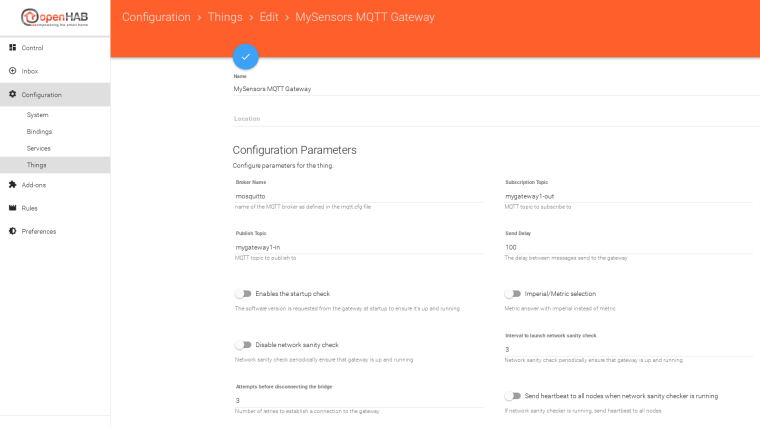
    1. Configure MQTT broker via PaperUI
      0_1512124003255_Bildschirmfoto vom 2017-12-01 11-25-59.png
      or

    via *.things file

    Bridge mysensors:bridge-mqtt:gateway [  brokerName="mosquitto", 
                                            topicPublish="mygateway1-in",
                                            topicSubscribe="mygateway1-out",
                                            startupCheckEnabled=false ] {
                                            
    }
    
    1. Configure or discover things.

    That's it!

    OpenHAB

  • Are folks here happy with Domoticz?
    T TimO

    I've tried Domoticz at the beginning and was amazed at how easy it is to setup.
    As other mentioned before I missed the flexibility and started with OpenHAB.

    I really like the flexibility of my setup:

    • MySensors Binding with three gateways attached (1x USB, 1x Ethernet RF24, 1x Ethernet RFM69)
    • Sonos
    • Influx / Grafana
    • node-red (for rules) https://flows.nodered.org/node/node-red-contrib-openhab or MQTT
    • Pushover
    • EbusD (heating)
    • Samsung TV
    • upcoming: Neato Vac
    • OpenHAB App

    I'm trying to combine the best out of all worlds which is really easy with OpenHAB.

    Examples:

    1. I've installed a (good looking) push button as a doorbell directly attached to the USB mysensors gateway and if the button is pressed a message is send via Pushover to our phones and the sonos in the livingroom is playing a sound while the sonos in the room of our baby girl is quite while she's sleeping.

    2. At (dawn - 120 minutes) the rollershutters (MySensors node) are closed, except the shutters of the doors to our terrace which will be delayed by 45 minutes. Additionally a light (433 MHz socket from hardware store) in the corridor and lights on the terrace (MySensors node) are switched on. Everything is switched off automatically at a given time. Rules are defined in node-red.

    3. Pressure of the heating system (Ebus) is below 1.3 bar --> send Pushover to phones

    The controller strongly depends on what you're up to. What devices are you using?

    If you're only using MySensors and maybe other devices that support Domoticz and don't need that much flexibility: stick with Domoticz. It's a good choice.

    If you have different devices, look into OpenHAB, if there's a binding.

    If you need the full flexibility go with node-red. There are many extensions available for node-red to support Pushover, Sonos .... so maybe that's the way to go.

    Domoticz

  • Serial Gateway connection to Openhab
    T TimO

    @CARSTEN I've compiled a modified version of the OpenHab Serial binding with a baud rate of 115200 as this is standard in mysensors.

    Download: org.openhab.binding.serial_1.6.0.201411271703.jar

    As @tboha suggested you currently have to manage all commands by yourself.

    I've attached my modified serial binding here. Please be aware, that all other configurations that depend on serial binding won't work with the modified version, because of the changed baud rate.

    I'm currently testing with this Serial Gateway:

    Serial Gateway

    Here is my OpenHab configuration for simple testing:

    demo.items: demo.items
    demo.rules: demo.rules
    demo.sitemap: demo.sitemap

    OpenHAB development ope

  • openHAB 2.0 binding
    T TimO

    I finally found some time to develop on the binding.

    A new version is available with the following changes:

    • On startup the binding will request I_VERSION from gateway to ensure its proper startup. Thanks @andreacioni for the PR!!

    • HVAC (V_VAR1, V_VAR2 ...) are now available. Thanks @Denke for the PR!!

    • The request for ACK feature is now available for testing. It works for light/status for me. If a message is NOT acknowledged by a node the binding retries to send the message five times. If no ACK is received after that the binding will try to revert the item to its old state. This only works, if a state is known (not NULL, for example at startup).

    Additionally I've tested the binding with multiple gateways (one EthernetGW, one SerialGW), works fine.

    OpenHAB

  • openHAB 2.2 binding
    T TimO

    Dear fellow openHAB2 binding users,

    it's time for a new release of the binding. The added functionality is low, but under the hood there were a few changes, so after the refactoring @andreacioni has done at the beginning of this year, I've done some refactoring too, with the objective to fullfil the regulations for an integration into the official openhab2-addons repository.
    I've tried to improve the readability of the configuration and of the code itself.

    This leads to an important point: The current release is not backwards compatible!!
    Whatever is configured (MySensors binding related) will not work anymore with the current release.

    But why?

    • nodeId & childId were Strings in the old bindings and now are Integer
    • skipStartupCheck was renamed to startupCheckEnabled

    If you've configured the things with the *.things file you just have to do two easy steps:

    1. Look for skipStartupCheck and switch it with startupCheckEnabled and reverse the logic (true to false and vice versa)

    2. Look for nodeId="123", childId="456" and remove the quotation marks ", so it will look like: nodeId=123, childId=456

    Copy the new jar file into the addons folder, start OpenHAB2 and you're good to go.

    If you've configured the things in PaperUI the easiest way is to delete all things and rediscover them. Of course in large installations this won't be much fun.

    I hope this won't happen again in further versions! :s

    Fixed in this release:

    • RGB & RGBW corrections
    • Removed bug that prevented autodiscovery of deleted things
    • mysensors.test fragment added / tests moved
    • Static code analysis
    • Move to 2.2.0 Snapshot

    The changes in functionality were small so there is no need to install the new version asap if you are able to forgo the above mentioned functionality.

    Downloads:
    OpenHAB MySensors Binding 2.2.0

    OpenHAB MySensors Binding 2.1.0 (old binding version, with old configuration if you still need it)

    OpenHAB

  • OH3 - MySensors Binding
    T TimO

    For those of you willing to help testing the OH3 integration here is a link:

    Jar Download

    Please don't forget to fulfill the requirements for mqtt und serial. Installation of bindings will do.

    What's working after a quick test:

    • binding loads in OH3
    • serial gateway receives messages (ethernet gateway should work too)
    • discovery is working

    What's not working:

    • MQTT gateway: it's broken some time and needs some tinkering

    Please let me know if you found some time to test the binding.

    OpenHAB

  • German speaking members
    T TimO

    :+1: ;-)

    General Discussion

  • DHT22 on Arduino Pro Mini 8Mhz 3.3V - Failed
    T TimO

    @Puneit-Thukral Please do a restart of OH2 after discovery of a new thing, there is a bug that prevents the thing from coming online.

    Troubleshooting

  • openHAB 2.0 binding
    T TimO

    What do you want to keep updated? The OH2 runtime? The binding?

    I update the link of the binding (jar-file) in the first post here whenever I add or fix something. You only have to switch this jar file in your installation. In the current alpha phase it is an good idea to delete the userdata folder, but with that you will lose all already discovered and added things. I have configured all things/items that should survive a deletion of the userdata in the thing.conf, items.conf etc.

    For the future I plan to make a pull request so that the mysensors binding will be a fixed part of OH2, but I want to ensure its stability before I do so. Additionally there are some features I would like to add before making a pull request.

    OpenHAB

  • Check messages node-gateway
    T TimO

    The message is send only once, indicating that the node is requesting an ACK. The controller needs to handle the ACK and send a response to the node via the gateway. The node does not resend the message if no ACK is received, that needs to be implemented in the sensor sketch, it is not part of the library.

    General Discussion

  • Node battery voltage in openHAB iOS
    T TimO

    @ben999 : Here's an example how to integrate the battery percent value: https://github.com/tobof/openhab2-addons/wiki/Examples
    Look for bathBat01.

    OpenHAB

  • What did you build today (Pictures) ?
    T TimO

    Great idea! :D

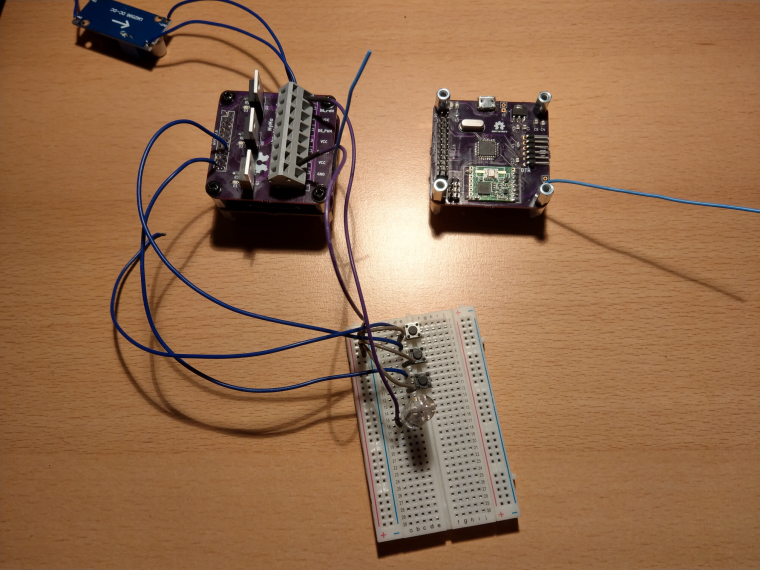
    I've continued to work on my MyMo (MySensors Motherboard).

    0_1508442160260_IMAG0372.jpg

    The board on the right is a Atmega328p / RFM69 based motherboard with the dimensions of the Sensebender gateway. On the left there is a three channel dimmer/switch for 12 V LEDs stacked on a motherboard. In theory (because of the MYSX connector) the board should fit on the sensebender gateway if more horse power is needed. I've not tested that yet.

    General Discussion

  • openHAB 2.0 binding
    T TimO

    Hey @Nicklas-Starkel !
    I hope it will work out for you! :-)

    It is not yet part of OH2 and downloadable within OH2 because my pull request is still open. A OH2 developer needs to look at it. :-)

    OpenHAB

  • MY_NODE_ID AUTO doesn't work, what am I missing?
    T TimO

    I'm not aware of a controller that is able to hand out IDs via MQTT, although that is possible. So you have to use static IDs with a MQTT gateway.

    Hardware

  • openHAB 2.0 binding
    T TimO

    Hey @Duncan-Pullen !

    The main reason is: I'm waiting for suggestions / approval from the OH2 developers. :)

    The MySensors binding has grown big and a review takes some time.

    OpenHAB

  • [solved] RFM69 based nodes unable to report Lib Version
    T TimO

    I've tinkered a little w5100-RFM69-gateway lateley wich works with the softspi implementation I've tried to push the other day. I'll give your implementation a try at the weekend.

    Bug Reports

  • OpenHAB 2.5 MySensors Serial Gateway - How to install
    T TimO

    Hey!

    The MysGW Service is running with root permissions and therefore creates the device "/dev/ttyMySensorsGateway" with owner and group root.

    Please test: "sudo usermod -a -G root openhab"

    Do a restart to be sure the settings are used.

    That shouldn't be the final solution though.

    OpenHAB
  • Login

  • Don't have an account? Register

  • Login or register to search.
  • First post
    Last post
0
  • MySensors
  • OpenHardware.io
  • Categories
  • Recent
  • Tags
  • Popular