Skip to content

My Project

967 Topics 13.5k Posts

Show off and share your great projects here! We love pictures!

  • STM32f303k8t6 Nucleo board with DS18S20 Temp sensor.

    2
    0 Votes
    2 Posts
    725 Views
    Y
    @litunbls This forum is Arduino only really... Search the web or convert an Arduino library so it can be compiled in Keil.
  • GUVA-S12SD UV sensor sketch

    2
    0 Votes
    2 Posts
    1k Views
    T
    /** DESCRIPTION Sensor: CJMCU-GUVA-S12SD/CJMCU-S12D Sensor Arduino SIG -> A0 GND -> GND VCC -> 5V or 3.3v part created by Henrik Ekblad henrik.ekblad@mysensors.org Copyright (C) 2013-2015 Sensnology AB Full contributor list: https://github.com/mysensors/Arduino/graphs/contributors part Original link : CSDN 博客链接. part by Tonbor august 2018 */ // Enable debug prints to serial monitor #define MY_DEBUG // Enable and select radio type attached #define MY_RADIO_NRF24 //#define MY_RADIO_NRF5_ESB //#define MY_RADIO_RFM69 //#define MY_RADIO_RFM95 #include <MySensors.h> #define UV_SENSOR_ANALOG_PIN 0 #define CHILD_ID_UV 0 uint32_t SLEEP_TIME = 30*1000; // Sleep time between reads (in milliseconds) MyMessage uvMsg(CHILD_ID_UV, V_UV); int lastSend =0; int sensorValue; long sum = 0; int vout = 0; int uv = 0; int lastUV = -1; void presentation() { // Send the sketch version information to the gateway and Controller sendSketchInfo("UV Sensor", "1.3"); // Register all sensors to gateway (they will be created as child devices) present(CHILD_ID_UV, S_UV); } void setup() { Serial.begin(115000); } void loop() { uint32_t currentTime = millis(); sensorValue = 0; sum = 0; for (int i = 0 ; i < 1024 ; i++ ) { sensorValue = analogRead(UV_SENSOR_ANALOG_PIN); sum = sensorValue + sum; delay(2); } vout = sum >> 10; vout = vout * 4980.0 / 1024; Serial.print("The Photocurrent value:"); Serial.print(vout); Serial.println("mV"); if (vout < 50) { uv = 0; } else if (vout < 227) { uv = 1; } else if (vout < 318) { uv = 2; } else if (vout < 408) { uv = 3; } else if (vout < 503) { uv = 4; } else if (vout < 606) { uv = 5; } else if (vout < 696) { uv = 6; } else if (vout < 795) { uv = 7; } else if (vout < 881) { uv = 8; } else if (vout < 976) { uv = 9; } else if (vout < 1079) { uv = 10; } else { uv = 11; } //Send value to gateway if changed, or at least every 5 minutes if ((uv != lastUV)||(currentTime-lastSend >= 5UL*60UL*1000UL)) { lastSend=currentTime; send(uvMsg.set(uv)); lastUV = uv; } sleep(SLEEP_TIME); }

  • Getting out of the box

    8
    1
    0 Votes
    8 Posts
    2k Views
    zboblamontZ
    @mfalkvidd Gland plugs are almost bulletproof, perfect for the selected diameter. The beauty of the free grommets usually accompanying cases is that they may be cut to size, whether that is an antenna or a cable conduit...
  • Serial and openHAB - Warnings in Log

    1
    0 Votes
    1 Posts
    642 Views
    No one has replied
  • My Wind Station

    2
    4
    3 Votes
    2 Posts
    2k Views
    S
    you could also provide the links on eBay of the pieces
  • ac power noise?

    3
    0 Votes
    3 Posts
    1k Views
    CrankyCoderC
    checking it out now :)
  • Masterless communication between multiple arduinos.

    2
    0 Votes
    2 Posts
    893 Views
    mfalkviddM
    Welcome to the MySensors community @shaukat59 MySensors does not support mesh networking. Building something using http://www.airspayce.com/mikem/arduino/RadioHead/classRHMesh.html is probably one of the leeast hard ways to do what you want.
  • This topic is deleted!

    1
    0 Votes
    1 Posts
    7 Views
    No one has replied
  • Compact battery-powered motion + temperature + humidity project

    1
    2
    4 Votes
    1 Posts
    2k Views
    No one has replied
  • Solar Powered Mini-Weather Station

    111
    10 Votes
    111 Posts
    141k Views
    My experience with using a "Micro USB 5V 1A 18650 Lithium Battery Charger Board With Protection Module" together with the "16 LED Solar Power Motion Sensor Security Lamp Outdoor Waterproof Light"s solar panel is that it's not charging the battery as well as the original built in PCB. Due to the varying voltage (up to 6V) of the solar panel it's not so well suited as a power source for "Micro USB 5V 1A 18650 Lithium Battery Charger Board With Protection Module". I experimented with diodes in serial (2 diodes gave best result) to lower the voltage. However using the original board allowed the battery to charge with a much higher current. I just cut of the motion sensor, and the power switch. It seems to work well. It's even charging a few mA now here when it's raining. My conclusion is that the "Micro USB 5V 1A 18650 Lithium Battery Charger Board With Protection Module" might be used but the original PCB makes a better job charging the battery. Cheers!
  • A6C Camera issues

    2
    0 Votes
    2 Posts
    1k Views
    J
    @keshav345 said in A6C Camera issues: I have captured an image using A6C GSM module using the suitable AT commands through Ai thinker tool but when i try opening it will display as invalid image. Hi, idk how to do with python unfortunatly not even in C++ (arduino) because i don’t have the level for do that but i know the steps: send the AT command for take the picture, and “read” it in HEX and store them, cut the extra code (all Jpgs start and finish with the same HEX) and save it in a file with the jpg extension, it’s done.After it my IP camera start working properly! (It’s what i show in my video here: https://www.youtube.com/watch?v=poNPcxNvCww) The most defficult is for me to save in Hex and cut the image because i can’t find an another projet with the same kind of problem :/
  • MySensors Hydroponics Greenhouse project

    23
    3 Votes
    23 Posts
    8k Views
    ThucarT
    A quick video update: https://youtu.be/vnUFV_amSPQ The tomatos and peas are trying to go through the roof. Cucumbers are close to follow. They are all aiming for the ventilation hatches - I think they are planning a grand escape... The NFT system pump stopped working coupe weeks after setting it up. Have not gotten around to ordering a new pump. That will be a project for next year.
  • RFID Card reader - Wiegand

    10
    6 Votes
    10 Posts
    10k Views
    H
    @ross-shirer Thanks for bring this topic alive as I had not seen this before and it was just what i was looking for the basis of another project. I have thrown together a quick test node and it is working all fine with openHAB. The instructions for use are included within the program Summary block. 1. A local database with Card id's is kept in the node. Card id 0 is the "master master" card. With the master card you can: - Open the door lock (just present it) - Include other cards (present it twice and present the new card) - Delete cards (present it three times, present the card to be deleted and confirm with master card) - Browse the cards (present it four times), the display shows the card indexes with their status. So the MasterCard is needed to enable the other cards. Swipe the master card twice and then swipe the new card. Remember to comment the eprom clear command after first run otherwise the non MasterCard data will be lost on reboot. As i did not do that at first, so caused a few minutes delay. //cardDB.initDB(); // ONLY in the first run to clear the EEPROM store (comment later) Working fine for me with nine cards, tenth card unlocks ok but report status is incorrect. More than ten are not accepted by the program due to EPROM size limits. (time to add serial memory)
  • UV Sensor ML8511

    13
    0 Votes
    13 Posts
    8k Views
    alexsh1A
    @benik change delay(100); to delay(300000); //5 mins reporting
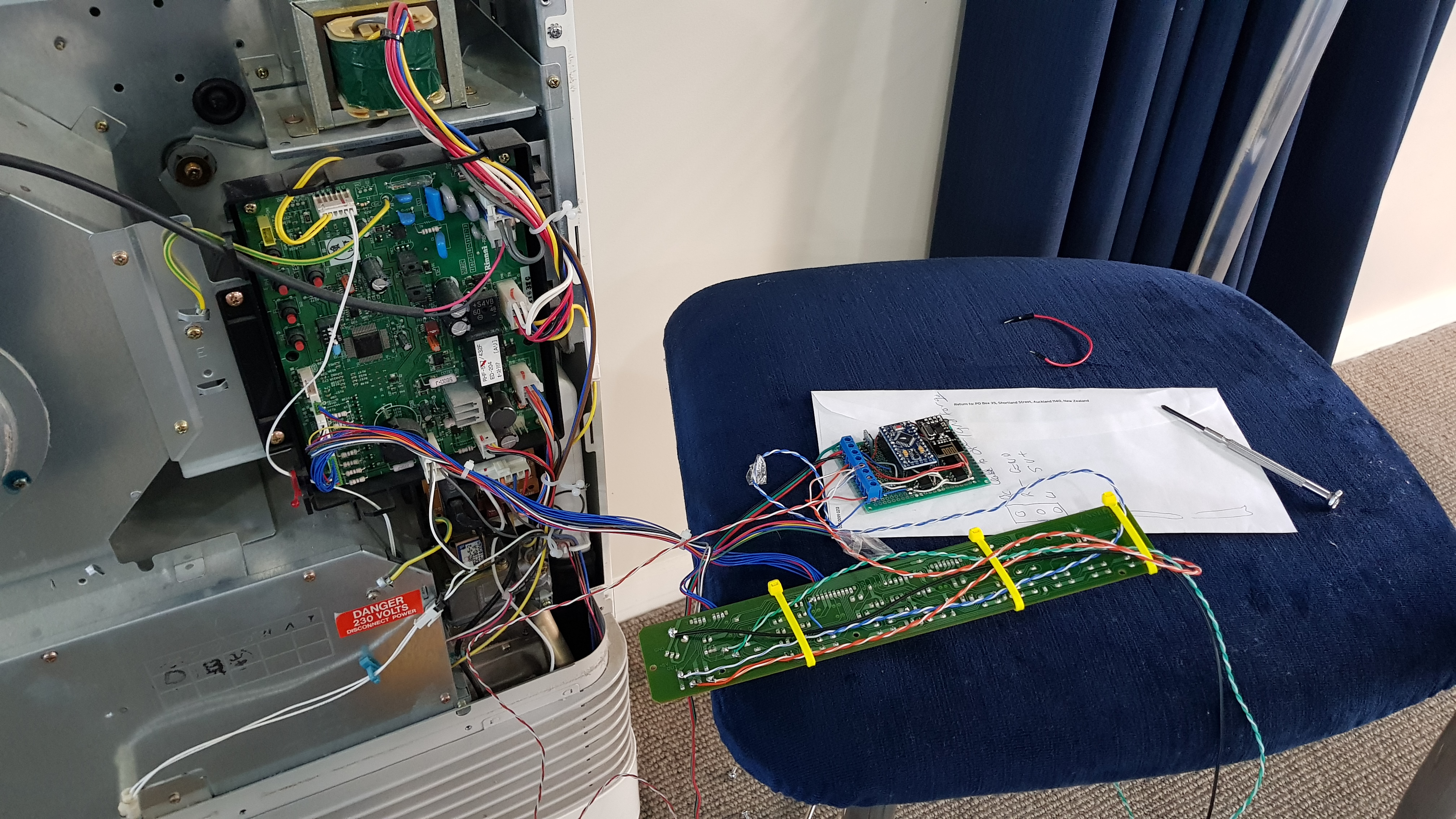
  • Rinnai Gas Heater (FTR557) node

    1
    2
    1 Votes
    1 Posts
    791 Views
    No one has replied
  • Low power temperature/humidity node with sonoff si7021

    1
    1 Votes
    1 Posts
    2k Views
    No one has replied
  • Water pressure sensor

    8
    0 Votes
    8 Posts
    4k Views
    D
    @lekeb How is your pressure sensor working out? are you getting accurate reading? I'm looking to hook up something similar to vera
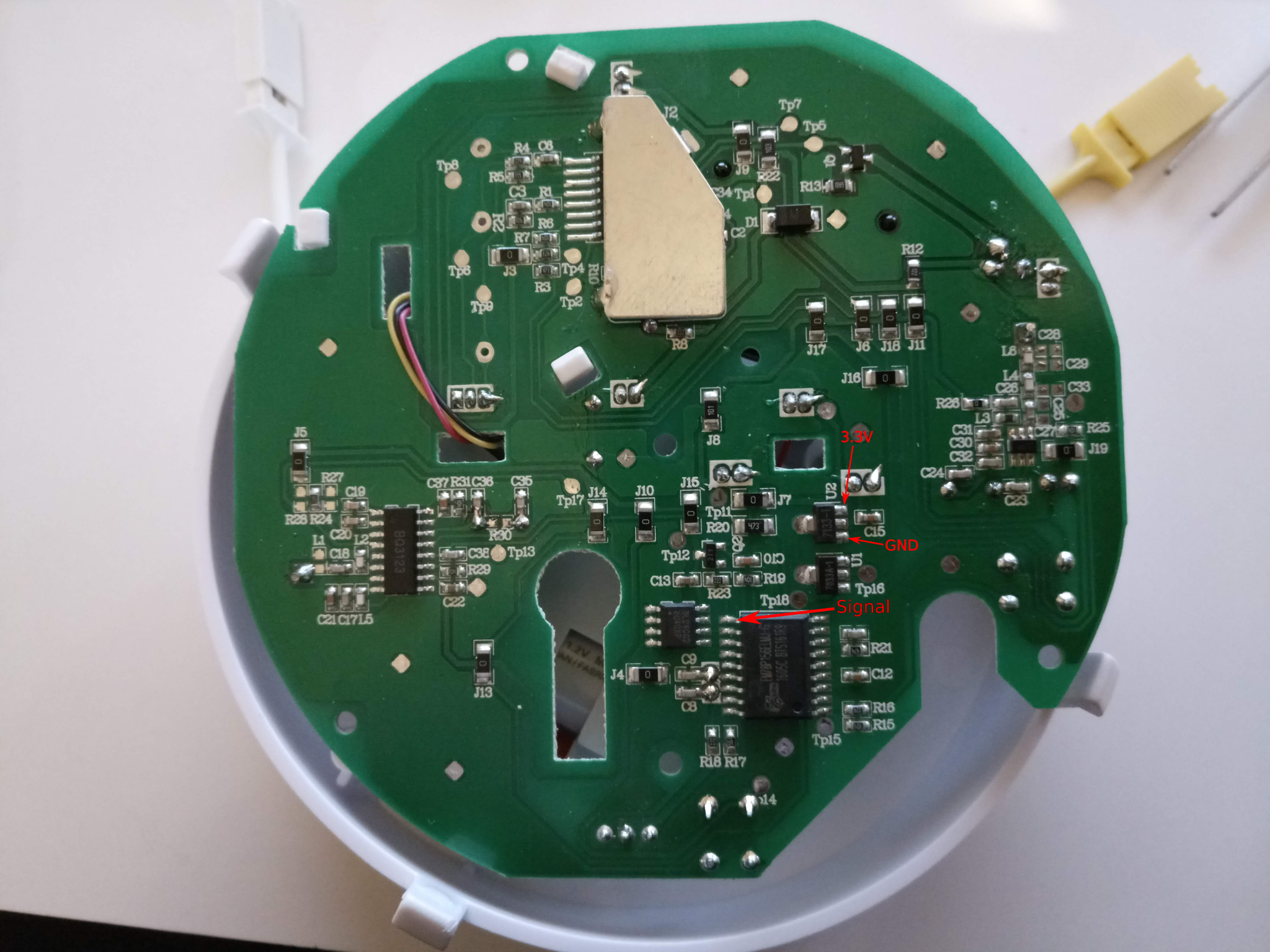
  • Nemaxx smoke alarm WL2

    4
    2
    1 Votes
    4 Posts
    2k Views
    S
    @freynder it is different. I don't know if they try to connect to each other and if some having issues with that it drains the battery.
  • Battery powered fingerprint reader

    10
    4 Votes
    10 Posts
    8k Views
    S
    @user2684 well, here i prefer to use a faster processing gateway. no issue with slower nodes.. but i'm not using official mys branches (could be that, not sure..). nice to hear it's working as you wish, the most important ;)
  • An ultrasonic measurement saga finally over...

    6
    3
    3 Votes
    6 Posts
    2k Views
    zboblamontZ
    @boots33 Sure... It's not finished in that want to reverse some of the mods made in desperate attempts to isolate the problem, before realising the illogic of the range checking. It's no different to any other pulse timer in function, and doubtless could be made more efficient by more knowledgeable people than I, but it is working flawlessly now which was the objective. The original idea was that the Slave would sleep as per Gammon's I2C example, constantly available to be remote commanded, but as the switched off ADC stayed off after sleep I lost the battery reading which divider was running continually. Inserting a latching relay, it ended up remote powered up with the readings taken during setup, otherwise it is completely off. It's a straight 5v promini chinese clone with only the power led removed, powered by 4x2AA cells via a latching signal relay, as it is only fired up every hour by the sleeping Master, it should hopefully last a while... Might extend the cycles to 3 or 4 hours, but for now it is feeding back accurate information on groundwater intrusion which has proven a bit of a surprise... // Adapted from Nick Gammon tutorials from 18th February 2011 //ADC disabling prior to sleep failed to restart originally and written out #include <Wire.h> #include <avr/sleep.h> const byte MY_ADDRESS = 61; const byte AWAKE_LED = 13; #define echoPin 5 #define trigPin 6 #define USon 4 #define BatteryIn A3 long duration; int distance,test,test2; const unsigned long WAIT_TIME = 500; volatile unsigned long counter; volatile int ultradepth, batterypower; // various commands we might get enum { CMD_READ_TANK = 2, CMD_READ_BATTERY = 3 }; char command; void setup() { command = 0; pinMode(USon, OUTPUT); pinMode(trigPin, OUTPUT); pinMode(echoPin, INPUT); analogReference(INTERNAL); digitalWrite(USon,LOW); digitalWrite(USon, HIGH); delay(100); digitalWrite(trigPin,HIGH); delay (100); digitalWrite(trigPin,LOW); delay(100);/// Allow decay of pulse READULTRASONIC(); READPOWER(); Wire.begin (MY_ADDRESS); Wire.onReceive (receiveEvent); // interrupt handler for incoming messages Wire.onRequest (requestEvent); // interrupt handler for when data is wanted delay(150); } // end of setup void receiveEvent (int howMany) { command = Wire.read (); // remember command for when we get request } // end of receiveEvent void loop (){ if (++counter >= WAIT_TIME) { flasher();//1 flash signals going to sleep set_sleep_mode (SLEEP_MODE_PWR_DOWN); sleep_enable(); digitalWrite (AWAKE_LED, LOW); sleep_cpu (); sleep_disable(); // release TWI bus TWCR = bit(TWEN) | bit(TWIE) | bit(TWEA) | bit(TWINT); for (byte i = 0; i < 3; i++) {//3 flashes wakened up flasher(); }; // turn it back on again Wire.begin (MY_ADDRESS); } } void READULTRASONIC(){//JSN-SR04-2.0 digitalWrite(USon,HIGH); delay(100); duration=0; distance=0; test=1; test2=3; while ((test!=test2)&&((distance<300)||(distance>1860))){// Get two consecutive readings in specified range digitalWrite(trigPin, LOW); delayMicroseconds(100); digitalWrite(trigPin, HIGH); delayMicroseconds(150); digitalWrite(trigPin, LOW); duration = pulseIn(echoPin, HIGH); distance = duration/5.82;//This is in mm if (test!=distance){ test=distance; distance=0; } else{ test2=distance; } delay(100);///// 500 originally but why??????? } digitalWrite(USon,LOW); ultradepth=distance; } void READTANK (){ byte buf [2]; buf [0] = ultradepth >> 8; buf [1] = ultradepth & 0xFF; Wire.write (buf, 2); }/// end of READTANK void READPOWER(){//Still needs cap on resistive divider int val, read1, read2; read1=1; read2=2; ///Get two consecutive identical readings while(read1!=read2){ val= analogRead(BatteryIn); if(read1!=val){ read1=val; } else{ read2=val; } } batterypower=val; } void READBATTERY () {// Battery reading send now byte buf [2]; buf [0] = batterypower >> 8; buf [1] = batterypower & 0xFF; Wire.write (buf, 2); } // end of READBATTERY void requestEvent () {// Original which parameter removed switch (command) { case CMD_READ_TANK: READTANK (); break; // send Tank Depth Reading case CMD_READ_BATTERY: READBATTERY (); break; // send Drone battery reading } // end of switch } // end of requestEvent void flasher(){ digitalWrite (AWAKE_LED, HIGH); delay (20); digitalWrite (AWAKE_LED, LOW); delay (50); } EDIT - With playing around with so many variations, I had copied the wrong sketch version here, now resolved. One of the more frustrating aspects I found in this setup was instability, presumably due to Wire interrupts or a dodgy connection somewhere. The Slave would in isolation get a valid figure to forward, yet somehow the Master would pass completely different figures to the Gateway or everything would lock up. One curiosity noted was the delay between the Master powering up the Slave and requesting results over Wire, it worked fine with sleep(5000), but 1000 would introduce instability.

21

Online

12.0k

Users

11.2k

Topics

113.4k

Posts