Skip to content
  • MySensors
  • OpenHardware.io
  • Categories
  • Recent
  • Tags
  • Popular
Skins
  • Light
  • Brite
  • Cerulean
  • Cosmo
  • Flatly
  • Journal
  • Litera
  • Lumen
  • Lux
  • Materia
  • Minty
  • Morph
  • Pulse
  • Sandstone
  • Simplex
  • Sketchy
  • Spacelab
  • United
  • Yeti
  • Zephyr
  • Dark
  • Cyborg
  • Darkly
  • Quartz
  • Slate
  • Solar
  • Superhero
  • Vapor

  • Default (No Skin)
  • No Skin
Collapse
Brand Logo
  1. Home
  2. My Project
  3. Wirsbo/Uponor thermostat replacement

Wirsbo/Uponor thermostat replacement

Scheduled Pinned Locked Moved My Project
hardwarethermostatdevelopment
11 Posts 4 Posters 13.8k Views 6 Watching
  • Oldest to Newest
  • Newest to Oldest
  • Most Votes
Reply
  • Reply as topic
Log in to reply
This topic has been deleted. Only users with topic management privileges can see it.
  • D Offline
    D Offline
    Denke
    Hardware Contributor
    wrote on last edited by
    #1

    Hi all
    Here is my first mysensors HW that i developed and also my first post. Not all functions are tested at the moment.
    I started by analyzing the current thermostat on size and function. Then i took all the info and started working with it in designspark.

    My plan is to use this with Openhab

    Spec
    -Should be able to open/close valve in Uponor system
    -Should in the future be able to open the valve from 0-100% (Think i need to change valves for this)
    -Should fit in the Wirsbo thermostat mechanics
    -The system shall fall back to "old thermostat" function if the home automation stops working by using the knob setting
    -The system shall be built as much as possible on cheap components that could be bought on for example ebay

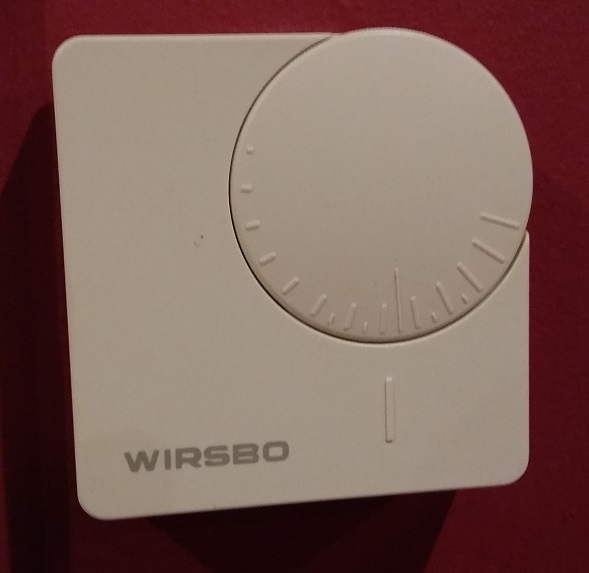
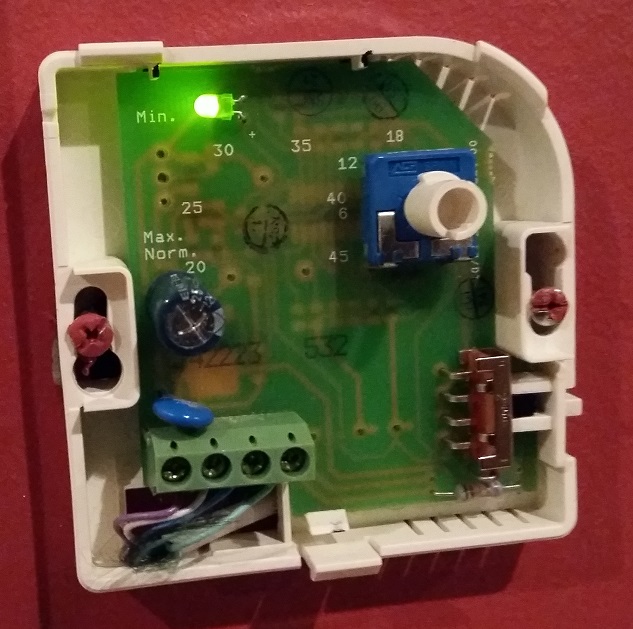
    Old System
    20151231_164549_small.jpg 20151231_164629.jpg

    New system
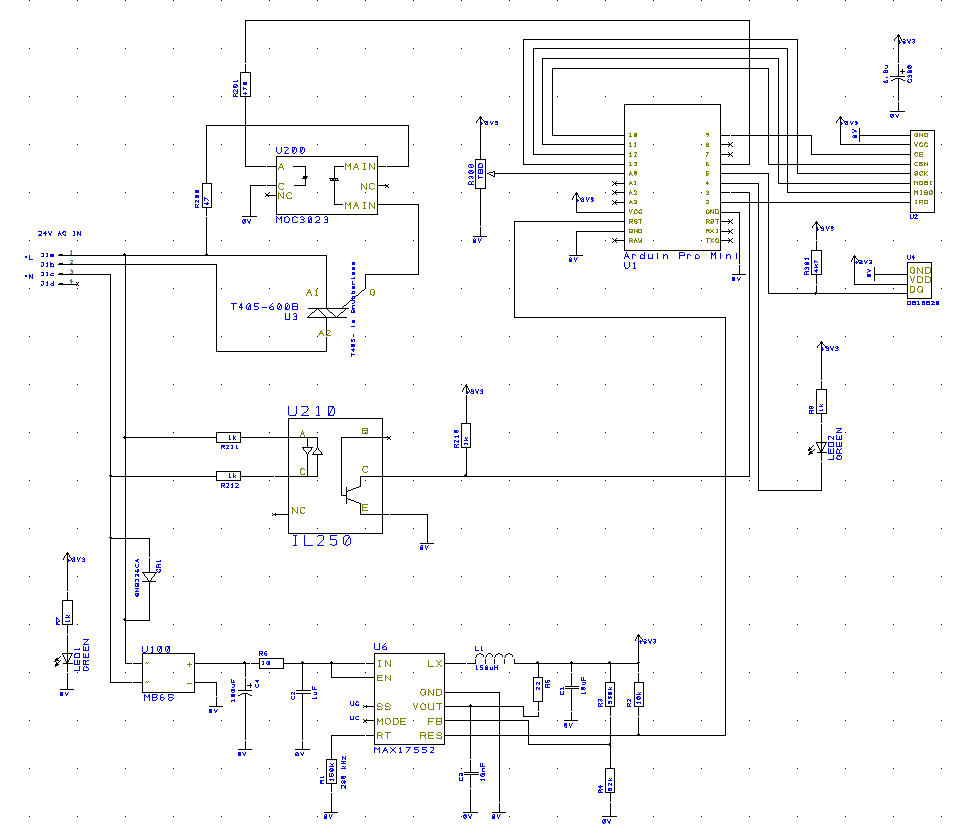
    If only on/off function is requested then the MOC 3023 could be replaced by a a new one with zero crossing detection and then also the zero crossing detector can be omitted (IL250 in the schematic)

    Schematic
    upload-150a1152-6fed-4abf-b197-75042bb49eb0

    Result
    The HW fits in the old casing
    Not all components are mounted at the moment as i have not received them yet, but the board have partial functions
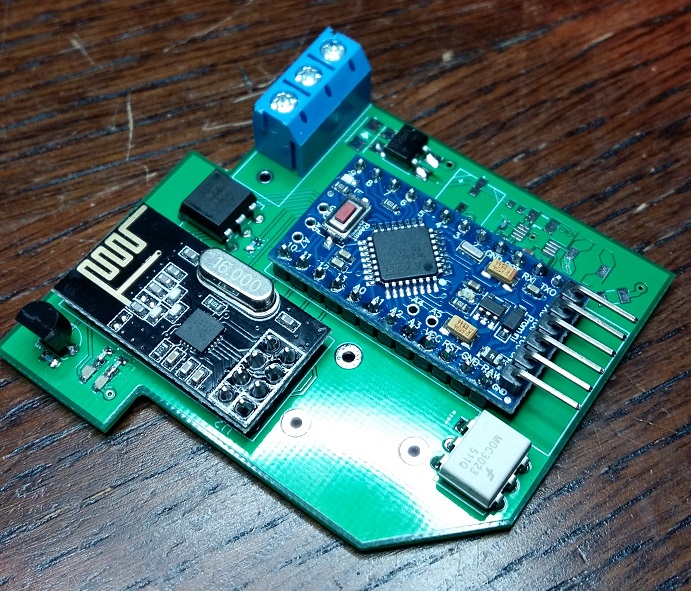
    20151228_213359_small.jpg

    RaspberryPi-Openhab

    1 Reply Last reply
    5
    • HoffanH Offline
      HoffanH Offline
      Hoffan
      wrote on last edited by
      #2

      This was a nice project.

      I have a lot of these wirsbo in my home. I hope this will work well

      1 Reply Last reply
      0
      • D Offline
        D Offline
        Denke
        Hardware Contributor
        wrote on last edited by
        #3

        I hope so to.

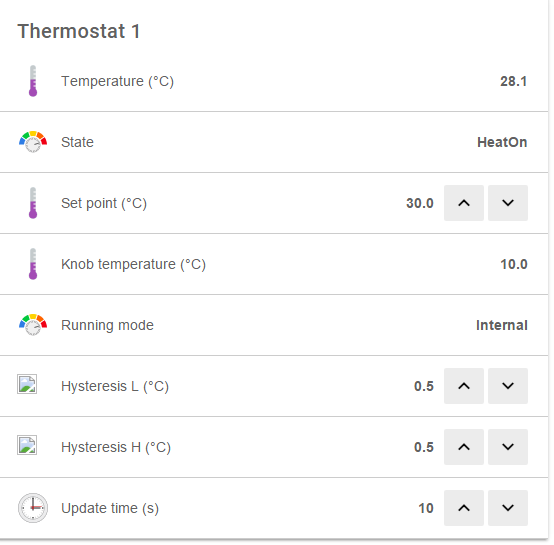
        At the moment i struggling with the best way to present this sensor to my openhab and also what is the best way to set it up.

        Parameters in
        -remote requested temp //temp requested by the home automation system/user (mandatory)
        -hysteresis low, hysteresis high //where to open and close from requested temp point (Setting for the Tech user) 0.5 will be default
        -Update time //how often shall i regulate/change and measure (Setting for tech user) 1min will be default

        Parameters out
        -Temperature
        -valve state
        -Info field:
        --Direct requested temp (knob reading)
        --Remote requested temp (See above)
        --Running mode internal/external (fall back if no communication is reaching the thermostat, but thermostat info is visible in system)
        --hysteresis set in thermostat
        --Update time

        Anyone got any thoughts on what is the best way to present this.

        RaspberryPi-Openhab

        1 Reply Last reply
        0
        • B Offline
          B Offline
          bjornhallberg
          Hero Member
          wrote on last edited by
          #4

          Fantastic project! I also have a ton of these Wirsbo thermostats (from circa 1999) at home. Some of them have failed and have been bypassed. Remarkably expensive to replace and remarkably dull design wise. I always wanted to build something like this, possibly with the addition of a small oled display and a 3d printed or cnc machined (wood) enclosure.

          1 Reply Last reply
          0
          • D Offline
            D Offline
            Denke
            Hardware Contributor
            wrote on last edited by
            #5

            New boards ordered. Took the oportunity to add an extra connector for SPI. So this in combination with the SDA/SCA will make it possible to add an OLED.

            RaspberryPi-Openhab

            1 Reply Last reply
            1
            • D Offline
              D Offline
              Denke
              Hardware Contributor
              wrote on last edited by
              #6

              Finally my new boards have arrived, made some mistakes on the first one.
              0_1458579438206_20160321_172653 [297988] (2).jpg

              RaspberryPi-Openhab

              1 Reply Last reply
              0
              • C Offline
                C Offline
                clio75
                wrote on last edited by clio75
                #7

                Hi,
                Nice project. I have started similar "upgrade".
                But my plan is to have separate temp/humidity sensors that reports to the VERA.
                And then have a separate controller that open/close the valves/attenuators.
                Now I have some sensors connected. My next step is to create one arduino/MySensor PID controller.
                This should get actual temp and setpoint from VERA.

                For a fallback I have some Ideas.

                • Use some Pre Programmed settings.
                • Last PID settings
                • Get information directly from each sensor. (setup from VERA)

                Looking forward to follow your project :)

                1 Reply Last reply
                0
                • D Offline
                  D Offline
                  Denke
                  Hardware Contributor
                  wrote on last edited by
                  #8

                  Now the code is tested against openhab2.0 after some work adding HVAC in the binding. Will make a pull request for the binding part soon
                  0_1458674411278_upload-75e8cbec-c0dc-4aa4-91e2-1361eadfe771

                  RaspberryPi-Openhab

                  1 Reply Last reply
                  3
                  • D Offline
                    D Offline
                    Denke
                    Hardware Contributor
                    wrote on last edited by
                    #9

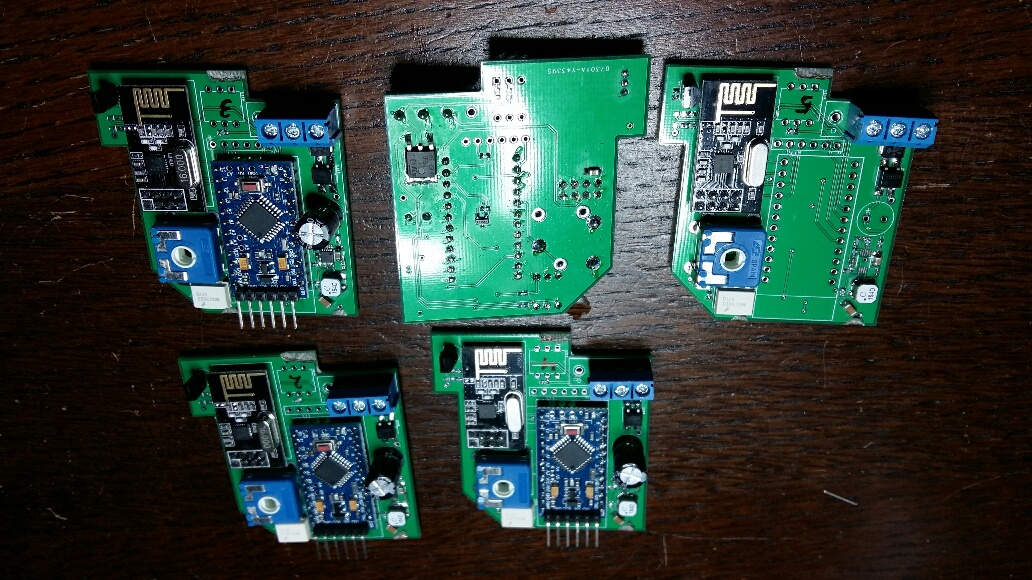
                    2 boards completely assembled and working as expected. 3 more to go after ordering the missing components. Now some last fixes to the code so that memory can be wiped by pressing a button and also the check if connected to the home automation system if not a fallback should be initiated
                    0_1459366791462_20160330_205611_resized_1.jpg

                    RaspberryPi-Openhab

                    1 Reply Last reply
                    2
                    • B Offline
                      B Offline
                      bjornhallberg
                      Hero Member
                      wrote on last edited by
                      #10

                      @Denke Any updates to this project? Did you deploy the sensors? Any issues or has it been smooth sailing for the last couple of years?

                      D 1 Reply Last reply
                      0
                      • B bjornhallberg

                        @Denke Any updates to this project? Did you deploy the sensors? Any issues or has it been smooth sailing for the last couple of years?

                        D Offline
                        D Offline
                        Denke
                        Hardware Contributor
                        wrote on last edited by
                        #11

                        @bjornhallberg The sensors are working fine and have been installed in my home for the last couple of years. Some optimisation needs to be done to the code, that i have not done. This is more connected to understanding when the mysensors network is in "range" as i want to fallback on the manual knob if the mysensor network is inactive for some reason or if i sell the house and the controller goes with me.
                        RaspberryPi-Openhab

                        1 Reply Last reply
                        1

                        Hello! It looks like you're interested in this conversation, but you don't have an account yet.

                        Getting fed up of having to scroll through the same posts each visit? When you register for an account, you'll always come back to exactly where you were before, and choose to be notified of new replies (either via email, or push notification). You'll also be able to save bookmarks and upvote posts to show your appreciation to other community members.

                        With your input, this post could be even better 💗

                        Register Login
                        Reply
                        • Reply as topic
                        Log in to reply
                        • Oldest to Newest
                        • Newest to Oldest
                        • Most Votes


                        13

                        Online

                        12.0k

                        Users

                        11.2k

                        Topics

                        113.4k

                        Posts


                        Copyright 2025 TBD   |   Forum Guidelines   |   Privacy Policy   |   Terms of Service
                        • Login

                        • Don't have an account? Register

                        • Login or register to search.
                        • First post
                          Last post
                        0
                        • MySensors
                        • OpenHardware.io
                        • Categories
                        • Recent
                        • Tags
                        • Popular