Skip to content

My Project

967 Topics 13.5k Posts

Show off and share your great projects here! We love pictures!

  • Irrigation Controller miniboard

    2
    1
    0 Votes
    2 Posts
    786 Views
    M
    @jesus-cataluña Hi great work! Any chance for your sketch? There isn't many working sketches (without many errors in log) for home assistant. Unfortunately I can't write code.
  • Anyone who've done this ? need help

    3
    0 Votes
    3 Posts
    870 Views
    J
    @mfalkvidd Thank you the components just delivered some parts are still on delivery but i wanna ask the gateway thing on the smart plug i wish you can help me find a link where i can access it
  • How To - Doorbell Automation Hack

    106
    9 Votes
    106 Posts
    115k Views
    F
    @flopp Found one mistake. I wrote some Serial.print to see where in the code my problem was and I wrote in a wrong place, so the code was looping on a wrong way. When that was corrected I found out that my relay needed to get 1 when it was off, so I just changed to below and now I don't get a green light as soon as I power on the arduino #define RELAY_ON 0 #define RELAY_OFF 1
  • Questions for a thermostat project.

    8
    4 Votes
    8 Posts
    1k Views
    D
    @nagelc Just ordered one of those buck converters from Digikey. Thanks for the suggestion. That might fix my whole issue.
  • NRF52 GPIOTE with 2 inputs

    4
    0 Votes
    4 Posts
    899 Views
    W
    @nca78 If you're talking about the basic motion sketch - I've tried it and it doesn't work The node checks in when initially powered but i can't seem to trigger it...
  • New project theory for Ag feed industry

    13
    0 Votes
    13 Posts
    2k Views
    alowhumA
    MySensors supports Lora (RFM95), so you could have the devices talk to a controller at home. As a controller I recommend the Mozilla WebThings Gateway :-) Less manual tinkering with config files. And yes, communicating with each other without a parent gateway is also perfectly possible. How about using sensors that are more robust than ultrasonic? There are some sensors used non-contact detection of water/gas levels, for example. if you want some GSM code, give me a shout.
  • 0 Votes
    30 Posts
    5k Views
    A
    Hi there! I have been doing some electronics and here is my thoughts about how to connect things. Any help will be very welcomed. My idea is to create a PCB after testing everything on a breadboard. [image: 1564422473670-irrigationmys-resized.png] [image: 1564422345375-hbridge-resized.png]!
  • BLDC controller by LaserSolid 690

    1
    1 Votes
    1 Posts
    512 Views
    No one has replied
  • Lamp

    1
    5
    3 Votes
    1 Posts
    476 Views
    No one has replied
  • d-diot Gas sensors and RGB lamp

    1
    1
    1 Votes
    1 Posts
    472 Views
    No one has replied
  • Irrigation Controller (up to 16 valves with Shift Registers)

    371
    4 Votes
    371 Posts
    305k Views
    E
    @dbemowsk Thank you!
  • Water Pressure Sensor

    1
    0 Votes
    1 Posts
    672 Views
    No one has replied
  • d-diot: dual MySensors gateway for Raspberry... And more!

    14
    3 Votes
    14 Posts
    4k Views
    franz-unixF
    @tbowmo Thank you for your effort! Now my turn... the whole schematics of the d-diot board is available for download here! :wink: Of course I have to learn more and do some testing before implementing in the d-diot board the constant current source circuit that you suggested, but this a great option to eliminate the MP1584 (that one day may become unavailable on the market) and to lowering the cost. For the same reasons my plan is to substitute the step up module MT3608 with a boost converter circuit, made from standard passive components (like this). In any case, if someone else needs to make an universal IR remote with a Raspberry Pi, the configuration of the GPIO pins of the Raspberry is here, while the steps necessary to configure LIRC and lirc_web are here. The final results is this: [image: 1559765591483-screen1-resized.png] [image: 1559765616342-screen2-resized.png] Here the guides to play with the IR gateway (add a remote, clone a remote, Home Assistant integration)

  • RF433 Hub for controlling Watts Clever switches

    5
    2
    2 Votes
    5 Posts
    1k Views
    franz-unixF
    @homer Glad that it helped! But make sure that RFLink supports your Watts Clever smart plug. If you already have an Arduino Mega and an RXB6 receiver at home is quite easy and fast to verify that. Another interesting option is that you can couple the Arduino Mega with an ESP8266 and then expose the serial output over Wifi with ser2net (see here) in the ESPEasy firmware. This other project goes further and use an ESP8266 to write the serial output of the RFLink to an MQTT server. Both solutions add flexibility to the positioning of the RFLink module in your home.
  • Candle Manager - user-friendly web-based tool to program Arduino's

    5
    5
    3 Votes
    5 Posts
    2k Views
    alowhumA
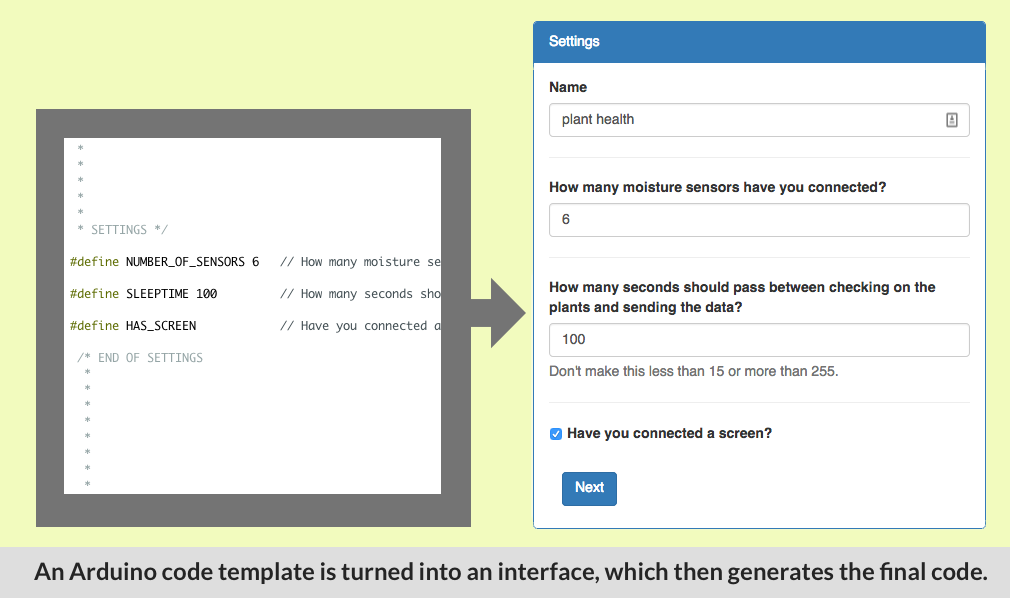
    @homer This is how I do it: First download the latest Mozilla WebThings Gateway image and burn that onto an SD card. Their guide will explain how to 'burn' it onto an SD card. Insert it into the pi and boot it up. After a while you will see a new WiFi network for the gateway. Connect to it and follow the steps. You can skip the step to make a subdomain at Mozilla. Once done, open gateway.local in a browser that's on the same wifi network. You should now see the Mozilla Gateway interface. Under settings -> development enable SSH. Open a terminal window and SSH into the device. Google how to do that. For linux/mac it's something like: ssh pi@gateway.local and then enter the default password raspberry. once logged in, you have to install PHP. sudo apt-get install php5-fpm php5 -y Next, copy the Candle Manager from Github onto the Pi. git clone https://github.com/createcandle/Candle-manager.git chmod +x ./Candle-manager/start.sh ./Candle-manager/start.sh Now you should be able to go to gateway.local:8023 to see the Candle Manager. By default it comes with only one demo sketch. In the future you will be able to install a lot more. Arduino Sketches have to be properly formatted and placed in the 'sources' folder to be automatically presented in the Candle Manager interface. Examples of such sketches can be found here. Basically, the variables that you want to be modifiable via the interface have to be placed in a special section. The description at the top of the sketch will also be shown in the interface. For example: /* * * Temperature and more sensor * * This device can measure: * - temperature * - humidity * - airpressure (barometer). * * * * SETTINGS */ // You can enable and disable the settings below by adding or removing double slashes ( // ) in front of a line. #define HAS_DISPLAY // Did you connect a display? //#define FAHRENHEIT // Do you want temperature measurements to be in Fahrenheit? //#define MY_SECURITY_SIMPLE_PASSWD "changeme" // Be aware, the length of the password has an effect on memory use. /* END OF SETTINGS * * * */ // The actual sketch and other variables are placed here.
  • DHT and DOOR sensor

    20
    0 Votes
    20 Posts
    4k Views
    HomerH
    How much power are you feeding the sensor? I've had issues when I've fed too little power and it's resolved once I use more power.
  • Shunt motor/valve

    1
    1
    2 Votes
    1 Posts
    521 Views
    No one has replied
  • Dooya DC1802 sniffing and repeat

    2
    2
    0 Votes
    2 Posts
    977 Views
    HomerH
    @peter-gonczy I'm only a noob, but is that the whole sketch? Doesn't it need to be setup so it talks to the gateway?
  • Constant current high voltage dimmable led driver

    1
    1 Votes
    1 Posts
    709 Views
    No one has replied
  • Start neopixels when présentation fails

    4
    0 Votes
    4 Posts
    981 Views
    T
    Thanks. Everything is ok. I now have a node with 3 push-buttons for 3 colors settings and vocals commands for lazy persons or Tony stark. It's for a Iron Man reactor with neopixels... I wanted to Say : "Jarvis.. Iron Man laser" to have flash effects with neopixels. For this i use mysensors + jeedom + Google Home mini + ifft. Need to had Wait(200) in my loop to be sure to receive message from gateway. Thanks again

21

Online

12.0k

Users

11.2k

Topics

113.4k

Posts