
Skip to content
  • MySensors
  • OpenHardware.io
  • Categories
  • Recent
  • Tags
  • Popular
Skins
  • Light
  • Brite
  • Cerulean
  • Cosmo
  • Flatly
  • Journal
  • Litera
  • Lumen
  • Lux
  • Materia
  • Minty
  • Morph
  • Pulse
  • Sandstone
  • Simplex
  • Sketchy
  • Spacelab
  • United
  • Yeti
  • Zephyr
  • Dark
  • Cyborg
  • Darkly
  • Quartz
  • Slate
  • Solar
  • Superhero
  • Vapor

  • Default (No Skin)
  • No Skin
Collapse
Brand Logo
W

wergeld

@wergeld
About
Posts
96
Topics
5
Shares
0
Groups
0
Followers
0
Following
0

Posts

Recent Best Controversial

  • Time Series Database?
    W wergeld

    @TRS-80 I looked at Grafana and InfluxDB a few years ago and found them supremely limited. It may be that I am a MS SQL Server user but the act if trying to do an update/delete of a value in InfluxDB is painful. Running everything through a JSON call to modify data annoys me.
    So, all that aside I prefer sending data for long term storage to an instance of SQL Server 2012 - even with 4 sensor nodes + weather queries and some other data that send info every 30 seconds, 5 minutes, 10 minutes, and 30 minutes for a few years. I am not even above 100 MB of storage used. The data types are Date, INT, CHAR(xxxx), and in one crazy case VARCHAR(1000). I use Domoticz's built in sqlLite and hassio's DB to handle the data view from my controllers (yes, I have 2). The split of data occurs in Node-Red where it gets the data from my MQTT broker and sends to controllers (different subscription topics due to C/F fubaring in hassio) and send to SQL Server for long term storage. Efficient storage types is the key so a timestamp as an INT/BIGINT would be nice. As long as all your values are INT as well that is even better. Timeseries DBs do have their use, I have just not found one I like.
    If there is a timeseries DB that can be accessed via ANSI SQL that would be awesome.

    Other thought - you could use Elasticsearch to send in values as "documents" and then run analysis on them. For dataviz, I use the built in ones in my two controllers and I have written my own to handle long term data analysis. I prefer Highcharts for doing the viz as that is what I use at work. It is clean, efficient, and fully customizable.

    General Discussion

  • Started with MySensors and about to give up (some feedback)
    W wergeld

    @pptacek Had not seen those before. Order some and a few nanos to go with it. I had been using the slim node v2 AA battery boards using just the 328p bare chip. Issue I have with that board is the layout of the pins for my needs. It is a great board and I use the nodes I have a lot - no disrespect meant to the developer of it.

    I agree that the entry ramp to get mysensors working is a bit complex. I started with the RPi as the gateway because well, it should work. Had a hell of a time making it function. Ended up getting the RPi hat that has the capacitor and NRF slot on it that plugs into the GPIO headers. But, issues persisted with the library for the RPi not working on the RPi 2 until some very helpful folks pointed me in the right direction. A lot of this is pure tinkering and not yet a prime time off the shelf system. I knew that going in and accepted. It has been a great learning experience. The frustration I initially had was all because I expected the guides/docs to be up to date. They are not. As bad as that is, once you accept it and decided to a) add to the docs yourself or b) carry on screaming it becomes rewarding. As an example, getting MySensors to work in Hom Assistant is easy using an MQTT gateway....until you realize that HA tells the nodes what measurment units to use and the nodes then flip (from Celsius to Fahrenheit) when you think it should do the conversion on the front end of HA. I still, for the life of me cannot get the nodes to flip back to Celsius from an MQTT command (had to reflash the nodes with the code).

    At the end of all this I am still having fun and learning new things. As the OP said this is not my first programming rodeo (currently a senior SQL developer working with epic sized data with a massive helping of javascript, R, python, and .NET). The micro controller code paradigm was (is still?) new to me even after almost 6 years of messing around with various projects including MySensors.

    If we can help any new people stay on this journey it is time well spent. I offer my services for any help that may be needed for docs or guides.

    General Discussion

  • What did you build today (Pictures) ?
    W wergeld

    @kalina That is some excellent solder work. Last time i tried to do SMD work it ended up being 110% solder, 5% PCB, and 0% component at the end.

    General Discussion

  • What did you build today (Pictures) ?
    W wergeld

    @zboblamont Do you have any more info on this? Components and schematic? I am looking to do this as well as Florida is now fully into storm season.

    General Discussion

  • MQTT + Domoticz + HA + Setting units system = WTF
    W wergeld

    @nagelc This seems to me the proper way to do it. Presentation of data on web/app should not modify the actual data from the node itself. For now HA is a no go for me until I get a chance to look at the HA mysensors code to see what it is doing.

    Troubleshooting

  • MQTT + Domoticz + HA + Setting units system = WTF
    W wergeld

    @gohan I am using node-red in the middle because I have other locations I am sending my sensor data (SQL database, etc). The MySensors MQTT gateway talks on mygateway1-(out/in) and it works great. But, Domoticz requires a different topic as listed here (https://www.domoticz.com/wiki/MySensors#Configuring_the_MQTT-gateway_sketch):
    For Domoticz to work without additional software (like NodeRED), you will have to set MY_MQTT_PUBLISH_TOPIC_PREFIX to "domoticz/in/MyMQTT" and MY_MQTT_SUBSCRIBE_TOPIC_PREFIX to "domoticz/out/MyMQTT".

    Node-red is great for this sort of stuff. I re-broadcast the mygateway1 on the domoticz topic.

    I did not add a gateway any differently in HA vs Domoticz - I pointed it at the MQTT topic (in HAs case it is the mygateway1 and for Domoticz it is domoticz). HA happens to send back to the gateway (on an MQTT topic I imagine) the setting to change to imperial from metric (which is the default). But, Domoticz did not do this. I think maybe Domoticz gets the metric/imperial setting from the gateway and then, depending on the Domoticz units configuration, converts the value to be shown on the front end. I suppose the next thing for me to try is just use MQTT on HA without setting up the mysensors gateway explicitly. But, not sure how HA would know to convert my values to imperial. Or, I could just re-code my nodes/gateway to force imperial at all times.

    Troubleshooting

  • MQTT + Domoticz + HA + Setting units system = WTF
    W wergeld

    So, first here is my general setup:
    Multiple DS18B20 temp sensors sending data in metric.
    One ESP8266 gateway that is using the MQTT protocol.
    A mosquitto broker running on an RPi
    Node-red running on the same RPi that re-broadcasts the MySensors topics (mygateway1-out/blah) on the Domoticz required one (domoticz/in/MyQTT/blah).
    The same RPi with latest 4.97 Domoticz install listening on their MQTT topics. Domoticz is set to use imperial units of measure.
    All is working as it should.

    Last night I installed HomeAssistant (not HASS.io) on my laptop and set it up to use the MySensors protocol and to listen in on the mygateway1-out/# topics. And, of course, I set the HA temp units to imperial. Messed around a bit and decided that enough was done for the night (could not get it to talk to my smart TV).

    I then checked my Domoticz dashboard and saw that, well, my house was turning into an oven! The 2 sensor nodes are now reporting temps of 170F! I look at the Domoticz log and it isn't a transient event. I then look at node-red in debug and see that the mygateway1-out is sending out F values instead of C values and Domoticz is converting the values from C to F...but the numbers are already F - so, yay, I get massive wonkiness!

    I go back into HA (fire it up again) and change the units system from imperial to metric and, next sensor report cycle, the values are back to being sent in as C. What the ever loving hell? Let's dig into the code a bit.

    In the nodes there is this bit:

    // Fetch and round temperature to one decimal
       float temperature = static_cast<float>(static_cast<int>((getControllerConfig().isMetric?sensors.getTempCByIndex(i):sensors.getTempFByIndex(i)) * 10.)) / 10.;
    

    Okay, so it asks the controller what it should report in.

    • But, why did this change with the HA settings change?

    • If HA was just listening on the MQTT topic what the hell is it doing communicating back to the node to tell it use imperial? Can I turn this off and have HA report the correct value (in C) and unit (convert to F)?

    • If Domoticz is just listening on the the MQTT topic why is it not telling the gateway to use imperial?

    I am very confused by this. If I decide to have my nodes report in F how the hell is Domoticz going to handle that? Do I then have to change Domoticz settings to C to get the real number but have incorrect units assigned?

    I really don't think the HA settings - unit change should have any impact whatsoever on the actual number sent from a node. It is purely presentation layer not data layer. There should be a method to tell HA that "values sent are in metric" and if the front end unit is set to imperial it should convert the raw number on HA's side - not change the settings on the gateway.

    Troubleshooting

  • Total noob!
    W wergeld

    @stkilda It really depends on how much "control" you want. I run mosquitto broker, node-red (for handling lots of MQTT messages and for internet API calls), and for my controller I use Domoticz. All of this on my raspberry pi 2 B. I have around 1% CPU usage and ~25% RAM usage. There is not a lot of cross-traffic on my system (meaning I only send data to Domoticz from nodes and not the other way around). This works just fine. You can do the same on your laptop given any OS you want to use - your install and config will of course be different. Yes, you need to have your controller on all the time.

    Domoticz is the easiest to get up and running. All you need is an ethernet/serial gateway and off you go. I use the MQTT gateway and Domoticz requires its own MQTT topic (lame) but that is easy to setup on node-red (I just rebroadcast my MQTT gateway messages on a the Domoticz topic).

    Hardware

  • Node-Red as Controller
    W wergeld

    @chisight I had done the raw file import. Issue I was facing was with the single/double quotes being interchanged. Easy fix. I am not sure if my "fix" for the VString was necessary. I just wanted to see what each sensor value was going to return. I need to get my DB setup a little better (using SQL Server as I cant stand the rigidness of time-series DBs like Influx).

    Node-RED node-red

  • Node-Red as Controller
    W wergeld

    A little clean up in notepad++ and I have a working flow!
    I made some modifcations (of course) for my setup. The main one is the ability to get the sensor value type. Initially the code in the Parse node did:

    // msg.topic = context.global.MYS.TOPIC_PREFIX + '/' + msg.controller + ' / ' + msg.nodeId + ' / ' + msg.childSensorId + ' / ' + msg.subTypeString;
    
    
     var tokens = msg.topic.split('/');
     
     msg.rawData = tokens;
     if(tokens.length >= 5)
     {
     msg.controller = parseInt(tokens[1]);
     msg.nodeId = parseInt(tokens[2]);
     msg.childSensorId = parseInt(tokens[3]);
     msg.subTypeString = tokens[4];
     msg.subType = context.global.MYS.VNum(msg.subTypeString);
     msg.command = 1; // SET
     msg.acknowledge = 0; // no ack as default
     }
    
    return msg;
    

    I modified the msg.subType to use:

    msg.subType = context.global.MYS.VString(msg.subTypeString);
    

    Now to set this up to write to my DB.
    Many thanks to @FotoFieber and @chisight

    Node-RED node-red

  • Node-Red as Controller
    W wergeld

    @chisight I attempted to use this code but node-red would not let me import. Checked the json online and it does not appear to be valid.

    Node-RED node-red

  • What did you build today (Pictures) ?
    W wergeld

    Christmas wreathe for the techie in all of us.
    pretty colors
    flashing
    wire wrapping

    Uses a pro mini and a lot of wire-wrapping. Other components on the circuit boards are just there for show.

    (ugh, google photos links not showing up so converted to links)

    General Discussion

  • Hardware shows node values updated - Device view does not
    W wergeld

    So, got my ESP8266 and set it up as the ethernet gateway. Removed the on-board RPi gateway. Domoticz picked up the new gateway easily enough (this has never been an issue). Now, turned on my nodes (with static nodeIDs) and the gateway picked up one of the two nodes (why? no idea). Sent presentation to gateway then to Domoticz. Domoticz sees the humidity sensor as S_UNKNOWN but with V_HUM values???? I have no idea what is happening. The ESP gateway log shows the sensor as S_HUMIDITY just fine. So, this is a new wrinkle. But the same issue persists - temp/hum updated on the Hardware view of the gateway but Device view of that sensor is never updated from initial state. I am this close to taking the whole system out back with a baseball bat.

    So, status now:
    Only 1 of 2 nodes seen by gateway (unique IDs on both)
    The 1 node values are sent to gateway around every 5 minutes (with new values as tested over night)
    Domoticz does not update the Device with any new values from initially seen data
    Gateway serial log is showing updates just fine
    MYScontroler running on my Windows box also sees the updates just fine
    OpenHab2 does not see any updated from initially seen data
    Stress level at 100%

    Domoticz

  • Hardware shows node values updated - Device view does not
    W wergeld

    So, since updating to beta release on 11/2 it has now been 5 days since the Device value has been refreshed. Every time I go to check the Hardware view it is updated and has new/diff values. This is stupid.
    I have now updated to the latest Domoticz beta in hopes something changes.

    Domoticz

  • Hardware shows node values updated - Device view does not
    W wergeld

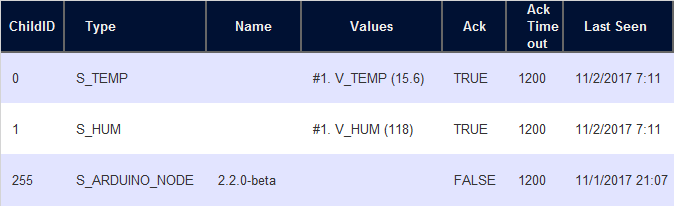
    @sundberg84 No, it is a different value. In my image above you see that the Hardware shows 15.6C (which is 60F) and the Device shows 72F. When I view the log for the gateway I see that roughly every 5 minutes (which is what I set in the node as minimum send rate) there are new values - and they match in Hardware view of the node. My view of the Devices is for All devices. The only one under Not Used is that "new" Temp only item.

    Domoticz

  • Hardware shows node values updated - Device view does not
    W wergeld

    @sundberg84 Okay, but why would it not report updated values for Temp then when Hardware view of the node shows updates?

    Domoticz

  • Hardware shows node values updated - Device view does not
    W wergeld

    @sundberg84 Not sure I follow but will try and answer each item.
    If you look around you might find one added device with combined Temp/Hum and two single devices 1) Temp 2)Hum
    I only see these two devices listed. The Temp+Humidity was created before the upgrade to 3.8666 and was last updated at ~4:30pm yesterday (although the Hardware view of the nodes showed updated (and different) values up until my upgrade of Domoticz. The other device is Temp only and was last updated (actually the first time seen) at ~9pm yesterday and not updated since. No other combined devices from MySensors nodes present (there are others from Weather Underground).

    This is because Domoticz wants to incorporate two devices (HUM + Temp) into one. If the values are presented in a certain order they are combined into a single node. If the node does not update regular they will be read as two different devices and not updated on the first one.
    Again, the node does update regularly (about every 5 minutes if a value has changed). Look at the Hardware view - it shows that both temp/hum were updated at 7:11am this morning but Device view says only temp was updated at 9pm last night or combined temp/hum at 4:30 yesterday.

    To avoid this I use two options. Present the temp/hum/(baro) as child ids not close to each other (1-2 and 2-3) or you have to update all values in the same time (ie. you cant use, if value is the same do not send it).
    I will look into how to present two different child IDs.
    The values are updated at different intervals from node. In the code on the node I test if new measurement for temp is different than last measurement - if so I send, if not I don't. Same for humidity. I can alter this to send temp/hum value if either one is different.

    Domoticz

  • Hardware shows node values updated - Device view does not
    W wergeld

    Well,
    I let the system run over night after upgrading to latest beta 3.8666. And same (yet slightly different issue) persists. The node is updated in the Hardware view but the Device view has not had the temp/hum updated - AND there is now a new device but it is only for temp????
    Hardware:
    0_1509622042487_upload-e48e2a4b-ea1f-44c7-8c33-daf9cde332f1
    Observe that data was last seen minutes ago.

    Device:
    0_1509622126601_upload-542e3994-aeb2-4d17-b8fb-92b9e1c3609b

    Note the "LaCrosse TX3" entry that only reports temp - this is new. I am at a complete loss here.

    Domoticz

  • Hardware shows node values updated - Device view does not
    W wergeld

    @gohan Okay, flipping over to beta channel.

    Domoticz

  • Hardware shows node values updated - Device view does not
    W wergeld

    @gohan Yes, did that. Same thing. Node reports data to Domoticz. Domoticz shows the updated values in Hardware view but does not update the device. I have tried auto-ID assignment and manual using different IDs. Same result each time.

    Domoticz
  • Login

  • Don't have an account? Register

  • Login or register to search.
  • First post
    Last post
0
  • MySensors
  • OpenHardware.io
  • Categories
  • Recent
  • Tags
  • Popular