Skip to content

Troubleshooting

Help! Everything just falls apart
2.7k Topics 21.5k Posts
  • Separate msg.payload into Temperature,Humidity,Luminosity objects.

    2
    2
    0 Votes
    2 Posts
    3k Views
    YveauxY
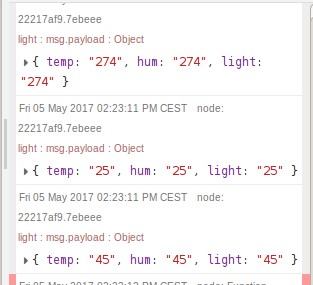
    @maggie How about something like this? [image: 1494051978740-upload-fc11da28-374f-45fd-902a-fc1f1ce56984-resized.png] The Humidity/Temperature injects simulated data coming in from your sensors. This data gets split on a semicolon: var fields = msg.payload.trim().split(':'); msg.type = fields[0]; msg.value = parseInt(fields[1]); return msg; and the switch determines on msg.type where to route the data. If you want to try this code then just copy/paste he following block into Node-Red: [{"id":"d56d943.4bfae68","type":"switch","z":"3ce68302.c3197c","name":"","property":"type","propertyType":"msg","rules":[{"t":"cont","v":"Humidity","vt":"str"},{"t":"cont","v":"Temperature","vt":"str"},{"t":"else"}],"checkall":"true","outputs":3,"x":500.8333511352539,"y":823.6666984558105,"wires":[["7f9e7e7f.48016"],["e23d0ce6.78b9d"],["82fc1542.5faa18"]]},{"id":"68c3690d.519a88","type":"inject","z":"3ce68302.c3197c","name":"","topic":"","payload":"Humidity:45","payloadType":"str","repeat":"","crontab":"","once":false,"x":150.8333282470703,"y":807.6667022705078,"wires":[["9e7dc36.f3b074"]]},{"id":"4da4d5e4.5a276c","type":"inject","z":"3ce68302.c3197c","name":"","topic":"","payload":"Temperature:23","payloadType":"str","repeat":"","crontab":"","once":false,"x":164.3333282470703,"y":866.3333129882812,"wires":[["9e7dc36.f3b074"]]},{"id":"9e7dc36.f3b074","type":"function","z":"3ce68302.c3197c","name":"Split","func":"var fields = msg.payload.trim().split(':');\nmsg.type = fields[0];\nmsg.value = parseInt(fields[1]);\nreturn msg;","outputs":1,"noerr":0,"x":354.83333587646484,"y":824.3333625793457,"wires":[["d56d943.4bfae68"]]},{"id":"7f9e7e7f.48016","type":"debug","z":"3ce68302.c3197c","name":"Humidity","active":true,"console":"false","complete":"value","x":680.8333282470703,"y":805.0000152587891,"wires":[]},{"id":"e23d0ce6.78b9d","type":"debug","z":"3ce68302.c3197c","name":"Temperature","active":true,"console":"false","complete":"value","x":694.3333129882812,"y":852.3333129882812,"wires":[]},{"id":"82fc1542.5faa18","type":"debug","z":"3ce68302.c3197c","name":"Other","active":true,"console":"false","complete":"value","x":676.3333129882812,"y":904.3333129882812,"wires":[]}]
  • Question regarding I_PING and I_PONG

    1
    0 Votes
    1 Posts
    708 Views
    No one has replied
  • Troubleshooting sketch

    4
    0 Votes
    4 Posts
    1k Views
    mfalkviddM
    @gohan which one?
  • How can i define message Payload Type

    5
    0 Votes
    5 Posts
    1k Views
    zzz-teoZ
    hmm! OK! sounds reasonable! Thanx you... :)
  • Payload always 0 when using Arduino Pro Mini

    8
    0 Votes
    8 Posts
    2k Views
    A
    You are all actually amazing and I appreciate your time. Thanks.
  • SOLVED: MQTT ESP8266 Gateway issue

    16
    0 Votes
    16 Posts
    5k Views
    mppM
    @gohan there are different things going wrong, the parent id can't be found (eventhough it is set manually to 0), but there's also a lot of debug specific to the esp module.
  • BedOccupancySensors - 'MySensor' does not name a type

    2
    0 Votes
    2 Posts
    912 Views
    mfalkviddM
    @Deluka looks like the sketch is for MySensors 1.x and my guess is that you have installed MySensors 2.x.
  • Node doesn't work without repeater

    17
    0 Votes
    17 Posts
    3k Views
    hekH
    Try setting #define MY_RF24_PA_LEVEL RF24_PA_LOW on the gateway The gateway might be SCREAMING so high that the node doesn't pick up the answer.
  • Measuring and Reporting Battery Level

    3
    1
    0 Votes
    3 Posts
    2k Views
    E
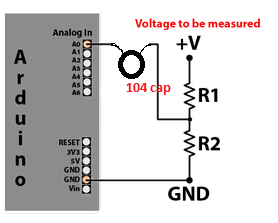
    @sundberg84 aaah ok so across R2, thanks so much!
  • Node sending req packets constantly (Packet type 2 on MQTT)

    req mqtt type 2
    16
    0 Votes
    16 Posts
    3k Views
    S
    I have posted a question regarding what i think could be the fix to my issue over at: https://community.openhab.org/t/push-state-of-one-mqtt-topic-to-another/27597 Not sure if it will become of anything though. If anyone else has any experience with MQTT and openhab2 over here, then please be sure to shout a thought. It seems that not many people have got this sketch to work with openhab, google searches are bringing up posts from a year or two ago made on our forum here regarding this issue with no clear/simple solution.
  • NewBee: Auto ID Problem / !TSM:ID:FAIL

    4
    0 Votes
    4 Posts
    1k Views
    mfalkviddM
    @Severin great! Thanks for reporting back.
  • Detect Generator running

    5
    1
    0 Votes
    5 Posts
    2k Views
    E
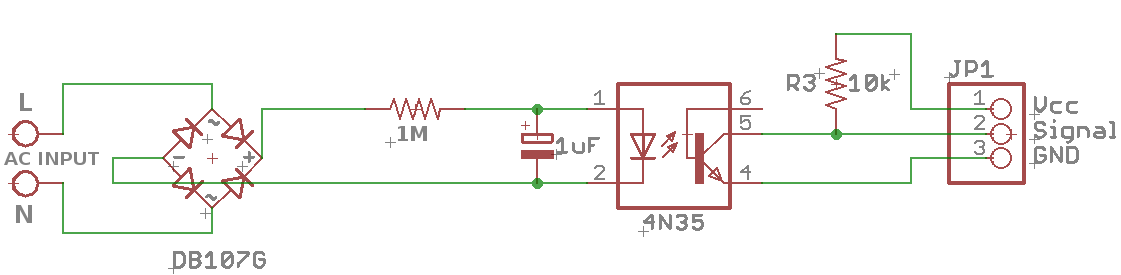
    Thanks All, I got it sort of working using the original circuit with this sketch below, using another variable with last runstate, sorry my coding is shocking.,... #define MY_DEBUG #define MY_RADIO_RFM69 #define MY_RFM69_FREQUENCY RF69_433MHZ // Define for frequency setting. Needed if you're radio module isn't 868Mhz (868Mhz is default in lib) #define MY_IS_RFM69HW // Mandatory if you radio module is the high power version (RFM69HW and RFM69HCW), Comment it if it's not the case //#define MY_RFM69_NETWORKID 101 // Default is 100 in lib. Uncomment it and set your preferred network id if needed #include <MySensors.h> unsigned long SLEEP_TIME = 3600000; // Every hour Sleep time between reports (in milliseconds) #define DIGITAL_INPUT_SENSOR 3 // The digital input you attached your motion sensor. (Only 2 and 3 generates interrupt!) #define CHILD_ID 15 // Id of the sensor child int laststate=0; // Initialize motion message MyMessage msg(CHILD_ID, V_TRIPPED); void setup() { pinMode(DIGITAL_INPUT_SENSOR, INPUT); // sets the motion sensor digital pin as input } void presentation() { // Send the sketch version information to the gateway and Controller sendSketchInfo("Motion Sensor", "8.0"); // Register all sensors to gw (they will be created as child devices) present(CHILD_ID, S_MOTION); } void loop() { // Read digital motion value bool tripped = digitalRead(DIGITAL_INPUT_SENSOR) == LOW; if ( tripped==1) { laststate=1; Serial.print("Generator State = "); Serial.println(tripped); } if (( tripped==1 ) & (laststate==1)) { //Serial.println("Still Running"); delay(60000); } if (tripped==0) { laststate=0; Serial.println("Generator OFF"); //send(msg.set(tripped?"1":"0")); // Send tripped value to gw // Sleep until interrupt comes in on motion sensor. Send update every two minute. sleep(digitalPinToInterrupt(DIGITAL_INPUT_SENSOR), HIGH, SLEEP_TIME); } }
  • ets Jan 8 2013,rst cause:2, boot mode:(1,7)

    6
    0 Votes
    6 Posts
    10k Views
    sundberg84S
    @mpp said in ets Jan 8 2013,rst cause:2, boot mode:(1,7): @sundberg84 i'm not using nrf at the moment but rfm69. Does the rfm radio also require a cap? And could you point me to a schematic for a cap on the voltage regulator? Doesn't the esp have an internal voltage regulator? I found this looks good. It wont hurt using capacitors but im sure some will do without as well. Under the header "Part Selection: Voltage Regulator" you find a typical schematics for a voltage regulator in this case LM1117. If you want to go specific you can in most cases look up recommended capacitors in the datasheet for your regulator. As a general rule I use one small 0,1uF and one large 10uF...
  • MySensors plugin : Choose the Serial Port

    7
    0 Votes
    7 Posts
    2k Views
    D
    @hek said in MySensors plugin : Choose the Serial Port: Yes, there have been reports of Vera re-numerating the usb-serial devices at reboot, which is very annoying. I use a usb hub and it always pops up again after reboot. The only time have problems, is if I leave the gateway unplugged during reboot. Then I have to reconfigure it again. Its been quite some time since this issue has been discussed. Has there been any updates which can solve this re-numerating problem at reboot?
  • OrangePi Gateway not gatewaying

    4
    0 Votes
    4 Posts
    748 Views
    gohanG
    Try to assign a node ID manually. When you have set the node ID, check if anything is received by the gateway, and make sure sensor is like 2 meters apart from the gateway. If you still don't see anything in controller's log, try a different power source for the node radio.
  • timealerts and mysensors library conflict?

    2
    0 Votes
    2 Posts
    823 Views
    TmasterT
    pretty difficult question hum? lol i solve it by forgetting TimeAlarms.h and set just an hour that triggers the solenoid like this (HX and MH its the time,[hours] and [minutes] defined at beginning and its set manually) if (hour() == HX && minute() == MX ) { analogWrite(RELAY_PIN,255); delay(400); analogWrite(RELAY_PIN,90); //half voltage(+-5v to 6v) to not burn valve selenoid(hold voltage) digitalWrite(LEDR1,HIGH); //Serial.print("time up"); } else if (hour() == HXend && minute() == MXend ) { digitalWrite(RELAY_PIN,LOW); digitalWrite(LEDR1,LOW); //Serial.print("time down"); }
  • Serial Gateway restarting

    31
    1 Votes
    31 Posts
    7k Views
    J
    @Yveaux Tested with 2.2 Beta gateway. Problem seems solved. I am running on 5V 16 Mhz / RF24_PA_MAX now. Could not reproduce the problem anymore. Thx for your help!
  • This topic is deleted!

    12
    0 Votes
    12 Posts
    240 Views
  • 0 Votes
    8 Posts
    15k Views
    YveauxY
    @gohan Indeed... See e.g. my experience here: https://forum.mysensors.org/topic/2890/chinese-rubbish-or-is-it
  • Need advice on choosing software

    7
    0 Votes
    7 Posts
    2k Views
    gohanG
    Openhab is only difficult to learn the language for making the user interface

21

Online

11.7k

Users

11.2k

Topics

113.2k

Posts